Blogs
|
Microsoft Ignite is headed to Atlanta, Georgia, on September 26-30, 2016. Microsoft Ignite is for IT professionals looking for what’s next in technology and skill building across Microsoft’s technologies. Pre-register now and get ready for—
1,000+ hours of content, 700+ sessions and a multitude of networking opportunities.
Insights and roadmaps from industry leaders.
Deep dives and live demos on the products you use every day.
Direct access to product experts.
Interactive digital labs.
Knowledge and answers direct from the source.
Smart people talking tech everywhere you look.
Pre-register now for the lowest price and claim your spot in Atlanta, September 26-30, 2016.
Of course technology doesn’t wait, so we offer a range of smaller targeted events, as well, around the world. For those of you interested in learning more about Windows, Office, Azure or any other IT, developer or business technologies, join us at any of the following events:
Convergence 2015 EMEA in Barcelona, November 30-December 2, 2015.
Microsoft Cloud Roadshows.
You can also find local Microsoft events at www.microsoft.com/events.
If you want to learn more about Microsoft’s event lineup in 2016, check out Chris Capossela’s blog post.
The post Talk to the Office 365 team at Microsoft Ignite 2016 appeared first on Office Blogs.
Office Blogs
.
Blog
.
<span class='date ' tip=''><i class='icon-time'></i> Dec 05, 2015 11:50am</span>
|
|
In this episode, Jeremy Thake and Richard DiZerega talk to Matthew McDermott about SharePoint search.
http://officeblogspodcastswest.blob.core.windows.net/podcasts/EP67_MatthewMcD.mp3
Download the podcast.
Weekly updates
dev.onedrive.com/sdks.htm
Office Dev PnP Web Cast - OneDrive for Business Customizations
Excel Add-in for Azure ML
johnliu.net/blog/2015/10/posting-to-office-365-onenote-via-powershell
github.com/waldekmastykarz/sample-yooffice-cors
Show notes
Display templates and query rules—channel9.msdn.com/events/SharePoint-Conference/2014/SPC322
Search extensibility and content enrichment—channel9.msdn.com/Events/Ignite/2015/BRK4124
Hybrid Search with Office 365 and Cloud Search Service—channel9.msdn.com/Events/Ignite/2015/BRK3134
Hybrid business connectivity—channel9.msdn.com/Events/Ignite/2015/BRK4113
Got questions or comments about the show? Join the O365 Dev Podcast on the Office 365 Technical Network.
The podcast RSS is available iTunes or search for it on "Office 365 Developer Podcast" or add directly with the RSS http://feeds.feedburner.com/Office365DeveloperPodcast.
About Matthew McDermott
Matthew is a founder and director at Aptillon, Inc, a nine-time Microsoft SharePoint Server MVP and part-time trainer for Critical Path Training. Matthew specializes in SharePoint integration, strategy and implementation consulting to help his clients solve business problems with SharePoint. Matthew is a speaker, content author, blogger and specialist in SharePoint technologies focused on web content management, collaboration, search and social computing. An accomplished cook and bartender, in his spare time Matt spends as much time with his wife as his dog will allow. You can find his blog at ableblue.com/blog and follow him on @MatthewMcD.
About the hosts
Jeremy is a technical product manager at Microsoft responsible for the Visual Studio Developer story for Office 365 development. Previously he worked at AvePoint Inc., a large ISV, as the chief architect shipping two apps to the Office Store. He has been heavily involved in the SharePoint community since 2006 and was awarded the SharePoint MVP award four years in a row before retiring the title to move to Microsoft. You can find Jeremy blogging at www.jeremythake.com and tweeting at @jthake.
Richard is a software engineer in Microsoft’s Developer Experience (DX) group, where he helps developers and software vendors maximize their use of Microsoft cloud services in Office 365 and Azure. Richard has spent a good portion of the last decade architecting Office-centric solutions, many that span Microsoft’s diverse technology portfolio. He is a passionate technology evangelist and frequent speaker are worldwide conferences, trainings and events. Richard is highly active in the Office 365 community, popular blogger at www.richdizz.com and can be found on twitter at @richdizz. Richard is born, raised and based in Dallas, TX, but works on a worldwide team based in Redmond. Richard is an avid builder of things (BoT), musician and lightning-fast runner.
Useful links
Office 365 Developer Center
Blog
Twitter
Facebook
StackOverflow
http://aka.ms/AskSharePointDev
http://aka.ms/AskOfficeDev
http://aka.ms/AskOffice365Dev
Yammer Office 365 Technical Network
O365 Dev Podcast
O365 Dev Apps Model
O365 Dev Tools
O365 Dev APIs
O365 Dev Migration to App Model
O365 Dev Links
UserVoice
The post Episode 067 on SharePoint Search with Matthew McDermott—Office 365 Developer Podcast appeared first on Office Blogs.
Office Blogs
.
Blog
.
<span class='date ' tip=''><i class='icon-time'></i> Dec 05, 2015 11:49am</span>
|
|
At Microsoft, we’re making important changes in the way we do business. We’ve embraced today’s mobile-first, cloud-first world, committed to reinventing productivity and business processes, and revamped our approach to global markets. But some things haven’t changed. We continue to deliver innovative products and services to millions of individuals, businesses, governments and organizations worldwide, providing the tools they need to work, communicate and collaborate effectively—any time, any place and on any device.
As part of that commitment, we’re always working to increase the value and availability of Office 365.
Earlier this week, we announced that Office 365 will now be delivered to customers in India from local datacenters in Mumbai, Pune and Chennai, making Office 365 the first global commercial cloud service to provide productivity and collaboration services from within India. And as more Indian businesses benefit from the local availability of Office 365, the value of the service continues to grow daily.
Two key ways that we’ve made Office 365 more valuable for our customers are embodied in recent improvements to Microsoft FastTrack and the Office 365 Financial Services Compliance Program. Last week, we announced that we’re changing FastTrack from a one-time benefit to an ongoing program, and from an onboarding service to a customer success service designed to help you realize business value faster with the Microsoft Cloud. And this week we announced that we’re making the Financial Services Compliance Program publicly available for financial service customers, offering greater trust and transparency to financial service customers who may need deeper insights into our cloud service capabilities, risks and performance, plus contractual commitments to help them meet their regulatory obligations.
New features and capabilities in Office 2016 are also adding to the value of Office 365. Office 2016 takes the work out of working together by making it easier than ever for you to collaborate and share Word, Excel and PowerPoint documents with friends and colleagues. In addition, the new forecasting sheet functions and one-click forecasting in Excel 2016 help you analyze and explain your business data and understand future trends.
Meanwhile, we continue to improve Office 365 in other ways as well. We expanded our preview of the new Skype for Business voice and meeting capabilities in Office 365 to a total of 15 countries worldwide. We’re also making OneDrive for Business integration available to customers signing in to Sway with Office 365 work and school accounts, and we’re updating Sway for iPhone and iPad for seamless co-authoring and powerful cloud-hosted design assistance across more devices.
As we continue to transform our business, we will stay focused on our core values. And we will keep on providing productivity and collaboration solutions to help you succeed.
Below is a roundup of some key news items from the last couple of weeks. Enjoy!
Microsoft begins global release of Office 2016—Discover why people worldwide are excited about the release of Office 2016.
Microsoft’s cloud serves up Office 365 in India—Learn how Microsoft is expanding its cloud services globally and delivering Office 365 to customers in India from local datacenters.
7 secrets to successful online collaboration—Find out how online collaboration, the key to staying mobile and working remotely, is made easier with Office 365.
Your top questions about Office 2016 answered—Get answers to all of your questions about Office 2016 and its features and capabilities.
Office 365 to replace Redbird mail—Discover why Illinois State University chose Office 365 for its students and faculty.
The post Office 365 news roundup appeared first on Office Blogs.
Office Blogs
.
Blog
.
<span class='date ' tip=''><i class='icon-time'></i> Dec 05, 2015 11:49am</span>
|
|
This month’s Office 365 Dev Digest was written by Jeremy Thake, technical product manager for the Office 365 Dev team.
Welcome to the eighth edition of Dev Digest, designed to help you—the Office 365 developer—keep up-to-date with what’s new in Office 365 development.
It is extremely exciting to see the Office.js APIs grow in Word and Excel with new features. The Content Publishing team internally has been busy building out code samples to show off these new APIs. Check them out in the code samples section below.
There has also been an update to the Office 365 Unified API preview for how you access users’ OneDrive for Business. This is a breaking change in the preview API, so if you are using these APIs now, please make sure you read this notification.
Vesa Juvonen and the rest of the Office 365 PnP team have been extremely busy over the last two years, and he wrote a great blog post that summarizes all that hard work! The October release brings with it a huge amount of new concepts worth checking out! The team has also started a weekly webcast to talk about this in more detail. So now, each week, you have the podcast by Richard and me, Sonya’s Dev Show and the PnP webcast.
The Property Manager Hero Demo that we’ve talked about since demoing it at TechEd Europe last year has been updated to take advantage of a bunch of new APIs in Preview. Todd Baginski also created six hours of on-demand video training, which walks through setting up the ASP.NET MVC web application and building the iOS or Android mobile apps from scratch.
For Office 365 developer speakers, we have amazing SWAG boxes, which you can request to give out to your attendees at your next speaking session at a public user group or conference.
In the next few months, we have a few hackathons running around the world, including the AngularConnect conference in London, SharePoint Europe conference in Stockholm and AnDevCon in Santa Clara. I hope to see you all there hacking away with your chance to win an Xbox One!
I encourage you all to engage with us on the Office 365 Technical Network with your questions.
Dev documentation
The Microsoft Content Publishing team works hard producing documentation to help developers learn our platform. Here are the key new and updated articles for this month:
Office Add-ins
Debug add-ins in Office Online
Debug Office Add-ins on iPad
Office 365 APIs
Updates:
Understanding authentication with Office 365 APIs
Office 365 Groups REST API reference (preview)
Resource reference for the Mail, Calendar and Contacts REST APIs
Outlook Mail REST API reference
Examples of Office 365 unified API calls (preview)
API endpoints of Office 365 for China
Copy APIs enable Make It Mine scenarios for OneNote
For more documentation check out Office developer documentation.
Code samples
Our team is continually on the lookout for new code samples to help you jump-start your own projects. Here is a list of the most recent new and updated samples from Microsoft as well as the dev community.
We added 13 new samples that show you how to connect to the unified API (preview) and make calls to it. The samples span three mobile platforms (iOS, Android and Windows) and six web frameworks (PHP, ASP.NET, Node.js, Angular and Ruby). The snippet samples demonstrate the variety of things that you can do with the unified API.
Property Manager updates and new training
O365-PHP-Unified-API-Connect
O365-AspNetMVC-Unified-API-Connect
O365-Nodejs-Unified-API-Connect
O365-Angular-Unified-API-Connect
O365-Angular-Unified-API-Snippets
O365-Python-Unified-API-Connect
O365-Ruby-Unified-API-Connect
O365-Android-Unified-API-Snippets
O365-Android-Unified-API-Connect
O365-iOS-Unified-API-Snippets
O365-iOS-Unified-API-Connect
O365-UWP-Unified-API-Snippets
O365-UWP-Unified-API-Connect
Most recent Office 365 Dev podcasts
Since joining Microsoft, I have been running around campus interviewing people about various dev topics. If you would like to hear me interview someone on a particular topic, please submit your suggestions in the Yammer group, and I’ll go hunt the relevant people down to interview.
Here are the most recent podcast interviews:
Episode 064 on Office.js API updates in Office 2016
Episode 065 on the Office Extensibility team with Tristan Davis
Episode 066 on TechCrunch Disrupt SF 2015
Episode 067 on Search with Matthew McDermott
For more podcasts, check out dev.office.com/podcasts.
Patterns and practices
The Microsoft Patterns and Practices team is working hard to release samples to show the power of SharePoint Add-ins. Don’t forget to join the monthly community calls to hear the updates from them directly on Skype for Business and the previously launched Skype Developer Platform (developer.skype.com).
Here are the latest updates from the team:
PnP October 2015 monthly release notes at dev.office.com
PnP October community call recording at Channel 9
New weekly PnP webcast series released, with first topic on the OneDrive for Business customizations
Transforming your SharePoint customizations to add-in model—Resources
New training package created based on the PnP guidance at OfficeDevPnPTraining
Numerous updates and new articles to PnP section in MSDN at OfficeDevPnPMSDN
For more on patterns and practices, check out dev.office.com/patterns-and-practices. All questions related to released materials and guidance can be added to our Yammer group at OfficeDevPnPYammer.
Dev community blog posts
The Office 365 dev community has been busy this month. It is exciting to see the effort people put into their posts in their spare time to share with the community.
Check out these articles from the Microsoft field, MVPs and more:
Office Dev Show: Episode 13—Getting started with NodeJS by Sonya and Richard
microsoft.com/EN-US/library/mt616496.aspx—Word
microsoft.com/EN-US/library/mt616485.aspx—Excel
Office 365 Developer Patterns and Practices-October 2015 release
External sharing API for SharePoint and OneDrive for Business
Building an Excel 2016 add-in with Angular and Enhanced office.js by Scot Hillier
Office Add-ins—Launch in Office Online by Simon Jager
Office Add-ins—Launch in Excel Online from Visual Studio by Simon Jager
mastykarz.nl/office-365-unified-api-mail by Waldek Mastykarz
O365 Dev Challenges-Part 1: Introduction to creating a multi-tenant Office 365 add-in using VS2015 by Mikael Svenson
Introduction to Office UI Fabric by Mark Rackley
com v1.0.0-Full sample coverage of Office UI Fabric v1.0.0 by Andrew Connell
What’s new in Office 2016 for developers
Increase the productivity of users with enhanced Office.js APIs in Office 2016
Office Developer SWAG boxes for your user groups
Using OAuth from PowerShell by Stephen Owen
The Dev Intersection Countdown Show
The new Office is here by Kirk Koenigsbauer
Cloud Roadshow Cities
Office Dev Show Episode 12—Office UI Fabric with Sonya Koptyev and Humberto Lezama Guadarrama
Introducing ng-OfficeUI Fabric—angular directives for Office UI Fabric by Andrew Connell
Introducing OfficeUIFabric.com—demos and reference samples for Office UI Fabric by Andrew Connell
Using Azure Deployment Slots to implement dev/test/production ALM for Office 365 apps and SharePoint Add-ins by Chris O’Brien
Two things that are not super obvious when working with the new Office 365 Groups API by Waldek Mastykarz
Building File Handler add-ins for Office 365 by Richard diZerega
onedrive.com/sdks.htm
Office Dev PnP webcast—OneDrive for business customizations
Excel add-in for Azure ML
net/blog/2015/10/posting-to-office-365-onenote-via-powershell
com/waldekmastykarz/sample-yooffice-cors
Office Store
Companies across the globe are extending the value of Office every day with Office Add-ins. See how these solutions are making a difference at real companies by watching their stories on betterwith.office.com!
Upcoming events
There are plenty of events on the horizon. Don’t miss out on these great events with Office 365 content. Our team looks forward to meeting you all at these events, so don’t be shy; come say hello at the Office 365 booth!
Oct 26
Dev Intersection, Las Vegas
Nov 9-12
European SharePoint Conference, Stockholm
Dec 1-3
AnDevCon, Santa Clara
For more events check out dev.office.com/events.
Until next month, please join our community discussions at www.yammer.com/itpronetwork and follow us on @OfficeDev on Twitter and on Facebook.
Also, be sure to follow along with us on our daily developer mission: Jeremy Thake (@jthake), Sonya Koptyev (@SonyaKoptyev), Richard DiZerega (@richdizz) and Jim Epes (@j_epes).
—Jeremy Thake
The post Office 365—monthly Dev Digest for October appeared first on Office Blogs.
Office Blogs
.
Blog
.
<span class='date ' tip=''><i class='icon-time'></i> Dec 05, 2015 11:48am</span>
|
|
Digital handwriting—or inking as we like to call it—is now better than ever in OneNote, with support for a variety of new functionalities for our iPad and Windows 10 users.
Pencil and Paper by FiftyThree support
OneNote on iPad now supports writing with the Pencil by FiftyThree stylus. Use Pencil to write, draw and erase with enhanced precision and ease. Simply pair your Pencil with your iPad and then select it from your stylus options in OneNote. You’ll immediately notice the added feedback of the Pencil is great for a variety of inking scenarios, and the ability to easily flip the Pencil and erase in a familiar way, making it a top selling stylus for iPad.
A fan of the Paper app by FiftyThree? Now you can take your notes, checklists and sketches and send them to OneNote to get your content on virtually any device and work with others in shared OneNote notebooks. Whether you want to use Pencil directly in OneNote or start in Paper and share to OneNote, we’ve got you covered. For full details on Paper’s OneNote integration, check out FiftyThree’s blog post.
Apple Pencil for iPad Pro support
As previously announced, we now have Apple Pencil stylus support in OneNote for iPad Pro. Now you can easily sketch, outline, write and annotate to your heart’s content. The only thing that can stop you now is a cramp in your hand. Home remedy tip—we hear bananas help with that.
Ink Shape Recognition
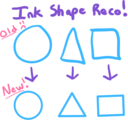
In response to one of our top requested features on OneNote’s UserVoice, we’re excited to announce a new feature called Ink Shape Recognition coming to OneNote this November for iPad, iPad Pro and our Windows 10 app. Ink Shape Recognition is a new mode that will automatically convert your hand-drawn shapes into perfect-looking shapes while inking. It recognizes over a dozen shapes including basics like circles, triangles and squares, but also more complex shapes like quadrilaterals, pentagons and hexagons.
To turn on Ink Shape Recognition, just tap the new Convert to Shapes button on the Draw tab.
Once enabled, simply draw shapes with your pen (or press the button to the left of Convert to Shapes to draw with mouse or touch) and watch as your shapes automatically are converted into better-looking versions of themselves! It’s great for everything from basic flowcharts and mind maps to Venn diagrams. We know teachers will be eager to try shape recognition out for Math class!
New Surface Pen and Pen Tip support
Along with the Surface Pro 4 and Surface Book announcement came a new Surface Pen and Pen Tip kit, both of which are available for pre-order now and begin shipping October 26, 2015.
The new Surface Pen has increased pressure sensitivity, adds an eraser at the top and lets you click and hold for Cortana—all while still letting you click once to open a blank page of OneNote—even if your Surface is locked. You can then quickly jot down any flash of inspiration, easily convert it to text and share it with others.
The new Surface Pen Tip kit lets you choose a pen tip with the right feel for you. Stay with the medium tip for the familiarity of a #2 pencil or swap it for a low-friction tip similar to a fine point pen. Choose from four different tips in the kit—each of which is included with the purchase of the new Surface Pen or sold separately if you want to have extra tips on hand.
Excited about all the changes? Don’t already have OneNote? Get it here.
As always, we appreciate your feedback. Please continue to give us suggestions and ideas on the OneNote UserVoice.
—Ian Mikutel, OneNote Ink product manager
The post OneNote partners with FiftyThree to support Pencil and Paper, plus Shape Recognition coming soon appeared first on Office Blogs.
Office Blogs
.
Blog
.
<span class='date ' tip=''><i class='icon-time'></i> Dec 05, 2015 11:47am</span>
|
|
Office 365 customers want assurance that effective controls are in place to safeguard their data. We have enhanced our Service Organization Controls (SOC) audit reports with two new trust principles, Processing Integrity and Confidentiality. These build on the established Security and Availability trust principles.
The Office 365 SOC reports are designed to provide customers with transparency into the design, implementation and operational effectiveness of security and compliance controls, as well as results of control tests as noted by our independent third party auditors. Insights from these reports help you evaluate how Office 365 maintains compliance with your regulatory requirements and also helps you manage the move to Office 365.
Based on customer feedback we also added controls and test results around the following areas:
Data transmission and encryption—You are able to review controls that are implemented to encrypt data transmission between Microsoft employees and Office 365 datacenters, between Office 365 clients and Microsoft datacenters, between multiple Microsoft datacenters, as well as encryption at rest within Microsoft datacenters.
Security development lifecycle—We detailed additional controls around how Office 365 adheres to secure development best practices, such as code reviews and risk assessments.
Data replication and data backup—We enhanced our testing to demonstrate effectiveness of resiliency testing capability that covers a full datacenter outage.
You can readily access this information directly from the Office 365 Service Trust Portal (STP) when you authenticate using your Office 365 credentials. To access STP, ask your Office 365 company administrator to sign in at the Service Trust Portal. Once your company administrator signs in for the first time, they can provide STP access to other users in your organization. If you are evaluating Office 365, you can use your Office 365 trial credentials to access STP.
If you have a comment or question on this post or need the detailed onboarding guide to STP, email us at O365STPApprovals@microsoft.com. We look forward to seeing you on STP soon!
—Sarah McCoy and Om Vaiti, senior program managers for the Office 365 Trust Engineering team
The post Announcing the enhanced Office 365 SOC audit reports with new trust principles appeared first on Office Blogs.
Office Blogs
.
Blog
.
<span class='date ' tip=''><i class='icon-time'></i> Dec 05, 2015 11:46am</span>
|
|
In this episode, Jeremy Thake and Richard DiZerega about the Angular Connect event in London.
http://officeblogspodcastswest.blob.core.windows.net/podcasts/EP68_AngularConnect.mp3
Download the podcast.
Weekly updates
Office Add-in with Knockout.js
Outlook REST API changes to beta endpoint: Part II
Update 2 on the Office 365 unified API
Add-in command sample
App registration tool
Office Dev PnP webcast—remote timer job framework
Retrieving posts from blogs available in Delve with Office 365 REST API
com/OfficeDev/SayMyName-Mail-Addin
com/thm1118/Provider-Host-App-java-Sharepoint-OnPremise-HighTrust
Got questions or comments about the show? Join the O365 Dev Podcast on the Office 365 Technical Network.
The podcast RSS is available iTunes or search for it on "Office 365 Developer Podcast" or add directly with the RSS http://feeds.feedburner.com/Office365DeveloperPodcast.
About the hosts
Jeremy is a technical product manager at Microsoft responsible for the Visual Studio Developer story for Office 365 development. Previously he worked at AvePoint Inc., a large ISV, as the chief architect shipping two apps to the Office Store. He has been heavily involved in the SharePoint community since 2006 and was awarded the SharePoint MVP award four years in a row before retiring the title to move to Microsoft. You can find Jeremy blogging at www.jeremythake.com and tweeting at @jthake.
Richard is a software engineer in Microsoft’s Developer Experience (DX) group, where he helps developers and software vendors maximize their use of Microsoft cloud services in Office 365 and Azure. Richard has spent a good portion of the last decade architecting Office-centric solutions, many that span Microsoft’s diverse technology portfolio. He is a passionate technology evangelist and frequent speaker are worldwide conferences, trainings and events. Richard is highly active in the Office 365 community, popular blogger at www.richdizz.com and can be found on twitter at @richdizz. Richard is born, raised and based in Dallas, TX, but works on a worldwide team based in Redmond. Richard is an avid builder of things (BoT), musician and lightning-fast runner.
Useful links
Office 365 Developer Center
Blog
Twitter
Facebook
StackOverflow
http://aka.ms/AskSharePointDev
http://aka.ms/AskOfficeDev
http://aka.ms/AskOffice365Dev
Yammer Office 365 Technical Network
O365 Dev Podcast
O365 Dev Apps Model
O365 Dev Tools
O365 Dev APIs
O365 Dev Migration to App Model
O365 Dev Links
UserVoice
The post Episode 068 on the Angular Connect event—Office 365 Developer Podcast appeared first on Office Blogs.
Office Blogs
.
Blog
.
<span class='date ' tip=''><i class='icon-time'></i> Dec 05, 2015 11:46am</span>
|
|
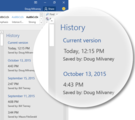
Office 2016 for Windows includes a host of new features that take the work out of working together. With features like real-time typing and share making it easier than ever to collaborate, you and your teammates might be nervous about making a mistake and not being able to get back to where you were. With History, you no longer have to worry! In Office 2016, you can enjoy an improved version history experience for your SharePoint and OneDrive for Business documents, making it much easier to find and restore previous versions of your files.
To see the list of previous versions of your files, open up the History pane by selecting File > History. You can easily scroll to see who edited your file and how the file evolved over time.
Each version in the History pane shows when it was created and who last edited it. Click a version to open it and take a closer look. If you decide you want to go back to an older version, simply click Restore to revert your file back to that point in time. Don’t worry, if you restore the wrong version or realize you actually liked it better before, you can always return back to how it was before you clicked Restore.
History helps you feel more confident while collaborating, because you have the comfort of knowing your and everyone else’s changes are always recoverable in a previous version, no matter how many people are working on a file. Even if you don’t want to go back to a previous version, the Office 2016 History feature enables you to see how changes have occurred over time, making it easy to get caught up on what has happened in the file.
Go ahead and collaborate with confidence! History has your back.
—Doug Milvaney, program manager for the Office Core team
The post History—collaborate with confidence! appeared first on Office Blogs.
Office Blogs
.
Blog
.
<span class='date ' tip=''><i class='icon-time'></i> Dec 05, 2015 11:46am</span>
|
|
The show that brought you the latest in Office from the engineers behind the tech is expanding to cover the breadth of Microsoft technologies. Today marks the launch of Microsoft Mechanics, our official new show and video platform for tech enthusiasts and IT professionals.
Beyond Office topics, we’ll begin covering the latest tech from the Azure, Windows and Surface teams with the same demo-packed 10-minute shows from the engineers and experts. We started on this journey at Ignite last May, when Ignite Studio shared the stage with teams across Microsoft.
So you might be wondering if there will be less emphasis on Office now that we’re expanding scope. Actually, we’re doing more with Office than ever before and we recently even launched the Demo Bench, a 2-3 minute demonstration format typically delivered straight from the Microsoft engineers. We’ve already published more than a dozen of these in September alone, covering Office 2016, Exchange Server 2016 and OneDrive for Business updates. And there are many more to come, in addition to the longer Office-specific shows. The Office Blog and our dedicated Microsoft Mechanics site remains the home for all Microsoft Mechanics shows related to Office, Exchange, SharePoint, Skype and the breadth of Office 365 tools and technologies.
Stay informed, follow us on Twitter and take part in our launch sweepstakes or subscribe to Microsoft Mechanics today. As always, let us know of additional topics that you’d like us to cover via our Office 365 Network Yammer group. Some of our best show ideas have come from the community—like the PowerShell, Power BI and Lotus F1 Team shows, among others.
See you next week for the first Microsoft Mechanics show!
—Jeremy Chapman
The post Office Mechanics is expanding to become Microsoft Mechanics appeared first on Office Blogs.
Office Blogs
.
Blog
.
<span class='date ' tip=''><i class='icon-time'></i> Dec 05, 2015 11:45am</span>
|
|
Today’s post was written by Michelle Hollingsworth, teacher and curricular head for the Earth and Life Sciences department at the North Park Secondary School.
Technology is pervasive in our school communities and using it effectively in our teaching practice is the utmost goal. Recognizing areas of need in our practice and then identifying solutions to work around those issues is a regular practice of teachers. Effectively utilizing the various technologies available for those solutions is a challenge we all face.
In my own practice, one of my greatest areas of need was identifying a method that would accurately record and log my evidences for triangulation of data. Our ministry of education wants teachers to utilize their professional judgment when assessing students and take into account all the observations, conversations and products that provide evidence of student understanding. However, in a high school classroom a lot of those observations and conversations happen informally and, as a result, can be extremely difficult to record.
I took a variety of opportunities to work with colleagues to devise different methods of effectively and reliably recording these anecdotal evidences of learning, all of which ended up being a lot of work for mediocre benefit. It wasn’t until I was working with a colleague who had acquired a Microsoft Surface 3 and we started experimenting with the OneNote platform, which I saw a realistic way of effectively tracking, recording and using these forms of anecdotal evidences of learning. In addition, I found this to be a great way of managing and using a platform, which will further facilitate student learning.
Unfortunately, at that time, OneNote wasn’t well adapted to my iPad, so I was forced to watch and suggest, as my colleague played on this new technological classroom platform, until Microsoft launched a rigorous version for the iPad.
Since then, I have gotten my hands on OneNote Class Notebooks and I am thoroughly amazed by its versatility!
I now use OneNote Class Notebooks in all of my courses. While it took students some time to adapt to using OneNote Class Notebooks, the ease of use and organization of the OneNote helped immensely with the transition.
Where did my journey begin?
Initially, I started using OneNote as a method of submitting work. This meant no matter where I was, if I had my iPad, I could mark, assess and leave feedback on student work. For example, while waiting for a delayed flight out of Phoenix, I was able to get a class set of biological diagrams marked and I didn’t have to lug a marking bag around on my vacation to do so! From there things have progressed greatly.
I have had students create their own chapter of a virtual textbook where they’re only permitted to use 10 percent of their class textbooks—everything else must be found and appropriately sourced. This pushes students to evaluate the information they’re researching and create a document that others will understand.
The next step is to give past chapters to students and have them evaluate the chapters and add to or refine them. Students are asked to justify their additions and changes, causing them to critically assess what they’re reading, identify good work and explain the rationalization of their choices. Now that’s student-focused learning!
Using OneNote for student reflection
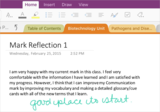
I also use OneNote to have students reflect on their own progress. Because the documents are all in one place, they can track their own progress. It also allows me to hold the students accountable to themselves.
If they say they need to do x, y or z in order to improve their performance, we can check at the next reflection to verify if they have done what they said they would and how that has affected their progress.
Students comfortable with technology can embed videos, photos and voice-overs. While students who prefer to write, draw or build can submit their work in words and pictures or by using the draw function within OneNote itself.
The most amazing thing about OneNote Class Notebooks is that by the time the semester is over students have a portfolio illustrating their progression throughout a course. As a teacher, I can pinpoint growth in a variety of areas, which is the end goal of all teachers!
I formalized this process by asking students to reflect on their own learning, choose their best work and explain to me how they have progressed throughout the course.
The OneNote Class Notebooks have helped draw student awareness to their own learning, recognize their own progress and realize their own greatest areas of development and progress. This empowers students in their own learning and helps them recognize their role to play in their own personal progression!
By working with OneNote Class Notebooks, I am able to teach my students the 21st-century skills they will need beyond the classroom while ensuring they can be effective evaluators of their own work and that of others. Meanwhile, I am able to collect ongoing evidence of their learning and development, which enables me to triangulate evidence of their understanding in a variety of formats and allows every student to find their place to shine!
—Michelle Hollingsworth
The post OneNote—triangulation of evidence for learning and building 21st-century skills appeared first on Office Blogs.
Office Blogs
.
Blog
.
<span class='date ' tip=''><i class='icon-time'></i> Dec 05, 2015 11:45am</span>
|