Blogs
|
Content Map
Many people associate content maps with mind maps, but not me. For me, a content map is a defined structure of a course or project based on client-furnished information and overall learning objectives. I would liken it to creating an outline for an essay. Remember how your high school English teacher always made you write out (and usually submit) that damn outline for your essay? It may have been annoying, but it was important. The same way content maps are important.
It’s a lot easier to modify the structure of a course in the design phase, when you’re mapping out your content and the structure of the entire course. Here, feedback can be provided, and you won’t have to go into each and every module to make modifications. Sure. It might seem like an unnecessary step, but in the long run, it will save you time.
A content map will typically include, but is not limited to, the following elements:
High-level course objectives
Timing per module
Module information, including sub-modules and topics
Assessment information (e.g. type of assessment items to use).
Some folks might call this design documentation, but it’s really just a small portion of the design documentation.
In the Defence sector, it was not uncommon to walk into a room and see a wall full of post-it notes. This industry referred to these walls as ‘Scalars’, which provided overall scaffolding for training programs. At the smaller scale, these scalars are really just enormous content maps.
If you haven’t started using content maps, you should make this documentation part of your development process, even if it’s not a deliverable and even if it’s written on a post-it or napkin. In the end, it’s going to guide you and keep your project structured, which stands to increase the overall effectiveness of the training you’re developing.
Ashley Chiasson
.
Blog
.
<span class='date ' tip=''><i class='icon-time'></i> Jul 15, 2015 12:36pm</span>
|
|
Today I wanted to share a little video demo and I decided that I would show you how to create custom feedback layers in Articulate Storyline 2. Storyline provides you with default feedback layers, and they’re nice enough…but once you’ve seen them several times over, they get start seeming a little less than exciting. Additionally, you may have clients who want a customized look and feel to their product to set them apart from their competitors. Most people like pretty things.
Creating custom feedback layers is very easy. You essentially create the elements you want to include on a new layer, add in a continue button (which I copied from the default feedback layer in this demo), and it’s as easy as that!
If you want to check out the Storyline file I’m working in (some folks are more hands-on learners), I’ve uploaded it for you to download - Click here to download the .story file.
Check out the video demo, below, and don’t hesitate to comment if you have any questions or concerns! Also feel free to request other video demos. I’m more than happy to share them.
Custom Feedback Layers in Storyline 2 from Ashley Chiasson on Vimeo.
Ashley Chiasson
.
Blog
.
<span class='date ' tip=''><i class='icon-time'></i> Jul 15, 2015 12:35pm</span>
|
|
This week’s term was inspired by an acronym-laden course I had the opportunity to recently review. Oof!
What is a Glossary?
A glossary is a list of acronyms, terms, or phrases used within a certain context. If you’re reading a book, you’ll often find a glossary of terminology in the back pages of the text. If authors feel that it’s necessary to include a glossary for their text, why shouldn’t course developers feel a similar urge?
Why would I want to add a glossary to a course?
Every industry has their phrases and acronyms, and these acronyms might mean something different to different people. Good courses will want to avoid this confusion, and a glossary is a fantastic way for doing just that. One good example of how a glossary can be helpful: the military often uses the same acronyms across divisions (e.g. Air Force/Navy/Army), yet these acronyms change meaning - not always, but often. For individuals who have trained in multiple divisions, this can be extremely confusing, and a glossary will help ensure that the terminology used within the course is clarified, as necessary.
Resources
5 Easy Ways to Add a Glossary to Your E-Learning Course by Tom Kuhlmann
Ashley Chiasson
.
Blog
.
<span class='date ' tip=''><i class='icon-time'></i> Jul 15, 2015 12:34pm</span>
|
|
For those of you who are regular visitors to this blog, you know that I’m a total ThingLink addict. In my (humble) opinion—I believe it is one of the most useful, dynamic, all-inclusive web tools currently available for both teachers and students. I love, love the many ways that an interactive image can be integrated into the curriculum to actively engage students in the learning process. And with a variety of new features—video options, customized and active icon sets, the ability to embed a live Google form and most recently, a partnership with Tackk—another web tool in which can create virtual flyers—to say that the possibilities are endless is really no exaggeration.
So, of course, when I saw this collection of ThingLink images based on interactive vocabulary instruction—compiled by ThingLink Education Community Manager and edtech rock star Susan Oxnevad—I knew that sharing it far and wide was a no-brainer.
If you’re not yet a ThingLink believer, I’m pretty sure you’ll be drinking the Kool-Aid after you check out this super cool resource!
Created with Padlet
The full screen version of this collection can be found here.
Edutech for Teachers team
.
Blog
.
<span class='date ' tip=''><i class='icon-time'></i> Jul 15, 2015 12:33pm</span>
|
|
This week’s term was inspired by the need to streamline and become more efficient. Hopefully it will help open your eyes to one of the many ways in which you can streamline your development process.
Slide Masters?
Slide masters are a view in Microsoft PowerPoint and Articulate Storyline (and possibly other products I’m not considering right now) that allow you to design slide layouts for use in content screens. They allow you to structure slides and add placeholders for text/images/video, etc. They became a thing for me when I began using Microsoft PowerPoint, and to be honest I didn’t really use them much until I started working in Articulate Storyline.
Once I began using slide masters in Storyline, I quickly saw how they could streamline my development process. I liken the process of creating slide masters to an argument organizations often engage in when debating the benefit of training - yeah, there’s a pretty good initial ‘cost’ of development, but the Return on Investment (ROI) will be even greater!
Another benefit - if you’re working on a project with multiple developers, designing slide masters will enhance consistency, especially when it comes to positioning of elements (e.g. title text).
I suppose this isn’t so much a definition as it is a recommendation…so go forth and master the slides!
Ashley Chiasson
.
Blog
.
<span class='date ' tip=''><i class='icon-time'></i> Jul 15, 2015 12:32pm</span>
|
|
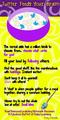
Yep, it’s another post about the value of Twitter. Yes—Twitter. If you haven’t yet adopted this social media platform as one of your go-to places for professional development, you really don’t know what you’re missing! And it’s not just the latest celebrity drama!
Seriously, despite the 14o character minimum, tweets—articles, thoughts, opinions, inspiration, quotes, images and more—allow like-minded individuals (you and me) to connect, collaborate, discuss, exchange and even debate all sorts of ideas with virtual colleagues. Whether it’s best practices, instructional strategies, the latest and greatest tech tools or an innovative project, invaluable information is just a hastag away!
Check out the infographic below for additional info about why you should build a PLN on Twitter. Who knows… Maybe it will inspire you to become a "cereal" tweeter!
A shout out to edu rock star Krissy Venosdale for creating and sharing yet another very useful and motivational infographic!
Edutech for Teachers team
.
Blog
.
<span class='date ' tip=''><i class='icon-time'></i> Jul 15, 2015 12:32pm</span>
|
|
As many of you know, I wrote a book - Articulate Storyline Essentials. I’m at Learning Solutions Conference 2015, it’s my first time being here, and to share my excitement of both of these things, I’m giving away two copies of my book!
All you have to do is enter, and I’ll be drawing a winner over the weekend. Maybe it will be you!
a Rafflecopter giveaway
Ashley Chiasson
.
Blog
.
<span class='date ' tip=''><i class='icon-time'></i> Jul 15, 2015 12:31pm</span>
|
|
As Quincy Jones once remarked, "I’ve always thought that a big laugh is a really loud noise from the soul saying, "Ain’t that the truth."
That said, Edu-fun Friday is a series devoted to adding some humor to the lives of teachers who visit this blog. After all, there’s nothing better than ending the week on a positive note! Plus, do we have the best topics to provide us with some comic relief or what?
As much as I love, love my devices, there are times in which I still prefer to use one of these low maintenance fossils. How ’bout you?
Edutech for Teachers team
.
Blog
.
<span class='date ' tip=''><i class='icon-time'></i> Jul 15, 2015 12:31pm</span>
|
|
I’ve been at Learning Solutions Conference 2015 all week long, have met some fantastic people, have attended some amazing sessions, and have reconnected with some old pals. I also presented for the very first time at LSCon, and it went really well! I was really nervous, but the session attendees were great, and it went really well.
My husband is also here, for vacation purposes, so we’ve been trying to squeeze in some fun activities. We went to the Magic Kingdom, and had never been…and decided very quickly that it was a horrible experience and we’ll never go back (how do people handle that place?! I need to know the secrets), but we did find an amazing mini golf course, and had a lot of fun doing that.
Don’t forget to enter the contest (in the post below) for a chance to win a copy of Articulate Storyline Essentials!
Here is the slide deck from my presentation on building your e-learning portfolio; if you don’t have an e-learning portfolio…GET ON THAT!
Ashley Chiasson
.
Blog
.
<span class='date ' tip=''><i class='icon-time'></i> Jul 15, 2015 12:30pm</span>
|
|
I read a fantastic article on Active Learning, written by Christopher Buddle, in University Affairs this morning, and it served as inspiration for this week’s terminology Tuesday.
Active Learning
According to Buddle (2015), "Active Learning is a philosophy and an approach in which teaching over beyond the "podium style" lecture and directly includes students in the learning process." With the millennial students and those to come, this seems to be a teaching strategy that will become increasingly popular. When I consider myself as a student, I learned a lot from the traditional teaching approach, but it was more akin to the professor making deposits into the student’s mind. You go to the lecture, you’re talked at for an hour or more, and even if you don’t have issues plaguing your attention and focus, you’ll likely get distracted sometime within that hour. This is why active learning will be important when it comes to enhancing student engagement and overall academic achievement.
Active learning strategies discussed in the Buddle (2015) article include:
The teacher becoming the student
Teacher poses questions to students drawing from material taught within the lecture.
Clear and muddy
Students indicate areas of the lecture that were clear, and other areas that were muddier or more confusing; in the next lecture, the teacher spends some time re-explaining the more universally muddy components.
Groups
Students are placed in groups to discuss a particular question and they report their response to the entire class.
Instant feedback
Students are provided with instant feedback in the form of scratch-off cards. I have to admit that this seems a bit more complicated an approach, so the uptake by other teachers (unless the cards are provided by the institution) may be slow. However, instant feedback is very important, and can be provided through other means (e.g. online quizzing).
Pair and share
Students pair up and discuss the teacher-posed question with one another.
The great thing about these strategies is that they force the students to become more engaged with the material. Students may initially find these approaches uncomfortable, but in the long run they will likely lead to increased information retention, and ensure that students are actually paying attention to the lecture instead of zoning out mid-way through.
Ashley Chiasson
.
Blog
.
<span class='date ' tip=''><i class='icon-time'></i> Jul 15, 2015 12:29pm</span>
|