Blogs
|
A few months ago I wrote a post about the value of utilizing Google Forms in education and shared a super cool resource containing 80+ ways to incorporate them into the classroom.
Well, I’m back again… With more reasons why you should become a fan of this edtech gem…
Yep, this geeky girl love, loves this particular component of Google Apps for Education. Why? Because forms can be created quickly and easily for an unlimited amount of purposes: assessment, polls, surveys, questionnaires and so much more! And the best part? There is no need to have advanced technology skills to make forms an integral part of your digital toolkit.
That said, whether you are a forms believer or not, check out the interactive image shown below—one I developed with ThingLink for a professional development session I facilitated last week in my district. It not only includes a ton of resources related to developing and using this tool to support learning, but it also demonstrates how forms can be used as a bell ringer and/or exit ticket.
Be sure to hover over the image to reveal the really good stuff!
And by the way—no, you are not seeing things. Forms work seamlessly with ThingLink. All you need is the link and a live form appears right within the image!
A full screen version of this image can be found here.
Edutech for Teachers team
.
Blog
.
<span class='date ' tip=''><i class='icon-time'></i> Jul 15, 2015 12:29pm</span>
|
|
There’s a section of my next book that I’m working on, and one sub-section discusses asset management (my editor will be pleased to hear that I am in fact at least thinking about writing). While at Learning Solutions Conference 2015, I attended a morning buzz session on Content Curation, wherein asset management was discussed…A LOT. It seemed as though many folks either didn’t know what the heck ‘asset management’ meant, or how to go about managing their assets, so I saw an opportunity for a great Terminology Tuesday topic. What can I say, I’m an opportunist…when it comes to blogging at least.
Asset Management
Asset management is just what it sounds like - managing your assets. Now, your ‘assets’ may come in many forms. For example, Media Assets (images/video/audio), Customer Furnished Assets (files provided by the client, which could be images/video/audio/PowerPoints/Word documents, etc.), Content Output (outputs from whichever authoring tool you’re using). If you’ve worked on large projects, you will likely relate to how unwieldy these assets can become if you don’t have a system in place for keeping everything organized.
This is where the ‘management’ element comes into play. What I like to do to manage my assets is to set up a folder structure. I’ve adopted a folder structure based on that of an organization I worked for previously…because it made sense and was easy to follow. It looks something like this:
Project Folder
100 Project Management
Depending on how large the project is, this folder may have sub-folders; for example:
Meeting Minutes
Action Tracking
Risk Management
Contracts
Invoices
200 Development
This folder typically contains sub-folders related to my development; for example:
Client-Furnished Information (CFI)
Scripts and Storyboards
Audio Narration
Media
Video
Audio
Scratch Audio
Final Audio
Images
Flash
Output
Quality Assurance
300 Client
This folder will include anything sent to the client for review; for example:
Delivered
Review Comments
Final
Within these folders, there may be other sub-folders, but this is the general structure I follow. When it comes to filenames, I either follow a file naming convention dictated by the client, or will follow an internal file naming convention I’m accustomed to, which indicates the project, type of media, asset number, and version number. For example, PROJECT_A_001_01 (which indicates Audio file 1, version 1). If there are multiple or courses for one project, I will also add an arbitrary course number so that I can keep everything in check, and I will maintain these filenames within a spreadsheet, housed within the main 200>Media folder.
Now…I get that all of this may sound super detailed and overwhelming, but when you get used to operating in a somewhat-organized manner, it really helps streamline your workflow and make you more efficient. It also makes it a lot easier to call up course assets in the event you need to re-use them (e.g. if you’re working for a client with multiple projects that may have shared elements).
Basically, you just need to commit to a structure, and then keep using that structure and process whenever you begin work on a new project. It can be a pain in the butt to set up sometimes, especially if you’re really busy and especially if you cringe at the thought of doing ‘unpaid’ administrative duties for your business, but believe me…you will thank me later. When you aren’t spending even more ‘unpaid’ hours digging through external hard drives or flash drives looking for some obscure storyboard you worked on two years ago. Can I get an amen?!
Ashley Chiasson
.
Blog
.
<span class='date ' tip=''><i class='icon-time'></i> Jul 15, 2015 12:29pm</span>
|
|
With Halloween—one of the craziest days of the year in a school—rapidly approaching, many teachers are looking for some fun activities to share with all of the ghosts and goblins that live in their classrooms.
If you’re one of these educators trying to preserve what’s left of your sanity at this time of the year, then check out some really spook-tacular collections of Halloween-themed resources that are sure to creep out your students—in a good way, of course!
Whether it’s writing prompts, science experiments, Halloween candy math, Edgar Allan Poe videos or haunted vocabulary, there’s something ghostly awaiting you below on my recently updated Trick or Tweet greatest hits list:
» The History Channel: The History of Halloween
Bet you didn’t know Halloween is one of America’s favorite holidays, but what’s the real story behind the tricks and treats of Halloween? Find out by exploring this site filled with cool facts, figures, videos and interactives.
» Scholastic: Halloween Trick or Treat for Facts and Fun
Get your classroom in the Halloween spirit with these math and science activities, writing ideas, and crafts. Plus, use the Halloween-themed book lists to find a perfect read-aloud title or scary stories to share with your students for independent reading.
» 7 Halloween Themed Educational Activities
A collection of Halloween-themed games and activities curated by Richard Byrne, author of Free Technology for Teachers—apps, math adventures, safety games, typing activities, a web hunt and more!
» It’s Halloween!
A Pinterest board containing 90+ Halloween sites to celebrate Halloween by Edutopia.
» The Best Sites for Learning About Halloween
A collection of all things Halloween by Larry Ferlazzo—A visual history, slideshows, vocabulary and spelling games, cloze activities, Halloween Around the World and Mia Cadaver’s Tombstone Timeout, one of the most favorite games found on the BBC site and more!
» Halloween Activities
A variety of educational sites for Halloween by 19 Pencils.
Classroom Connection:
Use these resources to teach and learn about the Halloween holiday.
Edutech for Teachers team
.
Blog
.
<span class='date ' tip=''><i class='icon-time'></i> Jul 15, 2015 12:29pm</span>
|
|
When I was drafting my presentation for Learning Solutions 2015, I added a section that I think is of relevance to most people, and if not…stay gold, pony boy. Anyhow, this section was related to letting go of fear, and I thought it might be appropriate to share my insight on this topic with a broader audience.
Fear will only hold you back, and you really need to just let it go. I know that’s easier to say than do, but it’s true! What do you have to lose? If you would have told me three years ago that I would be speaking in front of large audiences, many individuals of whom I respect and idolize, I would have told you that you were out of your friggin’ mind! I was the university student who would take zeroes whenever and oral presentation was required, but I’m slowly conquering that fear. People who know me are often surprised to find out I have a fear of public speaking, but it’s a fear that held me back when I was trying to grow my business.
My rationalization for being afraid of public speaking was that I was sharing my thoughts with a jury of my peers, and all I could think about was how judgmental they would be. This fear kept me from engaging in communities and from sharing my work, because what authority was I to be subjecting folks to my garbage? But that’s just it. My thoughts, and ideas, and samples, and interactions aren’t garbage. Sure, they might not always be the best, but someone will find the information of value. And really, you’re your own worst critic.
Once I began to let go of this fear, I was able to speak somewhat intelligently to individuals on topics I’m passionate about, and I was able to share my work, grow my portfolio, and grow as an e-learning professional.
Without being able to let go of fear, I would never have previously considered sharing silly glimpses into my ridiculous mind. You need to let go of fear to grow as an individual, and don’t sell your ridiculousness short - someone will appreciate it. I promise. It’s okay to open up feelings of vulnerability. We’re all vulnerable. But you don’t need to let that hold you back!
Ashley Chiasson
.
Blog
.
<span class='date ' tip=''><i class='icon-time'></i> Jul 15, 2015 12:29pm</span>
|
|
As Quincy Jones once remarked, "I’ve always thought that a big laugh is a really loud noise from the soul saying, "Ain’t that the truth."
That said, Edu-fun Friday is a series devoted to adding some humor to the lives of teachers who visit this blog. After all, there’s nothing better than ending the week on a positive note! Plus, do we have the best topics to provide us with some comic relief or what?
TGIF! Fact.
Edutech for Teachers team
.
Blog
.
<span class='date ' tip=''><i class='icon-time'></i> Jul 15, 2015 12:28pm</span>
|
|
Yesterday I had a discussion with the university about something I’m very excited about. It’s really the potential that I’m excited about, because it’s too early to tell whether anything will come of it or not. As part of my take away, I will be conducing a needs assessment, and as part of that needs assessment, I will need to conduct an environmental scan.
Environmental Scans
Environmental scans are a means of data collection aimed at gathering information on internal and external factors related to whatever it is that you’re researching. Environmental scans allow you to compare what other organizations/institutions, etc. are doing and where they’re doing it. Are they doing something comparable to what you want to do? If so, what is their target audience? Will their program deter individuals from participating in your program? How much competition is there? What does the target audience want?
These questions can easily be answered by conducting a thorough environmental scan. These scans will help you determine whether there are any needs or gaps and how you can meet those needs or fill those gaps. Furthermore, an environmental scan may help you prioritize. For example, if I wanted to create a new program on How to Bathe a Cat, I would look at what others are doing, how they’re doing it, and whether their audience or instructors are experiencing any gaps. My priority would be to address any gaps identified in the environmental scan within my program to ensure that I maintained a competitive advantage.
Resources
Environmental Scanning - What it is and how to do it by Thinking Futures
Environmental Scanning by James L. Morrison
What’s the purpose of the environmental scan and how do we get this? By Nonprofit Answer Guide
Ashley Chiasson
.
Blog
.
<span class='date ' tip=''><i class='icon-time'></i> Jul 15, 2015 12:28pm</span>
|
|
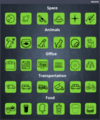
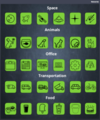
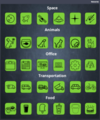
It’s been a hot minute since I’ve shared anything e-learning challenge related, but I really enjoy using icons, so I whipped up a quick Storyline file with some themed icons.
The Challenge
This week’s challenge was to create a set of icons, buttons, or stickers to share with the e-learning heroes community.
The Method
I decided to keep the concept fairly simple, use a standard shape with a drop shadow and then add icons from The Noun Project. I’ve long been a fan of The Noun Project, and if you don’t know what the heck I’m talking about, click the link and go check them out!
I decided on several themes: Space, Animals, Office, Transportation, and Food, and sourced icons for all of these themes. Once sourced, I added the icon to the shape, grouped the shape and icon together for all icons, and then added a ‘show layer’ trigger to all of the buttons. Prior to publish, I added credits under the Resource tab for all icons used.
The Result
Check out a quick demo by clicking here.
Download the Storyline file to snag all of these icons by clicking here.
Ashley Chiasson
.
Blog
.
<span class='date ' tip=''><i class='icon-time'></i> Jul 15, 2015 12:28pm</span>
|
|
First off, I have to address something I didn’t pick up on until this morning - last week was one year of Terminology Tuesday posts. Sure, I didn’t hit every single Tuesday as I had intended, but there have been 52 terms discussed (53 today), and that’s just bananas!
This week, I wanted to talk a bit about the concept of reusability in e-learning, and perhaps veer from the traditional concept discussion that’s often related to SCORM.
Reusability in E-Learning
When I think about reusability in e-learning, I think about objects and content that can be reused in a variety of contexts. Developers often run into this when working on large projects or in industries that involve trade-specific courseware development. My first experience with reusable assets was working with clients in the Defence sector. Often times we were working on projects for the same aircraft (although perhaps several years between projects), and it became quickly beneficial. For instance, one client had provided us with a 3D model of the aircraft, whereas another client several years later did not have access to this same model. We were able to reuse the initial model to suit the needs of the new project. Reusability also came in handy when developing component installation courses and then removal courses (we simply had to reverse the interaction, but could use the same objects).
Being mindful of reusability is critical as it can save you time and money in the long run. Reusing previously established assets (for the same client, of course - in the Defence sector example, the end client was the same, whereas the contractor may have been different, so the end client ‘owned’ all of the assets) will reduce the amount of development various departments and/or individuals have to spend.
Best practices for reusability might include creating your own content repository and defining a file naming convention that will make it easy for you to find what you’re looking for. If you’re extra savvy, you can create a coded database, but that might require a lot more effort than you have time for.
If you work in a specific authoring tool, it may save you time on a new project to have a repository of developed themes and/or interactions; this can help shave time off in the initial prototyping phase, and provides you with an arsenal of ideas for what you might be able to do from a design perspective, and can prove invaluable if design is not your forte.
Ashley Chiasson
.
Blog
.
<span class='date ' tip=''><i class='icon-time'></i> Jul 15, 2015 12:28pm</span>
|
|
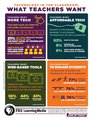
An apple a day is great, but a recent PBS national survey revealed that what teachers really want—besides an all expense paid trip to Aruba—is more access to technology in the classroom. But not just any technology—educators want web-based tools that motivate students to learn and reinforce content being taught.
The biggest barrier in making this wish a reality? Cost; therefore, pointing to the need for free digital classroom resources such as online sites, tools, interactives and games.
Check out the infographic shown below illustrating that teachers really do understand the value of integrating technology into classroom practices.
A shout out to PBS LearningMedia for sharing this cool visual!
Edutech for Teachers team
.
Blog
.
<span class='date ' tip=''><i class='icon-time'></i> Jul 15, 2015 12:28pm</span>
|
|
I’ve presented on How to Build Your E-Learning Portfolio several times over the past year, and it still amazes me how few e-learning portfolios I come across online. For this reason, I’ve decided to take a four-part approach to sharing what I know about building your e-learning portfolio.
The Importance of an E-Learning Portfolio
For e-learning professionals, and for many folks working in other ‘visual’ industries, a visual portfolio is essential. I said it. Essential. A portfolio will help you out if you eventually seek to change jobs, roles, or move into a freelance/contracting role, and it will quell the inevitable question from prospective employers/clients, "can we see some work samples and/or your portfolio?" Portfolios should be considered the cornerstone for every e-learning professional.
In my opinion, there are three main reasons why having a portfolio is important:
It highlights your capabilities; specifically with visual technologies;
It can act as a visual resume. Most Instructional Designers have had a Subject Matter Expert review their Word storyboard only to say "but, I just can’t visualize it." As an ID, you know that the next phase is developing the content and media assets, but the SME just can’t get past the storyboard phase. This problem is similar to one that prospective clients have when trying to visualize how you and your abilities could work for them and their needs; and
It can lead to an increase in job offers. Once prospective clients can see what you’re capable of doing, their confidence in your abilities will increase, which can help you reduce the amount of hustling you have to do.
My portfolio started out with just a few items, but once it went live, I saw a dramatic increase in the amount of prospective client inquiries I had. You will never stop playing the sales person as a small-business owner, but you can significantly reduce the amount of hustling you do, and will likely be able to enjoy the luxury of being able to choose who you want to work with.
Since tossing my portfolio online, I’ve been able to focus on working with clients I’m passionate about doing work with instead of scooping up anything and everything. It’s also allowed me to funnel work into the hands of other hustling independents to keep their revenue streams open when mine is at capacity.
With all of that being said, I would consider investing time into building my portfolio to be a direct correlation with an increase in my quality of work life and overall job satisfaction!
Ashley Chiasson
.
Blog
.
<span class='date ' tip=''><i class='icon-time'></i> Jul 15, 2015 12:27pm</span>
|