Blogs
|
So, I’m sure you’ve seen one of these charts hanging out in a science classroom before—especially when you were a chemistry student…
But the real question is… Have you ever seen an interactive version of the periodic table? If not, then put this resource on your must-see list because this recently released edtech gem, created by the Periodic Videos team using the TED-Ed platform, contains a video lesson about every single element on the periodic table. Yeah, it’s all that!
Check out a sample video lesson on Hydrogen below.
Besides the video lessons, teachers also have access to additional information that accompanies each element, which includes multiple choice, open-ended and discussion questions as well as other online resources. And as an added bonus, each original video can be customized to suit individual classroom needs. Check out the full lesson page on Hydrogen here!
Classroom Connection:
Use the interactive TED-Ed periodic table resource as an engaging and informative way for students to learn facts about the chemical elements and their properties.
Edutech for Teachers team
.
Blog
.
<span class='date ' tip=''><i class='icon-time'></i> Jul 15, 2015 12:27pm</span>
|
|
I’ve been watching a lot of YouTubers lately. It’s one of my favourite ways to take time out and get my head out of work mode. One of my favourite video styles to watch are vlogs, because they give you a glimpse into the lives of others. Now, I know that sounds creepy, but sometimes it’s just refreshing to get out of your own head.
What is a Vlog?
A vlog is a video-blog. Instead of blogging traditionally, as I’m doing now, the user video-blogs or vlogs. These videos are often done in a day-in-the-life style, but can also be optimized for training and development, akin to webinars or screencasts.
Vlogging has a huge presence in the YouTube content creator community for obvious reasons, but there are many Instructional Designers and IDs who are creating similar content. One cool way that I can see a day-in-the-life style working might be to set up your camera behind you while you work to create some cool time-lapse demos.
Another approach could be similar to the beauty gurus you see on YouTube - these content creators often explain how to achieve different beauty looks. You can use this approach as an opportunity to create brief tidbits of instructor-led training.
When thinking about this post, I really just wanted to emphasize the importance of thinking outside of the box with regard to your training, and leveraging approaches that are working well in other contexts!
Ashley Chiasson
.
Blog
.
<span class='date ' tip=''><i class='icon-time'></i> Jul 15, 2015 12:27pm</span>
|
|
As Quincy Jones once remarked, "I’ve always thought that a big laugh is a really loud noise from the soul saying, "Ain’t that the truth."
That said, Edu-fun Friday is a series devoted to adding some humor to the lives of teachers who visit this blog. After all, there’s nothing better than ending the week on a positive note! Plus, do we have the best topics to provide us with some comic relief or what?
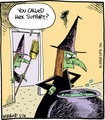
The moral of this story? The next time you request tech support, be careful what you wish for!
Edutech for Teachers team
.
Blog
.
<span class='date ' tip=''><i class='icon-time'></i> Jul 15, 2015 12:26pm</span>
|
|
This post is one in a four-part series for How to Build Your E-learning Portfolio. You can read Part 1 here.
Common Challenges
I understand that building your portfolio can be challenging. As are most things in life.
Maybe you aren’t legally allowed to share your work samples because they’re controlled goods or you’ve signed an air-tight Non-Disclosure Agreement;
Maybe you don’t have time…we’re not all Beyonce; or
Maybe you don’t know where to begin.
My goal here is to become your portfolio-building sensei and hold your hand through this entire process. There are times when you will feel overwhelmed (maybe even by looking at those three challenges), but you don’t need to feel that way. It’s okay. Everything will be okay. You just need to have a real conversation with yourself about when you want to stop hunting down every work opportunity (that costs time that no one is paying you for!) and let your portfolio do the work for you.
Challenging Yourself
Now, you may already feel challenged by those challenges impacting your lack of portfolio, but I’m asking you to challenge yourself even more!
Before taking the leap into full-time independent contractor-ship, I knew that I needed some sort of portfolio. I had been freelancing part-time for several years and was losing out on a lot of opportunities because I had nothing to show when asked "can we see your portfolio?" At the time, I had a full-time job with clients predominantly in the Defence sector, and all of my coolest work samples were classified as controlled goods; I wasn’t able to share any of my professional work, and I felt defeated.
At first I wallowed, but then I had some real-talk with myself, got serious, and created my first two portfolio pieces. The first was a tabbed interaction with hotspot pups designed to teach you how to bathe a cat. When in doubt, go with what you know. I’m a crazy cat lady who didn’t really know how to bathe a cat, but wikihow came to the rescue with some hilarious illustrations, and that simple tabbed interaction is still a hit with clients.
Portfolio Piece # 1
Click to view interaction.
The second portfolio piece was inspired by many of the small business books I had read. I wanted to share brief reviews of these books, so I created a hotspot-based interaction that linked to book reviews contained within scrolling panels.
Portfolio Piece #2
Click to view interaction.
Both of these portfolio pieces were very basic in terms of technological prowess, they were developed in Articulate Storyline before I had become more experienced within Storyline, and were the launching pad for my portfolio.
The moral of this story: When feeling defeated, challenge yourself to be creative!
Ashley Chiasson
.
Blog
.
<span class='date ' tip=''><i class='icon-time'></i> Jul 15, 2015 12:26pm</span>
|
|
Problems with your contacts, battery or text messages? Well, as it turns out, these creepy instances may not be random! Um, yeah… Just so you know—your device just may be haunted. Find out what the strange ringing and phantom vibrations might really mean by checking out the fun Halloween-themed infograhic below.
Thanks to Joy of Tech for sharing this comical image!
Edutech for Teachers team
.
Blog
.
<span class='date ' tip=''><i class='icon-time'></i> Jul 15, 2015 12:26pm</span>
|
|
I saw some tweets awhile back about showing your work or working aloud, and the concept ties in nicely with my discussions on portfolio building, so I figured it was a good opportunity to create a greater awareness!
Show Your Work
Showing your work and working aloud are really about sharing how you got from point A to point B with an audience. Such sharing serves to enlighten your audience, and while some examples they may have previously encountered, if you continue sharing your work, your audience will undoubtedly learn something and some point.
When I started this blog, I went at it from an Instructional Design professional looking for work perspective. Blog posts were focused on clients, and had less of focus on imparting knowledge to my actual audience. Once I realized that my audience was coming primarily for the instructional design and freelance wisdom, I switched focus to cater to that audience. Initially I thought that I would see a decline in the amount of prospective clients I had, but that wasn’t the case. And, I get to share the small wealth of information I have with a group of individuals who can genuinely benefit from such information.
Ways of Showing Your Work
Now, there are so many ways for you to show your work: participating in forum discussions, creating and sharing infographics, recording screencasts, creating demos, sharing walkthroughs of how you got from point A to point B, creating day-in-the-life posts.
My explanatory posts that accompany my E-Learning Heroes Challenge entries are always very popular, and I like to think that it’s because I provide an explanation of the concept, the method I took in achieving the concept, and finally I show the result, which is typically a full demo of the interaction or free download.
Free downloads are a great way of sharing your work, because they allow users to reverse-engineer your interactions to suit their needs OR use the interaction ‘off-the-shelf’/as-is.
Screencast demos are another crowd-pleaser. These videos get a lot of views from folks looking to solve problems, so when you share your solution, it makes a small pocket of the world that much less problematic!
Of course these are just a small sampling of ways that you can show your work, so get creative!
Ashley Chiasson
.
Blog
.
<span class='date ' tip=''><i class='icon-time'></i> Jul 15, 2015 12:26pm</span>
|
|
Over the past few weeks, I have been getting some fantastic questions from readers, and I’ll slowly be trickling through and responding to each.
The first question comes from Tristan (by the way, I love your WordPress theme - start blogging!):
Would you consider doing a follow up article on cold emailing techniques?
Cold emailing is certainly not the most fun activity, but it has landed me quite a few opportunities, especially in my early days as a freelancing Instructional Designer. First off - You need to get over yourself if you aren’t already. Take all of the fear and shame out of the idea of cold contacting prospective clients. Ain’t no shame in that! Back in the old days, businesses did this all the time, and businesses still do door-to-door, which is similar, but a lot more difficult. A cold email is how I landed my role at a university, which had I waited for a posting and applied traditionally, would have been looked over for one of the 100+ over-qualified applicants with more experience.
I had a great conversation with a friend a few months back. He was looking to break into the Technical Writing scene and wasn’t sure how to do it. I encouraged him to do some cold emailing, but he was nervous about what he would say. This happens when we’re anxious about whether we’re capable of doing the job. So my second piece of advice is to exude confidence from every fibre of your being. You enjoy what you do and you know (or are pretty darn sure) you can do what you’re saying you can, so just own it!
Now, when it comes to specific techniques, I took several approaches:
I created a canned, but modifiable, email that could broadly address any individual or organization. Once developed, I modified it based on who it was being sent to. Key elements included: introduction of me and my background, explanation of how my expertise might work for the individual/organization, link to my portfolio, attachment of my resume, and a thank you for taking the time to read the email.
I researched the heck out of the people I was cold emailing. This is important because it sets your email apart from anyone else who may be cold emailing, which in my experience, few people do this nowadays, so you really want to show off your best self because you’re already putting yourself out there. After researching, I modified my email appropriately.
I followed up! In most cases I followed up 2-4 weeks following the email.
One great thing about cold emailing is that often times, prospective clients don’t realize that they need their services, so when they’re offered (and explained clearly and without jargon), some folks will have an "Aha!" moment and realize that you’re just what they’ve been looking for to resolve a problem that has been plaguing them and/or their organization.
I will say that cold emailing may not be as fast as other means in terms of securing gigs; the university didn’t contact me until a year and a half after I emailed - how they still had my email, I don’t know, but they did, and I’ve been here ever since! However, those are the techniques that I used, and I hope that this information can help you.
Ashley Chiasson
.
Blog
.
<span class='date ' tip=''><i class='icon-time'></i> Jul 15, 2015 12:25pm</span>
|
|
This post is one in a four-part series for How to Build Your E-learning Portfolio. You can read Part 1 Here and Part 2 Here.
Part 3 is meant to address two of the most common challenges: what do I do if all of my work is proprietary or I’ve signed an air-tight non-disclosure agreement?, and I’m not creative, where can I find inspiration?
Sanitize That Sample!
Folks are always asking me what to do in situations where they are legally not allowed to share their work samples, and for those individuals, I recommend sanitizing that sample! Check out the two versions below:
Original
The original is part of a client project that I used as an example for how easily you can sanitize a work sample. Now, I will say that the conversion is not the most visually appealing, but it serves the purpose of illustrating that sanitation doesn’t need to be a huge undertaking.
Sanitized
As you can see in the example provided, sanitizing a work sample doesn’t need to be a huge undertaking. In this case, I removed the logo, changed the background, and changed the colour palette. The content for this organization is readily available online, so it’s not considered controlled goods; therefore, I was able to keep all of the existing textual content. For those of you who are restricted by branding AND textual content, I would suggest removing all branding and replace textual content with dummy text, and tada! You’ve sanitized your work sample!
Check this site out for a list of fun dummy text generators!
I came from the wonderful world of military contracts, and there is not a whole heck of a lot (aka nothing) you can share because everything is considered controlled goods. But don’t get hung up on not being able to include the super cool 3D render of an aircraft, and instead just focus on pulling apart the elements of the e-learning project (e.g. the menu structure, the iconography, the visual elements used in various screen styles). So, another suggestion for dealing with proprietary content would be to pull elements from existing work and create your own customized version of it. This is great because if you’ve been working on a project for awhile, there might be things about it that you hate (but which have been approved by a higher power), so you can change those things and really make it yours!
Finding Inspiration
Inspiration comes in many forms, and you just need to make something your muse and run with it! There are so many websites and cool apps out there now, so you can easily fall in love with a beautiful design - you might find inspiration in websites, digital magazines, video games, or templates built by others. Whatever inspires you, put your own stamp on it, build it out, and don’t forget to toss it into your portfolio!
For example, one of the E-learning Heroes Challenges (more on that in a moment), was to create our own digital magazine template. These creations were inspired by existing digital magazines and they elements they consist of, and with a little imagination, I was able to bring together my own digital magazine, The Meadows.
Click to view the full interaction.
The E-Learning Heroes Challenges
For me, the Articulate E-Learning Heroes Challenges were huge when it came to kickstarting my motivation. Half the battle is your own imagination, so the challenges were great. Each week, there would be a new challenge and a prompt for entry submissions, and each week, I would be blown away by the entries.
The E-Learning Heroes Community is a supportive environment, and comments tend to be positive or constructive in nature - I’ve made some of my closest friends here! The weekly challenges are a great way to see what your peers are capable of doing and get ideas for how you can apply similar approaches in your future projects.
My portfolio has grown considerably since I began participating in the weekly e-learning challenges, and the greatest praise I have for the weekly challenge is just that; it challenges me to think outside of the box and create interactions I may not have previously considered creating!
Ashley Chiasson
.
Blog
.
<span class='date ' tip=''><i class='icon-time'></i> Jul 15, 2015 12:24pm</span>
|
|
Whether you choose to focus on Veterans Day and its history for one class period, or maybe you’re planning to incorporate a special project in honor of our American heroes… Either way, utilize the resources located within the interactive image shown below to connect classroom curriculum to the day set aside to honor those who fought for our freedoms.
Be sure to hover over the image to reveal a variety of "hotspots" containing Veterans Day lesson plans and activities.
Click here to access a full-screen version of this image.
Edutech for Teachers team
.
Blog
.
<span class='date ' tip=''><i class='icon-time'></i> Jul 15, 2015 12:23pm</span>
|
|
I’ve been working on a lot of content scripts lately, and was surprised that I haven’t yet addressed the concept of scripting in one of my Terminology Tuesday posts, so today is the day!
Scripts in E-Learning
When it comes to writing scripts for e-learning, I’m familiar with two main approaches: content scripts, and audio/narration scripts.
Content scripts are essentially content dumps of all client-furnished materials related to the module, course, or topic you’re working on. When I write a content script, it typically includes the learning objectives, any lessons contained within the course and/or module, and any knowledge checks or assessment items located within those lessons. The goal is to have all of this content handy so that it can just be copied/pasted into the authoring tool or storyboard (depending on what milestones exist within your project). Scripting content also familiarizes you with the content, so when you get further down the wormhole of development, you have some ideas when it comes to factors such as interactivity and/or media treatment.
Audio/narration scripts are developed for the voice talent, and include elements such as screen identifier, pronunciation guide, the text requiring narration, and an audio filename. In my process, I tend not to script the audio narration until the client has signed off 100% on the textual content. Revisions to audio are often timely and expensive, so having the client review the textual content ahead of the audio scripting phase is a best practice.
Sure. Scripting is an additional step (or two) in the development process, but it really does help in the long run. It makes all of the subsequent development tasks a lot more smoother, and there is often less revision involved…or the revisions are caught in the scripting phase, leading to fewer revisions in the storyboarding and/or authoring phases. Time is money, so efficiency is always at a premium.
How do you use scripts? Are you using them primarily for content or audio scripting? What elements do you include in your scripts? Let me know in the comments!
Ashley Chiasson
.
Blog
.
<span class='date ' tip=''><i class='icon-time'></i> Jul 15, 2015 12:23pm</span>
|