Blogs
|
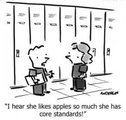
As Quincy Jones once remarked, "I’ve always thought that a big laugh is a really loud noise from the soul saying, "Ain’t that the truth."
That said, Edu-fun Friday is a series devoted to adding some humor to the lives of teachers who visit this blog. After all, there’s nothing better than ending the week on a positive note! Plus, do we have the best topics to provide us with some comic relief or what?
This must explain why I don’t like apples so much!
A shout out to artist Mark Anderson for the TGIF humor!
Edutech for Teachers team
.
Blog
.
<span class='date ' tip=''><i class='icon-time'></i> Jul 15, 2015 12:22pm</span>
|
|
Thanks ttcInnovations for the opportunity to linkup with other bloggers and share a sneak peek into my daily routine! Everyone who’s participating is sharing their own stories so check them out: ttcInnovations, Jackie Van Nice, Rachel Barnum, Melissa Milloway.
5:45am
The Wake-Up Light has been gradually getting brighter for the past 15 minutes, but I’m not ready to get out of bed! By 6am, my husband is reminding me that the shower is free (aka ‘get your butt out of bed already!’).
6:30am-7:45am
Breakfast consists of multi-grain cheerios and a green smoothie, and I flip through my emails, check Twitter, and download a source file while I eat. Joe takes Oliver out to play frisbee and tire him out, so I feed the cats, dry my hair, do my face, and throw on some clothes.
We’re out the door by 7:10am, and as with most things in my life, nothing productive really begins until coffee has made its way to my mouth, so we stop for coffee.
By 7:30am I drop Joe off at work, and I’m at the university by 7:45am.
7:45am-6pm
I’m at the university until 3:30pm. First and foremost, I tackle coffee and write out my to-do list, and then I do several development plan and course reviews.
I brew and drink a tea while quickly uploading some revisions for a client. This brings me to 10:45am, so I take a walk around campus before heading to the gym around 11am. At the gym, I run a quick 2.51 km - I’m running a half-marathon on Sunday, and I’m trying to squeeze some very short runs and cross-training in ahead of the race. Dodgeball starts tomorrow and softball practices is on Thursday and Friday, so I don’t want to do too much more than that.
After the gym, I grab a slice of pizza from my favourite pizza place because…life’s all about balance, right?
I make my way back to the university, and populate another faculty member’s course, answer some faculty questions, and record some audio narration, taking me to 3:30pm. Life at the university is definitely a lot busier than it sounds! Having written this, it seems like I do nothing, but there never seems to be enough hours in the day.
While at the university, I monitor three different email accounts to ensure nothing pressing comes up with my clients outside of the university. Nothing major is going on today, so I feel good about being productive this evening.
At 3:30pm I pack up and leave the university and head back to pick Joe up from work.
By 5pm, we’re home. I toss supper on (hummus-crusted baked chicken and roasted sweet potato) and begin to plug away at client work. I catch up on some YouTube videos and blog-reading while I wait for supper to finish.
6pm-7pm
I deliver revisions for two courses (for one client), and plug away at another course for this client - the one I recorded audio for earlier. The course is pretty much finished, but I need to edit and synchronize the audio, which is tedious…but I love what I do, so it ain’t no biggie.
I read a low-rated review of Articulate Storyline Essentials and get discouraged for a little while. I’m really proud of having written that book, but it was really tough to pare down content to just the basics. The screenshot walkthrough style isn’t for everyone; different strokes for different folks I guess. I’m trying to focus on the positive reviews I’ve received, and not let it hold me back from working on the book I’m currently writing.
7pm-9pm
I continue working on the course and toss a load of in the dryer. I’m doing my work over a beer and the glow of the TV as I use the Blue Jays/Orioles game as background noise. I deliver the course for review, get in bed, and read to wind down. I’ll be out like a light by 10pm.
Ashley Chiasson
.
Blog
.
<span class='date ' tip=''><i class='icon-time'></i> Jul 15, 2015 12:22pm</span>
|
|
FINALLY, David! Something I can squeeze into my regular procrastination! THANK YOU!
The Concept
This week’s challenge is to share a collection of reaction gifs for any e-learning topic we wish to discuss. Very simple concept that I feel most folks, also keen on procrastinating, can stand behind.
The Method
Staying on topic, I chose to select reaction gifs related to some of the 83 e-learning challenges we’ve had. I also chose to stick with pop culture references, in terms of television/YouTube/Internet…I guess all of these gifs (that exist) are pop culture references to some extent, so I think my point is moot. I then curated a bunch of gifs to express various reactions I’ve had to the challenges over the years, and then I sifted through the previous challenges to see which previous challenge elicited which reaction.
The Result
1. Just when you thought a terrible challenge was over.
(via Gifrific)
That’s how I felt when I saw that E-Learning Challenge #32 - Death, Taxes, and E-Learning Mistakes was coming back to haunt me in E-Learning Challenge # 33 - Fix Your E-Learning Mistakes…and how I feel each time I see one of those challenges retweeted.
2. When you see that the world will finally understand the importance of font choice.
(via OffColorTV)
This is how I felt when E-Learning Challenge #51 - Font Games and Interactions for E-Learning Designers announced.
3. When you know exactly what tool you’ll use to complete a challenge.
(via Tumblr)
When E-Learning Challenge #53 - Create Your Own E-Learning Characters with Pictograms was announced, I knew immediately that I would be using PowerPoint for this challenge (which I have yet to complete…shhh).
4. When David finally posts an ‘easy’ (re: less time-consuming) challenge.
(via Tumblr)
Much like my feeling for this challenge, and for E-Learning Challenge #39 - Education Podcasts for Online Training and E-Learning Challenge #67 - Podcast: How Do Instructional Designers Get Things Done?, I see this challenges and do a happy dance. I don’t have as many hours in the day as Beyonce, but I got this, boo!
5. When you hear about some new technology.
(via pandawhale)
When reviewing the entries for E-Learning Challenge #45 - Audio Recording Tips for E-Learning Designers, I decided to purchase a better mic for my audio setup.
6. When David posts a challenge that I know will require my brain.
(via reactiongifs)
This is how I feel the majority of the time David posts a challenge, because time is one thing in my life that is lacking. Math is not my strong suit, so I definitely felt like this when I saw E-Learning Challenge #71 - Teaching Math Concepts with E-Learning. Pythagorean, whaaaat?!
7. How some challenge titles make me feel.
(via wifflegif)
E-Learning Challenge #80 - Can You Pass an Eight-Grade Science Test? Uh…no. I can’t, and I do not wish to return to age 14…I’ll have flashbacks.
8. Whenever I see my first E-Learning Heroes Challenge entry retweeted
(via Tumblr)
Whenever David retweets my first E-Learning Heroes Challenge entry - E-Learning Challenge #25 - Instructional Design Tips that Really Pop, I get a little sentimental.
9. When I can finally participate in a challenge!
(via imgur)
Whenever I locate the elusive creature called ‘time’ and can actually participate in a challenge, I feel like doing a happy dance, like Ron Swanson. That’s how I felt when I participated, most recently, in E-Learning Challenge #78 - E-Learning Icons: Show and Share Your Favourite Styles.
10. When I realize my entry is the first submission for a challenge.
(via Tumblr)
This is how I feel today, posting my entry for E-Learning Challenge #83 - 10 Reaction Gifs for Every E-Learning Challenge.
Ashley Chiasson
.
Blog
.
<span class='date ' tip=''><i class='icon-time'></i> Jul 15, 2015 12:21pm</span>
|
|
In the words of Cicero, "Gratitude is not only the greatest of virtues, but the parent of all the others."
Two thumbs up for this guy because in my opinion, there’s almost nothing more important than teaching our students about the importance of showing gratitude for and toward others. That said, a few of my Multimedia students, one of my colleagues and I teamed up to write and produce a Veterans Day video tribute that was shared during assembly and morning announcement programs throughout my district yesterday and today.
Our goal was to develop a visual powerful enough to create understanding about the countless sacrifices the men and women who serve(d) in our nation’s armed forces have made to ensure we have the opportunity to live in a democracy. Most importantly, we wanted to encourage and/or remind our student body to be appreciative of those who have provided the liberties and freedoms we enjoy on a daily basis.
Again, my opinion, but I think we accomplished our goal—or at least that is the feedback we have received since sharing our video. Check it out for yourself below.
A shout out to Kermit, Jack, Meghan and Ms. Trostle for working with me on a very worthwhile project!
Classroom Connection:
I realize Veterans Day is officially over for this year, but it’s never too late to teach students the importance of honoring and remembering past and present members of our armed forces. At the very least, I hope this video will become a resource you can bank for future references.
Edutech for Teachers team
.
Blog
.
<span class='date ' tip=''><i class='icon-time'></i> Jul 15, 2015 12:20pm</span>
|
|
As Quincy Jones once remarked, "I’ve always thought that a big laugh is a really loud noise from the soul saying, "Ain’t that the truth."
That said, Edu-fun Friday is a series devoted to adding some humor to the lives of teachers who visit this blog. After all, there’s nothing better than ending the week on a positive note! Plus, do we have the best topics to provide us with some comic relief or what?
I pretty much have that same "What the what?" reaction when I am constantly reminded to update my Java—ha, ha!
A shout out to Daily Funny Stuff for the TGIF laugh!
Edutech for Teachers team
.
Blog
.
<span class='date ' tip=''><i class='icon-time'></i> Jul 15, 2015 12:19pm</span>
|
|
If you’re looking for a fun way to spark student creativity while encouraging them to take unique pictures, then consider developing your very own Ultimate Photo Challenge similar to the one I recently completed with my Multimedia I students.
It went down something like this: Students were challenged to complete various photo tasks using a mobile device or digital camera. For example…
Objects arranged to look like a smiley face
A shadow/silhouette shot of one or more group members
A group selfie. The more creative, the better!
A hand-made heart photo (because they just ♥ this class!)
Dress up an object and place it in a unique setting
A human pyramid
A sidewalk chalk drawing
Holy Batman! Got superhero t-shirts?
A photo bomb (Yeah, I know it’s not spontaneous, but it’s still funny!)
Once students staged the necessary photos for the project, they were required to compile a digital presentation capturing their most excellent pics utilizing a tool, app or program of their choice. Then they shared their best stuff with the rest of us—and the world via their wikispace.
This project—it was like a good ol’ fashioned scavenger hunt with a funky tech-based twist!
Check out the example I created using the Pic Collage app.
Classroom Connection:
So, why did I create this project? Besides working with classmates on a super cool team building activity, I wanted students to use a variety of tech skills in an innovative way. Yep, this was me checking out the digital side of my multimedia peops, and it turned out to be a pretty awesome experience!
Use this project idea to spark an idea that will unleash the digital creativity within your students. Trust me, there’s nothing like seeing them work together to develop a finished product they are really proud of—especially one they really enjoyed completing.
Edutech for Teachers team
.
Blog
.
<span class='date ' tip=''><i class='icon-time'></i> Jul 15, 2015 12:19pm</span>
|
|
Alrighty folks! Today is the final edition of the How to Build Your E-Learning Portfolio blog series. I’m sad to see it finish, but I’ve been happy to have helped so many of you!
This post is one in a four-part series for How to Build Your E-learning Portfolio. You can read Part 1 Here, Part 2 Here, and Part 3 Here.
Part 4 is all about actually building out your portfolio and promoting yourself!
Building Out Your Portfolio
For many, building out your portfolio may seem like a daunting task, but it doesn’t need to be difficult!
You can post samples to dribbble, dropbox, or google drive (if you’re wondering how to share your Storyline samples using Google Drive or Dropbox, I recorded a screencast showing you how to do just that - Click Here). I love sharing knowledge with others, so I incorporated my portfolio into my blog using WordPress (self-hosted); occasionally I do show my work posts, and I have a portfolio section of my website that uses a simple WordPress plugin. It’s also important to invest in yourself, so if you don’t have the time or expertise to easily add portfolio pieces to your website, pay someone who does have the expertise. For example, I spent about 5 hours of my time trying to figure out how to get the ‘simple WordPress plugin’ to work properly and finally conceeded to paying someone to do it for me…it took them half an hour, and only cost 30 dollars. WORTH IT.
One important thing to note is that you should always ask your clients during the course of the project (or at the end), if you can use a sample from the project in your portfolio. Sometimes they’ll say "sure!", and you can do what you want. Sometimes they’ll say "sure, but not everything", and you’ll need to pare things down and have the client review ahead of posting. Sometimes they’ll say "You can’t share the actual project, but you can share a screencast of you walking through the project," and you can do just that - these situations may crop up if you develop a project that will be resold, and screencast demos are neat because they show the world a behind the scenes peak into your process. Sometimes the client will allow you to include a screenshot or two and specify that a video screencast demo of the project can be made available on request (this occurred with my samples for the YMCA). Whatever your client’s preference, there is usually some way of working a portion of the project into your samples; you just need to think outside of the box.
My current portfolio isn’t fancy, but it does exactly what I need it to do. Clients don’t want to view 500 full courses before deciding they like your work, but they do need to see some representation of your capabilities within the world of e-learning. Every client is different, so it’s important to consider a varied approach to your portfolio. What I mean by this is to include a representative sample of portfolio pieces - several work samples, several personal samples, perhaps some design samples if that’s something you’re good at. Your prospective clients need to believe, from your portfolio or discussions with you, that you are the right person for the job!
Self-Promotion
Once you have your portfolio built, promote yourself! I’m active in several communities (Freelance to Freedom, Articulate E-Learning Heroes, ATD, and LinkedIn), so I promote myself by participating in those communities; this participation is meant to spread knowledge, and be less overt. Ensure you have completed your profiles for any site you participate in, and include links to your website and social media accounts. Twitter and LinkedIn are the only social media platforms that I really use for business, and most of my promotion comes from retweets, views, or from colleagues sharing my content.
I share my content on social media, but it’s also important to share relevant posts from your colleagues because self-promotion shouldn’t be selfish. You should want to support others who are trying to share information and enhance the knowledge exchange. So promote yourself, but don’t be selfish!
If you can afford or have the opportunity to attend or present at industry conferences, this is a fantastic way to promote yourself and to support others. I love presenting at the Articulate Community Roadshows (I’m presenting at another this June!) and I thoroughly enjoyed presenting at and attending Learning Solutions 2015. Not only can you share your wealth of knowledge with a greater audience, but you can support your colleagues as they do the same. You can network the heck of the events, if you’re into that, but I’m a bit more introverted, so I tend to let folks come to me or reach out to individuals I already know. Ensure you have business cards - I don’t hand out a ton, but they’re available if someone asks. Be ready!
Final Note
I hope that this series has provided more clarity as to why an e-learning portfolio is so important and how you can easily create one - remember, your portfolio can provide you with the freedom to choose work you’re most passionate about, so make some time, and show yourself off! Please let me know, in the comments or through the Contact page, if you have any outstanding questions, and I will do my very best to answer expediently.
Ashley Chiasson
.
Blog
.
<span class='date ' tip=''><i class='icon-time'></i> Jul 15, 2015 12:19pm</span>
|
|
The nominations for the 11th Annual Edublog Awards are officially open, and that can only mean one thing: It’s time for this Geeky Girl to send some love to a few of her most favorite edtech peops!
To kick things off, I’d like to give a special shout out to my Tech Club student Aubs (a.k.a. the one and the only Geeky Girl Jr.) for continuing to rock out her super cool blog, Simply Aubree. You’ve accomplished many goals since entering the blogosphere, but here’s to you obtaining that badge you’ve been dreaming about for-like-ever! Keep up the fantastic work as well as your always positive attitude and great things will continue to happen!
The remainder of my 2014 nominations shake out something like this:
» Best Individual Blog — TechChef4u
» Best Group Blog — Two Guys and Some iPads
» Best New Blog — Shake Up Learning
» Best Edtech/Resource Sharing Blog — Cool Tools for 21st Century Learners
» Best Teacher Blog — Mathy Cathy
» Best Library/Librarian blog — The Daring Librarian
» Best Individual Tweeter — Donna Baumbach/Aunty Tech
» Best Twitter Hashtag — #edtech
» Best Free Web Tool — ThingLink
» Best Educational Wiki — ICTmagic
» Best Educational Use of a Social Network — TechChef4u on Facebook
» Best Mobile App — Dropbox
» Lifetime Achievement — Richard Byrne
Learn more about how you can nominate your favorite edtech people, places and things for a 2014 Edublog Award here!
Edutech for Teachers team
.
Blog
.
<span class='date ' tip=''><i class='icon-time'></i> Jul 15, 2015 12:19pm</span>
|
|
I know. I know. I skipped a week, but I promise that I have something special in store for all of you Terminology Tuesday fans, so pipe down!
This week I sifted through my archives and was surprised that I had yet to discuss Subject Matter Experts (SMEs), so it seemed like no better time than the present to table that term for explanation and discussion.
Subject Matter Experts (SMEs)
SMEs are just that - ‘experts’ within a given subject matter. These individuals are often the authority for content accuracy within your e-learning projects. SMEs come from all walks of life, but generally have a wealth of academic and/or on-the-job experience to be considered proficient in their domain.
Typically, Instructional Designers will work closely with SMEs to determine learning objectives, define training plans and outlines, and ensure accuracy of content within the storyboarding and/or prototyping phases. Occasionally, SMEs may write assessment items, or the Instructional Designer may work in liaison with the SME to determine appropriate assessment items and distractors.
The relationship between the Instructional Designer and the SME can be an intricate one…The Instructional Designer often needs to navigate how to effectively communicate with the SME in order to acquire necessary information for the project. SMEs sometimes have a hard time separating the nice to know from the need to know, and this is really where the Instructional Designer needs to learn how to effectively question the SME to ensure they are developing instructionally sound content, and not overloading learners with extraneous information.
In further considering the relationship between Instructional Designer and SME, it is very important to define roles and responsibilities at the beginning of each project. Without doing so, or without being able to assert dominance within a given area (e.g. design versus content accuracy), a SME can easily run away with the project, negatively impacting the overall design. It has been my experience (not always), that some SMEs believe they could better design the e-learning, which is why it’s important for both individuals to understand their roles and to respect one another’s role in the project.
Above all else, communication is the magic ingredient when it comes to working with a SME. If you can nail down an effective communication strategy, you should be golden!
What have been your experiences working with SMEs?
How do you navigate your working relationship with SMEs to ensure utmost respectability and fair treatment?
Resources
SMEs are from Mars, Instructional Designers are from Venus - Tara D. Holwegner, Life Cycle Engineering
3 Tips You Must Know When Working With SMEs - Sister Mandi, Elearning Brothers
Working With SMEs: An Instructional Designer’s Guide to Collecting and Organizing Content From Subject Matter Experts - Peggy Salvatore and Jonena Relth
Ashley Chiasson
.
Blog
.
<span class='date ' tip=''><i class='icon-time'></i> Jul 15, 2015 12:19pm</span>
|
|
The Geeky Girl is back… This time with another interactive image focusing on an updated round of super cool Thanksgiving lesson plans, activities and games that can be utilized in your classroom prior to the upcoming break. So, if you’re in search of some tech-based Thanksgiving games to keep your students engaged before vacation, Edutech for Teachers has got you covered!
Just hover over the interactive image to find tons of Thanksgiving-themed games and interactive learning activities for students and/or skip past the graphic to find additional materials for teaching and learning about this popular American holiday.
Check out the full screen version of this image here.
Additional Teaching & Learning Resources:
» Scholastic News - Learn about how the pilgrims reached America and celebrated the first Thanksgiving via videos, slideshows and a virtual field trip.
» TIME Magazine - An interesting article regarding "The Top 10 Things You Didn’t Know About Thanksgiving".
» Teachers Love SMART Boards - A list of Thanksgiving-related activities that can be utilized with an interactive whiteboard.
» abcteach - Games, puzzles and coloring pages designed for elementary students.
» The Best Websites To Learn About Thanksgiving - From audio and video to engaging reading activities, Larry Ferlazzo’s comprehensive list of Thanksgiving web sites includes something for everyone!
» The History Channel - Tons of videos related to the origins, history and traditions related to Thanksgiving. A few noteworthy videos include The History of Thanksgiving and the Mayflower Deconstructed.
» National Geographic for Kids - Contains a funny fill-in turkey story/Mad Lib that can be used as for a writing activity.
» Thanksgiving Web Quest - Visit Web sites about the Pilgrims, the Wampanoag and the famous harvest feast and learn new facts along the way!
» 10 Thanksgiving Myths Dispelled - A cool infographic created by Misconception Junction.
» The Pilgrims and the First Thanksgiving - A web adventure in which students have to answer questions along the way.
» Thanksgiving Trivia - The Huffington Post challenges you to take the ultimate quiz about Turkey Day.
» Thanksgiving Quiz - Another fun holiday quiz created by Funnel Brain.
» How Thanksgiving Works - A variety of Thanksgiving related articles and videos about the History of Thanksgiving as well as related customs, traditions and more from the creators of How Stuff Works.
» What Really Happened? Comparing Stories of the First Thanksgiving - A great feature from the New York Times Learning Network that also contains links to other useful resources.
» Thanksgiving Teacher Resources - Cross-curricular lesson plans, projects and ideas as well as videos, slideshows, art activities and more!
» Thanksgiving Ideas for the Classroom - Interdisciplinary lesson plans, activity ideas and other curriculum resources from NEA.
Classroom Connection:
Use the resources and materials listed above to teach students about the Thanksgiving holiday.
Edutech for Teachers team
.
Blog
.
<span class='date ' tip=''><i class='icon-time'></i> Jul 15, 2015 12:18pm</span>
|