Blogs
|
If you're going to the eLearning Guild's Learning Solutions Conference this coming week in Orlando, come join me--and say hello!
I'll be speaking in three sessions:
Featured Session (F2) Subscription Learning: A Fundamentally Different Form of eLearning
Time: Wednesday March 19, 10:45AM
Details on the session
Slides for the session
Over 300 people are expected to attend. Get there early for a good seat!
Concurrent Session (105) Serious eLearning Manifesto (Also with Clark Quinn and Michael Allen)
Time: Wednesday March 19, 1:00PM
Details on the session
We will hand out paper version of the Manifesto at the session (there are no slides)
Morning Buzz (MB31)
Time: Thursday March 20, 7:15AM
A casual conversation about the eLearning Manifesto and Instructional Design
Note: Look for Clark Quinn, or Michael Allen's name (as mine is not listed), but I'll be there!
Will Thalheimer
.
Blog
.
<span class='date ' tip=''><i class='icon-time'></i> Jul 15, 2015 01:49pm</span>
|
|
Teaching Students to Be Better Annotators Infographic
When asked to share the hardest part of teaching good highlighting and annotation skills, teachers said:
"Teaching kids that highlighting is not painting the barn." —Patricia B.
"Getting students to understand the different aspects of text worthy of notation—main idea, significant detail, theme, etc." —Melissa W.
"Convincing them it’s necessary." —Amy S.
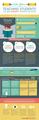
With these comments in mind, We are Teachers created the Teaching Students to Be Better Annotators Infographic, which provides ideas for teaching annotation in the classroom.
Why Annotate?
Annotation has some big benefits for readers and writers alike:
It slows down those super-speedy readers who are racing to the finish line.
It helps students make connections.
It encourages students to ask questions and find evidence, both of which are emphasized in the Common Core.
It fosters a personal relationship and understanding of the text.
it makes reading active.
It improves reading comprehension.
3 Mistakes Kids Make and How to Fix Them
They Highlight Everything: Just about every teacher has seen a textbook spread that has been turned entirely neon yellow.
FIX IT: Show students there isn’t much difference between a totally blank page and one that’s been completely highlighted. Emphasize that highlighting isn’t a tool to make us understand as we’re first reading, but rather one to help us remember the most important passages on a deeper level.
They’re Inconsistent: When you mark notes about the author’s purpose in purple ink on one page and with only a series of exclamation marks on the other, it’s hard to flip through the text and find what you need.
FIX IT: Develop a class system of annotation symbols or notes, or invite students to create one of their own.
They Sweat The Small Stuff: Some students understand that you aren’t supposed to highlight the entire page, but they still aren’t sure how to pull out the text elements that ARE important, like evidence, argument, and author’s purpose.
FIX IT: Try doing some "reverse highlighting," where you cross out everything that isn’t 100% essential. Then discuss what’s left. Why is it so important? Use your discussion to help create a framework for annotation.
Don’t Want To Mark Up Your Books? 3 Ideas to Try Instead
Use sticky notes to mark key passages and story elements.
Try e-books or an e-reading platform like Accelerated Reader 360, which has built-in annotation tools.
Make photocopies of key pages and have the students annotate those (if the text is in the public domain).
Digital vs Pen and Paper
Using programs like Accelerated Reader 360, it’s easy to set up auto tags for things like Author’s
Purpose, Argumentation, and Inference & Evidence.
Most digital programs allow students to see what other readers have annotated, which can help kids understand other perspectives on the text.
Physical annotation creates more wear and tear and makes it difficult to reuse the book.
Digital annotation can easily be adapted to students with vision or fine motor impairment.
Students who struggle with handwriting can also benefit from typing their notes.
Learning to annotate by hand is helpful for students who take penand-paper assessments.
An unlimited number of students can annotate the same text.
The act of handwriting may help some students better remember their annotation.
Kids can develop their own systems for annotation and figure out what works best for them.
4 Ways to Keep Annotation Fun
Annotation can often seem intimidating or like "another thing to do" while reading. Here are four ways to keep it fun!
Encourage students to develop their own "secret codes" for annotation. Have them make legends explaining what each symbol in their secret codes means.
Make it visual. Encourage students to sketch or doodle in response to their reading and to use small designs to represent various themes (e.g., happy face = friendship).
Occasionally keep track of something silly—like how many times the author uses the word "supposedly." It might just lead to a deeper conversation about word choice and author style!
Don’t grade or make kids turn in annotation—at least not always. The emphasis should be on the fact that annotation is a personal response to reading and a way to understand the text on a deeper level.
View also:
The Ultimate Guide to Note Taking in Class Infographic
Via: www.weareteachers.comThe post Teaching Students to Be Better Annotators Infographic appeared first on e-Learning Infographics.
eLearning Infographics
.
Blog
.
<span class='date ' tip=''><i class='icon-time'></i> Jul 15, 2015 01:49pm</span>
|
|
I'm teaching the following half-day workshop at the upcoming ISPI conference.
This workshop goes for $150, which is an absolutely incredible bargain...
Click here to learn more about the workshop or the conference.
Radically New Research-Inspired Smile Sheet DesignWill Thalheimer, Work-Learning Research, Inc.contact: will.thalheimer@work-learning.comWorkshop Code: WUQ
Research shows that traditional smile sheets are not related to learning results. Given this, we could just ignore smile sheets. However, because most organizations want to use smile sheets anyway, shouldn’t we try to make them better? In this workshop, Thalheimer will show how to create a "performance-focused smile sheet," a radical improvement in smile sheet design--one that has been inspired by his years of research-based practice. The new design involves two meta-improvements. First, it is a smile sheet design that seeks information about key performance factors; and second, it is a smile sheet design that creates outputs that are more meaningful than data from scale responses. Performance-focused smile sheets will never be a one-source learning-feedback mechanism, but they provide a significant improvement over the traditional smile sheet.
Will Thalheimer
.
Blog
.
<span class='date ' tip=''><i class='icon-time'></i> Jul 15, 2015 01:49pm</span>
|
|
Need a really cool summer vacation app that can double as a pretty powerful instructional tool?
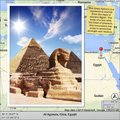
Then Photo Mapo is a must-have digital gem that has countless classroom app-lications. That’s right! This digital gem can transform photos into mapped masterpieces that can be shared with family and friends across social media networks including Facebook, Twitter, Flickr and Instagram.
Here’s how Photo Mapo works: Choose one of 23 template styles (Postcard, Treasure, Retro, etc.) and tweak the background color. Then select a favorite photo from the camera roll and add an optional description to the image. Other information that can be customized on each "postcard" includes date, time, latitude, city, state and country. Map type (terrain, roads, hybrid and satellite) as well as Map Zoom (how much detail is displayed) can also be determined in the settings. Another super cool feature is that Photo Mapo has the GPS technology to attach the actual location where the picture was taken or the user can enter a specific address. The latter is a very cool option, especially when third party photos are being utilized (Flickr, Creative Commons and the like).
Check out a few samples shown below. Hopefully they’ll get those wheels turning!
For fun…
For the classroom…
Classroom Connection:
Do I even have enough space to share the ways Photo Mapo can be utilized in the classroom? Seriously, when I first saw this app, I immediately thought of the social studies angle: Historical figures, events, places and/or landmarks. But after giving it some additional thought, this cool tool has potential far beyond one content area—field trips, setting of a story or book, visual writing prompts or even the creation of graphics to accompany writing activities (favorite and/or bucket list destinations) and lit trips (similar to those created with Google Earth) to name a few. A Photo Mapo image could also be a nifty way to promote school or professional events—assemblies, conferences, trainings, workshops, etc.
As an extension activity, student masterpieces can even be compiled into a digital story by getting busy with some app smashing utilizing Pic Collage or Adobe Voice.
Edutech for Teachers team
.
Blog
.
<span class='date ' tip=''><i class='icon-time'></i> Jul 15, 2015 01:49pm</span>
|
|
In the Decisive Dozen--the list of the twelve most important learning factors--Content Validity is Rule #1. If you're training your learners on bad content, you're doing more harm than good.
The TSA has apparently broken this rule to the tune of One Billion Dollars, spending money to train TSA agents to read body language--when there is no scientific evidence that people can actually detect liars.
This has to be one of the most costly training errors in the history of training and development! Congratulations TSA officials...
If you want to test your own skill at detecting liars, see this nice NY Times interactive.
Will Thalheimer
.
Blog
.
<span class='date ' tip=''><i class='icon-time'></i> Jul 15, 2015 01:49pm</span>
|
|
It might be hard to imagine, but Thinglink just powered up it educational value with a new release: ThingLink Video. That means that users not only have the capability of transforming images into a dynamic multimedia sensations—complete with embedded links, images, audio and video—but this new feature now provides users with an interface to create pop-up videos using the same interactive content.
Yeah, if all of that sounds super cool, that’s because it is. Plus, ThingLink Video is simple to use, free and most importantly, yet another way for teachers to totally engage their students in learning.
I received early access to the beta version of the new edtech gem yesterday and since then, created the example shown below using a digital citizenship video my Tech Club students produced earlier this year.
Note: As the video is rolling, be sure to click on the "pins" that become visible on the screen to access additional information related to the video.
Want to create your own ThingLink Video? Then register for an account here. You can even watch an excellent tutorial created by Thinglink guru Susan Oxnevad as a quick guide for getting started on your new pop-up masterpiece!
Classroom Connection:
From an instructional standpoint—students not only love being engaged, but they also appreciate having the opportunity to discover new content. So why not generate a ThingLink Video as a means for them to explore additional info and/or extend learning related to a particular topic or concept?
Because some video creation tools and apps are limited in the amount of information that can be included, ThingLink Video could also be utilized by students to enhance videos they create and publish to YouTube.
Edutech for Teachers team
.
Blog
.
<span class='date ' tip=''><i class='icon-time'></i> Jul 15, 2015 01:48pm</span>
|
|
NPR's Morning Edition produced a five-minute radio piece on the U.S. Airforce Academy's attempt at improving learning results by modifying the ability-grouping of their cadets.
According to the piece, reported by Shankar Vedantam, based on research by Dartmouth researcher Bruce Sacerdote and colleagues:
Weaker students did better when in squadrons with stronger students (but note caveats below).
However, when researchers intentionally created squadrons with only the strongest and weakest students (that is, the middle students were removed), the weaker students did worse than they otherwise would have. The researchers argue that this was caused by the splintering of the squadron into groups of strong students and groups of weak students.
Middle students did better when they didn't have weaker and stronger students in their squadrons.
It appears that the middle students acted as a glue in the mixed-ability squadrons--and specifically, they helped the squadron to avoid splitting into groups.
Of course, one study should not be taken without some skepticism. Indeed, there is a long history of research on academic ability grouping. For example see the review article:
Schofield, J. W. (2010). International evidence on ability grouping with curriculum differentiation and the achievement gap in secondary schools. Teachers College Record, 112(5), 1492-1528.
As Schofield reports:
International research supports the conclusion that having high-ability/high-achieving schoolmates/classmates is associated with increased achievement. It also suggests that ability grouping with curriculum differentiation increases the achievement gap. For example, attending a high-tier school in a tiered system is linked with increased achievement, whereas attending a low-tier school is linked with decreased achievement, controlling for initial achievement. Furthermore, there is a stronger link between students’ social backgrounds and their achievement in educational systems with more curriculum differentiation and in those with earlier placement in differentiated educational programs as compared with others.
But she also warns:
However, numerous methodological issues remain in this research, which suggests both the need for caution in interpreting such relationships and the value of additional research on mechanisms that may account for such relationships.
In addition, social effects are probably not the only effects in play. For example, the research tells us that learners do better when they are presented with information and given instructional supports targeted specifically to their cognitive needs. So for example, this could be why the middle-ability students did better when they were grouped together.
Also interesting is that neither the NPR piece or Shofield's abstract reports specifically on how the mixed groupings affect the stronger learners.
Indeed, other researchers have advocated that gifted students should not be so ignored. See for example the following review article:
Subotnik, R. F., Olszewski-Kubilius, P., & Worrell, F. C. (2012). A proposed direction forward for gifted education based on psychological science. Gifted Child Quarterly, 56(4), 176-188.
Here's what these authors recommend:
In spite of concerns for the future of innovation in the United States, the education research and policy communities have been generally resistant to addressing academic giftedness in research, policy, and practice. The resistance is derived from the assumption that academically gifted children will be successful no matter what educational environment they are placed in, and because their families are believed to be more highly educated and hold above-average access to human capital wealth. These arguments run counter to psychological science indicating the need for all students to be challenged in their schoolwork and that effort and appropriate educational programing, training and support are required to develop a student’s talents and abilities.
Will Thalheimer
.
Blog
.
<span class='date ' tip=''><i class='icon-time'></i> Jul 15, 2015 01:48pm</span>
|
|
Infographics in eLearning Infographic
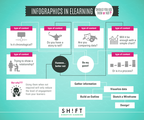
Do your learners prefer acquiring and processing information via images, pictures, maps, graphs, charts, illustrations, and other visual aids? Since they are visual learners have you thought of using infographics at your course? People have come to love Infographics since they are attractive and compelling! They simplify data and makes consuming them easier. They are exciting! And they jazz up your eLearning course like few other elements can! The Infographics in eLearning Infographic highlights the types of eLearning content for which an infographic is the best choice (and for which other forms of visual aid should be used).
When to Use Infographics in eLearning
When there is a chronological story to tell: This can include a biography of a person, growth of a business, or an evolutionary history of process/product.
When you’re contrasting data. Comparing two processes, ideas, items, or people? Infographics are the best way for summarizing the thoughts.
When you are connecting concepts. When showing relationships between events, categories, ideas, and time.
When you want to explain a process. Technical subject matter can easily be explained with symbols, icons, and shapes.
When not to Use Infographics in eLearning
Using infographic when not required will only reduce the level of engagement from your readers. Avoid using infographics when:
When you have to tell a simple narrative. If simply have to tell a story, get on with it. If told correctly (a proper beginning, middle, and end) it will still be appreciated.
When a simpler graphic will suffice. If your idea can be communicated using simple shapes and graphics, avoid an infographic.
Because you think it would be cool. Infographics costs time and money. You want to make the most cost-effective eLearning experience — one that leverages visuals to boost engagement and not to incur costs. It may be tempting, but stay put.
Read also: List of Free Tools to Create Infographics for your Learners
Via: info.shiftelearning.comThe post Infographics in eLearning Infographic appeared first on e-Learning Infographics.
eLearning Infographics
.
Blog
.
<span class='date ' tip=''><i class='icon-time'></i> Jul 15, 2015 01:48pm</span>
|
|
For folks going to the ISPI Conference in Indianapolis next week, here are my session titles.
For details, specific timing, and slides, click here.
SUNDAYSpeed Mentoring
TUESDAYSpecial SessionThe Serious eLearning Manifesto:An Effort to Help eLearning Live Up to its Promise
WEDNESDAY MID MORNINGGeneral Session (RTP)The Decisive Dozen--Research-Supported Learning Factors
WEDNESDAY LATE MORNING THRU LUNCHPit Stop & Refuel: Roundtable & Lunch Discussion Insight Learning: Helping Employees Have Creative Insights
Will Thalheimer
.
Blog
.
<span class='date ' tip=''><i class='icon-time'></i> Jul 15, 2015 01:48pm</span>
|
|
As Quincy Jones once remarked, "I’ve always thought that a big laugh is a really loud noise from the soul saying, "Ain’t that the truth."
That said, Edu-fun Friday is a series devoted to adding some humor to the lives of teachers who visit this blog. Even though it’s summer, there’s still nothing better than ending the week on a positive note! Plus, do we have some of the best topics to provide us with some comic relief or what?
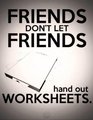
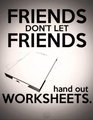
OK, so not all worksheets deserve the bad rap they often get—especially in this edtech world—but I still think I have some friends that need to be rescued from the dark side!
Thanks to Sean Junkins for sharing this image!
Edutech for Teachers team
.
Blog
.
<span class='date ' tip=''><i class='icon-time'></i> Jul 15, 2015 01:48pm</span>
|