Blogs
|
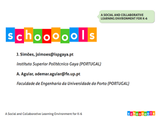
Os slides e o abstract da contribuição Schoooools.com: A Social and Collaborative Learning Environment for K-6 para a EDULEARN11 - 3rd Annual International Conference on Education and New Learning Technologies em co-autoria com Ademar Aguiar da FEUP, estão já disponíveis. A conferência teve lugar em Barcelona nos dias 4, 5 e 6 de Julho.
Este artigo apresenta a plataforma escolinhas.pt ou schooools.com, na sua versão internacional. O artigo procura justificar a necessidade deste tipo de plataformas para os alunos do ensino básico (que são nativos digitais) e as razões que levam a que as tradicionais plataformas de e-learning (p.e. Moodle) não constituam a melhor proposta para este público. O funcionamento da plataforma como um Ambiente Pessoal de Aprendizagem (Personal Learning Environment - PLE) e as características específicas que estes ambientes devem possuir para ir ao encontro do público-alvo do escolinhas.pt (jovens de 6 a 12 anos) são igualmente discutidas. A plataforma permite também a participação activa de pais e professores e tem uma forte ligação com a escola real. A segurança e privacidade são dois dos pontos-chave da plataforma.
Ver também a entrevista com o Ademar Aguiar, o promotor do projecto, no Fórum Regiões.
O projecto escolinhas.pt está actualmente em fase de internacionalização com importantes contactos no Brasil e Chile.
Education & eLearning Blog
.
Blog
.
<span class='date ' tip=''><i class='icon-time'></i> Jul 20, 2015 01:48pm</span>
|
|
The most popular posts of 2008 are:
Storyboard Templates for Instructional Designing
8 Easy Steps to Create a Storboard
Learn Cooking Through Games
E-learning Design Challenge Series: Designing a Game Based Course
How to Think of an Instructional Strategy
Applying Instructional Theories/Strategies in Game Based Learning
The Role of an Instructional Designer
Designing an Effective Instructional Strategy - Learning From Gaming
How to Innovate Interactivity Models in E-learning
Needs Analysis in Instructional Designing - An Introduction
Rupa Rajagopalan
.
Blog
.
<span class='date ' tip=''><i class='icon-time'></i> Jul 20, 2015 01:48pm</span>
|
|
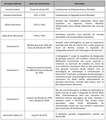
É habitual a classificação de grupos etários (Boomers, Gamers, Geração X, Geração Y, nativos digitais, etc), consoante o período em que os indivíduos desses grupos nasceram e a forma como a sociedade e os acontecimentos verificados no mundo durante a sua infância e juventude os influenciaram. Os efeitos da evolução tecnológica influem também nesta classificação em gerações culturais. São habituais as referências a estas gerações nas publicações na área da educação, em particular no que diz respeito ao uso das TIC no ensino.
Esta organização do conhecimento histórico, e a sua análise sociológica, feita sob o conceito de geração, é habitual em países como os Estados Unidos. A classificação da tabela acima organiza os grupos etários de acordo com contextos históricos relevantes neste país embora o fenómeno da globalização leve a que para as gerações mais recentes existam, à escala mundial, poucas diferenças culturais ou geográficas. A geração que se seguirá à actual, a geração Z, ainda não tem uma designação definida embora se aponte como hipótese a designação Generation Alpha (ou Generation A). Esta será a primeira geração constituída apenas por indivíduos nascidos no século XXI. Para designar esta geração, nascida a partir da década de 2010, são também propostos os nomes de Generation T (T de tablet) ou Generation App, (ver 'Generation Y' is Dead, Long Live 'Generation T'), realçando a importância dos novos equipamentos móveis com formas de interacção baseadas em gestos naturais.
Education & eLearning Blog
.
Blog
.
<span class='date ' tip=''><i class='icon-time'></i> Jul 20, 2015 01:47pm</span>
|
|
A software product tutorial essentially helps users work with the features of the product. So it is mandatory that tutorials have concise and precise tasks and steps to work with the product. Most importantly software product tutorials must be help users achieve something by using the product.
Things you must do before you begin
· Explore the product and its features thoroughly
· Try working with the product features yourself
When you must start writing product tutorials
· When you know everything that you need to know about the product
· When you understand and know the product and why users must use the product
· When you are very sure of the features, the tasks that you can do with the features and the steps for each of the
tasks
Quick Tips to Create Software Product Tutorials
Create end to end software product tutorials.For example here is a tutorial that teaches you to create realistic water reflection using Photoshop. As you can see this tutorial helps you achieve something using Photoshop and that is why this tutorial is an end to end tutorial.
Tip 2
Always start with a brief description about the feature and add details such as why users must use the feature. For example in this tutorial on MS Word, there is a short audio text which mentions how the track changes feature is useful when you revise and make changes to a document and when that document has to be used by many others.
Tip 3
List what you are going to cover in the tutorial at the outset. This must cover all the tasks that one can do with the product feature. For example in this tutorial on MS Word, all the tasks that one can do using the Track Changes feature have been listed as learning objectives in the first page.
Tip 4
Disclose the end result of the tutorial. For example in this tutorial that helps you create your first PowerPoint presentation, it will be a good idea to show a complete presentation at the outset and guide the learners to create that specific presentation. This way the users would find the tutorial object oriented.
A good example is this photoshop tutorial which shows you in the begninning the photo effect you can create following the steps in the tutorial.
So the user is very clear about what he/she is going to achieve by taking the tutorial.
Tip 5
List the tasks in a logical order. The sequence of tasks must lead users to the end result. For example the logical order of some of the the tasks to create a PowerPoint presentation are:
Create a New Slide
Change the Layout of the Slide
Add Text
Add Images
Insert Slide Notes
Add Animations
Here the order of the tasks are very important.
Tip 6
Write precise instructions. For example Click on the word and choose Copy from the context menu is not a precise instruction. What the writer meant was Select the word, right-click and choose Copy from the context menu.
Tip 7
Make sure you write the button or tab names exactly the way it appears in the product. I have spent hours searching for buttons and tabs suggested by tutorials and which I could not find in the product.
Tip 8
Make sure you write the steps for each task logically and correctly. For example to the steps to create a new presentation in PowerPoint are:
Select File -> New from the Main Menu.
In the New Presentation Task Pane , choose Blank Presentation.
Tip 9
After you write the tutorial, follow the instructions you have written and execute the tutorial. This will help you identify the errors.
Rupa Rajagopalan
.
Blog
.
<span class='date ' tip=''><i class='icon-time'></i> Jul 20, 2015 01:47pm</span>
|
|
E-learning Tyro has just launched his new site E-learning Planet where he is not only going to share useful information but also facilitate:
Free online assignments for budding Instructional Designers
Contests for Instructional Designers and Graphic Designers
Do check out E-learning Planet!
Rupa Rajagopalan
.
Blog
.
<span class='date ' tip=''><i class='icon-time'></i> Jul 20, 2015 01:46pm</span>
|
|
Oportunidades para o E-learning no Contexto da Web 2.0
Este artigo - Oportunidades para o E-learning no Contexto da Web 2.0 - foi publicado no nº 17 da revista Politécnica (Dezembro de 2010) editada pelo Instituto Superior Politécnico Gaya. O nº 17 ainda não está on-line mas fica aqui o link para o artigo completo (no Scribd) e o resumo:
Este artigo aborda o posicionamento dos sistemas de e-learning face ao recente desenvolvimento das redes sociais e da Web 2.0. É apresentada uma perspectiva histórica do e-learning, desde os primeiros cursos à distância até ao ensino apoiado nas tecnologias de informação e comunicação.
As tendências impostas pela Web 2.0 e pelo uso de tecnologias na sociedade em geral são analisadas tendo em vista a sua aplicação ao ensino. São apresentadas as implicações do uso dessas ferramentas e a forma como estão já a ser aplicadas no que é designado por e-learning 2.0. É discutido o significado actual do conceito de e-learning e as oportunidades das sua aplicação à realidade actual do ensino.
Partes deste artigo, que foi escrito há cerca de um ano, foram também já publicadas neste blogue.
Education & eLearning Blog
.
Blog
.
<span class='date ' tip=''><i class='icon-time'></i> Jul 20, 2015 01:45pm</span>
|
|
Has it happened with you that you saw a movie and wondered how the director visualized the amazing scenes?
Has it also happened that you checked out an e-learning course and wondered how the Instructional Designer thought of the visuals, animations and interactivities?
Well, it has happened with me an umpteen number of times. I just keep thinking what gets into people’s heads that they think so creatively.
Designing E-learning course just like movie making requires lot of creativity and innovation. An Instructional Designer has to visualize every screen of an e-learning course and get the graphic designers and programmers in the team to implement it exactly the way he/she visualized.
Doesn’t this remind you of a movie director, who visualizes every scene of a movie and gets his actors to enact it exactly the way he visualized?
The Instructional Designer has to work with the available content, strategize and present the content in such a way that it appears new and interests the learners.
The movie director has to work with common themes and strategize to present the theme in such a fashion that it appears new and interesting to the audience.
Now both the Instructional Designer and the movie director have to be really good at visualizing. This is critical both to the movie and the e-learning course.
What do you think a movie director does to improve his visualization skills?
Watch a lot of movies, read novels, etc.
Now what do Instructional Designers to do work on their visualization skills?
Check out other e-learning courses and what else?
Apart from checking out and analyzing e-learning courses, an Instructional Designer must also play a lot of games.
Most people think playing games is a waste of time. But then it is not true for an Instructional Designer at least.
Just as in a game, visuals and interactivities are crucial to an e-learning course too.
So here I list the three reasons why Instructional Designers should play games
Three Reasons Why Instructional Designers Should Play Games
Reason 1: Games have loads of visual strategies
I seriously believe games give you lot of visual strategies much more than any other sources. If you keep playing games, you get an opportunity to see different visual designs and then when you get to design e-learning courses you can use similar ideas.
For example the other day I had gone to Subway and I really hated the sandwich the chef out there made. I thought he was not trained. He did not know the combination of sauces that would make the sandwich taste good.
And then I thought of this as a business case for e-learning. Suppose Subway management decides to go for an e-learning course for all chefs in Subway. Let’s say the management wants something visually appealing, something interactive and engaging.
I could just visualize the following:
Virtual customers, virtual kitchen and virtual ingredients. Customers order a customized sandwich. The waiters drag and drop the ingredients on the sandwich in the right combination depending on customer requirements. For every correct sandwich they gain points. For every wrong sandwich they lose points. The waiters’ objective is to gain maximum points by making right sandwiches.
If it is a low budget course, you can use just images and simple animations. If budget is not a constraint, this can be a simulation.
Now this strategy is inspired by games as follows:
You could use this strategy when learners have to learn something by rote.
The bottom line is to identify good strategies while playing games and use in e-learning.
Reason 2: Games show ways in which you can encourage audience participation
Most games require mouse clicks or pressing arrow keys. But then it doesn’t get monotonous because the context and objective of the game is different every time. In the given context the whole act of clicking and pressing gets very interesting and exciting. When you play games you get to know how to use existing interactivity models in different contexts and for different purposes.
For example in the game called Dreams, you simply click to find the differences between the two images as shown below:
The interactivity model used above is simple and basic, yet the objective and context of the game makes the play interesting.
Likewise in the game below, you just have to mouse over the faces that show up. The challenge of the game is to mouse over maximum faces that show up within a time limit.
As you start playing the game you get addicted to it.
The bottom line is when you play games you get to know how to innovate on existing interactivity models.
Reason 3: Games show ways in which you can engage the audience
People love playing games and they get so engrossed that they forget time. Games can just engage anyone and everyone. So what is it in a game that engages people?
The answer is simple. It is the challenge in the game that engages audience. People want to badly reach the objective of the game and this sustains their interest.
I guess e-learning courses must also have this element of challenge which will engage the learners during the learning process and games will give you ideas on how to make your e-learning courses challenging.
With this I end my post here and leave it open for discussion
Please check out some online games here and let me know what you think:
Miniclip
Kongregate
Big Fish Games
Rupa Rajagopalan
.
Blog
.
<span class='date ' tip=''><i class='icon-time'></i> Jul 20, 2015 01:45pm</span>
|
|
Soon after I wrote the post: Why Instructional Designers Should Play Games? , I got a query from one reader asking how game based strategies will work when there is a budget constraint for an e-learning course.
I guess you do not have to have 3D animations or advanced gaming strategies to make your e-learning course engaging. You can use simple interactivity models, simple graphics and yet make the course engaging.
I recently played this game called Wizard of Symbol.
The game has basic interactivity models that you use in e-learning too. The game does not use high level graphic design. Yet it is interesting to play the game.
The game happens in a wizard book. You flip the book to progress.
The objective of the game is to uncover all the secret symbols from the secret book.
To uncover each symbol you need to just hold and drag the mouse across the number in a chronological order. If you stop in between it gets counted as a mistake and you get to resume from the point you stopped. Once you run though all the numbers, the symbol and the details about the symbol gets unravelled.
For example here is the first challenge in the game:
I just clicked and dragged the mouse through all the numbers in a chronological order. The result was as follows:
The symbol got unravelled as follows:
Then the details of the symbol appeared as follows:
Now can you not use this strategy for e-learning too? Think about it. Will this strategy not work when you have to teach facts?
For example if you have to teach some botanical names of plants, don’t you think you could use the interactivity model used in this game?
You can tweak the interactivity model used in the game to suit the budget constraints for your e-learning.
This strategy also works well when you want to evoke curiosity in the learners.
Now what do you think about this? Please let me know.
Rupa Rajagopalan
.
Blog
.
<span class='date ' tip=''><i class='icon-time'></i> Jul 20, 2015 01:43pm</span>
|
|
Saiu o nº 25 da E-Learning Papers, Game-based Learning: new pratices, new classrooms. Os artigos publicados estão disponíveis para download.
Education & eLearning Blog
.
Blog
.
<span class='date ' tip=''><i class='icon-time'></i> Jul 20, 2015 01:42pm</span>
|
|
I have heard of teachers who teach science concepts by telling stories using pictures, cartoons and multimedia. Teachers tell stories because kids like stories and they learn faster.
Not only kids, adults also like stories. We understand better through stories and storytelling.
The other day I was working on a short e-learning prototype. I thought of some strategies and then I quickly outlined the slides of the e-learning in a PowerPoint. I thought I had done a good job.
Later my friend suggested that I narrate the strategy I used in the e-learning prototype. We continued to discuss and then we took turns to narrate each slide of my prototype.
To my surprise I found a couple of logical pitfalls. I discovered that I start with a story , go on and on, the story breaks in between for sometime and then the story ends.
I didn’t discover this when I designed each slide of the prototype.
Well, story telling is an excellent exercise in Instructional Designing, in the sense that it tells you how logical and effective your prospective e-learning course is.
Have you ever tried narrating your Storyboard to someone?
This is similar to what a movie director does. A movie director always narrates the plot to the actors. The actors can very well read the movie script themselves. But then most movie directors make it a point to narrate their script because this is how the movie comes alive even before the actual work begins.
Here is what Prof Karl Kapp suggests to help Instructional Designers to become story tellers:
Here is one idea, have the designer create a lesson entirely in pictures using PowerPoint or some other slide media and force them to "tell the story" to an audience complete with characters, plot and setting-no words on the slides…none. It really forces the analytical side of a designer over to the "story telling side" and requires some real thinking about stories and e-learning.
I think all Instructional Designers must be good storytellers because:
Instructional Designers are supposed to be Creative
The E-learning courses they design must engage the audience
Do you think Instructional Designers must be good story tellers? Please write in your views in the comments section.
Rupa Rajagopalan
.
Blog
.
<span class='date ' tip=''><i class='icon-time'></i> Jul 20, 2015 01:41pm</span>
|