Blogs
|
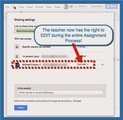
Another great new update to Google Classroom was added on December 10th!Teachers now have the right to EDIT during the entire Assignment process in Google Classroom! Another long awaited feature! Thanks, Google!I'm so excited that the Google Classroom team has updated Classroom with this new feature! Since Classroom was first released, the level of access that a teacher would have over student assignment files would differ, depending on where you and the students were in the process.In the past, share permissions during an Assignment changed like this:At the beginning of the Assignment --> Teacher has Commenting RightsWhen student Turns In Assignment --> Teacher becomes the OwnerWhen teacher Returns Assignment --> Teacher has Commenting Rights againMany teachers didn't like the way this worked, mainly because when the teacher has Commenting Rights they can't see the Revision History of the document, and therefore can't see what changes the student has made to their work.The Google Classroom team is so great at listening to users and responding to feedback! Now, the share permissions for the teacher has changed for the better!The new share permissions during the Assignment process are now like this:At the beginning of the Assignment --> Teacher has Edit RightsWhen student Turns In Assignment --> Teacher becomes the OwnerWhen teacher Returns Assignment --> Teacher has Edit Rights againBecause of this change, the teacher now has complete editing rights during the entire process, can also comment and make suggestions, and can always view the Revision History!
Michael Fricano II
.
Blog
.
<span class='date ' tip=''><i class='icon-time'></i> Jul 23, 2015 07:39am</span>
|
|
Hey folks — am returned from all the San Francisco adventures, and am happy to be home.
Now that I have time to draw breath, I’ll actually finish some of those blog posts, but here’s a round up of stuff that’s been going on, in no particular order:
There’s a new Research For Practitioners piece up at Learning Solutions, by the delightful Chris Atherton (Yay! Happy dance!) on how the structure of information impacts learning. Go ahead and read it now, if you like. We’ll wait here for you.
I wrote a piece for Inside Learning Technologies Magazine on Fixing eLearning’s Big Problem (do you agree? just curious).
Just got back from a busy week at ASTD ICE (did a certificate workshop, two panels, speed-mentoring, planning committee meetings and a session) and it was lovely to see and meet so many people. I mentioned that I did a webinar earlier in the week (a shorter version of my session on game design for learning), and if you missed it (and are interested), there’s a recording here.
I’m doing a three hour workshop on game design for learning with the ASTD-Middle Tennessee chapter on July 18 in Nashville — if you are interested, this is a BARGAIN at $29/$39 (be sure to read that last sentence in your best used-car-salesman-voice). Also doing a regular chapter session on Narrative Techniques for Learning.
Just arranged to do a half-day workshop for UX Week in SF August 21-22 on Change Management. Really excited about this one
As soon as I post this, I’ll remember six more things, but that’s what the edit button is for, right?
Update: YES - HERE IS THE THING I FORGOT:
ELearning Guild Thought Leaders Webinar on June 11th, 10:30 PT/1:30 ET - the topic will be Design for Behavior Change - registration info here
Julie Dirksen
.
Blog
.
<span class='date ' tip=''><i class='icon-time'></i> Jul 23, 2015 07:39am</span>
|
|
More updates for Google Classroom!The amazing Google Classroom team added two great new features on January 15th. And now there's even an app for Android and iOS! Read on for a break down of the new features and the iOS app.Archiving ClassesFor teachers who have a lot of classes to manage, the Classroom dashboard can quickly become cluttered, especially as we move through quarters and semesters. One of the great new features that solve this issue is the ability to Archive classes. This new option will remove the classroom from the dashboard for both the teacher and the students and place it in a new location called Archived Classes. Archived classes are still viewable by the teacher and the students, but no changes or edits can be made. All files shared and created within the classroom are still kept in Drive, so rest assured that classroom content is kept safe. Teachers also have the option to Restore and Delete an archived class. Restoring a class will place it back on the dashboard and it will become editable again. Deleting the class will remove it completely from Google Classroom for both the teacher and the students, however, files are still kept safe in Drive.Screenshots of the new Archive FeatureTeacher Assignments PageStudents already had a very useful and helpful Assignments Page where they could easily keep track of all their assignments for all of their classes. But, teachers didn't really have anything similar...until now! Teachers now have their own handy Assignments Page where they can keep track of all of the assignments for all of their classes in one place! You can filter the assignments by class and organize assignments into a Reviewed and Not Reviewed list.Screenshots for the new Teacher Assignments PageAndroid & iOS Apps Now Available!Probably the biggest deal with this most recent update is the addition of a mobile app for Google Classroom. Now teachers and students can access Classroom on their Android or iOS tablets and phones!Be aware though that this app is not currently full featured and does not allow the teacher do everything that can be done on the web-based version. For example, in the app teachers can only create Announcements. Assignments need to be created on the web. Also, the new Assignments Page for teachers is not available in the app as well.However, this app was mainly designed for the student in mind in its initial release. Students are given more options and functionality in order for them to access and complete assignments on the go. One of the added benefits to using the app is that students can attach images from the Camera Roll and use a built-in camera to take pictures all within the Google Classroom app. Teachers and students also have easy access to their Drive files.Screenshots of the new Google Classroom iPad AppThe Google Classroom team is hard at work on future updates but they need your help! If you have any suggestions for how the app can improve (both on the web and for the mobile apps) suggest feedback and create a post on the official Google Classroom forum. You can suggest feedback by clicking on the "?" bottom right corner of Classroom.
Michael Fricano II
.
Blog
.
<span class='date ' tip=''><i class='icon-time'></i> Jul 23, 2015 07:39am</span>
|
|
I’m working on a change management presentation, and have been looking for some of the social norms research - especially at the practice of using messages that help people understand that the majority of the group is already doing the desired behavior.
Before I close the tabs, I thought I’d collect the most interesting links here (that’s all I have time for today!).
Wikipedia entry (which defines it, and rightly points out that outcomes are uneven for this approach) - https://en.wikipedia.org/wiki/Social_norms_approach
Environmental behaviors and social norms (This is a nice summary paper of using social norms in environmental campaigns, influencing behaviors like littering) - http://195.37.26.249/ijsc/docs/artikel/03/3_03_IJSC_Research_Griskevicius.pdf
Thermostats with social feedback (This is one of the actual papers on this pretty widely known example) - http://www.carlsonschool.umn.edu/assets/118375.pdf
Social norms and teen smoking (And feet. An interesting television commercial aimed at social norms and teen smoking) - http://nudges.org/2011/06/14/new-social-norm-campaign-on-teen-smoking-in-texas/
Social norms and tax compliance (using a general appeal vs a social norm appeal to improve tax compliance) - http://www.socialnorms.org/CaseStudies/taxcompliance.php
More social norms and tax compliance (HBR article, though you need registration/subscription to see the whole thing) - http://hbr.org/2012/10/98-of-hbr-readers-love-this-article/ar/1
Social norms and binge drinking (a write up of one of the earlier studies that looked at perceived and actual norms for college students’ drinking behaviors) - http://socialnorms.org/pdf/socnormapproach.pdf
Julie Dirksen
.
Blog
.
<span class='date ' tip=''><i class='icon-time'></i> Jul 23, 2015 07:39am</span>
|
|
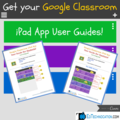
Guides were updated on July 15, 2015!Get your FREE user guide for the new Google Classroom iPad App!Google just released an Android & iOS app for Google Classroom. It's not full featured (yet) so it's important that teachers and students understand exactly what you can and can't do with the app. I've created two separate user guides, one for teachers and the other for students. Both give a breakdown of the various screens you'll encounter while using the app, and also what exactly can be done on all those screens. A teacher's view is different from a student's view, so it was necessary to create the two separate guides. It's also very important to understand that the app is not full featured, meaning it doesn't allow you to do everything that you can do on the web version. Although, students do have more functionality than teachers in the app at this point. More features are definitely soon to come. Don't forget to submit your feedback if you'd like to see a specific feature! The Google Classroom team is listening and prioritizes all user feedback!The Google Classroom iPad App User Guide for Teachers!Click to access the Google Doc. Feel free to print or save!Google Classroom iPad App User Guide for Students!Click to access the Google Doc. Feel free to print or save!
Michael Fricano II
.
Blog
.
<span class='date ' tip=''><i class='icon-time'></i> Jul 23, 2015 07:39am</span>
|
|
My PLN has helped curate this great list of educational Youtube Channels!With the help of my PLN, I've collected some of the best Youtube channels for teachers and students. Below is a publicly accessible Google Document with commenting enabled. I started a list of my favorite Youtube Channels for a presentation I recently gave, and in planning to blog about my list, I thought I'd turn to my #EduAwesome PLN for an even more extensive list. Shout-outs to +Sarah Staudt, +Elizabeth McCarthy, +Kathy Wegley, +Tim Freitas, +Trevor Naidoo, and +Butch Wilson!My favorite channel for educators: +Jeffrey Bradbury's TeacherCast.net. He has some great podcasts and video tutorials specifically for educators!My favorite channel for students: +YouTube EDU's Primary & Secondary Education. I appreciate how they further organize the video content into subject areas.Click to access the Google Doc directly.Create a comment or suggestion to add your favorite channels!
Michael Fricano II
.
Blog
.
<span class='date ' tip=''><i class='icon-time'></i> Jul 23, 2015 07:39am</span>
|
|
Okay, so I understand that it looks like I just post every Sebastian Deterding presentation on this blog, but really, I don’t. He’s a prolific guy. This one is specifically aimed at design for online learning, so it’s double-plus-good, and therefore must be posted here:
Gameful Design for Online Learning from Sebastian Deterding
Julie Dirksen
.
Blog
.
<span class='date ' tip=''><i class='icon-time'></i> Jul 23, 2015 07:39am</span>
|
|
YouTube Kids Android and iOS App Released!On February 23, 2015, Google released a new Youtube app. This time focusing on its youngest users! I've given this new app a spin and here's my review at launch.Who is the intended audience?This app seems to have been designed for very young children, or children that are not yet literate. Although the content can be used with children that are able to read. Some of the most notable content displayed when you first launch the app are Sesame Street, Barney & Friends, and the Berenstain Bears. So that might give you a better idea of who the intended audience is. However, Khan Academy is also available through the app.Design & User InterfaceThe app is very simplified, focusing on the use of large icons and windows to display options and content. The user has 4 categories to choose from: Shows, Music, Learning, and Explore. Each category displays related video content and YouTube channels. And it's all available in a single scrollable screen. Children can swipe left and right to slide through all of the YouTube content.There is also a very simple search option available to children (which can be turned off via the Parental Controls). You can type your search word(s) in the box or use Google voice search! According to the help page on Search in YouTube Kids, they use a variety of methods to gather the search results and it isn't 100% accurate, but I've found it to work pretty well when conducting a few searches myself (see image below). If you happen across any inappropriate content, you should definitely report it using the Send Feedback option in the Parental Controls.Parental ControlsOf course, there are Parental Controls included! To access these controls, the adult needs to type in a random 4 digit number, expressed through words. This is why I mentioned earlier that this app seems geared toward preliterate children, because once they know how to read, they too can access these controls! Parental Controls include the option to turn off the search feature, clear watch history, and create a time limit, which locks the app when time runs out. Implications for SchoolsIf you're at a school that has Youtube blocked or locked down tight, this might be the answer to allowing younger children to access Youtube content. This app would be great as a "centers" activity, or the teacher could direct students to search for a specific video related to the learning.This app is also considered a signed out app experience, meaning there is no option to sign in to a Google account. So no information can be collected on the user. But this also means that there are no options for saving videos or creating playlists.There were reports last year that Google is working on more kid friendly apps, and the YouTube Kids app seems like a good start to the trend!
Michael Fricano II
.
Blog
.
<span class='date ' tip=''><i class='icon-time'></i> Jul 23, 2015 07:38am</span>
|
|
So, apparently there’s a chinese version of Design For How People Learn, which is delightful.
Apparently when you take a Cammy Bean quote, translate it into Chinese, and then let google translate turn it back into English, you get this marvelous wisdom:
‘If you let me fall in love with a book, then I would deeply in love with this present. Julie Dirksen prepared for the beginner a most excellent book, so that they can be like the old bird as instructional design. "
- Cammy Bean, Kineo, vice president of learning design
How great is that? Be like the old bird, people.
Coming up next: A Russian version in September
Update - here’s the Russian Version available for pre-order:
There’s no Cammy Bean quote, but run the title through Google Translate and it comes out:
"Art of teaching - How do any training not boring and effective."
Well, okay then.
Julie Dirksen
.
Blog
.
<span class='date ' tip=''><i class='icon-time'></i> Jul 23, 2015 07:38am</span>
|
|
New Updates Released for Google Classroom on February 25, 2015!The Google Classroom Team is at it again with 4 more updates for Google Classroom. Three of them are specifically for the mobile apps. Let's take a closer look!Customize the Classroom Header with Your Own Image!Teacher have been stuck with a premade selection of Classroom header images since the app was officially released in August. The ability to upload your own image into the header has been frequently requested. Teachers love the ability to customize their online space just as much as we do our classrooms! Now you can! With this new round of updates, teachers can upload their own image into the header space of their individual Classrooms and there is a new gallery of Patterns to choose from as well. The image needs to be at least 800 pixels wide and 200 pixels tall. The banner color will be selected automatically, likely based on the dominant color in the image. Happy customizing!About Page Now Accessible in the Mobile AppsWhen the Android and iOS apps for Google Classroom were released in January, one key feature was missing; the About page! Teachers use the About page in Classroom to share important resources and information, and to have it missing from the app was frustrating. Well, freak out no longer! With the newest update of the apps, students and teachers will now have access to the About page. However, the teacher can only view the About page in the app. The option to edit is not yet available.iOS Update Allows Students to Attach Files from other AppsIt's a lengthy process when having students create content in other apps on the iPad and then trying to get it into a Google Classroom assignment. It would involve moving the file from one app into Google Drive and then attaching it to a Classroom assignment from Google Drive. But wouldn't it be nice if your students could just attach a Note in Notability straight into Classroom? With the latest iOS update to the Google Classroom app, this will now be possible. When students are working in another app and they want to export or "share" their work, the Google Classroom app will now appear in the list of apps to share to. Tapping the Classroom app icon takes them into Google Classroom where they can select which Assignment they want to attach it to. This will eliminate those extra steps on the iPad when trying to move a file from one app into a Classroom Assignment.Sharing a Note from Notability to Classroom just got easier!When sending a file to the Classroom app, students choose the assignment.Important note: the list of Assignments is organized by their due date. With the latest assignment shown first.Once the Assignment is chosen, the student can tap "Attach" to finalize.Bonus feature: when students use this new option in the iPad, it will upload the students file into their Classroom sub folder automatically, keeping the students files neat and organized for them!This One is for the Students! Emojis Now Available in the Android App (and iOS!)So apparently students want the ability to use emojis in the Google Classroom app. The Google Classroom Team thought this was a cute idea and wanted to give one update to the students. Gotta love their sense of humor! This feature will now be available in the Android app. Surprisingly, you can already use emojis in the iPad app, and they'll show up in the app. However, they don't translate over to the web version of Classroom. Enjoy a flood of emojis from your students now!!The Google Classroom team continues to listen to its users, both teachers and students! Submit your feedback by clicking the "?" in the bottom right corner of Classroom and choose "Send Feedback".
Michael Fricano II
.
Blog
.
<span class='date ' tip=''><i class='icon-time'></i> Jul 23, 2015 07:38am</span>
|