Blogs
|
In Unit 4 of the Coaching Digital Learning MOOC-Ed, we learned about the 4 Cs of Digital Age skills: Communication, Collaboration, Critical Thinking, and Creativity. Below are my two response to the reflection questions as well as a PowToon Coaching Service Announcement that we had to create for our unit 4 activity.What benefits for student learning do you see in integrating communication, collaboration, critical thinking, and creativity into your school culture?I think the most important benefit for students in integrating the 4 C's in their learning is that it prepares them for the world ahead. These skills are what allow us to survive and thrive in any profession. They are not just skills, but life skills because they help us to improve our lives and the lives of others.These skills also help students to develop their personalities and character traits, important aspects of who they are and who they want to become in the future. Skills, like critical thinking and creativity, help students to express themselves and to feel free in their exploration.Share some of the strategies you’ve used in your practice to elevate the importance of communication, collaboration, critical thinking, and creativity.Just recently, my coworker and I started working with our teachers on a Personalized Professional Development Plan.Now that teachers are more familiar with some of the tech tools at our school, such as Google Apps, they now have to work together as a grade level to create an Action Plan for next school year. In this Action Plan, they have to decide how they will use at least one of the Google Apps to promote and practice effective Communication and Collaboration in the classroom. They worked together to determine and layout the necessary steps to be successful. The Action Plan requires that they determine what their overall goals will be, what resources they'll need, what their deadlines will be, and what their individual responsibilities will be.Next school year, the teachers will put their Action Plan to use. And later into the next school year, they will continue to work on their Personalized PD Plan, by determining how other tech tools can be used to promote the other Cs (Critical Thinking and Creativity). And they will decide what other PD they would like to receive to continue their Plans.My 4 Cs Coaching Service Announcement (CSA)Created with PowToon.comMy Instructional Technology Coaching Action Plan. Please comment on the document and add your resources, opinions, and ideas!My other Coaching Digital Learning MOOC-Ed Unit Reflections:Unit 1 ReflectionUnit 2 ReflectionUnit 3 ReflectionUnit 4 ReflectionUnit 5 ReflectionUnit 6 ReflectionCheck out my Coaching Digital Learning Pinterest Board with all of the resources and videos from the entire course!Follow Michael's board Coaching Digital Learning, #CDL_MOOCed on Pinterest.
Michael Fricano II
.
Blog
.
<span class='date ' tip=''><i class='icon-time'></i> Jul 23, 2015 07:46am</span>
|
|
I’m listening to the most recent toolbar episode with Judy Unrein, Brian Dusablon and their guest, Connie Malamed. They talk about a number of things, but there’s a lot of discussion of creativity - how to be creative, the importance of creativity for problem solving, and the unfortunate lack of creativity that can happen in learning design.
I think that there’s a weird attitude to creativity in our field - that it’s a nice-to-have (and just be clear — this isn’t something Judy, Brian and Connie said, but rather an attitude I’ve bumped into many times elsewhere). I think that there are a couple of reasons this isn’t true:
We pay attention to things that are novel and unusual. We are constantly concerned with engaging our users. We know what whatever we build isn’t effective if users aren’t paying attention. In the same way that humor can improve learning and retention, unusual and novel stimuli break through our cognitive tendency to habituate to an unchanging stimulus (and yes - using big words to make your business case is a legitimate strategy).
Well-designed experiences create positive affect in learners, which can improve learning and retention. The best resource on this is probably Don Norman’s Emotional Design, but his contention is that things that are well-designed do work better.
So, creativity is a legitimate design strategy - not something that is a pretty garnish on the plate.
Here are a few other interesting things on creativity:
Connie’s great blog post on evidence-based practice for improving creativity: http://theelearningcoach.com/elearning_design/improve-creativity/
This fascinating video that suggests that creative problem solving isn’t just about stimulating creativity, but also about inhibiting our current set of rules for how things should work: through-the-wormhole-creativity-cap.html
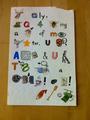
And because this post needs some creativity actually in it - here’s a Kickstarter Thank You note I just got from a former student (Taylor Baldry http://www.taylorbaldry.com) who did a project on helping people remember the genders of foreign language nouns by attaching little cartoon genitalia to pictures of the objects (and if that’s not creative, I don’t know what is):
Julie Dirksen
.
Blog
.
<span class='date ' tip=''><i class='icon-time'></i> Jul 23, 2015 07:46am</span>
|
|
Unit 5 of the Coaching Digital Learning MOOC-Ed focused on Digital Citizenship. Here are my reflection question responses.Share what keeps you up at night and what steps you have taken to foster a culture of safe and responsible use in your school/district.Two of the most important things I try to teach and demonstrate for my teachers and students is Copyright and our Digital Footprint.It is far too easy to violate copyright law while on the internet, and many students, and even teachers, still don't understand how the law works and how to protect it. Just because you are an educational institution and your students are creating projects for the classroom does not mean you can use other people's work and their images freely. Copyright is more than just protecting other people's investments and money. Its about protecting the artist and the creator and valuing their work and contributions to society.I often relate the use of information and images on the web to students taking and using other students work. It's a matter of responsibility and respect. If we don't uphold the law and protect the work of the people, than less and less people are going to be willing to share.Another issue that often bothers me is disregard for our Digital Footprint. That the actions we take and information and pictures we post, no matter how old we are, creates a footprint on the internet. And this footprint can be seen by the world, not just our teachers, our family, and our friends. Many students don't understand this and many parents still struggle with this issue at home. A few years ago I sat in a conference session about digital citizenship, and a former FBI investigator talked about the misconceptions of our Digital Footprint. He brought up a good point that our students today will try to become the future leaders of tomorrow, and many of them don't understand that what they share on the internet today can follow them and haunt them when that time comes. Everyone is responsible for helping our children learn the importance of our digital footprint and what is appropriate and not appropriate on the web.What is your vision for incorporating and modeling Digital Citizenship in your school/district to strengthen a culture of digital innovation?What many schools and districts tend to do is to shield our students from the vast world of the web. Youtube has some inappropriate content, let's block it. Facebook might have some creepers and inappropriate pictures, block it.This is the wrong tactic. Shielding our students is not going to stop them from exploring it and using it on their own. I think we are finally realizing this, and instead of choosing to block, we are finally opening the gates and allow our teachers and students to explore its educational value. Websites like Youtube, and Social Networks like Facebook and Twitter can be used for learning, if used and taught appropriately.it is impossible to shield our students completely from the bad in this world, so rather than attempting this tactic and failing miserably, lets embrace it and teach our students how to use it appropriately and safely.That's why I believe in the idea of modeling appropriate uses and having students practice. Give them access to Youtube and lets talk about all the great educational and inspirational videos that we can watch. Let's talk about all the bad videos and inappropriate content and why its not ok to watch them at school. But there must also be consequences. Rules and boundaries need to be set, and if a student breaks them, punishment needs to be consistent. They need to understand why its not ok and what the consequences might be in life (not just in school).My Instructional Technology Coaching Action Plan. Please comment on the document and add your resources, opinions, and ideas!My other Coaching Digital Learning MOOC-Ed Unit Reflections:Unit 1 ReflectionUnit 2 ReflectionUnit 3 ReflectionUnit 4 ReflectionUnit 5 ReflectionUnit 6 ReflectionCheck out my Coaching Digital Learning Pinterest Board with all of the resources and videos from the entire course!Follow Michael's board Coaching Digital Learning, #CDL_MOOCed on Pinterest.
Michael Fricano II
.
Blog
.
<span class='date ' tip=''><i class='icon-time'></i> Jul 23, 2015 07:46am</span>
|
|
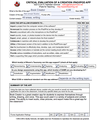
In the final unit of the Coaching Digital Learning MOOC-Ed, we learned about the importance of and practiced evaluating EdTech tools and resources, such as iPad Apps and websites with the use of rubrics and evaluation tools.One of the these tools is +Kathy Schrock's iPad App Evaluation Form. I used it to practice evaluating the app, Book Creator, which I already know is great for students! But I liked how the evaluation form focuses on different features of apps that allow students to do certain things. You can see my evaluation of Book Creator below as well as a link to the blank form.What challenges have you faced in selecting the appropriate digital resources for your own use or other’s use? How did you overcome these issues?One of the biggest challenges when selecting a digital tool or resource for my teachers and students, is its ease of use and reliability. Teachers often want a tool that is quick to learn, easy to use, and fits in perfectly with their lesson on unit. Finding the right tools to fit this criteria can be very difficult and often impossible. I have to be careful in the way I present the tool, and it can be a delicate process in helping the teacher to figure it out. One wrong move with the tool, and teacher may lose interest without fully exploring its use and opportunities.After reviewing this Unit’s Resources and Activity, what resources/checklists/rubrics, etc. would you consider sharing with your colleagues in order to build their capacity around choosing appropriate technology to maximize learning and teaching? Next school year, I'll be working at a new school in my state that has a continuing 1:1 iPad Program.After exploring Kathy Schrock's iPad App Evaluation tool, I definitely think I'm going to help introduce the idea of an iPad App Evaluation tool to the teachers. I think it's important to think about the purpose and usability of an app. Does it fit a need in the class? Can it be used to enhance a lesson or a project? Using an evaluation tool can help teachers to better understand and think about how an app is going to fit in to the classroom. It may also help teachers to think about some aspects that they weren't aware of.+Kathy Schrock "Critical Evaluation of a Creation iPad/iPod App" and other rubricsMy Instructional Technology Coaching Action Plan. Please comment on the document and add your resources, opinions, and ideas!My other Coaching Digital Learning MOOC-Ed Unit Reflections:Unit 1 ReflectionUnit 2 ReflectionUnit 3 ReflectionUnit 4 ReflectionUnit 5 ReflectionUnit 6 ReflectionCheck out my Coaching Digital Learning Pinterest Board with all of the resources and videos from the entire course!Follow Michael's board Coaching Digital Learning, #CDL_MOOCed on Pinterest.
Michael Fricano II
.
Blog
.
<span class='date ' tip=''><i class='icon-time'></i> Jul 23, 2015 07:46am</span>
|
|
So the first column of what will hopefully be a longish running series for the elearning guild is up — it’s an effort to make learning-related academic research more available to a professional practitioner audience:
http://www.learningsolutionsmag.com/articles/1021/research-for-practitioners-social-interaction-belief-and-learning
Here’s the story behind it:
Several months ago, Clark Quinn and I were at a workshop and we were discussing the problem of evidence-based practice. We agreed that staying connected with academic research was a critical activity for instructional designers, but we both recognized that it was really hard to do. Busy practitioners just don’t have time to sit down and read all the way through the latest copy of BJET (the British Journal of Educational Technology).
The Internet is a mixed blessing in this regard—a huge number of journal articles are freely available online, but the academic publishers are firewalling them more frequently these days. And even if you can get access to articles—who has time to read them?
This Learning Solutions article is the first in a series intended to address this problem. This series will present short summaries of academic research that may be of interest to eLearning designers. The Learning Solutions article authors (there are several of us) will offer a short, blog-length summary of each study and include a brief discussion of the implications for design. Some of the journal articles we summarize will be newly released research, and some will be older studies that we think still have implications for eLearning design.
We are very interested in your feedback—we want to know whether this is helpful to you as a practitioner? Let us know what you think—please leave your reactions in the comments following the article!
Julie Dirksen
.
Blog
.
<span class='date ' tip=''><i class='icon-time'></i> Jul 23, 2015 07:46am</span>
|
|
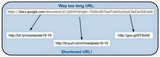
As an educator, professional development provider, blogger, avid user of Social Media, and a Hangout host, I am often in need of URL Shorteners to easily share links, documents, websites, etc. But, which URL Shortener service is the best one?A URL Shortener is a web-based service that will take a long URL (website address) and squeeze it into a very short easier to manage URL. When a shortened URL is used, the person will be redirected to the longer URL.Shortening a URL can be helpful for several reasons:Sharing a shortened URL with students makes it quicker and easier for them to type and remember.Sharing a shortened URL during a workshop or training makes it quicker and easier for the participants to type and remember.Shortened URLs take up less space in a presentation, document, blog, or website.Shortened URLs make it easier for you to manage.There are 3 main services that will shorten URLs for you and they are all free! However, some come with added features and bonuses. The 3 main services are TinyURL.com, goo.gl, and bit.ly. Some are far better than others, but I'll break down their pros and cons below.Tinyurl.comTinyURL.com was the first URL Shortener that I was introduced to and I used it a lot early on. It's probably the quickest and easiest to use.Cons:No statistics offered on links (# of clicks, views, etc.)No account or log in = not able to manage already created TinyURLsVery simple user interface (to some, this might be a pro)Pros:Create customized URLs (rather than a randomly generated URL, you can customize the ending)Preview Feature allows users to "preview" where the URL takes them before they are actually redirected.Create a handy Toolbar Button to make it even easier to create TinyURLs.Goo.glGoo.gl is Google's URL Shortener service. If you use your Google Account frequently, you might want to give this one a try.Cons:No customization of the URL (generates a random URL w/ numbers and letters)You can't "delete" shortened URLs from your list (You "hide" them instead)Pros:Connected to your Google AccountKeeps a record of all of your past URLs (w/ log in)Each URL has its own click statistic (counts the number of clicks/visits of the shortened URL)Click statistics include clicks over time, browsers used, countries, platforms, and referrersYou can see what the original URL is and what the website looks like in the user interfaceEach URL comes with a QR CodeChrome Extension: Goo.gl URL Shortener!Bit.lyBit.ly is my new favorite URL Shortener! This service is the one that I use most often because of its many pros and lack of cons.Cons:Honestly, I couldn't find any cons for bit.ly...Pros:You can create personal account to manage and track all of your URLsYou can customize URLs & go back and change them later!Each URL has individual View Statistics (# of clicks, clicks over time, which social networks direct the most traffic, and by country)The Shortened URLs are nicely organized (clean user interface)You can add notes to URLsComes with a handy search tool to find buried URLsYou can edit the title of your bit.ly URLBundles feature (group URLs, add multiple curators, share & email)Chrome extension: bitly | ♥ your bitmarksiPhone App!Have I missed anything with these popular URL Shorteners? Let me know in the comments and I'll add them in.Which URL Shortener is your favorite and why?
Michael Fricano II
.
Blog
.
<span class='date ' tip=''><i class='icon-time'></i> Jul 23, 2015 07:45am</span>
|
|
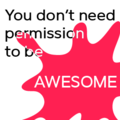
Peachpit (my publishers) are doing kind of a cool little series of posts on the Best Design Advice You Ever Got.
Click here to see my entry: http://www.peachpit.com/articles/article.aspx?p=1930037
What’s the best design advice you ever got?
(Artwork is courtesy of Judy Unrein, the Awesome color is courtesy of Crayola, and quote is from Alex Hillman via Aaron Silvers)
Julie Dirksen
.
Blog
.
<span class='date ' tip=''><i class='icon-time'></i> Jul 23, 2015 07:45am</span>
|
|
This year, I wasn't able to make it to the ISTE 2014 Conference. I just had too many other engagements. But, I was excited to see a growing movement and community of others in the same situation as me! My friend and co-host of EdTech Mixed Plate, +Michelle Carlson Colte, sent a tweet my way with the hashtag, #notatiste14. I dug a little deeper into this hashtag, and found a thriving community! Here are my 5 takeaways from my #NotAtISTE14 experience:NOTATISTE14 Google+ Community - This community was created by +Jennifer Wagner and currently has 309 members. It includes so many great posts of resources gathered from ISTE, blog posts, and sharing of notes taken during sessions and keynotes.#NotAtISTE14 Participant Google Presentation - In order for the community members to get to know each other, a Google Presentation was created and participants were invited to create their own slide. There are now more than 150 slides! This was a great opportunity to meet and connect with new people, as we shared are interests and our social network connections.Badges & Ribbons - The most fun part of participating in #NotAtISTE14 was being able to create our own digital badges and collecting digital ribbons! I'm still sorting through all the real ribbons I collected at ISTE 2013, so I was having a blast adding digital ribbons to my badge this time around. This was another fun activity that we could all participate in even though we couldn't attend the conference. It also allowed us another avenue for getting to know each other. Thanks to +Vicky Sedgwick for creating everything! (Click the link to download your own badge and ribbons!)81dash - This new service, created by +Carlos Fernandez, is a communication platform designed for teachers to use with students. Its a back channel chat tool with added features! Teachers can lock the chat room to a specific set of students, and students can insert files into the chat, take notes, and create tasks, as they work together. This looks to be a very promising tool for classrooms! +Jerry Swiatek created a great tutorial video for 81dash!Follow the Hashtags! - Even if you did or did not attend ISTE this year, the hashtags are always a great way to follow along with the action and the learning and to continue to learn long after the conference is over! Use a service like Tagboard.com to follow the hashtags across multiple social networks. #ISTE2014 and #NotAtISTE14How was your ISTE 2014 experience? What have you learned these past few days? Share in the comments or on Google+!
Michael Fricano II
.
Blog
.
<span class='date ' tip=''><i class='icon-time'></i> Jul 23, 2015 07:45am</span>
|
|
So, my self-appointed mission today is to encourage as many people as possible to go look at the slides from Stephen Anderson’s latest talk about things like curiosity, design, play and experience. So so great.
Julie Dirksen
.
Blog
.
<span class='date ' tip=''><i class='icon-time'></i> Jul 23, 2015 07:44am</span>
|
|
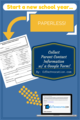
Collect Parent Contact Information w/ a Google Form!Use a Google Form to gather Parent Contact Information this school year!It's not just about saving trees and going paperless, although those are good reasons! But collecting contact information digitally for your class this school year is also about making things efficient and easier to handle!A Google Form can be a quick and easy way to collect this information, but once you have it gathered, there are some bonuses to what you can do with the data!Paper FormWhile working with a group of teachers last school year on Google Apps for Education in the classroom, one of them came up with the brilliant idea of converting their outdated and difficult to handle Parent Contact Information paper form into a Google Form. I absolutely love this idea and think it's a great way for any teacher to get their feet wet with Google Apps at the start of the school year. One of the first things we typically do at the beginning of the school year is send home a form requesting contact information from the parents. I used to do this with a simple paper form. Then, as I collect the forms back in class, I would manually type the information into a spreadsheet and also create email contacts. But, of course, this was way too time consuming!Now, with Google Forms we can simplify and make this process much more efficient!How to Setup Your Parent Contact Google Form:First, you want to create the Google Form and set up the questions. Google Form uses survey questions, from open-ended, to multiple choice, to date selections, and checkboxes. Think about the information you want to gather from your parents, but also consider what you want to do with that information once it is gathered in a spreadsheet. Google Forms will automatically put user responses into a neatly organized spreadsheet for you.Create a new Google FormMake a Copy of my Example to Save You Time!I've already created a sample Google Form, with typical questions for gathering parent contact information. You can find it here. I've made this Google Form available to the public so that you have the opportunity to "Make a Copy". Please do not make changes to the actual form until you Make a Copy.Next, you will need to find an easy way for parents to access your Google Form from home. By default, your Google Form will be given a link, but it is usually long and complicated. You won't want to give your parents this difficult link. Instead, you can use a URL Shortener service, that will convert your long URL to an easier to use short link. See my previous post on which one to choose, The Pros & Cons of URL Shorteners. For example, I created a shortened URL for my sample Google Form with the service, bit.ly, bit.ly/MrFContactForm. Your parents will appreciate a shorter, easier link!Added (7/25/14): I was reminded today by a fellow teacher that you could also use a QR Code to share your Google Form with your parents. This is especially useful if you want parents to fill out your form during Open House! I blogged about this very thing at the beginning of last school year! You can find it here, Help Your Students & Parents Keep in Contact with a QR Code!Lastly, once you receive responses from your parents, you can decide what you would like to do with the information collected in the spreadsheet. Here are a couple of ideas:Copy the first and last names of your students into a separate spreadsheet to create grading checklists. This saves you the time of having to type all those names yourself!Using the parents' email addresses, phones numbers, and mailing addresses, create contacts and contact groups in your email client.Plug your students' birthdays into your calendar. Using a Google Form to collect parent contact information is a great way to get your feet wet with Google Apps at the start of a new school year! Once you accomplish this, think about how Google Forms could be used in other ways in your classroom. From Pot Luck Party sign ups, to in-class data collection for math, and even quizzes and formative assessments!Michael will be presenting at the following upcoming events:Hawaii Association of Middle Schools Conference 2014Schools of the Future Conference 2014Edcamp Honolulu 2014
Michael Fricano II
.
Blog
.
<span class='date ' tip=''><i class='icon-time'></i> Jul 23, 2015 07:44am</span>
|