Blogs
|
Had a lovely time at the Learning Solutions Conference last week. Did a full day pre-con on Gameful Learning Design with Rick Raymer, which was a lot of fun.
I also did a session on Narrative Techniques for Learning. When I was working on Design For How People Learn, I listened a lot to a podcast on storytelling techniques.
A lot of learning and development folks *are* fiction writers, in the form of learning scenarios, examples and case studies, but (in my experience) it’s frequently pretty dull stuff (and I say this as someone who has written some dull scenarios myself).
So this session is about pulling some of the specific strategies that fiction writers use to into learning scenarios. There are a lot of other interesting ways to explore storytelling in terms of meta-structures, psychology and cultural constructs. This isn’t that presentation (though I’ll probably do that one too, one of these days).
This presentation is focused on specific strategies for making learning stories more interesting.
Narrative Techniques for Learning from Julie Dirksen
References:
Storytelling podcasts: http://www.storywonk.com and http://popcorndialogues.com/
The Hero’s Journey: http://en.wikipedia.org/wiki/Heros_journey
Three Act Structure: http://en.wikipedia.org/wiki/Three_act_structure
Clark Quinn on narrative urgency: http://blog.learnlets.com/?p=2931
Movie Cliches: https://www.youtube.com/watch?v=rbhrz1-4hN4
Article: Effects of humor on sentence memory. Schmidt, Stephen R. Journal of Experimental Psychology: Learning, Memory, and Cognition, Vol 20(4), Jul 1994, 953-967. doi: 10.1037/0278-7393.20.4.953
TV Tropes: http://tvtropes.org/pmwiki/pmwiki.php/Main/HomePage
Resonate by Nancy Duarte: http://www.amazon.com/Resonate-Present-Stories-Transform-Audiences/dp/0470632011
Kathy Sierra on Building the Minimum Badass User: http://businessofsoftware.org/2013/02/kathy-sierra-building-the-minimum-badass-user-business-of-software-a-masterclass-in-thinking-about-software-product-development/
Julie Dirksen
.
Blog
.
<span class='date ' tip=''><i class='icon-time'></i> Jul 23, 2015 07:43am</span>
|
|
Google brings its Geo Tools to teachers in Hawaii!On October 25 & 26, approximately 50 teachers gathered in Hawaii to learn about a slew of Google Geo Tools that teachers and students can use in the classroom. Here are my takeaways from the event!+John Bailey, the Program Manager for Google Geo Education, along with +Jim Sill, +Brendan Brennan, and +Marybeth Baldwin, led some amazing and inspiring sessions. The focus of the event was on Google's Geo Tools, which includes Google Earth, Google Maps, Google Tour Builder, My Maps, and the new Views. I thought I knew how to use most of these tools, but I had no idea what more they could do! Here are my biggest takeaways from the event:Google Acquires Skybox ImagingThis was excited to hear! Back in August, it was announced that Skybox Imaging would be acquired by Google. What this does for Google is it provides the company with its very own satellites that can capture images and even video of the Earth's surface in real time. One really cool example is of an airport in Beijing. One idea that was mentioned was the ability to track endangered elephants, not just with satellite images, but HD quality video as well!Some Little Known Features in Google MapsI've used Google Maps before to get directions or to locate a street or a business, but +Jim Sill revealed some features that I had no idea about!Did you know that the Diamond Head Crater'sperimeter is approximately 2.25 miles?First is the ability to measure distances! If you right click on the map, you'll see the option "Measure Distance", then click to create dots and have their distances measured. This option isn't saved however, it's only temporary. But I could instantly imagine how students might use this! Comparing measurements between two locations, determining area, finding perimeter; there are many possibilities!If you zoom out far enough in Google Maps, you'll see cloud cover. Did you know that the clouds in Google Map are actually in real time? I thought that was pretty cool!Another great feature that could create some interesting conversations with students is the ability to see population clusters through light pollution. If you zoom all the way out in Google Maps, you'll see night and day as well as light pollution on the side that is currently covered by the night sky.Cloud cover in real time!Determine population clusters with light pollution!Also, zooming all the way out in Google Maps reveals the option to see the Moon and Mars. Open the Explore tab at the bottom to reveal these options.Check out the Moon and Mars in Google Maps!Extend the Learning Even Further with My MapsWhat used to be Maps Engine Lite is now the new My Maps. My Maps allows you to create your own maps with place markers, data, and information. You can share and even collaborate on maps with other people (similar to how you would share a Google Doc). The ability to collaborate on a Map alone is reason enough to try it with students.I've traced the island of Oahu and compared it to the sizeof the Big Island in Hawaii!One of my most favorite features of My Maps is the option to draw and create polygons! You can draw lines on your map with the Line Tool. Then those lines can be connected to form a polygon. The polygon can then be moved freely around the map! Want students to compare the size of the neighborhood to that of their city or state? Go right head!Another useful feature of My Maps is the ability to import data from a spreadsheet or create one right inside the map. With the ability to collaborate, multiple students could be working on one map to gather information and data for locations all over the world!Create a table inside of My Maps and add information and data to your placemarkers!Access Historical Imagery in Google EarthAnother amazing feature that Google offers to its users of Google Earth (and Google Tour Builder) is the ability to view historical imagery as far back as the 1930s & 1940s (in some parts of the world). This can be a powerful tool for demonstrating change over time and to help students learn how natural disasters and population growth affect the world.There are so many great Geo Tools that Google offers, and most of them are easy enough for teachers and students to use in class. One of the most important things I learned at the Geo Teacher Institute was that these Geo Tools don't just have to be used to teach geography and history. They can also be used to teach mathematics and even enhance reading and writing.Check them out for yourself! Visit the Google Maps Education website and see if there's an institute coming to your area.
Michael Fricano II
.
Blog
.
<span class='date ' tip=''><i class='icon-time'></i> Jul 23, 2015 07:42am</span>
|
|
So, several conversations recently are coming together:
- Judy Unrein’s post on Mike Monteiro’s How Designers Destroyed the World talk, and her discussion about how designers can’t be just be order takers (go watch the talk - it’s amazing)
- A conversation with Stephen Anderson about his upcoming IA Summit talk called Stop Doing What You Are Told! about reframing the design problem (soooo looking forward to those slides)
- Dan Lockton’s article in the guardian about sustainable design, which talks about how, if people aren’t doing things the way we would like, we should figure out how to solve their problems, rather than treating them as the problem.
Getting to the problem
So, this is hard. I think designers are often given solutions to implement, rather than problems to solve. I sometime think that’s half my job with clients — getting a clear statement on the problem they are trying to solve, or the opportunity they are trying to realize. It’s something where the outside perspective can really help — when you live with problems all the time, they frequently become tacit.
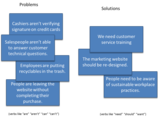
When I was teaching undergraduates, this was a hard idea to communicate, but it’s a key skill that everyone needs to have. I used to have a really simple card sorting game that I’d have my students play to see if they were being given a problem to solve, or a solution to implement. If it was a solution, then they had to work on a way to get the actual problem clearly stated.
I think, in light of Dan’s article, I’d tweak it a bit more, and talk about strategies for unpacking even the problem statements (e.g. the card "Sales people aren’t able to answer customer technical questions" would probably be better as "Customers have technical questions that they need answered during the sales process").
I have several different questions that help me dig for the problem:
"Uh huh, and what do they need to do with that?" or "What do they need to do differently?"
"What bad thing will happen if they don’t know that?"
"Can you give me an example?"
"If you woke up tomorrow and we’d implemented this perfectly, what would be different?"
"What does is it look like when they get it wrong? What are common mistakes?"
Curious to know what other people do — what do you use to understand what the real problem/opportunity/challenge is?
Julie Dirksen
.
Blog
.
<span class='date ' tip=''><i class='icon-time'></i> Jul 23, 2015 07:41am</span>
|
|
Nominations for the 2014 Edublog Awards is open until November 24th!For this year's 2014 Edublog Awards I made four nominations for what I consider some of the best blogs and resources for teachers.There are a lot of nomination categories for the 2014 Edublog Awards, also known as the Eddies! I chose four of those categories and submitted my nominations. The categories I nominated for are: Best EdTech Blog, Best Librarian Blog, Best Administrator Blog, and Best Twitter Chat.Best EdTech BlogFor the Best EdTech Blog, I nominate +Kasey Bell's ShakeUpLearning blog! Kasey is an authorized Google Education Trainer, an organizer of many education related events, and already has many recognitions for her work in the field of EdTech. She blogs often and her content is inspiring, informational, and full of resources, tips, and tricks! I enjoy reading Kasey's blog posts and look forward to her new ones. She is also very connected through social media and runs the North Texas Google Educator Group (GEG NOR-TX).Check out Kasey's blog at http://www.shakeuplearning.com/blogBest Librarian BlogFor the category, Best Librarian Blog, I nominate +Linda Lindsay's mauilibrarian2 in Olinda blog. Linda is a librarian at Seabury Hall in Maui, HI. She is also a Google Certified Teacher, an authorized Google Education Trainer, and runs the weekly Google Rocks! Hawaii hangout on air. Linda posts frequently about events occurring at her school and in her library, but she also posts a lot of EdTech related content as well.Check out Linda's blog at: http://www.mauilibrarian2.com/Best Administrator BlogMy nomination for the Best Administrator Blog category goes to +Jan Iwase! Jan's blog is called Collaborating, Communicating, Critical Thinking, and Creating. Jan is the principal of Hale Kula Elementary on Oahu, HI. She is also fairly new to the blogosphere, but her blog posts about her experiences and reflections on her school and her position as an administrator are heartfelt, deeply though out, and inspiring for other administrators and teachers to read.Check out Jan's blog at: http://hkesprincipal.blogspot.com/Best Twitter ChatI'm a little biased in this category (well, a lot actually...) , but my nomination for the Best Twitter Chat has to go to #edchatHI! #edchatHI is a monthly Hawaii Twitter chat for educators that I help coordinate, plan, and moderate. We started this Twitter chat in 2013 and it has steadily grown since then. We are still a very small Twitter chat compared to others, but I find it fun and engaging to connect with other educators in my state and in other parts of the world! I just love my PLN!Learn more about #edchatHI: https://sites.google.com/site/edchathi/Nominations for the Edublog Awards ends on November 24th. You can submit your own nominations here. Learn more about the Eddies here. Voting for award nominations has not yet been announced, but will likely occur soon after nominations end.I'd like to personally thank my blog nominations: +Kasey Bell, +Linda Lindsay, and +Jan Iwase! Keep blogging!
Michael Fricano II
.
Blog
.
<span class='date ' tip=''><i class='icon-time'></i> Jul 23, 2015 07:41am</span>
|
|
The Hour of Code will soon be upon us and it's going to be the largest global learning event in history!Last year the Hour of Code reached 15 million users and 10 million girls just within 5 days! That was an introduction. And now there is a push for more Computer Programming courses in education. This year the goal is to reach 100 million users! So how can you participate and what resources are available for you and your students? I've curated everything I could possibly find for The Hour of Code (and beyond...)!The tutorials available on the Code.org website are great! They're fun and engaging and they teach important programming skills to students of all ages through leveled activities. The tutorials are also perfect for exposing students to the mysterious and vastly unknown world of programming. But when I think of The Hour of Code and Computer Science in general in regards to the typical teacher, I can't help but think about the following questions:How can we integrate this into our existing curriculum so that its purposeful?Most of us don't even know or understand programming, so how do we teach it and apply it in our classrooms?How can schools and communities create more opportunities for students to engage with computer science?What other resources and support exist for teachers interested in integrating computer science in their curriculum?What happens after The Hour of Code?How do we encourage more girls to explore an interest in computer science?I've curated a detailed list of resources that I hope helps answer these questions. These resources include apps, curriculum guides, professional development, and extracurricular opportunities for students.Mobile Apps That Teach CodingIn my search for iPad apps that teach and promote programming to children, I found quite a list for a variety of age levels! Some of these apps are available on multiple devices and some of the app developers have even created teacher resources and curriculums! Daisy the Dinosaur(ages 4-8)WebsiteiTunes (FREE)Run Marco!(ages 4-8)WebsiteiTunes (FREE)Google Play (FREE)ChromeScratch Jr(ages 5-7)WebsiteiTunes (FREE)CurriculumKodable(ages 6-8)WebsiteiTunes (Freemium)Kodable for Classrooms (Paid)ResourcesCodeQuest(ages 6-8)WebsiteiTunes (FREE)The Foos(ages 6-8)WebsiteiTunes (FREE)CurriculumHopscotch(ages 9-11)WebsiteiTunes (FREE)CurriculumCargoBot(ages 4+)WebsiteiTunes (FREE)Made with the Codea iPad app!Tynker(ages 9-11)WebsiteiTunes (FREE)Google Play (FREE)CurriculumMove the Turtle(ages 9-11)WebsiteiTunes ($2.99)LightBot(ages 9-11)WebsiteiTunes (FREE)iTunes ($2.99)ResourcesCodea(middle & high school)WebsiteiTunes ($9.99)Build apps on your iPad!Hakitzu Elite(ages 9+, fantasy violence)WebsiteiTunes (Freemium)Google Play (Freemium)CurriculumRoboComBasic(ages 9 - High School)WebsiteiTunes (FREE)Google Play (FREE)KineScript(ages 9 - High School)iTunes (FREE w/ Ads)iTunes ($1.99)CodeAcademy(middle & high school)WebsiteiTunes (FREE)CurriculumKhan Academy(middle & high school)Computer Programming CourseHour of Code CourseiTunes (FREE)Web-Based Coding Activities BotLogic.us - BotLogic.us is an educational puzzle game that challenges kids and adults to tackle complex logic problems while teaching valuable programming concepts.GameStarMechanic - Gamestar Mechanic uses fun, game-based quests and courses to help you learn game design and make your own video games!Blockly Games - Blockly Games is a series of educational games that teach programming. It is designed for children who have not had prior experience with computer programming. By the end of these games, players are ready to use conventional text-based languages.Curriculum, Lesson Ideas, & ResourcesPlaying games and activities that teach and promote coding is one thing, but what needs to happen in our schools is a transformation of how Computer Science is treated and a plan for classroom integration. But we struggle with the idea of teaching Computer Science in our classrooms because: (1) we don't completely understand it (2) we don't have the proper resources to implement it. For those reasons, I've gathered a list of some of the most comprehensive curriculum, lesson ideas, resources, and articles for teaching Programming and Computer Science in your classroom at any grade level!CodeAcademy CurriculumCode.org K-5 CurriculumCode.org Middle School CS in Science CurriculumCode.org Middle School CS in Math CurriculumCode.org CS Principles High School Lesson Plans (COMING SOON)Exploring Computer Science High School CurriculumKhan Academy Computer Programming CourseComputer Science Unplugged (Lesson Activities)CodeAvengers Coding LessonsEdSurge "Teaching Kids to Code" Resource GuideGoogle’s Made with Code Resources & ActivitiesGameStarMechanic Teacher Lesson GuidesArticles:Getting Smart - "Coding in the Classroom: Here to Stay"Getting Smart - "Coding in the Classroom: How Teachers are Learning to Code"Getting Smart - "Experts Weight In On K-12 Coding & CS Resources"Getting Smart - "The Transition from Cursive to Coding"edSurge - "We Need Coding In Schools, But Where Are the Teachers?"edSurge - "Learn to Code, Code to Learn"Encouraging Girls to CodePart of this big push for more Computer Science and Programming in education is to also encourage girls to enter related career paths. According to the Made with Code website, only 0.4% of female college freshman plan to major in CS. And since the 1990s, women with degrees in CS have dropped from 29% to 18%. There shouldn't be a gender equality gap, no matter what the profession. I've gathered a list of resources and opportunities that can help school's encourage more girls to participate!Start a club for girls! Create a Girls Who Code ClubInspire girls with Women Makers and Female Mentors!Connect a hobby with CS! Have them try a Sew Electric ActivityRead how a simple introduction can hook a student for life! NYTimes "I Am Woman, Watch Me Hack"Continue to Foster that Interest in CSOnce The Hour of Code is finished and gone, what's next? What else can we do to help encourage and foster an interest in Computer Science in our students? Create a safe, engaging, and fun opportunity beyond the classroom, start a club and join a workshop! Here are some resources to get started!7 Steps to Start a Coding Club at Your SchoolGirls Who Code ClubCoderDojo ClubsCode Club WorldAfter School Tynker ClubCode.org WorkshopsFollow Michael's board Coding for Kids on Pinterest. BONUS: Decorate a Christmas Tree w/ Google's Made with Code
Michael Fricano II
.
Blog
.
<span class='date ' tip=''><i class='icon-time'></i> Jul 23, 2015 07:40am</span>
|
|
The last blog post I wrote was about starting design with a problem rather than a solution, and it came from a conversation with Stephen Anderson about a presentation he was putting together for the IA Summit.
Here’s his presentation, and (of course) it’s great stuff:
Julie Dirksen
.
Blog
.
<span class='date ' tip=''><i class='icon-time'></i> Jul 23, 2015 07:40am</span>
|
|
Google recently released 3 major updates for Google Docs and Google Sheets!The Google Drive team has been hard at work added some much needed features to the web-based Google Docs and the Docs and Slides iOS Apps! Features that everyone has been longing for!December 1, 2014 - You Can Now MERGE CELLS in Google Docs Tables!This feature has been very very very long awaited! At least by me it has, but I'm sure for many other users as well. It has always perplexed me why Google Docs would not allow you to merge cells in a table. It seems like such a basic feature and a necessity! Well, as of December 1st, we can now merge cells in document tables! This makes me so very happy! I no longer have to worry about converting Word documents to Google Docs and having to fix tables that get royally screwed up!December 8, 2014 - Edit Text in Tables in the Google Docs iOS App!The lack of being able to view and edit tables while working on Google documents on my iPad was always a huge disappointment and frustration for me. On December 8th, the Google Docs app received an update allowing users to the ability to edit text in tables on a Google document! Woohoo!! Unfortunately, you still can't create and edit the actual table in the app. You'll have to create the table on a computer first, and then transfer over to your mobile device.December 8, 2014 - Insert Text Boxes, Shapes, and Lines in the Google Slides iOS App!When the Google Slides app for the iPad was first released, it was very limited in its capabilities and thus pretty useless. You could create a blank Google Slide, but you couldn't choose a theme and you couldn't insert text boxes, shapes, and lines, and images (unless you converting to a Power Point, but who wants to do that?!). So, on December 8th, Google also released a new update for the Google Slides iOS app as well! This new update allows users to insert text boxes, shapes, and lines into a Google Slide in the iOS app! But, it's still missing themes and the option to insert images.Here is the December 8th post by +Google Drive.
Michael Fricano II
.
Blog
.
<span class='date ' tip=''><i class='icon-time'></i> Jul 23, 2015 07:39am</span>
|
|
Just wrote a piece for the Research for Practitioners series over at Learning Solutions Magazine on some really fascinating research at the Stanford Virtual Human Interaction Lab. It’s crazy interesting research, and it involves virtual chainsaws, behavior change and crafty research techniques. What’s not to love in that?
Go check it out here: Research for Practitioners: When It’s Not a Knowledge Problem
Julie Dirksen
.
Blog
.
<span class='date ' tip=''><i class='icon-time'></i> Jul 23, 2015 07:39am</span>
|
|
Here's a mid week Hour of Code Update!Since I posted my curated resources last week for The Hour of Code, there have been some updates and new releases that teachers and students might find useful, fun, and engaging!Look at this map. This is a map of events from HourofCode.org for this week! According to the website, there are currently more than 77,000 events planned around the world! That is amazing! And I'm sure more and more are being added every day!I've come across a few more resources since last week that I thought might be useful and enjoyable for teachers and students participating in the Hour of Code (and beyond)! Here they are!Apple App Store Dedicates a Page to the Hour of Code!If you visit the App Store on iTunes, you'll see that a page has been dedicated to the Hour of Code, with all kinds of resources to assist schools with implementation and learning. They have Apps, Apps for Kids, Books, Podcasts, iTunes U Courses, and iTunes U Collections. Lots of resources for all ages!Two New Web-Based Coding Activities!Kodable is a great iPad app for younger students to introduce them to the concept of programming. Just recently, the developers of Kodable released a web-based version of the game! Check it out at: game.kodable.comGoogle released it's Santa Tracker service at the beginning of December! Every day, their is a new game or learning activity. Check the calendar! On December 9th, the learning activity is a coding activity that uses blockly programming to direct Santa to the gifts! Give it a try!2 More iPad Apps that Teach Programming!I came across two more iPad apps that teach programming to younger students.The first app is called Bee-Bot. Use step-by-step directional commands to get the bee to the flower! This can be a fun game for students but it might be challenging for some because it doesn't list the steps you choose. I guess you have to memorize your movements.The second app I found is called Cato's Hike. This is another app for younger students that uses step-by-step directional movements, but there are more complex options as you progress through the levels. There is a free lite version and a paid version for $4.99.Here is my Coding for Kids folder on my iPad! Join the Google+ Community for Resources Galore!I started a public Google+ Community for The Hour of Code last week and it now has more than 100 members! Please join if you are participating or are interested in the Hour of Code, Computer Science, and Programming in schools! A few of the members shared their resources and I want to pass it on for all of you to use and enjoy!Check out +Nicole Zumpano's Hour of Code Resource Guide. Nicole created this great elementary lesson plan for the teachers at her school, but it's definitely applicable for any teacher!+Shaun Johnson is a Spanish teacher. You might be wondering to yourself: how does Spanish and programming fit together? Well, Shaun made it happen! He uses Scratch with his students to help reinforce the language learning. Check out his blog post to learn how he did it!+Myra Deister created a Smore poster for her high school! It contains a variety of options for participating in the Hour of Code!Share your resources in the comments please!
Michael Fricano II
.
Blog
.
<span class='date ' tip=''><i class='icon-time'></i> Jul 23, 2015 07:39am</span>
|
|
I should have posted this a few days ago, but I’m doing a webcast tomorrow (Wednesday May 15th, 1pm ET) for ASTD on using the psychology of game design for learning. Talking about some familiar stuff (flow, hyperbolic discounting) and a few new things (visceral feedback). Not sure if you need to be an ASTD member to attend, but I *think* you can just sign up:
http://webcasts.astd.org/webinar/731#.UZKUcU7gd84.twitter
Julie Dirksen
.
Blog
.
<span class='date ' tip=''><i class='icon-time'></i> Jul 23, 2015 07:39am</span>
|