Blogs
|
Google added 2 new features to Classroom today!Google promised added features and updates and they delivered today with 2 new features added to Google Classroom! They are the "About" page and the ability for the teacher to access student files before they turn them in.The first new feature in Google Classroom can be found in the menu at the top of the Classroom page. It is the About tab! Now, teachers have a place in the Classroom to include information about the class. You can give your class a Title and a Description, include the Room Location, and even attach files, drive files, Youtube videos, and links. Think about including those important documents like a syllabus, required materials list, forms, etc.The second new feature, and a feature that I've heard a lot of other teachers requesting since Classroom first became beta, is the ability for the teacher to have access to student created files in Classroom before they "Turn In". Previously, teachers had no access to students files until the students turned in the file within the Classroom Assignment page. Now, that's changed!Once the student visits their Assignment page and creates their file, it will automatically appear in the teacher's Drive folder. And the teacher can also access student files in the Assignment page as well, as shown in the below image.Google is listening loud and clear to teachers and wants to make Classroom the best it can be possibly be. Keep sending your Classroom feedback to Google. Keep the updates and new features coming, Google!Michael will be presenting at the following upcoming events:Hawaii Association of Middle Schools Conference 2014Schools of the Future Conference 2014Edcamp Honolulu 2014
Michael Fricano II
.
Blog
.
<span class='date ' tip=''><i class='icon-time'></i> Jul 23, 2015 07:44am</span>
|
|
So, I just finished Reuben Tozman’s Learning On Demand, and it’s great stuff. It’s particular great because I’m working on some of the exact issues he describes right now.
Specifically, we are just starting to create content for a new system, and I’m wrestling with questions like:
What kind of structure should we use for the content?
How do we make the content searchable?
How do we make the content adaptable?
How do we use the same content in multiple places without having duplicate content?
How do we make intelligent content that can be recommended to users when they need it?
Reuben addresses all those questions, in a really accessible way - the book is fast and very readable, despite the fact that Reuben is talking about some fairly complex stuff.
I’ve been talking a lot lately about how we aren’t in the content delivery business any more, and if nice content delivery is the only tool in our instructional design toolbox, then that should be a worry. The tools are just starting to appear to support doing something beyond pure content delivery in elearning, and Reuben’s book is a great place to start to understand that perspective.
As an aside, I’m working with these folks for the next several months as their Director of Instructional Design:
Altius Education
It’s been *really* interesting work so far, and it gets me out of Minnesota for the winter. So if anybody is in the Bay Area and wants to get together for nerdy shop talk, just let me know
Julie Dirksen
.
Blog
.
<span class='date ' tip=''><i class='icon-time'></i> Jul 23, 2015 07:44am</span>
|
|
4 Reasons to Teach Your Students theResearch Process with Google DriveShow your students the power of Google Drive while conducting research!Teaching students how to effectively use the Research Process while also focusing on proper citations, copy right, proper searching, website evaluation, synthesizing of information, and on, and on, and on can be a very daunting and exhausting task for both the teacher and the students! Luckily we have a wonderful online suite of tools to help ease and manage this process, all included within Google Drive! I'll share 4 Reasons why Google Drive is such a great way to teach the Research Process to students.Reason #1 - The Research Tool!Access the Research Tool by visitingthe Tools menu.The Research Tool, in my opinion, is one of the most powerful features in Google Drive, and, if not for my other three reasons, could stand as the only reason you need to conduct research in Google Drive. The Research Tool is available in both Google Docs and Google Slides and allows the user to do several important Research related things:Students can use the Research Tool to search Google by choosing from several useful filters: Everything, Images, Scholar, Quotes, Dictionary, Personal, and Tables.The many filters of the Research Tool!Students can Preview a website before they actually visit it. This allows students to think about the website evaluation process. By using the Preview feature, they can ask themselves questions like, "Does this website contain a lot of ads?" and "Does this website have a lot of text and/or images?"Students can Insert Link directly into their document. This creates a clickable link that takes them directly to the website. This is useful when students want to visit the website again at a later time. It prevents students from forgetting the website when they need it the most.And the feature that gets the most "Ooooh"s and "Aaaaah"s is the Cite feature, which creates a footnote citation for the website, which can be changed to MLA, APA, or Chicago format. This is also one of the most important steps in the Research Process. Don't forget to cite those sources, students!Preview, Insert Link, & Cite all withinthe Research Tool.The Research Tool also allows students to easily drag in images from the side panel. And those images automatically get a footnote citation with a link direct to the source. The Research Tool can be such a time saver for teachers and students. And with the collaboration features of Google Docs, think about the possibilities with teacher and peer feedback and group projects along side the Research Tool!Reason #2 - Google Docs Add-Ons!Look for the Add-Ons in the menu bar of your doc or sheet!Add-Ons were introduced to the world back in March 2014. They are tools that you can add to your Google Docs and Sheets that allow for extra, useful features as you're working. There are two Add-Ons available in Google Docs that can assist students in the research process.TextHelp Study Skills - Highlighting ToolsTextHelp Study Skills Add-OnFeatures of the Highlighting ToolsThis is the first Add-On you will want to instruct students to add. This Add-On allows the user to highlight text in their document, then it collects all of the highlighted text into a separate document automatically for easy organization! This is a great way for students to gather keywords and important information in their research and then have it all collated for them easily and quickly!Disclaimer: The Highlighting Tools Add-On is a feature from the Read&Write for Google paid app. This Add-On will give you access to the 4 highlighting colors for 30 days, then you will only have access to yellow.EasyBib Bibliography CreatorEasyBib Add-OnEasyBib Add-On FeaturesIf you're familiar with EasyBib.com, then you know that it's a great online service that will create bibliography citations for you in any format. They've also create a Google Docs Add-On! With the Add-On, students can quickly and easily create citations for Books, Journal Articles, and Websites. Teachers can also choose to create citations in MLA, APA, or Chicago format. Then, once the student has selected the citations that they want, they can add a Bibliography to their document. It will place the Bibliography at the bottom of the document complete with a header.Reason #3 - The Comment Tool!I think many teachers that already use Google Drive, are probably familiar with the Comment Tool. I know many teachers that use this as a way to provide students with feedback. But the comment tool can be used in other ways that can aid students during the Research Process.Students can use the comment tool to annotate their research!One great way for students to use the comment tool is to annotate their research, by attaching keywords and topics to important pieces of information. Then, when they are ready to use the research for a project, they have their comments to point them in the right direction!Reason #4 - Revision History!Revision History is great for trackingstudent work!As teachers, we want to make sure that our students are being responsible and trustworthy. We also want to ensure that they are managing their time wisely while conducting research and working on a project. If the teacher requires students to share access to their Google document, which I'm sure most teachers do, then the Revision History Tool will come in very handy in determining if students are focused and responsible. Revision History will track every change a student makes to the document and attaches a date and time stamp. All a teacher needs to do is check the Revision History of a student's document to determine if they've done the work and in a timely fashion.Google Drive has so many great features built into it, that conducting research in a Google document seems like a no-brainer! But an important aspect of the research process, or with any project for that matter, is organization! While testing out these features with my students, over time I've realized that if students are not organized in their research, then these tools won't make a difference! Because of this realization, I decided to create a Research Template for students to help keep them organized and on track. Feel free to check out my template and "Make a Copy" for yourself!http://bit.ly/ResearchTemplateMy Research Project Template for students! Organization is key!Hopefully, these reasons as well as my Research Template can help teachers and students to work through the Research Process, while staying organized and efficient! Let me know if have any other ideas on how Google Drive can help the Research Process!Michael will be presenting at the following upcoming events:iTeach808 ConferenceSchools of the Future Conference 2014Edcamp Honolulu 2014
Michael Fricano II
.
Blog
.
<span class='date ' tip=''><i class='icon-time'></i> Jul 23, 2015 07:44am</span>
|
|
This is excerpted and expanded from a post that I wrote for the Tin Can blog
We’ve talked about WIIFM (What’s in it for me?) for years - it’s one of those things you always hear that you need to include in learning experiences to persuade your learners to pay attention.
I’ve started to think that’s a really unsatisfactory view of the world - most of the people I know don’t need a sales pitch to do their jobs, or to learn something to help them do that. Instead, they need to know that the thing they are learning is actually useful and necessary.
One of my favorite studies is this one from Dan Ariely called Man’s search for meaning: The case of Legos.
The paper starts with a discussion of meaning and work:
"Most children think of their potential future occupations in terms of what they will be (firemen, doctors, etc.), not merely what they will do for a living. Many adults also think of their job as an integral part of their identity. At least in the United States, "What do you do?" has become as common a component of an introduction as the anachronistic "How do you do?" once was, yet identity, pride, and meaning are all left out from standard models of labor supply."
The paper goes on to explain "we view labor as meaningful to the extent that (a) it is recognized and/or (b) has some point or purpose."
They did two actual experiments — one where they had participants do a word problem exercise, and a second where participants were constructing figures with legos.
All the participants were paid money for their efforts, but some of the participants had their papers shredded as soon as they were done (without anyone even looking at the page), or their lego figures immediately broken back up in front of them (I particularly love that they labeled this last instance as the "Sisyphean" condition).
You can read the details here, but essential, people worked significantly longer or for less money in the condition where their work wasn’t meaningless. That shouldn’t be the case if people where primarily motivated by what they could get out of the situation (i.e. $$$). Dan Pink talks about several similar studies in his book Drive, when he talks about the importance of autonomy, mastery and purpose.
So, my issue with WIIFM is that, while it probably doesn’t hurt to let people know about the benefits of something, it’s not really a complete answer.
How about WCIDWT?
I think we should talk about WCIDWT (What can I do with that?). If I have the knowledge or skill that you are trying to teach me, what will I be able to do that I couldn’t before?
Kathy Sierra talks about this when she compares old school marketing ("Buy this because we kick ass") vs a focus on the user ("Buy this because we want you to kick ass"). What can *you* (the end-user) do to be more awesome, to know more and to do more.
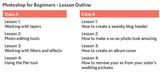
I’ve been playing around with the idea of accomplishment-based learning — using accomplishments as the fundamental organization of content and learning experiences, so that the very structure of the course is about learners accomplishing thing (*real* accomplishments - not finish-the-lesson or pass-the-test accomplishments). For example which photoshop course would you rather take?
So, my issue with WIIFM is that it feels transactional — I’m trying to *buy* your attention by waving shiny things, when instead it should be about your goals, and what you can do. WIIFM also feels disrespectful of learners for those same reasons.
Thoughts? Opinions? Examples? Violent disagreement? Would love to hear about it in the comments below.
Julie Dirksen
.
Blog
.
<span class='date ' tip=''><i class='icon-time'></i> Jul 23, 2015 07:44am</span>
|
|
This past weekend (September 6 & 7), CUE and the Learning Revolution Project held the first ever Online Summit Featuring Google for Education. This was a paid online event which used Google Hangouts on Air to host live and recorded keynotes and presentations. In leading up to, during, and after the event, I found the whole thing to be well organized and well managed by an amazing task force!Over the past year or so, I've noticed an increase in the amount of professional development opportunities occurring online, including EdcampHOME, EdcampONLINE, Connected Educator Month, and the multitude of conferences by the Learning Revolution Project, like the annual Global Education Conference and the 2013 Global STEMx Education Conference. The popularity and the need for such PD is growing quickly. In my opinion, there are 4 reasons why this is happening.Cheap & Free! Who would be crazy enough to pass up a learning opportunity that is either extremely cheap or, in most cases, completely free!? The Online Summit was only $40 and included a 1 year membership to the CUE organization, and gave attendees access to more than 40 keynotes and presentations, both live and recorded. Conferences organized by the Learning Revolution Project, have always been free!The Technology Advances Quickly & is Easier to Use! To have a successful online event, the technology needs to be readily available, easy to set up and use, and must fit the needs of the presenters and attendees. That technology exists today and is quickly becoming main stream. The Online Summit used Google's Hangouts On Air, which is a very popular videoconferencing tool, which allows for live events, but also records straight to Youtube. Learning Revolution conferences utilize Blackboard Collaborate for live sessions and recordings. These technologies are easy to use for both presenter and attendee and are free!What I Want, When I Want! Another important reason for virtual PD becoming so popular is because it allows educators a choice in how we want to learn and grow. We no longer have to only abide by the choices that our districts and schools make for us. If I want to learn more about Google Apps, I don't have to go and speak with my administration about PD, I can find it quickly and easily on my own. And in most cases, I can access the content on my own time after the online conference is said and done. And the content is usually available indefinitely. I can also refer back to it over and over again. The experience is very different from attending a physical conference, where you would attend sessions, take some notes, and forget what happened the next day. With online conferences it's always available.The Driving Force Behind Virtual PD is Passionate Educators! I know that a lot of the paid physical conferences that I attend are organized and led by those with a passion for education, but the conferences can also be expensive. Maybe the cost is due to a need to make a profit, or to pay for the location, or to cover the cost of bringing in presenters. But I love virtual PD, because in most cases, they are led by people who simply and only have a passion for education, for sharing, and for helping teachers learn and grow. That's why I help plan Edcamp Honolulu! Because I just love it! And I know that the people behind other online conferences, like the Online Summit and the upcoming Gaming in Ed conference, love it to. They do it out of love and passion for the profession. And because of this reason, I choose to participate in many of these online professional development opportunities, because I know I'm going to gain so much more from these experiences.If you haven't yet participated in online professional development, now, more than ever, is the time to start! There are so many great opportunities that exist for those in the education profession and you have so much to gain from them, like me!Here are just some of the current online PD opportunities:K12 Online Conference 2014 (Oct 20 - 31)EdcampONLINE (Oct. 25, 2014)Gaming in Ed Conference (Sept. 15 - 18)Global Education Conference (Nov. 17 - 22)Library 2.014 (Oct. 8-9)Connected Educator Month (October)TeacherCast broadcasts by +Jeffrey BradburyCheck out all the Twitter chats on ChatSalad.comEdTech Mixed Plate LIVE Hangout (shameless plug)Google Rocks! Hawaii LIVE Hangouts by +Linda LindsayAny Social Network (Twitter, Google+, Facebook)If you know of any other opportunities, please add them in the comments!
Michael Fricano II
.
Blog
.
<span class='date ' tip=''><i class='icon-time'></i> Jul 23, 2015 07:44am</span>
|
|
Hey folks, this is a really excellent discussion of the issues and research around using extrinsic rewards as a way to motivate behavior. Chris Hecker is looking at the question through the lens of game design, but it really, really applies to learning design as well.
There’s a write-up at the website, and a recording of the talk if you scroll down. It’s long-ish, but well worth the listen.
Found this via Amy Jo Kim on twitter: https://twitter.com/amyjokim
Julie Dirksen
.
Blog
.
<span class='date ' tip=''><i class='icon-time'></i> Jul 23, 2015 07:44am</span>
|
|
iOS 8 has finally arrived! But, be forewarned, all of your favorite classroom apps might not be compatible just yet! Watch out for more new app updates with iOS 8 compatibility in the next few weeks and beyond.When you finally do update, there are some key iOS 8 features that teachers might be interested in!A Better Spotlight Search!AirPlay to Apple TV without Wifi!Inter-App Communication Will Make App Smashing Easier!A Better Spotlight Search!The new iOS is bringing an update to the Spotlight search on the iPad. You can access the Spotlight by sliding down on the iPad screen with one finger. The update will allow Spotlight to show more search options, such as: Wikipedia results, popular websites, news articles, and apps that you haven't installed. Currently, Spotlight only shows you emails, notes, contacts, and apps on your iPad. AirPlay to Apple TV Without Wifi!Normally, you can AirPlay your iPad screen onto your TV with the use of an Apple TV, but both devices need to be connected to the same Wifi connection. iOS 8 will remove the need for Wifi between devices, and instead allow you to AirPlay your iPad to Apple TV offline. This is called Peer-to Peer Airplay. Learn more at: https://www.apple.com/airplay/A New Guided Access Feature!Guided Access is a feature that was added in iOS 7. It allows a parent or teacher to lock a child into a specific app and control which app features you want the child to use. With iOS 8, a new option will be added to Guided Access. It is the Time Limit option, which allows the teacher to determine how long you want the child to use the app. When time is up, the child will get a giant notice on the screen that says, "Time Expired".Inter-App Communication Will Make App Smashing Easier!Have you ever "app smashed" before? App Smashing is when you use multiple apps to complete a project. For example, creating a document in Google Docs then moving it to Notability for annotations is App Smashing! Or taking photos with the Camera app and then using the app Pic Collage to create a collage of images with borders, stickers, and text is also App Smashing! With iOS 8, apps will now be able to work within each other to make app smashing easier! With Inter-App Communication, you can use the an app like Awesome Screenshot to take screenshots in the Safari and Chrome Browser (as shown below). Other apps like Pocket, Evernote, and Pinterest insert themselves into the Safari and Chrome browser so that you can share website resources.There are many, many, many more new features with iOS 8! If you want to learn more and explore, check out the links below!http://jonathanwylie.hubpages.com/hub/iOS-8-Education-Whats-New-for-Schoolshttp://www.macrumors.com/roundup/ios-8-features/http://gizmodo.com/ios-8-the-best-hidden-features-that-apple-didnt-show-y-1586023628http://www.theverge.com/2014/9/17/6237271/best-ios-8-features-you-may-not-know-abouthttp://learninginhand.com/blog/2014/9/16/new-in-ios-8-for-teachers-studentshttps://www.apple.com/education/it/ios8/http://www.edudemic.com/ios-8-coming-big-wins-education/http://www.classthink.com/2014/06/08/how-will-ios-8-affect-your-school/http://www.pastemagazine.com/blogs/lists/2014/09/the-15-best-updates-to-ios-8.htmlhttp://www.macrumors.com/2014/09/17/ios-8-notification-center-widgets/
Michael Fricano II
.
Blog
.
<span class='date ' tip=''><i class='icon-time'></i> Jul 23, 2015 07:44am</span>
|
|
Connected Educator Month BEGINS!Are you ready to join educators from all over the world? Are you already a connected educator? Want to learn how to become one? Then get ready! Start with these ten things to do during Connected Educator Month!1. Register for the Calendar & Create Your ScheduleStart with the calendar at http://connectededucatormonth2014.sched.org/. There are probably hundreds of events planned for Connected Educator Month, even into November and December! Sign up for a "Sched" account then start adding events to your schedule! You can also use legend on the right side of the page to choose specific type of events, like Twitter Chats, Book Clubs, and Webinars.Check the calendar daily for new events!Use the "Add To My Sched" to create your own schedule!Download the Starter Kit!2. Download the Starter Kit https://dl.dropboxusercontent.com/u/8413898/CE14/connected-educator-month-starter-kit-2014.pdfThe Connected Educator Starter Kit is another great place to start your journey on becoming connected! Its a PDF document filled with 31 days of ways to get connected. It's also ties in with the badges you can earn. More on that in #3!3. Earn some (or all) of the Badges http://badges.connectededucators.org/There is a fun element incorporated into Connected Educator Month! Earn badges for yourself or nominate other educators for badges. You can earn your own badges by completed the daily challenges in the Starter Kit (see #2). If you earn a badge display in proudly on your site or blog!Earn badges throughout the month!4. Join edConnectrhttp://edconnectr.connectededucators.org/edConnectr is a online space created specifically for people participating in Connected Educator Month. It's describing as a "education matchmaking service" designed to help you connect, collaborate, and find help. It has a really amazing "Connections" view that shows you all of your potential connections to other educators.5. Join the conversation online with #CE14Of course every great educational event has to have a hashtag to follow. When you're sharing about Connected Educator Month online, use the hashtag and join the conversations. Also, be sure to attached the hashtag when you're participating in other Twitter chats that are taking part in #CE14!6. Join the Google+ Community https://plus.google.com/u/0/communities/104893890693102193318Join a budding Google+ Community with educators looking to connect and share as they participate in Connected Educator Month! You need a Google+ account to join.7. Follow the Connected Educator Month Bloghttp://connectededucators.org/innovations/Organizers of the CE blog are posting great content throughout the month, including this Launch Day blog post!8. Have a cup of Joe in the Connected Cafehttp://connectededucators.org/connected-cafe-2014/The Connected Cafe is a series of Twitter chats scheduled every Tuesday, Wednesday, and Thursday from 7-8pm EDT during the entire month of October and led by +Sheryl Nussbaum-Beach. Follow the hashtag, #CE14 to participate. Each Twitter chat will have guest hosts and a focused topic. Check out all the other Twitter chats happening during the month as well!9. Watch EdTech Mixed Plate throughout October!https://sites.google.com/site/edtechmixedplate/During every Sunday in October my co-hosts and I are planning 4 episodes of EdTech Mixed Plate. Each episode will focus on one of the themes of Connected Educator Month and we'll also have our own special guests! Starting the line up is +Matthew Dillon on Sunday, October 5. He'll be sharing his experience in beginning a FabLab at 'Iolani School for K-6 students. Join the event here.10. Join the Book Club!http://connectededucators.org/book-club/The Book Club will focus on books that promote connected learning and online communities. There is a Book Club NING you can join to get started. The first great book on the list is The Connected Educator.
Michael Fricano II
.
Blog
.
<span class='date ' tip=''><i class='icon-time'></i> Jul 23, 2015 07:44am</span>
|
|
http://www.mangahigh.com/en_us/games/bidmasblaster
http://www.learnalberta.ca/content/mejhm/index.html?ID1=AB.MATH.JR.NUMB&ID2=AB.MATH.JR.NUMB.INTE&lesson=html/object_interactives/order_of_operations/use_it.html#
also — william horton, and sorting shoes
Julie Dirksen
.
Blog
.
<span class='date ' tip=''><i class='icon-time'></i> Jul 23, 2015 07:44am</span>
|
|
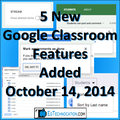
The Google for Education team added 5 new features to Google Classroom on October 14, 2014! Here is the official blog post. These features have been frequently requested by educators ever since Classroom was released in August. In this blog post, I'll break down those features and provide you with video tutorials of how they work.Reveal Deleted Items in the StreamOne concern that many teachers had with the Classroom Stream was that students could create and then delete posts and comments without the teacher ever knowing that it happened. That's been fixed with a new feature that allows the teacher to reveal deleted items in the stream! Now the teacher can see their own deleted assignments and announcements and any posts or comments that students deleted. Deleted items appeared grayed out.Google Classroom - Reveal Deleted Items (Youtube)Students Can Now Turn In Assignments without an AttachmentAnother major concern from teachers was that students could only turn in their Assignments if a file was attached. So, for example, if a teacher wanted to assign the students a quiz with a Google Form, students technically couldn't "Turn In" the assignment, because there was no file attached to it. Of course, there is always a work around, but it isn't always convenient. Now, students are able to complete an assignment without an attachment just by click on the "Mark as Done" button.Google Classroom - Student Option to Mark as Done (Youtube)More Classroom Control for TeachersTeachers have now been given more control over their students in Classroom with two more added features! When teachers grade, they often want to organize their students by first or last name. That wasn't possible in Classroom until now! Also, some teachers wanted the ability to prevent students from posting and commenting on the stream. I have my own opinion on this matter, but I can understand how the stream might get cluttered with all the posts and comments from students. Some teachers want to turn that feature off, or at least "mute" one or two unruly students, and now they can!Google Classroom - Roster & Stream Control (Youtube)Invite Students from a Google GroupIf you are familiar with Google Groups, you can now access your Groups while inviting your students to your Classroom. Google Groups are a great way of sharing a variety of Google related items with large groups of people. You can create your own Google Group by going to groups.google.com. Once your Group is set and ready, you will be able to access it in the invite menu in Classroom.Google Classroom - Invite Students from a Google Group (Youtube)Now, can we all say "Thank You!" to +Google for Education for listening to teachers' feedback! There are more updates to Google Classroom on the way, so stay tuned! While you're waiting, check out the rest of my Google Classroom Video Series on Youtube!
Michael Fricano II
.
Blog
.
<span class='date ' tip=''><i class='icon-time'></i> Jul 23, 2015 07:43am</span>
|