Blogs
|
The Genius Hour Design Cycle: A Process For Planning
by Nigel Coutts, thelearnersway.net
Ed note: Part 1 of this 2-part series can be seen here; note that some of the language has been slightly revised from the original post by Nigel. He uses the term passion projects, which is very close to Genius Hour and Passion-Based Learning. The differences across the three terms are often a matter of individual use and interpretation, a point we wanted to help clarify by using the three terms interchangeably even though they may not be exactly the same-passion projects needn’t use a Genius Hour format, nor does passion-based learning necessarily need to take the form of projects. In that way, the above model can be used for any of the three, but it felt most precise as a model for teachers to use to design Genius Hour projects. So, here we are. You can (and should!) read more from Nigel at thelearnersway.net.
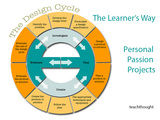
In an ongoing effort towards polishing the edges, over the years we have continued to refine the processes we apply to the Personal Passion Project. We have gained insights into the sorts of projects that work well and which will cause difficulties. We have added a degree of structure while maintaining the required degree of freedom necessary for a personalised project.
The results of this learning are presented (in the model above and the text) below.
1. Be prepared to be amazed
The quality of the students projects will go beyond what you expect. This is particularly important when a student comes to you with a grand idea that seems too hard or overly complex. If the student has the right level of passion for the project and an idea for how they will get started they will more than likely complete the project and complete it well.
2. Don’t let your fears get in the way
The students are almost certainly going to select topics that you have no knowledge of and don’t have the skills to support. At this point it could be easy to let your fears and insecurities get in the way. The best way to move forward is to listen to the student; do they know what they are doing? do they know which questions they need to answer? what problems they need to solve? If the answers to all of this are positive, start looking for an expert to help when times get tough.
3. Some students need a push in the right direction
Some students will come up with projects that are too simple with answers that could be easily Googled. We introduced the students to ‘High Order Thinking Skills’ and built these into the planning forms students complete. Projects need to include elements of synthesis, evaluation and creativity with the minimum requirement adjusted for individuals. We provide students with a list of verbs appropriate for the top levels of Bloom’s taxonomy and help them use these in framing their topics.
4. Some students design a project that has nothing to do with their passion
A student might have a passion for surfing and decide they are going to write a book about the history of the sport. The problem is they have designed a project where they will need to be a historian, a researcher, a writer and you know they don’t enjoy doing any of this. Maybe with the right topic they will gain a wider interest in these things but most likely they will quickly dream of days at the beach.
5. Some projects are just not possible
It can be hard to say no to a project but some are just not feasible. A classic example is the student who wants to design a better tennis racquet by selecting the right mix of shape and materials. The problem is that the modern tennis racquet uses high tech composites and even with million dollar R&D budgets the differences between one design and the next is hard to prove.
6. Time and Scale
Some projects will clearly take longer than you have available, others are simply too large in scale or will rely on the involvement of too many people. Setting manageable goals and working to an achievable timeframe is important. At the same time you need to ensure that the concerns over time constraints are genuine.
Creating a detailed timeline with estimates of how long each phase will take is beneficial on many levels at this stage. For the students the conversations around how long the project will take can include some rewarding reflection on how they approach tasks and can assist in their development of an understanding of their learning style. Some students need time to talk about their project and unpack ideas socially, others need quiet time to think through the steps, some just dive in and fix mistakes and redirect their plans as they go.
7. Too many changes
One of the challenges for some students has been the ever changing project. They select one topic, discover they don’t like it or encounter a problem they can’t easily solve and change to another topic. A week later and the process repeats. Setting a definite deadline after which there can be no changes is important. In the end the students work out that they have to make their ideas work.
8. Just enough planning
Over the years we refined the level of planning the students were required to do before commencing on their projects in earnest. The initial version required great detail and length processes for developing focus questions and setting targets. For some students and some projects it worked well but for others it got in the way. Eventually we got to a point where the planning had just enough detail, so we know the students have an understanding of their project and that we can support them along the way. View our simplified planning template
9. Relying on experts and building a team
Many of the projects students have explored over the years fall outside of the expertise of their teachers. I have no idea how to sew for example and have been of equally little help to students who are basing their projects around dance or music. Across the school we have found amazing partners with the skills we needed and in most cases they are keen to spend time with a student who they share a passion with. Building a team of support around the project is key to its ultimate success. Being mindful of the workload within this team is also important. We have had some colleagues so keen to help that they become overloaded and although they never complained we had to be careful in managing the demands on their time.
10. Collaboration & Self Organized Learning
Because this is a Personal Passion Project we have not included team projects. Nevertheless collaboration between students is an important part of many projects. Where possible foster the opportunities for collaboration while allowing each student to maintain control of their project. The power of collaboration will lift the quality of the projects as students share ideas and encourage each other to go beyond expectations.
Collaboration will also solve some of the problems with projects outside the teacher’s comfort zone. This year I had a group of students focused on game development and their ultimate success was a direct result of the community of like-minded learners they created around their projects. This is a perfect demonstration of students adopting a self-organized learning environment as they connect with their passions.
11. The invisible safety net
For the Personal Passion Project finding the right levels of scaffolding, teacher input and guidance is one of the challenges. We want the students to feel that they are working independently while maintaining an appropriate level of support. In many ways we are wanting to provide an invisible safety net that allows the students to take risks independently while having the support they require.
12. Documenting the process and ensuring time for reflection
Giving time to active reflection on the process has been important. Students need to be able to take a step back and assess what they have achieved and what remains to be accomplished. Sharing these ideas with peers is most beneficial and allows you to train the students in reflecting on their learning and in giving feedback to their peers.
The act of reflecting on the process has also benefitted many students when it is time to share their projects with the world as their audience is as interested in the process as they are in the product. This is particularly true for projects where the process is not obvious or is underestimated by the audience. A good example is game design projects in which the finished product does not reveal the level of knowledge and effort that was required.
13. Real Audiences
For all learning adding a real audience for the students is critical, too much of what students do is produced for an audience of one. For the Personal Passion Project presenting to an audience in the end of term ‘Gallery Walk’ has been critical in ensuring the success of the projects. The students gain a real sense of achievement from this day and the feedback is always genuinely positive.
For 2015 we are planning to move to a ‘Genius Hour’ model with students engaging in a scaffolded programme of project management skill development throughout Semester One that leads into planning for and completing a Personal Passion Project across Semester Two. The difference will be that the learning experience will be distributed across the year, one hour per week.
We hope that this fits with the demands of the new syllabus from a time perspective while retaining the best parts of the present model. Certainly at the end of the year we will reflect and share what has been learned.
The post The Genius Hour Design Cycle: A Process For Planning appeared first on TeachThought.
TeachThought Blog
.
Blog
.
<span class='date ' tip=''><i class='icon-time'></i> Aug 05, 2015 09:46am</span>
|
|
Mac Hack: How To Use Your iPad As A Second Screen Without WiFi
by TeachThought Staff
Looking for some extra screen size out of your MacBook or Mac computer? If you have all three of the following, you may find some use in Duet Display.
1. An iOS mobile device (iPad or iPhone)
2. An OSX laptop or computer (MacBook Air, MacBook Pro, or iMac)
3. The need (or perceived need if you have the habit of buying things because they’re interesting rather than because you’re going to actually use them) for a second screen
We just paid $14.99 for use here, and so far are intrigued with its lag-free speed.
What is it?
Duet Display is an app developed by ex-Apple display engineers, which is a pretty compelling attempt to establish credibility to set this app apart from the other second screen apps that aren’t fast enough, reliable enough, or are otherwise too janky to use.
The big idea here is to use your mobile (or more mobile) device to give yourself an extra visual slot for your work. Or your students’ work. And unlike Apple TV or other methods of displaying this content and that screen, this one doesn’t depend on WiFi, but rather your Lightning connection instead.
In their own words, the app developers explain below.
What’s the big deal?
"Duet is the first high performance solution to use your iPad as a second display for your Mac. Unlike other second display apps, duet’s display has zero lag."
Who made it?
"Duet (was) created by a team of ex-Apple display engineers. Our area of expertise is specifically doing what duet promises. We build a very high quality product and stress ease of use and reliability."
How does it work?
"We accomplish this by turning your iPad into a second display using the USB to 30 Pin or Lightning connection. It is far more stable than Wi-Fi, especially for people on the go. You don’t have to worry about your 802.11n network, your router settings, whether you’re on a VPN, or if you’re downloading or uploading too much data to use your display. Duet just works."
Okay, so I download the Mac app and iOS app. What hardware does it work with?
Mac Hack: How To Use Your iPad As A Second Screen Without WiFi
The post How To Use Your iPad As A Second Screen Without WiFi appeared first on TeachThought.
TeachThought Blog
.
Blog
.
<span class='date ' tip=''><i class='icon-time'></i> Aug 05, 2015 09:46am</span>
|
|
Are You A Whole Teacher? A Self-Assessment To Understand
by TeachThought Staff
Whole Child Learning is a thing; Whole Teaching should be a thing too, no?
Here at TeachThought, Jackie Gerstein’s usergeneratededucation is at the top of our reading list, in large part for her thinking about the human side of formal education. Much of our content-that is, the content here at TeachThought, and that on her site-overlaps because of our shared perspective on teaching and learning: self-directed learning, the role of play in learning, the idea of citizenship, student-centered learning (and student-centered teaching), and more.
(The fact that we have to push ourselves to think of the "human side" could be part of our problem; teaching and learning are among the most human of processes-a natural response to our environment and curiosity.)
We’ve also long been interested in the work of Costa and Kallick with the Habits of Mind (See What Are The Habits Of Mind? and 16 Strategies For Integrating The Habits Of Mind) as wonderful supplements to an academic curriculum. More and more, they’re richness has us wondering if they’re not more important than the "content" itself.
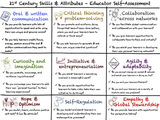
These ideas have pushed us to consider what it is that students really need to know in a modern world, which we’re going to have spend some time this year thinking about. And it is in that whole Habits of Mind/new knowledge demands context comes Jackie’s "Twelve 21st Century Skills & Attributes: Educator Self-Assessment." Jackie has framed this concept (modern teaching) through 12 characteristics, and again through teacher self-assessment questions for each characteristic.
The end result is a shift from academia to people to can supplement standards-based teaching and learning, or replace it altogether if we want to get all progressive and avant garde about it.
You can read more here-in fact, follow her on twitter, and add her blog to your favorite RSS reader.
Are You A Whole Teacher? A Self-Assessment To Understand
Oral & Written Communication
1. Do you provide learners with opportunities to speak and write using their own unique and genuine voices?
2. Do you help learners create focus, energy, passion around the oral and written communication they want to make?
Critical Thinking & Problem-Solving
3. Do you promote and reinforce doing things that haven’t been done before, where you and your learners have to rethink or think anew?
4. Do you ask learners to generate and ask their own unique essential questions?
Collaboration Across Networks
5. Do you facilitate global communication and collaboration with your learners?
6. Do you give learners opportunities to collaborate face-to-face and virtually?
7. Do you assist your learners in developing their own personal learning networks?
Curiosity & Imagination
8. Do you promote, encourage, and reinforce inquisitiveness?
9. Do you encourage your learners to add their own "personal touches" to their learning experiences?
Initiative & Entrepreneurialism
10. Do you assist in learners becoming involved in meaningful work?
11. Do you provide opportunities for learners to take risks? Take their own initiative to do things?
Agility & Adaptability
12. Do you accept change as normal and natural? And assist your learners in doing the same?
13. Are you and your learners flexible?
14. Do you and your learners use a variety of tools to solve new problems?
Hope & Optimism
15. Do you model, teach, reinforce positive self talk? A ‘Can Do’ attitude?
16. Do you assist learners in enhancing their personal agency thinking?
17. Do you expose learners to stories that portray how others have succeeded or overcome adversity?
Self-Regulation
18. Do you model and assist learners in developing and understanding their own metacognitive processes?
19. Do you help learners develop their own ability to self-motivate?
20. Do you assist learners in reflecting on and evaluating their learning experiences?
Empathy & Global Stewardship
21. Do you provide learners with opportunities for perspective taking?
22. Do you assist all learners in understanding the interdependence of all living things?
23. Do you create opportunities for learners to put empathy into action; engage in pro-social behavior intended to benefit others?
Resilience
24. Do you help learners see failures as opportunities for growth?
25. Do you encourage and reinforce learners’ own intimate resiliency?
26. Do you insure that each and every learner knows "You Matter"?
Grit
27. Do you give learners opportunities to work on long-term, complex projects?
28. Do you assist learners in identifying and acknowledging the rewards of persevering through tough times?
Vision for the Future
29. Do you give learners the time, resources, and opportunity to identify and pursue their dreams?
30. Do you assist learners in developing the steps needed to achieve their dreams?
Whole Teaching; Are You A Whole Teacher? A Self-Assessment To Understand
The post Are You A Whole Teacher? A Self-Assessment To Understand appeared first on TeachThought.
TeachThought Blog
.
Blog
.
<span class='date ' tip=''><i class='icon-time'></i> Aug 05, 2015 09:46am</span>
|
|
Windows 10 Will Be Free; Should Teachers Care?
by Terry Heick
"We want people to love Windows on a daily basis."
Microsoft Chief Executive Satya Nadella made their intentions clear at the Windows 10 Live Event January 21st, 2015 in Remond, Washington. Windows needs to be everywhere. And it is.
Sort of.
With the pending release of Windows 10 (sometime this fall-for a new operating system by Microsoft, that’s pretty soon), they took the stage to explain to an increasingly mobile world why they still mattered. We all grew up on Microsoft products (with some Macintosh thrown in). Office continues to be the standard by which productivity suites are measured. Word, PowerPoint, Excel, OneNote and other de facto 1990s products are available everywhere today-on Macs, PC, iPads, iPhones, Androids.
Windows Phones, while not popular, have strong hardware and a surprisingly good operating system. Their purchase of Nokia gave them mobile bandwidth they hoped would allow them to compete with Apple. Xbox is neck-and-neck with Sony in the world of video games. Whether battling Google for patents, Sony for video game supremacy, or Apple for everything else, Microsoft is everywhere.
Only they remain almost entirely invisible in a world no longer obsessed with productivity-the same world that left BlackBerry behind. Platform-thinking, mobility, and the thoughtfulness of interfaces have replaced drivers, office suites, and even cost as prime mover factors. While people talk about apps and the cloud, the keystone is ecology. And everyone wants you using theirs.
For teachers and schools and classrooms and students, while Apple has always occupied a niche, Microsoft has dominated marketshare. According to edweek and the International Data Corporation, In the third quarter of 2014 "shipment of devices loaded with Microsoft’s Windows dropped to a 51 percent market share this year from a 63 percent market share in 2013." Chromebooks are replacing Microsoft laptops because Google Drive is replacing Microsoft Word.
And there goes Microsoft’s long-held trump card. If you want mobile learning, you buy an iPad or Android. If you want streamlined document sharing and access, you use Google Drive and Google Apps for Education.
What compelling reason is there to use Microsoft? Google is a Swiss army knife. Apple is hip and forward-thinking. Right now, education is aching for innovation, and have turned to technology to make it happen.
And they’re not getting a compelling response from Microsoft.
The post Should Teachers Still Care About Windows? appeared first on TeachThought.
TeachThought Blog
.
Blog
.
<span class='date ' tip=''><i class='icon-time'></i> Aug 05, 2015 09:46am</span>
|
|
100 Words: Teaching As Hammering With Paintbrushes
by Terry Heick
Okay, so quick 100 words on teaching and creativity.
Schools are made of classrooms, classrooms of students.
Students are people, and people seek to solve problems important to them. Schools, then, are think-tanks-gathering places for resources and information in order to creatively solve problems.
Without students at the center of the learning experience, learning is passive, which mutes creativity-or at least fails to necessitate it.
Students demonstrate extraordinary resourcefulness when scarcity meets need. In failing to allow students to solve problems, we reduce learning to its crudest form-institutional compliance. We force naturally creative students into decidedly non-creative roles.
Lesson? Don’t hammer with a paintbrush.
Image attribution flickr user bengrey
The post Teaching As Hammering With Paintbrushes appeared first on TeachThought.
TeachThought Blog
.
Blog
.
<span class='date ' tip=''><i class='icon-time'></i> Aug 05, 2015 09:45am</span>
|
|
Editing Robert Burns For The 21st Century
by Dr. Pauline Mackay, Lecturer in Robert Burns Studies, University of Glasgow
Here at the University of Glasgow’s Centre for Robert Burns Studies, we are undertaking a major project to edit Robert Burns’s works for the 21st Century.
Funded by the Arts and Humanities Research Council and led by Professor Gerard Carruthers (General Editor), the project team is working to produce the multi-volume New Oxford Edition of The Works of Robert Burns; has established an innovative website, including social networking, with the wider global Burns community; has commissioned, recorded and uploaded new performances of Burns’s songs to support the OUP edition; and has hosted a number of events including conferences, performances, key-note lectures, symposia and exhibitions.
A project on this scale has never been undertaken in Burns studies. By making use of 21st century digital resources, and by adopting 21st century editorial practices, we are better placed than ever before to offer a fully (and extensively) annotated scholarly edition of the bard’s works that considers the fullest possible ranges of manuscripts, printed books and many other sources for his poetry, song, prose and correspondence.
The first volume of the new Oxford edition, Robert Burns: Commonplace Books, Tour Journals, and Miscellaneous Prose (edited by Professor Nigel Leask), represents a milestone in Burns scholarship. Although most of the items have been published before, they’ve never been gathered together in one volume with introductory material, complete textual resourcing and full annotations, all considered with the context of Burns’s life and historical age.
The ‘Ayrshire’ Commonplace Book (1793-5), the ‘Edinburgh Journal’ (1787-90), and the ‘Glenriddell Manuscripts’ (1792-4) are transcribed from original manuscripts, and offer a fascinating insight into Burns’s creative process, as well as containing unique drafts of many of his most important works.
The Tour Journals see Burns narrate his travels in the Borders and Highlands at the height of his fame in 1787, and reflecting on Scottish culture and society at a time of intense historical change. The project team are also plotting the routes of Burns’s tours on contemporary maps with assistance from the National Library of Scotland Maps Department and, from January 2015, visitors to the project website will be able to read what the bard said about different places that he visited on his journey, and to enjoy some accompanying images as part of this new digital resource.
The volume also collects Burns’s miscellaneous prose writings, ranging from the prefaces to the Kilmarnock and Edinburgh editions of his Poems, through the poet’s blueprint for a circulating, subscription library in Dumfriesshire, to his correspondence in the newspapers touching on matters of contemporary political and social import.
The second volume of the new edition, edited by Professor Murray Pittock, will be The Scots Musical Museum: a collection first gathered by James Johnson (c.1750 - 1811) and one of the canonical texts in the formation of what we now think of as the Scottish song tradition. This particular set of songs is also important in the question: what is the Burns canon?
Until the 1960s, Burns was credited with the authorship of an increasing number of songs in the Museum, until almost 40% of its 600 songs were attributed to him. At the same time, it has long been recognized that many of the questions surrounding the status of Burns’s authorship are in reality unresolved.
What Is The Robert Burns Canon?
Now for the first time, a full annotated research edition of the Museum’s 600 songs will both examine the background and development to Burns and Johnson’s collection, and also, through an archaeology of known eighteenth-century variants, seek to establish which songs were by Burns, which were partly by him, and which he edited and/or collected. The result could change the Burns canon forever.
Following songs for Johnson, the third part of the OUP edition will be edited by Dr Kirsteen McCue who will focus exclusively on Burns’s songs for his second song editor George Thomson (1757-1851), considering these within the context of Thomson’s big and opulent collections of ‘National Airs’.
The close working relationship between Burns and Thomson only lasted from 1792 until the poet’s untimely death four years later. However, manuscripts and relics of Burns’s collaboration with Thomson are the main source of information we have about the bard’s song-writing methods and his opinions of what makes a good song or, indeed, a bad song. Furthermore, Burns was committed to Thomson’s collection and even left Thomson the copyright of many of his songs.
In addition to commissioning songs by Burns and many of his contemporaries, Thomson asked contemporary European composers like Beethoven and Haydn to ‘set’ or ‘arrange’ the melodies for these songs for piano and voice along with parts for violin and cello. And so, Thomson may be credited with initiating the remarkable combinations of Burns and Haydn and Burns and Beethoven, enhancing the poet’s profile internationally.
The Editing Robert Burns for the 21st Century website aims to be a valuable complimentary resource where interested parties can read blogs about the team’s research activities, enjoy several online exhibitions (for example, about ‘Auld Lang Syne’, Burns’s most internationally famous song), and download the many freely available new recordings of Burns’s songs. As we edit Robert Burns for the 21st century, our textual editing, musicological and digital activities must necessarily go hand in hand. We hope that you will enjoy and make use of the end result!
Visit the project website to access resources and freely available recordings: http://burnsc21.glasgow.ac.uk/, and follow us on twitter.
Image attribution wikimediacommons; Editing Robert Burns For The 21st Century
The post Editing Robert Burns For The 21st Century appeared first on TeachThought.
TeachThought Blog
.
Blog
.
<span class='date ' tip=''><i class='icon-time'></i> Aug 05, 2015 09:44am</span>
|
|
The Flow Theory In The Classroom: A Primer
by Steve Wheeler, Associate Professor, Plymouth Institute of Education
This is number 6 in my blog series on major learning theories. My plan is to work through the alphabet of psychologists and provide a brief overview of their theories, and how each can be applied in education. In the last post we examined the work of Craik and Lockhart on Levels of Processing theory. In this post, we explore the work of Mihály Csíkszentmihályi on Flow Theory. This is a simplified interpretation of the theory, so if you wish to learn more, please refer to the original work of the theorist.
There is an interesting news report on the BBC News website this morning. It is a piece claiming that children who use technology at home are finding that they are not able to concentrate in school. They are not able to focus, claims the report, because ‘they’re spending so much time on digital games or social media.’ Yeah right. It’s easy to blame lack of concentration on technology, but what about the quality of the lessons they are attending?
The onus is on teachers to make lessons more interesting, and that is what they are trained to do. Part of the solution might be to incorporate these digital games and social media into some of the lessons. Just how can we engage students more effectively? Here’s Flow Theory:
The Flow Theory
You know that moment when you are in the zone, on the ball, completely focused? You become so absorbed by what you are doing that your forget what the time is, you forget to eat, you miss sleep. That’s essentially what flow is. According to Mihály Csíkszentmihályi, being in the flow is the ultimate in focused intrinsic motivation.
In simplistic terms, being in the flow is where students find themselves in that narrow channel between disinterest and fear. There is a fine balance between the challenge of the task, and the skills the learner has at their disposal. Maintaining this balance avoids disillusionment if your skills don’t measure up to the challenge, or boredom if the task is too simple and easy to achieve.
Applying The Flow Theory In The Classroom
Learners who are immersed in their studies tend to be single-mindedly motivated to explore their topic. Getting them to the place where they fall so in love with learning that little else matters is another matter entirely. One of the ways teachers can help students to focus more on their studies is to make learning so irresistible that there is seems to be no other option.
Games and gamification may offer students the fine equilibrium between boredom and anxiety, as will other forms of immersive learning such as role play, simulation and problem solving. As long as the learning resource is designed to have the appropriate levels of challenge built into it, students will be interested. The graphic illustrates this clearly. P2 and P3 are positions that should be traversed quickly if students are to remain in the flow. (See also our post on Why We Play Video Games.)
To be successful, challenge-based learning requires achievable goals that require some incremental development of skills beyond the average, and where the challenge rises commensurately to match those skills (student progresses from P1 to P4). If the subject matter is made interesting and enjoyable enough, teachers won’t have to work too hard to encourage students to actively engage.
They will do so naturally, because they will want to rise to the challenge, and succeed because they see no other possible outcome.
Reference
Csíkszentmihályi, M. (1990) Flow: The psychology of optimal experience. London: Harper and Row.
Previous posts in this series:
Anderson ACT-R Cognitive Architecture
Argyris Double Loop Learning
Bandura Social Learning Theory
Bruner Scaffolding Theory
Craik and Lockhart Levels of Processing
This post first appeared on Steve’s personal blog; image attribution the man himself (Steve Wheeler); The Flow Theory In The Classroom: A Primer
The post The Flow Theory In The Classroom: A Primer appeared first on TeachThought.
TeachThought Blog
.
Blog
.
<span class='date ' tip=''><i class='icon-time'></i> Aug 05, 2015 09:44am</span>
|
|
An EdTech Primer: Technology Use, Benefits, And Online Safety Tips
by Amy Williams
Today, many parents can pinpoint one significant difference between their child’s education and our own-technology.
Granted, we overhear complaints about Common Core or standardized tests, but the major difference is the influx of technology in education-the internet, computers, apps, and social media. The chalkboards and film projectors, which were the height of technological advancement back in our day, are now obsolete and tucked away in the storage room collecting dust.
Different Kinds Of Technology Usage In The Classroom
Today’s classrooms are now decked out with Smartboards, computer labs, Ipads, student laptops, Powerschool, electronic textbooks, and more. In fact, many teachers are typically the first group to commonly implement and understand technology in "almost all areas of personal use".
Here is a quick list of 12 popular apps and programs teachers use with students.
Google Documents (Android, iOS)
Twitter (Android, iOS)
Grapher (Android)
iTunes and iTunesU
Dropbox (Android, iOS)
eReader Programs (Such as Kindle on Android, or iBooks on iOS)
Classroom Response Systems, or "clickers" (see various models and apps)
Testing Programs (Accelerated Reader, Lexile, Accelerated Math, etc.)
Nearpod (Android, iOS)
Netflix (Android, iOS)
YouTube (universal)
Google (universal)
Educational Benefits
Recent data reveals that "78% of K-12 teachers and administrators believe technology has positively impacted the classroom and the productivity of students. Roughly 65% of educators surveyed also believe that students are more productive today than they were three years ago due to the increased reliance on technology in the classroom".
Listed below are just a few of the benefits offered by technology:
Technology can hold a child’s interest and encourage the mastering of skills through games and practice exercises that can adapt to their learning levels.
Students are able to locate information and details for almost any topic without a trip to a library or days of research.
Teachers are able to engage students and offer diverse platforms for to develop new concepts and show understanding.
Technology allows richer details and experiences through multimedia.
Social Media allows learning connections to form beyond the classroom.
Students can create videos, web pages, blogs, e-projects and more for class projects.
Technology allows you to publish and give real purpose to assignments.
Risks Associated With Online Activity
In the fast paced world and ever changing technology, it is important for educators to stay current and utilize technology that our students will encounter in life. This quest to utilize relevant technology in the classroom can raise some safety concerns.
Student safety is probably to most common concern with technology use. Over 90% of "technology coordinators, school administrators, and teachers support teaching cyber ethics, safety, and security in schools". However, only 35% of teachers admit that their school districts implement and require teaching this concepts in the curriculum.
The real-time data collected from tests, "clickers", and student feedback is valuable and has a place in the classroom. However, teachers need to realize that simply having a computer in the classroom to merely take tests on is also a pitfall of technology. Teachers need to strive to extend beyond the norm and encourage real growth and research.
Due to the continuing development of the adolescent brain, teens are not always able to make responsible choices when granted the freedom offered by new technologies. However, educational technology can enrich the learning process in ways that once were impossible in a classroom.
9 Classroom Technology Safety Tips For Students & Teachers
Online safety is a very important factor to consider when using educational technology in the classroom. Teachers are no longer able to dazzle students with Speak’N Spells or a floppy disk of The Oregon Trail.
Here are a few tips to utilize to safely use technology in your classroom:
1. Stretch yourself to the edges of the SAMR model. Think SAMR model, or the stages of edtech disruption.
2. Make sure students & parents understand goals, tools, and uses of edtech.
3. Thinking of technology as a tool, not a destination.
4. Maintain filters and firewalls.
5. Watch for fake profiles online. Include lessons about cyberbullying, predators, & identity.
6. On or off: Make sure students are intentionally visibile or anonymous online.
7. Use strong passwords. (And "password" isn’t strong.)
8. Create safe environment where students feel comfortable talking to you about learning, threats, challenges, embarassment, or other edtech effects.
9. Understand COPPA-compliance; keep private data private.
10. Provide strategies for dealing with the extraordinary, incredible, shady, unknown, old, new, and emerging corners of the digital world.
Moving Forward
Worksheets and notes still have value in a classroom, but the unlimited learning potential technology can provide is in our grasp. It is important to know what the types of Internet usage are available and to possess an understanding of the potential gains or risks associated with these technologies.
Higher level thinking skills and concepts are able to be developed with a few simple clicks of a button or a swipe of a finger. Thankfully, learning will never be obsolete. As Albert Einstein said, "The day you stop learning is the day you stop living."
9 Classroom Technology Safety Tips For Students & Teachers; An EdTech Primer: Technology Use, Benefits, And Online Safety Tips
The post An EdTech Primer: Technology Use, Benefits, And Online Safety Tips appeared first on TeachThought.
TeachThought Blog
.
Blog
.
<span class='date ' tip=''><i class='icon-time'></i> Aug 05, 2015 09:44am</span>
|
|
Looming Teacher Observation? 7 Tips For A Better Outcome
by Jason Lange
It’s nerve-racking to have someone watch you, especially while you work. So it’s no surprise that classroom observations cause anxiety for many teachers. While things run smoothly most of the time, teachers may worry that Murphy’s Law will reign once an observer steps into the classroom.
Teachers sometimes question the evaluator’s level of expertise. And as principals are drawn into more administrative roles, teachers question whether they have the focus for making accurate assessments, especially considering all of the logistic, operational, and disciplinary tasks at hand.
Observer bias, as a recent report suggests, is another anxiety producer. Observers tend to give higher marks to teachers who have the best-performing students and penalize those who lead struggling classrooms.
With all of these thoughts swirling, even the most effective teacher can stumble during an observation. But there are a few things a teacher can do to diminish the likelihood of this happening. The key is to be prepared, welcome feedback, and use it to build a better classroom.
Teacher Observation? 7 Tips For A Better Outcome
1. Visualize success
There are a number of things you can do to soothe stage fright. First, shift the focus away from your fear to your true purpose: delivering a lesson to your audience. You have to forget about what could go wrong, focus on reassuring thoughts, and visualize success. Prepare your lesson in advance, and read it aloud to get a sense of your voice.
2. Connect with students
Once it’s time to deliver the lesson, connect to your audience with smiles and greetings. Remain open, use confident posture, and make eye contact. Just be yourself. Above all else, remember that no one is perfect, and it’s OK to make mistakes.
3. Reach out to observers ahead of time if possible
Be proactive. Before the observation, you should prepare some "look for" questions. This way, your administrator will know that you’re seeking genuine feedback. For example, if you know that you tend to rush through instructions, you should ask the administrator to watch for that and pinpoint areas for improvement. This sort of feedback delivers authentic growth.
4. K.I.S.S.
Keep things simple. Observation day is not the time for a video, test, or lengthy writing prompt. Just keep it simple, and deliver a solid lesson. Elaborate plans, such as a skit or student debate, can easily go wrong. Plus, they don’t really highlight your instructional skills.
5. "Ignore" observer
Don’t let your observer become a distraction. Choose an unobtrusive place for your observer to sit before the session takes place. Be sure to provide the administrator with a copy of the lesson plan so he can follow along.
6. Specify takeaways
Reap the benefits. After the observation, don’t simply skim the administrator’s notes. Ask questions about anything you don’t understand or agree with; then, create an action plan for improvement. This plan should address areas in which you want to improve, the timeframe for the improvement, and metrics that can be used for determining success. Use SMART goals: specific, measurable, achievable, realistic, and timely.
7. Focus on student actions, not teacher actions
Focus less on what you’re going to do, and more on what students will be doing-and make sure there is a clear relationship between activities and learning objectives.
Conclusion
The time and effort it takes to plan a lesson are only useful if you can determine whether the lesson was successful. An outside observer can be invaluable for highlighting where a lesson was most effective or where it derailed. The "plan, teach, reflect" cycle of improvement is key to supporting teacher growth.
No one likes to be told that they’re doing something wrong, but a good observer can provide an outside vantage point from which to pinpoint opportunities for growth that might have otherwise gone unnoticed.
If done properly, the point of a classroom observation isn’t to judge; rather, it will help you develop as a teacher so you can help your students succeed. It can be an uncomfortable process to get used to, but once you learn to calm your nerves and see the benefits, it can be an invaluable tool.
Jason Lange is the CEO and co-founder of BloomBoard, a company dedicated to bettering the K-12 education space by providing a marketplace for personalizing educator development. BloomBoard uses the data collected from free observational and evaluation tools to create individualized learning plans and recommendations for teacher growth; image attribution flickr user ijirkamatusetek; Looming Teacher Observation? 7 Tips For A Better Outcome
The post Looming Teacher Observation? 7 Tips For A Better Outcome appeared first on TeachThought.
TeachThought Blog
.
Blog
.
<span class='date ' tip=''><i class='icon-time'></i> Aug 05, 2015 09:43am</span>
|
|
What If Schools Helped Students Identify And Scale Their Gifts?
by Drew Perkins, International Conference of Creativity, Thinking & Education
Recently while reading the most recent Fast Company magazine I came across an article entitled The Startup Revolution is About to Surge Again and was intrigued by the applications to education.
What instantly struck me was the dichotomy made between being a startup and scaling up to some sort of legitimacy. I especially like the bullet points they made below and it made me wonder about the role of standardization and creativity in education, a topic for a panel (Orbiting the Giant Hairball) on which I’ll be participating in April at the International Conference of Creativity, Thinking & Education in Minneapolis.
Standardization is most frequently thrust on students and the stuff done to them. While the debate over Common Core rages on with the issue of standardization being a major focal point it’s easy to see how requiring every student to learn the same things (and often in the same ways) could stifle creativity and innovation.
What if we shifted the conversation and debate around standardization and taught kids like they were startups and their goal was to essentially find and standardize/scale what they were great at and passionate about? Learn how to do those things very well and "standardize" that or those things as a craft to be carried into adulthood.
The 4th bullet point above notes, "Scaling is all about standardizing and executing your business model so that you can take advantage of network effects." Of course students are not a "business" and shouldn’t be treated like one, but don’t we want our young to grow and prosper in much the same way? What better way than to refine a passionate idea and/or talent as an entrepreneur would?
So what if instead of thinking of standardization with the focus being on the curriculum, content, or the teaching we viewed it through the lens of startups and scaling up and the transformation of a student, or even a school or district? What if we thought of our students as startups and our schools and classrooms as incubators that were focused on providing support to student growth?
To be clear, I’m not talking about growth as "student achievement" here which often takes the form of test scores and gaps and things much more easily measured and quantified. Instead, what if our education system was transformed to help students identify and scale what they’re good at and could turn into "a repeatable business model" that could be a passion-driven and profitable career(s)?
When approached this way, could standardization become empowering instead of emasculating?
You can discuss this and more with Drew Perkin, Terry Heick, and Jackie Gerstein at International Conference of Creativity, Thinking & Education; What If Schools Helped Students Identify And Scale Their Gifts? image attribution flickr user vancouverfilmschool
The post What If Schools Helped Students Identify And Scale Their Gifts? appeared first on TeachThought.
TeachThought Blog
.
Blog
.
<span class='date ' tip=''><i class='icon-time'></i> Aug 05, 2015 09:43am</span>
|