Blogs
|
This week Google Classroom received updates that teachers and administrators should note.
A new "share to Google Classroom" button is starting to appear on popular sites and services including Quizlet, Discovery Education, PBS, and Duolingo. The share button will enable teachers to quickly send resources from sites displaying the Classroom share button to their Google Classroom streams where they can be used as announcements or assignments.
Administrators and teachers will benefit from a new Google Classroom API that will allow developers to publish apps that can integrate with Google Classroom. An example of this is found in the new rosterSync for Sheets Add-on. rosterSync enables administrators to sync information from any student information system with Google Classroom. Watch the video below to learn more about rosterSync.
Thanks to Frank Franz and Ken Halla for the tips about the updates.
This post originally appeared on Free Technology for Teachers
if you see it elsewhere, it has been used without permission.
Related StoriesReady or Not...The New Google Drive UI is Coming to YouA Quick Tip on Google Docs FormattingInsert Images Into Google Slides and Docs on Your iPad or Android Tablet
Richard Byrne
.
Blog
.
<span class='date ' tip=''><i class='icon-time'></i> Aug 05, 2015 10:38am</span>
|
|
This week at the ISTE conference I recorded a few video segments with app developers. The first of those segments features Adam Bellow, the developer of eduClipper. eduClipper is coming out with some new features later this month. Adam talks about those features in the video embedded below.
If you can't or didn't watch the video, here's what you need to know.
1. eduClipper will soon have a new start-up tutorial for users. I saw the wireframes for those tutorials and can tell you it will be easier than ever to save and share content on eduClipper.
2. eduClipper is going to start featuring the most popular content and content contributors on the site.
3. Subject category tags are being added to eduClipper. The tags will make it easier to organize and find shared resources.
4. You will soon be able to share content from eduClipper to Facebook, Twitter, and other social networks.
Disclosure: I have a small advisory role with eduClipper.
This post originally appeared on Free Technology for Teachers
if you see it elsewhere, it has been used without permission.
Related StoriesThe Month in Review - The Most Popular PostsThe Week in Review - The Most Popular PostsPearltrees - Visually Organize and Share Collections of Files and Links
Richard Byrne
.
Blog
.
<span class='date ' tip=''><i class='icon-time'></i> Aug 05, 2015 10:38am</span>
|
|
Actively Learn was one of my favorite discoveries at the ISTE conference this week. Actively Learn provides teachers with a platform through which they can create, distribute, and assess reading activities.
To get started on Actively Learn first register for an account then create your first classroom within your account. Students join your Actively Learn classroom by entering a class code at activelylearn.com/signup. After creating your classroom you can begin adding reading assignments to it.
To create an assignment in your Actively Learn classroom you can select from thousands of articles arranged by topic, grade level, reading level, and length. Some articles have comprehension questions built into them while others do not. You can add reading comprehension and or discussion questions to any article that you select from the Actively Learn library. You can also upload your own articles as PDFs.
Once you have selected an article and added questions to it, distribute it to your students through your Actively Learn classroom. Students can read and respond to questions directly within the Actively Learn platform. You can require students to answer questions before the next section of an article is revealed to them. In addition to responding to your questions, students can flag sections of an article with "I don't understand." As the teacher you can see those flags and respond to them in your Actively Learn classroom.
Actively Learn has free and paid plans. The free plan includes unlimited assignments and unlimited access to a gradebook. The paid plans provide more tools for analyzing how students work with text beyond responding to your questions.
This post originally appeared on Free Technology for Teachers
if you see it elsewhere, it has been used without permission.
Related StoriesThe Month in Review - The Most Popular Posts81Dash Offers a Revamped Tool for Backchannels and MoreSeeSaw - Easily Create Digital Portfolios on iPads, Chromebooks, and Android Tablets
Richard Byrne
.
Blog
.
<span class='date ' tip=''><i class='icon-time'></i> Aug 05, 2015 10:38am</span>
|
|
Last fall Google renamed their Maps Engine Lite tool to My Maps. My Maps makes it easy to create simple custom maps with up to three layers on them. For example, check out this post to see how I made a biking route map in My Maps.
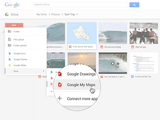
Today, Google announced that My Maps is now fully integrated into Google Drive for Google Apps for Education users. This was previously the case for Gmail users who used My Maps. Google Apps administrators can enable or disable My Maps for their users. With My Maps enabled in Google Apps for Education students and teachers will be able to create, save, and edit maps from their Google Drive dashboards.
Applications for Education
As I have written in the past, there are quite a few good uses of creating maps with multiple layers.
Multiple layers can be used for showing data differences on a year over year or month over month basis. You can display the same data with different base layers for comparison. Students working collaboratively on a map can be responsible for editing their own layers on the same map. If you’re using My Maps to have students create literature trips (look here for inspiration), they can create a different layer for each chapter of a book. Students mapping the history of an event like the U.S. Civil War can create a different layer for each year of the war.
This post originally appeared on Free Technology for Teachers
if you see it elsewhere, it has been used without permission.
Related StoriesGoogle Classroom Gets a Share Button and More New FeaturesReady or Not...The New Google Drive UI is Coming to YouA Quick Tip on Google Docs Formatting
Richard Byrne
.
Blog
.
<span class='date ' tip=''><i class='icon-time'></i> Aug 05, 2015 10:37am</span>
|
|
After my panel presentation on Monday at the ISTE conference I was approached by Janet Liao from the School of Education at Indiana State University, Bloomington. She is conducting a national research study into teachers' professional development preferences. Since this is a topic that I am also interested in, I agreed to share the survey here. If you have 5-10 minutes to help, I know that Janet will appreciate your input. The survey can be completed here.
This post originally appeared on Free Technology for Teachers
if you see it elsewhere, it has been used without permission.
Related Stories5 Takeaways from Redefining Professional DevelopmentRiddle Adds New Features for Building Image-based QuizzesHow to Create Image-based Quizzes and Polls on Riddle.com
Richard Byrne
.
Blog
.
<span class='date ' tip=''><i class='icon-time'></i> Aug 05, 2015 10:37am</span>
|
|
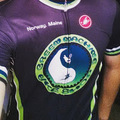
My local bike club jersey.The Tour de France begins on Saturday. Check out this animated video to learn all about the tactics of the race, the logistics of the race, the physiology of riding in the race, and many other interesting facts about the world's most famous bicycle race.
If watching the race (broadcast on NBC Sports in the US) inspires you to get outside and ride a bike, don't forget your helmet. The Brain Injury Alliance of Kentucky offers some good resources about brain injury prevention. One of those resources is a short animated video designed to teach students about the need for wearing a helmet and how to wear helmets when biking or skateboarding. In the video students learn how to pick a helmet and how to properly fit a helmet. Watch the two minute video below.
The Science Behind the Bike is a four part video series from The Open University. The series has a total running length of 33 minutes and is a complement to a larger Open Learn course called The Science Behind Wheeled Sports. The videos and the course are designed to help students understand the physics, the physiology, and the technology that influence the outcome of cycling events.
Sticking with the science of bicycling, Global Cycling Network offers a video addressing the question of whether having a light bike or light body makes the bigger difference in speed on a bike. The video is a bit long, but worth watching for the process and outcome. Ask your students for predictions before jumping to the end.
This post originally appeared on Free Technology for Teachers
if you see it elsewhere, it has been used without permission.
Related Stories118 Practical Ed Tech Tips VideosHow X-rays and CT Scans WorkThe Physics of Soccer (Football) Banana Kicks
Richard Byrne
.
Blog
.
<span class='date ' tip=''><i class='icon-time'></i> Aug 05, 2015 10:37am</span>
|
|
Earlier this week I shared some news about updates to 81Dash. 81Dash is a free service for creating moderated classroom backchannels as well as shared task lists. In the video embedded below I provide an overview of how to use the features of 81Dash.
This post originally appeared on Free Technology for Teachers
if you see it elsewhere, it has been used without permission.
Related Stories81Dash Offers a Revamped Tool for Backchannels and MoreMy Maps - Create and Edit Maps in Google Drive5 Takeaways from Redefining Professional Development
Richard Byrne
.
Blog
.
<span class='date ' tip=''><i class='icon-time'></i> Aug 05, 2015 10:36am</span>
|
|
Earlier today I shared a video about using 81Dash as a moderated backchannel tool. In the past I've published videos about using TodaysMeet and Tozzl for the same purposes. All of those videos are included in the playlist embedded below (there are two videos about TodaysMeet).
Back in April I hosted a free webinar about using backchannels in the classroom. The recording of that webinar is embedded below.
This post originally appeared on Free Technology for Teachers
if you see it elsewhere, it has been used without permission.
Related Stories81Dash Offers a Revamped Tool for Backchannels and MoreHow to Create a Moderated Classroom BackchannelMy Maps - Create and Edit Maps in Google Drive
Richard Byrne
.
Blog
.
<span class='date ' tip=''><i class='icon-time'></i> Aug 05, 2015 10:36am</span>
|
|
Fireworks are popping around my little town this evening. Of course, my dogs are not happy about that. The upside of hearing the amateur fireworks displays is that it reminded me of a couple of videos about the science of fireworks.
If you or your children are wondering how the fireworks actually work, take a look at the following videos from National Geographic and Discovery News.
Both of these videos could be the basis of a flipped science lesson. In this post I provided an overview of how to use five services to create flipped video lessons.
This post originally appeared on Free Technology for Teachers
if you see it elsewhere, it has been used without permission.
Related StoriesHow X-rays and CT Scans WorkThe Physics of Soccer (Football) Banana KicksBuild Your Own Silicate Materials - And Other Virtual Chemistry Lessons
Richard Byrne
.
Blog
.
<span class='date ' tip=''><i class='icon-time'></i> Aug 05, 2015 10:36am</span>
|
|
As I was doing some landscape work in my yard today there was n doubt that summer is here. The sun felt hot and even a breeze didn't cool me down much as I moved piles of dirt in my yard. (If you're curious, I am building terraces for planting). I was not in danger of heat stroke today, but the experience did remind me of a TED-Ed lesson on the topic.
What Happens When You Get Heat Stroke? is a TED-Ed lesson that explains the difference between exertional and classical heat stroke. The lesson also explains the symptoms and treatment for heat stroke. The video is embedded below. The full lesson is available here.
This post originally appeared on Free Technology for Teachers
if you see it elsewhere, it has been used without permission.
Related StoriesHow X-rays and CT Scans WorkThe Physics of Soccer (Football) Banana KicksThe Science of Fireworks
Richard Byrne
.
Blog
.
<span class='date ' tip=''><i class='icon-time'></i> Aug 05, 2015 10:35am</span>
|