Blogs
|
All summer long I am offering online professional development courses. Tomorrow night I'll be starting a new section of Blogs & Social Media for Teachers and School Leaders. Graduate credit is available for completing the course. Click here to learn more and to register.
Blogs and Social Media for Teachers and School Leaders is designed to help teachers and school leaders develop an understanding of the many ways they can use blogs and social media (Twitter, Google+, Instagram, and more) to enhance communication between school and home. After learning about how each of the tools works we’ll dive into developing strategies for implementation.
Blogs and Social Media for Teachers and School Leaders is a five week webinar series during which teachers and school administrators will learn the how to choose the best blogging platform for their situations, how to set-up a blog for classroom and school-wide use, and learn about strategies on how to manage blogs in classroom and school-wide settings. Participants will also learn how to avoid the mistakes that often lead to blogging endeavors being abandoned. After establishing blogs we’ll jump into using social networks like Twitter, Google+, and Instagram to reach out to parents, students, and other members of school communities.
This post originally appeared on Free Technology for Teachers
if you see it elsewhere, it has been used without permission.
Related StoriesHow to Schedule Blog Posts on Blogger, Edublogs, and KidblogHow to Turn Your Blogger Blog Into a Book - VideoCreate a Physical Record of Your Blog With BlogBooker
Richard Byrne
.
Blog
.
<span class='date ' tip=''><i class='icon-time'></i> Aug 05, 2015 10:34am</span>
|
|
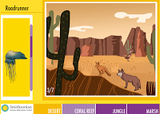
Habitats is a fun little game from the Smithsonian Science Education Center. The online game challenges elementary school to match animals to their habitats. The game shows students images representative of four habitats; desert, coral reef, jungle, and marsh. Students drag pictures of animals from a list to their corresponding habitats. Students receive instant feedback on each move they make in the game. Once an animal has been placed in the correct habitat students can click on it to learn more about it in the Encyclopedia of Life.
Applications for Education
Habitats could be a fun game for students to play as a review activity after studying one or all four of the habitats featured in the game.
This post originally appeared on Free Technology for Teachers
if you see it elsewhere, it has been used without permission.
Related StoriesDinosaster - A Game About Dinosaur ExtinctionThe Physical Effects of Heat Stroke - A TED-Ed LessonThe Science of Fireworks
Richard Byrne
.
Blog
.
<span class='date ' tip=''><i class='icon-time'></i> Aug 05, 2015 10:34am</span>
|
|
Years ago I used Stupeflix for a couple of classroom video projects. Then the service changed pricing models and I could no longer use it with students. Recently, someone on Facebook (sorry, I now cannot find who) mentioned Stupeflix so I gave it another look this morning. Some great improvements have been made to Stupeflix since the last time that I used it.
Stupeflix allows you to create audio slideshow videos up to twenty minutes in length. You do not need to register in order to create a video on Stupeflix. You can and should register if you want to be able to go back and edit your video after it has been published.
To create a video on Stupeflix start by choosing a theme for your video then uploading pictures from your computer. If you don't have any pictures on your computer you can importing some from your Flickr, Facebook, or Instagram account. Once your pictures are uploaded or imported you can drag and drop them into the sequence in which you want them to appear. You can layer text on each image. To add sound to your video you can select a soundtrack for the entire video or layer sound on each image individually. Stupeflix provides a nice gallery of free soundtracks that you can use or you can import your own audio tracks. When you're ready to see your finished product, click the preview button before publishing your video.
Click image for full size.
With the free Stupeflix plan your videos must be made public and they will have a watermark on them. You can embed them into a blog post as I have done below.
Applications for Education
Stupeflix doesn't require students to register in order to make a video. That could make it a good alternative to Animoto or YouTube's audio slideshow tool. One drawback to Stupeflix is that the advertising displayed next to some free videos might be misleading for younger users. For example, the advertisement displayed next to my free video included a link to download software which some students might think is a link to download their videos. See my screenshot below for an explanation.
Click image to view full size.
This post originally appeared on Free Technology for Teachers
if you see it elsewhere, it has been used without permission.
Related StoriesThe Week in Review - The Most Popular PostsThe Science of Fireworks5 Videos About Classroom Backchannel Tools
Richard Byrne
.
Blog
.
<span class='date ' tip=''><i class='icon-time'></i> Aug 05, 2015 10:34am</span>
|
|
The Canadian Museum of Nature offers a large collection of online games about mammals, birds, and dinosaurs. Choose one of the three categories on the gallery page to see all of the related games. The games are primarily matching activities with some small interactive elements added into the mix. For example, the game about beaver lodges asks students to help create a beaver lodge by dragging the proper pieces together while also making the beavers swim away from predators.
Applications for Education
The games offered by the Canadian Museum of Nature do provide students with a little bit of context and some instruction before and while they are playing. That said, these games are best suited as review activities in elementary school classrooms.
This post originally appeared on Free Technology for Teachers
if you see it elsewhere, it has been used without permission.
Related StoriesHabitats - An Educational Game from the SmithsonianDozens of Online Games and Quizzes About GrammarConsumer Education at the Mall
Richard Byrne
.
Blog
.
<span class='date ' tip=''><i class='icon-time'></i> Aug 05, 2015 10:34am</span>
|
|
Creating image collages can be a nice way for students to summarize the highlights of a school event, demonstrate photography skills, or assemble a little story to introduce themselves to their new classmates in the fall. From Google Drawings, to PicCollage, to PicMonkey there are plenty of tools for making digital image collages. FotoJet Collage Maker is a new-to-me tool to add to the list of options for creating image collages.
FotoJet Collage Maker is free to use without registering on the site. To get started select a template from the gallery of nearly 200 templates. Each template is just a starting point as they can all be modified to your liking. After choosing a template you can import pictures from your desktop or from your Facebook account. Instagram-like color filters can be applied to each picture that you import. A large gallery of font styles is available to use as you add text to your collage. Completed collages can be downloaded in a variety of sizes and resolutions. Collages can also be shared to Facebook.
Click to view full size.The same method that I used to make PicMonkey collages interactive can be used to make FotoJet collages interactive. Click here to learn how.
This post originally appeared on Free Technology for Teachers
if you see it elsewhere, it has been used without permission.
Related StoriesThe Week in Review - The Most Popular Posts5 Videos About Classroom Backchannel ToolsThree Tools for Creating Multimedia Year-in-Review Collages
Richard Byrne
.
Blog
.
<span class='date ' tip=''><i class='icon-time'></i> Aug 05, 2015 10:33am</span>
|
|
Disclosure: SeeSaw's parent company is an advertiser on FreeTech4Teachers.com.
Last week at the ISTE conference I was able to meet with Carl Sjogreen who is the developer of the popular iPad apps Shadow Puppet Edu and SeeSaw. We talked about how the apps were developed and some features that are rolling-out later this year. Unfortunately, the video did not come out as well as I hoped, but what was usable is embedded below.
About Shadow Puppet Edu:
Shadow Puppet Edu is a free iPad app that students can use to create audio slideshow videos. The app offers an integrated search tool that students can use to find pictures from the Library of Congress, to search for images from NASA, and to find Creative Commons licensed images from Flickr. Students can also import pictures and videos from the camera roll on their iPads.
After selecting a set of images students can arrange them into any sequence by simply dragging and dropping them into order. Then to create a story students press the record button and talk while flipping through the images. Shadow Puppet Edu allows students to add text and stickers to each image too. When they’re happy with their work students can share their Shadow Puppet Edu projects through a variety of methods including YouTube and email. Shadow Puppet Edu projects are automatically saved to the camera roll on a student’s iPad. Students do not have to register for an account or have an email address to use Shadow Puppet Edu.
About SeeSaw:
SeeSaw is available as an iPad app, as a Chrome web app, and as an Android app. Through SeeSaw students can add artifacts to their portfolios by taking pictures of their work (in the case of a worksheet or other physical item), by writing about what they've learned, or by uploading a short video about things they have learned. The SeeSaw apps students can add voice comments to their pictures to clarify what their pictures document. Students can create folders withing their accounts to organize content from multiple subject areas.
To get started with Seesaw create a free classroom account. Students join the classroom by scanning a QR code (you will have to print it or project it) or entering a classcode that grants them access to your Seesaw classroom. As the teacher you can see and sort all of your students' Seesaw submissions. SeeSaw allows parents to create accounts through which they can see the work of their children. As a teacher you can send notifications to parents when their children make a new SeeSaw submission.
This post originally appeared on Free Technology for Teachers
if you see it elsewhere, it has been used without permission.
Related StoriesLeave Audio Comments for Students In Their Digital Portfolios on SeeSawOur Story - an App for all LevelsPicCollage for Kids - Create Visual Stories
Richard Byrne
.
Blog
.
<span class='date ' tip=''><i class='icon-time'></i> Aug 05, 2015 10:33am</span>
|
|
When I was a freshman at Central Connecticut State University I had a professor say to me, "you throw around punctuation like it's confetti." There are days when that statement is still true. One of those pieces of confetti punctuation that troubled me then and troubles me now is the semicolon. I know that I am not the only person who has been tripped up by the semicolon. A new TED-Ed lesson, How to Use a Semicolon, was made for people just like me. The video is embedded below. The full lesson with application questions is available here.
This post originally appeared on Free Technology for Teachers
if you see it elsewhere, it has been used without permission.
Related StoriesThe Physical Effects of Heat Stroke - A TED-Ed LessonThe Science of FireworksDozens of Online Games and Quizzes About Grammar
Richard Byrne
.
Blog
.
<span class='date ' tip=''><i class='icon-time'></i> Aug 05, 2015 10:33am</span>
|
|
The Practical Ed Tech Summer Camp starts next Monday morning in Portland, Maine. The event has been sold out since May, but I just had a last minute cancellation. There is one seat available now. Click here to register or read on for more information.
The Practical Ed Tech Summer Camp is a hands-on exploration of how to use free technology tools in your classroom. This two day workshop is based on my framework for using technology to help students discover new information, discuss their ideas, and demonstrate their knowledge. Registration is limited to ensure that every participant gets the attention he or she deserves.
This year's Practical Ed Tech Summer Camp is being held at the Holiday Inn By the Bay in downtown Portland, Maine. Healthy breakfasts and hearty lunches will fuel your brain for learning and are included in your registration. And when we're done for the day you can walk to dozens of restaurants along the Old Port's cobblestone streets, walk to the ocean, or even hop a boat and take a sunset cruise to see the islands in Casco Bay. Beaches are just a few minutes drive from the hotel.
The two day workshop is based on my framework of Discovery, Discussion, and Demonstration. The first day is focused helping students use technology to discover and discuss. Day two is focused on demonstrating knowledge by creating new digital content including podcasts, videos, and other multimedia productions. Click here for general outlines of the day.
This post originally appeared on Free Technology for Teachers
if you see it elsewhere, it has been used without permission.
Related StoriesSpring & Summer PD Opportunities With MeOnline Course - Blogs & Social Media for Teachers Begins Tomorrow NightSurvey - What Makes for Good Professional Development?
Richard Byrne
.
Blog
.
<span class='date ' tip=''><i class='icon-time'></i> Aug 05, 2015 10:33am</span>
|
|
Last week I met with representatives of dozens of companies pitching their products at the ISTE conference. In the course of the year I’ll hear dozens of more pitches and receive hundreds, if not thousands, of press releases from edtech companies. Of all of those companies, the ones that fail to hold my attention make the same mistake. Whether they realize it or not, they talk down to teachers.
There are a few ways I hear edtech companies talk down to teachers without realizing it. First, if your response to "why did you start this company?" is "I’ve always been interested in education and I wanted to help with problem X" you’ve already lost me and most of my friends. Your response has signaled that you think anyone can step into education and immediately make an impact. Nothing is more offensive to teachers than people who don’t have classroom experience (one year of Teach for America doesn’t count) purporting to have the solution to their problems. I’ve always been interested in dentistry, but I’m not going to tell my dentist that I have a better way of performing root canals. Yes, I know you've talked to lots of teachers and read lots of books. I've also talked to lots of dentists and read books.
The second unintentional talking down mistake edtech companies make is assuming nothing. I sat through a few pitches at ISTE in which I was asked, "are you familiar with the SAMR model?" Seriously, we’re at the largest edtech conference in the world and you’re asking me if I’m familiar with SAMR? Guess what, you’ve just talked down to me and probably most of the other educators who stopped by your booth during the conference. If I wasn’t familiar with the term I’d do what I’ve taught students to do for years, either ask or figure it out in context.
Third, stop asking teachers to do for free what companies in other industries pay for. Yes, we all love a free tee shirt (provided it fits and isn’t ugly), free coffee, or free pens. But don’t ask teachers to give hours of their time for one of those things and a "digital badge" that says something like "teacher ambassador for company X." If you want market research, pay for market research. If you want product advisement, pay the hourly rate (or equity rate) for product advisors. In other words, offer something of value in return for teachers’ time. You might be thinking, well Google and Apple don’t provide anything to teachers. That’s not true because being a Google Certified Teacher or Apple Distinguished Educator provides those teachers with a fantastic opportunity to earn money as trainers around those products. (I’ve personally made a good living from my GCT status). People aren’t making money by being the "product ambassador" for a start-up that is addressing a small problem/ niche in the market.
Finally, the most obvious example of edtech start-ups talking down to teachers is found when a company attempts to tell teachers how to teach. Unless your company is run by teachers or has a lot of teachers on staff, you’re probably going to end up talking down to teachers when you make your pitch. Teachers receive enough edicts from on high in their school districts, they don’t need a edtech start-ups run by people who have little or no classroom experience telling them how they should be teaching. I recently, politely, sat through a pitch from a company that spent ten minutes essentially telling me how they tell teachers that worksheets are bad and digitized activities are good. There were two problems with that pitch. First, they didn’t say anything that is news to teachers. Second, their solution was to replace the worksheet with its iPad equivalent.
Believe me, I want edtech start-ups to do well. In fact, I love helping edtech start-ups that have remarkable products do well. When you do well, we all do well. Just make sure you’re doing well without talking down to the people you need the most, the teachers.
This post originally appeared on Free Technology for Teachers
if you see it elsewhere, it has been used without permission.
Related StoriesHow to Use a Semicolon - A TED-Ed Lesson for Almost EveryoneA Short Interview With the Founder of Shadow Puppet Edu & SeeSawFotoJet - Another Free Tool for Creating Image Collages
Richard Byrne
.
Blog
.
<span class='date ' tip=''><i class='icon-time'></i> Aug 05, 2015 10:32am</span>
|
|
On July 22nd Simple K12 is hosting a morning and afternoon of free webinars about Google tools for teachers. The webinars will start at 10:00am Eastern Time and run until 1:30pm Eastern Time.
There will be four webinars on July 22nd. I will be presenting sessions on YouTube tools, Blogger, and Google Drive Add-ons.
These free webinars are designed for folks who are new to using Google tools. Teachers who would like to pick up some tips for teaching others how to take advantage of the great things that Google has to offer will also enjoy the content of these webinars. Click here to register.
FAQs About Simple K12 Webinars:
1.) Is this free?
a. Yes!
2.) Can I have the recordings after?
a. We will make the recordings available for 2 weeks following the event.
3.) How do I access the recordings? Do I need a SimpleK12 membership?
a. No, SimpleK12 will share the links with Richard Byrne / FreeTech4Teachers.com and all of the registrants following the event so you can view for 2 weeks following the event. But be sure to register so you will be notified.
Disclosure: I am being compensated for my time presenting these webinars.
This post originally appeared on Free Technology for Teachers
if you see it elsewhere, it has been used without permission.
Related StoriesJoin Me Next Tuesday for an Afternoon of Free WebinarsJoin Me for An Afternoon of Free Webinars About Google AppsEdTech Start-ups - Stop Talking Down to Teachers
Richard Byrne
.
Blog
.
<span class='date ' tip=''><i class='icon-time'></i> Aug 05, 2015 10:32am</span>
|