Blogs
|
Sean Williams and I are hosting this event in Los Angeles on March 7 & 8. We'll be sharing the latest on Chromebooks (hot off the presses at the Google event in Mountain View later this month), the price is accessible, and the location is spectacular (with good food to boot). Here is more information in case you might be interested:Chromebook Camp with Google Apps for EducationMarch 7 & 8, 2011 (at City Club in Los Angeles)Brought you by the EdTechTeam, this unique professional development event for educators offers hands-on experience with Google's fast intuitive Chromebooks, inspirational ideas for using Google Apps (and Chrome Web Apps) in education, and tips for getting started with advanced topics such as apps scripting or hosting your own instructional channel on YouTube - all in a spectacular setting. Registration is open for the introductory first day, the advanced second day, or both days. Best of all, everything you learn during the workshop can be implemented right away for FREE, with or without Chromebooks. More: http://www.edtechteam.com/chromebookNaturally, we'd love it if you share this with your colleagues in the area (or who might be interested in traveling to the event for that matter). And, of course, I'd be happy to answer any questions about what we have planned.
EdTechTeam
.
Blog
.
<span class='date ' tip=''><i class='icon-time'></i> Dec 05, 2015 01:31pm</span>
|
|
Our first Chromebooks and Google Apps in Education workshop went well yesterday. A unique professional development event for educational leaders, the workshop offered hands-on experience with Chromebooks, educational uses for Google Apps (and Chrome Web Apps), and a full spectrum of solutions for Google Apps and Chromebooks in Schools - all in a spectacular location. The updated resources are publicly available here: http://www.edtechteam.com/workshops/2012-03-07If you'd like to host your own Chromebook event, contact us or fill out the online request form. The EdTechTeam also offers Chromebooks for a 30 day evaluation period. Contact us to request two units for evaluation.
EdTechTeam
.
Blog
.
<span class='date ' tip=''><i class='icon-time'></i> Dec 05, 2015 01:31pm</span>
|
|
We invite you to join us for the first annual Google Apps for Education California Summit to be held at the Hyatt Regency Santa Clara on July 12 & 13, 2012. This high intensity two day event focuses on deploying, integrating and using Google Apps for Education to promote student learning in K-12 and higher education.The program features Google Certified Teachers, Google Apps for Education Certified Trainers, practicing administrators, solution providers, Google engineers, and representatives from the Google Apps for Education team.Plan now to send your teachers, administrators, tech directors, library media specialists, tech support staff, CTOs, and anyone who is interested in finding out more about leveraging Google Apps for Education to support student learning. More...
EdTechTeam
.
Blog
.
<span class='date ' tip=''><i class='icon-time'></i> Dec 05, 2015 01:30pm</span>
|
|
The EdTechTeam is thrilled to announce the first* international Google Apps for Education Summits!A team of Google employees, Google Certified Teachers, and Google Apps Certified Trainers will converge on the American School Foundation in Mexico City on August 31st and September 1st, 2012. The summit is open to educators from Latin America, the Caribbean, and around the globe. Visit the event site for more information and to register: http://mx.gafesummit.comA similar event is planned at Albany Senior High in Auckland, New Zealand on October 9, 2012. The summit is produced in partnership with the ULearn Conference, and participants are encouraged to come for the summit - stay for the conference. The summit (and conference) are open to educators from Australia, the Asia Pacific region, and around the globe. Visit the event site for more information and to register: http://nz.gafesummit.comBoth events are meant for teachers, administrators, tech directors, library media specialists, tech support staff, CTOs, and anyone who is interested in finding out more about leveraging Google Apps for Education to support student learning. Sessions include keynote presentations, informative breakouts, cutting-edge demonstrations, and hands-on workshops led by experienced and knowledgeable professional developers. Topics include:Deployment & Management of Google AppsGoogle Apps ScriptsGoogle Apps for Education CertificationYouTube for SchoolsGoogle Docs, Google Sites, Google Calendar, Gmail power tips, and... even more!To view all of the global Google Apps for Education Summits produced by the EdTechTeam, visit www.gafesummit.com. If a location in your region isn't listed, consider hosting your own summit.*Note: The Prague Summit at the International School of Prague on October 13 and 14, 2012 (where some of the EdTechTeam will be presenting) was actually announced first, but Latin America and New Zealand will happen first. Learn more or register for the Prague summit here: http://www.praguesummit.org
EdTechTeam
.
Blog
.
<span class='date ' tip=''><i class='icon-time'></i> Dec 05, 2015 01:30pm</span>
|
|
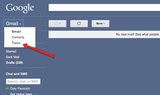
In anticipation of the upcoming Rocky Mountain Google Apps Summit, I will be posting a series of #inbox0 tips for Google Apps users. Thanks for your interest! +Cory Pavicich#inbox0 tip 1: Your inbox is NOT your task list. Decide what to do the FIRST time you open an email, and then Archive, Archive, Archive!Many of us keep emails in our Gmail inboxes to remind us to do something later. Maybe you star it, or use Priority Inbox so that it drops to the "read and important" label. You should never open an email more than once before you decide what to do with it. Decisions take energy, and you are wasting yours looking at the same emails again and again.To get control of your inbox keep your tasks in a task list, NOT your in inbox. Gmail makes this easy by providing you with an integrated task list. Gratuitous shot of my empty inboxBut how are you supposed to manage your Tasks in Gmail, knowing that new emails will distract you at every turn? Use Google's secret Canvas View for tasks! Bookmark https://mail.google.com/tasks/canvas so you can manage your tasks without having to manage your email!I will have more #inbox0 tips in the coming weeks, but sign up for the Rocky Mountain Google Apps for Education Summit and attend my series of Gmail management workshops!To learn more about Gmail and all the Google Apps for Education, join us at a Google Apps for Education Summit!Register now for the CA Google Apps for Education Summit July 12-13th in Santa Clara CA and the Rocky Mountain Google Apps for Education Summit August 2-3 in Boulder CO.Rocky Mountain Google Apps for Education Summit August 2-3 in Boulder CO.
EdTechTeam
.
Blog
.
<span class='date ' tip=''><i class='icon-time'></i> Dec 05, 2015 01:29pm</span>
|
|
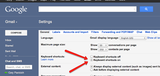
In anticipation of the upcoming Rocky Mountain Google Apps Summit, I will be posting a series of #inbox0 tips for Google Apps users. Thanks for your interest! +Cory PavicichAre you a hunt and peck emailer?#inbox0 tip #2: Your time is valuable, so don’t waste it with a mouse! Know your Gmail shortcuts!Who doesn’t think a hunt-and-peck student typer is ill-prepared? How is your slow navigation of your email account any better? Know your shortcuts! If you think your time is valuable, quit wasting it with your mouse.Turn on your shortcuts by going to your Gmail Settings, and finding it under the General tab:Once you've turned on shortcuts, it's all about practice. But remember that the extra time you put in now will pay off in thousands of saved seconds for years to come. Of course, you will need to learn all of the shortcuts. Luckily, there is a shortcut for that. You can press the "?" key to get a full list of Gmail shortcuts.I will have more #inbox0 tips in the coming weeks, but sign up for the Rocky Mountain Google Apps for Education Summit and attend my series of Gmail management workshops!To learn more about Gmail and all the Google Apps for Education, join us at a Google Apps for Education Summit!Register now for the CA Google Apps for Education Summit July 12-13th in Santa Clara CA and the Rocky Mountain Google Apps for Education Summit August 2-3 in Boulder CO.Rocky Mountain Google Apps for Education Summit August 2-3 in Boulder CO.
EdTechTeam
.
Blog
.
<span class='date ' tip=''><i class='icon-time'></i> Dec 05, 2015 01:29pm</span>
|
|
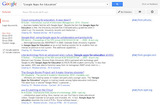
Another of my favorite search tools to share with educators and students is Google Scholar, a specialized tool that searches only "scholarly sources" rather then the entire internet. During the time that I was performing the literature review for my dissertation (from about 2004 to 2008) this was a more powerful and relevant search tool than the academic databases the university library paid tens of thousands of dollars a year for... and it's only gotten better since.Naturally, your local librarian may have a bone to pick with Google regarding what constitutes a "scholarly source" but in general this includes peer reviewed journals, university publications, some trade journals, and occasionally trade magazines (like T.H.E., Technology Horizons in Education, for instance). You can read about the inclusion criteria (for webmasters) to learn more.Many sources are available full text in one click from Google. Others can be accessed in full text with a few clicks through to the original web-based sources, such as ERIC. Some, though, are still locked up in paid databases such as JSTOR. Still, I've found it easier to locate these sources with Google Scholar and then check to see if the university has access to those specific articles... and Google Scholar now offers Library Links to give you easy access to documents that you have permission to view in your institution's library.The "killer" feature of Google Scholar is this though...If you've found an article that is directly relevant to what you're researching, writing about, or trying to decide in your school, how do you traditionally find more like it? You look in the back at the works cited, references, or bibliography. But, this vein of relevant materials only moves backward in time. If you find an article published in 2000, it will only reference articles published in the 90's or before. Wouldn't it be great if you could go the other way - forward through time?Google Scholar let's you do just that with the "cited by" feature. So an article published in 2000 may've been cited 54 times since then, and by clicking on the "Cited by 54" link, you are presented with all 54 of those resources... and you can then click on the "cited by" links for each of those sources to see the works that have cited them since their publication date! You can now follow the vein of relevance forward in time to more timely resources - and even search for specific topics within the citing sources.Yes. That is awesome. Especially for making meaningful research-based decisions in education. See why I like it?Perhaps better yet, you can now have your own "24/7 research team" scouring scholarly articles... and emailing you whenever a new and relevant source is discovered. Just use Google Scholar Alerts.Last year, Google also added Google Scholar Citations, a simple way to compute citation metrics and track them over time. For instance you can explore who has cited Albert Einstein's work over the years. If you're involved in scholarly research yourself, you can also click here and follow the instructions to start tracking citations of your own work. For example, you can view my Scholar profile to access a few documents of mine that appear in Google Scholar... sadly, it seems nobody has been citing my work, at least in a way Google can automagically track. ;)The latest magic available from Scholar actually appears as a tool in Google Docs. While in a Doc, use the Tools menu to select "Research." The new research sidebar will appear to the left of your doc. Here is the key excerpt from the Research Tool help page:Narrow your search results to only articles by selecting "Scholar" from the drop-down menu in the search bar. Once you have selected an article you’d like to read or reference, click on that entry in the search results. You will see a Web or PDF hyperlink in the upper left-hand corner of the entry that will take you to a web or PDF version of the article itself. You will see a Cited by hyperlink in the upper right-hand corner of the entry, showing how many times the article has been cited, that will direct you to the Google Scholar list of sources that have cited this article. Clicking on either of these links will open the result in another window. At the top of the search results list, you will see an option to change the citation format. Click the drop-down menu and select from APA, Chicago or MLA. The search results below will change in format based on this choice. To insert an article citation into your document, select the article and click Cite.If you'd like to learn more about Google Scholar, there are excellent FAQs and help files, and some advanced search tips. The Google Scholar Blog can also help keep you up to date with new features, new resources, and other changes, such as their new modern look.You can also learn more in an exciting and inspirational face-to-face environment (with Googlers and Google Certified Teachers) by joining us at a Google Apps for Education Summit in your region.
EdTechTeam
.
Blog
.
<span class='date ' tip=''><i class='icon-time'></i> Dec 05, 2015 01:28pm</span>
|
|
In anticipation of the upcoming Rocky Mountain Google Apps Summit, I will be posting a series of #inbox0 tips for Google Apps users. Thanks for your interest! +Cory PavicichAre you an inbox horder?#inbox0 tip #3: Make choices about an email the FIRST time you see it. DO IT, DELEGATE IT, or DEFER IT.Many people love the Superstars feature of Gmail, but I'm not a big fan. Why? staring and flagging emails is an often abused way to not have to decide what to do with a recently read email. Most of us are guilty of reading emails, closing them, and then leaving them in our inboxes as a reminder to deal with them later. However, avoiding decisions about email is the #1 way to NOT get to Inbox 0. Instead, decide to decide what to do with your email.There are only four decisions you can make about an email (with apologies to the much more gifted @gtdguy David Allen, whose Getting Things Done system best defines this advice).Delete ItDo ItDelegate ItDefer ItThat's it! There are no decisions that you can make that do not fit into one of those three categories. So how do you use this to get you to Inbox 0?Delete it: Of course, you should never delete an email in Gmail. So archive instead. Is something reference material or noise? Go ahead and get it out of your inbox as fast as you can. I recommend keyboard shortcuts, and then advanced search tools (covered in a later tip).Do It: When you open an email and it's a simple decision, usually a yes/no or informational question, then you can do it right then. However, when you are "checking your email" DON'T reply to emails that take more than two minutes to resolve. That's work, and emails that require more than two minutes are work that should be organized and prioritized. 2+ minute emails should be deferred.Delegate It: Can someone else do this better, faster, or easier than you? Is it another person's job to resolve this email? Don't do work that someone else can/will do for you, especially if it's their job. Good email habits have clear boundaries. Here's your opportunity to set your own.Defer It: Beware urgent work in the disguise of important work. Often the urgency of an email will entice you to break the two minute rule outlined above. But few urgent emails are also important (they just seem like it. When something comes into your inbox and it will take you more than two minutes to respond, defer it into a trusted system. For the Google Apps devotees, how about Google Tasks?Once you've decided that an email cannot be Deleted, Done, or Delegated, and you've Defer it, go onto the next email. Once all your email is clear, THEN you can decide, from within your trusted system, what work is really important. But if you take on new email projects while there are still unprocessed emails in your inbox, you might as well assume you are doomed to inbox .I will have more #inbox0 tips in the coming weeks, but sign up for the Rocky Mountain Google Apps for Education Summit and attend my series of Gmail management workshops!To learn more about Gmail and all the Google Apps for Education, join us at a Google Apps for Education Summit!Register now for the CA Google Apps for Education Summit July 12-13th in Santa Clara CA and the Rocky Mountain Google Apps for Education Summit August 2-3 in Boulder CO.
EdTechTeam
.
Blog
.
<span class='date ' tip=''><i class='icon-time'></i> Dec 05, 2015 01:28pm</span>
|
|
In anticipation of the upcoming Rocky Mountain Google Apps Summit, I will be posting a series of #inbox0 tips for Google Apps users. Thanks for your interest! +Cory PavicichNo two emails are created the same#inbox0 Tip #4: Every Gmail email has a unique, stable url that can be copied and referenced from any open tab.Have you ever found yourself returning again and again for the same reference email? Maybe you've stared the email, or maybe you search for it each time you need to review the contents. Either way, the content is an important reference tool for a larger project, and you need quick and easy access to the email. Reports of a creative mind in the area are highly exaggeratedIn the life of an #inbox0 ninja no email is allowed to survive in your inbox, and every extra keystroke counts! Unnecessary searches are extra key strokes, especially when you are trying to get real work done (not just check your email). For each major project I keep a Project Planning Document using David Allen's natural planning model as a framework. My planning documents are peppered with email reference links, which allow me to work from a document without having the pestering annoyance of email interrupting each time I need to check a reference email. Of course, a folder in your bookmarks with reference emails can work just as well. What doesn't work is letting that email point its accusatory finger of failure each time you open your email...I will have more #inbox0 tips in the coming weeks, but sign up for the Rocky Mountain Google Apps for Education Summit and attend my series of Gmail management workshops!To learn more about Gmail and all the Google Apps for Education, join us at a Google Apps for Education Summit!Register now for the CA Google Apps for Education Summit July 12-13th in Santa Clara CA and the Rocky Mountain Google Apps for Education Summit August 2-3 in Boulder CO.
EdTechTeam
.
Blog
.
<span class='date ' tip=''><i class='icon-time'></i> Dec 05, 2015 01:27pm</span>
|
|
There’s something about that Rocky Mountain skyline that can’t help but inspire, and when 250 educators arrived on a balmy Thursday morning to the Boulder Marriott for the Google Apps EDU Rocky Mountain Summit, they certainly did not disappoint!Ever-awesome committee member Molly Schroeder helps check in scores of excited educators to the Summit.Attendees were teachers, educators, administrators, professional developers, and technical staff. All came and packed the house for our opening keynote, Allyson McDuffie, from the Google geo team right there in Boulder. Her keynote inspired in the ways geographic education is changing with technology, and flew us right into a great kickstart to the conference. The next morning, fellow Googler Tina Ornduff shared her wisdom from the Google Geo Teachers Institute and geo tools she works with and sent a similarly inspiring message out to the crowd.Our two keynotes (and family!) smile for the camera.There was plenty of networking time throughout the two days, and it was so nice to walk around and hear conversations about the issues, initiatives, ideas, and passions amongst educators from around the region and beyond. Nexus 7 tablets were being explored, there was a lab of Chromebooks that educators got to play with during sessions, and partnerships and collaborations were brewing right alongside the morning coffee. The hallway was full of the event’s sponsors, including Wikispaces, Schoology, Haiku LMS, Cloudlock, and Jordan Pedraza from the Google Apps EDU team, all ready to share how their products worked with Google Apps for Education and answer questions from folks.Attendees show off how "Googley" they are at the Summit Photo Booth.Sessions ranged from getting started to getting geeky, and popping in and out of each packed house it was exciting to see some of the ideas being generated - from Mark Wagner’s search contest to giveaway Search Education’s helpful "Google a Day" books to to Allison Mollica sharing some global applications of Google Sites, it was tough to choose which session to go to each hour. The conference ended with a special tour for several attendees, a cornerstone of many of the Google Apps EDU Summits, of the very unique Google Boulder office just down the street! A handful of attendees got to view the Googley culture that only few get to see-- a rockwall and ping-pong table made for engineers to "work out a problem," a VW van in the middle of the office if you need to get some solitude, and plenty of unique and collaborative work spaces sprinkled throughout.Personal learning networks were alight with #gafesummit’s hashtag and Google + Hangout Demo’s, and it was exciting to add these folks to each other's PLN's. At the end of the sold-out event, it was sad to see so many passionate educators go, but we knew they were off to begin their school years and put into place so many of the groundbreaking ideas they’d discussed for the past two days, and we look forward to following them online and see them next year to share their stories of success!
EdTechTeam
.
Blog
.
<span class='date ' tip=''><i class='icon-time'></i> Dec 05, 2015 01:27pm</span>
|