Blogs
|
Creating learning programs is a common practice that allows you to build a sequential learning path with different courses and resources for different learning levels. A learning plan drives the growth of users and constitutes a valuable tool for the development / maturation of new skills, or the reinforcement of existing ones.
Learning plans can include, for example, language courses, soft skills, technical topics or product information, and they are all useful for learning new content and certifying new skills. Selling learning plans could be a profitable business - but how do you go about selling learning programs?
Step 1: Build your learning plan
First of all you have to create the courses that will be included in your learning plan. You can add any kind of course available in the Docebo LMS: e-learning, webinar or classroom courses, and this way you can maximize the effectiveness of training by getting the most out of all these three learning methods, combining e-learning resources with webinars and live training.
You can assign prerequisites to the learning plan in order to make it sequential, so that only users that have passed the previous courses can then proceed in the learning program.
What happens if a student misses a classroom course that is part of a sequential learning plan? Typically, if you have set prerequisites between courses the student will have to suspend his/her learning plan because s/he cannot access the next course without having completed the classroom course first.
Docebo has found a solution for this - we have introduced a catch-up courses option to learning plans! Basically the catch-up sessions will allow students to attend a substitute, or plan B, course instead of the "official" classroom course they missed, and therefore they can proceed with the learning plan as originally intended, with no interruptions.
Step 2: Make your learning plan purchasable
The second step is to create the Learning plan by assigning an appealing image, title and description. In order to sell your learning plan you have to insert it in a catalog and manage the e-commerce settings accordingly e.g. assign a price for the learning plan which will cover all the courses included in the plan. Alternatively, you can choose to sell only some of the courses included in the learning plan in which case the final price will be the sum of prices of the individual courses. The Docebo LMS allows payment through the most popular payment systems in the web: Paypal, Authorize.net and Adyen, you just need a valid merchant account for one of these three systems and you can easily set up all the required information in our ecommerce settings page. You can easily track all the information through the new e-commerce-transactions custom report. This report shows the list of e-commerce transaction data. The report contains one transaction item per row, with the information in columns, making it easier and quicker to check all the information. You can export the file in csv or xls format.
Conveniently, you can also schedule the sending of the report to yourself and all your stakeholders on a daily, weekly or monthly basis - making the process fully automatic.
Get started: Get going with your e-commerce project with a free trial!
Do you want to create your own learning plans and sell them to your customers? Start your Docebo LMS free trial and test-drive its powerful e-commerce features!
The post Selling online courses with the Docebo e-commerce module appeared first on Docebo.
Docebo e-Learning Blog
.
Blog
.
<span class='date ' tip=''><i class='icon-time'></i> Jul 15, 2015 05:37am</span>
|
|
Since the early 2000s e-commerce has become increasingly common and widespread. The sale of services and content for elearning isn’t an exception and many service providers leverage a specific technology - the payment gateway - which is able to manage and simplify credit card payment processes, whilst maintaining a high level of security.
E-commerce payment gateway
This technology is the online equivalent of the POS (point of sale) of actual physical stores. The payment gateway encrypts sensitive information (such as credit card numbers) during the purchasing transaction.
The Docebo elearning platform comes with an e-commerce module which is integrated with several gateways so you can safely sell your training content through the platform. Amongst these gateways, Adyen is particularly interesting - also it’s growing very fast in the payment gateway market.
The integration between Docebo and Adyen
Adyen allows you to use all main credit cards services available on the market, and so it assures a wide range of choice for anyone looking to buy training content through your Docebo LMS e-commerce module.
Adyen is great because of its ability to work with a wide network of local payment systems, such as non-mainstream banks and credit cards which are seldom supported by even the most common gateways.
This offers an advantage to producers, developers and service providers who work with local organizations to manage their e-commerce project/s. In fact Adyen currently supports more than 250 payment methods.
Another noteworthy Adyen feature is SEPA (Single Euro Payments Area) adoption for direct deposits in the Euro area.
Why use Adyen with Docebo?
White-labeling: Adyen allows a complete layout customization of the payment page so it can be consistent with your corporate identity.
PCI compliance: by using Adyen you can sell content via Docebo without worrying about being compliant with the PCI (Payment Card Industry Data Security Standard) since all payments are handled through the Adyen infrastructure.
Direct API: thanks to APIs, Adyen ensures your customer’s payment card data is secure during the transaction. And if you resell content online you will have an immediate savings because you don’t need to worry about PCI compliance costs.
Activate your elearning e-commerce!
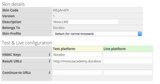
The integration between Docebo and Adyen is an excellent opportunity to sell your courses and training content safely online. To get started what you need is a Docebo elearning platform and an Adyen account: the integration will take only few minutes, as shown in this procedure.
Do you already have a Docebo elearning platform? If not, you can activate it now, free for 14 days, and test it out for your elearning-related e-commerce project!
The post Welcome to secure e-commerce with the Adyen & Docebo integration appeared first on Docebo.
Docebo e-Learning Blog
.
Blog
.
<span class='date ' tip=''><i class='icon-time'></i> Jul 15, 2015 05:36am</span>
|
|
The corporate HR systems landscape is multi-dimensional. As well as core HR data and systems, companies typically have many systems for managing recruiting, learning, and talent processes, as well as their line of business applications.
Whether you have an HR Suite or Best of Breed applications (or both!) creating a coherent picture of your people is both complex and difficult to manage. But HR is increasingly being challenged to do just that - integrate its people data and deliver joined up business processes that transcend the functional silos and systems landscape.
Join Docebo’s Head of LMS Development Team, Raffaele Quitadamo, on Tuesday June 30th at 9am PDT | 12pm EDT| 5pm BST | 6pm CEST for a webinar based on extensive independent research with David Wilson, CEO of Fosway Group, Europe’s #1 HR Analyst.
They will discuss the drivers, challenges and benefits of integrating your HR systems landscape, including:
The complexity of corporate HR and functional systems landscape today
The challenges in really joining up the people data picture and the drivers to do so
How key people data elements are critical for driving real business outcomes from talent and learning
The role of LMS as a central hub for integration between HR, Talent and Work
How HR and Learning leaders need and can work with IT to address these challenges
REGISTER NOW
The post Webinar 6/30: Integrating the HR Landscape on the Cloud - data, processes & business outcomes appeared first on Docebo.
Docebo e-Learning Blog
.
Blog
.
<span class='date ' tip=''><i class='icon-time'></i> Jul 15, 2015 05:36am</span>
|
|
iSpring’s engineers have put Docebo LMS through compliance tests with iSpring-generated learning courses and we’re happy to announce that Docebo supports SCORM uploading and reporting. New to iSpring? Check out this article on publishing e-courses with iSpring.
Just follow these simple steps to upload your SCORM package into Docebo:
1. Login as an administrator.
2. Under the Admin panel, select Courses. 3. Navigate to any course into which you would like to upload a SCORM package, or create a new course for that purpose. 4. Give your course a Name, and then add a Description. The Course type option allows you to optimize the appearance for a smartphone or desktop/tablet display, and you can also choose a Thumbnail to your course. When you are done configuring your course, click CONFIRM. 5. Now your course is ready to enhance with training materials. Select ADD TRAINING MATERIAL → SCORM. 6. Click UPLOAD FILE to locate your iSpring-generated SCORM package. At this point, if you like, you can select your desired view mode (see below). Then click SAVE CHANGES. 7. Your SCORM file will be uploaded and processed by the system. This process usually takes a few minutes, so grab a coffee and wait while it’s being uploaded.
8. Once the item is processed, you will see the unambiguous green check mark. Now you can preview the course by clicking the Play button down below. 9. Success! Here is our SCORM course that we have created with iSpring: There is a switch at the top right labeled LEARNER VIEW / ADMIN VIEW. You can toggle this switch to see how students or admins will see the course listing.
One really cool feature of Docebo is that you can choose a View Mode for your course (see the 6th step in this tutorial for a screenshot).
Play Inline will open it right on the same webpage inside the course player.
Lightbox (default) will open a viewer over the top of your Docebo webpage (like the picture viewer on Facebook).
Fullscreen will expand your course to fit the full screen automatically. Be aware that Flash content doesn’t capture keyboard input in Fullscreen mode, so choose the Mobile (HTML5) output option from the iSpring Publish window.
Play in New window will open a new tab in your browser to show the course.
Note: The SCORM package file size must not exceed 800 MB.
We hope you found this post helpful. If you follow these simple instructions, you will be delivering courses on Docebo LMS in no time. Thanks for reading, and good luck with your course authoring! Author: Brian Tarr
Before finding an outlet for his talents - both tech-savvy and creative - Brian Tarr worked as an iSpring tech support pro for two years. Now that his latent writing abilities have finally been discovered, we enjoy reading his every single article. Always full of humor, his work is invariably built on a solid foundation of research and facts.
The post How to upload your iSpring course into Docebo appeared first on Docebo.
Docebo e-Learning Blog
.
Blog
.
<span class='date ' tip=''><i class='icon-time'></i> Jul 15, 2015 05:36am</span>
|
|
These are trying days for companies that are using learning management systems with SCORM players built on Java. In fact, the NPAPI support is being dropped by Chrome and other major browsers are following, with a total drop likely to happen in the next few months. So, how can you keep your corporate training up & running?
First of all, let’s distinguish the two different ways this NPAPI issue affects your corporate training. The first way is related to the SCORM player embedded in your learning management system (LMS), while the second way is all about Java-based or Silverlight-based objects which may be included in your SCORM packages.
LMSs, SCORM players & NPAPI
If your SCORM object is currently not working in Chrome, you should probably investigate it further and find out how your LMS’s SCORM player was built. Is it built on Java? That would be the most plausible reason behind your mess (because I bet this thing is driving you absolutely crazy!).
So, what can you do about it? You can always try to find a smart workaround, but if you’d like to have a strong long-distance strategy for your corporate training you ought to carefully read the "NPAPI deprecation: developer guide"
In September 2015 (Chrome 45) we will remove the override and NPAPI support will be permanently removed from Chrome. Installed extensions that require NPAPI plugins will no longer be able to load those plugins.
What I suggest is to then investigate how you can migrate to a compliant learning management system, like Docebo. The Docebo elearning platform’s SCORM player has been built on Javascripts, and that’s why you’ll be able to keep your corporate training project on track, with no interruptions or headaches.
Do you want to give Docebo a try? The good news is you can try the Docebo LMS for 14 days, free of charge, and check for yourself if it fits your training needs - and compliance, of course!
What if SCORM objects come with Java items?
The second - and worst - scenario is about SCORM packages which come with Java-based or Silverlight elements inside. Unfortunately this is something 100% related to the company that has developed the course, so you may consider contacting them directly for support.
Nevertheless, course developers will, sooner or later, be forced to face this NPAPI issue, so it’s worth it for you to get in touch with your course provider and check where they currently are in this rather messy story (hopefully, are already working on a fix!).
The post Chrome & NPAPI? Keep your SCORM player working with Docebo! appeared first on Docebo.
Docebo e-Learning Blog
.
Blog
.
<span class='date ' tip=''><i class='icon-time'></i> Jul 15, 2015 05:36am</span>
|
|
Let’s face it, you probably don’t have a whole lot of time to sit and read through a lengthy guide when creating your asynchronous eLearning course. There is still plenty to do before your deadline rolls around, but you still want to be able to deliver the best possible eLearning experience to your learners. Thankfully, you can use these asynchronous Learning tips to get all the information you need in a fraction of the time.
1. Incorporate a variety of different eLearning activities.
Self-guided learners need a variety of different activities to cater to their individual learning styles. This also helps to prevent boredom, thereby boosting engagement and learner participation. Include video presentations, audio narratives, interactive scenarios, and text-based modules in order not only to add variety to your eLearning course, but also to make it more exciting and customized to the particular needs of your audience.
2. Use stories and real world examples to boost motivation.
One of the main challenges of designing an asynchronous eLearning course is creating a connection with your learners. They may feel isolated from the eLearning community, as a whole, which hinders them from actively participating. This is why it’s important to integrate stories, real world examples, and anecdotes that tie into the subject matter. Use humor whenever possible to keep it light and entertaining for your learners. Just make sure that it serves the learning goals and objectives.
3. Give them a helping virtual hand.
Even learners who are working autonomously need support from time to time. They may encounter a technical glitch that prevents them from progressing in the eLearning course, or they may need help, in order to understand a more complex idea or concept. Whatever the case may be, they need access to reliable support, such as an email, a contact form, a video chat with the online course facilitator, etc. Since they won’t be able to get help from a face-to-face instructor, you should offer them an alternative form of assistance that addresses their concerns and answers the pressing questions.
4. Break the eLearning course down into bite size modules.
Chances are, your learners aren’t going to be willing or able to sit through an hour-long eLearning session, thanks to busy schedules and other distractions. This is why it’s essential to break your eLearning course down into smaller modules that are easily digestible. Ideally, these modules should be of about 15 to 20 minutes long, if not shorter, so that your learners can complete each one of them, when convenient. You should also make it easy for them to start where they left off by including an online course map or progress bar they can click to access the next module they want to access in the eLearning course.
5. Make your design intuitive and user-friendly.
Your eLearning course should have simple and straightforward navigation controls, as well as an intuitive design that guides learners through the eLearning experience rather than frustrating them. Make sure that all links are active by checking the buttons and hyperlinks frequently, and provide instructions on how they should navigate in the eLearning course.
6. Stress the real world benefits from the start.
Your asynchronous learners are going to need all the motivation they can get, especially those who aren’t particularly inspired to learn in the first place. As such, you will want to stress the real world benefits of completing the eLearning course even before they hit that ‘start’ button. Let them know how they can use the subject in their real lives, and which specific skill sets they are developing, as well as how each particular piece of new knowledge is going to improve their lives; in short, let them know what are they can get out of your eLearning course.
7. Tap into their intrinsic motivation.
While external rewards may be a great motivator, it’s the intrinsic motivation that truly counts. Intrinsic motivation is fueled by inner rewards, such as the desire to expand their knowledge base and build their skill sets. Typically, learners who are intrinsically motivated fare better in self-guided eLearning courses than those who rely on extrinsic motivation. So, figure out what motivates them by doing some audience research, such as conducting surveys or focus groups, and then cater to their needs when creating the eLearning course.
8. Encourage group collaboration to provide peer-based support.
Another key element that is often lacking in asynchronous courses is collaboration. Therefore, you may want to consider integrating message boards, forums, and project management platforms into your eLearning design to give them the opportunity to get peer feedback. They can share their experiences and work together to solve common challenges, even though they are completing online assignments on their own.
9. Put their knowledge to use.
No learning experience is complete without an effective assessment strategy, and this is doubly important for asynchronous eLearning courses. You must integrate exams or quizzes to test learners’ knowledge and check their progress. Doing so also gives them the chance to gauge their own progress, so that they can fix incorrect learning behaviors and improve upon their weaknesses.
10. Strike a balance between entertaining and enlightening.
It’s true, the most successful asynchronous eLearning courses are fun, engaging, and entertaining, but these elements should not overshadow the real purpose of the eLearning course, which is learning! Include plenty of interactive exercises, humorous stories, and other immersive eLearning activities, but always have the learning goals and objectives in mind.
The trick to creating an effective and engaging asynchronous learning course is making your learners feel connected not only to the eLearning course material, but to the online learning community as a whole. So, use these tips to immerse them in the eLearning experience and get them excited about acquiring new knowledge and skill sets.
Want to learn more tips on how to create effective asynchronous Learning experiences for your audience? Read the article 6 Tips For Creating Engaging Asynchronous Online Training Courses to find out 6 more ways to further engage your learners into your next asynchronous eLearning course. Author: Christopher Pappas
Christopher Pappas is founder of The eLearning Industry’s Network. Currently, the eLearning Industry has a network of more than 250,000 professionals involved in the eLearning Industry. He is also the Founder and Owner of the Instructional Design and eLearning Professionals’ Group, which is the largest online community of professionals involved in the eLearning Industry at LinkedIn. You can connect with Christopher on Linkedin and Twitter.
The post 10 Invaluable Tips To Develop Asynchronous Learning appeared first on Docebo.
Docebo e-Learning Blog
.
Blog
.
<span class='date ' tip=''><i class='icon-time'></i> Jul 15, 2015 05:35am</span>
|
|
People worrying about a lack of ideas and blank pages will become a relic of the past. There’s absolutely no excuse in 2015 not to be creative! Anyone and everyone can be trained, inspired and mentored by tons of sources on the web. In fact, there is a silent creative inside each one of us and you cannot even begin to imagine how this ‘creative you’ can benefit your business or your career!
How many times have you been asked to make an impressive presentation or course? You are aware of the ‘content’ but you probably don’t know how to package it to impress your audience and make it memorable.
This scenario is exactly what we are confronted with when about to write any creative/new content for a company, for example, an article or blog post, a manual for customers, or a summary for executives. And if your employer asks you to create some training content to deliver to your colleagues being effective serves an even greater purpose, in fact it becomes essential!
So, the question you must ask is how can you unleash your creativity to produce such content?
3 things you need to become more creative:
a strategy
a tool
a delivery method
You will find all these things on the web - Google can help with this but be sure to use smart keywords when searching. Let’s take a closer look at all three points in this post.
Not all strategies are right for you!
To be perfectly honest you need to do a lot of research and study to find the right strategy to become a public speaker that stands out or a recognized elearning blogger. But for those who are time strapped we can suggest a powerful shortcut: you need to follow a marketing guru!
Spend some time looking at good websites or YouTube channels, listen to the advice of the experts, and if you are convinced, try to apply this advice. If that sounds too time consuming, then skip the articles and videos, and try to find a strategy in the form of an infographic! If you don’t know where to get started, take a look at Pinterest, the social network dedicated to creativity and packed full of professional infographics.
Find the easiest tool
Every time you need to find a tool to solve a problem, you should define exactly what the final result should be and you must also have a clear vision of the budget you have! If you want to create an elearning infographic you need a specific tool, and not a generic tool to ‘manage text and images’. If you want to communicate via video you need a completely different tool. And last but not least, if you want to create a stunning elearning slideshow you need a third type of tool! So, define your desired final output and search for the tool designed to do that, and nothing more. Remember, if you are a beginner, a full-featured and comprehensive suite is bound to drive you crazy! My last suggestion is to look for a service on the web (SaaS) rather than a product to be installed on your hard disk. In that way you will avoid compatibility problems with your devices and you could work from anywhere using any devices available. I’m not here to promote any specific tools but I’d like to give a couple of hints: look at Prezi for presentations, Piktochart for infographics and Camtasia or PowToon for videos!
Match to your audience expectations when you deliver
You can share your product in different ways and you could always have a live presentation and an "on demand" delivery of your product at hand. That’s the case not only if you are presenting something to a large audience, but also if you are delivering a corporate presentation.
Remember that if someone can’t attend your live presentation, it would always be appreciated if that person could see it later. For example if you’re delivering a slide presentation, you could upload it later on a social network like Slideshare and then send the link to different people. If you write a summary for your boss, you could share within the corporate social network or Intranet to make your colleagues aware of it. Anyway let’s return to the presentation itself…
I’m quite sure you have at least one smartphone and either a desktop or laptop in your toolbox, if that’s the case then impress your audience by using both of them for your presentations! You can use the smartphone to move through the presentation and this will definitely impress your audience much more than a laptop and mouse. This is just an example of what you can do. Try to find the best presentations from notable keynote speakers on YouTube and you will find an endless stream of inspiration and style to inspire you.
And now, finally, here’s my selection of recommended sites and tools for you - enjoy!
brandongaille.com An inspiring blog on marketing
piktochart.com Infographic creator
canva.com Create design for web or print
Infogr.am Data visualization
prezi.com Presentation software
The post Awesome elearning & presentations: unleash your creativity! appeared first on Docebo.
Docebo e-Learning Blog
.
Blog
.
<span class='date ' tip=''><i class='icon-time'></i> Jul 15, 2015 05:35am</span>
|
|
We have a couple of great features coming-up with the July roll-out of the Docebo learning management system (LMS) plus a bunch of minor updates as well. Get ready to use the brand-new Audit Trail and Coaching Apps on your next enterprise elearning project!
The Audit Trail App is built to match the specific needs of Enterprises that are running extended enterprise training programs, so it will be exclusively available for the Enterprise edition of Docebo.
Audit Trail
The Audit Trail provides a higher level of internal tracking which makes you compliant with international regulations that require logging and tracking events (such as FDA’s 21 CFR Part 11). This App creates an immutable record that keeps track of the administrative actions performed inside the elearning platform. For example, you’ll always be able to understand exactly who made a specific action like change the course completion, the enrolment status, but also the deletion of users and/or learning content. That’s helpful if you’re running a complex training project where many people are involved as administrators.
Coaching
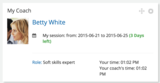
The second great improvement is the Coaching App, a tool designed to make it easier for users to attend courses - and therefore finish them! What if users have doubts or questions while they’re attending a course? Thanks to the platform’s Coaching feature they will be able to see all of the coaches assigned to the course they’re attending and they will be able to request a coaching session with one of them to fix the problem. What a great way to keep the learning plan on track! Moreover, we’re almost ready to roll-out a number of minor - but very smart - updates, so you can build a better learning experience:
CSV export: you can simply export the users list in a CSV file. It really is as easy as it sounds.
Learning Plan report: for creating reports about user progress in learning plans
Remove users from branch: this is now doable as a massive action
Customizable menu items: change your LMS menu according to your needs, by adding and removing items
Automatic redirection at log-out: if you need to redirect users to a specific page when they log-out of the LMS you can now do this!
Sessions info: when selecting a classroom course, users will see detailed information about each session of the course
We’re working to bring these updates live at the beginning of July, so stay tuned because we’ll be back soon with more details!
In the meantime, if you’d like to take a look at our LMS, start your free trial in a few clicks!
The post Docebo rolls out Audit Trail and Coaching in July appeared first on Docebo.
Docebo e-Learning Blog
.
Blog
.
<span class='date ' tip=''><i class='icon-time'></i> Jul 15, 2015 05:34am</span>
|
|
In the last few years markets have become more competitive as product lifecycle is reducing and go to market timing is becoming more and more important.
But the real factor that makes marketing more complex is that products and services are becoming more technological and therefore complex and so they require more knowledge to be used. The potential customer (in both the B2B and B2C markets) needs to be familiar with the product in advance: they have to know it BEFORE they buy it. Knowing a product before purchase is related to market education.
Since technology moves so fast, it in fact anticipates trends by satisfying needs the market doesn’t even know it has yet - this is why marketing today has the role of actually preparing the market for new products and services which are evolving at an incredible pace. This begs the question - do we need marketing evangelists for each and every product?
The marketing education strategy
In the B2B sector, sophisticated services that are widely used in mature markets (Ex. cloud / SaaS software, complex marketing strategies for Inbound lead management and so on) are not yet adopted in the emerging markets that are usually more "traditional" when it comes to adopting innovations. Managers operating in those markets need to be educated and engaged about these new opportunities.
In this marketing education strategy, content marketing is the first step. Content is made to engage and educate, but are blog posts and whitepapers enough? The market is asking to be educated and education is something related more to training than blogs or papers, because training means learning and sharing through experiences, it really means to be coached about a product. This approach works well both in the B2B and B2C sectors.
Customer/dealer academies for B2B and B2C
But, do all customers need to be trained? Do Marketing Managers need to create customer or dealer ‘academies’ for each and every product? I don’t think so, but the more complex the product is (also regarding the regulations/laws behind it) and the more it comes with ‘grey’ areas in communication, the more it makes sense that customers need to be engaged through training.
Here you can find examples on how ‘customer/dealer academies’ can be implemented in a B2B or B2C sector:
Personal financial services: Financial markets are become more and more complex, this is why trained customers are those who better understand complex financial products and they are more likely to use bank, insurance, fintech company financial services compared with untrained customers.
Software for accountability and laws: If you are selling payroll or accounting software your main clients would be CPA’s or Lawyers. So, if you can train them about specific topics (and better yet, give them professional credits for it) they will then refer their customers to you.
Product certification: A trained partner network sells 10 times more than untrained partners. Certifying your network of partners and dealers gives partners a competitive edge.
Dealer and Reseller training: Share company culture with partners and dealers, and train them in a timely manner about new upcoming products - you can use an extended enterprise training approach and corporate MOOCs to leverage your sales through channel partners.
Imagine Mark Zuckerberg creating a customer academy about internet.org, explaining the benefits of a distributed internet in poor countries in order to engage people supporting the cause and to involve other evangelists.
3 tips and tricks to make your customer and prospect academy more successful and appealing:
Use top influencers and VIPs for your courses: When you build your training material use influencers, well reputed people and subject matter experts.
Add gamification components: Engage your students with badges, points and contests in order to improve course completion
Rewards and incentives for top performers: If training is a key component for your "Extended Enterprise" ecosystem (like partners, dealers or franchisors) you can leverage incentives for rewarding the completion of a course ladder
Conclusion
In a market where speed and complexity are the two main key factors of success, a blended approach that mixes Training and Marketing can be the perfect vehicle between Lead generation and an increase in sales.
The post Do we need product evangelists for each product/service? appeared first on Docebo.
Docebo e-Learning Blog
.
Blog
.
<span class='date ' tip=''><i class='icon-time'></i> Jul 15, 2015 05:34am</span>
|
|
In his book The Manager as coach and mentor, Eric Parsloe succinctly explains what coaching is, and why it should be a common practice in the training process.
"Coaching is a process that enables learning and development to occur and thus performance to improve. To be successful a coach requires a knowledge and understanding of process as well as the variety of styles, skills and techniques that are appropriate to the context in which the coaching takes place".
In a best case scenario, even if a training program has been built by an expert, it will satisfy only general needs. Moreover, people who attend training need to have the right motivation to complete the training program successfully - this is true especially for employees already overloaded with daily tasks.
Coaching: from Sports to Business
Much like athletes in sports, employees should be stimulated by a coach. In the business field, the manager becomes a coach: his job is to help learners learn how to act and behave during specific situations in the workplace.
Only in this way will learners be able to build their own working processes (and also acquire knowledge and competencies of course). Basically, this is what Sir John Whitmore says in his book Coaching for Performance. A former racing driver, he’s the pioneer of Business Coaching.
Even if the coaching process belongs to the field of sports, it has naturally become a part of business. Perhaps because standard training techniques are no longer enough to develop skills and improve personal performance.
In his book, Whitmore quotes his mentor Tim Gallwey:"Coaching is unlocking a person’s potential to maximize their own performance. It’s helping them to learn rather than teaching them".
Coaching in the Military field
Well before becoming the norm in business, ‘coaching’ was always fundamental in the military. Army doctrine in the Field Manual 6-22 defines coaching as "the guidance of another’s person’s development in new or existing skills during the practice of those skills".
This definition tells us something more: the coach is someone who has technical competencies. He will drive someone to acquire the same competences by working on possible situations.
Unlock learner potential
In the business coaching process, the key is the manager: s/he has to let the learners be, rather than impose his or her individual way of facing situations. S/he has to think about people in terms of their potential, not their performance. In other words, the manager has to be confident about the learners.
In education it has been demonstrated that when the teacher trusts his/her students, this influences their performance. In business this is true as well.
A manager will give co-workers tasks s/he believes they will complete successfully. But by acting this way, this person will get stuck in working at the same level. In order to help co-workers move forward, the manager should be helping them to achieve goals. And this is supposed to be done not by imposing his/her own methods, but instead by stimulating co-workers to create their own way to perform.
The result is a more confident and reliable co-worker with improved skills.
When should we use coaching?
We clarified what coaching is, but when should we integrate coaching with traditional training?
It could be useful for managing problem solving, relationship issues, task performance, team working, staff development, assessment, and team building. It’s useful for motivating staff and facilitating the delegating process.
Even if a lot of books and essays have been written about this topic, Whitmore warns us that:
"Coaching is not merely a technique to be wheeled out and rigidly applied in certain circumstances. It is a way of managing, a way of treating people, a way of thinking, a way of being".
A smart tool to coach
Companies should adopt best practices to integrate standard training programs - deployed both in elearning and classroom mode - with coaching, in order to have skilled and confident employees who are able to both follow procedures and also build their own.
That’s why Docebo has created the Coaching feature for the Docebo learning management system - it’s designed for companies that need to create coaching sessions associated with elearning courses.
Coaches can arrange one to one sessions to assist single learners, but they can also be involved in group meetings and drive learners to compare their experiences in peer to peer sessions.
This is a big step forward: by combining elearning technology with coaching, the coach becomes a virtual coach - becoming more present, effective and useful than ever.
With Docebo’s Coaching feature, companies are able to have a smart and simple tool to bring coaching inside elearning, and make their already running distance learning programs even more effective with an invaluable live-support added value.
The Coaching feature will be available in a few days, if you’d like to test it out, sign up for a free 14-day trial!
The post How Coaching enables L&D and improves workplace performance appeared first on Docebo.
Docebo e-Learning Blog
.
Blog
.
<span class='date ' tip=''><i class='icon-time'></i> Jul 15, 2015 05:34am</span>
|