Blogs
|
Just as in everyday life, in training programs everyone is unique. Today, companies and big organizations gather people together from different cultures with different goals, and ways of learning and improving. So, how can everyone’s individual needs be accommodated? Elearning programs, in order to be effective, must be tailored around the individual - their needs and peculiarities - and this is the reason why Docebo is designed to help companies deliver customized elearning programs.
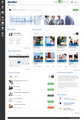
Exploring Docebo 6.6’s Admin Dashboard
It all begins with the welcome page! A standard welcome page for everybody doesn’t work at all, and a lot of the time even a ‘customized’ page isn’t enough, and can be rather superficial. That is to say, it’s too simplistic to customize a page to match a specific role’s needs for customized learning, you need to go much deeper into customization and build a unique learning experience.
This is what we had in mind when we created the new dashboard system: a new way to let you welcome your learners to the LMS and customize their experience from the very beginning by building pages to match their very unique needs and expectations.
The Docebo learning management system is designed with a ‘modular approach’ previously evident through our "app marketplace" and course panel. Now this philosophy is expressed in the newly updated dashboard.
By managing a training project within your organization, the admin dashboard layout area lets you create multiple dashboard styles and assign them to your learners, power users and admins. In order to offer a varied experience, you can also customize the appearance for each branch or, if using the Extended Enterprise LMS, client and dealer.
Pick your widgets and build customized elearning programs
Customizations can be managed with different widgets. With customization you can present the information the specific group of users actually needs (i.e. it’s targeted), and nothing superfluous.
As a modular learning management system, Docebo offers a wide selection of widgets capable of doing pretty much everything - the only limit is your imagination. You can create the best learning environment for your users, with all the relevant features you’d like to have, customized according to multiple configuration options. Everything you want is at your fingertips, you just need to set the system up according to your needs.
Let me quickly guide you through Docebo’s world of widgets:
My Courses
This widget is the most basic, but at the same time the most essential one. It will let you present your training offering according to user enrollments.
Courses Catalog
Showcase your courses directly in the home page. If you want to promote your most popular courses, you can do it here. You can also insert some catchy elements to get users’ attention and attract them to the full catalog.
My Learning Plans
A helpful widget for users as it shows them the list of Learning Plans they are enrolled in.
Subscription codes
Are you looking for an alternative - and effective - way to allow your users to enrol? Start using the subscription codes widget, a must-have if you’re already using the related app!
HTML/WYSIWYG
A simple HTML/WYSIWYG editor for your custom content: do you want to embed inspirational phrases? Or maybe you prefer motivational images? You can do so right here!
IFrame
If the HTML/WYSIWYG editor is not enough, you can get onto this even more powerful widget. The "IFrame" lets you include content that lies in an external company website.
Social
This widget shows the list of social networks your company is in. Users can connect with your social profiles directly from the LMS.
User Profile
It allows you to display the avatar and profile information of the currently logged-in users. And remember: having a nice profile picture is a must when it comes to social interactions!
Calendar
Let users keep track of their training schedule and see their upcoming events with the calendar widget.
Blog
This widget shows the latest blog posts published by your users.
KPIs-related widgets
The last three widgets are KPIs-related. They are designed to share with users some interesting data, and they’re built on the LMS roles - you can select the KPIs that are to show for each role:
My KPIs: KPIs about users’ performance, so they’re aware about their own performance
Power User KPIs: Power Users’ statistics to keep an eye on the users they are managing
Admin KPIs: Admin stats, because we love clear charts and graphs!
And finally, take a look at the final results of a ‘hyper widget’-powered LMS: Do you already have a Docebo elearning platform? Login and start playing with these new tools! Otherwise, you can start your Docebo free trial in less than 30 seconds: click right here!
The post Deliver high-impact training through customized elearning programs appeared first on Docebo.
Docebo e-Learning Blog
.
Blog
.
<span class='date ' tip=''><i class='icon-time'></i> Jul 15, 2015 05:38am</span>
|
|
We will be at the ATD 2015 International Conference & Exposition from May 17th to 20th at the Orange County Convention Center in Orlando in stand #441. As you probably already know, this event is the largest, best attended and most relevant exhibition and conference in the L&D calendar with some 10,500 visitors each year.
If you’re considering doing more with elearning in your organization you would gain a lot by attending and what’s more entrance to the expo is free! If you decide to attend we’d be delighted to schedule a specific time at our stand to meet, answer all your questions, and give you a tailored demo of our latest release, Docebo 6.6 which focuses on Partners’ and Customers’ training via Extended Enterprise features, and enhanced modularity. Some new features in Docebo 6.6 include:
Extended Enterprise: An enhanced Multi-domain App which manages multiple clients with unique domains from a single LMS
Widgets Feature: A highly configurable and modular user dashboard with the widgets feature. This feature will enable the LMS admin to customize and assign multiple configurations so that s/he can provide a unique and personalized experience to learners
Certification & Retraining App: This app enables a set of functionalities to manage the retraining of LMS users over time
Https Web App: This app allows you to enable the HTTPS protocol, upload and install your SSL certificate for your custom domain and for each domain configured through the Multidomain App
Join Docebo at ATD 2015
If you would like to see Docebo LMS version 6.6 in action, please drop by ATD Booth #441. And to set up a meeting for a live demo at the event please click here!
We hope to see you next week in Orlando!
The post Meet us at ATD 2015 International Conference & Exposition appeared first on Docebo.
Docebo e-Learning Blog
.
Blog
.
<span class='date ' tip=''><i class='icon-time'></i> Jul 15, 2015 05:38am</span>
|
|
We have just released a case study on Global IT security company Rapid7’s choice to use Docebo’s Extended Enterprise LMS to help it meet two related challenges:
Rapid7 needed an efficient and effective LMS to centralize all of its content in one place and deliver this to its employees
Rapid7 also needed to deliver coursework to its customers
READ THE CASE STUDY
Why did Rapid7 choose the Docebo LMS?
Internally, Rapid7 needed to bring together a number of departments - and provide them with content efficiently - and Docebo met this requirement. Rapid7 also chose Docebo because it’s an easy to use LMS and Shane Smith, Senior Director, Global Learning & Support, confirmed that this is now paying dividends in terms of high levels of system usage by Rapid7’s employees and customers. "We want the LMS to be able to provide content for Rapid7 customers and enable them to pursue multiple layers of certification. We have the same vision for our partners, which provide services and/or resell our products. We also want to be able to internationalize our content - and I believe that Docebo helps us achieve all these visions," explained Shane Smith. "Based on our research, Docebo’s LMS, with its Extended Enterprise (EE) capabilities, was always equal or superior to all the other vendors’ products that we looked at."
Shane Smith, Senior Director, Global Learning & Support, at Rapid7
How does Rapid7 use the Docebo LMS - both internally and externally?
For its external customers, the LMS delivers technical certification classes for Rapid7’s Nexpose and Metasploit products.
For its employees, Rapid7 uses the LMS to deliver product knowledge related learning, security training, as well as informational awareness - which includes items relating to people strategy, along with reports of internal company meetings.
Rapid7 currently has some 600 employees, all of whom have access to the learning materials on the Docebo LMS.
Shane commented, "Like Rapid7’s employees, our customers value the ability to go to one place and always get the information they need. The Extended Enterprise nature of the LMS provides us with a highly effective - and cost-effective - way of delivering our online courses and our certification classes."
READ THE CASE STUDY
The post IT security professionals choose Docebo’s Extended Enterprise LMS appeared first on Docebo.
Docebo e-Learning Blog
.
Blog
.
<span class='date ' tip=''><i class='icon-time'></i> Jul 15, 2015 05:38am</span>
|
|
As head designer at Docebo, my daily job is to study, design and develop Docebo’s LMS graphic interfaces and user experience to ensure engagement, product ease of use and innovation. Today I want to tell you a story that begins with a very simple idea: bringing training assets, information and experience to people in order to engage and support the learning activity without having them lose their time ‘searching’ through the assets to find what they need. In other words: the training comes to you and not you that has to search for it!
How? Wearable devices, like next-gen cameras, glasses or watches are the new tools that are contributing to our technology growth by offering new and interesting opportunities for advanced adopters of LMSs and pushing the evolution of learning globally.
Let’s focus, for example on the brand new Apple Watch. Even if It has a smaller screen, compared with an iPhone, there are many ways to deliver small pieces of information (bite-sized or chunks of learning) that can be strictly connected to a learning activity. How? From a learning standpoint, it’s a good start to focus on any kind of notification that should gain my attention quickly, and in a cool way, that may include interactions between students and teachers, activities list/s and productivity tasks, step-by-step procedures or quick "binary" quizzes.
Imagine an Apple Watch elearning app
So, here begins the story I want to tell you, of how an Apple Watch could be involved in a blended learning session (a kind of training that mixes both Classroom and eLearning activity).
Let’s meet John Doe. In this hypothetical story he’s a sales person and today he’s travelling to San Francisco to attend his assigned Sales and Marketing Principles intermediate classroom session, which is handled with Docebo’s ILT-Classroom module to better organise the course logistics and deliver online training assessment. He wears his brand-new Apple Watch and he has just installed the Docebo Apple Watch elearning app. Using the app he can check his upcoming learning activities, and find today’s session (amongst others) … …and navigate to the course location. During his walk to the location he receives a notification about a last minute change: the session has been postponed and will start at 3:30pm. On arriving at the course’s location, the watch shows quick, clear indoor directions to the classroom and John, as soon as he steps in the classroom, is also able to immediately register his presence. The course has started and the Sales and Marketing Principles intermediate session looks very interesting. At the end of the course, John is very satisfied and he doesn’t have any doubt about how to answer the satisfaction survey that has just appeared on his watch. But the best satisfaction is to know that, after having completed the final test through the Docebo LMS, he passed the course with a solid 86/100 score! Well done John! This was John’s story and it’s a clear example of how all the support assets related to a blended learning activity can be pushed to the user: you don’t need to register your presence, it’s the app that asks you to do it. You don’t need to check the results, as the app will tell you how you performed.
Want to try John’s experience on a "real" Apple Watch elearning app, and experience the wow-factor too?
Use this interactive proof of concept! Just click/scroll each screen to experience John’s journey to his blended training activity!
This is just a proof of concept, not a Docebo product.
The post A story about John & his Apple Watch elearning app appeared first on Docebo.
Docebo e-Learning Blog
.
Blog
.
<span class='date ' tip=''><i class='icon-time'></i> Jul 15, 2015 05:37am</span>
|
|
Protection of data is something big companies really care about. And as training is, without a doubt, an online activity which requires enormous data exchange, today we’ll share some hints about how you can secure your online training content and build a safer elearning environment in a few steps.
Usually, training content (online courses, for example, but also powerpoint presentations, as well as PDF or video files) is hosted on a Learning Management System and it is sent via the internet to users who are attending a learning program.
In a normal scenario, if your data is streamed through the internet without any kind of protection, someone could potentially capture and read it very easily. For example, it could be done by someone who connected to your WiFi network.
HTTPS protocol to protect data
To overcome this potential issue, websites which deliver and or manage sensitive information are using the HTTPS protocol: this is a security measure to encrypt data so it’s protected and remains unreadable if someone is able to steal it.
Within the SaaS (Software as a Service) world, there is a common option for this: vendors host customers on their own HTTPS-certified domain and allow them to use this secure access without any limitations.
Here’s an example: https://customername.vendorname.com or https://vendorname.com/customername
This usually works pretty well, especially for small companies. But large companies often need to go further as they need to deploy the SaaS application on their own domain, and get something like this: https://academy.customername.com
In all these cases, if the SaaS application supports custom certificates, organizations are able to provide their domains with HTTPS encryption and offer users a safer online environment.
How to secure your LMS data with Docebo
How can you actually leverage HTTPS protocol to secure your data? In the next few lines we’ll see the procedure to be followed with your Docebo learning management system.
The first step is to select your domain: this domain will be the master and it will be needed for all the other operations.
Let’s say that we are going with this domain: https://academy.mycompany.com.
If you haven’t already activated your custom domain app, then access your Docebo learning management system and activate it. This is easy, as you just need to go into your LMS, click on "apps & features" and then activate the custom domain app. Once activated you can configure it easily by typing-in the domain name then confirming it. After the confirmation message, the system will give you a very important set of information that’s needed to properly configure your DNS. The DNS lets the world know which server is responsible for a domain, and usually your IT team is in charge of the settings.
Now you should be able to reach your LMS at http://academy.mycompany.com, so it’s time to apply HTTPS to this domain.
HTTPS certificate for your Docebo LMS
Firstly, you have to activate the HTTPS app in your Docebo elearning platform. The procedure is exactly the same as for the custom domain. Once you have activated the app, you have two choices depending on whether you already have a valid certificate for the domain or not.
A certificate is an electronic document that is released by a recognized authority that guarantees your existence and identifies your company. Some companies have wildcard certificates which cover lots of domains: you should ask for one of those certificates if they are available.
If that’s not the case, you can purchase a valid certificate by choosing from the many available vendors. In order to do so you will need a CSR that can be generated from within the Docebo HTTPS app by filling-in a simple form with your company data.
Once you have the certificate, you should also have a ".key" file with it. This file is needed to ensure safe communication between the final user and the web application. Finally, you should have a CA certificate, that is another kind of certificate that identifies the vendor who sold you the certificate.
All this info is entered into the HTTPS app. The system will perform a check on the information, and it will automatically configure HTTPS for you if everything is fine. If you encounter any difficulties, remember that our Help Desk is at your disposal at anytime and we can help you with this procedure!
The post Improving elearning security through HTTPS appeared first on Docebo.
Docebo e-Learning Blog
.
Blog
.
<span class='date ' tip=''><i class='icon-time'></i> Jul 15, 2015 05:37am</span>
|
|
By the end of the month, we’ll be adding some cool features to your Docebo learning management system: support for multi ADFS, AICC format and Go2Training will come along with powered e-commerce transaction reports, improved learning plans and Adyen integration. Moreover, you’ll find a new course player option. I’d like to take you through some of these new features!
As you may already know, Docebo is a modular learning management system designed to be simple at its core, but extensible in that you can extend its features via a great number of apps and integrations to build complexity per need / requirement. This is the reason why our cloud LMS can be adopted by small-medium companies as well as by large enterprises which have to manage complex training projects for multiple clients or partners - and the new features we’re going to release will be beneficial for both:
Multi ADFS: if you have the multi-domain app active on your LMS, this allows you to use different ADFS to let multiple customers access the same elearning platform.
AICC: we know that this standard is commonly used by course providers and companies that run training. If you are one of those companies you can now use AICC courses in your Docebo elearning platform!
E-Commerce transaction reports: you already have transaction reports in your Docebo LMS, but due to this new improvement you can now export reports via APIs, plus create specific reports to better analyze the trends of your e-commerce business.
Catch-up sessions: schedule an online ‘plan B’ course to be unlocked if your users fail the initial classroom course. That way they’ll be able to keep up with their training and career path according to the training plan you have envisaged.
Adyen integration: another improvement on the e-commerce side, as you are now able to use Adyen (a fast growing payment gateway) to accept payments via your Docebo elearning platform e-commerce module.
Go2Training: you’re likely already using GoToWebinar and GoToMeeting to set-up webinars and meetings directly within your Docebo LMS. This new integration is designed to finally let you can schedule a Go2Training session as well!
We’ll also be adding a new course player option with the 6.6.1 update. This is something you’ll find very useful because it allows users to navigate courses much quicker, in fact with the single click of a mouse! Check out how it looks below: Are you ready to push your Docebo elearning platform further? We’ll be back on this blog by the end of the month to share more details about this update. Stay tuned and just drop us a line should you like to know more about our cloud learning management system!
The post Docebo June roll-out: new LMS features & integrations appeared first on Docebo.
Docebo e-Learning Blog
.
Blog
.
<span class='date ' tip=''><i class='icon-time'></i> Jul 15, 2015 05:37am</span>
|
|
In this post, Claudio Erba, CEO at Docebo, writes about how SaaS/Cloud adoption can change the ‘pilot project’ approach in corporations. From the (outdated) legacy vendor approach which is time expensive, with locked multi-year contracts - to the modern SaaS/Cloud way of doing business where pilot projects start with a fully-featured trial, modular and scalable plans over time, and free help desk to make the experience run smoothly!
Do you remember the ‘old days’ when software salespeople came to YOUR office, monopolized YOUR time in YOUR meeting rooms, and stole your coffee and donuts along with your time. They spent A LOT of time talking with your employees, and after several meetings and some content-poor slides you were still only left with a vague idea of what the software was all about. I have one piece of good news, and one piece of bad news for you:
The bad news is that, unbelievably, the market is still full of software vendors like that, and you can still think of a ‘pilot project’ with this kind of software as very expensive in terms of time and money (they have to justify ‘old style’ software inefficiency, which comes along with high prices and a very long time to deploy a legacy system).
The good news is that SaaS (Software as a Service) changed the concept of software adoption in and of itself by giving customers exactly that they want: cheaper software implemented in a shorter time-frame (and this not only saves you time, but on donuts and coffee too!).
The new way of software adoption via free trial from SaaS/Cloud vendors is a simple three-point strategy:
Free Trial: the prospect must be allowed to activate a free trial (for a limited period of time) in order to test, evaluate, and actually use the application.
Flexible Pricing: The purchase should be user self-provisioning (aka cloud self-service), with scalable plans designed to be upgraded and/or downgraded according to the software usage and customer’s actual needs.
First class, product-oriented pre-sales approach which provides consulting and Help Desk service (even during trial period).
Given the free trial period and the pre-sales approach during the pilot project, the first two phases of software adoption are:
Familiarization: Start exploring the software, fall in love with the user interface (which in the SaaS market is typically described as ‘easy to use’) and also understand the benefits that the application can bring to the organization.
Utilization: given the ability to activate a free product trial in just a few seconds, the prospect is able to create his/her own prototype within minutes, and start using the application without involving any third parties in the project.
Modern buyers, conservative buyers, & SaaS/Cloud
SaaS/Cloud applications are targeted at modern buyers, as conservative Purchase Offices or IT managers (who prefer the IBM sales approach) would find it difficult to understand the SaaS/Cloud user self-provisioning process. Modern buyers don’t like RFPs, they prefer the ‘try and buy’ approach and they want to ‘get a feel’ for the application by actually using it in pilot projects based on real business processes.
The SaaS/Cloud pilot project adoption process is therefore a new method the modern vendor has to coach and support the prospect in. Here’s why:
Help Desk, even during the trial: can you imagine a help desk team that promptly answers your questions BEFORE you buy the product? Usually a SaaS vendor provides complementary support during the free trial period. Have you ever heard of a legacy vendor that comes to your offices to install the free version of the software and start delivering help desk services without a 5 year commitment? Thought not…
Technical pre-sales team acts as a consulting team: we all know a lot of consulting is needed before software adoption. Usually a SaaS/Cloud pre-sales team has high technical skills, a strong passion for technology and is ready to assist the customer during the product evaluation/pilot project. Another difference is that the pre-sales team starts talking about the product right from the word go, without long, vague discussions on irrelevent topics (in your meeting rooms!). And what’s more, the pre-sales team of a SaaS application is committed to delivering demos, customized demos (more often than not remotely) and vertical webinars without monopolizing your time, money and space!
In the event of a big SaaS deployment, specialized roles such as Customer Success Managers and Implementation Specialists may be involved to better support and advise the prospect during the trial phase.
After the pilot phase, the purchase is usually a small plan, as the prospect has the opportunity to run a second pilot project and then scale-up quickly according to project requirement/s. This is basically one of the most interesting advantages of the SaaS approach: flexible pricing so you can start with a small plan, deploy the solution and upgrade to a higher plan when ready.
And what about enterprise customers? They usually prefer multi-year commitments because they think the adoption of a software/IT solution is a strategic commitment. In these cases, SaaS vendors understand this need and they provide enterprises with multi-year plans, baseline-priced but still with the opportunity to upgrade/downgrade in a flexible way, which is not typical at all for legacy vendors.
Since donuts and coffees don’t grow on trees (and are strategic assets for each and every company ) - the SaaS/Cloud vendor’s mission is about giving a clear answer to whoever asks for accessible, modular and flexible solutions. Solutions which are ready to go, easy to use, and also able to scale-up according to project requirement/s. In the end it comes down to this, you’ll be able to spend more time on the pilot project and less time (wasted) in the meeting room!
Author: Claudio Erba, Docebo Founder and CEO
Described as a Revolutionary Entrepreneur beyond today’s boundaries, Claudio Erba is a serial entrepreneur, who founded Mailforyou.com in partnership with IEI Spa in 1999. Between 2001 and 2005 he lectured at the University of Florence, and in 2005 he founded Docebo, a SaaS company in the elearning market. You can connect with Claudio on LinkedIn or on Twitter @ClaudioErba73
The post How legacy software vendors steal your donuts and coffee appeared first on Docebo.
Docebo e-Learning Blog
.
Blog
.
<span class='date ' tip=''><i class='icon-time'></i> Jul 15, 2015 05:37am</span>
|
|
Nowadays companies and organizations are facing a serious challenge when it comes to retraining employees for compliance - i.e. how to provide training and information to employees so as to be compliant with all the norms and laws of the country. Violations of any regulations can mean legal issues for a company - prosecution, fines and loss of business can result - so it is of the utmost importance to ensure that employees are fully trained and their knowledge is kept up to date.
Docebo aims to make this easier for companies with its recently introduced "Certifications and Retraining" app that allows admin to easily create training certifications that validate skill levels for various topics. Delivery and expiration policies related to the certifications can be configured according to the specific needs of the organization, following the mandates outline in compliance training.
Retraining for guaranteed compliance
Topics for compliance training (unlike regular training) are often repeated on a regular, for example, annual, basis. So being compliant means the system not only certifies your users, but also allows you to retrain employees in order to renew the certification on time and avoid expiration. With the new Docebo learning management system certifications and retraining app, this workflow becomes completely automated and compliance becomes effortless.
This app enables some level of customization in so far as you can build out the certification process - create and assign specific items to achieve, specific reports to track information, and build your own email system in order to alert users about the expiration dates of certificates and how to renew.
Users will get the certification by completing different items such as designated elearning or ILT courses, webinars, learning plans, and external activities.
Docebo’s CTO Fabio Pirovano explains:
"One of the main advantages of our approach with this new feature is the separation of the certification from the course/ activity/ learning plan(s) that trigger it, allowing for much greater flexibility in the management of the certification process.This flexibility enables your learners to maintain their certification without having to retake the same course over and over again, yet all the while having the certification credential maintained and tracked by the system."
Let’s go over how to create a certification system with the new Docebo app in 3 simple steps.
Building a certification system
Create the certification in a few clicks by assigning a name, a short description and choosing also when it will expire. Remember that you can create as many certifications as you want, according to compliance mandates.
Moreover if you work in a company or an organization operating in different countries and you are dealing also with different laws and rules, with Docebo you can create different certification processes customized according to the different requests of each country. Assign certification policies: decide how the users will get the certification.
You can sign a certificate to be awarded at the completion of any of the following: elearning courses, ILT courses, webinars, learning plans, and external activities.
This tool allows you to create a certification program using different items, achieved through activities managed directly by the platform such as elearning courses, webinars and live training or through courses and activities taken outside but correctly recorded into the platform by the External training app.
Remember that courses can be enriched with the powerful "test" tool that allows you to create and manage evaluation tests to check your user’s real level of knowledge.
You can also decide to allow users to retake the same course or learning plan to renew the certification.
Create a certificate to be unlocked when certification is achieved: through the certificate feature you can build customized certificates that users will be able to download and print once they have completed the items included in the certification program.
How to create the notification system
Create your notification system to track certifications issued and alert users about upcoming expiration dates. Docebo allows you to create a customized system of emails or alerts very quickly and easily. By using the Notification app you can create emails to alert users when they achieve a new certification, and one or more reminder emails when the certificate is about to expire (you can define how far in advance the notification should be sent).
This email includes the instructions the user has to follow to renew the certification.
Through the notification app you can also build a system of emails that allows you to keep company managers updated re: certificates achieved or expired. This notification system allows you to always be one hundred percent up to date about the status of compliance certificates in your company so you can fulfill requirements. Users can check the status of their certifications by accessing the ‘My activities’ area and choosing the related tab.
Sign up for a free trial
Activate your Docebo learning management system in a few minutes to check out the certifications and retraining app - click here to start your free trial!
The post Compliance training with Docebo’s certifications & retraining app appeared first on Docebo.
Docebo e-Learning Blog
.
Blog
.
<span class='date ' tip=''><i class='icon-time'></i> Jul 15, 2015 05:37am</span>
|
|
When we think of social media tools that may be useful in the realm of eLearning, Twitter is probably the last one that springs to mind. Its reduced character count posts may be ideal for quick social interactions, but how can eLearning professionals use them to engage and enlighten their audience?
The truth is that Twitter is one of the most powerful social media and can be a great tool not only for social learning, but also for building an effective online presence as an eLearning professional. But are there any tips and tricks you need to know before you dive into the Twitter ocean? In this article, I will reveal 16 golden rules that eLearning professionals should follow when join Twitter.
Introduce yourself properly.
Once you set up your Twitter account, as an eLearning professional, you need to write a short bio that will inform your fellow Twitters who you are and what you are interested in. Be concise; after all, Twitter is a social medium that adores personal expression using as few words as possible. If you are wondering whether you should use an avatar or a photo for your Twitter profile image, keep in mind that photos are more personal and thus more engaging. Finally, also consider adding to your profile a link to your LinkedIn account.
Be selective about whom you follow.
Undoubtedly, you may want to have as many Twitter followers as possible. But apart from following the right people, some of whom you will find from bios and tweets that interest you, do not follow back everyone who follows you. This has nothing to do with being snobbish; rather, it protects you from irrelevant Twitter information overload. Follow only accounts that offer you material you find valuable and avoid following people who tweet more often than you can handle, for instance, let’s say more than 4 tweets a day. Don’t worry if you don’t get enough connections; people who think that your Twitter feed is of value will find you sooner or later.
Join Twitter discussions.
To make the best out your Twitter experience as an eLearning professional, you must take advantage of its conversational nature. Don’t just wander around looking for people to connect; contribute your eLearning insight to Twitter exchanges that interest you, ask questions or just retweet the most successful statements and support them by sharing them within your own network. Encourage your learners to join online discussions with you, and don’t forget to always use the appropriate hashtags, in order to keep the conversation on track.
Build your network of eLearning professionals.
There are a myriad of eLearning professionals with Twitter profiles, which gives you the opportunity to build a network of contacts and potential collaborators who may be able to help you create eLearning courses in the future. For example, you can find eLearning content developers and subject matter experts who you may need to call upon for an upcoming project, or even build a business relationship with a graphic designer who has a project you might be interested in. Twitter is, by nature, a networking tool. So, why not use it to create a network of like-minded eLearning professionals who can help you develop more powerful online courses and keep you in the loop when new jobs are available? Use Twitter to track both those you are personally interested in and those who may be the most influential. Following and connecting with other eLearning professionals can reinforce your eLearning network and help you discover new eLearning blogs, websites and other eLearning trends. It is also a great way to exchange ideas, concerns, as well as eLearning design and development tips and tricks, so do not hesitate to interact with your colleagues as often as possible.
Create an eLearning community for your learners.
The biggest value of social media is that they facilitate community building and Twitter can do so successfully to the advantage of your learners. Reach your learners who already have Twitter accounts and encourage the rest of them to create their own. Use your Twitter feed to get them involved by asking them to reflect on what they are learning and share their thoughts, questions, concerns, as well as any relevant information, with others. This way, you will engage your audience and take advantage of Twitter as one of the greatest tools for social learning, which, without doubt, enhances every eLearning experience.
Follow the subject matter experts.
Following your subject matter experts and encouraging your audience to follow them as well, will not only help your learners to get additional information about your eLearning course, but also offers you tweeting material. Incorporating subject matter tweets into your Twitter feed will motivate your audience to ask questions and keep the conversation in the virtual classroom going, even after the eLearning course is over. Furthermore, you can use their tweets as an indicator of whether they have understood the eLearning content. This provides you with valuable feedback about the effectiveness of your eLearning course.
Re-tweet from subject matter experts.
Twitter is a treasure trove of eLearning insights and advice. It is filled with subject matter experts and eLearning professionals who know a great deal about their field and are happy to share their knowledge. Why not take full advantage of their experience and expertise by re-tweeting their posts and sharing them with your learner network. For example, if a subject matter expert tweets about a new article that your learners might benefit from or a tip that they would like to share, then re-tweet it to give your audience the opportunity to expand their knowledge base. It might even spark greater interest in the topic and encourage them to go seeking answers on their own.
Encourage online collaboration with Twitter hashtags.
It seems as though Twitter hashtags are virtually everywhere. Even television programs and magazine ads now feature hashtags that are used to quickly find a topic in the Twitter-verse. eLearning professionals can use these hashtags to their advantage, as well. Twitter hashtags are an invaluable social learning tool. Using eLearning Twitter hashtags is a great way to discover new eLearning trends, as well as to provide your learners with the latest information about an eLearning topic that might be particularly useful to them. You can also create your own eLearning hashtags, such as a hashtag related to your eLearning course. In this case, make sure that each hashtag you create is unique and short, so it allows space for the rest of 140 characters, which Twitter limits you to use for every tweet. Create a hashtag as a point of reference each time your learners communicate with one another, provide feedback and discuss key ideas that center around a specific subject. By doing so, your learners can see all tweets connected to that hashtag and offer their own thoughts on the topic, so that they can become an active and integral part of the eLearning community you have created.
Create activities that center on hashtag-based research.
Hashtags can also help learners carry out research for upcoming assignments or assessments. For example, if learners want to know more about a particular idea, they can do a Twitter search by using a hashtag, phrase or keyword to immediately view ongoing conversations about the subject. In addition, they are also able to see if any links to online videos or webinars have been tweeted or if any other Twitter users have shared ideas or insights about the topic in the past.
Spark discussion using Twitter chat sessions.
Schedule weekly or monthly Twitter chats with hashtags. Simply create a hashtag, let your Twitter followers know when the chat will be held, and then host a lively debate on the hashtag’s page. This allows you to reach out to your learners, boost peer collaboration, and offer support for those who may have questions or concerns that need to be addressed promptly. Create an assignment that centers on weekly Twitter posts that test user knowledge and spark discussion among your online learners. Students can chat with other students online to benefit from the experience and skills or to improve their understanding of the subject matter. If you are holding regular Twitter chats, remember that consistency is key. Stick to a set time and try to develop some ground rules that can keep the chat on track.
Create Twitter-based assessments.
Twitter can also be used as an assessment tool. You can ask your learners to reflect upon the subject matter or create a brief summary of what they have learned during the lesson to test their knowledge. Twitter forces them to be concise and clear with their responses. Rather than summing up the concepts in a lengthy essay, they have just a handful of characters to convey their thoughts and ideas, which means that they must fully comprehend the subject matter in order to be able to effectively communicate the key takeaways of the lesson.
Create links to eLearning videos and articles.
Twitter may have a limited character count, but that makes it ideal for linking to eLearning videos and articles that your learners may find helpful. There are also sites that shorten URLs, so that you can save your characters for a brief description of what they’ll find in the link. Twitter offers a highly effective way to create eLearning activities and use videos and other online resources as supplementary learning aids for your learners. For example, you can ask learners to read an article or watch a video then post their thoughts about the subject matter, or encourage them to post a question each week that improves their comprehension of the topic. This also gives other learners the opportunity to share what they have learned and to gain an in depth understanding of core ideas and concepts of the lesson.
Keep learners updated about upcoming events and activities.
Rather than sending out emails or posting events in your eLearning course, you can use Twitter to keep your learners updated on important events, assignment deadlines and assessment dates. Learners are more likely to actually read these important updates, as well, given that they probably access Twitter more often than the eLearning course. If you are holding a webinar at the end of the month, for example, you can let them know within a matter of minutes, and probably reach more learners in the process. Chances are that your learners are going to be on Twitter or other social media sites more often than they are logged into the eLearning course platform, so reaching out to them via this avenue is practical and effective. You can also send out notifications for important world or industry-specific events that they may need to know about, such as upcoming trade shows or world events that relate to the subject matter or have an impact upon the industry as a whole.
Tweet news and trends that serve as examples of real world application of your eLearning course material.
Posting about current trends and news also gives you the opportunity to tie real world subjects into your online course. For example, if your eLearning course pertains to business management and you post an article about an upcoming merger, your learners can instantly see how the online content of your eLearning course links to real world benefits and applications.
Create Twitter backchannels during webinars or live training events.
Create a Twitter backchannel for your eLearning course, webinar or live training event where learners can hold a discussion and share their opinions with their peers. This also gives instructors and facilitators the chance to see what learners are thinking and to get a clear idea of whether they are actually absorbing the information or if further clarification is needed. For instance, learners can access the backchannel Twitter chat via the hashtag to ask questions about a specific topic or to share personal experiences that may benefit their peers.
Be consistent.
As it happens with all social media, in order to establish an effective online presence, you need not only to be there, but also to consistently take advantage of what they have to offer you. Log in, tweet and retweet at least once a day and preferably twice. This will help you not only keep track without losing valuable Twitter news, but also reminds your fellow Twitters that you are there because you have something interesting to say. Of course, you must not tweet just for the sake of tweeting; instead, try to share meaningful material and comment on current eLearning developments and eLearning trends.
Twitter gives eLearning professionals the ability to engage their learners and provide them with valuable learning resources, even if they have no prior experience with social networking platforms. It also permits them to reach a wider learning audience and to enhance the eLearning experience of learners who may be distracted, pressed for time, or unable to attend other type of synchronous elearning events.
Now that you know all the tips that this Twitter guide has to offer you, you might want to learn more about the role that social media play in your field. Read the article 12 Golden Social Media Rules For eLearning Professionals and find out how to make your social media presence not only effective, but genuinely outstanding. Author: Christopher Pappas
Christopher Pappas is founder of The eLearning Industry’s Network. Currently, the eLearning Industry has a network of more than 250,000 professionals involved in the eLearning Industry. He is also the Founder and Owner of the Instructional Design and eLearning Professionals’ Group, which is the largest online community of professionals involved in the eLearning Industry at LinkedIn. You can connect with Christopher on Linkedin and Twitter.
The post The Ultimate Twitter Guide For eLearning Professionals: 16 Golden Rules To Follow appeared first on Docebo.
Docebo e-Learning Blog
.
Blog
.
<span class='date ' tip=''><i class='icon-time'></i> Jul 15, 2015 05:37am</span>
|
|
According to Bersin & Associates, amongst the top business challenges at this point in time is the need for growth through human capital management. In fact:
35% of organizations see the need to accelerate and globalize
51% struggle to hire the right talent
(source: http://www.slideshare.net/jbersin/big-data-in-hr-the-opportunity)
These two facts combined means that a broader HRM strategy should be integrated within an L&D strategy. The HR role and its own processes have been changing rapidly in the last two or three years. And according to Josh Bersin
"A new model of HR will emerge, one which focuses on global delivery of core services, talent services, as well as what we call ‘strategic enablement’ services. And technology will play a much larger role".
(source: http://www.forbes.com/sites/joshbersin/2013/01/11/hr-leadership-technology-and-talent-management-predictions-for-2013/)
In the HR world, attracting, developing and retaining employees are the main goals that should be pursued and an IT strategy can certainly help to measure results. Interoperability and data sharing across HR functions are two key elements of a strategic HCM (Human Capital Management) solution.
This is the only strategy that avoids business process inefficiencies that are often consequences of various disparate applications installed at different points in time in various functional areas (siloed applications).
In order to build integrated processes and foster business outcomes, you should improve data sharing between your HR tool, and Learning and Talent Management.
Benefits of an integrated HRM approach
The strategy outlined above will help the executive decision-making process, and bottom line results:
Bottom line: If you want to improve your workforce performance, you should integrate the key modules of your software suite, otherwise you may find your company spending more on IT without improving the bottom line.
Executive decision-making: Managers are responsible for rating, rewarding and holding employees accountable for achieving specific business goals and creating innovation. By having a clear vision of the strengths and weaknesses of the work force, executives are able to identify potential gaps that affect productivity. Accurate HR data helps them forecast future needs and measure the true impact of performance and compensation systems.
Up to this point we have highlighted the two most relevant improvements for a firm that adopts an integrated HRM approach. But the positive outcomes are spread over different processes and daily tasks. Below I list some of them:
Hiring the best with less
An integrated solution helps managers improve the efficiency of the hiring process. Several tasks such as advertising, resume screening, and interviewing candidates are automated. And not surprisingly, this will also reduce the cost of hiring.
Training at the speed of business
The time to train to new employees is dramatically reduced when the training process is integrated with the hiring process, and that can be better (and more quickly) achieved when a company has planned a technical integration between the training system and the recruitment platform.
Alignment between training and performance
L&D professionals and operational managers can work together to deliver learning in the workplace at the point of need. Thanks to the quality of available data, executives can track where employees fall on performance and then give them the right training for support.
Rewarding and Retaining
Stop rewarding only the C-levels of your company and deploy a company-wide pay-for-performance model. Using data and metrics, HR are now able to retain top talent by compensating objective results and preferred behaviors.
Nurture happy people
Engagement is the key! Compensation and salary are still the most relevant factors an employee considers, but nowadays, especially if you deal with millennials, even that is not enough.
"A year-end cash bonus doesn’t give an immediate sense of gratification for a job done today, and it may not address what’s on an employee’s mind today".
(Source: http://www.forbes.com/2009/11/19/incentives-recognition-engagement-leadership-ceonetwork-employees.html)
‘Reward-immediacy’ can be achieved through an organization’s IT system - an integrated HRM system helps in delivering day-to-day and collaborative engagement strategies, and mobile devices could play a big role in engaging workers immediately. For example, workers can receive push notifications about rewards to their mobile devices at the exact same time they have earned it.
Compliance first
Become - and stay - compliant. This is imperative for companies of all sizes. With a regulatory landscape that changes rapidly, the need for a set of tools that helps executives avoid the risks of ‘non compliance’ is high.
Conclusion
This is a simple list to get you started on making strategic decisions if you’re thinking of moving to a more integrated HR management system. You might to surprised to discover that an LMS (Learning Management System) can be the central focus of an integrated suite. Look out for my upcoming blog posts on this topic! Author: Valentina Piccioli
Valentina Piccioli is Docebo’s E-Learning Analyst has helped and supported many of the Docebo’s customers. Topics have included E-Learning, cloud-based solution deployment, and leveraging cutting-edge technologies to build integrated learning environments.
The post 8 reasons to use an integrated HR solution suite appeared first on Docebo.
Docebo e-Learning Blog
.
Blog
.
<span class='date ' tip=''><i class='icon-time'></i> Jul 15, 2015 05:37am</span>
|