Blogs
|
Companies and organizations involved in elearning need learning content to be compliant with some requirements, i.e. with regards to the way content is packaged and tracked within the training program. AICC and xAPI (Experience API, or formerly Tin Can) are among the most important standards: whilst AICC has been around for a while, the xAPI is relatively recent. Companies and organizations today need both standards: this post explains why!
AICC is a well known industry standard: it was born in 1989 and it has had broad acceptance in the last year. But saying "1989" sounds like we’re talking about the ice-age, especially in IT. So why is AICC still important for elearning adopters?
AICC: the reasons behind its long shelf life
There are two good reasons behind the long-lasting success of AICC. The first one is all about its tracking system: the way this system works is that it allows companies and training administrators to have the learning content in a location that does not necessarily have to be the learning management system used to play it.
And this first reason drives us to the second one - due to the ability to keep content on its own server, a lot of big course vendors still have a huge catalog of courses which are using this standard.
Those catalogs are extensive but also really expensive to update, and this is why these vendors are not able to adopt new technologies in short timeframes - as switching to a new standard would mean a complete revision of all the training content hosted on the catalog.
This is the reason why we have recently added AICC support to the Docebo learning management system (check out this article). All the organizations currently running AICC elearning courses can now use Docebo, hassle-free.
From Tin Can to xAPI: a core called LRS
What we used to know as "Tin Can" is now called xAPI. It is the new, up and coming standard in the elearning industry, and it has a good chance to grow even more in terms of adoption, and in comparison with other standards, for at least two reasons:
Like AICC, xAPI is able to perform tracking within an LRS that is not in the same place as where the content is
Unlike SCORM and AICC, by using xAPI companies are able to track whatever information they need, with no more limitations related to a specific set of possibilities
(The "authority" behind the still-a-work-in-progress AICC standard has moved its efforts to xAPI and has discontinued evolving the AICC standard).
Whilst this is all definitely cool in elearning terms, you might be asking yourself right now, "wait a sec, LRS, what’s that?" It is a new concept introduced by xAPI, and it stands for Learning Record Store. In simple terms, the LRS is the place where all the tracking information is actually stored (e.g. content your users are viewing) and it acts like a huge data collector from which you can later extract all the saved data.
This new tool opens two scenarios on the elearning market: a pure-LRS series of vendors and LMS vendors who decided to build an internal LRS, of course integrated with the LMS itself. This second way is the one we chose at Docebo.
xAPI and new analytics scenarios
In the short term, the main advantage you have using xAPI is the collection, in a single place, of everything you want and need (as you can choose to store things like learning activities, classroom activities as well as user interactions with company software).
It’s still too early to predict how the market will be in the years to come, but we can say that having all this data in a single place - and in the exact way you need it - will be disruptive in terms of statistical analysis and reporting about training projects.
The post Package & track elearning: why companies need both AICC & xAPI appeared first on Docebo.
Docebo e-Learning Blog
.
Blog
.
<span class='date ' tip=''><i class='icon-time'></i> Jul 15, 2015 05:34am</span>
|
|
Docebo has just released a whitepaper, authored by David Wilson, CEO of Fosway Group, on Integrating the HR landscape on the Cloud. This paper sets out practical strategies for IT and HR managers to overcome the monolithic approach to HR suites by leveraging the Cloud for seamless online integration of HR tools and systems. Download the whitepaper
"Cloud is a future-proof technology which enables IT and HR managers to easily integrate systems and tools online - just in time - and according to the evolving needs of the Enterprise. This whitepaper is a guide for IT and HR departments, with practical strategies, uses-cases and best practices on how large organizations are able to integrate systems on the Cloud and simplify data exchange and management."
Claudio Erba, CEO of Docebo
The Docebo whitepaper covers:
The challenges of connecting the people data picture and the drivers to do so
The role of LMS as a central hub for integration among HR, talent and work
Systems legacy & the growth of Cloud in the systems landscape
How key people data elements are critical for driving real business outcomes
How to work with IT to address these challenges
Download the whitepaper
The post Docebo whitepaper: Integrating the HR Landscape on the Cloud appeared first on Docebo.
Docebo e-Learning Blog
.
Blog
.
<span class='date ' tip=''><i class='icon-time'></i> Jul 15, 2015 05:34am</span>
|
|
As you may have already heard in previous posts, we have been working on some additional Docebo LMS features. This new features roll-out focuses on Audit Trail and Coaching, two brand-new apps designed to make your elearning training more compliant and effective.
Audit Trail: thorough tracking for thorough Compliance
If you are running a training project you’ll be very familiar with the numerous international regulations that require logging and tracking events inside a learning management system. The Audit Trail app has been developed to provide you with superior tracking related to everything that happens inside your Docebo elearning platform: this makes you compliant with all the regulations that require an audit trail.
One of the most commonly known regulations is the FDA’s 21 CFR Part 11:
Title 21 CFR Part 11 is the part of Title 21 of the Code of Federal Regulations that establishes the United States Food and Drug Administration (FDA) regulations on electronic records and electronic signatures (ERES). Part 11, as it is commonly called, defines the criteria under which electronic records and electronic signatures are considered to be trustworthy, reliable and equivalent to paper records (Title 21 CFR Part 11 Section 11.1 (a)).
Source: Wikipedia.org
Moreover, the audit trail report provides written evidence of the entire sequence of activities that have affected specific operations, procedures, or events - this is useful in order to allocate the appropriate accountability in case of incident, specifically incidents related to compliance.
Create and assign coaches to learners
The second big news in this Docebo roll-out is the release of the new Coaching app which allows you to create coaching sessions inside an elearning course. The specified coach will support learners in achieving professional tasks and goals, and each coach can follow one or more users simultaneously.
As we have recently highlighted, this is a big step forward: by combining elearning technology with coaching, the coach becomes a virtual coach - becoming more present, effective and useful than ever. By using the coaching app, you can make your already running distance learning program even more effective with an invaluable live-support added value.
You can read more about how Coaching enables L&D and improves workplace performance here.
CSV, Report, Custom menu and more
Let’s go over the minor features which come along with these new apps:
CSV export: you can simply export the users list into a CSV file. It really is as easy as it sounds.
Learning Plan report: you can create reports about user progress in learning plans and keep everything under control
Remove users from branch: this is now doable as a massive action, so you can save plenty of time
Customizable menu items: change your LMS menu by adding or removing items to create a customized learning experience
Automatic redirection at log-out: if you need to redirect users to a specific page when they log-out of the LMS you can now do this!
Sessions info: for a more comfortable learning experience when selecting a classroom course users see detailed information about each session of the course
Do you want to get a hands-on feel for these new features? You can activate a Docebo free trial in a few seconds, click here to find out more!
The post Audit Trail & Coaching now live on the Docebo LMS appeared first on Docebo.
Docebo e-Learning Blog
.
Blog
.
<span class='date ' tip=''><i class='icon-time'></i> Jul 15, 2015 05:34am</span>
|
|
Many regulations worldwide require specific data tracking in an LMS so that evidence of all events that have occurred in the elearning platform can be provided. Corporations need to be compliant with these requests. This post goes over how you can make your online training compliant by using Audit Trail for deep tracking of events that happen in the LMS.
Audit Trail: what is it?
An Audit Trail is an immutable record that keeps track of administrative actions performed in the learning management system, such as important changes to course completion and enrollment status changes.
The Audit Trail report provides written evidence of an entire sequence of activities that have affected specific operations, procedures, or events, and is useful to allocate appropriate accountability in case of any incident specifically pertaining to compliance.
Why do you need Audit Trail in your LMS?
There are a couple of good reasons why you need to have Audit Trail available in your corporate learning management system.
1. Total control over your training project
Firstly it makes life easier for your customers - when you are dealing with any kind of software and you have more than one administrator in charge of the system, management encounters common issues (such as ‘who deleted this user?’ or ‘who updated this item?’). The Audit Trail app addresses this so you’ll always be aware of who is responsible for what inside the learning management system!
2. Compliance with international regulations
Secondly, compliance is another reason you want Audit Trail in your LMS. Many regulations worldwide require specific data tracking so that evidence of all events that have occurred in the elearning platform can be provided - this ensures accuracy and trustworthiness of the certifications data that the LMS provides.
For example, one of the most well-known regulations is the FDA’s 21 CFR Part 11 compliance:
One of the most commonly known regulations is the FDA’s 21 CFR Part 11:
Title 21 CFR Part 11 is the part of Title 21 of the Code of Federal Regulations that establishes the United StatesFood and Drug Administration (FDA) regulations on electronic records and electronic signatures (ERES). Part 11, as it is commonly called, defines the criteria under which electronic records and electronic signatures are considered to be trustworthy, reliable and equivalent to paper records (Title 21 CFR Part 11 Section 11.1 (a)).
Source: Wikipedia.org
How to achieve compliance by activating the Audit Trail report
The Docebo learning management system has been just updated with the Audit Trail feature.
Here I will show you how you can create and implement the Audit Trail report and assure full compliance of your corporate online training (please note, this is available for the Docebo Enterprise solution only!).
Once you have activated the app you will see a new type of report inside the custom report area: the Audit Trail one. Select this and, after choosing users and courses you want to apply to the report, identify the kind of information you want to get. You can find information about:
Power users - main actions concerning allocation / purchasing / reclaiming seats, performed by each power user.
Courses - actions concerning deleting or updating courses, catalogs, training materials, widgets or the courses category.
Custom reports - actions concerning creation, publishing (for Power users), or deletion of customized reports.
Learning Plans - actions concerning creating, updating or deleting learning plans.
Users management - actions about creating, deleting and updating users into the platform and the association (or disassociation) of a user in a group. You can also find information about groups management.
Once you have included all the information you want to see, you can run the report for a view of the entire list of actions. What is interesting is that you will also have evidence of the IP address of the user who performed each action.
You can run an Audit Trail report each time you need to, or you can schedule the sending of this report to your email inbox, and also to anyone else involved in the certification or compliance process.
Ready to get started with elearning compliance? Start your Docebo LMS free trial and run a test-drive of the Audit Trail feature!
The post Corporate elearning: managing compliance training with Audit Trail appeared first on Docebo.
Docebo e-Learning Blog
.
Blog
.
<span class='date ' tip=''><i class='icon-time'></i> Jul 15, 2015 05:34am</span>
|
|
As Harbinger Knowledge Products unveils a brand new version of Raptivity Essential that lets you publish interactions in the HTML5 format in addition to Flash SWF format, I thought it would be interesting to talk to Shweta Kulkarni, who was involved deeply in the engineering of this product upgrade.What is the significance of Raptivity Essential?Raptivity Essential provides a sufficient selection of templates for a novice user to get a hold of interactive learning. This best seller pack of Raptivity helps users create a variety of interactions like interactive questions, brainteasers, presentation aids, simulations, glossary and surveys. Many of Raptivity Himalaya users have started their association with Raptivity using Raptivity Essential and eventually went on to upgrade their license all the way to Raptivity Himalaya. What prompted you to go the HTML5 way?As everyone is now taking their courses to mobile devices such as tablets and smart phones, there is a need of quick transition of eLearning courses to m-Learning platform. Course developers who have already made an investment in Raptivity Essential are looking for a solution which quickly migrates their existing content to tablets and smart phones without hassles. HTML5 support for Raptivity Essential pack will fulfil this requirement and make them HTML5-ready for their future course creation without losing the Flash output. What makes this a significant milestone?The entire Raptivity Himalaya library will be available in HTML5 format soon. This release of Raptivity Essential marks a major milestone in that direction. When we started with HTML5 Turbo Pack, and followed up with HTML5 Starter Pack, we were taking baby steps. Now we are nearing 40 HTML5 interactions, the largest HTML5 library of learning interactions available anywhere. And more are in the works as we speak.What were the technical challenges in porting Flash to HTML5 ? Most of the challenges boil down to replicating the Flash user experience. For example, take special effects like dissolve, explode, fly, blinds, magnify and so forth. We had coded these relatively effortlessly in Flash. To make them work as smoothly in the HTML5 version wasn't easy.Standard scroll bars don't work on iPad and iPhone. We designed custom scroll bars. Also, until recently drag-and-drop functionality was hard to implement. We are now betting on new libraries that will make this easy.Another area is inconsistency in filetypes supported on different browsers. In the Flash world, you worked with an .MP3 sound file and you knew it would work across browsers. With HTML5, you may need .OGG format.Thanks, hopefully we can do another post on this last topic. Software developers would love it.Certainly we can. You are most welcome.
Vikas Joshi
.
Blog
.
<span class='date ' tip=''><i class='icon-time'></i> Jul 14, 2015 05:37pm</span>
|
|
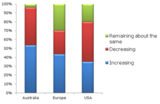
In a recent online event, we polled hundreds of course designers spread throughout Australia, Europe and USA with four simple questions. The results are quite interesting.Question 1.In your experience, over the past several years, are customer budgets per hour of eLearning increasing, decreasing or remaining about the same? Figure 1: Poll Results on E-Learning Budgets Per Hour of Seat TimeQuestion 2.What level of interactivity do clients expect in the courses you deisgn? Figure 2: Poll Results on Level of Interactivity Clients WantQuestion 3.What types of tools do you currently use for eLearning course creation?Figure 3: Poll Results on Current Tools in use for E-Learning Course CreationQuestion 4.Do you use a greater number of tools today than you did three years back? Figure 4: Poll Results on Number of Tools over the YearsMy key take away from this set of poll questions is that eLearning budgets per hour of seat time have shrunk, but customers continue to demand higher level of interactivity. Given the pace of technology advancement, producers are able to meet the customer demands by using the right set of tools. That explains the use of a greater number and variety of tools.Feel free to share your thoughts and interpretations of these poll results.
Vikas Joshi
.
Blog
.
<span class='date ' tip=''><i class='icon-time'></i> Jul 14, 2015 05:37pm</span>
|
|
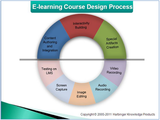
If the title of this post makes you think I will list a whole bunch of tools here, let me first set the expectations right. It is my endeavor to take a look at the e-learning course design process here, so that you can decide how to build a tool kit that addresses all process components.E-learning course creation is all about having a design process in place to build the right course in time. Every instructional designer follows some sort of an e-learning course design process. What I proposed one such process in a recent webinar titled "Interactive Courses on a Shoestring Budget" organized by Raptivity in November, 2011. As you may have noticed in the figure shown above, the graphic image of the doughnut has been divided into two parts.The lower part of the image has process steps such as screen capture, image editing, audio recording and video recording. These steps aid in the creation of assets for the course. These assets add to the picturesque quotient of the course and make it more engaging with videos, images, etc. The lower part also includes one final step of testing, which we will come back to later.The upper part of the doughnut has processes such as special artifacts creation, interactivity building, content authoring and integration. This is where you assemble the assets and make the course interactive and complete. Interactivity building makes the course content more easy to adapt and retain in an interactive format through games, puzzles, etc. The final milestone is reached when all the assets, interactions, special artifacts created are put together in the content authoring and integration process and thereafter, you test the course on the Learning Management System (LMS).Every course designer will follow some variation of this process. The process then, forms the basis of your tool selection. Building your e-learning course design tool kit is a matter of identifying the tools that help you execute the process efficiently. Some may be freely available tools, yet others commercially available. To view the narration of the doughnut given during the webinar, you can view the recording here.
Vikas Joshi
.
Blog
.
<span class='date ' tip=''><i class='icon-time'></i> Jul 14, 2015 05:37pm</span>
|
|
These days designing and delivering end-to-end e-learning on mobile devices is on everyone's mind. What kind of capabilties must tools have to support m-learning? Here is a quick 4-point checklist.Device CapabiltiesDepending on the target device, user interface capabilities will vary. The m-learning tool should utilize fully the capabilities of the target device. TemplatesReady-to-use templates for all supported devices go a long way in ensuring professional presentation while saving time. Preview CapabilityDue to the wide variety of form factors mobile devices come in, preview of learning material is a crucial step before publishing content.Media supportWith an explosion of device types and browsers, it is important to keep track of media supported by each combination. One way for an m-learning tool to create value would be to alert the user when a non-support type is referred to. Even better the tool could intelligently select an alternative media from multiple media provided.Both the creation and consumption of m-learning content on mobile devices is substantially different from traditional e-learning. Tool vendors will need to keep the differences in view while designing their wares.
Vikas Joshi
.
Blog
.
<span class='date ' tip=''><i class='icon-time'></i> Jul 14, 2015 05:36pm</span>
|
|
This summer's thought leadership webinar from Harbinger Group attracted over 1000 registrants. Perhaps it was the powerful and relevant theme that drew such crowd: Interactions on Mobile. What works? What Doesn’t? The Raptivity-sponsored event provided several insights in interactive mLearning. Here's a brief outline of the webinar:The need for interactivity in mLearningCharacteristics of mLearning interactions Challenges in mLearning, native vs. web apps Flash vs. HTML5Why HTML5 Tips for creating interactive content for mobileIn case you missed it, you can access the slide deck and the recorded webinar here.The webinar speakers were Janhavi Padture, Vice President at Harbinger Group and Robert Gadd, President and Chief Mobile Officer of OnPoint Digital. 'As always, we hosted the webinar three times in the day to cater to Asia-Pacific, Europe and Americas', added Jamaica Bracken, chief anchor.
Vikas Joshi
.
Blog
.
<span class='date ' tip=''><i class='icon-time'></i> Jul 14, 2015 05:36pm</span>
|
|
Assessments are inherently interactive. There is no assessment unless the learner interacts with the e-learning course in some way. What then does 'infusing assessments with advanced interactivity' mean?Some instructional designers believe that throwing in some multiple choice questions make learning sufficiently interactive. We would like to question that. Learners are bored to death with the chore of answering the same types of questions: MCQ, Matching, Fill-in and Drag-drop. They need variety. They need to enjoy their assessments. Don't they?Formative assessments, sprinkled throughout the learning material, aim to perform a knowledge-check. Here, there is huge potential for using a wide variety of exciting interactions. When the nature of the learning content drives your decision, you might choose interactions accordingly. For example, a product familiarization course may involve labeling, a soft-skill course may use videos or simulations, and so forth.Sometimes your instructional objective decides the interaction type. This would lead to interactions that require recalling a concept and applying it or simply memorizing it. Finally, the nature of your target audience influences the choice of interactions. Competitive audiences will enjoy games, those needing motivation could use other types of interactions.Summative assessments, which occur at the end of a learning module, aim to evaluate the learner and report a score. Prima facie it stands to reason that summative assessments are more serious business, and should somehow steer clear of interactivity. On close examination, though, we find several situations where summative assessments too can benefit from advanced interactivity.For example, a compliance training can include an assessment delivered as a simulation exercise. Similarly, when teaching leadership development, games can still deliver. The case of interesting assessments for K-12 is more obvious to make. Several questions can be delivered through game-like activities.In conclusion, then, both formative and summative assessments can be infused with advanced interactivity to enhance learner engagement, enjoyment and retention, without compromising the key goals of knowledge checking and evaluation.One great example of a simple interaction that works equally well in both types of assessments is Rapid Check. To see a demo of Rapid Check, click here. To hear about the various ways you can use Rapid check, watch this webcast.
Vikas Joshi
.
Blog
.
<span class='date ' tip=''><i class='icon-time'></i> Jul 14, 2015 05:36pm</span>
|