Blogs
|
The Teachers Guide to PinterestGetting Started with Pinterest!I'm surprised to find out how many educators are still not using Pinterest! So I've decided to put together this guide to help new users get started, and help more advanced users find great educational content. So why not use the summer to get acquainted with Pinterest and find some great resources for the next school year!Guys, Pinterest is not just for the ladies! I have a brother-in-law with a "Man Cave," board to prove it! Give it a shot. Watch the video below if you are new to Pinterest, and still don't quite get it.What is Pinterest?Pinterest is a visual bookmarking tool, where users save bookmarks or "pins" onto their virtual "boards" to organize and revisit. Pinterest is also a very powerful search engine! Use it to find and discover new ideas for the classroom, for your home and your life.Get Started!Now, go set up your account at www.Pinterest.com and get started! Stay tuned for more posts in this series to learn more about who and what to follow, and how to make the most of Pinterest in the classroom. And if you just can't wait, explore my previous Pinterest posts linked below.35 Educators You Should Follow on PinterestCreate Beautiful Pinterest Board CoversWhat do you love about Pinterest? Please share in the comments below!Kasey Bell will be presenting at the following upcoming events:iPadpalooza, June 23-25 (Austin, TX)ISTE, June 28-July 1 (Philadelphia, PA)Missouri Google Summit, July 11-12 (Kansas City, MO)California Google Summit, July 18-19 (Palo Alto, CA)TIA 2015, July 21-22 (Denton, TX)Texserve's 2nd Annual "Bridging the Gap: Technology & Instruction" Symposium (Keynote), July 30 (Dallas, TX)Hunt County Tech Camp, Aug. 4 (Commerce, TX)Revolutionize Learning Conference, Aug. 5 (Royse City, TX)
Shake Up Learning Blog
.
Blog
.
<span class='date ' tip=''><i class='icon-time'></i> Jul 15, 2015 11:09am</span>
|
|
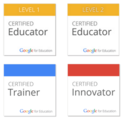
4 NEW Google Certifications! Plus a NEW Google Training Center!New and Updated Google Educator Certifications!I spend a lot of time helping other educators prepare for Google Certifications, and I am happy to share some new information today. In conjunction with the release of a brand new Google Education Training Center, Google has revealed its new certification to the masses. We have some new titles, badges, and wonderful ways to learn to implement Google Apps in the classroom.Google for Education CertificationsThere are officially three different Google certification programs for educators (and yes, we can now officially use the word, "certification," in all three): Google Certified Educator (level 1 and level 2), Google for Education Certified Trainer, and Google for Education Certified Innovator. Each certification level gets a brand new badge as well.Below are the details on the new Google Education Certifications, which is how it is stated on Google's new Training Center. The details below come directly from Google.The Google for Education team manages three different certification programs to meet the professional development needs of our school community:Google Certified Educator (Level 1): Designed for educators and classroom teachers who wish to demonstrate proficiency in using Google for Education tools. The Level 1 status indicates that an educator is able to successfully implement Google Apps for Education into their teaching practice in order to enhance teaching and learning. Google Certified Educator (Level 2): The Level 2 status indicates that an educator is able to successfully integrate a wider range of Google for Education tools and other technologies in order to transform their teaching practice.Google for Education Certified Trainer: Designed for individuals who deliver training or professional development to other educators. You may be a professional trainer at a partner organization; tech integrator or coach at a school or district; or maybe an independent consultant. This program requires you to have experience delivering training on Google for Education tools.Gather Your Prerequisites:Candidates for the Google for Education Certified Trainer program must demonstrate subject-matter expertise by achieving the Trainer Essentials certificate and delivering Google for Education training. All existing Google Educator certificates are also valid for application.Trainer Essentials Certificate + experience delivering Google for Education trainingNote: Google Certified Educator Level 1 and Level 2 certificates are not valid for application.Apply (Applications will re-open on July 8, 2015.):We accept and review applications every quarter. The application allows you to show us your training experience, style, and strategy.Training ExperienceProvide a training resume highlighting relevant work experience, training and speaking sessions, and other awards or certifications. Please limit to 2 pages. See example.Provide 3 references for trainings you've delivered in the past year - ideally from 3 different training sessions and/or organizations. Your references will receive a short survey to complete about their experience with your training.Training StyleSubmit a 2-minute video showcasing your training skills. The video should highlight one feature of Google Apps for Education, Chromebooks, Chrome, or Android Tablets with Play for Education in a classroom or school setting. Screencasts are preferred. See example.Training StrategyCreate a case study (using this template) that will give us a good understanding of your training strategy, including planning, implementation, evaluation, and sample learning materials. See example.Google for Education Certified Innovator: Designed for education thought-leaders who create new and innovative projects using Google for Education tools.Gather Your PrequisitesCandidates for the Google for Education Certified Innovator program are selected based on their professional experience, their passion for teaching and learning, their innovative use of technology in school settings and their potential impact on other educators.Google Certified Educator Level 2 + Demonstrate a history of innovation in schoolsApplyYou must attend a Google for Education Innovation Academy as the first step in becoming a Certified Innovator. Applications will open and close on a rolling basis and will be based on location. (Note: No dates have been released yet for the Innovation Academies).At the Google for Education Innovation Academy you will discover how to unlock creativity, translate insights into solutions, experiment rapidly, and build an effective innovation culture in your own schools and organizations. You'll come away with practical approaches, valuable tools and techniques, and the beginnings of an Innovation Project. The Innovation Academy is just the beginning of a journey with your peers - and Google - to impact education in your communities.Design an Innovation ProjectInnovation Projects are the tools through which Innovators implement and measure their impact. While the mission and outcomes of each Innovation Project will vary from person-to-person, here are some principles that will guide development:Have a mission that matters: Your mission should be something you care about and has the potential to touch many livesThink big but start small: No matter how ambitious the plan is, you have to start somewhereIterate and fail fast: We're not looking for perfection, we're looking for continual innovationShare everything: Encourage discussion, collaboration, and the exchange of ideasSpark with imagination, fuel with data: Use data to backup your insights or help you pivot directionsAll projects should drive change in education, impact educators and students, and be documented for other educators to follow.The Transition from other Google CertificationsAs we transition to this new system, there are many questions about your current certifications and where do we go from here. Here is a link to a document from Google explaining the transition to the new certifications. Hopefully, this will help answer a lot of your questions.FREE Webinar Overview Coming Soon!I will be offering a FREE webinar overview of the new certifications very soon. Sign-up here to be notified on the details of this event.The NEW Google Education Training CenterNot to be overshadowed by the news about the certifications, a new Google Training Center has been revealed. It was a great honor to be a part of this project and develop some of the lessons for educators.The new training center is designed to help teachers learn how to meaningfully integrate Google tools in the classroom with lesson ideas and facilitation tips. With both fundamentals and advanced levels, there is training to support all levels. You will also find resources and how-to training for all of the tools and devices. This is such a valuable resource for educators! Kasey Bell will be presenting at the following upcoming events:ISTE, June 28-July 1 (Philadelphia, PA)Missouri Google Summit, July 11-12 (Kansas City, MO)California Google Summit, July 18-19 (Palo Alto, CA)TIA 2015, July 21-22 (Denton, TX)Texserve's 2nd Annual "Bridging the Gap: Technology & Instruction" Symposium (Keynote), July 30 (Dallas, TX)Hunt County Tech Camp, Aug. 4 (Commerce, TX)Revolutionize Learning Conference, Aug. 5 (Royse City, TX)
Shake Up Learning Blog
.
Blog
.
<span class='date ' tip=''><i class='icon-time'></i> Jul 15, 2015 11:09am</span>
|
|
Share Your Voice ChallengeThe #ShakeUpLearning Share Your Voice Challenge!Today, I am delivering a five-minute Ignite presentation at ISTE. The subject of my Ignite is my reluctant journey into blogging. Below is a summary of my presentation and a challenge for educators. Will you take the challenge?A Perfectionist with Paralysis: Letting Go and Sharing Your Voice!I didn’t think my voice mattered. I didn’t think I had anything original to share. Why would anyone listen to me when there were so many other amazing educational bloggers sharing resources online--doing it better than I ever could. Why would I want to leave my perfectly comfortable position as a lurker on the sidelines? What if I fall flat on my face? These were the thoughts that haunted me before I committed to becoming a blogger.I had started a blog several times with the best of intentions. I spent countless hours researching the best platforms, templates, plugins, hosting options, and developing the perfect title for my blog--never satisfied with the results and never getting my feet off the ground. I would never be good enough. I was a perfectionist with paralysis. When I was a classroom teacher, my students occasionally blogged. Now, as an instructional leader, I encourage teachers to blog with their students. However, I was not an example for them to follow. I let my excuses get in the way. I let my fear of rejection and failure hold me back. Feelings of inadequacy and rejection had immobilized me.I wanted to launch my blog not only with the perfect content, but also with perfectly customized images and stellar resources and stand out in the crowd of educational bloggers. I wanted it to be EPIC from day one.My blog will never be perfect, that was just an excuse. So, I decided to let it go and focus on another skill that I speak on almost daily: risk taking! So in January of 2014 (see my first blog post here), I took a risk and put myself out there, put my blog out there, imperfections and all. I finally decided to go all in. I had to overcome my fear of not being good enough. I no longer let my need for perfection, however unattainable, stand in the way of my contribution to the world.First, let me tell you that educational bloggers and blog readers are VERY forgiving and supportive. The first time someone pointed to a mistake on my blog, I took it personally and would worry about it for days. But the more content I created, and the more support I felt from the community, the more my insecurities melted away. Yes, I made and still do make a lot of mistakes, but I have learned to let it go. Most of the time, criticism from fellow educators is handed out with a dose of kindness and compliments. We are very lucky to be in a community of educators that offer grace and overwhelming support for one another. I never expected blogging to flip my career on its head, but it did! Honestly, I never thought about the community that I was joining or creating on my own until it was there. Educators began leaving comments, sharing their ideas and greatly expanding my personal learning network. I have connected with some of the most inspiring teachers in the world! I would not be standing before you today if it weren’t for the support and encouragement of the educators who believed in me, and showed me the value of my authentic voice. My voice does matter! I do have something to contribute to the global educational community...and so do you AND your students!I am not an expert. I am a learner, a learner first! We are all growing and learning together, and should always be first and foremost learners. And guess what? The best bloggers are learners, not writers. And the moment you begin sharing original thoughts, ideas and content for online, you have become an educational leader and example for your students and peers. The Share Your Voice ChallengeAre you still sitting on the sidelines? This is my challenge to other educators that are like me: What are you holding back? What risks do you need to take to push yourself further, to push your students further? While I believe there is value in blogging for educators at any level, that may not be your calling. What are your God-given talents? What is your passion? Be yourself and let your personality shine through everything that you do. Every single person in this audience has something unique to share, something that is authentically you, and other educators and students can learn from you.We live in a connected world, where your voice can be heard if you want it to be. And guess what, the more we model connecting, curating and sharing our own unique passions for our students, he more likely they are to take a risk and share their own voice.Every voice matters! Don't be afraid of failure, or let your need for perfection paralyze your contribution to the world. I invite you all to my blog, shakeuplearning.com, to take the challenge to Shake things up and Share YOUR VOICE!If you are willing to accept the challenge and try something new like blogging to share your own unique voice and passions, leave a comment below and share the risk you plan to take. This risk may be blogging, or anything else you feel led to try. I've also created a badge for you to use on your website, blog, or wherever you like. Be sure to use the #shakeuplearning hashtag to share your journey on social media. I can't wait to see and hear from you!every_voice_matters_badge.jpgFile Size:118 kbFile Type:jpgDownload File
Shake Up Learning Blog
.
Blog
.
<span class='date ' tip=''><i class='icon-time'></i> Jul 15, 2015 11:08am</span>
|
|
The Teacher's Guide to Pinterest: Part 2The Teacher's Guide to Pinterest - Part 2: Follow Your InterestsUse Pinterest to Follow What Interests You!Pinterest is a powerful search engine for finding and discovering new ideas, DIY projects, beautiful infographics, AND a phenomenal tool for finding and curating classroom resources! I promise you Pinterest is NOT just for women looking at crafts and recipes! So just in case you don’t believe me, I have put together this guide for teachers, educators, and educational leaders looking to make the most out of Pinterest.Today’s post is focused on a lesser-known way to discover pins that interest you. Did you know you can not only follow people and boards, but you can follow topics that interest you? I just began exploring this option, and it has opened up a whole new world. But I wish Pinterest made this easier to do…To follow your interests, start with one of the Pinterest categories, like "Education." (Click here to see Pinterest categories.) After selecting a category, you will see related interests at the top.Interests Related to EducationIt takes a while to drill-down to your favorite niches. I really had to dig to find the specific interests that I wanted.Once you have selected an interest, a small, red "follow" button will appear. This allows you to follow interests just like following a person or a board.Click to Follow an InterestYou can also see what interests other Pinners are following by clicking on their account > following. Three tabs will appear at the top. If they are following any interests, you will see them listed under the first tab. You can see the interests I follow here.25 Education and Technology Interests for Teachers to Follow on PinterestAnd to save you some time, I’ve done some of the digging for you and found some of my favorite educational interests below. Just click the link and "follow!" Pinterest will then begin to add pins based on these interest into your feed.EducationMathScienceLanguage ArtsSocial StudiesSpecial EducationArt EducationPhysical EducationEducational TechnologyTechnology IntegrationGoogleGoogle DriveBlended LearningDigital CitizenshipProject Based LearningProfessional DevelopmentInstructional StrategiesVirtual RealityWearable TechnologyAugmented RealityiPadAndroidLearningChoice BoardsMinecraftOther Posts in This Series:The Teacher's Guide to Pinterest - Part 1: What is Pinterest?more coming soon!What are your favorite interests to follow on Pinterest? Please share in the comments below!Kasey Bell will be presenting at the following upcoming events:Missouri Google Summit, July 11-12 (Kansas City, MO)California Google Summit, July 18-19 (Palo Alto, CA)TIA 2015, July 21-22 (Denton, TX)Texserve's 2nd Annual "Bridging the Gap: Technology & Instruction" Symposium (Keynote), July 30 (Dallas, TX)Hunt County Tech Camp, Aug. 4 (Commerce, TX)Revolutionize Learning Conference, Aug. 5 (Royse City, TX)
Shake Up Learning Blog
.
Blog
.
<span class='date ' tip=''><i class='icon-time'></i> Jul 15, 2015 11:08am</span>
|
|
3 Text-to-Speech Chrome Extensions to Support Struggling Readers and ELLUsing Google Chrome Extensions to Support Struggling Readers and English Language LearnersGoogle Chrome has so much to offer teachers and students, AND there are so many fantastic apps and extensions to support struggling readers. Text-to-speech is a great way to support struggling readers--it's reading with your ears!Benefits of Text-to-Speech for ReadersRelieves the burden of decodingFocus on comprehensionImprove fluency and enduranceIdentify and correct more errorsThere are several text-to-speech apps and extensions. Below are three that I find useful for the classroom.Chrome Speak It!I like this one for its ease and simplicity. Simply highlight the text, right-click and choose, "SpeakIt!"AnnouncifyThis is probably one of the more popular text-to-speech extensions among educators. This cute little birdie sits in your extension toolbar. When you find an article or selection of text on the web that you would like it to read, just click on the little birdie.There is an added bonus with this one! Not only does it read the text, but it opens the article in a new window and it gets rid of the ads and chaos around the article so that young readers can stay focused. But wait, there's more! It also blurs out the paragraphs that are not being read so it keeps the readers on the correct paragraph. The audio in the video below is not great, but will show you what it can do.Read&Write for GoogleThis last one if my favorite, and is made by Texthelp, who makes a lot of great tools for education! While I am just sharing one feature of this tool today, it is loaded with other features to support learning! (We will revisit those later.) The Read&Write for Google extension is free for teachers. Be sure you follow the directions in the Chrome Web Store.This little beauty has a purple puzzle piece as its icon, and it resides in the Omnibox (search box) in Chrome. Click it to open the toolbar, and then click the play button for it to read the text on the screen. BONUS! This feature works on websites as well as Google Docs! Below is a quick video overview of the tool.What are your favorite Chrome Apps and Extensions to support struggling readers? Please share in the comments below!Kasey Bell will be presenting at the following upcoming events:California Google Summit, July 18-19 (Palo Alto, CA)TIA 2015, July 21-22 (Denton, TX)Texserve's 2nd Annual "Bridging the Gap: Technology & Instruction" Symposium (Keynote), July 30 (Dallas, TX)Hunt County Tech Camp, Aug. 4 (Commerce, TX)Revolutionize Learning Conference, Aug. 5 (Royse City, TX)
Shake Up Learning Blog
.
Blog
.
<span class='date ' tip=''><i class='icon-time'></i> Jul 15, 2015 11:08am</span>
|
|
Creating a course using our multi-device authoring tool
Can I get multi-device previews? Does gomo do branching? Which interactions can I use?
We covered all this and more in yesterday’s webinar. Read on to find the answers to your commonly asked questions about our new authoring tool.
Q: Hi Mike - will a recording of this webinar be available?
A: Not today, but from next week all webinars will be recorded.
Q: Does gomo do branching?
A: Yes, using gomo’s action controls you can create branching content.
Q: Does gomo have a selection of different devices on the platform that you can preview to?
A: Yes - the gomo previewer allows you to test on desktop, tablet and smartphone, all within the gomo browser.
Q: What plans are there for common interactions such as drag and drop to be added to gomo?
A: gomo will ship with about 20 interactions on release. Many more will be added based on popular demand.
Q: Is there a minimum commitment? Could you purchase just one month initially to trial the software?
A: Personal and small team editions will include a 30 day trial, following which both editions will be available on a monthly rolling or annual contract.
Q: How much beta testing has been done?
A: Our end user beta programme starts in March. Please register on our website if you would like to be part of this.
Q: What format are the courses produced as?
A: gomo produces SCORM-compliant HTML5 content by default. This can also be packaged as a native app using Phonegap if required.
Q: How long have you guys been in business?
A: gomo is part of the Learning Technologies Group and grew out of Epic. We’ve been around since 1986.
Q: Will there be Tin Can support?
A: Yes. Tin Can is planned for later this year - probably in the summer release.
Q: Excellent webinar, well done, thanks Mike!
A: Thanks everyone - your kind words are appreciated!
And if you couldn’t attend this week’s webinar, make sure you register for a future demo, taking place on:
20th February at 2pm GMT
27th February at 2pm GMT
The post Introducing gomo: your questions answered appeared first on gomo Learning.
Gomo Learning Team
.
Blog
.
<span class='date ' tip=''><i class='icon-time'></i> Jul 15, 2015 11:08am</span>
|
|
Are you interested in seeing a multi-device authoring tool that allows you to create beautiful content for your PC, tablet and smartphone? Then you’re in luck because Managing Director Mike Alcock will be presenting two ‘Introducing gomo’ webinars on 20th and 27th February to tell you more about our new multi-device authoring tool.
Spaces for these 45-minute webinars are limited and expected to go quickly, so make sure you sign up now for your preferred slot. The options are:
Thursday 20th February - 2pm GMT
Thursday 27th February - 2pm GMT
Is this webinar for you?
Join Mike as he:
shows just how easy it is to create a new project in gomo
demonstrates the way these courses respond and adapt on multiple devices
showcases examples of learning created using gomo
explains how you can sign up to join the beta programme
reviews the pricing plans.
These webinars are also the perfect way to share gomo with your colleagues so they can see for themselves how quick and easy it is to build your own beautiful bespoke content.
Calling all Learning Performance Institute members
Are you a fan of the LPI’s webinar series? If so, register today to join Mike for ‘How to create beautiful multi-device learning with gomo‘ on 12th March at 10 am GMT. Webinars are free for members to attend.
We’re really excited to show you gomo, so get in early and secure your place now. And remember, there’s still time to enter our competition to win a free one year ‘small teams’ subscription to gomo if you haven’t done so already.
The post Have you booked your webinar space yet? appeared first on gomo Learning.
Gomo Learning Team
.
Blog
.
<span class='date ' tip=''><i class='icon-time'></i> Jul 15, 2015 11:08am</span>
|
|
Viewing a page of e-learning created using gomo
Here at gomo HQ, we’re getting more and more excited about the upcoming launch of our exciting multi-device authoring tool. Meanwhile, our webinar series featuring live demos continues. Last week’s session covered a range of topics, including gomo’s video streaming capabilities, image usage, theme customisation and more.
Here are the questions and answers from last week’s webinar.
Q: Can we import vector images?
gomo can support images in PNG, GIF and JPG format.
Q: Do exported courses work in Internet Explorer?
Yes, published content created using gomo is designed to work on Internet Explorer 8 and upwards. We will be releasing a full summary of supported devices and browser versions shortly.
Q: Will gomo content include offline capability?
Published HTML e-learning will require an active internet connection to provide SCORM tracking through an LMS. Courses can be published as native apps using Phonegap for offline delivery.
Q: How does gomo handle branching scenarios?
Branching content is created using gomo’s ‘action’ controls. When you are creating content, a number of assets support actions (e.g. a button) which can be linked to any topic and screen within your project to provide branching capabilities.
Q: Can I embed external/ custom HTML5 content?
gomo does not currently support custom HTML5 content, but we are currently looking into this as part of a future update to the product.
Q: Does gomo support video streaming?
Not yet. Our video asset currently only supports playback of videos uploaded to the project. Streaming from external sources (e.g Intranet, YouTube or Vimeo) is a planned enhancement for the video asset.
Q: Can a course be downloaded to work offline?
There is no restriction to stop you distributing your content for local playback. However, this may be restricted due to your network security policies or the policies of your chosen web browser. At present, we have successfully tested content running locally on Firefox and Internet Explorer. Chrome, on the other hand, has a security policy in place that prevents the content from loading.
Q: How are themes customised?
gomo will provide a number of themes which you can either use ‘as is’ or duplicate and customise based on your personal requirements. Once you have created your own customised theme, you can re-use this every time you create a project. Theme customisation is achieved through the theme control panel which allows you to change the size, look and feel of a theme as well as the way it behaves (e.g. horizontal or vertical scrolling).
gomo will also allow you to choose from a list of web-safe fonts. As a future update, we also plan to add in font uploading.
If you enjoyed this post, why not read more Q&As from our first gomo webinar? And if you haven’t been able to join us for a live demo yet, we have another webinar lined up for Thursday 27th February at 2pm GMT, so register today.
The post Themes, images and more: your webinar Q&As appeared first on gomo Learning.
Gomo Learning Team
.
Blog
.
<span class='date ' tip=''><i class='icon-time'></i> Jul 15, 2015 11:07am</span>
|
|
How is it already March? With less than a month to go until you can get your hands on gomo, we’re running more demo webinars to help you find out more about our multi-device authoring tool before its official launch on 2nd April. These webinars will cover everything from how much it costs to the key features of gomo, including the ability to collaborate on e-learning projects within your team, the incredible range of customisation features available and the super easy distribution of content across desktops, mobiles and tablets. Mike Alcock will demonstrate just how quick and easy it is to get up and running with gomo. We always enjoy receiving your questions in the Q&A session if there’s anything else we don’t manage to cover. The next webinars will be taking place on the following dates:
Wednesday 12th March at 10am GMT - hosted by the Learning & Performance Institute
Monday 17th March at 2pm GMT
Tuesday 25th March at 2pm GMT
Newly announced! Mark your diaries for Tuesday 1st April at 2pm GMT for gomo’s special pre-launch webinar. Registration will be open soon so follow us on Twitter @gomolearning for more details.
We really hope you can join us for one of our webinars, and can’t wait to show you why it’s time to meet your new authoring tool.
The post It’s Multi-device March - have you registered for a gomo webinar? appeared first on gomo Learning.
Gomo Learning Team
.
Blog
.
<span class='date ' tip=''><i class='icon-time'></i> Jul 15, 2015 11:06am</span>
|
|
The MountainMoot 2015 in Helena, Montana is a small conference with big ideas.
This one-of-a-kind moot is dedicated to helping teachers, students, and administrators optimize their use of the world’s leading learning management system, Moodle. We limit attendance to 150 attendees each year, and last year we sold out a month in advance, so make your plans early.
Though we focus on the use of Moodle to improve teaching and learning, we know a great conference needs more than great content. In addition to quality sessions by leading Moodlers, we focus on creating a community of teachers and learners that benefits our attendees long after the conference has closed.
To this end, we make sure the MountainMoot has plenty of time for social engagement and informal collaborative learning. If you attended last year, you also know that we have developed a rudimentary currency system (Moot bucks) and a live auction as a way to distribute the great prizes we give away every year. Last year we gave away a Swivl, a Kindle, and Ipevo wireless document camera, an Epson WorkForce wireless printer, and a whole boatload of other great prizes.
The MountainMoot 2015 is hosted in the Corette Library at Carroll College on July 15 - 17, 2015. The Corette library is a comfortable, collaborative, technologically integrated learning space with floor-to-ceiling views of the surrounding landscape. Filled with comfortable furniture and plenty of common space, we know you’ll be sad to leave at the end of the conference.
This post was first published on eLearning Industry.
eLearning Industry
.
Blog
.
<span class='date ' tip=''><i class='icon-time'></i> Jul 15, 2015 11:03am</span>
|