Blogs
|
As Quincy Jones once remarked, "I’ve always thought that a big laugh is a really loud noise from the soul saying, "Ain’t that the truth."
That said, Edu-fun Friday is a series devoted to adding some humor to the lives of teachers who visit this blog. After all, there’s nothing better than ending the week on a positive note! Plus, do we have the best topics to provide us with some comic relief or what?
When I was taking some pictures of fourth graders participating in the Hour of Code last week, one of them immediately asked me if I was putting it on Facebook. So, when I saw this cartoon, I totally laughed—again. Not only do I think it’s pretty funny, but it definitely speaks to the social media awareness that our digital natives possess.
Edutech for Teachers team
.
Blog
.
<span class='date ' tip=''><i class='icon-time'></i> Jul 15, 2015 11:59am</span>
|
|
I’m not the type that puts too much emphasis on awards. Blogging is a passion, a labor of love; therefore, awards do not define me or my work.
I mean, don’t get me wrong. It’s not that being recognized by others for a job well done is unappreciated, but what I know to be true intrinsically is way more meaningful to me than any external praise I can receive. Setting goals and then doing whatever is necessary to accomplish them is of the utmost importance—regardless of how others weigh in on the matter. That is why winning the Edublogs Teacher Blog of 2014 is significant to me. Not because I personally picked up some digital bling, but because in the process of doing so, one of my students made a dream a reality: To win the Student Blog of the Year. Knowing I played a key role in her success and better yet, we were recognized together—like a team—is beyond coolness. As an educator, it’s one of those unforgettable, irreplaceable, cherished moments that speak to me like "Yep, this would definitely explain why I chose this career path."
So, here’s to you, Aubs, for never losing sight of your vision, for staying the course despite last year’s disappointment and for finally picking up that swanky badge for your space. You rock, GG!
Be sure to check out Simply Aubree, an official award-winning blog, to read all about the ramblings of a country girl! ♥
Edutech for Teachers team
.
Blog
.
<span class='date ' tip=''><i class='icon-time'></i> Jul 15, 2015 11:58am</span>
|
|
If you enjoyed the 12 Digital Days of Christmas posts I published over the last few weeks, then you can’t miss the Celebrate Holiday Traditions interactive image embedded below. Compiled by ThingLink Education Community Manager Susan Oxnevad, this must-see contains a collection of resources to tech your halls before the holiday break.
From Christmas traditions and songs around the world to an inquiry project based on where Christmas trees grow as well as a super cool mash-up of activities based on Shel Silverstein’s Snowball poem, there’s something fun and festive for everyone!
Thanks to tech gurus Aunty Tech, Cathy Maher, Meghan Zigmund and Amy Kincaid for sharing your awesomeness!
Joy to the World! Psalm 98
Edutech for Teachers team
.
Blog
.
<span class='date ' tip=''><i class='icon-time'></i> Jul 15, 2015 11:58am</span>
|
|
In the words of Oprah, "Year’s end is neither an end nor a beginning but a going on, with all the wisdom that experience can instill in us. Cheers to a new year and another chance for us to get it right."
So, along with the opportunity to have 12 months of happiness, 52 weeks of fun, 365 days of love and laughter and 8,760 hours of learning to use all sorts of new cool tools, apps and gadgets, here’s to writing a new chapter in which you have the opportunity to get it right—however that may look for you.
And of course, as educators, we all have another year to influence the educational world and the students who live in it. Does it really get much better than that?
Regardless of where your 2015 journey takes you, I hope it’s an unforgettable one!
Edutech for Teachers team
.
Blog
.
<span class='date ' tip=''><i class='icon-time'></i> Jul 15, 2015 11:57am</span>
|
|
As 2015 begins, it’s out with the old and in with the new—goals, ways of doing things and efforts to make dreams become a reality.
Well, apparently, that old adage also holds true for tech-related terms, particularly those based on the latest trends and changes on the technology scene. So, what’s retro? What terms indicate you just might be a fossil? How about surf, click and .com? Yep, it’s true. These once popular geeky expressions top the endangered list as they are now being completely updated or replaced with newfangled hip words such as "torrent" and "glassed up". Take a closer look at the latest technical jargon by checking out the infographic shown below. And find out just how old school you are in the process!
A shout out to Lebara Mobile for creating and sharing this handy visual.
Classroom Connection:
The infographic provides connected educators with a guide to new and outdated technology terms—info that can be helpful in the classroom and beyond. You don’t want to sound like you’re a flashback from the Woodstock era, do you? (OK, so maybe you do but……)
Edutech for Teachers team
.
Blog
.
<span class='date ' tip=''><i class='icon-time'></i> Jul 15, 2015 11:55am</span>
|
|
As Quincy Jones once remarked, "I’ve always thought that a big laugh is a really loud noise from the soul saying, "Ain’t that the truth."
That said, Edu-fun Friday is a series devoted to adding some humor to the lives of teachers who visit this blog. After all, there’s nothing better than ending the week on a positive note! Plus, do we have the best topics to provide us with some comic relief or what?
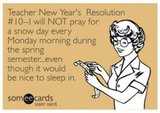
OK, so I don’t pray for snow days (sometimes), but I do frequently wish for two hour delays! Is that pathetic?
If you enjoy this meme, then you should definitely check out nine other Teacher New Year’s Resolutions here. A shout out to the Pensive Sloth for the giggles!
Edutech for Teachers team
.
Blog
.
<span class='date ' tip=''><i class='icon-time'></i> Jul 15, 2015 11:55am</span>
|
|
Looking for a way to add some coolness and originality to digital pictures? Then PhotoFunia, a fun and free online photo editing tool, is the ideal resource for you—and your students! Whether you want to see your portrait on the cover of a magazine, the billboards of Times Square or on the walls of the Louve—or maybe you just want to make your own mark in the sand, write graffiti text on a wall or create a customized road sign—either way, a myriad of effects and filters are waiting for you on this fantastic site!
Aside from hundreds of ways to pimp out your photos, did I mention how simple PhotoFunia is to use? Yep, you don’t even need a bunch of high-tech image editing skills in order to utilize and enjoy this application. Oh, and guess what? There is no registration or software download of any type necessary to get started. Just select the desired template, upload your photo(s), and after a few clicks, your very own work of art is ready in an instant. Depending on the filter chosen, users have several download options in order to save images for future use.
You can even have tons of fun on the go anywhere, anytime by utilizing one of the PhotoFunia mobile apps that are available for virtually any device.
Sound too good to be true? You might think so, but not so much. As the name implies, this tech tool makes tweaking photos a lot of fun! And it’s pretty impressive as well, especially for a freebie!
Check out a few of my favorite effects shown below…
Ever wondered what’s it like to be a rockstar? Project a picture of you and your students on a huge screen in front of your loyal fans by taking center stage with this fun concert effect.
So, you wake up in the morning and a newspaper is waiting for you. Look! One of your students made the headlines!
Create your own vintage stamp effect by uploading a few of your favorite student photos.
I’m sure your students have dreamed of starring in a hit TV show? Find out what they would look like with this nifty retro TV Prisoner effect.
Leave a personalized message on a foggy window.
Classroom Connection:
Give students the opportunity to use the PhotoFunia effects and filters to design captivating supplementary materials that add a creative edge to any project or presentation that requires the use of an image to convey an idea or concept: Digital stories, reports, posters, advertisements, comic strips, blogs, wikis and much more!
Edutech for Teachers team
.
Blog
.
<span class='date ' tip=''><i class='icon-time'></i> Jul 15, 2015 11:54am</span>
|
|
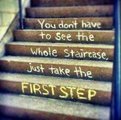
Just one example of the many words of wisdom spoken by Martin Luther King, Jr., pastor, activist, humanitarian and leader in the African-American Civil Rights Movement.
As we celebrate the life and legacy of this great man on the upcoming federal holiday established in his honor, don’t miss the opportunity to share some MLK information with your students so they can learn about the role he played in shaping our country’s culture and history.
As you might imagine, there are tons of teaching and learning resources available online, but out of all of them, I highly recommend the video "My Friend Martin", especially if you teach middle school students. It’s a cool mix of animation and actual black and white video footage that is extremely effective and captivating—one that can be used as a springboard to discuss Dr. King and his accomplishments. The use of kid lingo and voice overs from famous actors such as Whoopie Goldberg and LaVar Burton as well encouraging messages about how one person can make a difference by standing up for what is right even when it’s difficult makes this video a perfect choice for the classroom!
Even though I’ve seen the video dozens of times, it’s still my all-time favorite MLK educational resource. Check it out below!
Additional Resources:
» Martin Luther King, Jr.: A one stop shop for all things MLK—articles, videos, images and speeches. The History Channel has it all!
» Classroom Resources for Martin Luther King, Jr. Day: Help students put in perspective Martin Luther King, Jr.’s life, his impact on the Civil Rights Movement, and his significance to American culture and history via this NEA resource.
» Commemorate the Life of Dr. Martin Luther King Jr.: Learn about Dr. Martin Luther King Jr. and his nonviolent struggle for Civil Rights with these lesson plans and multimedia resources from Scholastic.
» MLK, Jr. Lesson Plans & Teacher Guides: The Dr. Martin Luther King, Jr.’s Legacy of Racial and Social Justice: A Curriculum for Empowerment is a teacher’s resource guide that provides activities for students in kindergarten through eighth grade to explore the rich history of the civil rights movement and the persona of Dr. Martin Luther King, Jr.
» Martin Luther King, Jr. Resources for Teachers: Check out quizzes, biographies, and various activities to learn about Martin Luther King, Jr. on this TeacherVision site.
» Martin Luther King, Jr. Day: Join Education World this January to celebrate Martin Luther King Day. The resource page includes articles, lesson ideas, books, activities and much more!
» Larry Ferlazzo’s Best Websites For Learning About Martin Luther King, Jr.: A comprehensive list of MLK resources.
Classroom Connection:
Use the Our Friend, Martin video and the other resources mentioned to teach students about the life and achievements of Martin Luther King, Jr.
Edutech for Teachers team
.
Blog
.
<span class='date ' tip=''><i class='icon-time'></i> Jul 15, 2015 11:53am</span>
|
|
As Quincy Jones once remarked, "I’ve always thought that a big laugh is a really loud noise from the soul saying, "Ain’t that the truth."
That said, Edu-fun Friday is a series devoted to adding some humor to the lives of teachers who visit this blog. After all, there’s nothing better than ending the week on a positive note! Plus, do we have the best topics to provide us with some comic relief or what?
Just imagine the impact if the principal is not very tech savvy! Ha, ha!
Edutech for Teachers team
.
Blog
.
<span class='date ' tip=''><i class='icon-time'></i> Jul 15, 2015 11:52am</span>
|
|
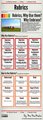
Rubrics… You know, those scoring guides that assist teachers with objectively evaluating student work. These same tools also provide teachers with a consistent framework using specific criteria to determine if and how learning objectives are achieved and skills are mastered. On the flip side, rubrics demystify the grading process for students by clearly stating, in age-appropriate terminology, the expectations of an assignment.
Regardless of whether or not you utilize rubrics, the must-see infographic shown below offers some pretty compelling rationale for promoting and/or reinforcing the implementation of this concept into every classroom.
Basically, rubrics can make the life of an educator simpler. Rather than adding an arbitrary grade to an assignment, rubrics streamline the scoring process by eliminating the guess work that is sometimes associated with determining the quality of project based assessments. Although they are very valuable and worthwhile tools, creating rubrics can be a challenging and tedious task.
That said, check out some of these really cool and useful digital tools that can assist educators in the development of rubrics. Not only can they be downloaded for future use, but they can be shared with others as well. Many of these sites also offer pre-made templates and examples that can be tweaked to suit your academic needs.
» RubiStar
» iRubric
» Rubrics4Teachers
» eRubric Assistant
» Common Core Rubric Creation Tool
» Teachnology General Rubric Generator
And then there’s the must-see Kathy Schrock’s Assessments and Rubrics page, a one stop shop for all things rubrics including tons of general and subject specific rubrics for all grade levels!
A huge shout out to Mia Macmeekin for creating and sharing another useful educational resource! Your infographics are the bomb! A special thanks also goes out to GoPixPic for the use of the rubrics image!
Classroom Connection:
Use the infographic as a guide to help explain why teachers should utilize rubrics to assess student assignments and projects. Utilize the tools mentioned to get the job done!
Edutech for Teachers team
.
Blog
.
<span class='date ' tip=''><i class='icon-time'></i> Jul 15, 2015 11:50am</span>
|