Blogs
|
Sometimes we just need to forget the curriculum, the standards, the test prep and interject some fun, some inspiration, some motivation into our daily routines. Well, I can’t think of a better way to do so than via the super popular Kid President videos.
This YouTube sensation, the brainstorm of Brad Montague—one based on the belief that kids have voices that can change the world—features the uniquely humorous yet meaningful words of wisdom from ten year old Robby Novak. Ironically, Robby has Osteogenesis Imperfecta, a brittle bone condition which has resulted in him having over 70 breaks since birth. But despite life’s struggles, Robby not only keeps going—he dances as well because after all, "It’s everybody’s duty to give the world a reason to dance."
Check out an example of a Kid President video shown below. This particular one—entitled "A Pep Talk from Kid President to You"—is one of my all-time favorites. The message not only encourages viewers to create something that will make the world awesome, but it also contains a special shout out to teachers and students. ♥
Classroom Connection:
OK, so like I said, the best way I personally believe the Kid President videos can be utilized is to break one out one of these gems when you feel the need to share some encouragement with your students—or colleagues for that matter. We recently began featuring a select video during our morning announcements program in the middle school, and our students love, love them.
Of course, if you want to go beyond just showing the video, follow-up with a class or small group discussion and/or a writing response to the particular message that was promoted. The Pinterest Board located here has some really neat ideas that could be modified to suit your needs.
You could even inspire your students to create their own motivational video as well. Now that would be awesome!
So, what are you waiting for? Get your learnin’ on and make some history. I’m out…
Happy 49th Anniversary to my really swell parents… Love you guys! ♥
Edutech for Teachers team
.
Blog
.
<span class='date ' tip=''><i class='icon-time'></i> Jul 15, 2015 11:49am</span>
|
|
As Quincy Jones once remarked, "I’ve always thought that a big laugh is a really loud noise from the soul saying, "Ain’t that the truth."
That said, Edu-fun Friday is a series devoted to adding some humor to the lives of teachers who visit this blog. After all, there’s nothing better than ending the week on a positive note! Plus, do we have the best topics to provide us with some comic relief or what?
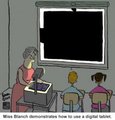
The funniest thing is that I’m pretty sure Miss Blanch thinks she’s all tech-ed out! Ha, ha!
Edutech for Teachers team
.
Blog
.
<span class='date ' tip=''><i class='icon-time'></i> Jul 15, 2015 11:49am</span>
|
|
What’s new this week in my Diigo bookmarks? Check out the links shown below for some of the latest and greatest web tools and resources that can be utilized to engage students in your classroom!
» Learn It In 5
A powerful library of how-to videos, produced by technology teachers, for the purpose of helping teachers and students create classroom strategies for today’s 21st century’s digital classroom.
» Tagul
A Web 2.0 tool that allows users to create word clouds with unique features such as words inside words, cool fonts, various cloud shapes, customizable colors, etc.
Posted from Diigo. The rest of my favorite links can be found here.
Edutech for Teachers team
.
Blog
.
<span class='date ' tip=''><i class='icon-time'></i> Jul 15, 2015 11:49am</span>
|
|
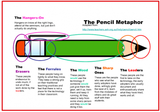
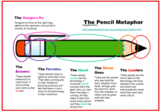
So, when it comes to technology integration, how would you classify yourself—as a leader, a sharp one, the wood, a ferrule, an eraser or maybe you’re one of those hangers-on? What. The. What? Yeah, if you’re wondering what in the world I’m referring to, then you definitely want to check out the Pencil Metaphor graphic shown below—one that outlines six ways educators typically react to the utilization of technology for educational purposes.
I realize the graphic is rather small, so if you’re having difficulty reading the details, here’s the scoop (or you can click on the image to view a larger version):
» The Hangers-On: Hangers-on know all the right lingo, attend all the right seminars, but just don’t do anything.
» The Erasers: These people endeavour to undo much, if not all, of the work done by the leaders.
» The Ferrules: These people hang on tightly to what they know. They keep a strong grip on their traditional practices, and feel that there is not a place for technology in their classroom.
» The Wood: These people would use technology if someone would just get them the gear, set it up, train them, and keep it running. All they need is help from some sharp person, and they would be doing it too. (Love the play on words here! Ha!)
» The Sharp Ones: These are the people that see what the early adopters have done, willingly grab the best of it, learn from the mistakes of others, and do great stuff with their students.
» The Leaders: These people are the first to take on the technology, the early adopters would usually document and enthusiastically share what they have tried, warts and all.
A shout out to TeachThought for sharing this interesting graphic. Click here for additional commentary about teachers and edtech as well as the origin of the Pencil Metaphor.
Classroom Connection:
Knowing where you stand in terms of integrating technology into instruction is a good thing—especially if there’s room for improvement.
Edutech for Teachers team
.
Blog
.
<span class='date ' tip=''><i class='icon-time'></i> Jul 15, 2015 11:48am</span>
|
|
Where is Bora Bora located? How much money is the latest Powerball jackpot worth? When does Duke play its next basketball game?
When there’s a need to know the answers to life’s burning questions, most people just "Google it". Yep, anyone is capable of typing a phrase into the Google search bar and waiting for some magic results.
But did you know there are several little-known tip and tricks that can help you search like a rock star? Check out some of the these hidden gems shown on the infographic below—suggestions that can assist with improving search skills in order to quickly and efficiently locate the most relevant information on the web.
A shout out to WhoIsHostingThis? for compiling and sharing this very valuable info!
Classroom Connection:
Maximize class time and search efforts by transforming your students into Google Power Users via these super cool tips and tricks.
This infographic would also make an excellent classroom poster. Check out the Block Posters web tool to create one of your very own!
Edutech for Teachers team
.
Blog
.
<span class='date ' tip=''><i class='icon-time'></i> Jul 15, 2015 11:48am</span>
|
|
As Quincy Jones once remarked, "I’ve always thought that a big laugh is a really loud noise from the soul saying, "Ain’t that the truth."
That said, Edu-fun Friday is a series devoted to adding some humor to the lives of teachers who visit this blog. After all, there’s nothing better than ending the week on a positive note! Plus, do we have the best topics to provide us with some comic relief or what?
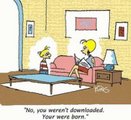
This one definitely beats the stork story!
Edutech for Teachers team
.
Blog
.
<span class='date ' tip=''><i class='icon-time'></i> Jul 15, 2015 11:48am</span>
|
|
So here it goes: My latest geeky girl adventure—a weekly series entitled "Tech It Up Tuesday" in which I will share an edtech tool, app, site or other resource that can be utilized in the educational setting.
OK, I get it. The blog series concept isn’t necessarily a new one—especially considering I already post two ongoing articles each week: Diigo Bookmarks on Sundays and tech related comics via Edu-fun Friday. But I thought it was time to "Tech the Plunge" with another regular post and with that, generate my first-ever corresponding hashtag. Isn’t it amazing what one can envision—and accomplish—during a snow day!
Well, here it is—my first official Tuesday "tech-isode". Game on…
To get things rolling, I found a super cool interactive image created by Sylvia Duckworth—a sketch note that was initially generated using the FlipInk app and then smashed with one of my all-time favorite tools—ThingLink. The result: One amazing resource that provides 25 reasons why educators can and should love, love, love Google. Check out this must-see masterpiece shown below.
Be sure to hover over the image to reveal the "hotspots" located within the graphic. Warning Label: Side effects may include becoming uncontrollably "Googly" over the plethora of tools that can used to tech out your classroom.
Classroom Connection:
As a self-proclaimed Google Girl, I must admit that I wasn’t even aware of some of these edtech gems. In any event, identify the tool(s) that will enhance your lessons and engage your students, then let the Google goodness begin! There’s surely something for every classroom included in this comprehensive resource.
And so there you have it—my first-ever "Tech It Up Tuesday" blog post—25 resources in one. How am I ever going to beat that!
A shout out to Sylvia Duckworth for creating this very useful and beyond cool infographic—and for giving me the thumbs up to feature it on my blog!
Oh, and BTW: That brand-new hashtag I referenced earlier is #techituptues. Be sure to follow it on Twitter!
Tech-knowledge-y Rocks… Just sayin’! ;-}
Edutech for Teachers team
.
Blog
.
<span class='date ' tip=''><i class='icon-time'></i> Jul 15, 2015 11:47am</span>
|
|
As Quincy Jones once remarked, "I’ve always thought that a big laugh is a really loud noise from the soul saying, "Ain’t that the truth."
That said, Edu-fun Friday is a series devoted to adding some humor to the lives of teachers who visit this blog. After all, there’s nothing better than ending the week on a positive note! Plus, do we have the best topics to provide us with some comic relief or what?
Funny—but at some point this scenario will probably be the norm rather than the exception. I wonder: Will the digital natives 20 years from now even know what a book is? Kind of like when you show students a picture of a flashcube or electric typewriter—items I used as a kid—and they are totally clueless.
Edutech for Teachers team
.
Blog
.
<span class='date ' tip=''><i class='icon-time'></i> Jul 15, 2015 11:46am</span>
|
|
Another year… Another opportunity to spend the day with the super cool Discovery Education Network (DEN) team at the 10th annual PETE&C Pre-conference Extravaganza: A Spotlight on Strategies (S.O.S).
Even though there is always a mind-boggling amount of invaluable info shared at each session, my best OMG take-away this time around was the S.O.S series, a must-see DEN favorite designed to provide teachers with simple yet effective instructional practices for using digital content to support student learning.
To date, there are 70+ teacher tried and tested strategies featured on the DEN blog and now thanks to Lance Rougeux, Vice President of Learning Communities and Educational Consultants at Discovery Education and all-around DEN tech guru, I will now be featuring these techniques on my space. Two thumbs up to this guy!
So, let’s get to the good stuff with some tips about how to get that visual literacy thing going on…
First up: Reading Between the Lines, a digital media strategy that focuses on main idea and summarization skills though the use of a very cool web tool known as Wordle. Check out the details below.
Background
Words are a powerful force, but yet often we do all the talking. Sometimes what is best is to allow the words to reveal their own hidden message. Wordle is often considered a "fun" tool, but not an instructional instrument. Through a simple cut and paste we can reveal what’s most important in a text and use that as an opportunity to build background knowledge for solid understanding of content.
Example
The image below is a snapshot of a Wordle created from the reading passage Getting to Know Energy in Ecosystems (found on the Discovery Education web site). Depending on a student’s history, passages like these can sometimes be challenging. By creating the Wordle and sharing before students read, we can review the most important concepts and ensure that the class has foundational knowledge and address any misconceptions.
Challenge
Select a reading passage that would interest your students from Discovery Education. Cut and paste the text into Wordle. The larger a word looks in the Wordle, the more times it appeared in the passage. Have students discuss what words are most important to know before reading the passage and review the definitions. Before students read the passage, have them go through the document and highlight the reviewed vocabulary words.
Bonus
Have students summarize a reading passage. Take a group of their summaries and cut and paste into Wordle. Discuss which words were most common. Have students re-write their summary to reflect the most important concepts.
Click here to snag a PDF version of this strategy and/or to view other strategies in this series click here.
Um, time out… My school doesn’t have a Discovery Education subscription, so now what? Aww, man. Now that’s a major bummer! But here’s a suggestion: Open some conversation with the powers that be to find the funding necessary to purchase these resources for you and your colleagues. It will seriously be one of the best investments your district or school entity will ever make! If the persuading, kicking, yelling and screaming your full head off antics don’t do the trick, then there’s always the Powerball option.
OK, seriously— even though the best way to roll out theses strategies is through the use of DE media, they can be utilized with any type of text, images, video and audio clips.
So, there you have it—an original S.O.S. trick to add to your edtech toolbox. Stay tuned for additional ways to activate learning in your classroom…
Edutech for Teachers team
.
Blog
.
<span class='date ' tip=''><i class='icon-time'></i> Jul 15, 2015 11:45am</span>
|
|
Ever need a puzzle to review content area vocabulary, spelling words or for a class newspaper or other school-related publication? Then look no further than Puzzlemaker, an online puzzle generator that both teachers and students can utilize to create a myriad of customized brain teasers including word searches, criss crosses, math squares, mazes and more!
Besides being a freebie, the best thing about this Discovery Education resource is its simplicity. Just select the type of puzzle you would like to design from the menu, complete the template provided, and just like that, you have a creation that is ready to be downloaded and printed for classroom (or homework) usage.
My kind of tool: Quick, easy, free, useful and fun—just like this post! Get your puzzle on here.
Classroom Connection:
OK, so Puzzlemaker is not exactly the best example of a really high tech or super academic tool, but it can be a valuable, time-saving resource nevertheless—especially when there is a need to review and/or demonstrate knowledge of curricular content. Teachers can generate topic-specific puzzles for their students and/or provide them with the opportunity to create a puzzle that can be shared with classmates.
Oh, and just in case the Common Core police ask: Solving puzzles really can involve the use of several important skills including vocabulary, reasoning, spelling and word attack skills to name a few.
Edutech for Teachers team
.
Blog
.
<span class='date ' tip=''><i class='icon-time'></i> Jul 15, 2015 11:45am</span>
|