Blogs
|
Summit French is a blog created by Doug Siegel. It is a homework blog where students can find out what they've missed for the week. It also has links to some excellent language resources.
You may wonder why this is worthy of a post? This is a great example of a simple but effective use of blogging to support learning. Doug posts regularly so that his students know that visiting the blog is worthwhile.
So Doug, here is my advice to you. Build on the excellent foundation that you have and try to get students to really interact with the blog. Encourage them to post comments, give them the opportunity to post and give each other feedback. The potential is unlimited.
This post originally appeared on Free Technology for Schools www.freetechforschools.com
Jonny Liddell
.
Blog
.
<span class='date ' tip=''><i class='icon-time'></i> Jul 23, 2015 09:24am</span>
|
|
Jamie Keddie, author of Bringing Online Video into the Classroom, looks at the benefits of handing over control of the video camera to students. Jamie will be hosting a webinar on this topic on 15th and 16 April.
Filmed presentations
Anyone who is involved in rail transport will know that stopping trains at stations wastes time, energy and money. Unfortunately, it is also necessary to let passengers on and off! Today, your students are highly-creative problem solvers. Their task is to work in small groups to design a high-speed train which doesn’t have to stop at stations, but which still allows passengers to alight and disembark.
After sharing ideas and reaching a consensus, each group prepares to present their solution to the rest of the class. This involves creating diagrams to reinforce ideas. When they give their presentations, you sit at the back of the classroom and film their performances.
Later, you show students the following video which illustrates an idea for a train which doesn’t have to stop at stations:
From teacher’s to students’ hands
Filming presentations and other performances can be a great way to motivate students and document their work. However, in the activity described above, the technology stayed firmly in the teacher’s hands. The result of this could be missed opportunities for student creativity, interaction, and learning.
By giving control of the video cameras to students, the activity could have been completely different. Rather than the traditional speaking-at-the-front-of-the-class format, groups of students could find their own quiet corners (either in or out of the classroom) and work together to create a video in which individuals communicate their group’s idea to the camera. The resulting videos can then be delivered to the teacher and later played on the classroom projector for everyone to see and comment on.
Here are some thoughts about why this second option may be favourable:
1. Students’ own devices
In many situations, students will come to class with video cameras already in their hands! Smartphones and tablet computers both have video-recording functions which are perfectly adequate for the classroom.
2. An open learning space
If students make use of their own video devices, the filming process can extend to outside the classroom. Assignments in which students create videos for homework become possible.
3. Less stress for students
Speaking English in class can be stressful enough for many students. When the teacher points a video camera at such learners, the experience can be even more intimidating. The camera may be less daunting in the hands of a classmate.
4. Technological control means creative control
If students control the technology, they can get creative. For example, they may want to think carefully about the filming location or props to include in the frame. They may also want to edit their work, include close-ups of visuals, decide what to leave in, decide what to take out, add credits, etc. In addition, with control of the technology, students can go at their own pace. They can film as and when they are ready. They can also do more than one ‘take’ in order to get the result that they are looking for.
5. Content ownership
Digital content is notoriously ‘slippery’. It does not deteriorate with time and can easily fall into unintended hands. Understandably, students may be concerned about what happens to videos that you create in the classroom. When students make use of their own video devices, they automatically become owners of the content. This can make the process less intimidating. In addition, if you would like students to share their videos online, they can choose to do so on their preferred video-sharing site.
6. Parental permission
Permission to film younger learners and teens can be easier to obtain if we can demonstrate to parents that we want them to make use of their own video-recording devices in and out of the classroom. As well as the ownership issue mentioned above, we can ask parents to take an active role in the video production process. For example, if we want students to upload their work, parents could monitor video content first before giving the go-ahead.
7. Reduced workload for the teacher
Perhaps the most important point to make! Tablets and smartphones can be regarded as all-in-one devices. Students can use them to create, edit and share video. There is no need to transfer video files from one machine to another (camera to computer, for example), a potentially time-consuming step that many teachers will be familiar with.
8. Engaged viewing
For some inexplicable reason, most teenagers that I have worked with engage better with video presentations than with live classroom presentations (see image above). With students’ attention, we can make use of the pause and rewind buttons for language feedback. This can include drawing attention to good language and communication, and error correction.
To find out more about using video in the classroom, register for Jamie’s webinar on 15th and 16th April.Filed under: Adults / Young Adults, Multimedia & Digital, Teenagers Tagged: Authentic video content, Bring Your Own Device, Bringing Online Video into the Classroom, BYOD, Creativity, Digital classroom, Images, Jamie Keddie, Smartphones, Tablet devices
Oxford University Press ELT blog
.
Blog
.
<span class='date ' tip=''><i class='icon-time'></i> Jul 23, 2015 09:24am</span>
|
|
This video is too good not to post. Chris Hadfield has done so much to stimulate public interest in Science and Technology since he has been on the international space station.So here's to the first Music video shot in space. It truly is beautifulThis post originally appeared on Free Technology for Schools www.freetechforschools.com
Jonny Liddell
.
Blog
.
<span class='date ' tip=''><i class='icon-time'></i> Jul 23, 2015 09:24am</span>
|
|
Barbara Hoskins Sakamoto, co-author of Let’s Go, outlines the benefits of only teaching young learners one new thing at a time by recycling, reinforcing, and building on new language.
How can you get your students to learn more English? Teach less! It sounds counter-intuitive, but it’s true.
Teachers are often pressured to teach more - more vocabulary, more grammar, more content - to satisfy parents and administrators. Moving through a coursebook quickly becomes the measure of success. However, the classes in which I see students making the greatest progress are those in which teachers introduce relatively little new language and actively recycle previously learned language, spending the majority of class time reusing both new and familiar language in new contexts.
The measure of a successful lesson isn’t how much you teach; it’s how much students can do with the language they’ve learned.
There are certainly times when you might choose to throw students into the deep end of the language pool - when asking them to work at understanding the gist of a listening or reading task, for example. But, it should be a choice that works toward your lesson goals, not the standard approach. If you need to spend most of your class with books open, explaining the language on the page, then students are unlikely to remember much for the next class. You end up teaching the same things over, and over, and over again without much feeling of progress.
In contrast, when we recycle language in class, we’re teaching students how to use the language they already know to figure out language that they don’t. It’s one of the most important abilities that skilled language users employ.
There’s no way we will ever be able to teach our students all the English they’ll ever need to know, so instead let’s teach them how to be confident in their ability to figure things out for themselves. One of the easiest ways to model this skill is to introduce new language in the context of familiar. Another way of looking at this is to make sure you maximize the value of any language your students spend the time learning. Here’s one simple example of how using familiar language to introduce new language can help students learn more effectively.
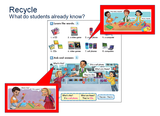
If you teach without recycling familiar language, this looks like a dense lesson - eight new vocabulary words and two question and answer patterns. However, actively recycling previously learned language can make the lesson more manageable. For example, students have already learned the concept of plurals, and how to add an -s to the end of words to indicate more than one item. They may need to be reminded, but they don’t need to learn it again. That reduces the vocabulary load to four new words (and their plurals). What’s this? It’s a (CD) is also a very familiar pattern. It’s the first question students learned to ask and answer in the first book of the series to which this page belongs (Let’s Begin). It was recycled in a lesson two units prior to this lesson.
By recycling the familiar pattern with the singular vocabulary words, it’s a small step for students to understand that the new pattern, What are these?, is the same question but for asking about more than one of something. By reducing the amount of new language to be taught, students now have more time to practice the language they’ve learned. They can use the questions and answers with vocabulary from earlier lessons, or apply their plural-making skills to topics that interest them, or personalize the language and build new skills by using the language to write about things in their own lives (e.g., This is my bedroom. These are my CDs. This is my cell phone. etc.) and then to read what classmates have written. Language becomes a tool for communicating about things students want to talk about, and because language is constantly recycled, students are unlikely to forget it.
Active recycling plays a big part in Let’s Go, so the Teacher’s Book lists what language is being recycled in each lesson, and the ‘Let’s Remember’ lesson at the start of each level highlights familiar language from the previous level that will be built upon in the new one. You can do the same sort of recycling, with the same benefits, with any coursebook or even with no coursebook at all. You simply need to keep track of the language being taught so that you know what you can recycle to help students learn new language or build new skills.
A simple guideline is to teach one new thing (new pattern or new vocabulary, but not both) in each lesson, or for longer lessons or older students, in each section of a lesson. Reducing the amount of time spent on introducing new language creates more time for students to use language:
to use it in games and activities that provide the repetition necessary for memory
to add it to their language repertoire in order to talk about new things
to learn to read what they can say and understand
to use language they can read to write about their own unique lives and experiences
and to use language to connect with other students in order to share their own and learn about others’ lives and experiences.
If you are interested to see how active recycling works in Let’s Go, you can download a variety of sample lessons from the Oxford Teachers’ Club Let’s Go teaching resources page.Filed under: Young Learners Tagged: Barbara Hoskins Sakamoto, Children, EFL, Introducing new language, Language acquisition, Let's Go, Primary, Recycling language, Reinforcing language, Revising language, Teaching English, Young Learners
Oxford University Press ELT blog
.
Blog
.
<span class='date ' tip=''><i class='icon-time'></i> Jul 23, 2015 09:23am</span>
|
|
Update from Will RichardsonA few weeks ago we posed a big question: Could our little edu-network make a REAL full-length documentary feature that incorporates kids in every aspect of the production process? It appears we’re going to find out. Within days, hundreds of you volunteered to help make this admittedly ambitious undertaking become a reality. (If you haven’t signed on and still want to help, fill out our survey now!) As a result, we have formed a core group of amazing people focused on marketing, fundraising and developing a comprehensive web presence. All of this structural support makes it possible for us to dig in deep and craft a compelling narrative for this film.To reiterate, Doug, Josh and I decided right from the start that this film could and should be built by the people who are most affected by education policy—namely kids, parents, and teachers. Instead of just talking about the problems with school in its current form, we’d like to see "our" film driven by what the community is actually doing. So, we’re setting the bar as high as possible to show what happens when kids are given the opportunity to do meaningful work, and prove that we can transform the focus and function of school. The next step is to engage with everyone out there thinking, writing, creating, and putting their ideas into action for the benefit of kids.We’d like to hear from you, get a glimpse of what you are doing, and potentially include footage of your kids doing meaningful things in and outside of your classrooms. Here’s how you can help:Send us high quality HD video footage of kids, teachers and classrooms that we can use in a teaser trailer we are putting together to fundraise, promote, and build excitement for the movie. This footage will also help us better visualize what the final feature will look like, although at this point we are not specifically looking for footage or stories for that purpose (yet). Some ideas of what we’re looking for include:Kids (and teachers) sharing ideas and creations publiclyKids designing their own experience to learn through inquiry, research, collaboration, and creatingKids (and teachers) collaborating with colleagues, classmates, and experts around the worldKids creating works that have real value outside the classroomSubmitting your videos of powerful learning is simple. You may provide a link to videos hosted on YouTube, Vimeo, or anywhere else on the web. For this teaser trailer we will likely use only a few seconds of any clip so if there is a specific part of the video we should look closely at, please identify that. If we want to use part of your video in this trailer we will ask for you to send us a file in full HD (1080p) format and have everyone in the video, and their parents, sign release forms.We’d love to get your submissions by June 1. You can e-mail Josh and Doug at whyschool@roughcutschools.com if you have any questions about the process.Finally, we’re now also on Twitter and Facebook. Follow us and like us to keep up with our progress. Our new website will be up soon as well.Thanks for all the support and enthusiasm you’ve already shown for this project. With your help we know it will be awesome! This post originally appeared on Free Technology for Schools www.freetechforschools.com
Jonny Liddell
.
Blog
.
<span class='date ' tip=''><i class='icon-time'></i> Jul 23, 2015 09:23am</span>
|
|
TeCoEd is an excellent resource site designed by Dan Aldred for the teaching of Computer Science and ICT. Dan's philosophy is that the best method of teacher development is sharing good practice a philosophy I very much agree with.The site is very easy to navigate with clear drop down menus on Raspberry PI, Computing, ICT, whole school tools and more. There are also some slide shows showing links to curated Scoop IT topics. I'm going to have to find out how to do that!If you teach ICT or Computer Science or run Raspberry PI clubs or coding clubs, TeCoEd is a great place to start. Have a look at http://www.tecoed.co.uk/index.html.This post originally appeared on Free Technology for Schools www.freetechforschools.com
Jonny Liddell
.
Blog
.
<span class='date ' tip=''><i class='icon-time'></i> Jul 23, 2015 09:22am</span>
|
|
Zarina Subhan, an experienced teacher and teacher trainer, tackles the second of our Solutions Speaking Challenges: "My students say the absolute minimum".
I find myself in the classroom in an unfamiliar position. It’s not the fact that I’ve given up teaching that makes this a new experience for me. It is the fact that I’m a student again. I’m learning Spanish and am sitting behind the desk, no longer the decision-maker who tells the learners what to do, but the student awaiting instructions and wondering if I understood them.
I’m rediscovering how uncertain, vulnerable and anxious it can feel to be a language student. Most of the reading, writing, listening, speaking and (most importantly) thinking in the target language (TL) happens in the classroom. I know I am there to improve my language; my motivation as an adult learner is high, yet I have to admit I could speak more in Spanish. So why don’t I?
The PPP Model
When you think you’ve grasped the structure of the language that has been presented, it is quite demoralising when you ‘practise’ it and get it all confused, or if you get the grammar focus right you somehow lose all previously-learned knowledge of the language.
When it is my turn to speak I keep babbling on about whatever it is that I’m attempting to say. The natural thing for the teacher to do is to correct me. However, as soon as s/he corrects me it interrupts me. I’m trying so hard to concentrate on what I have to say that this correction stops my thinking, when I need every single brain cell to be able to speak. It has taken me a great deal of focused thinking, recalling, structuring and motivation to construct and actually produce that language. Instead of feeling pleased about having actually communicated in the TL, I focus on what I failed to say correctly.
So, what if I could write a letter advising my teacher what would I say?
Letter to my teacher
Dear Teacher,
Please wait until I’ve completed what it is I want to say, then focus on the idea I communicated and show me you’ve understood.
That would really give me a feeling of success rather than failure. If at the end you could praise me and only correct me in terms of the structure/language/topic that is the focus for the lesson, it would help me turn your extrinsic motivation into my intrinsic motivation, and help me feel better about opening my mouth again in future.
Could you also not insist on us taking turns one after the other to speak?
I stop listening to my classmates until it’s just before my turn, when I tune back into the lesson. Perhaps if you asked for volunteers - the ones who actually have something interesting/fun to say - it would be more interesting for the rest of us and it wouldn’t be as painful as ALL of us reading out our boring, unimaginative offerings.
If you gave us more than 2 seconds to come up with a response to your questions it would give me more thinking time.
Please count to 10, or say the same thing a slightly different way. Whatever you do, don’t translate it, don’t ask several questions all at once, and don’t give us the answer before anyone has attempted to offer a response! Instead try writing up the key words of your question, show me a visual cue, and remind me when I last used this word/phrase. This all boosts my confidence and gives me more time to figure out my response rather than spending half my thinking time trying to be sure I’ve understood you correctly.
I’ve noticed that when we have a laugh, I can forget about my anxiety and about being wrong/not being understood.
So how about if we have points/smiley stickers/competitive games between teams - so that every time we give you a response in the TL we gain an advantage for our team? It may seem childish to you, but actually my wish to win/gain points/stickers overcomes the anxiety I sometimes feel and motivates me to speak.
Talking of anxiety, not everyone likes speaking in front of the whole class.
If you moved around the class and came to individual groups/pairs, we would feel happier speaking to each other with you listening in. Then you can correct us individually in a more intimate situation and not with everyone listening.
My lack of speaking is nothing personal. My lack of speaking is simply because I don’t like looking a fool in front of others. So I’d really appreciate it if you could eliminate the thinking that making mistakes is foolish and encourage the attitude that having a go is courageous. I think, then, I would be a better speaker in your classes.Filed under: Skills, Teenagers Tagged: ELT, New Solutions, Secondary, Solutions second edition, Speaking, Speaking in class, Speaking in English, Teenagers, Zarina Subhan
Oxford University Press ELT blog
.
Blog
.
<span class='date ' tip=''><i class='icon-time'></i> Jul 23, 2015 09:21am</span>
|
|
Google documents are a much more powerful tool than the simple cloud based word processing software I first discovered about 6 years ago. Now it is full of excellent and often Microsoft Word-beating features.Contextual spell check is an example of one of these powerful features. I learned about this at this year's Bett conference in London from Mark Allen at his Google Apps presentation.If you type into a Google Doc "Icland is an Icland".If right-click on the first icland I getIf I right click on the second I getThe spell checker understands the context and that the same mis-spelt word is likely to mean Iceland in the first instance and island in the second instance. Very clever indeed! This post originally appeared on Free Technology for Schools www.freetechforschools.com
Jonny Liddell
.
Blog
.
<span class='date ' tip=''><i class='icon-time'></i> Jul 23, 2015 09:21am</span>
|
|
How can we help students speak and learn grammar at the same time? Susan Earle-Carlin, author of Q: Skills for Success Listening and Speaking 5, provides tips for helping students use good grammar in their speaking.
Speaking, like writing, requires good grammar in order to communicate a message clearly. I sometimes use an analogy with my students to compare readers and listeners with passengers on a tour bus. Too many grammar mistakes, like too many bumps and detours in the road, will turn their attention away from what’s important towards how uncomfortable they feel and whether they will ever reach the end. So the question is, how can we help students use good grammar while not inhibiting them while they are speaking?
Control the grammar output
Make activities appropriate for the grammar level of the students. Ask beginners to describe the food in their home country, but have advanced students compare their class in English with one in another field.
Direct the students to target a certain grammar point in speaking. For example, ask students to talk about the objects in the classroom (singular/plural nouns and determiners), explain what is going on in their school at the moment (present progressive), or describe a scene using three adjectives and three adverbs (word form). Review the grammar first to optimize success and follow-up with some global comments on that grammar point, not singling out any particular student.
Provide practice
Give students lots of opportunities to speak in small groups without teacher intervention. However, remind listeners to ask questions if they don’t understand something the speaker says.
Allow students to practice a presentation with peers to help reduce the stress most ELLs have about speaking in front of the class. Less nervousness usually results in better grammar.
Encourage students to record and listen to their presentations for practice. Tell them to write down a sentence they have grammar questions on and give them the opportunity to ask you or the class for advice before presentation day.
Provide feedback
Interrupting students who are speaking to provide feedback is too negative. Instead, record their small group discussions or presentations. Listen to the recordings in conferences with individual students to discuss problems and suggest ways to improve grammar.
If students can have access to the recordings, assign a transcript for homework and tell students to circle and correct their grammar errors. Check them over and make suggestions on grammar areas to review.
Filed under: Adults / Young Adults, Grammar & Vocabulary, Skills Tagged: ELL, English for Academic Purposes, English Language Learners, Grammar, Q Skills for Success, Questions for Q authors, Speaking in English, Speaking skills, Susan Earle-Carlin
Oxford University Press ELT blog
.
Blog
.
<span class='date ' tip=''><i class='icon-time'></i> Jul 23, 2015 09:20am</span>
|
|
It's that time of year when things get busy and on top of that my wife is pregnant so I haven't had much time to post over the last 2 weeks. Thankfully here is a guest post from Anna who works for pdfconverter.com. It is a great tool that is quick, easy to use and completely free.Free Technology for Schools has not received any payment for this post. Teachers today have a challenging task to incorporate the constantly changing and improving technology into traditional ways of educating students. Those teachers who readily accept innovation and are already incorporating technology in their classrooms are doing their students a great service. As teachers are preparing these young individuals for the world of tomorrow, it can hardly be a good thing going through educational program without being in step with technology.There are many wonderful ed-tech tools and resources that make the classroom more interactive and fun. Free Online PDF to PowerPoint Converter is one such tool that can be very beneficial to both teachers and students. As its title clearly states, the tool turns PDF files into PPT slides and it works online, so there is no software installation required, which is very convenient for the classroom/computer lab setting. We all know that MS Office files are best sent/shared in PDF form, because of this format’s most obvious advantages: anyone can open and view the PDF file regardless the operating system or device they are usingPDF preserves formatting of the document and ensures that the recipient will see it just as its sender (creator) intended it. So, when students have an assignment to send a presentation to their teacher or to peers in order to work on it together, the presentations will often be sent in PDF, in order to preserve their formatting when opened on a different computer. When a teacher or peer opens the PDF and wants to make corrections, the quickest way to do it is to convert the PDF into its original presentation format. The PDF to PPT converter is very easy and accessible, so it would be fun to practice using it in class. Once you go to the tool’s page here, you only need to follow three easy steps:Select file to convert.Type your e-mail address.Initiate the conversion process by clicking "Start."Experimenting with the Free Online PDF to PPT Converter is one way of making the students comfortable with using technology. If you are concerned about the privacy of your documents, rest assured that the tool provider deletes all converted files within 24 hours of receiving it, and no data is ever shared with a third party. This post originally appeared on Free Technology for Schools www.freetechforschools.com
Jonny Liddell
.
Blog
.
<span class='date ' tip=''><i class='icon-time'></i> Jul 23, 2015 09:20am</span>
|