Blogs
|
Taught it is a great new site for sharing any resource quickly and easily. Without signing up you can share resources with the click of a button. Once you upload your resource, it provides a link and QR code for sharing the resource which are both active for 48 hours.If you choose to sign up to the site, you can save your shared files, extend the duration of the links and make connections with other people sharing resources. Signing up is quick and easy too.Taught it is another tool I highly recommend to encourage the less tech savvy teachers in your school to give using technology a go. The site provides links to files so short that a teacher could even get their students to write it down in their planner to access a resource for homework.One thing this resource has got me thinking about is differentiation. We constantly talk about differentiating our lessons to provide access to all of our students, yet when it comes to technology, schools often expect teachers to fit into a one size fits all approach, normally using the expensive software solution the school has paid for. I wonder how much more technophobic teachers would use technology if schools adopted a differentiated approach and helped teachers use the most effective tools based on their skill level.This post originally appeared on Free Technology for Schools www.freetechforschools.com
Jonny Liddell
.
Blog
.
<span class='date ' tip=''><i class='icon-time'></i> Jul 23, 2015 09:18am</span>
|
|
Photo courtesy of Jesse Milan via Flickr
Margaret Whitfield, co-author of the new Kindergarten series, Show and Tell, offers some practical tips on making the most of CLIL in the Kindergarten classroom.
CLIL (Content and Language Integrated Learning) has been a buzzword in English language education for a number of years now, and is an established part of many programs. Its supporters claim that combining subject learning (e.g. science or music) with language learning can increase student motivation and improve understanding. However, they’re often talking about older children who have some existing knowledge of English and the subject - can we bring CLIL into a Kindergarten classroom with equal benefits?
Well, the good news is that we don’t have to. CLIL is already there! In Kindergarten, children are being exposed to new concepts and content all the time, from number work to songs to mixing colored paints and beyond. In addition, young children are innately curious about the world around them and love to explore new things. So instead of starting from scratch, let’s look at the ways in which everyday Kindergarten activities can be exploited to make the most of their subject-learning and language-learning potential.
Let’s pretend
Pretending is a fundamental part of children’s play at this age. Whether they use costumes or just their imaginations, children are exploring the adult world they see around them. You can use this in a number of ways to explore different themes:
Social science
Focus on families, learning the names of different family members and talking about what they do, and providing opportunities for children to role-play families. Extend this to science, talking about and role-playing animal families.
Extract from Show and Tell Student’s Book 2
Language arts
Focus on fictional characters that the children are interested in - superheroes, princes and princesses, pirates, and so on. This can be a great way into describing people as well - look at storybooks together and talk about what the characters are like and how they feel at different points. Then the children can act out the characters, being happy, sad, fierce or brave!
Extract from Show and Tell Student’s Book 3
Social science
Focus on jobs, learning the names of different jobs and clothes and color vocabulary to talk about uniforms. Talk about what people in different jobs do and encourage children to role-play firefighters, doctors, police officers and so on - they won’t need much encouragement!
Extract from Show and Tell Student’s Book 3
All these activities link with language areas that you might be teaching, but the role-play will also generate a need for more language that children will then practice in a memorable way through their play.
Hands on
Practical activities are key to keeping children of this age interested and motivated, and they can be used to explore all kinds of topic areas. Take a look at the free ‘sink or float?’ experiment activity. Here are a few more ideas.
Subject focus
Language focus
Activity
Math: counting, simple addition and subtraction, finding one more or less
Number namesToys vocabularyHow many …?
Use toys (or other objects) to count in different scenarios, e.g. a teddy-bear picnic.
Music: learning a song, keeping the beatMath: counting backwards
Number names
Learn a simple counting song like ‘Five little monkeys’; use percussion instruments to keep the beat.
Science: learning about the senses
Food vocabularyIs it …?I like/don’t like…
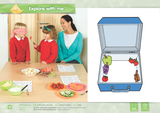
Use taste and smell to identify food without being able to see it.
Extract from Show and Tell Student’s Book 1
A table like this can be a useful tool for planning CLIL activities: whether you start with a subject area, a language objective or an activity that you already do that you want to exploit further, it can help you to consider the different elements together. Make sure that there is a natural fit between the language and the subject, and the activity will provide memorable, contextualized language practice. Consider the difficulty of each element, as well - if the language is tricky, maybe it would be better to use a subject area that children are familiar with; if the concepts are challenging, try to match it to language that the children already know.
I hope that, if you didn’t already, you’re now feeling that CLIL is an inspiring and achievable tool for kindergarten. Please post your experiences, and especially activities that have worked well for you, in the comments section below.
Would you like more practical tips on using CLIL and teaching 21st Century skills to your kindergarten children? Visit our site on Teaching 21st Century skills with confidence for free video tips, activity ideas and teaching tools.Filed under: CLIL, Pre-school Children, Skills Tagged: 21st Century skills, Children, CLIL, Content and Language Integrated Learning, Critical thinking, EFL, ELT, How to teach critical thinking, Kindergarten, Margaret Whitfield, Pre-school children, Show and Tell
Oxford University Press ELT blog
.
Blog
.
<span class='date ' tip=''><i class='icon-time'></i> Jul 23, 2015 09:18am</span>
|
|
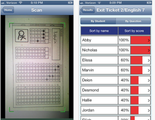
Quick Key is a fantastic app for the iphone which eliminates hand grading of tests and quizzes. It turns the iphone into a hand scanner to grade quizzes and tests up to 30 questions long.It was designed by teachers for teachers and is simple to use and best of all it's free. If you have a simple marking grid, it can recognise it and update the marks.Here is a great little video explaining moreNow I wonder when they will create the android version.....This post originally appeared on Free Technology for Schools www.freetechforschools.com
Jonny Liddell
.
Blog
.
<span class='date ' tip=''><i class='icon-time'></i> Jul 23, 2015 09:18am</span>
|
|
You need to get in quick for this offer. I only found out about it today and it expires tomorrow (20th September). You can get a free copy of 'Invent to Learn: Making, Tinkering and Engineering in the classroom. This book has been described as the bible of the makers movement in schools.I haven't read it yet but I intend to. don't be fooled by the title. It is not just for teachers of STEM subjects. The development of new technologies has turned us all into makers.Download it free through this link. The paperback copy is normally $28! This post originally appeared on Free Technology for Schools www.freetechforschools.com
Jonny Liddell
.
Blog
.
<span class='date ' tip=''><i class='icon-time'></i> Jul 23, 2015 09:18am</span>
|
|
Charles Vilina, co-author of the new Young Learners series, Oxford Discover, offers some practical tips on making the most of CLIL in the young learner classroom.
As a teacher of young learners, it’s easy for me to see when my students are engaged in the lesson. I see it in their faces, in their posture, and in the way they inquire and respond. The class is almost vibrating with positive energy.
What are the qualities of learning in such a classroom? Here are just a few suggestions:
active, useful, meaningful, productive, experiential, challenging, rewarding, shared
Students who see value and purpose in their learning, who are challenged to think actively and to ask their own questions, are going to be engaged in the lesson. Take those qualities away, and students become bored and disenchanted.
Discovering the World
This brings us to the subject of content-based language education, which many teachers know as CLIL (Content and Language Integrated Learning). In a CLIL lesson, we open the windows of our classrooms and invite our amazing world inside. Students discover the world for themselves, using the tools of language in a meaningful way as they move through the lesson. As a result, language fluency is increased.
For our young learners, a successful CLIL lesson is meaningful, challenging, rewarding, and requires them to think deeply and learn actively.
Eight Points for Success
There are eight points to remember when incorporating CLIL into your young learners’ classroom.
1. Introduce the world through many core subjects
Since our purpose as language teachers is to build fluency, students should be introduced to a wide variety of core subjects (in the areas of social studies, the sciences, the arts, and math) to build strong language skills. Each core subject has its own particular vocabulary, grammar, and approach to learning. Social language (BICS) and academic language (CALP) are used in these CLIL lessons, integrating and strengthening both.
2. Let students lead the way by asking their own questions
When we introduce a subject, students should first have the opportunity to discuss what they know and what they want to know about it. This inquiry-based approach to learning engages students from the start. Students are invited to discuss their prior knowledge and experience of a subject, making them feel that they are active participants in the learning process. When students then go on to wonder, to ask their own questions about the subject, they create a personal interest in finding the answers. This supports strong student engagement.
Questions might include, based on the subject matter:
Why do butterflies have four wings?
Why are there 365 days in a year?
Why are cities often built near rivers or lakes?
The teacher can contribute to this process by wondering, too. As the teacher also has questions, this changes student perception. They begin to look at their teacher as a partner in learning.
3. Present content through both fiction and non-fiction
Everything in our world is enriched when presented through fiction as well as facts. Our young learners need exposure to stories as well as to expository texts, giving them fresh examples of how knowledge can be presented. This builds literacy skills as well as knowledge.
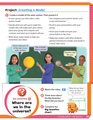
Here is an example of providing both fictional and non-fictional content for students, taken from Oxford Discover. The core subject is natural science, and it poses the big question, Where are we in the universe?
Extract from Oxford Discover Student’s Book 4
Extract from Oxford Discover Student’s Book 4
In the first reading above, the subject is presented through a fictional poem about a little girl and her imaginary spacecraft. In the second reading, a science article presents information about our solar system. Through both readings, students approach learning in a unique way.
4. Match the content to the students’ language ability
Be sure that the content you present is at a level of vocabulary and grammar that is comprehensible to your students. This means that the majority of the vocabulary and grammar in the readings has already been explicitly taught and learned in previous lessons.
However, every CLIL lesson will introduce additional vocabulary and grammar that are needed to understand the particular subject or topic. This additional vocabulary and grammar are taught explicitly, either before or after students are introduced to them in the readings. As students experience the new words and grammar through the context of the readings, their understanding increases.
5. Present content in an interesting and challenging way
The world is a fascinating place, but material is often presented in a dull way. Find content that triggers a child’s natural spirit of curiosity. There should be a sense of wonder, exploration, and discovery within the words of the readings.
6. Allow students to organize the content in a meaningful way
Once students have discovered information about a subject, they should have an opportunity to demonstrate their knowledge. This can begin with comprehension activities, but it should soon move to higher order thinking tasks.
A successful CLIL lesson often uses graphic organizers such as time lines, Venn diagrams, mind maps, or charts (illustrating cause and effect, chain of events, etc.). Graphic organizers require students to analyze the information and make sense of it.
Here is an example of a graphic organizer used for the reading shown above about our solar system. It is a Venn diagram, asking students to compare and contrast Earth and the planet Venus.
Extract from Oxford Discover Student’s Book 4
By challenging students to think more deeply, you create a much more active and motivating learning experience for them.
7. Give students an opportunity to talk about what they have learned
Throughout the CLIL process, students are building literacy skills through intensive reading. However, they need an opportunity to build their listening and speaking skills as well. Many opportunities exist in a CLIL lesson for this. For example, students should be encouraged to create their own questions about the readings. This lets students take control of their own learning, as well as to demonstrate what they know. As students share questions and answers, fluency is improved.
In addition, the graphic organizers described above can be a jumping board for dialogue. Students can work in pairs and complete the graphic organizers together while discussing their choices. Later, student pairs can work with other pairs to discuss what they have learned.
8. Provide a summative project to complete the CLIL lessons
A summative project allows students to take what they have learned and create something original with it. A strong summative project is collaborative (getting students to achieve something together) as well as creative (contributing their own original ideas) and communicative (listening, speaking, reading, and writing through the process). In addition, there should be an opportunity for students to present their projects to the class, building their public speaking skills.
Here is an example of a summative project around the subject of our solar system, taken from Oxford Discover. Students work together in small groups to create a model of our solar system, and then present it to the class.
Extract from Oxford Discover Student’s Book 4
To conclude, a successful CLIL lesson is a student-centered approach to learning. The teacher facilitates the learning process by moving around the class, ensuring that students are actively involved and using the language tools they need to succeed. It is inquiry-based, encouraging students to ask their own questions and seek their own answers together.
Most importantly, CLIL allows students to use their language skills in a meaningful and productive way, building fluency and confidence as they seek and discover knowledge.
Would you like more practical tips on using CLIL and teaching 21st Century skills to your young learners? Visit our site on Teaching 21st Century skills with confidence for free video tips, activity ideas and teaching tools.Filed under: CLIL, Skills, Young Learners Tagged: 21st Century skills, Charles Vilina, Children, CLIL, Content and Language Integrated Learning, Critical thinking, How to teach critical thinking, KWL chart, Oxford Discover, Reading texts, Young Learners
Oxford University Press ELT blog
.
Blog
.
<span class='date ' tip=''><i class='icon-time'></i> Jul 23, 2015 09:18am</span>
|
|
Here's a little known trick for video sharing using Google Drive. If you have a video you want to share but don't particularly want to share it on Youtube, you can upload to Google Drive and then embed wherever you like.Here are the steps:Go to Google Drive and hit the upload button (the one with the arrow pointing up next to create)Find the video you want to upload and upload it. Choose the option to convert to Google format (I haven't checked if it works if you don't do that).Open the video with Google Drive viewerClick on 'file' and then 'Embed this video'. If you have set the share settings to public then you can embed it anywhere and people can see it.For those of you who are wondering, what the video is, it is me sparring when I used to do boxing. I'm not so fit these days.....This post originally appeared on Free Technology for Schools www.freetechforschools.com
Jonny Liddell
.
Blog
.
<span class='date ' tip=''><i class='icon-time'></i> Jul 23, 2015 09:18am</span>
|
|
Last week we finally had enough students sign up for our Codecademy club meaning it can now run as an after school club. Only one problem (or opportunity). I don't know how to code. Well, what's a guy to do. Better start learning I guess!I got a little bit of a head start and completed the first few lessons before the first session with the kids and so far I have found the Codecademy materials amazing. You get regular feedback on how you have completed small tasks and there are lots of opportunities to review and apply what you have been learning. I have found it pretty straight forward so far, but some of the kids are geniuses. They move at double my speed and I can't keep up. By next week, I will be asking them for help and trust me, I will be glad of it.I have the feeling that Codecademy is going to be the best bit of professional development that I've had in a long time. Not just because I am learning new skills but it puts me in the place that teachers should really put themselves into more often; the position of the learner. What did I learn from my first experience (apart from a few html basics)? I learned how effective it is to learn things in small chunks with activities which are designed to progress in difficulty and build on prior knowledge.If your school doesn't teach any coding, try and start a Codecademy club. It is really simple. Once your students set up their account they will be moving at different speeds and many will overtake you. Don't worry if you don't know how to code. The best thing you can do is cultivate an environment where students learn to collaborate and help each other (and you!).Codecademy does provide tools for teachers although we went for the jump straight in and get the students working through it themselves route but there are materials to help you teach it if you want. I wouldn't recommend trying to teach them. You will most likely hold them back. Just let them learn and teach you a few things as they go. This post originally appeared on Free Technology for Schools www.freetechforschools.com
Jonny Liddell
.
Blog
.
<span class='date ' tip=''><i class='icon-time'></i> Jul 23, 2015 09:17am</span>
|
|
Co-author of English File third edition, Christina Latham-Koenig will be answering your questions in a live webinar on 27 May. You can register and send in your question now.
We are often asked where the idea for English File first came from. The truth is we felt that none of the coursebooks that we had used up to that point really provided what we needed as teachers. It seemed that these books were designed to work in a teaching environment that was very different from ours, and while there was a lot of imaginative, well-planned, and well-organised material to choose from, there was little to help us address the main challenges that we faced day-to-day.
How do you keep students motivated when they are fitting their class into the middle, or at the end, of a busy day at work? How do you maintain students’ attention when they have so many other things going on in their lives? And, what was always most important for us, how can you get students to talk to each other in English if they all speak the same first language, live in the same town, and have often shared many of the same experiences?
And so we needed to spend a huge amount of our preparation time adapting and supplementing the books we were using to make them more appropriate for our classes. We felt that we needed a greater variety of material to help change the focus and the pace of the lessons, we needed activities that helped to get the students’ heads out of their books, and we needed topics where students really would have something to say. The ideas that shaped the original English File series came directly from our own teaching experience and from talking to our friends and colleagues in the staff room about what worked and what didn’t work in the classroom.
Over the last twenty years in the course of researching and presenting English File, we have had the opportunity to go beyond the confines of our own staffroom and have met thousands of teachers from around the world (and had contact with thousands more via emails and questionnaires) and it has been truly enlightening to have been able to share experiences and to hear about the wide variety of challenges they face teaching English to their students as well as hearing their inspiring stories of success.
They have always been very honest in their feedback, telling us about English File lessons that they and their students have enjoyed, but also suggesting changes and improvements, anything from a text that never seemed to work with their group of students to an activity type that they find difficult to set up because of the arrangement of their desks or the acoustics of their classroom. They have shared their views on perennially divisive topics such as celebrities, sport, and fashion, pointed out why particular areas of grammar or pronunciation are especially difficult for their students, and given us a wide range of cultural insights from their countries.
This exchange of information has helped us to grow as writers and has been the inspiration for the second and third editions of English File. We are extremely grateful for the time teachers have taken to speak to us.
On Tuesday 27 May 2014, I will be hosting an English File Question and Answer webinar. If you would like to participate in this event, please visit the Registration Page. I will try to answer as many questions as I can in the time available - and I really look forward to hearing from you.
Best wishes,
Christina Latham-KoenigFiled under: Adults / Young Adults, Skills Tagged: American English File, Christina Latham-Koenig, English File, Webinar
Oxford University Press ELT blog
.
Blog
.
<span class='date ' tip=''><i class='icon-time'></i> Jul 23, 2015 09:17am</span>
|
|
I stumbled across this today and thought it was worth reposting.http://www.techlearning.com/news-and-trends/0061/apps-for-creativity-and-imagination/54141This post originally appeared on Free Technology for Schools www.freetechforschools.com
Jonny Liddell
.
Blog
.
<span class='date ' tip=''><i class='icon-time'></i> Jul 23, 2015 09:17am</span>
|
|
We’re helping to solve your EFL teaching problems by answering your questions every two weeks. This week, Stacey Hughes addresses a common fear: using technology in English language classes.
At the recent IATEFL conference in Harrogate, I spoke with many teachers who are still on the fence about using technology in their classes, and it is this EFL problem I would like to address in this blog.
For some experienced teachers, technology was seen as a gimmick. They couldn’t see any benefit technology could offer because the tried and tested activities they use had already proven successful. Other teachers I spoke with were nervous about the technology itself. Faced with the onslaught of apps, digital products and a host of crusading digital zealots, they retreated to the comfortable safety of books, pen and paper. For them, it was all too much too fast and they were overwhelmed.
I’d like to address the first of the two issues raised above before looking at ways teachers can ease into using technology.
Is technology a gimmick? It certainly can be, especially when it is used without thinking about how its use can enhance the pedagogical aim. There are many arguments for using technology: it is part of everyday life for many students, so it is natural to include it in lessons; it can make administrative tasks less time-consuming, freeing up class time or a teacher’s out-of-class work time; it renders some activities more motivating; it can put students in charge of their own learning; it provides access to information that wouldn’t be available otherwise; it allows students to practice and get feedback on language use… the list goes on. In essence, whether or not technology is a gimmick rests in the way it is used and for what purpose.
Here are some tips and things to think about when beginning your foray into using technology:
1. Start slow
You don’t have to use everything at once. Choose one device, tool or app to try this term or this year. It could be something as simple as asking students to email you their written paragraph or essay first drafts, writing comments on the papers in a different colour, using the highlighter to point out mistakes you want them to correct, then emailing the papers back to the students to correct for their final draft. For me, this method of feedback is preferable to handwriting comments because: I can write more; type-written comments are easier for my students to read (especially those whose L1 script is not Roman-based); I have a record of the feedback; students can’t lose their work (or if they do, I can simply email it to them again).
If you are feeling braver, try giving oral feedback on written work using Jing. My students responded positively to oral feedback because it gave them more listening practice. Have you always wanted to set up a class wiki, but baffled by the endless possibilities wikis provide? Start small: post up a text with questions you want students to read and answer for homework. Build the wiki over time.
2. Use the technology supplied with course books, workbooks and teacher’s books
If you are using CDs or DVDs, you are already using technology! Experiment with any online workbooks, student or teacher websites, learning games or mobile content. The benefit here is that everything is linked up, so teachers don’t have to think about how to relate the activity to the lesson aims. Don’t be afraid to let students take the lead with some of this - students are generally happy to help the teacher with the technology side of things. Course books also come with a degree of technological support from the publisher.
3. Use technology that is already in the room
Look at what you have available and then how you might use it. Be sure to include student cell phones and smartphones in your assessment. If you have a projector and internet access, for example, you can access interactive pronunciation charts for in-class pronunciation activities, or you can have an online dictionary at the ready for any vocabulary or collocations that come up in class. Keep these two open and running in the background (shrink them down) for easy access. Do quick image searches for vocabulary that comes up that can’t be explained easily - I once had the word badger in a text. I did a quick Google Images search, followed by a Wikipedia explanation projected on the wall - much more memorable than a simple explanation and I didn’t have to find a photo beforehand to bring to class.
4. Start with the learning aim
This is undoubtedly the most important thing to keep in mind. Put learning first and look for the best tool to use to aid that learning. Let’s imagine that you are teaching a Pre-Intermediate class and you want students to practice asking and answering questions. If students do this in pairs, it is hard to monitor everyone. Technology is beneficial here: students can video or audio record themselves (e.g. on their phones or tablets) and email you the recordings. You then have a record, can assess which students are able to ask and answer correctly, and can give directed feedback.
The added benefit of using technology in this way is that students are more likely to feel the task is purposeful and try to do it well. Creating a realistic context will add to the learning experience by showing students how the language they are learning in class relates to the real world: interviews ‘on the red carpet’, for example, provide a context and students can then do a blog write-up of the answers.
5. Ask yourself these questions:
What do I want my students to do or learn? Can technology help? If so, which technology? Is there something I can use that I already have or do I need to find something that I can use? Will using this technology benefit the students? If so, how? (If not, don’t use it!) How much time will it take me to learn this and is it time well invested? (i.e. Will students benefit proportionally? Once I have learned it, will I use it again and again?)
Invitation to share your ideas
What’s your technology story? Have you tried something out that you would like to share? Do you have any advice for those just beginning to take that first step into using technology? Please tell us about it by commenting on this blog.Filed under: Adults / Young Adults, Multimedia & Digital, Professional Development Tagged: #EFLproblems, EdTech, Educational technology, EFL, IATEFL, Language classes, Language learning, Professional Development, Stacey Hughes, Teaching problems, Using technology in class
Oxford University Press ELT blog
.
Blog
.
<span class='date ' tip=''><i class='icon-time'></i> Jul 23, 2015 09:17am</span>
|