Blogs
|
I’ve spent most of the past four months learning how public-sector pension administration is affected by WESA (the Wills, Estates and Succession Act that goes into effect in British Columbia on March 31).
That’s because my assignment was to design WESA-related training for the people in my organization who deal with members of the different plans we administer at BC Pension Corporation.
In the training / learning networks that I connect to, I frequently see discussion (and occasional grousing) about "compliance," which often seems to mean "having to comply with some picayune requirement." At the moment there’s a video clip making the rounds of Twitter and Facebook, with a flight attendant joking through the standard safety announcement.
I thought it was funny (though it wouldn’t be if I had to hear it five times a month), but the mandatory pre-flight announcement is also near the bottom rung of the compliance ladder. Where I work, compliance can mean "make sure we meet the legal and fiduciary requirements established to protect the interests of the individual members of pension plans and of their public-sector employers."
Putting that in terms of accomplishments, we want to be able to:
Accurately describe the options you have for nominating (designating) who will receive:
Any benefit available if you die before retirement
Any benefit available if you die after retirement
Correctly explain options for allocating benefits among multiple beneficiaries
Review nominations submitted by members for completeness and accuracy
Correctly enter that information into our system
Update information based on changes from the member or the employer
…and a number of other changes to how we’ve done things prior to this legislation.
So one part of this post is to say "yes, compliance can matter," and the other is just to talk a bit about how fortunate I’ve been in this new job. I was assigned to the WESA my first week on the job, because my acting manager believed it was good for people to have a project that’s their own.
I worked with the person writing our procedures related to nominations; he guided me through the initial thickets of terminology, acronyms, and workflow. My colleague Chris, the senior member of our instructional designer group, helped me plan my project and gave invaluable ideas from a course he’d developed on a similarly complicated topic. I also got to work with several subject-matter experts who "work in the plans," as we say — their day jobs involve dealing the members of one or another of the BC public-sector plans, so they know this stuff.
Best of all, the experts who were the instructors were eager to avoid information dumps and talk shops. Ultimately we created three versions of our course, tailored to three different job categories. Lots of practice cases — including simple ones they walked the participants through, so people could see the relevant part of the system and update a (fictional) member’s records instead of just having someone tell them how they’d do it back on the job.
I’m thinking of writing a bit more about this. I need to find the right balance between describing what I think is worth talking about, safeguarding specifics about our members and our systems, and putting people to sleep with more information about nominating beneficiaries than they might want to know.
I’ll figure that out, and I’ll try to get my posting frequency up a bit. I’ve been missing the thinking-out-loud for quite some time.
Dave Ferguson
.
Blog
.
<span class='date ' tip=''><i class='icon-time'></i> Aug 19, 2015 04:58pm</span>
|
|
I came across an email in which I’d noted a contribution that Terry Seamon made to an online discussion about learning at work:
Ultimately, the answer to "Do you understand?" is "Yes, let me demonstrate."
Sometimes-especially at large conferences-it can seem as though many trainers and instructional designers lapse into a kind of cognitive ritual, reciting orthodox objectives, sometimes for every 15-minute segment of formal instruction. "At the end of this topic, the student will be able to advance to the next topic."
I’m in favor of performance-based objectives, but mostly as a tool for design, not as a benediction recited over the heads of people who would much rather get something done. I firmly believe that what learners would rather hear is more along the lines of "This segment shows you how to calculate flood insurance rates for residential property."
Or, if they’re dealing with softer skills, "Next, you’re going to practice planning and conducting a counseling session when an employee’s performance has become unsatisfactory."
That’s 15 seconds, not ten minutes plus time to post the flipchart. It’s a virtual course? Then you have a much shorter audio/video lead-in.
Sometimes people benefit from knowing theory and concepts about a field, but as van Merriënboer and Kirschner say, you can’t practice theory. Theory is a kind of map, an effort at organization, like Samuel Champlain‘s maps of New France. Maps and theories get better as you put them to use, incorporating mindful experience into the previous effort at organization.
Champlain’s 1612 map of New France (from Wikipedia)
There was a time in my career when I’d strenuously avoid using "understand" as an objective, and I still think that on the part of someone planning any kind of structured learning, it’s at best oversimplification and at worst a sign he should have gone into another line of work. I’m speaking of the developer, though, not the client; more often than not, the client’s using "understand" as shorthand for a fistful of skills (and, frequently, a bucketful of facts).
Seamon’s statement above offers a way out of the dilemma without having to rant about behavioral objectives. How can someone demonstrate that he understands the difference between a single-life annuity and a joint-and-survivor annuity? Maybe he describes key differences; maybe he identifies examples of each when presented with descriptions of various types of annuities. Maybe he role-plays a conversation and gets feedback on his answers from an expert. You choose among demonstrations like these depending on what someone needs to accomplish in the workplace, and both you and the learner are better off for the choice having been made.
Dave Ferguson
.
Blog
.
<span class='date ' tip=''><i class='icon-time'></i> Aug 19, 2015 04:58pm</span>
|
|
The other day a project manager was remarking on the early stages of large projects and the inevitable changes that occur as those projects unfold.
I’m no project manager, so I was doing internal translation. I see a big project’s requirements document as like the initial design for a kitchen remodeling: in the new inventory system, we want to have glass cabinets, a wall-mounted oven, an island with its own sink, and on the south wall, bigger windows (for greater visibility into the supply chain). Only later in the process do you discover you won’t have the time, or the money, or both, to move Finance’s plumbing.
You’re facing some rethinking, but that doesn’t mean starting the project requirements from scratch.
If right now you’re wondering why Finance has a sink, then my analogy failed. Or, you recognized adjustments that you’ve seen, or that you can imagine, even though the project you’re thinking of didn’t involve inventory, Finance, or a kitchen, then I think I made my point.
A larger point is that, when it comes to improving performance, what’s crucial about an analogy is not how clever it is, but how effective.
The goal of an analogy is to help someone make a connection or reach an understanding that he hadn’t yet made. You can’t guarantee that your analogy will do that, though you can road-test it and modify it so that it’s more likely to.
Cleverness carries a risk that you’re focusing on surface elements, or on outside references that don’t apply to the immediate situation. Shakespeare’s plays are as full of analogies as O’Hare airport is full of wheeled baggage, but many of those analogies rely on references that in the twenty-first century we don’t understand.
Sweet are the uses of adversity
which like the toad, ugly and venomous,
wears yet a precious jewel in his head.
— As You Like It
It might be clever to work Shakespeare in, but if this one’s your choice, you’ll likely connect only with committed theatergoers and unreconstructed literature majors.
I tried a different line once, as a lead-in to a course on vendor-managed inventory.
If you can look into the seeds of time,
And say which grain will grow and which will not,
Speak then to me…
— Macbeth
It might not work for you, but I managed to avoid using a stock-art photo of a warehouse dock. More important, the inventory people saw the connection to the topic.
That helped me escape the too-clever trap, although technically this wasn’t an analogy, just an indirect lead into the topic. Banquo was not in this scene struggling with inventory control-but he was interested in knowing what the future might hold, which is a true, on-the-job concern for warehouse managers.
So the real test might not be whether you’re using an analogy, a metaphor, or a simile — but whether the way you present something new makes the aha! more likely.
CC-licensed kitchen sink photo by Steev Hise
Dave Ferguson
.
Blog
.
<span class='date ' tip=''><i class='icon-time'></i> Aug 19, 2015 04:58pm</span>
|
|
Here’s a Gaelic proverb:
Is iomadh urchair tha dol ‘s an fhraoch.
(Many a shot goes into the heather.)
In other words, when you hunt, you miss. And if you fire indiscriminately, paying no attention to when or why or how, not trying to figure out why you missed, and not turning to anyone else for feedback, you’re going to continue putting a lot of shot into the heather.
In my personal life, I’ve been sending a fair amount into the ground lately because I’m learning something new. And as I think is often the case, "learning something" really means "learning several different things, and also learning how they work together."
I joined a choir.
I haven’t joined a choir before, so I’ve been learning different but interrelated things:
The lyrics to songs I didn’t know (which so far is "all the songs we’ve been practicing")
The melodies of songs I didn’t know (see above)
The tenor part for these same songs
Those are all examples of explicit knowledge: they’re factual things. Learning the tenor part, for example, means learning the succession of tones.
I’m having to learn some tacit skills as well, such as what Maria von Trapp called "minding your own business" — concentrating on your part when other choir members who are not tenors are singing right next to you.
In addition I have to learn pronunciation, because I’ve joined Guth nan Eilean (the Voice of the Island), the Victoria Gaelic Choir.
It’s been a great experience. I ran into the choir when they were performing at the Victoria Highland Games last May. I was especially struck by how clearly they enjoyed what they were singing. It probably helped that I recognized two or three of the songs they sang.
It didn’t surprise me to discover there’s a worldwide community of groups who thrive Gaelic song. I’m especially impressed by people like Kathleen MacInnes and Mary Ann Kennedy who’ve made their language part of their careers.
No, not many people speak Scottish Gaelic. I can’t, except for a few traveler phrases and a handful of songs. But I always want to know the meaning of any song I sing in another language, and the Victoria Gaelic Choir gives me another reason to do that.
Here’s a whole flock of choirs at the Mòd (Gaelic festival) in Paisley, Scotland, last year, singing the unofficial anthem of such choirs:
Togaibh i, togaibh i, cànan ar dùthcha,
Togaibh a suas i gu h-inbhe ro-chliùitich;
Togaibh gu daingeann i ‘s bithibh rith’ bàidheil,
Hi ho rò, togaibh i, suas leis a’ Ghàidhlig!
Praise it, praise it, the language of our country
Give it honourable status
Promote it with spirit, and treat it with affection,
Hi horo, praise it, up with the Gaelic.
‘S i cànan na h-òige; ‘s i cànain na h-aois;
B’ i cànan ar sinnsir; b’ i cànan an gaoil;
Ged tha i nis aost’, tha i reachdmhor is treun;
Cha do chaill i a clì ‘s cha do strìochd i fo bheum.
It’s the language of youth, it’s the language of the aged,
it was the language of our ancestors, it was the language they loved
Although it is now old, it is robust and strong
It has not lost its power, and it has not surrendered to misfortune.
Dave Ferguson
.
Blog
.
<span class='date ' tip=''><i class='icon-time'></i> Aug 19, 2015 04:58pm</span>
|
|
My ancestors were all Scots-MacDougalls, MacLeods, MacLennans, MacFarlanes, MacIsaacs, Rankins, Macdonalds, and more than one who spelled my last name MacFhearghais-and so I’ve followed the run-up to next Thursday’s referendum asking "Should Scotland be an independent country?"
This is a question for the voters of Scotland, and I don’t pretend to have advice on how they should vote. In the social media streams I follow, though, I’ve seen many remarks to the effect that, despite excesses here and there, discussions in Scotland have had a high level of seriousness.
Just today, on the Facebook page for an artist I follow who’s an ardent advocate for Yes, a person planning to vote No was invited to a public discussion. He felt secure enough to ask with an emoticon wink, "Will I be safe?"
Ordinary individuals are exploring, considering, pondering, which is a good thing for any democracy.
What this post is about is not a Yes or No vote in the referendum, but the thoroughness of one organization firmly on the Yes side-Wings Over Scotland, a political website focused on the media.
What I mean by thoroughness is their approach to communicating with potential readers. I only happened to notice this because I came across a link to An Leabhar Beag Gorm, the Gaelic edition of their publication, The Wee Blue Book. (I don’t know much Gaelic, but I knew all four words in the Gaelic title, so it caught my eye.)
As Wings Over Scotland explains in their introduction to The Wee Blue Book, none of the 37 national or daily papers available in Scotland supports independence. "Newspapers have no duty to be fair or balanced, but… the press being so overwhelmingly skewed to one side is a problem for democracy.
"Our website…is biased, too. We support independence…"
To that end, they’ve collected a great deal of information and assembled it into the Wee Blue Book.
What’s impressive is how they’re offering it up. You can see on their August 11 post that the book is available:
For smartphones and tablets
For desktops and laptops
For ebooks (epub, Kindle, etc.)
As a website
In print
As an audio book
And, as you’ve seen, in Gaelic.
But wait! There’s more!
Wings Over Scotland has a print-ready edition-and when they say "print," they mean A6 paper, self-cover, CMYK, saddle-stitched, with a 3mm bleed, on 130gsm stock, so you can "just hand the PDF to a printing company."
Finally, they have a "low-colour, ink-saver version" for home printing, with instructions, so if you want to run off a couple yourself, you can.
I’ve never met the Reverend Stuart Campbell, who runs the site, but I’m pretty sure he’s a lot smarter than the average social media guru whose self-promotions rain down on LinkedIn and Twitter.
Dave Ferguson
.
Blog
.
<span class='date ' tip=''><i class='icon-time'></i> Aug 19, 2015 04:57pm</span>
|
|
CC-licensed image by Kudu Photo
In the world of organizational learning, there’s always another bandwagon. In fact, they have to widen the L&D Highway every few years to accommodate late-model bandwagons, as well as service vehicles full of batteries, charging cords, and templated reports. Which is great-if you’re in the bandwagon-supply business, rather than the far less trendy business of helping people accomplish things on the job.
I work for an organization where much of the staff works with complex computer systems. In our case, the systems help us administer pension programs — enrolling people when they start a job covered by one of our plans, producing annual statements of benefits, calculating estimates, processing transactions related to salary and service, and managing all the pension-payment transactions.
Hundreds of thousands of people-I suspect millions, actually-work in similar jobs in any industry you can think of. I am pretty familiar with hotel, airline, and passenger rail reservation systems, and I’ve helped train people to use systems for managing inventory, conducting pharmaceutical trials, monitoring accounts in the consumer packaged goods industry, trading natural gas, and tracking shipping containers.
Almost none of these systems had a way for people to practice tasks in a robust way.
By robust practice, I mean features or capabilities that let people practice complete tasks, as they would on the job, without risk to data, resources, vendors, or clients. It’s my contention that most large corporate systems, although they’re the workhorses of the organization, have no way for someone to practice what he’s supposed to do in the production system-except by working with real data.
I say "production system" as shorthand for the ability to reserve actual airline seats or handle actual pension benefits or process actual bank loans. And I’m going to say "practice system" when I mean the ability to exercise the same steps and skills without reserving actual seats, handling actual pensions, or issuing actual loans.
In a financial system for managing bank branches, for example, if you wanted to practice the steps to process a car loan, you had to pretend you were issuing a loan to yourself. And you really had to remember not to click approve, or customer-you would have a loan.
"Don’t push Approve!" is good guidance in that situation, but a lousy way to train someone in loan approvals.
Is this your experience, too?
Note: There is a poll embedded within this post, please visit the site to participate in this post's poll.
Simulations are at best a half-measure. (At worse, they’re a fantastic way to set money on fire.) It takes forever and two weeks to develop a simulation, and the Thursday after it’s released, IT relabels the Pending tab and adds two new buttons on the Estimation form.
(Added to original post: a comment from Clark Quinn on Twitter made me realize that this last paragraph could be misconstrued. I was thinking of simulations of some complicated corporate computer system-in other words, a standalone imitation of the production system, one that requires at least as much maintenance as the production system does.)
True robust practice doesn’t mimic the production system; it mirrors or piggybacks on production’s capabilities while ensuring that anything that goes wrong in the practice system stays in the practice system.
At Amtrak, we created a set of imaginary passenger trains-the "training trains." They had robust practice features, and also safety features.
Robust features:
Training trains ran on the same routes as actual trains, with the same schedules, fares, and accommodations.
The set of training trains contained every accommodation available, so you could practice reservations that might rarely or ever come to you otherwise.
Training train schedules, fares, features, and services were created using production-system data, so the training trains always reflected real-world conditions.
Practice IDs could retrieve such production-system information as schedules, fares, routes, on-board services, and operating status ("Is train 353 on time?").
You could log into a practice ID from any terminal connected to the production system.
Safety features:
A person using a production ID could not display the training trains. (You couldn’t make a reservation for a real person on an imaginary train.)
A person using a practice ID could not reserve space, create reservations, or issue tickets on an actual train.
Practice users could issue the "print ticket" command, but the actual printed ticket clearly read TEST TICKET / NOT GOOD FOR TRAVEL.
Practice users could not enter or alter production-system information — e.g., they could not report an actual train as departing on time or change the hours of a ticket office.
To log into a practice ID, you had to log out of your production ID.
Additional safety measures guaranteed, for instance, that imaginary revenue from training train reservations was not counted as actual revenue in the production system.
We try so hard as learning professionals to create authentic, high-value formal training. And we talk a lot about the problem of transfer, the need for spaced practice, the value of whole tasks, and the like. But we don’t seem to advocate for measures that would deliver robust practice to the workstation, and many of us are a little uneasy about what was described to me as "letting people run around inside a practice system."
Such running around, which I think of as "deciding what I want to practice, then practicing it," seems to me to have far greater potential for performance support than run-of-the-mill elearning, no matter how many images it has of people in suits, talking on phones.
Dave Ferguson
.
Blog
.
<span class='date ' tip=''><i class='icon-time'></i> Aug 19, 2015 04:57pm</span>
|
|
I’m not all that fond of the word "curator." (Keep in mind, though, that for some time I wasn’t all that fond of the word "blog.") I was fine with the original meaning-a person in charge of things in a museum, zoo, or similar place of collection. I agree it’s a logical extension to use it for someone who chooses items from a collection, or chooses the items that go into a collection.
In the online world, though, there’s a tendency to call anyone who slaps four things together a curator. Sometimes, I think, he’s just a guy letting you look into his virtual junk drawer.
David Kelly looks at this more seriously. He believes anybody in the learning and performance field (or probably any field) can be a curator if they listen, analyze, and share:
In a similar vein, Harold Jarche stresses the need for every professional to do his or her own personal knowledge management, and he talks about this in his Seek, Sense, Share framework.
I’ve just finished my first year in a new job. One of the things I want to do in the coming year is more deliberate personal knowledge management. Part of that involves collecting information from the networks I’m involve in and sharing that with my colleagues. I know from experience this increases my mindfulness, and the more I seek, the more things I find I have to think about and to share.
My trusty sidekick for sensemaking is Evernote. (I just looked up their home page, and I smiled at the tag line, "the workspace for your life’s work.") On my own computer, I can use their web clipping widget to add notes, adding my own tags and (if I’m so inclined) sending the new note to a particular notebook (section) in my Evernote collection. I can email things to my Evernote account, and from my phone I can create notes directly (in the Evernote app) or share things from other apps.
All that’s by way of introduction. Some time back I created a "keeper" tag for items I wanted to hang onto, specifically because I might want to share them with people.
What I’m now planning: a series of keeper posts. Rather than fling a bunch of things onto a page here because I have a bunch of things, I’ll go through my most recent keepers and pull out a subset of them. I’ll try to explain what I’ve kept, why I’m keeping it, and (at least implicitly) why I’m sharing it.
That’s what the next post will kick off.
Dave Ferguson
.
Blog
.
<span class='date ' tip=''><i class='icon-time'></i> Aug 19, 2015 04:57pm</span>
|
|
This is the first in a (theoretical) series of keepers — interrelated items shared by people I follow.
CC-licensed photo by victoriabernal
The keepers:
Julie Dirksen said, "Add ‘brain games’ to the myth pile" with a link to A Consensus on the Brain Training Industry from the Scientific Community (The Stanford Center on Longevity).
The SharpBrains blog offered A Brain Teaser for Each Cognitive Ability.
Mark Oehlert shared a link to Models of Enchantment and the Enchantment of Models, by Simon Roberts, at Perspectives, an ethnographic blog.
A post at Tom Kuhlmann’s Rapid E-Learning Blog led me to a collection of e-learning examples shared by people in response to the weekly e-learning challenge.
And, reinforcing the video I posted yesterday, a 2012 Learning Solutions article by David Kelly, Is Content Curation in Your Skill Set? It Should Be.
Why I’ve kept them, why I’ve posted:
The Stanford and SharpBrains selections both deal with the brain. On the one hand, Stanford’s countering the simplistic attitude that doing X will keep senescence at bay.
The promise of a magic bullet detracts from the best evidence to date, which is that cognitive health in old age reflects the long-term effects of healthy, engaged lifestyles. In the judgment of the signatories below, exaggerated and misleading claims exploit the anxieties of older adults about impending cognitive decline.
SharpBrains, for its part, says that its mission is "to provide independent, research-based, information and guidance to navigate the growing cognitive and brain fitness market." So cldearly they believe there are ways to maintain and improve brain fitness, though these beliefs don’t seem overdramatic. (Here’s Scientific American’s book review of The SharpBrains Guide to Brain Fitness.)
* * *
That’s a lot of brain stuff, and I think a good supplement is the Roberts article on models that Mark Oehlert shared. It has a striking quote from anthropologist Alfred Gell:
The technology of enchantment is the most sophisticated we possess. Under this heading I place all those technical strategies, especially art, music, dances, rhetoric, gifts etc., which human beings employ in order to secure the acquiescence of other people in their intentions or project…to enchant the other person and cause him/her to perceive social reality in a way favourable to the social interests of the enchanter.
Says consultant Roberts, "We’d like to think that our interests are coterminous with those of the people we advise…[However…] In pursuit of certainty in the face of uncertainty, is it not sometime the case that the enchanter becomes the enchanted?"
* * *
The e-learning challenge examples, for me, move from brain theory to workplace practice. Although I don’t work with Articulate, much of what gets done through the challenge can serve as a stimulus or even a model to get me out of far more conventional ruts. What’s more of a challenge than asking-and trying to answer-"How did she do that? How could I do that? How could I do something different now that I’ve seen that?"
* * *
I really enjoyed David Kelly’s comparison between curation and photography. Decades ago, as he says, "photographer" tended to mean someone with a lot of technical skill and a lot of technical equipment. Mere mortals took snapshots, not photographs.
…Just as tools exist today that enable the average individual to take a quality photo, tools exist today that enable an individual to curate information.
I’m not quite ready to call myself a curator, but this post does contains items I thought worth keeping for myself that and potentially worth sharing with others. That’s good enough for now.
Dave Ferguson
.
Blog
.
<span class='date ' tip=''><i class='icon-time'></i> Aug 19, 2015 04:57pm</span>
|
|
Last week, I had a Twitter conversation with Jane Bozarth and David Glow. All three of us, I think, started by having fun with the, um, suboptimal material Jane had been given to start with. I briefly described a spectacular example of a wrongheaded job aid, but we moved pretty quickly to the idea that mockery (however well deserved) wasn’t enough.
So rather than post this fictionalized version as a candidate for the Worst Job Aid Ever, I thought I’d try doing two things: talk about why this attempt works so poorly, and suggest some things I’d do differently if invited. I’m grateful to David and Jane for encouraging me in this.
It’ll be a bit wordy, so I’ll break it into two posts. This is the first.
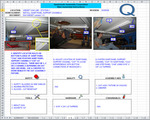
Here are two pages taken from a set of assembly instructions for a piece of industrial equipment. I’ve edited the pages, but only to conceal the source. The layout is exactly the same as the original. (You can click the images to see them full size in a new window.)
Assembly instructions, page 1 - 1
(By the way, when I said the layout is exactly the same as the original, I also meant that fifteen of the seventeen pages have an identical layout. Each page has space for three dropped-in photos; each has three borderless boxes of instructions [centered vertically, with text almost always in ALL CAPS]; each has the six boxes you see for safety, tools, quality, and so on.)
Assembly instructions, page 1 - 5
You may have noticed that the assembly instructions were created in Excel. I confess that I’ve kept this unique document for selfish reasons: it’s one of the most bizarre attempts at guiding performance that I’ve ever seen.
I’m not here to talk about bizarre-at least not today. I’m here to talk about why these instructors fail so badly.
What’s not working, and why
It’s true that never before nor since have I seen an assembly guide written in a spreadsheet, but that’s more a symptom than the underlying problem. A more important question: what’s Quasimodo’s problem? In other words, what are they trying to get done?
I’d say their goal is to have assembled widget vats that pass inspection and meet cost guidelines.
I’ve covered a lot of territory with "pass inspection," but the second-last sheet makes reference to a number of Quasimodo standards. (Click this image to open it in a new window.)
Inspection guidelines and standards
Although I never saw the actual equipment, it’s clear from photos that the finished product is about the length and width of a roomy parking space. Two or three people assembly it in a factory, from start to finish (meaning, not on an assembly line-the parts come to the assemblers). Assembly involves over 50 steps, several of which are variations of "repeat steps 1-5 for all four edges."
So what?
Well, mostly these steps are sequences of actions with few decisions:
Position center end wall panel CAD on assembly fixture.
Use two people or a jib crane to lift panels.
Check submittal for end wall connection and bottom connection orientation.
Fasten center end wall panel CAD to floor plane using 5/16 x 3/4 LG tappers.
Fasten center end wall panel CAD to floor support channel ZCA using 3/8 x 1-1/4 LG screw.
And so on and so forth…
I imagine these instructions were printed, pages slipped into sheet protectors and stored in a ring binder at the assembly area. They’re like a recipe from an industrial cookbook. So the fact they were created in Excel, while non-typical, is less relevant than the barriers created by their overall layout and especially by their approach to guiding behavior.
What else do we know about assembling the widget vat?
Workers need safety equipment like hearing protection and safety glasses.
Parts of the task involve specialized equipment (like that jib crane).
Some ways of working are more efficient or more effective than others ("start at the center and work your way out to the ends").
Detail often matters (as in the note above to check the submittal, a kind of specification for one specific assembly job).
And why doesn’t this attempt work well?
To shoot the biggest fish in the barrel: Excel isn’t a word processor. It’s not a publishing tool (unless you’re publishing numbers and charts, or else tables of data). Creating this guide in a spreadsheet needlessly complicates the task of updating and revising — and even searching.
This isn’t even well-done document publication via Excel. Here’s a portion of page 1-5 (the second image above). Note that the photo includes two callouts labeled CA while the accompanying text refers to panels CAA, CAB, and CAF. If you had the Excel file, you could enlarge the two CA callouts in the picture, and then you’d see that one of them actually reads CAA while the other reads CAB.
So Doctor Spreadsheet may not have been a proofreading whiz.
But who cares? The reason Excel is a poor choice is that nothing calls for Excel. There isn’t a single calculation in the entire document. You might as well have produced this in PowerPoint. Or taken photos of alphabet magnets you arranged on your fridge.
From a graphics standpoint, the lockstep layout assigns equal weight to two areas (task photos and procedural steps), and the same total weight to six blocks, one of which (quality) reads "n/a" on all but one of the 15 pages. Most of the time, a third of the space on a page is sitting around doing nothing. Nothing except confining the actual performance steps to their all-cap prison.
From a job-aid standpoint:
Before you begin information (like equipment and parts to have) should appear before the steps in the procedure.
Visuals, when necessary, should appear next to the step they illustrate.
Information that’s not needed on a page should not appear and shouldn’t have a reserved parking space that does nothing but delineate whether the information might show up on a subsequent page.
Steps should be clearer delineated, not crammed into a trio of one-size-fits-all holding pens:
Detail from page 1-6
The vertical centering manages to complicate reading even more, a remarkable feat for such a small amount of text. Another complication: in this example, step 5 says to repeat steps 1 through 5-a good recipe for an endless loop. I think the assemblers would figure out what the designer meant, but it’s no thanks to the designer.
So, as it exists, the QAC assembly instructions are hard to update, hard to read (from a graphics standpoint), and hard to follow (from a getting-your-work-done standpoint). It doesn’t seem like they’d easily get Quasimodo to the goal of assembled widget vats that passed inspection at a cost acceptable to the company — at least not until the workforce managed to build enough of these things to not need the instructions.
In my next post, I’ll show some possible revisions and talk about why I think they’d help. But I don’t have to have all the fun: add your comments. Ask your questions-if I’m able to, I’ll answer them. Let’s see if we can get to IPI sign-off a bit faster. You know, so we can excel.
Dave Ferguson
.
Blog
.
<span class='date ' tip=''><i class='icon-time'></i> Aug 19, 2015 04:57pm</span>
|
|
In a previous post, I showed a fictionalized example of an actual guide for assembling a piece of industrial equipment. These instructions weren’t particularly well done, and I set myself the task of making some improvements. I also wanted to explain what I did, and why I thought it was an improvement.
Revision, page 1
The original, written on seventeen sheets in an Excel workbook, had more than 50 steps. I didn’t fictionalize them all, and I haven’t tried to revise them all. I’ve done two pages (that cover what 5 of the original pages did). I think these revisions are representative. (You can click each image to open a full-sized version in another window.)
By the way: I don’t have any documentation other than what’s in the original widget vat instructions. In some places, I’ve made an educated guess about details that aren’t clear; in other cases I made things up. I’ll point these out along the way.
On to the revision!
Why my version looks this way
We’re guiding a task that’s mainly a procedure: a sequence of steps that follow one another logically, with relatively little decision-making.
Revision, page 2
I see this as a job aid for lots of reasons, including the large number of steps. A number of my revisions are part of what any good job aid should include.
A clear title
The original read "Main Assembly Instructions," which is ambiguous at best, unless Quasimodo Corporation only assembles one thing.
Here I’m pretending that there are several models of widget vats that differ mainly in size. I’ve put the model numbers into the title so the assemblers can tell easily if these are the instructions they want.
First things first: safety and prerequisites
Every page of the original version had a box listing the same three pieces of safety equipment-as if the developer thought the assemblers might take off their safety glasses between pages 11 and 12.
I’m also pretending that the "submittal drawing" spells out things like how many fasteners you need of each type. If that were not the case, I’d have to find out from my client whether (for example) the fasteners were stored at the assembly point, and if so how the workers could get more when they needed.
Emphasis techniques
Emphasizing what’s important
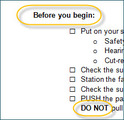
The original version didn’t make much effective use of contrast, alignment, or spacing, so it’s much harder to figure out what’s important. That’s one reason I’m a fan of language like "before you begin." In my revision, that stands on its own as the header for a number of items that we want the worker to do before starting the assembly.
And rather than the original’s unfortunate use of ALL CAPS, I recommend using capitals, boldface, or similar techniques in specific, limited circumstances. One of those circumstances is to highlight words like DO NOT, EXCEPT, DANGER, and so on.
Don’t confuse people with detail
Although the original used over 50 photos, in my revision I’ve hardly used any. In part that’s because I didn’t have good replacements for the photos-but also because many of the original photos fail to contribute useful guidance.
One problem with the original images-and with photos in general-is that they often provide too much detail, making it hard to grasp what’s important in a particular step. Or they ignore context, also making it hard to grasp what’s important.
Take a look at these three examples on one page of the original (click to enlarge):
Details from the original instructions
Drawbacks to these:
Left: Why do I need to see a picture of the parts cart? The instructions say it’s important to push rather than pull the cart-but they don’t say if there’s a specific end I should push from. If there is, show it. If there isn’t, spell that out.
Center: you might be able to figure out, after studying this picture, that you’re viewing the assembly area from the side-but you can’t tell whether the top of the assembled widget will be on the left or the right.
Right: the instructions tell you:
CHOCK ONE (1) WHEEL ON EACH END OF EACH VAT ASSEMBLY FIXTURE (FOUR (4) CHOCKS TOTAL).
In my first revision, I’d missed the "four chocks total" part, which implies that neither the all-caps approach nor the FOUR (4) text/numeral approach helped.
Although I didn’t have much to work with, I have a couple of examples of images I think would work better.
The top picture in "image detail" shows a closeup helpful for one assembly step: the flanges should face up, and they should face out from each other.
(Yes, I made up the term "bleem flange.")
The lower picture is a line drawing rather than a photo. Line drawings are a great way to eliminate unnecessary detail. I’ve teried to reduce details to the essentials: you’re fastening two (more-or-less) L-shaped pieces together, and you fasten through holes that alternate large/small/large/small.
(I’ve made the assumption here that the assembler should alternate directions when fastening these things: one fastener from one side, the next from the opposite side. If it were important to do that alternating while fastening, I’d add a box to spell that out. If you can install all the fasteners from one side, and then from the other, I’d spell that out. )
Some problems in the original version stem from the decision to always use three photos per page in the original. That’s a lot like deciding that you need to use one semicolon per paragraph: not wrong, exactly, but needlessly specific.
What I’d do instead:
Leave out the cart photo. My assumption: the assemblers know what the parts cart looks like. If they don’t, they shouldn’t be assembling widget vats.
Possibly include a close-up of the portion of the cart that I’m supposed to push, assuming there’s some sort of handle or push plate.
Use a bird’s-eye-view line drawing to show the layout of the assembly area.
In the text for this step in my revision, I made up some floor guidelines to show "top" and "bottom" of the assembled widget.
I also made up guidelines on the frame to show where to place some of the initial pieces.
Clarify where to place the wheel chocks.
Chock one wheel of each assembly fixture.
Written this way, it doesn’t matter how many fixtures you have, so you don’t need the FOUR (4) business so beloved by people writing procurement specs.
Place the chock so it’s closer to the center of the fixture than the wheel it’s touching. (If this is a best practice; I have no idea.)
Trying to build a useful set of performance guides like this can be a tool for analysis tool as well. You can’t create a successful guide without knowing what the inputs are, what the process is, what the outputs are, and what the standards for success are.
How many assembly fixtures do I need? On the framework, which side represents the top of the assembled piece? Can I install 20 fasteners in one direction, all in a row, and then 20 in the other? And what the hell is a "submittal drawing," let alone the cryptic "BOM?"
What’s more, you can identify items that don’t need to be in the guide. Frankly, I think it’s…perhaps less than helpful to list "vat part cart" as an assembly aid. That’s like saying, "In order to build your IKEA Poang chair, buy the Poang chair and bring it home."
The changes here, and the reasons behind them, apply to most performance guides like this. In my next widget vat post, I’ll show some revisions I’d make that are specific to procedural or step-by-step job aids like these instructions.
Dave Ferguson
.
Blog
.
<span class='date ' tip=''><i class='icon-time'></i> Aug 19, 2015 04:57pm</span>
|