Blogs
|
(Click image for a downloadable version of the regulations on Scribd)
I have a collection of job aids, some going back more than 50 years. I keep them for various reasons: some are amusing, many are creative, and all of them are examples of helping people to perform some task.
What makes a job aid a job aid?
It presents information that’s external to the performer.
It’s used on the job. It’s part of how the performer carries out some task.
It enables accomplishment: when a person uses the job aid, he can accomplish some result that he couldn’t otherwise.
It reduces the need for memorization.
I use "memorization" here only as a label for some of what we call learning, which is storing certain knowledge in your memory so you can retrieve it and apply it in the proper context. (I know, I’m oversimplifying.)
Job aids, when used appropriately, offload some of the cost of memorization: instead of learning all the information or steps for some task, the person learns how to use the job aid to carry the task out.
Just as not every task is suited to job-aiding, not every person can use every job aid. A job aid supports the performance of a particular job, or at least the completion of a particular task. Implicit in that is a certain level of background knowledge and overall capability. If you don’t know much about photography and digital images, than a job aid for some advanced feature in PhotoShop probably was not designed for you.
Please understand that I mean no offense, and realize I’m making a possibly unjustified assumption, when I say that you, esteemed reader, probably couldn’t make good use of a job aid for a forequarter amputation.
That’s the surgical removal of someone’s arm and shoulder. It’s not a common procedure. In the UK, doctors perform about 10 per year, mainly on cancer patients.
David Nott performed one, too. He’s a vascular surgeon who volunteers with Médecins Sans Frontières (Doctors Without Borders). In 2008, while serving in the Democratic Republic of Congo, he was confronted with a boy who’d lost most of his arm. The child was at grave risk of dying; Nott knew the only procedure that could help him was a forequarter amputation.
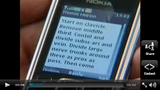
As the BBC reported, Nott believed he had the surgical skill but wasn’t sure he knew all the steps for this specific operation. There was no way to get real-time support (say, over an open phone line). So he contacted Dr. Meirion Thomas of London’s Royal Marsden Hospital, who provided performance support… via text message.
Click to view video on The Telegraph's site
Notice how Thomas’s instructions rely on skill and knowledge that Nott already had. "Cont(r)ol and divide (the) subsc(apular) art(ery) and vein" is one highly compressed step. Professor Thomas knew that the intended performer could get around the typo, could identify the vessels, and would know the meaning of "control" and of "divide."
Nott told The Telegraph he was able to carry out the three-hour procedure thanks to the guidance, which is one of the truly distinctive job aids in my collection.
Dave Ferguson
.
Blog
.
<span class='date ' tip=''><i class='icon-time'></i> Aug 19, 2015 05:02pm</span>
|
|
I’m experimenting with changes to this blog. Mostly they have to do with the theme. If you’re not a blogger, that’s the collection of WordPress files that controls the appearance of the blog-not just the arrangement of colors and typefaces, but also the display and position of features like those you see in the sidebar ("latest posts," "latest comments," and so on).
I really liked my longtime theme, Simpla. The white space went well with the blog’s name. But it hasn’t been updated in a long time, and it’s not widget-aware.
For the three people still reading, a widget is a little drag-and-drop control. For example, with the old theme, to have drop-down list for displaying archives by month, I had to edit the PHP code for the sidebar and add this:
<<id="archives"><h2><?php _e('The last few months'); ?></h2>
<ul>
<?php wp_get_archives('type=monthly&limit=6'); ?>
<!-- END ARCHIVES -->
<!-- Archive dropdown -->
<h4>Or any month at all:</h4>
<select name="archive-dropdown"
onChange='document.location.href=this.options[this.selectedIndex].value;'>
<option value=""><?php echo attribute_escape(__('Select Month')); ?></option>
<?php wp_get_archives('type=monthly&format=option&show_post_count=1'); ?> </select>
</ul>
Nothing to it.
(click to enlarge)
Using more up-to-date themes (like Suffusion, which I’m experimenting with), you can add or delete widgets without having to worry about forgetting an angle bracket or a semicolon.
The example on the right is taken from this blog as I write. Suffusion allows for multiple sidebars-the spaces outside of the main post area. I dragged five different widgets into Sidebar 1; the order in which I place them is the order in which they appear.
That example includes the Archives widget, which I left open to show how easy it is to customize the title and to say whether you want the archive as a full list, or as a dropdown. Since I’ve been scribbling on this Whiteboard for more than 5 years, I didn’t think the full list was the best option.
The Series TOC widget (second from last in the example) is another benefit I get from a more up-to-date theme. I’ve written several post series, and the widget automatically displays titles for the first post in each one. When I begin another series, I don’t have to do anything to update that table-of-contents; as long as I’ve named the series (through another WordPress gizmo called a plugin), the widget will include the new title.
As I tinker with changes, cosmetic or (I hope) substantive, I’ll probably make mistakes, which is why I say things will be up in the err for a while. And I do have some grunt work to do-that random quote, which I’m fond of, can’t retrieve the 300-odd quotes stored in the database. It looks like I may have to re-enter them one at a time.
Dave Ferguson
.
Blog
.
<span class='date ' tip=''><i class='icon-time'></i> Aug 19, 2015 05:02pm</span>
|
|
Reference job aid is a term I use for any job aid that collects or lays out information so that someone can look up a meaning, decode an example, or perform other kinds of work with facts.
(Over the next few days, I’ll post several examples of real-world job aids. This is the first one.)
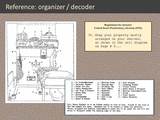
The image below and its accompanying table of callouts are taken from the Institution Rules and Regulations for the former United States penitentiary on Alcatraz Island, California. As the regulations make clear, an inmate was entitled to food, clothing, shelter, and medical care. Anything else was a privilege and could be revoked.
Who used this job aid?
My guess is: guards, to explain to inmates how their cells were to be organized, and to make certain that cells conformed to the rules. Also, possibly, the inmates themselves, though I have a suspicion it would be more to justify some claim: "Hey, I’m allowed to have up to twelve books."
What was the task it supported?
Most likely, it was a reference for what can someone have in his cell? What is he not allowed to have? (In the latter case, if an item is not pictured here, it’s not permitted. This is one way to for you to be certain that Robert Stroud, despite the title of a movie, never kept birds while at Alcatraz. Apparently as a title The Birdman of Leavenworth didn’t sound as striking.)
(Click to enlarge)
Dave Ferguson
.
Blog
.
<span class='date ' tip=''><i class='icon-time'></i> Aug 19, 2015 05:02pm</span>
|
|
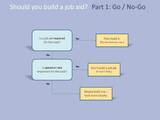
If you’re wondering whether you should build a job aid to support some task, this is the first of a three-part guide to help you figure things out.
That first consideration ("Is a job aid required?") isn’t as daft as it might seem. If your organization mandates a job aid for some task, then you’re stuck. You want to do the best job you can with it (or maybe you don’t), but unless you convince the right people to reverse the policy, somebody’s going to be building a job aid.
Which means you can skip the rest of the "should I build?" stuff that will appear in Parts 2 and 3.
Assuming that a job aid isn’t mandatory, the next question is whether speed or rate is a critical factor in performing whatever the task is. The short answer is that if speed matters, a job aid isn’t going to work.
First, when it comes to routinely high-volume work like factory production or air-traffic control, that normal high-volume state doesn’t allow the performer time to consult a job aid. Successful results depend on learning-on committing skill and knowledge to memory, and on retrieving and applying those things appropriately.
I’m a pretty fast typist (65 - 80 words per minute if I’ve been writing a lot), but the moment I glance down at the keyboard my rate drops, because the visual signal interferes with the virtually automatic, high-rate process I normally use at a keyboard.
That’s rate. As for speed, many jobs call for you to apply knowledge and skill in an unscheduled fashion, but quickly. Think about safely driving a car through a tricky situation, much less an emergency. You don’t have the opportunity to consult a job aid. If a kid on a bike suddenly pulls out in front of you, you can’t look up what to do.
Anyone who’s helped train a new driver knows what it’s like when the novice is trying to decide if it’s safe to turn into traffic. We experienced drivers have internalized all sorts of data to help us decide without thinking, "Yes, there’s plenty of time before that bus gets here; I can make the left turn." In the moment, the newcomer doesn’t have that fluency but has to be guided toward it-just not via a job aid.
What’s next?
Once you’ve determined that you’re not required to build a job aid, and that there’s no obstacle posed by a need for high speed or high rate, you’ll look at the nature of the performance for clues that suggest job aids. That’ll be the next post: Ask the Task.
CC-licensed image of seabirds by Paul Scott.
Dave Ferguson
.
Blog
.
<span class='date ' tip=''><i class='icon-time'></i> Aug 19, 2015 05:02pm</span>
|
|
Example of a deployed fire shelter
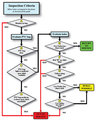
Flowcharts, along with their decision-table siblings, guide a person through choices, evaluations, or decisions. As an example of a flowchart, I’m using inspection guidelines for a personal fire shelter. The guidelines come from the USDA Forest Service website (specifically, Fire Shelter Inspection Guide and Rebag Direction).
A fire shelter is a last-ditch, personal-protection device, meant to radiate heat away from a firefighter who’s been trapped by a fire. The shelter’s pup-tent shape encloses air for the fighter to breath as the fire passes over.
The photo on the right is taken from page 16 of The New Generation Fire Shelter, a 2003 publication. Although the text doesn’t say so explicitly, a portion of the shelter appears to have been cut away so you can see how the firefighter lies within it after it’s deployed. (There are hand straps to hold the shelter down.)
Firefighters receive a fire shelter as part of their equipment, and one of their responsibilities is to inspect it regularly. That’s what the guidelines are for.
A fire shelter in its bag
The second photo shows what a fire shelter looks like in its bag. Firefighters leave the bag closed until they have to deploy it, which explains the need to inspect the bag regularly.
There’s more to the guide than appears below; I’m just highlighting its flowchart. Which is a good excuse for me to point out that most job aids are combinations of techniques-for example, step-by-step instructions (a cookbook) combined with decision guidance (like a flowchart).
Who uses this job aid?
A Forest Service firefighter or a person with similar responsibilities. While you could use this to help inspect any fire shelter, the language in the guide implies that you’re inspecting your own.
What’s the task being guided?
Determining whether a fire shelter has any defects that would render it unsafe.
Notice the number of decisions involved:
Is there moisture in the bag?
What’s the status of the bag itself?
Are there holes? How many, and what size?
Does it have a label with a red R?
Does it have a yellow rebag label?
I want to emphasize, because of the nature of the task, that the full guide has a number of photo examples (e.g., this is what a label with a red R looks like).
(See full guide at the U.S. Forest Service site)
Dave Ferguson
.
Blog
.
<span class='date ' tip=''><i class='icon-time'></i> Aug 19, 2015 05:02pm</span>
|
|
The previous post in this series covered the initial go/no-go decisions: are you required to build a job aid? Does a need for rate or speed make a job aid impractical?
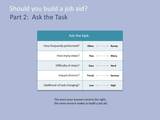
If the answer in both cases is no, then you don’t have to build a job aid, yet there’s no reason not to (so far). A good way forward at this point is to consider the characteristics of the real-world performance you have in mind. This is related to though not the same as task analysis. I have my own name for it:
What that means is: use what you know about the task to help determine whether building a job aid makes sense. You can go about this in many ways, but the following questions quickly cover a lot of the territory.
♦ ♦ ♦
How often does someone perform the task?
"Often" is a relative term-in fact, most of the questions in Ask the Task are relative. That doesn’t mean they’re not pertinent. Asking "how frequent is frequent?" turns your attention to the context of the task and the people who typically carry it out.
Frequency isn’t the same thing as regularity. Some tasks are frequent and predictable, like a weekly status update. Some are more random, like handling a payment by money order. And some are much more rare, like a bank teller in Vermont handling a money transfer from Indonesia.
Whether you end up building a job aid, designing training, or just tossing people into the deep end of the performance pool, you need some idea of how frequent "frequent" is, and where the specific task might fall along a job-relevant frequency scale.
Think about what frequency might tell you about whether to build a job aid. Yes, now. I’ll tell you more at the end of the post, but we both know you ought to do some thinking on your own, even if we both suspect few other people will actually do that thinking while they read this.
♦ ♦ ♦
How many steps does the task have?
It’s true, some tasks don’t really seem to have steps. Or they have very few: look up the arguments for the HTML <br> tag. And some tasks have so many that it might make sense to break them up into logical subgroups: setting up the thermoformer. Testing the thermoformer. Troubleshooting problems after the test.
Think of "step" as the lowest level of activity that produces a result that makes sense to the performer on the job. If I’m familiar with creating websites, then "create a new domain and assign it to a new folder in the \public_html directory" might be two steps (or maybe even one). If I’m not familiar with creating websites, I’m going to need a lot more steps.
That makes sense, because a job aid is meant to guide a particular group of performers, and the presumption is that they share some background. If you have widely differing backgrounds, you might end up with two versions of a job aid-see the Famous 5-Minute Install for WordPress and the more detailed instructions. Essentially, that’s two job aids: one for newcomers (typically with more support) and one for more experienced people.
As with frequency, you need to think about how many steps the task involves, and whether you think of those as relative few steps, or relatively many.
♦ ♦ ♦
How difficult are the steps?
You can probably imagine tasks that have a lot of steps but not much complexity. For someone who’s used to writing and who has solid, basic word processing skills, writing a 25-page report has plenty of steps, but few of them are difficult (other than getting reviewers to finish their work on time).
In the same way, a task can have relatively few steps, but many of them can be quite difficult.
That’s the reason for two step-related considerations when you Ask the Task whether a job aid makes sense: how many? How hard?
Pause for a moment and think which way you’d lean: if the steps in a task are difficult, does that mean "job aid might work," or does that mean "people need to learn this?"
♦ ♦ ♦
What happens if they do it wrong?
This question focuses on the consequences of performing the task incorrectly. Whether a person has a job aid or not is immaterial-if you don’t perform correctly, what happens? Personal injury? Costly waste or rework? Half an hour spent re-entering the set-up tolerances? Or simply "re-enter the password?"
As with the other questions, you need to think about the impart of error in terms of the specific job. And, if you haven’t guessed already, about the relationship between that impact and the value of building a job aid.
♦ ♦ ♦
Is the task likely to change?
We’re not talking about whether the job aid will change, because we still haven’t figured out if we’re going to build one. We’re talking about the task that a job aid might guide. What are the odds the task will change? "Change" here could include new steps, new standards, new equipment, a new product, and so on.
♦ ♦ ♦
Ask the task, and the job aid comes out? Right!
You’ve probably detected a pattern to the questions. So the big secret is this:
The more your answers tend to the right, the stronger the case for a job aid.
What follows is the 90-second version of why. (As your read the lines, just add "all other things being equal" to each of them.)
The less frequently someone performs a task, the likelier it is that he’ll forget how to do it. If you’re an independent insurance agent whose practice mostly involves homeowner’s and driver’s insurance, and you write maybe six flood insurance policies a year, odds are that’s not a task you can perform without support. Job aids don’t forget.
The more steps involved in the task, the more challenging it will be for someone to retain all those steps correctly in memory and apply them at the right time. Job aids: good at retention.
The more difficult the steps are, the harder the performer will find it to complete each step appropriately. A job aid can remind the performer of criteria and considerations, and even present examples.
The higher the impact of error, the more important it is for the performer to do the task correctly. You certainly can train people to respond in such circumstances (air traffic control, emergency medical response, power-line maintenance) , but often that’s when the performance situation or the time requirement presses for such learning. Otherwise, a well-designed job aid is a good way to help the performer avoid high-cost error.
The more changeable the task, the less sense it makes to train to memory. Mostly that’s because when the change occurs, you’ll have to redo or otherwise work at altering how people perform. If instead you support the likely-to-change task with job aids, you’ve avoiding the additional cost of full training, and you mainly need to replace the outdated job aid with the new one.
Here are the ask-the-task questions, together once more:
Dave Ferguson
.
Blog
.
<span class='date ' tip=''><i class='icon-time'></i> Aug 19, 2015 05:02pm</span>
|
|
The Scrooge-O-Meter from LSS Financial Counseling Service is an example of a calculator job aid. Calculators guide someone through a task by prompting for numerical values and performing calculations. The idea is to help a person reach some conclusion without having to master the factors or the math involved.
(LSS Financial Counseling Service is part of the work of Lutheran Social Service of Minnesota.)
Who uses this job aid?
Most likely someone trying to learn the added financial burden of buying on credit. (See additional thoughts from the group that created it, later in this post.)
What is the task supported?
I would say "awareness" or even "empowerment." The goal is to help someone understand the additional cost of purchasing on credit. I filled in the numbers you see in this example. The result says to me that "spreading out" credit payments for my holiday buying makes those purchases nearly 10% more expensive than I’d thought.
Notice that it doesn’t render judgment ("$68.72 extra? Are you nuts?!?"). The job aid simplifies the process so I can more readily see and understand the impact of buying on credit. I’m free to make my own decisions about what to do next.
More about the Scrooge-O-Meter
LSS Financial Counseling Service wants consumers to know that they can turn to a national network of nonprofit financial counseling and debt management (FCS is a member of that network). The page with the Scrooge-O-Meter offers a toll-free number, online counseling, a newsletter, and other resources.
Darryl Dahlheimer, program director of LSS Financial Counseling Service, was kind enough agree to its appearing here and also to provide these details:
There are many tools to help consumers calculate credit card repayment, but here are three reasons we like this one:
It sets a playful tone, to overcome the shame/intimidation of finances for so many who feel "dumb about money" but want to learn.
It helps make the true cost of using credit visible. Plug in an example of buying that $500 iPad at a major store on their 21% interest credit card and then paying only the $15 minimum each month. You will pay a whopping $757 and take over four years to pay off.
Conversely, it allows you to see the tangible benefits of paying more than minimums.
Dave Ferguson
.
Blog
.
<span class='date ' tip=''><i class='icon-time'></i> Aug 19, 2015 05:02pm</span>
|
|
The first two parts of this series, in one line each:
Is a job aid mandatory? If not, does speed or rate on the job prohibit the use of a a job aid?
Do the characteristics of the task tell you that a job aid makes sense?
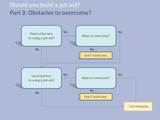
If they do, you might feel ready to leap right into design. But in the real world, people don’t just perform a task; they work within a complex environment. So the third part of your decision is to ask if any obstacles in that environment will hamper the use of a job aid.
You could ask these question in either order, but physical barriers are sometimes easier to address than social ones.
Often people have to work in settings where a job aid might be a hindrance or even a danger. Someone repairing high-tension electrical lines, for example. Or someone assembling or disassembling freight trains at a classification yard:
You don’t need to watch this video about humping railroad cars, but as the narrator points out around the 4:00 mark, in the distant past a worker would have to ride each car as gravity moved it down a manmade hill (the hump), applying the brake by hand if the car was moving faster than about 4 mph. It would have been impossible to give the brakeman a job aid for slowing the car, so his training (formal or otherwise) would have required lots of practice and feedback about judging speed. And possible trial and error.
Texas highway map, 1936
Rather than develop impractical job aids for aspects of this set of tasks, modern railroads rely on computers to perform many of them. For example, radar monitors the speed of cars more accurately than a person could, and trackside retarders act to moderate that speed.
Remember, the goal is not to use job aids; the goal is to produce better on-the-job results. Sometimes you can do that by assigning difficult or repetitive tasks to machinery and automation.
In many cases, though, you can overcome physical obstacles to the use of a job aid by changing its form. No law requires a job aid to be on an 8 1/2 by 11 inch laminated piece of paper. Nor on the formerly ubiquitous, multifolded paper of a highway map.
A road map can support different kinds of tasks. You can use it at a table to plan where you’re going to go, to learn about the routes. No barriers to such use. But for a person who’s driving alone, a paper road map is at best a sub-optimal support. It’s hard to use the map while trying to drive through an unfamiliar area.
Deep in the heart of Oslo
Real-time support for the driver now includes geosynchronous satellites, wireless technology, a constantly updated computer display-and a voice.
That voice is transformative: it’s a job aid you don’t have to read. Because the GPS gives timely, audible directions, there’s no need to take your eyes off the road and decipher the screen.
Other examples of overcoming physical barriers: attach the job aid to equipment. Use visual cues, like a change of color as movement or adjustment gets closer to specification. Combine audio with voice-response technology ("If the relay is intact, say ‘okay.’ If the relay is damaged, say ‘damaged.’")
But he had to look it up!
Overcoming physical barriers is one thing. Overcoming social barriers is…a whole bunch of things. Your job aid will fail if the intended performer won’t use it.
Popular culture places a great value on appearing to know things. When someone turns to an external reference, we sometimes have an irrational feeling that she doesn’t know what she’s doing-and that she should. In part, I think we’re mistaking retention of isolated facts with deep knowledge, and we think (reasonably enough) that deep knowledge is good.
At its worst, though, this becomes the workplace equivalent of Trivial Pursuit. A railroading example might be someone who can tell you not only the train numbers but the locomotive numbers that ran on a certain line decades ago-but who can’t issue you a ticket in a prompt, accurate, courteous manner.
The performer herself may be the person believing that performance guided by a job aid is somehow inferior. Coworkers may hold it, putting pressure on the individual. Even clients or other stakeholders may prefer not to see the performer using a job aid.
Maybe there’s a way around this bias. The job aid could be embedded in a tool or application, such that the performer is merely applying one feature. That’s essentially what a software wizard does. Watch me turn this data into a chart-I just choose what I want as I go along.
(And doesn’t "choose what I want" sound much more on top of things than "look stuff up?")
For a injection gun used for immunizations in third-world settings, healthcare workers occasionally had to make adjustments to clear jams and similar equipment glitches. Some senior workers did not want to seem to need outside help to maintain their equipment, but couldn’t retain all the steps. (Remember in Part 2? Number of steps in task, complexity of steps?) So the clearing instructions were attached to the equipment in such a way that the worker could follow the job aid while clearing the gun.
♦ ♦ ♦
The considerations here aren’t meant as either exhaustive or exclusive. They are, however, important stops to make, a kind of reality check before you hit the on-ramp to job aid design. The reason for building a job aid is to guide performance on the job while reducing the need for memorization, in order to achieve a worthwhile result. If the performer can’t use it because of physical obstacles, or won’t use it because of social ones, the result will be… no result.
CC-licensed photos:
1936 Texas highway map by Justin Cozart.
Norwegian GPS by Stig Andersen.
1879 Michigan Central RR timetable from the David Rumsey Map Collection.
Dave Ferguson
.
Blog
.
<span class='date ' tip=''><i class='icon-time'></i> Aug 19, 2015 05:02pm</span>
|
|
In the current issue of Smithsonian magazine, Teller (of the professional duo, Penn & Teller) reveals some secrets of his art.
First he talks about the world of neuroscience and perception, into which he’s often invited as a speaker. And he makes the point that when it comes to experimenting with human perception, neuroscientists are amateurs compared with magicians.
I recall his partner Penn Gillette saying once that they were not magicians. They were tricksters, swindlers. His point was that nothing in their act was magical. They’re not exempt from the laws of physics. Instead, as magicians have done for thousands of years, they rely on trickery, on quirks of perceptions.
It’s well worth reading the original (link in the first paragraph, above) to enjoy Teller’s style and to take in the details he provides for points like these:
Exploit pattern recognition. Our brains constantly seek patterns, especially when there isn’t one. That’s why the night sky has constellations, but an evenly spaced series of dots seems to have no pattern at all.
Distract with laughter. What Teller’s really talking about here is a kind of cognitive overload-if you’re watching the performance and laughing at the comedy, you’re likelier to miss some small detail. I think the same thing applies when a training exercise is sufficiently engrossing-people don’t care as much about elegant presentation and high-end graphics if the exercises feels like interesting, useful work.
Nothing fools you better than the lie you tell yourself. Here, he’s talking about allowing the audience (or the learner) to reach their own conclusions, make their own judgments, even if as the "designer" he knows these will be erroneous. For a magic act, that means the audience is all the more mystified by the effect-thus, success. When it comes to learning, the learner is comparing a conclusion she arrived at with new data that conflicts with that conclusion. That, gentle reader, is where the learning starts.
He goes on; you don’t need me to repeat it here. I found the article engaging enough that I wanted to see more, and came across a 2008 article in Nature Reviews - Neuroscience. In Attention and awareness in stage magic: turning tricks into research, Teller and several coauthors study magic tricks so that "neuroscientists can learn powerful methods to manipulate attention and awareness in the lab."
If you’re doubtful, take a look at this demonstration by one of the coauthors, pickpocket Apollo Robbins.
I think it’s worth the 16 minutes. Watch carefully during the first two-thirds, when (I’m not giving away much here) Robbins actually picks the pockets of a volunteer who’s pretty sure that’s what’s going to happen. You’ll find the subsequent explanation all the more compelling.
"If I’m here (standing alongside the mark), and I want to split his attention… I’ll bring my chin up into his personal space. His head will whip up to my face, and he won’t focus on that movement (of my hands)."
Dave Ferguson
.
Blog
.
<span class='date ' tip=''><i class='icon-time'></i> Aug 19, 2015 05:02pm</span>
|
|
The Nuremberg Funnel, according to Wikipedia, is a humorous expression for a kind of teaching and learning. It implies knowledge simply flowing effortlessly into your brain as you encounter it-or else a teacher cramming stuff in the mind of a dullard.
(The term dates to at least 15th-century Germany, and I suspect the notion of funneling or otherwise stuffing knowledge into someone is a few months older than that.)
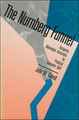
The Nurnberg Funnel is humorous as well, in a slightly drier way. John M. Carroll’s 1990 book, subtitled Designing Minimalist Instruction for Practical Computer Skill, describes efforts to help people learn to use computers and software. In 1981, Carroll and his colleagues analyzed problems that people had learning then-new technology like the IBM Displaywriter and the Apple Lisa.
In one extended experiment, Carroll and his colleagues had volunteers work with the Lisa, its owners guide, and the documentation for LisaProject. The goal was to find out what interested but untrained users actually did with these materials.
Mostly what they did was struggle.
On average, the learners took three times the half hour estimated by Apple and enthusiastic trade journals-just to complete the online tutorial. "Two [learners] who routinely spent more than half of their work time using computers… failed to get to our LisaProject learning task at all."
Carroll calls into question what he refers to as the systematic or systems approach to user training. To him this means "a fine-grained decomposition of target skills" used to derive an instructional sequence: you practice the simple stuff before you go on to more complex tasks they contribute to.
Carroll believes that "the systems approach to instructional design has nothing in common with general systems theory." What’s worse is that in the workplace, the highly structured step-by-step approach just doesn’t work.
If only people would cooperate! But they don’t.
The problem is not that people cannot follow simple steps; it is that they do not… People are situated in a world more real to them than a series of steps… People are always already trying things out, thinking things through, trying to relate what they already know to what is going on…
In a word, they are too busy learning to make much use of the instruction.
(that emphasis is Carroll’s, not mine — DF)
After further experiments, Carroll and his colleagues created what they called the Minimal Manual. Earlier they’d made up a deck of large cards "intended to suggest goals and activities" for learners, and useful as quick-reference during self-chosen activity. In chapter 6 of The Nurnberg Funnel, he describes the next stage-a self-instruction manual designed on the same minimalist model.
Training on real tasks
The Minimal Manual used titles like "Typing Something" or "Printing Something on Paper" rather than suboptimal, system-centric ones in the original Displaywriter materials. Carroll’s materials also eliminated material that was not task oriented-like the entire chapter entitled "Using Display Information While Viewing a Document."
At the same time, the experiment included essential material not well covered in the original document. It was easy for learners to accidentally add blank lines but difficult for them to get rid of them. The Minimal Manual turned this into a goal-focused task that made sense to the learner: "Deleting Blank Lines." While not catchy, that title’s a big improvement on "how to remove a carrier return control character."
Getting started fast
In the Minimal Manual the learner switches on the system and begins the hands-on portion of instruction after four pages of introduction. In the systems-style instruction manual, hands-on training begins after 28 pages of instruction.
Learners created their first document only seven pages into the Minimal Manual…. In the commercial manual, the creation of a first document was delayed until page 70.
Carroll shows several ways in which the comprehensive systems-style manual bogs down, overloads the learner, and gets in the way of doing anything that seems like real work. I can remember endless how-to-use-your-computer courses that spent 45 minutes on file structure and hierarchy before the target audience had ever created a document that needed to be saved. This is like studying the house numbering scheme for a city before learning how to get to your new job.
Reasoning and improvising
The Minimal Manual approach included "On Your Own" work projects-for example, make up a document and compose the text yourself. Then try inserting, deleting, and replacing text.
Some explanation is always necessary, but the minimalist approach kept that to… a minimum. "The Displaywriter stores blank lines as carrier return characters." That’s it. You don’t really have to know what a carrier return character is-what’s important to you as a user is (a) it’s what creates blank lines, and (b) if you delete it, you delete the blank line.
In general, this approach introduced a procedure only once. The three-page chapter "Printing Something on Paper" was the only place that printing was explained. Elsewhere, exercises simply told the learner to print. If he wasn’t sure how, he’d have to go back to that chapter.
In part, the team chose this approach because of the endless and often fruitless searching that learners had done in earlier trials, losing themselves in thickets of manuals and documents. The fewer pages you have and the clearer their titles, the easier it is to find what you’re looking for.
Here’s the entire explanation for the cursor control keys:
Moving the cursor
The four cursor-movement keys have arrows on them (they are located on the right of the keyboard).
Press the ↓ cursor key several times and watch the cursor move down the screen.
The ↑, ←, and → keys work analogously. Try them and see.
If you move the cursor all the way to the bottom of the screen, or all the way to the right, the display "shifts" so that you can see more of your document. By moving the cursor all the way up and to the left, you can bring the document back to where it started.
Connecting the training to the system
Carroll’s subhead here is actually "Coordinating System and Training," but I wanted to be more direct. His team deliberately used indirect references in order to encourage learners to pay attention to the system they were learning. In those long-ago days, for example, computers had two floppy-disk drives. The Minimal Manual didn’t tell learners which drive to put a diskette in. "We left it to the learner to consult the system prompts."
Supporting error recognition and recovery
As with other parts of the experiment, Carroll and his colleagues used error information from previous testing to guide the support provided by the Minimal Manual. Multi-key combinations (hold down one key while pressing another) baffled many learners, especially when the labels on the keys were meaningless to them: ("press BKSP, then CODE + CANCL"). And then there was this:
A complication of the Code coordination error is that the recovery for pressing Cancel without holding the Code key is pressing Cancel while holding the Code key.
Good thing we never see anything like that any more, huh?
Exploiting prior knowledge
It’s easy to forget how confusing word processing can be-at least till you try learning some new application for which you have very little background. (I’ve taken a stab at learning JavaScript, and I can see that’s probably not the basis of my next career.) The Minimal Manual strove to counter the relentless, technocratic, system-centric thinking in the original. "The impersonal term ‘the system’ was replaced by the proper name…the Displaywriter."
I can hear IT people I’ve worked with sniffing "so what?" I’ve actually had a programmer say to me, of a useful but very complicated tool, "If they can’t understand this, they don’t deserve it."
One particularly useful approach: document names. Back when most white-collar work did not involve computers, people created paper documents all the time, but rarely thought of documents as requiring a name. (What’s the name of a letter? What’s the name of a memo?) So the bland instruction "Name your document" seems like one more small technical obstacle in the way of getting something useful done.
Carroll’s team had learned that naming created lots of problems for learners, and so found a way to ease learning of this unfamiliar concept.
In the terminology of the Displaywriter you will be "creating a document" — that is, typing a brief letter. You will first name the document, as you might make up a name for a baby before it is actually born. Then you will assign the document to a work diskette — this is where the document will be stored by the Displaywriter. And then, finally, you will type the document at the keyboard, and see the text appear on the screen.
It might still feel odd to have to name a document, but the baby analogy brings the idea a bit closer to what the average person already knows.
♦ ♦ ♦
There’s a great deal more in chapter 6 that I’ll have to return to in another post. I wanted to share what’s here, though, because I think it’s extremely relevant to the future of learning at work.
That omnipresent quotation from a movie puppet often exasperates me.
Of course there’s try-in fact, it’s the effort involve in genuinely trying that’s essential. Otherwise, no Jedi training and not much need for a master; Yoda could just take a seat behind Statler and Waldorf.
Trying and succeeding leads to conclusions that may or may not be correct-sometimes they’re simplistic, sometimes they’re downright erroneous. Trying and falling short, in an environment where such trying is encouraged, can lead to analysis, to greater awareness of the available steps, inputs, and tools, and to improved performance.
The bigger lesson, I am more and more convinced, is that comprehensive systems training is a myth. People might spend extended time in formal classes, or labor their way through highly structured text or tutorials, but most of the time they’re looking for how to accomplish something that seems valuable to them. Just tell me how to get these images posted. Let me create a series of blog posts that have automatic navigation. How can I search this mass of data to find things that are X, Y, and Z, but not Q?
As I put it in a different context (vendor-managed inventory), I don’t want to know about standard deviation. I want to know whether the grocery warehouse computer’s going to order more mayonnaise-and how to tell it not to, if that’s what I think is best.
In no way am I saying that analysis doesn’t matter. It matters a lot-witness the skillful observation and analysis of user testing that led Carroll and his associates to the Minimal Manual. That for them was a starting point-they examined data from their testing to gain further insight and to guide decisions about supporting learning.
Dave Ferguson
.
Blog
.
<span class='date ' tip=''><i class='icon-time'></i> Aug 19, 2015 05:01pm</span>
|