Blogs
|
Today’s post was written by Kirk Koenigsbauer, corporate vice-president for Microsoft Office.
Today, we are excited to announce the availability of several new Office 365 communications services designed to modernize voice, video, and meeting experiences, while saving companies substantial costs in their communication infrastructure. Organizations can now replace their legacy meeting and phone systems with innovative services built on the familiar Skype for Business experience, all naturally integrated within Office 365—the world’s most-used collaboration and productivity platform.
We are also excited to announce significant new security and analytics capabilities aimed at dramatically improving our customers’ ability to protect their organizations and glean insights from data.
Communication-powered productivity
We believe that the heart of productivity is great teamwork, and the heart of great teams is great communication. Productivity today is centered on conversations—sometimes a quick instant message or call, and sometimes a meeting planned in advance including voice, video and content sharing.
With many different avenues of communication, people need tools that allow them flexibility in how they connect. For years, consumers have embraced new ways of communicating, turning "Skype" into a verb synonymous with video calling. But corporate telephony, including PBX systems, and audio and video conferencing systems, has lagged behind—until now. Having Skype for Business as an integrated part of the work people are already doing in Office means greater continuity as they collaborate and communicate throughout their day.
Built on the familiar Skype user interface, Skype for Business makes connecting with colleagues as easy and intuitive as connecting with friends and family on Skype. With the new services, Skype for Business gets even better, for organizations and their people:
PSTN Conferencing provides the flexibility to dial in to a meeting from a traditional phone, in addition to the existing ability to join a meeting with a single click on your PC or mobile device.
Skype Meeting Broadcast makes it easier than ever to produce large virtual meetings for up to 10,000 meeting attendees, who can join from virtually any browser or device (see it in action). Now Skype for Business truly is a single platform for every type of meeting.
Cloud PBX enables companies to eliminate separate PBX systems and transition to the cloud with Office 365 as the central location to manage users for communication and
With PSTN Calling, Office 365 customers can also subscribe to Microsoft managed calling plans and phone numbers, starting in the U.S. with more markets coming later.
Watch this video to learn more about how the new Skype for Business capabilities can benefit your organization.
Simplify your infrastructure, lower your costs and empower your people
Microsoft is the only company that has built this combination of capabilities—a cloud business phone system including dial tone, and a complete meetings solution including audio, video, content sharing and messaging service—as a core part of a complete productivity and collaboration suite, available across mobile platforms and at a global scale.
Today, over half of our business customers are currently paying for multiple conferencing solutions, and many are still using legacy PBX phone systems. Now they can simplify their infrastructure with one cloud platform for meetings and voice, ultimately reducing the cost, complexity and effort of maintaining legacy phone and conferencing systems.
But it’s about more than saving money. People spend nearly a third of their time at work in meetings, yet only 18 percent of information workers actively use conferencing tools that enable rich experiences like video and content sharing. When you consider that nonverbal signals account for nearly 90 percent of the messages we receive during interpersonal communication, it’s clear that moving to modern communication tools can have a dramatic impact on productivity and collaboration.
Desktop sharing during a Skype for Business meeting.
A rich partner ecosystem
As we release these new capabilities in Office 365, partners will play an integral role in extending the value of our new services. At the forefront are our global systems integrator partners, who have the highest level of experience in delivering communications solutions end-to-end.
We also partner with telco operators who provide secure, high-quality network connectivity and managed services that help customers get the best experience with the new Skype for Business services. These partners include BT Global Services, Orange Business Services, SoftBank, TATA Communications and Telstra.
Key partners like Polycom are delivering innovative new solutions for audio conferencing including the Polycom® RealPresence Trio™ for groups, and Polycom® VVX® desktop phones, which are the first phones qualified for the new Skype for Business services in Office 365.
Application partners like Genesys are also building on our platform to deliver solutions like contact center applications that work with Skype for Business and Office 365.
Deeper value from security and analytics
In addition to the Skype for Business capabilities, we’re releasing new security and data analytics capabilities in Office 365, including:
Delve Analytics—Empowers individuals through rich dashboards that provide insights on time and relationships, with the goal of helping individuals get time back and spend it effectively.
Power BI—A business analytics service that enables information workers to visualize and analyze data with greater speed, efficiency and understanding through live data dashboards, interactive reports and compelling visualizations.
Customer Lockbox—Gives customers new approval rights, transparency and control over their data in the cloud.
Advanced eDiscovery—Integrates Equivio machine learning, predictive coding and text analytics capabilities, to reduce the costs and challenges that come along with sorting through large quantities of data for eDiscovery purposes.
Advanced Threat Protection—Protects against unknown malware and viruses by applying behavioral analysis.
All of the new capabilities are now available and represent significant new value to enterprise customers. We’re excited to see the impact it can have on your organization!
For a deeper look at the new capabilities and the scenarios enabled with Office 365, please visit Office.com/enterprise.
—Kirk Koenigsbauer
The post Office 365 brings significant new value to business customers worldwide appeared first on Office Blogs.
Office Blogs
.
Blog
.
<span class='date ' tip=''><i class='icon-time'></i> Dec 05, 2015 11:13am</span>
|
|
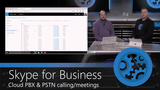
Most companies manage their telephone communications using a PBX (private branch exchange) system, which is essentially hardware that acts as a private telephone switchboard. Now, with Skype for Business Cloud PBX, you can eliminate separate PBX systems for users and move the functions of the PBX into the cloud, assign and manage phone numbers using Skype controls within your Office 365 admin console, and easily enable dial-in telephone numbers for your Skype meetings. We explain how this works and demonstrate everything in this week’s Microsoft Mechanics.
You can get phone numbers directly from Microsoft or port existing phone numbers into Skype for Business and assign or re-assign them to your users as needed. If your organization has hundreds or thousands of users, all of this can be automated via PowerShell scripting. So all of the communication needs of a new user—from email and collaboration to meetings and phones—can be automated and delivered straight from Office 365. Additionally, with PSTN Conferencing, an administrator can easily enable phone numbers to be added to their users’ Skype meetings, so anyone who receives the meeting request can dial in via a landline or mobile phone.
Cloud PBX also works with your existing carrier circuits with on-premises PSTN connectivity. In this configuration, you connect Skype for Business software to communicate between your existing PBX or PSTN Gateway and Cloud PBX in Office 365. This allows you to continue to use your carrier contract and circuit for phone calls while the users are hosted in Office 365.
Ideally, the connection between anything on-premises and online would be done using Azure ExpressRoute for Office 365, but you can use a normal Internet connection as well.
Cloud PBX and PSTN Conferencing are included in Office 365 E5 or can be purchased standalone. In the coming months, we’ll be expanding the number of countries where calling plans will be offered. And because this is a cloud service, you’ll see more and more features added to the service soon.
If you’re evaluating Office 365 E5, we’ve released a number of Microsoft Mechanics demos and shows highlighting the new capabilities:
Customer Lockbox in Office 365
Office 365 Advanced eDiscovery
Advanced Threat Protection in Exchange Online
Over the next week, Microsoft Mechanics will go deeper on the remaining Office 365 E5 features with an explanation of Delve Analytics and updates to Power BI.
See you then,
Jeremy Chapman
The post A deeper view into Skype for Business Cloud PBX appeared first on Office Blogs.
Office Blogs
.
Blog
.
<span class='date ' tip=''><i class='icon-time'></i> Dec 05, 2015 11:13am</span>
|
|
Today’s post about Office 365 was written by Andre Garcia, AVP for Global Infrastructure Services at ABM.
ABM believes that the early adoption of technology gives the company a competitive advantage. Today, we are enabling mobility and anywhere, anytime productivity for our workforce with Office 365 and the new capabilities in Skype for Business. We are one of the largest facility solution providers in the United States, with more than 300 offices in the United States and international locations. So for our employees, the workplace can be underground in a boiler room or on the top floor of corporate headquarters. Technicians and field staff work onsite at universities, airports, hospitals and industrial sites, just to name a few. Traditionally, there’s been a large gap between people working in the field and people working in the office. Enhancing connections and communications among employees so they can connect and collaborate on a variety of devices is a key goal for us.
We all know the Office user interface, and we all know the consumer version of Skype. So right off the bat, it was easy for our employees. We are introducing Skype for Business to all of our Office 365 users as they come on board, and they are really excited about it. Everyone loves the audio dial-in capabilities you get. There are so many ways to join a meeting—dialing in on a landline or a mobile phone, easily dragging people from the directory into a meeting, or calling from your computer—you can do it all using Skype Meetings with PSTN Conferencing.
In addition, PSTN Calling lets me work in the most efficient manner possible. If I want to pick up a phone, I can. If I want to be reachable at a phone number away from my computer, that’s also simple. If I want to join calls using VOIP, I can do that too. This feature gives us a tremendous amount of flexibility, and it all works seamlessly. We provisioned our executives and shipped webcams to them, and they have been very impressed with the technology. When employees have a positive experience with the easy call-in, call-out capabilities and the rich meeting functionality, they start questioning, "Wait, why do I need other conferencing solutions?" They realize that they can use Skype for everything. So we can cancel all those other accounts and save money by consolidating vendors without worrying about losing any functionality: there’s a great collaboration experience available in one consolidated solution for voice and meeting—video, desktop sharing and co-authoring.
And it’s so easy to manage users and voice services right in the Office 365 solution with Cloud BPX. With just a couple of clicks, we can provision users for PSTN Conferencing and PSTN Calling. You simply assign users phone numbers and from there it’s a walk in the park. There’s also potential cost savings with PTSN Calling. We are expecting more predictable pricing from Microsoft’s PSTN Calling flat rate plans.
ABM is an international company with more than 100,000 employees, so we are naturally interested in Skype Meeting Broadcast. I think a lot of companies will want to empower their senior executives to use the broadcasting feature to distribute messages to employees with "watch them when you want" built-in video on demand flexibility.
Skype for Business is the culmination of our journey to cloud-based communication services and transforming the workplace. We have been early adopters all along, but thanks to the flexibility that’s built into Microsoft technologies, we can undertake the journey at our own pace, working through hybrid scenarios. The ability to do audio and video calls between Skype Consumer Network and the new enterprise version means we can more easily communicate with our suppliers, customers and contractors, which streamlines communications across the organization. Collaboration and communication have been critical components of how employees get work done at ABM all along, but with Skype for Business we’ll be truly working like a network.
The post ABM builds teamwork between field and offices to boost service and productivity appeared first on Office Blogs.
Office Blogs
.
Blog
.
<span class='date ' tip=''><i class='icon-time'></i> Dec 05, 2015 11:12am</span>
|
|
We are pleased to introduce a new Excel 2016 feature that improves the analyst’s workflow—smart rename support in the Power Pivot data model.
Now in Excel 2016, when you rename a table, column or DAX measure in the data model, the rename is seamlessly propagated through the workbook and all the affected objects in the workbook adjust to use the new name. Smart rename support in the data model significantly improves the scenarios when the user renames a table, column, calculated field, measure or hierarchy in the Power Pivot window.
Specifically, the following enhancements have been made:
Affected DAX calculations now adjust to use the new names. This saves the user from manually finding and fixing the invalid DAX formulas.
Affected PivotTables and Fields Lists now adjust to use the new names. This saves the user from manually rebuilding the PivotTables.
In a similar manner, the affected PivotCharts and Fields Lists adjust to use the new names. This saves the user from manually rebuilding the PivotCharts, as the renamed objects were removed from the PivotChart before.
And last but not least, the affected Slicers and Timelines adjust to use the new names. This saves the user from re-creating the Slicers and Timelines, as the affected Slicers and Timelines disappeared from the workbook before.
A live demonstration is better than a thousand of words, so let’s see the new experience in Excel 2016:
http://officeblogseast.blob.core.windows.net/wp-content/2016/11/Excel%202016%20Smart%20Rename%20Demo.mp4
Smart rename support for Cube functions and Named Sets in the workbooks is not supported at this stage.
We hope that you’ll love the new experience, and we will be glad to hear your feedback.
The post Announcing smart rename support in the data model for Excel 2016 appeared first on Office Blogs.
Office Blogs
.
Blog
.
<span class='date ' tip=''><i class='icon-time'></i> Dec 05, 2015 11:11am</span>
|
|
ABB—The collective power of knowledge
Today’s post about Office 365 was written by Andy Tidd, global chief information officer at ABB.
Disruptive innovation is occurring throughout the power and automation sectors served by ABB—changes in the electric utility value chain, the growing importance of the digital grid, solar and wind power, collaborative robotics, the Internet of Things, services and people—and ABB is driving the change. We pride ourselves on innovation that keeps us at the forefront of technological change in power and automation so we can deliver solutions that make this world a more efficient, cleaner place. My challenge is to ensure that creativity and inspiration continue to flourish at ABB without any technological barriers. How do we meet this challenge for a global company with people working in roughly 100 countries? We connect people to enable collaboration, and for that we use Microsoft Office 365.
Obviously security and compliance are important aspects of the purchasing decision for any technology, and Office 365 was no exception. We deployed Office 365 to more than 125,000 of our employees around the world, at a rate of up to 5,000 seats a week. It was a successful example of IT maintaining daily operations while enabling a strategic business objective—fostering global communications and collaboration to drive innovation. But to be relevant, the project had to focus on business productivity and user experience—bringing people together to enable them to create new products that deliver additional value to our customers. So we listened to employees’ expectations for an agile, mobile, always connected work environment that erases geographical boundaries and opens the door to global collaboration. Office 365 helped us meet those expectations. Its flexible cloud-based services are designed to promote mobility and it works with PCs, tablets and mobile phones running on all the major operating systems.
ABB has been deployed on all Office 365 services for more than a year and it has proved itself as a suite of modern, intuitive collaboration tools that really support our business-led collaboration focus area. Yammer is everywhere facilitating teamwork. SharePoint Online is used extensively thanks to the simplicity of setting up Sites for project collaboration. Employees are empowered to share knowledge that addresses issues and goals across departments and geographies. Everyone uses the tools as a natural extension of how they work, creating teams, messaging each other and quickly starting up Sites to accelerate projects, foster innovation and get to market faster. And as people share their knowledge and exchange ideas, we build a knowledge base that’s discoverable and accessible to all.
Today, I have daily conversations with colleagues in countries around the world; it’s refreshing and helps me understand the challenges out there in our global communities. The more we know about our colleagues, the faster we can pull together to respond quickly to changes in the market.
I have been most gratified by the way the whole organization came together to achieve this global transformation. When you are going to affect 125,000 people across the company, it’s a big responsibility. We had dedicated teams that did a lot of planning up front. And Yammer proved itself as a perfect grassroots change agent; teams formed dynamically and worked alongside the implementation groups in each country. Conversations started all over the place, and this turned out to be a fantastic channel for end-user support. By the time the Office 365 deployment was complete, I wondered how we could have got on without this tool. The continual innovation that comes with Office 365 means that I can concentrate on enabling our businesses to more easily focus on their core business, which adds value for our company and for our customers.
What is the most lasting benefit of this transformation for ABB? With business-led collaboration, we are achieving the collective power of knowledge. Today, the sum of our talented individuals can be brought together to work toward improving customer satisfaction through innovative products, and to a large extent, that’s down to Office 365.
—Andy Tidd
The technologies involved
ABB fully deployed approximately 125,000 employees on Microsoft Office 365. All employees use Microsoft Exchange Online for web-based email and shared calendaring. Yammer and SharePoint Online are fully deployed for enterprise social and team-based collaboration using Sites. OneDrive for Business provides online storage for all employees, and everyone connects with each other using Skype for Business Online for instant messaging and presence awareness.
The post ABB—sparking innovation through the collective power of knowledge appeared first on Office Blogs.
Office Blogs
.
Blog
.
<span class='date ' tip=''><i class='icon-time'></i> Dec 05, 2015 11:10am</span>
|
|
Product teams across Microsoft are striving to follow the spirit of being customer focused, and the Access team is no exception. The Access product team has been conducting onsite customer visits and talking to customers from all over the world to learn more about who our customers are and how they use Access in their business and personal lives.
Our goal is to maintain a continuous dialog with the Access community to discover user scenarios, pain points while working with the product, ideas and suggestions for improvements. To achieve this goal, we’ve set up a new dedicated Access UserVoice site. This is a great platform for customers from all over the world to suggest ideas for Access and then vote on them. This platform provides an opportunity for the entire community to voice their opinions and to directly influence the Access roadmap. The Access product team is closely monitoring this site and is responding to suggestions.
Please check out our dedicated site at Access UserVoice and let your voice be heard!
—The Access product team
The post Connecting with our customers on Access UserVoice appeared first on Office Blogs.
Office Blogs
.
Blog
.
<span class='date ' tip=''><i class='icon-time'></i> Dec 05, 2015 11:10am</span>
|
|
On the heels of this week’s announcement of Office 365 bringing significant new value to business customers worldwide, Michael Tejedor returns to Microsoft Mechanics to provide a comprehensive look at the hundreds of new Power BI features that are now generally available. Power BI is a business analytics service that allows you to monitor and analyze all your data in one place, through a single pane of glass. It’s been about 10 months since the start of the Power BI preview followed by our June early look at the new updates and customization options for Power BI.
On this week’s show, Michael starts by demonstrating the Power BI dashboard, which provides more visualization capability and includes a new charting engine. He demonstrates the dashboard’s live reports, allowing you to drill into underlying reports and explore additional details as well as obtain new visualizations of the data. A great recent edition to Power BI is the expanded browser experience, and editing capabilities in PowerBI.com.
Beyond the browser and dashboard, we share how your business analysts can use the new Power BI Desktop tool to create interactive reports. We also show how you can create custom visualizations or use pre-packaged Content Packs to quickly visualize data from popular services like Salesforce, CRM Online or Adobe Analytics. Content Packs can now even be built from data within your own company. Michael demonstrates a new capability in Power BI to automatically expose trends and uncover patterns in a dataset by simply clicking View Insights. We get hands-on with all of this and more as we walk through the major updates to the Power BI experience on the show.
You can try Power BI today for free at PowerBI.com. If your company uses Office 365, Power BI Pro is available as part of the new Office 365 E5 plan, or it’s available as a standalone offering. We’ve featured a lot more Power BI in action on past Mechanics shows highlighting Lotus F1 Team’s implementation and predicting the outcome of last year’s El Clasico match in Barcelona.
Thanks for watching,
Jeremy Chapman
The post A demo tour of updates to Power BI Pro appeared first on Office Blogs.
Office Blogs
.
Blog
.
<span class='date ' tip=''><i class='icon-time'></i> Dec 05, 2015 11:09am</span>
|
|
A critical part of being able to collaborate in Office is the ability to work with others regardless of the platform you are working on or where you are working. With Office for iOS, you can easily find, edit and share documents using your iPhone or iPad!
Get started with Office for iOS
To get the most out of Office for iOS, we recommend that you sign in with your Microsoft account or organizational account for work/school. Not sure if you have an account? Go to the Account tab, tap Sign in and enter the email address associated with your account. If you have an account, then Office for iOS will redirect to the proper sign-in page; if not, then you are guided through the new user set-up process.
Free for everyone
Office for iPhone and iPad is free for everyone. After installing Office on your iOS device, you can read Office documents in high fidelity anywhere you take your device. You can also edit files stored on OneDrive for Personal, Dropbox for Personal and iCloud for free without having a subscription.
Additionally, if your account already comes with an Office 365 subscription, you can unlock more features, such as Track Changes and options for charts and tables. New users can simply tap the Upgrade icon inside the Account tab to start an Office 365 subscription today.
Open files from everywhere
Office for iOS allows users to open files from many different storage locations, such as OneDrive, SharePoint, Dropbox and iCloud. To connect to a OneDrive, SharePoint or Dropbox service, go to the Open tab, tap Add a Place and select the corresponding storage service to add.
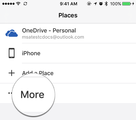
To open files from iCloud, Google Drive or any supported third party storage service, tap More from the Open tab. Office integrates with the file picker provided by iOS (iOS 8 or above required), and you can edit files from any storage app that opts in for this extension.
Files stored in OneDrive and SharePoint provide the best Office experience by offering features such as co-authoring and easy-share. Every Microsoft account comes with OneDrive for Personal, so start using yours today!
Seamless experience between devices
Today Word, Excel and PowerPoint are available in almost every consumer platform from Windows to iOS. The "Recently used files" and the "Welcome back" features provide seamless transition experiences for those with multiple devices running Office.
Recently used files
The Recent tab in Office displays the most recently opened documents and is synced across devices if the file is stored in OneDrive for SharePoint. Imagine a scenario where you just left work and need to continue working on a document from your phone. The file will be positioned at the top of your recently used items, even if it was opened from another device. In Office for iPhone and iPad, you can also Pin a document to ensure it stays at the top of the list, and this change will reflect across different devices.
Pick up where you left off
When opening a Word document or PowerPoint presentation, the Welcome back! pop-out takes you back to the last paragraph/slide you were at, allowing you to quickly pick up where you left off. For files stored in OneDrive or SharePoint, this option takes you to your last reading position, even if it was from another device.
Work everywhere
Office for iOS comes with powerful offline support, so you can work on a document even without having a network connection. The green badge in the Recent tab indicates the file is available for offline editing, and Office for iOS automatically saves the changes back to the server when the device becomes online.
Collaboration—easy share
Files stored to OneDrive, OneDrive for Business and SharePoint offer the best collaboration experience. To start sharing a document, simply tap the Share icon inside the Open/Recent tab or from within a document.
If you have created another document that’s stored locally on your iOS device, all you need to do before you start sharing is upload it to a cloud location. Simply tap the File action icon, select Move to Cloud and then select OneDrive, OneDrive for Business or SharePoint as your destination.
Outlook attachment quick edit
Even though sharing using links reduces the hassle of merging files and keeps everyone up to date, many files are still sent as attachments, resulting in a tedious process of having to download the file, make and save your edits, re-attach the document and then email it back. This procedure has been dramatically improved within the recent update for Outlook and Office.
The next time you receive a Word, Excel or PowerPoint attachment inside Outlook, simply open the document in the Office app and start editing. When you are done, tap the Back button in Office and the updated file will be available as a draft in Outlook.
Productivity everywhere
Office for iOS offers familiarity to Office users coming from other platforms, with a brand new look that’s optimized for iPhone and iPad. The teams are working hard and continually delivering new features to address customer feedback. Get Office for iOS from App Store today and start collaborating from your iPhone or iPad!
Word for iOS
Excel for iOS
PowerPoint for iOS
—Hugo Song, program manager for the Office team
The post Collaboration in Office—Office for iOS offers productivity on the go! appeared first on Office Blogs.
Office Blogs
.
Blog
.
<span class='date ' tip=''><i class='icon-time'></i> Dec 05, 2015 11:08am</span>
|
|
Sway became generally available in August, enabling many additional eligible Office 365 business and education customers to begin using Sway worldwide. We continue to listen to customer feedback and work hard to address top requests from our Office 365 customers. Today we’re excited to announce additional admin capabilities we added to Sway as a result. These new controls allow Office 365 admins to better manage and tailor the way Sway is used within their organizations.
Sway now has a per-user licensing model
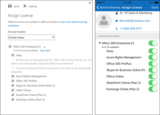
Sway has now implemented a per-user licensing model, which means that Office 365 admins can assign access to Sway on an individual or group basis instead of at the organizational level. Not only does this provide organizations with greater control but it also means that companies can more easily run pilot programs with select users for Sway before rolling it out across the organization. Any user for whom Sway is disabled will not see Sway in the Office 365 app switcher or on the home page. Here is more information on how you can control Sway licensing for your organization using the Office 365 admin center and PowerShell, as well as the Office 365 Admin app.
Sway will continue to be on by default for all new Office 365 users, and all users in organizations where Sway was previously enabled at the tenant level are automatically enabled through the new per-user licensing model. Organizations that previously disabled Sway at the tenant level will need to re-disable Sway within the new per-user licensing model for the entire organization or select individuals/groups.
Office 365 admins can now assign access to Sway on an individual or group basis.
Sway allows Office 365 admins to choose Insert tab sources
Sway now allows Office 365 admins to control which third party content sources (such as Flickr, YouTube and Twitter) are enabled in Sway’s Insert tab for users in their organization. This granular control allows admins to tailor the Sway experience for their users. In particular, this addresses requests from education customers wishing to better control what external content their students can access and add to Sway in alignment with organizational policies. To toggle sources on and off, visit the Office 365 admin center, select Sway under Service Settings and simply flip the desired switches.
Office 365 admins can now control which third party content sources are enabled in Sway for users in their organization.
Sway status now shows in the Service Health Dashboard
We know it’s important to our customers to stay informed on how Office 365 services are performing for your organization. That’s why Sway service status is now visible within the Service Health Dashboard in the Office 365 admin center, as well as the Office 365 Admin app. Any future Sway incident will be highlighted and reported in the Sway row and in the app.
The Service Health Dashboard now displays Sway service status as well.
As always, we’re continuing to listen to your feedback and improve the Sway user experience, as well as the Sway management experience for Office 365 admins. Please keep letting us know on UserVoice what you’d like to see us add or change about Sway. Business and education customers can provide feedback on the Sway experience for Office 365. We’ll keep updating the Sway Admin FAQ as we roll out new features such as those discussed in this blog.
—Sway team, @Sway
Get Sway | Follow Sway
The post New Sway admin controls—per-user licensing, Insert tab source controls and more appeared first on Office Blogs.
Office Blogs
.
Blog
.
<span class='date ' tip=''><i class='icon-time'></i> Dec 05, 2015 11:07am</span>
|
|
In this episode, Jeremy Thake and Richard DiZerega talk to Yina Arenas about the Microsoft Graph.
http://officeblogspodcastswest.blob.core.windows.net/podcasts/EP74_MicrosoftGraph.mp3
Download the podcast.
Weekly updates
Hack productivity
PowerApp your Office and SharePoint mobile solutions
Introducing Microsoft PowerApps
Develop an API for PowerApps
Office Dev PnP Webcast—asynchronous operations with Office 365 using Azure WebJobs
Channel 9.msdn.com with Andrew Coates
Advanced Windows 10 development with the Office 365 APIs
github.com/jakkaj/DayBar
Stalking your favorite celebrities with Office 365 Connectors for Groups
Using Office 365 Connectors for Groups in ASP.NET MVC
Saving properties on an Exchange item in Outlook add-ins
Be careful to case sensitivity in Microsoft Graph REST API
Building daemon or service app with the Microsoft Graph PI
Office Dev Show: Episode 19—Form.io
Show notes
graph.microsoft.io/
Connect(); 2015 videos
Microsoft Graph /v1.0
Microsoft Graph /beta
Got questions or comments about the show? Join the O365 Dev Podcast on the Office 365 Technical Network.
The podcast RSS is available iTunes or search for it on "Office 365 Developer Podcast" or add directly with the RSS http://feeds.feedburner.com/Office365DeveloperPodcast.
About Yina Arenas
Yina Arenas is an senior program manager in the Office Extensibility team developing the app models for Office servers and services. In previous releases, she worked on the Office authorization infrastructure and the SharePoint app model. Yina is passionate about enabling usage and adoption of Microsoft productivity services through the developer ecosystem and helping developers build collaborative applications more efficiently and effectively by leveraging the capabilities of Office applications and services.
About the hosts
Jeremy is a technical product manager at Microsoft responsible for the Visual Studio Developer story for Office 365 development. Previously he worked at AvePoint Inc., a large ISV, as the chief architect shipping two apps to the Office Store. He has been heavily involved in the SharePoint community since 2006 and was awarded the SharePoint MVP award four years in a row before retiring the title to move to Microsoft.
You can find Jeremy blogging at www.jeremythake.com and tweeting at @jthake.
Richard is a software engineer in Microsoft’s Developer Experience (DX) group, where he helps developers and software vendors maximize their use of Microsoft cloud services in Office 365 and Azure. Richard has spent a good portion of the last decade architecting Office-centric solutions, many that span Microsoft’s diverse technology portfolio. He is a passionate technology evangelist and frequent speaker are worldwide conferences, trainings and events. Richard is highly active in the Office 365 community, popular blogger at www.richdizz.com and can be found on Twitter at @richdizz. Richard is born, raised and based in Dallas, TX, but works on a worldwide team based in Redmond. Richard is an avid builder of things (BoT), musician and lightning-fast runner
Useful links
Office 365 Developer Center
Office 365 main blog
dev.office.com blog
Twitter
Facebook
FlipBoard
Slack channel
StackOverflow
http://aka.ms/AskSharePointDev
http://aka.ms/AskOfficeDev
http://aka.ms/AskOffice365Dev
Yammer Office 365 Technical Network
O365 Dev Podcast
O365 Dev Apps Model
O365 Dev Tools
O365 Dev APIs
O365 Dev Migration to App Model
O365 Dev Links
UserVoice
The post Episode 074 on Microsoft Graph with Yina Arenas—Office 365 Developer Podcast appeared first on Office Blogs.
Office Blogs
.
Blog
.
<span class='date ' tip=''><i class='icon-time'></i> Dec 05, 2015 11:05am</span>
|