Blogs
|
When it comes to ensuring data is stored and protected in accordance with compliance standards, organizations can no longer afford to think about email alone. They must now account for new communications mediums including social media, instant messaging and other collaboration platforms. Governance and regulatory policies have already been updated to reflect the growing influence of these new mediums.
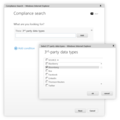
Today we are pleased to announce that the Preview for archiving third-party data in Office 365 is now available. Announced earlier this year, the third-party archiving capability extends the rich, unlimited archiving capabilities we already provide for email, documents in SharePoint and OneDrive for Business, and Skype for Business meetings and conversations.
The Preview is available worldwide to all Office 365 commercial customers. To participate, you simply need to reach out to one of our partners listed below, indicating that you would like Office 365 to be your archiving destination for all third-party data.
The 17a-4’s DataParser is a cost-effective middleware solution with a modular design to collect many different forms of regulated content for compliance with SEC rules and eDiscovery requirements. The DataParser collects data feeds, instant messaging, database content, document management platforms and trading systems for ingestion into Office365 to create a single point of compliance management, discovery and supervisory procedures.
The Actiance platform provides real-time policy enforcement, content monitoring and capture of 70+ leading social media, unified communications, collaboration and IM channels. The company services small- to large-sized businesses across all industries and counts among its customers all of the top-10 U.S., top 5 Canadian, top 8 European and top 3 Asian banks.
ArchiveSocial provides 100 percent authentic capture of social media for compliance with regulations such as SEC, FINRA and FOIA. It maintains social media records in pure native format and accurately replays social media conversations and other dynamic content. ArchiveSocial is the trusted solution for hundreds of organizations in regulated industries and the public sector, including the City of Austin, the State of North Carolina and the U.S. Department of Justice.
The Daegis AXS-One Archive is a secure, highly scalable archiving solution for managing the preservation, collection, review and disposal of structured and unstructured data—including email, IM, social media, voice, file system, SharePoint and reports. With full support for Microsoft Office 365 content, the AXS-One Archive shines a light on dark data, simplifying and reducing the cost of information governance and eDiscovery while lowering risks related to Enterprise data.
Globanet’s social media and message capture platform—Globanet Merge1™— extends archiving, eDiscovery and compliance to data sources including email, IM, social media, financial and mobile text communications. The product is a dynamic, user-friendly and affordable way to merge all company data streams into a single database.
Verba offers the first complete Collaboration Recording solution available today—only Verba provides collaboration compliance, quality management and speech analytics with integrated IM, voice, video call and desktop screen recording in an easy-to-use and cost effective software solution. Regulated industries the world over have turned to Verba for a one-stop shop for their collaboration recording and compliance needs.
We continue to invite more data capture partners to integrate with Office 365. If you’re a partner who is interested integrating, please email O365ArchivingPartners@microsoft.com to learn more and participate in this program.
Technical documentation for this is also available here.
—The Office 365 Archiving team
The post Archiving third-party data in Office 365 now available in Preview appeared first on Office Blogs.
Office Blogs
.
Blog
.
<span class='date ' tip=''><i class='icon-time'></i> Dec 05, 2015 11:21am</span>
|
|
For almost any company, whether large or small, project management is necessary for getting—and remaining—organized. There are multiple project management tools available to help your business manage resources, project and control costs, communicate effectively with multiple team members, and track progress on any given project. While some of these tools can be installed as software on individual network computers, a great many of them are web-based—in other words, they’re available in the cloud.
Benefits of project management tools in the cloud
You may be one of those people who shudders at the phrase "cloud computing," but take a moment to consider what it really means. While on-premises project management tools have their place, cloud-based software comes with a plethora of benefits, including the following:
Lower upfront cost. When you use on-premises project management software, you have to pay for a number of items, including software license investments, server hardware, IT staff for support, lengthy deployments and more. Alternately, a cloud-based solution typically only requires a monthly or annual fee.
More secure than ever. Despite what many business executives have believed in the past, the cloud offers just as much security as on-premises solutions—the company simply does not control the physical servers. As a recent article in Forbes suggests, "cloud computing is no longer an oxymoron."
Accessible from anywhere. As long as you have an Internet connection, you can access your project management software in the cloud. Because access is achieved through a web browser, it’s also possible to allow team members to view, edit and manage documents via devices other than computers.
Connected team. Even when workers are separated by miles, they can feel part of a cohesive unit with a cloud-based solution. Because everyone receives to-the-minute updates, no one relevant to the project is accidentally left out of the conversation. Furthermore, conversations can be conducted in the project space (instead of via email) and stored for future reference.
Increased productivity. Thanks to a centralized location where all project summaries, tasks, documents, newsfeeds and calendars are kept, cloud-based project management solutions can save time. And when time is saved, productivity can increase. In addition, a centralized location allows team members to access project documents in real time wherever they are located.
Real-time communication. One of the biggest benefits of using project management software in the cloud is the ability to give quick feedback on information as soon as it’s uploaded to the project workspace. This can also increase productivity because it lowers the instances of work that needs to be redone.
Up-to-date, data-driven decisions. As a business looking to become—and stay—profitable, it’s important to base decisions on more than just a whim. Thanks to the fact cloud-based software is instantaneously updated, you have the necessary information at your fingertips. In addition, most tools will have built-in reports to bring you the insights you need to make business-related decisions.
Simplified IT. When you use on-premises project management software, you are typically responsible for server maintenance, which requires the attention of internal IT personnel. Cloud-based software, on the other hand, is maintained for you by the service provider (or another resource)—saving you the time and hassle of dealing with any updates or bugs, and allowing you to focus on running your projects smoothly.
Instant updates. Unlike on-premises software, which requires you to download updates whenever a new version is released, cloud-based tools are updated automatically. There’s no need to pay to upgrade your entire application suite or wait for your IT team to have the time available to implement the updates.
Steps for finding the best cloud-based project management solution for you
Unfortunately, getting started with a new project management solution isn’t as simple as understanding the difference between on-premises and web-based, cloud choices. Selecting the best solution for your company requires several steps—but the end result is worth the effort you put forth. Follow these steps to decide on a qualified service provider.
Step 1: Conduct a needs analysis.
This won’t come as a shock to you, but every company is different—with different sizes, different goals and different needs. That means it’s up to your company to decide exactly which solution fits you best. Be sure those who actually will use the product have a voice in the discussion. Consider factors like whether your projects only involve internal employees or external clients as well, or what kinds of reports you will need to run. Once you know your needs, it’s easier to evaluate service providers based on the features they offer.
Step 2: Research, research, research.
When searching for a service provider, be on the lookout for those that offer the following features:
Enterprise-grade reliability
Ability to add teams and projects quickly
Reporting features that give quick insights about your portfolio
A familiar environment or at least one that’s easy to navigate and use
Ability to see and act on tasks in one location
Scheduling capabilities that allow you to plan and manage tasks effectively
Summary dashboards for data-driven decisions
24/7 IT support
Continuous data backup, disaster recovery and globally redundant data centers
Scalable solution that grows with your business
Step 3: Take a test drive.
In the same way you’d test drive a vehicle before purchasing it, you should try out a project management solution before implementation. Test drives allow you to get a closer look at a tool’s features and imagine how the tool would work in a situation similar to yours.
Step 4: Consider timeline and process for implementation.
If you’ve decided to go with an online-based tool for project management, it doesn’t matter if it matches up well with your current applications—this only applies to on-premises solutions. But you will need to consider when you will have the manpower and budget to make the switch, and then coordinate with your chosen service provider to make it happen.
Step 5: Implement and train.
You’ve finally implemented a new project management software solution. Congratulations! But unfortunately, your work isn’t complete. It’s important to make sure your employees have the training they need to use the new tool effectively. Set up multiple sessions so everyone can work one into their schedule. In addition, create practice projects so everyone has a chance to explore and become familiar with the tool’s features before they have to use it in the real world.
Project management in the cloud is the wave of the future. Find a tool that works for you—and don’t be left behind.
For more information about moving to the cloud check out our eBook: Myths About Moving to the Cloud.
The post The future of planning—online project planning in the cloud appeared first on Office Blogs.
Office Blogs
.
Blog
.
<span class='date ' tip=''><i class='icon-time'></i> Dec 05, 2015 11:20am</span>
|
|
Earlier this year, we introduced a new mobile app called Outlook Groups that lets you engage with your team on your mobile device. Available for Windows Phone, iOS and Android, the Outlook Groups app enables you to have conversations, view and edit files stored in SharePoint, access a shared OneNote notebook, @mention colleagues and groups and even discover other relevant groups. Download the Outlook Groups app and learn more in this article about how to get the most out of the experience.
Since the launch of Outlook Groups, we’ve received great feedback from our customers. Today we’re happy to announce several new features in the app as well as support for several languages in addition to English.
The new features include the ability to:
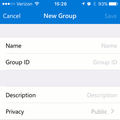
Create new Office 365 Groups.
Add and remove members and owners of existing groups.
View a person’s profile card—including contact information, where they fit within the organization and their list of Group memberships.
Creating an Office 365 Group via app.
Group conversations in the localized Spanish Outlook Groups mobile app.
In addition, Outlook Groups now supports the following languages: Spanish, Portuguese, French, German, Italian, Japanese, Korean, Dutch, Russian, Chinese Simplified and Chinese Traditional, with more coming soon.
Going forward we will continue to improve the experience, such as calendaring in Outlook Groups. Please keep your input coming as we continue to improve the Outlook Groups app.
—Christophe Fiessinger, senior product manager for the Office 365 team, @cfiessinger
Frequently asked questions
Q. What is the minimum requirement for installing Outlook Groups on my phone?
A. Outlook Groups requires an Office 365 work or school account. We’ve listed the minimum requirements across Windows Phone, iOS and Android here, as well as mobile app frequently asked questions.
Q. When will Delve and Yammer integrate with the Office 365 Groups service?
A. By the end of 2015, we’ll introduce Office 365 Groups insights and discovery in Delve. We are targeting the Office 365 Groups and Yammer integration to be available during the first half of 2016, as mentioned in this post last May. For more information on our roadmap, please visit Office 365 Roadmap and the Office Blogs.
Q. Why didn’t we call the mobile app "Office 365 Groups?"
A. Office 365 Groups is a cross-suite service enabling individuals to easily create public or private groups. Individual apps such as Outlook Groups will take advantage of the Office 365 Groups service and deliver new team collaboration experiences.
The post Outlook Groups now supports 11 new languages and more! appeared first on Office Blogs.
Office Blogs
.
Blog
.
<span class='date ' tip=''><i class='icon-time'></i> Dec 05, 2015 11:20am</span>
|
|
Today’s post was written by Paul Andrew, technical product manager for Identity Management on the Office 365 team.
We have made a lot of improvements to the Office 365 modern authentication public preview program recently and to represent these we’ve renamed it from the Office 2013 modern authentication public preview to the Office 365 modern authentication public preview.
Here’s a summary of the updates:
Modern authentication in the Office 2013 Windows client and in the Office 2016 Windows client are complete and at GA.
All users of Office 365 modern authentication can now get production support through regular Microsoft support channels.
Use of Office 365 modern authentication is now on by default for Office 2016.
No form is required for using modern authentication with SharePoint Online or Exchange Online. However, a Microsoft connect form is still used for requesting enablement of modern authentication against Skype for Business Online.
An updated table of client software compatibility is now available.
What is modern authentication?
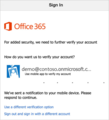
Modern authentication brings Active Directory Authentication Library (ADAL)-based sign-in to Office client apps across platforms. This enables sign-in features such as Multi-Factor Authentication (MFA), SAML-based third-party Identity Providers with Office client applications, smart card and certificate-based authentication, and it removes the need for Outlook to use the basic authentication protocol. The chart below shows the availability of modern authentication across Office applications.
Office client application
Windows
Mac OS X
Windows Phone
iOS
Android
Office clients
Available now for Office 2013 and Office 2016.
Office 2016 Mac Preview supports ADAL including Word, Excel, PowerPoint and OneNote. OneNote was released with ADAL in 2014.
Coming soon.
Word, Excel and PowerPoint are available now.
For Android phones: Word, Excel and PowerPoint are available now. For Android tablets:
Word, Excel and PowerPoint are coming soon.
Skype for Business (formerly Lync)
Included in Office client.
TBD
Coming soon.
Coming soon.
Coming soon.
Outlook
Included in Office client.
Outlook uses ADAL for licensing but not yet for mailbox access.
Coming soon.
Available now.
Available now.
OneDrive for Business
Included in Office client.
OneDrive for Business Sync is TBD.
Available now for Windows Phone 8.1.
OneDrive for Business is available now.
OneDrive for Business is available now.
Legacy clients
There are no plans for Office 2010 or Office 2007 to support ADAL-based authentication.
There are no plans for Office for Mac 2011 to support ADAL-based authentication.
There are no plans for Office on Windows Phone 7 to support ADAL-based authentication.
There are no plans to enable older Outlook iOS clients.
There are no plans to enable older Outlook Android clients.
Getting started with modern authentication
To use Office 365 modern authentication follow these steps:
If you are using Active Directory Federation Services (ADFS), then first review the caveats with modern authentication published here.
Use PowerShell to enable your Exchange Online service for modern authentication as described here. SharePoint Online is already enabled.
Enable any Office 2013 users to use modern authentication as described here. Office 2016 and most other Office client software is already enabled as shown in the table below. Details about setting up Office clients is described here.
If needed, use the Microsoft Connect form here to request for your Skype for Business Online service to be enabled for modern authentication.
Also note that to use modern authentication with Office 2013 you will need the March 2015 update patch described here.
For Office 365 administrators, we have documentation on enabling MFA here.
For Office 365 users, we have documentation on using MFA here.
Frequently asked questions
Q. When will Office 365 modern authentication be made generally available and enabled by default? Also, when will the limitations described above be completed?
A. We have production support for these features today. It is enabled by default on Office 2016 clients and other clients as described in the article. We are still working on updates to enable this by default for Exchange Online and Skype for Business Online. These updates are planned to be released when testing has determined that they are at the quality and usability level that we require. We are not able to provide a specific release date.
Q. I applied to the preview program; do I need to do anything else to use Office 365 modern authentication?
A. If you applied before November 17, 2015, refer to this article to verify that your tenant was enabled. On or after November 17, 2015, use instructions from the article to enable your tenant.
Q. What if I was previously accepted into the TAP, private preview or public preview for modern authentication?
A. No action is needed from you. You can verify your tenant state by using the instructions here.
Q. How do Office 2013 and Office 2016 use modern authentication?
A. Read aka.ms/ModernAuthClients for more details.
Q. I applied to have my Skype for Business Online service enabled on the public preview; how will I know when my tenant will be enabled and how long will this take?
A. We expect to turn around requests in four weeks. We are not able to respond to requests that contain invalid data. If you have not heard back after four or more weeks, contact your Microsoft account manager or contact the public preview program owners at adalprev@microsoft.com.
Q. Does Office 365 modern authentication require any specific Office 365 SKUs?
A. No. Any Office 365 SKU can use modern authentication.
Q. What is required for to use a third-party identity provider with ADAL-based authentication?
A. The third-party identity provider should be tested and qualified for use with ADAL with the Azure Active Directory federation compatibility list. There is an updated test tool for testing ADAL with identity providers available at testconnectivity.microsoft.com. Select Install Now towards the bottom of the page. Once the Microsoft Connectivity Analyzer Tool is downloaded and running, select the test called: I can’t set up federation with Office 365, Azure or other services that use Azure Active Directory.
Q. What Office 2013 Windows clients are included in the update?
A. Word 2013, Excel 2013, PowerPoint 2013, Lync 2013, Outlook 2013, Publisher 2013, Visio 2013, Access 2013, Project 2013 and OneDrive for Business Sync Client.
Q. What is ADAL?
A. ADAL is the Active Directory Authentication Library that is used in Office 365 modern authentication. Details about ADAL are available here.
Q. Can I use modern authentication with PowerShell?
A. Azure AD PowerShell has support for modern authentication in public preview as described on the Active Directory Team Blog. SharePoint Online Management Shell has support for modern authentication available from here.
The post Updated Office 365 modern authentication public preview appeared first on Office Blogs.
Office Blogs
.
Blog
.
<span class='date ' tip=''><i class='icon-time'></i> Dec 05, 2015 11:19am</span>
|
|
In this episode, Jeremy Thake talks to Chris O’Brien about SharePoint development.
http://officeblogspodcastswest.blob.core.windows.net/podcasts/EP72_ChrisOBrien.mp3
Download the podcast.
Weekly updates
Outlook REST API changes to beta endpoint—Part IV
The evolution of PowerPoint—introducing Designer and Morph
Office Dev PnP Web Cast - JavaScript development patterns with SharePoint
Office 365 Developer Patterns and Practices (PnP)-November 2015 release
Announcing gulp-spsync—a Gulp plugin that syncs local files with a SharePoint site
How to debug Office Add-in In Office clients without Visual Studio
Debugging Office Add-ins
Searching documents across multiple Office 365 groups with REST API
Use a Shared folder as an Office Add-in catalog
Building a good authentication flow in an Office Add-in
Dissecting and validating the Exchange Identity token
Got questions or comments about the show? Join the O365 Dev Podcast on the Office 365 Technical Network.
The podcast RSS is available iTunes or search for it on "Office 365 Developer Podcast" or add directly with the RSS http://feeds.feedburner.com/Office365DeveloperPodcast.
About Chris O’Brien
Chris has over 14 years’ experience working with complex projects on Microsoft technologies. He has spent a lot of time leading SharePoint delivery teams and projects, and have extensive experience as a developer and continue to do hands-on coding. He works hard to contribute to the technical communities he works in and regularly speaks at conferences and publishes articles. In the past, he has worked for Microsoft as a SharePoint field engineer.
About the hosts
Jeremy is a technical product manager at Microsoft responsible for the Visual Studio Developer story for Office 365 development. Previously he worked at AvePoint Inc., a large ISV, as the chief architect shipping two apps to the Office Store. He has been heavily involved in the SharePoint community since 2006 and was awarded the SharePoint MVP award four years in a row before retiring the title to move to Microsoft.
You can find Jeremy blogging at www.jeremythake.com and tweeting at @jthake.
Richard is a software engineer in Microsoft’s Developer Experience (DX) group, where he helps developers and software vendors maximize their use of Microsoft cloud services in Office 365 and Azure. Richard has spent a good portion of the last decade architecting Office-centric solutions, many that span Microsoft’s diverse technology portfolio. He is a passionate technology evangelist and frequent speaker are worldwide conferences, trainings and events. Richard is highly active in the Office 365 community, popular blogger at www.richdizz.com and can be found on Twitter at @richdizz. Richard is born, raised and based in Dallas, TX, but works on a worldwide team based in Redmond. Richard is an avid builder of things (BoT), musician and lightning-fast runner.
Useful links
Office 365 Developer Center
Office 365 main blog
dev.office.com blog
Twitter
Facebook
FlipBoard
Slack channel
StackOverflow
http://aka.ms/AskSharePointDev
http://aka.ms/AskOfficeDev
http://aka.ms/AskOffice365Dev
Yammer Office 365 Technical Network
O365 Dev Podcast
O365 Dev Apps Model
O365 Dev Tools
O365 Dev APIs
O365 Dev Migration to App Model
O365 Dev Links
UserVoice
The post Episode 072 on SharePoint dev with Chris O’Brien—Office 365 Developer Podcast appeared first on Office Blogs.
Office Blogs
.
Blog
.
<span class='date ' tip=''><i class='icon-time'></i> Dec 05, 2015 11:18am</span>
|
|
In the world of work, email is a mainstay. It allows us all to communicate at lightning-fast speeds—without having to pick up the phone. It gives us the power to thoughtfully consider projects, questions, answers, opinions, requests and feedback, all of which opens the door to better communication. And it gives us the ability to see the progression of conversations without digging through a mountain of individual messages. However, most people aren’t taking full advantage of what their email systems offer. Sure, they know how to send messages, set tasks, make notes, block their calendars and schedule reminders, but there are also some pretty great features (and hacks) that you may not know about that could just transform the way you use business email. Let’s take a look:
Future delivery/delayed delivery: Whether you have news that you don’t want to share immediately or a project that’s ready for delivery but you don’t want to submit it too early, future/delayed delivery allows you to create and distribute messages on your schedule.
Message grouping: For heavy email users, the ability to group messages into conversations related to specific topics can help you keep track of emails, stay up to date on developments and work more efficiently.
Conditional formatting: Like message grouping, conditional formatting can help you organize conversations and stay on top of a certain topic. However, instead of grouping all messages into a batch that you can browse at a glance, conditional formatting simply displays messages matching selected criteria in the font and/or color of your choice.
Rules: Providing you with yet another organizational option, the rules feature allows you to create and manage settings that empower your email system to automatically process messages in a certain way. Some systems can check for and include sender, recipient, email size, date and more. This way, you’ll never miss a message from your boss or your most important client; messages with large attachments can be singled out, etc.
Email to text: For those times when you need an immediate response, or need to contact someone who may not have access to his or her email account, a text message may be the best way to get in touch. Some business email providers offer this feature, others don’t. If yours does, it can help you relay urgent messages quickly. Just be careful to reserve use of this feature for those who prefer it or for truly critical situations—because it can be disruptive to receive a barrage of non-urgent text messages while in a meeting, on vacation, etc.
Desktop alerts: Whether you need to reduce distractions for a day or indefinitely, by disabling desktop alerts you can eliminate pop-up notifications about new messages and focus on whatever the task at hand may be. Conversely, if you’re waiting for an important email that you can’t afford to miss by a moment, you can easily turn on desktop alerts for a few hours or turn them on and leave them on for good.
Email templates: If you’re a PR exec, public information officer, customer service representative, work in sales or are in any position that requires you to field requests for information about a program, service, product or topic, email templates can help you make quick work of your responses. After creating your template, all you’ll have to do is locate the template, personalize it as necessary and hit send. Not only will it help you save time, but increase your productivity. Plus, by not having to repeat yourself over and again, it might just improve your job satisfaction.
Save messages as files: If you want to save certain emails in the same file as project work, contracts or other documents, you can simply drag your message from your email window to your file folder. Or, you can click Save As and choose to save a message in a specific location. This way, you can refer back to messages without digging through your inbox and/or archive.
Multi-action shortcuts: If your email system supports shortcuts, it may also support multi-action shortcuts, which gives you the ability to combine several shortcuts into one quick action. For instance, if you want to mark a group of emails as read and simultaneously move them to a specific folder, or even mark messages as read, flag them as important and forward them to your team, you can do that with multi-action shortcuts. Some email systems that support multi-action shortcuts also allow you to create your own shortcuts, so you can customize your actions and make quick work of managing your inbox.
Automated cleanup: Some email systems include an automated cleanup function that can help you save space and keep your inbox tidy. When a conversation (message and response) occurs over email, some email systems can analyze the contents of that conversation and determine if a message is completely contained within each thread. If it is, then the previous message will be automatically deleted—so you’ll have access to both the original message and all comments within a single email conversation, but your inbox won’t be clogged by redundant emails.
Of course, if someone keeps clogging up your inbox with messages you don’t need or want, you can generally block their messages by using your "junk" or "spam" filters. But if you don’t want to permanently prevent someone from contacting you via email, you can simply select to send certain conversations directly to your trash by clicking the Ignore button.
Delegate access: Finally, if you’re going on sabbatical, an extended vacation or parental leave and you don’t want to either check messages daily or weekly—or come back to a mountain of email—you may be able to give someone else permission to manage your inbox. Simply look at your account settings. If you see a Delegate Access button—or something similar—you can choose to give access to a coworker who can step in and respond to messages in your absence. Of course, you’ll still have the ability to check messages and respond as appropriate, but this feature can help you keep things in check while you’re away.
Email continues to be an important tool in the business world, and your mastery of these tools will only enhance your value in the workplace. Hopefully, we have shared one or more features that you will introduce into your business arsenal, leading to increased productivity.
Related content:
IDC Analyst Report: How the Hosted Exchange Server is Redefining SMB Cloud IT Adoption
Sync, send, and receive: Why cloud-based email and storage make sense for your business whitepaper
The post 11 features to get the most out of your business email appeared first on Office Blogs.
Office Blogs
.
Blog
.
<span class='date ' tip=''><i class='icon-time'></i> Dec 05, 2015 11:18am</span>
|
|
This month’s Office 365 Dev Digest was written by Jeremy Thake, technical product manager for the Office 365 Dev team.
Welcome to the ninth edition of Dev Digest, designed to help you—the Office 365 developer—keep up to date with what’s new in Office 365 development.
This week has been an exciting week, with the Microsoft Graph being announced as generally available. It’s a great time for developers to start exploring our production ready APIs and also to start experimenting with the new APIs that have been introduced into Preview. There is a ton of great content published on the Connect(); Channel 9 site that can be consumed in video format too.
I have attended some hackathon events this month that produced some exciting results. Check out the submissions from the European SharePoint Conference in Stockholm, the AngularConnect conference in London and DevIntersections in Amsterdam.
I encourage you all to engage with us on the Office 365 Technical Network with your questions.
Dev documentation
The Microsoft Content Publishing team works hard producing documentation to help developers learn our platform. Here are the key new and updated articles for this month:
Microsoft Graph
Microsoft Graph API site
Office Add-ins
Office Add-in requirement sets
Best practices for developing Office Add-ins
Add license checks to Office and SharePoint Add-ins
Office and SharePoint Add-in license XML schema structure
Validation policies for apps and add-ins submitted to the Office Store (version 1.9)
Office 365 APIs
New:
Outlook People REST API reference
OneNote development
Tutorial: Create a OneNote app
OneNote authentication and permissions
Branding guidelines for OneNote API developers
Develop with the OneNote API
Get OneNote content and structure with the OneNote API
Open the OneNote clients
Create OneNote pages
Update OneNote pages
Add images and files to OneNote pages
Input and output HTML for OneNote pages
OneNote API error and warning codes
Use the OneNote save dialog on your web pages
Updates to:
Resource reference for the Mail, Calendar and Contacts REST APIs
Outlook Mail REST API reference
Outlook Contacts REST API reference
Outlook Calendar REST API reference
New OneDrive SDKs are available for:
iOS
C#/.NET
Python
For more documentation check out Office developer documentation.
Code samples
Our team is continually on the lookout for new code samples to help you jump-start your own projects. Here is a list of the most recent new and updated samples from Microsoft as well as the dev community.
Repo Report—Repo Report is an Outlook add-in made with Angular that scans your emails for GitHub repository links and displays information about the ones it finds.
OneDriveAPIBrowser—A Windows Forms app that allows you to browse your OneDrive files and metadata. This sample uses the OneDrive SDK for C#.
Most recent Office 365 Dev podcasts
Since joining Microsoft last year, I have been running around campus interviewing people about various dev topics. If you would like to hear me interview someone on a particular topic, please submit your suggestions in the Yammer group, and I’ll go hunt the relevant people down to interview.
Here are the most recent podcast interviews:
Episode 068 on the Angular Connect event
Episode 069 with Bradly Green on AngularJS
Episode 070 at the MVP Summit
Episode 071 on the PNP Partner Pack with Paolo Pialorsi
Episode 072 on SharePoint dev with Chris O’Brien
For more podcasts check out dev.office.com/podcasts.
Patterns and practices
The Microsoft Patterns and Practices team is working hard to release samples to show the power of SharePoint Add-ins, and we have started to grow the program to other topics as well. Don’t forget to join the monthly community calls to hear the updates from them directly with demos on latest released samples and solutions.
Here are the latest updates from the team:
PnP November 2015 monthly release notes at dev.office.com.
PnP November 2015 community call recording at Channel 9.
New weekly PnP webcast series released with following recordings now available:
Introduction to Office Dev PnP Partner Pack
Introduction to Office Dev PnP Provisioning engine
Introduction to Office Dev PnP PowerShell
Remote timer job framework
Numerous updates and new articles to PnP section in MSDN at OfficeDevPnPMSDN.
For more on patterns and practices, check out dev.office.com/patterns-and-practices. All questions related on released materials and guidance can be added to our Yammer group at OfficeDevPnPYammer.
Dev community blog posts
The Office 365 dev community has been busy this month. It is exciting to see the effort people put into their posts in their spare time to share with the community.
Check out these articles from the Microsoft field, MVPs and more:
Social Share makes it easy to distribute slides and decks to more people through social networks
Getting started with yo office for web dev n00bs
Simplifying Office 365 Unified API calls with Postman and OAuth 2
Update 4 on Office 365 unified API
Office 365 Developer Patterns and Practices—November 2015 release
Office Add-in with Knockout.js
Outlook REST API changes to beta endpoint: Part II
Update 2 on the Office 365 unified API
Add-in command sample
App registration tool
Retrieving posts from blogs available in Delve with Office 365 REST API
com/OfficeDev/SayMyName-Mail-Add-in
com/thm1118/Provider-Host-App-java-Sharepoint-OnPremise-HighTrust
$ yo office v0.4 released
Implementing admin consent in multi-tenant Office 365 applications using implicit OAuth flow
Versioning SharePoint Add-ins in your VSO Scripted build
Office 365 Dev Patterns and Practices graphics presentation
Two practical things about the new Group Files API
Office Dev Show—Episode 17: Grace Hopper Celebration
Office Dev Show—Episode 16: Getting Started with Android Studio
Display Events from an Outlook Calendar in SharePoint using Office 365 APIs
The new Office—October feature update
Office Store
First, some news: the Store is revamping its merchandizing algorithm to improve relevance and accuracy of top results—and is planning to roll out features that better spotlight our top-ranked solutions and Office App Award winners. Stay tuned for more info on this in the next month or so.
Next, pay a visit to betterwith.office.com to see the latest version of our customer evidence videos. We have just published our first in a series of education-focused videos with a look at how a Florida aeronautics school uses Poll Everywhere in the classroom.
Meanwhile, developers have published a raft of top-quality new add-ins and web apps in the Store—nearly two dozen in the last month have won top or near-top ratings from the Store Validation team for performance, business value, ease of use and other metrics. Some of our longtime partners, like Smartsheet, DocuSign, PayPal, Salesforce, iGlobe and Sensei, published updates that also won top marks.
Some of the top new entries include:
Smart Connect for Oracle Sales Cloud
By InvisibleSolutions
This free Outlook add-in instantly connects Exchange and Office 365 with the Oracle Sales Cloud.
SPZip Lib
By ItsZap Inc.
SPZip Lib is a paid SharePoint Add-in utility (with a free trial) that allows users to download files or folders from SharePoint as a ZIP file. It’s offered in several languages and is one of a half-dozen Store add-ins by this developer.
BeyondCore Analyst for Office
By BeyondCore (with a second add-in for Outlook)
This ISV has produced two top add-ins that help users with one-click statistical analysis and validation with explanatory text right within the body of the Office document. This version works with Word, Excel and PowerPoint; a second version works with Outlook. BeyondCore is used by 23 members of the Fortune 500 and has been mentioned in the Gartner Magic Quadrant reports.
Other highly regarded new offerings include:
Goodpoint CSV Uploader—A SharePoint Add-in that enables users to export CSV files into SharePoint lists.
Sharefile Connector for Office 365—Enables users to access and edit SharePoint and OneDrive for Business accounts from Sharefile, enabling greater organizational flexibility on where to store files.
Sage Live Reporter—The latest addition to the Sage accounting-system family of add-ins that enables users to do financial reporting within Excel, based on objects in their Sage Live application.
Annotate by NomisClature, which enables users of Word and Excel to annotate sections of their documents with text, images, videos, lists and links.
Jedox Social Analytics for Excel—Lets users analyze data from Twitter with the help of the Jedox GPU Accelerator. Includes geographic analysis and provides analysis of what people are saying about your brand or company.
Officelink—A Word and Excel add-in that enables authorized access to report data and layout objects from the IDL-Report-Catalog, a service from Germany’s IDL Beratung.
Upcoming events
There are plenty of events on the horizon. Don’t miss out on these great events with Office 365 content. Our team looks forward to meeting you all, so don’t be shy—come say hello at the Office 365 booth!
December 1-3, 2015
AnDevCon 2015: Office 365 Developer Hackathon
Santa Clara, California
February 21-24, 2016
SPTechCon: The SharePoint Technology Conference
Austin, Texas
For more events, check out dev.office.com/events.
Until next month, please join our community discussions at www.yammer.com/itpronetwork and follow us at @OfficeDev on Twitter and on Facebook.
Also, be sure to follow along with us on our daily developer mission: Jeremy Thake (@jthake), Sonya Koptyev (@SonyaKoptyev), Richard DiZerega (@richdizz), Vesa Juvonen (@vesajuvonen) and Jim Epes (@j_epes).
—Jeremy Thake
The post Office 365—monthly Dev Digest for November appeared first on Office Blogs.
Office Blogs
.
Blog
.
<span class='date ' tip=''><i class='icon-time'></i> Dec 05, 2015 11:16am</span>
|
|
Today’s post was written by Juliet Wei, senior product marketing manager for the Yammer team.
Yammer’s mission is to enable open team collaboration, and we recognize that sharing goes hand in hand with the right levels of privacy, security and compliance. With more than 85 percent of the Fortune 500 using Yammer to collaborate, our goal is to provide customers with industry-leading privacy and security commitments.
Today I’m thrilled to announce that Yammer has achieved a major compliance milestone to enhance its commitment to the protection of personal data for European customers. Effective immediately, all customers can obtain a Data Processing Agreement with the European Commission’s standard contractual clauses for data processors, known commonly as the "EU Model Clauses (EUMC)." This provides customers with an alternative to transfer personal data from the European Union to the United States.
Additionally, the standard HIPAA Business Associate Agreement (HIPAA BAA) for Microsoft enterprise online services is now available for Yammer customers.
Organizations want a collaboration platform that gives them the right levels of privacy, security, and compliance. The EUMC and use of the standard HIPAA BAA for Microsoft enterprise online services are part of Yammer’s ongoing investments to deliver the protection customers need to collaborate with confidence.
—Juliet Wei
Frequently asked questions
Q. What privacy and security commitments does Yammer offer today?
A. As with all Microsoft Cloud enterprise services, Yammer offers strong privacy and security commitments. Yammer runs in Microsoft managed datacenters in the U.S. and provides the following: Data Processing Agreement with the EU Model Clauses, HIPAA BAA, ISO 27001 certification and compliance with Section 508, the amendment to the Workforce Rehabilitation Act of 1973 for web accessibility.
Q. Do I need to take any action to receive the protection of EU Model Clauses and HIPAA BAA?
A. The Updated Microsoft Online Services Terms, which will include the EU Model Clauses and the standard HIPAA BAA for Microsoft enterprise online services for all of Yammer’s existing and new customers, will be available on January 1, 2016. To obtain the EU Model Clauses or the standard HIPAA BAA for Microsoft enterprise online services immediately, please contact your account manager for an amendment.
The post EU Model Clauses and HIPAA BAA update now available for all Yammer customers appeared first on Office Blogs.
Office Blogs
.
Blog
.
<span class='date ' tip=''><i class='icon-time'></i> Dec 05, 2015 11:15am</span>
|
|
Office 365 provides customers with a continuous stream of innovative features that provide significant productivity improvements while keeping information highly secure. We are working on resources and tools to help you leverage Office 365 information security features and controls, so you can manage security in your Office 365 tenant. The Office 365 Service Trust Portal (STP), launched earlier this year, is an example of a feature that provides deep insights into how Office 365 services are operated and independently audited.
Now we are pleased to present the customer security considerations (CSC) workbook that can be used to facilitate a quick review and implementation of the security controls available in Office 365. The CSC workbook is designed to provide you with information on key security and compliance features to consider when adopting, deploying and managing Office 365.
The CSC workbook, which currently is implemented as a Microsoft Excel workbook, is in preview. Your feedback will allow us to improve the CSC workbook for your business needs, and we hope to receive your feedback. Over time, the number of pivots will increase and additional compliance scenarios will be incorporated.
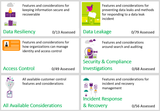
The CSC workbook contains two security-based pivots on the same set of features and information. One pivot is the Office 365 Customer Control Considerations section. Information in this section is organized into five scenarios listing the features that can be used to manage information security risks:
Data Resiliency—Considerations for protecting and recovering information from potential data corruption.
Access Control—Things to consider around managing identity and access control using Office 365 and Azure features.
Data Leakage—Considerations around using encryption and controlling forwarding.
Security and Compliance Investigations—Considerations for conducting compliance searches and forensics investigations, as well as logging and hold actions in Office 365.
Incident Response and Recovery—Things to consider around security incident response and recovery.
In addition to these five scenarios, an all-up list of considerations is provided.
The second pivot is the Office 365 Risk Assessment Scenarios section. Information in this section is organized by risks/threats and how you will implement various controls to manage these risks:
Malicious Customer Administrator
Former Employee
Credential Theft
Malware
Trusted Device Compromised
Attacker Foothold
Microsoft Operator
We hope that the CSC workbook provides you with quick information on how to help secure your Office 365 service with features/configurations that you manage. Based on the usage of this tool and your valuable feedback, we hope to expand the scope of considerations as appropriate and make it even more user friendly in the future.
To get the CSC workbook, sign in to the STP and download the "Office 365 Customer Security Considerations Preview" and "Office 365 Customer Security Considerations Preview Reference Guide" from the Trust Documents area.
If you have not yet signed up for access to the STP, you can find instructions for doing so here.
For questions and feedback about the CSC, please contact us at cxprad@microsoft.com.
We look forward to hearing from you!
—Jon Nordstrom, senior solutions architect, Office 365 customer experience; and Om Vaiti, senior program manager, Office 365 Trust Engineering
The post Announcing Office 365 customer security considerations preview appeared first on Office Blogs.
Office Blogs
.
Blog
.
<span class='date ' tip=''><i class='icon-time'></i> Dec 05, 2015 11:15am</span>
|
|
In this episode, Jeremy Thake and Richard DiZerega talk to Sonya Koptyev on Connect(); 2015 announcements.
http://officeblogspodcastswest.blob.core.windows.net/podcasts/EP73_Connect.mp3
Download the podcast.
Weekly updates
Synchronize your Outlook and Redmine experience with Ahau Software
news.microsoft.com/futurevisions/
Office Dev PnP webcast—Branding SharePoint using add-in model techniques
Dun & Bradstreet helps Azuqua qualify customer leads with its Excel add-in
Microsoft Graph turns Office into new collaboration resource
Office 365 Connectors for Groups walkthrough
Where am I? Detecting the Office host in Office Add-ins
Single sign-on (SSO) for Outlook add-ins with ease
Announcing SharePoint Server 2016 Beta 2 and Project Server 2016 Beta 2
Creating all day events with the Microsoft Graph on Office 365
Enhancing your Office 365 Groups using custom Connectors and Cards for Groups
Show notes
Connect(); 2015
Today at Connect()—introducing the Microsoft Graph
Connect() 2015 Office Extensibility News
Got questions or comments about the show? Join the O365 Dev Podcast on the Office 365 Technical Network.
The podcast RSS is available iTunes or search for it on "Office 365 Developer Podcast" or add directly with the RSS http://feeds.feedburner.com/Office365DeveloperPodcast.
About Sonya Koptyev
Sonya Koptyev is a senior product marketing manager responsible for the Apps for Office developer platform. Sonya is a seven year veteran at Microsoft and has worked in a variety of roles throughout the company, including a senior consultant and professional development manager with Microsoft Consulting Services.
About the hosts
Jeremy is a technical product manager at Microsoft responsible for the Visual Studio Developer story for Office 365 development. Previously he worked at AvePoint Inc., a large ISV, as the chief architect shipping two apps to the Office Store. He has been heavily involved in the SharePoint community since 2006 and was awarded the SharePoint MVP award four years in a row before retiring the title to move to Microsoft.
You can find Jeremy blogging at www.jeremythake.com and tweeting at @jthake.
Richard is a software engineer in Microsoft’s Developer Experience (DX) group, where he helps developers and software vendors maximize their use of Microsoft cloud services in Office 365 and Azure. Richard has spent a good portion of the last decade architecting Office-centric solutions, many that span Microsoft’s diverse technology portfolio. He is a passionate technology evangelist and frequent speaker are worldwide conferences, trainings and events. Richard is highly active in the Office 365 community, popular blogger at www.richdizz.com and can be found on Twitter at @richdizz. Richard is born, raised and based in Dallas, TX, but works on a worldwide team based in Redmond. Richard is an avid builder of things (BoT), musician and lightning-fast runner
Useful links
Office 365 Developer Center
Office 365 main blog
dev.office.com blog
Twitter
Facebook
FlipBoard
Slack channel
StackOverflow
http://aka.ms/AskSharePointDev
http://aka.ms/AskOfficeDev
http://aka.ms/AskOffice365Dev
Yammer Office 365 Technical Network
O365 Dev Podcast
O365 Dev Apps Model
O365 Dev Tools
O365 Dev APIs
O365 Dev Migration to App Model
O365 Dev Links
UserVoice
The post Episode 073 with Sonya Koptyev on Connect(); 2015 announcements—Office 365 Developer Podcast appeared first on Office Blogs.
Office Blogs
.
Blog
.
<span class='date ' tip=''><i class='icon-time'></i> Dec 05, 2015 11:14am</span>
|