Blogs
|
When Nicole and David of Articulate approached me to present at an Articulate workshop being held in Toronto, I was floored. Nicole actually gave me a nudge to submit a proposal for Dev Learn 2014 first, and that almost made me fall over…I reluctantly submitted a proposal…but would probably die of nervousness if they selected me to present (we’ll see).
After having previously overcome my fear of submitting a proposal for Dev Learn - How terrified would YOU be to present your own work/ideas in front of a room full of your industry idols? Yeah. That’s what I thought! - I agreed. This will be my first formal presentation since my undergraduate degree, and I’m hoping the attendees and organizers are just as welcoming and supportive as the E-Learning Heroes Community that I’ve grown to love.
But Ashley…What will you be presenting?!
You know…I really considered a diorama, but given the nature of the e-learning industry, I didn’t think it would be well-received (or large enough for all to see from their seats), so with some encouragement from David and Nicole, I settled on the topic of How to Build Your E-Learning Portfolio. I’ll be explaining the pain points associated with developing an e-learning portfolio, ways of easing this pain, and how (like me) you too can build your very own e-learning portfolio.
In the e-learning industry (and many others), it is critical to have a visual portfolio to present. It doesn’t need to be anything fancy, but it should showcase some of your best work and competencies. Before I developed my portfolio, it was a struggle to find work; now, the contracts come to me and I’m often able to pick and choose the contracts I want to work on versus simply taking whatever’s available in order to put kibble on the table.
NEAT! I’d love to attend the workshop - what are the details?
The workshop is being held in Toronto, Ontario on July 10th, 2014, and all of the details you need (including how to purchase tickets) can be found by clicking here.
If you do attend, please be kind and pop by to say hello. Please don’t heckle me too much - no one wants to see a grown woman sob in front of her peers. It ain’t pretty. I’m so excited and nervous for this event, but I think it’ll be a gentle way to step outside of my comfort zone.
Ashley Chiasson
.
Blog
.
<span class='date ' tip=''><i class='icon-time'></i> Jul 15, 2015 01:07pm</span>
|
|
An exciting new training and learning resource has now been launched and is available to all students and staff at Plymouth University at http://lynda.plymouth.ac.uk.
lynda.com is a comprehensive library of video-based training resources, available 24/7, providing a wide range of tutorials dedicated to increasing knowledge across varied subject areas to all PU students and staff. The online courses cover everything from commonly used software packages such as Microsoft Office to specialised applications in subject areas such as photography or web-development, as well as more generic topics including presentation, time management and negotiation skills.
This launch of lynda.com forms part of the University’s Digital Learning Environment (DLE) which utilises technology to benefit the staff and student learning and teaching experience.
"We are delighted to be working with lynda.com" says Neil Witt, Professor of Technology Enhanced Learning. "By launching unlimited access to this fantastic resource of over 2,800 online courses for all of our students and staff, we are helping to create a stimulating learning environment."
lynda.com’s online courses are continually updated and taught by industry experts. Through these engaging video tutorials, lynda.com allows users to learn the latest tools and techniques in business, digital media, design and development.
Neil continues, "Plymouth University’s licencing of the lynda.com learning resource is another avenue for students and staff to explore and refine their career development and technology skills through self-paced courses and materials. We want to encourage our students to extend their skills and knowledge outside of the classroom, and with lynda.com we will be helping them to succeed in their future academic, professional and personal lives".
Each online course is divided into timed segments; you can watch just what is needed to answer a specific question, select the course transcript, brush-up on a new feature or, of course, view the entire course. lynda.com allows you to keep track of what you have viewed, will show you all the courses that you have started and those you have been completed, with the opportunity of downloading a course completion certificate.
More Information for students and staff
Students and staff can learn more about lynda.com by watching the introductory movie about the service and also how to use lynda.com.
Here are just a few of the benefits of using this service:
Access to over 2800 courses and 110,000 tutorials with new releases every week
Courses are available to view on your desktop, mobile or tablet device
Watch complete courses or select topics as you need them
Learn at your level, with beginner to advanced courses
Up-to-date content helps to keep your skills current
Choose from a selection of subject specific playlists or create your own playlists
Students and staff can use existing username and password to access this new resource http://lynda.plymouth.ac.uk.
For frequently asked questions visit http://lynda.plymouth.ac.uk/faqs.
For help with signing in please contact the Service Desk. Tel: +44 1752 588588 or email: for students libraryandITenquiries@plymouth.ac.uk for staff support@plymouth.ac.uk.
Technology Enhanced Learning
.
Blog
.
<span class='date ' tip=''><i class='icon-time'></i> Jul 15, 2015 01:07pm</span>
|
|
Elearning Superstars is a curated list of five inspiring elearning examples, published every Tuesday. Subscribe to get weekly updates via email.
This week we have some great elearning by BMW, New York Times, Lynda.com, Codecademy and Jackie Vannice.
I hope you enjoy what we have found. Let us know what you think of these examples by leaving a comment on Elearning Superstars.
1. BMW: Augmented reality training for service engineers
2. New York Times: Amazing Girls
3. Lynda.com: World’s largest video training website
4. Codecademy: Self-guided coding classes
5. Jackie Vannice: Faces of Ebola
The post Elearning inspiration: BMW, New York Times, Lynda, Codecademy, Jackie Vannice appeared first on Elucidat Blog.
Elucidat Blog
.
Blog
.
<span class='date ' tip=''><i class='icon-time'></i> Jul 15, 2015 01:07pm</span>
|
|
I have a little something in the works, and it will make a lot more sense (and application) once it’s revealed. Until then, it’s back to regular business. This week, I’ll be discussing the term ‘Instructional Strategy’, explaining a couple of variations, and providing a few reasons why it’s essential to understand the term in relation to your course development.
Instructional Strategy
Basically, an instructional strategy is an all-encompassing plan of attack for your course. It defines what will be taught and how that information will be taught. Essentially, the instructional strategy is the blueprint that drives your learners to achieve the performance objectives (more on that in the coming weeks) you have defined.
Instructional strategies are typically selected based upon the type of learning that needs to occur. One person may take a philosophical approach (e.g. learning based exposure to the environment) while another chooses an instructional strategy based on the type of learning (e.g. verbal information needs to be conveyed meaningfully in order to enhance retention). In the end, it all comes down to personal preference and most folks learn as they go.
Alright…sounds simple enough, but why is it so important?
The instructional strategy is important because it is used to conceptualize and lay out the course before getting bogged down in the design and development (it’s quite costly to fly by the seat of your pants in those phases). Without a clear instructional strategy, you will be doomed to make some costly mistakes later on down the line. Furthermore, failing to develop an instructional strategy will open up your work to further interpretation by clients, potentially increasing revision cycles (time is money).
Two types to consider:
A macro-instructional strategy provides an overall blueprint for a larger learning experience (e.g. an entire course), whereas a micro-instructional strategy dictates each part of the learning experience (from the course to the module to the unit to the lesson, etc.). If you’re looking for a cover-your-butt type of instructional strategy, the kind that doesn’t come back to haunt you in the end, the micro-instructional strategy is the way to go. Think about how annoying you feel when someone else is micro-managing you. Well - there’s good reason (sometimes), and that’s because the want to dictate each and every little thing…annoying for many occupations, but as an Instructional Designer, it really just protects you in the end.
Like this post? Want more Instructional Design tips? Sign up below!
Ashley Chiasson
.
Blog
.
<span class='date ' tip=''><i class='icon-time'></i> Jul 15, 2015 01:07pm</span>
|
|
Attention eLearning managers: are you looking for useful tools to help your team create more eLearning faster? In this post, I’ll share the tools I love to use and show you how to use them to speed up your own eLearning development.
1. Elucidat
Elucidat is a simple authoring tool that can help you speed up the eLearning development process. Instead of using desktop tools that are great for small or one-person development teams, cloud-based tools like Elucidat are better designed for high-volume eLearning teams. Elucidat helps me author, publish and maintain eLearning faster than a desktop tool.
Here are my favorite Elucidat features:
Inbuilt comments and reviews so you and your team can all work in one place
Ready-to-go themes to help you get started quickly
Republishing feature that lets you quickly update courses without needing to publish and deploy again
Related: Learn how Utility Warehouse used Elucidat to deliver elearning to 46,000 learners
2. PowerPoint
PowerPoint is a great tool! Once you forget about it being a presentation tool and think about it being design software, it can be great for storyboarding. It provides a visual way to present designs and entire briefs to your development team.
I use PowerPoint to create my own graphics. After I save an object as an image, I import it into my eLearning software.
PowerPoint’s image effects feature can help you manipulate existing images. For example, you can use it to quickly work up decent visual designs similar to these used in Haji Kamal.
Related: Draw inspiration from this comic book tutorial
3. Audacity
Audacity is an audio editor and recorder. You can record live from a microphone or easily edit previously-recorded material. I use Audacity to create voiceover files. You can also use it to help you:
Remove background noise
Reduce or amplify volume
Manipulate speed, pitch and tempo
Fade in and out
4. Camtasia
Camstasia is a screen-recording and video-editing tool that lets you capture anything on your screen as a video. It allows for zooming in and out, panning animation effects and audio effects including fading and noise removal. You can add and customize callouts to enhance your video, which is an especially useful feature in training videos.
I use Camtasia to bring together my images, sound files, video clips and audio. It makes it easy to arrange all my clips into a flowing video and is great for creating animations that zoom in on the recording to draw learners’ attention to specific action in the video.
My favorite features that can help you save time when editing videos:
Cut and split clips on the timeline
Edit the audio and add voice narration
Add title clips and transitions
Add callouts, captioning or cursor effects
5. Snagit
Snagit lets you capture images and videos with just a few clicks. You can quickly take screen captures and highlight the important stuff using the built-in markup tools. Snagit enables you to take screenshots, capture screen videos and take mobile captures.
I use Snagit to grab screenshots of virtually anything I want. For example, I use Snagit to quickly provide feedback, create clear documentation and enhance the way I work with my team members and clients.
Elearning inspiration: Virgin Media used Snagit to empower employees to share knowledge company-wide
6. Adobe Photoshop
Adobe Photoshop is a design program that lets you compose and retouch images and photos. It has a full suite of painting tools like brushes, pencil, airbrushing and cloning. It has pretty much everything you want in a graphics package.
Alternatively, for the less skilled, you can try Canva. Canva is a very simple design tool to help you create stunning graphics really quickly!
7. ColorPic
ColorPic is a desktop tool that quickly lets you create color palettes for your eLearning courses. You can pick any color from your screen simply by putting your mouse over it. So if you have your corporate identity/branding kit, you can simply grab the colors from the screen and add it straight into your palette. For Mac users, Sip is a great alternative.
8. MindManager
MindManager is a fast mind-mapping tool that you can use to quickly gather requirements and map out content into chapters or topics.
I use it to organize my courses and curricula. It can also be easily incorporated into a design documentation or design brief.
You can use mind-mapping tools to help you visualize the way your branching logic will work in your eLearning scenario.
What eLearning software tools do you use?
These are eight of my favorite eLearning software tools that I use on a regular basis. I challenge you to try some of these tools and see if they can help you speed up eLearning development.
Have I missed any must-use tools? Share your favorite eLearning tools in the comments below.
A version of this article first appeared on Elearning Industry
The post Develop elearning faster with these eight software tools appeared first on Elucidat Blog.
Elucidat Blog
.
Blog
.
<span class='date ' tip=''><i class='icon-time'></i> Jul 15, 2015 01:07pm</span>
|
|
I’ve been feeling pretty slack lately, but I won’t argue about being too busy to participate to my fullest potential. In any event, this week’s e-learning challenge is all about interactive step graphics in online training - coming from a Defence background, this is a great challenge for me, because at least 80% of the work I did previously was procedural training for complex procedures (e.g. aircraft maintenance training). I will warn you that this week’s submission is 1 - a throwback to one of my initial portfolio pieces (because this month has been all about the hustle) and is 2 - likely not going to dazzle you as much as an Electronic Performance Support System (EPSS) for removing the main landing gear of an aircraft.
The Concept
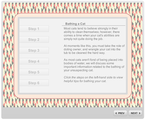
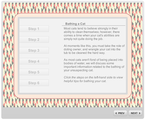
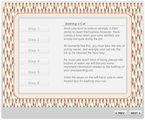
Create an interactive step graphic that trains users on a very important procedure. In this case, I chose to discuss the steps for bathing your cat. This is a very tricky procedure, so be especially cognizant of Step 3. Full Disclosure: Our cats are very good at cleaning themselves and we have never had to forego this procedure first-hand. Please let me know, in the comments, how you’ve fared in your attempts. I’ve heard that some cat’s need to be sedated; if this is the situation you’re faced with, and you find it challenging to administer pills to your feline, Bruce Graham has a lovely training module to help you with this problem.
The Method
For some reason, I really wanted to have a background image, so I sourced one from ColourLOVERS and modified the transparency. Then, I sought about creating some cute looking tabs and writing the procedural documentation for how to bathe a cat. I consulted WikiHow for these assistance, and they did not disappoint, providing me with many fantastic images to use within the module.
I tossed everything together and added triggers to my tabs, with each trigger displaying a layer. Images were called up within a new lightbox-esque (but not to be confused with an actual lightbox) layer, and Bob was my uncle.
The Result
To view the complete interaction and potentially save yourself a world of hurt (literally), click here.
Ashley Chiasson
.
Blog
.
<span class='date ' tip=''><i class='icon-time'></i> Jul 15, 2015 01:07pm</span>
|
|
New technologies are changing the way learning is being created and delivered to learners. Read on to here some predictions from seven elearning experts.
1. Upside Learning: Elearning Trends For 2015
This presentation highlights the 10 elearning trends for 2015 that may act as the game changers in the field of Technology Enabled Learning.
10 elearning trends for 2015 (Slideshare)
2. Connie Malamed: 8 Learning Design Trends To Watch In 2015
These are exciting times in the world of learning.
"Ubiquitous Internet access, shifts in workplace power structures and wider dissemination of cognitive research are some of the many factors contributing to the following trends to watch in the coming year."
Read Connie’s learning design predictions for 2015
3. Pranjalee Thanekar: Top 13 Elearning Trends for 2015
Elearning has gradually shifted its base to tablets and smart phones, now evolving into multi-device learning.
"While multi-device learning continues to be a major technology trend as we move into 2015, there are some other technologies and trends that (continue to) influence the way eLearning is developed and delivered," says Pranjalee Thanekar.
Here’s a look at the top 13 eLearning trends for 2015
4. DigitalWits: Top 8 Elearning and EdTech Trends for 2015
DigitalWits spent the past four months talking with people in large companies, elearning agencies, corporate training departments, human resources, recruiting, edtech-focused venture capitalist firms, staffing agencies, instructional designers.
They identified eight key trends in their 2015 Elearning Forecast
5. Eric Skilling: 9 Mobile Learning Stats That Will Blow Your Mind
Mobile learning is set to make a splash within corporate training if it hasn’t already. Here’s an infographic Eric put together that includes some interesting facts about mobile learning.
Click here to see Eric’s nine mobile learning statistics
6. Steve Penfold: 6 elearning statistics to consider in 2015
Learning and development is changing. Here are some statistics to help shed light on some elearning trends that might affect you.
6 elearning statistics to consider in 2015 (infographic)
7. Litmos: Gamifications Trends in Elearning
Did you know that 80% of say that their productivity would increase if their university or organization was more game-like?
Take a look at this infographic with more elearning gamification trends
The post Elearning trends: 7 experts share their 2015 predictions appeared first on Elucidat Blog.
Elucidat Blog
.
Blog
.
<span class='date ' tip=''><i class='icon-time'></i> Jul 15, 2015 01:06pm</span>
|
|
It’s only been two months since I took my side-gig Instructional Design work full-time, but I have been LOVING it! Making the leap was one of the scariest decisions I’ve ever made, but it has paid off, and I’m a lot happier for it. My favourite aspect so far is being location independent; it’s nice to not have to be tethered to an office to do my job, and I think our dog has been really enjoying the extra time spent home.
Now, taking your side-gig full-time does not always have its perks - this past month for instance has been extremely busy for me, which is a great problem to have, but it has also meant that I need to hustle harder to get my work done and invoice those clients! I’ve missed every Thursday poker night in May and was unable to go on a day-long hiking trip that I really wanted to go on, all in the name of work…and I’ve been working some long days (and nights…and weekends).
If you’ve been wondering how you can take your Instructional Design gig full-time (or even break out into the field), here are the best three bits of advice I have for you:
1. Build Your Portfolio
This is so important! I understand that it may be difficult to do - heck! I have over 5 years of work that’s considered ‘controlled goods’ that I can’t use in my portfolio - some of my best work…it’s disappointing. However, don’t let Non-Disclosure Agreements and controlled goods get you down, instead proactively build your portfolio. Research various types of courses to develop and create miniature one-offs of those courses.
Challenge yourself to step out of your comfort zone by producing a creative portfolio that showcases your skills and abilities. If you need help, David Anderson puts up weekly e-learning challenges over on the E-Learning Heroes Community, and these are a great way to get your creative juices flowing and add pieces to your portfolio.
Another alternative is to volunteer your services to small businesses; this is a great way to help out organizations to develop their training opportunities, while building your portfolio. If a contract is developed for such an arrangement, MAKE DAMN SURE that the only important requirement (on your end) is that you get to use the project in your portfolio - very few things in life are free, and free training is a steal! Cover your butt and make sure you spell it out in the contract, just to make sure!
"But is a portfolio necessary?" - You know, it’s really not. However, it does give you a HUGE leg up when you’re competing against others for an Instructional Design job. You’ll end up being more of an ‘on purpose instructional designer’ instead of an ‘accidental instructional designer’ (both are fine, but you want to highlight your worth)! My business has grown considerably since adding a few small pieces to my portfolio; now, professional pieces are still hard to come by due to the aforementioned NDAs and controlled goods issues, but just showcasing some of your abilities can really help clients visualize how you can work for them on their projects!
2. Get Online! Be Social! Be Proactive!
Now - I know you’re already online, because you’re reading this, but what I mean is go get a website and start blogging. Now that you’ve built an awesome portfolio, put it somewhere for all to see. Get on twitter! Be active in communities! Take time to build a profile and following on LinkedIn!
The internet and social media is amazing when it comes to promoting yourself - it’s one of the best marketing tools I’ve come across so far, and once you start building a group of followers (on your blog, twitter, LinkedIn, wherever)…you will begin to see results in the form of business.
Another downside of small business ownership can be the hustle - the time you spend, that you aren’t being paid for, promoting yourself and seeking new contracts. I have to be honest - at least 1 hour a day is still reserved for finding new business opportunities. It can be frustrating and discouraging, and every industry has its peaks and valleys, but you want to make sure you’re contracting yourself out in advance (as much as possible). Keep hustlin’ and don’t get lazy! You’ll quickly find out that in the world of freelance, lazy = no work = no pay = no mortgage payment.
Now, I will make one forewarning about being active on social media. Try your best to keep your participation to meaningful posts; reciprocate. If you’re involved in a community, try to be helpful! You’re there for a reason and so are others, the least you can do is engage in meaningful ways and share your wealth of knowledge.
3. Remember - You are on a continuous learning journey!
As Instructional Designers (or aspiring Instructional Designers), I would hope that you have long-since been embracing your journey as a continuous learner, but if you haven’t - GET ON IT, GIIIIRL! Making it on your own in a very competitive industry can be difficult, but it doesn’t have to be. You can get a leg up on your competitors or find freelancers who need help with overflow work or even just need to collaborate with your services to get their contracts done, but the difference between you and your competitors will often be your abilities.
You don’t need a formal education, but I will say that it has definitely helped - people love qualifications, let me tell you! You don’t need a lot of experience, but start now, because it definitely helps! What you need are mad research skills - research anything and everything you think might help you improve your abilities. If you want to enhance current skills or acquire new skills, you can often find all of the information you need online.
Invest in yourself - TREAT YO’ SELF! It will pay off in spades, I promise. The Internet is a wonderful place - you can find courses on almost anything at sites like Udemy, SkillShare, and Lynda. Many post-secondary institutions offer formal diplomas and/or certifications in Instructional Design, and there are SO MANY great books out there. You just need to do the research! By and large, the best resource I’ve found for my field has been the Articulate E-Learning Heroes Community. I’ll say it once, and I’ll say it again - THESE FOLKS ROCK! There is so much talent within those forums, it is unbelievable; when it comes to researching, you can find almost anything within that forum, and everyone is so supportive!
Like this post? Want more Instructional Design tips? Sign up below!
Ashley Chiasson
.
Blog
.
<span class='date ' tip=''><i class='icon-time'></i> Jul 15, 2015 01:06pm</span>
|
|
This week, I’m going to talk a bit about M-Learning. Why? Because it’s pretty popular - heck - I wouldn’t be surprised if my dog had a smartphone!
M-Learning - Say Whaaaat?
M-Learning (or Mobile Learning) refers to learning through means deployed by mobile devices. Really - it’s a pretty brilliant thing! In a world that is constantly on-the-go, what could be more convenient than being able to learn on the go? Mobile learning allows for this flexibility. With all of the devices (smartphones, laptops, tablets, MP3 players, digital books, etc.) learning has expanded its reach, and it’s up to us as Instructional Designers to work to develop solutions that are deployable through these devices. It’s a very exciting time!
One of my favourite aspects of M-Learning is the portability. I love that you can design training solutions or learning aids that professionals can take into the field and learn from on an need-to-know basis (similar to just-in-time training). Working within the Defence sector, I worked on many programs designed for aircraft maintenance technicians to be able to carry to the maintenance environment to consult during a procedure. Often these involved 3D demonstrations of part removal/installation. Alternatively, medics can use portable devices to access information as a sort of encyclopaedia, therefore M-Learning holds great capabilities - how many times can you say that something is capable of saving a life?!
You can also look at benefits of M-Learning from an efficiency standpoint. While mobile devices may be costly, it is a lot more cost efficient than having a school upgrade technology or purchase curriculum-based reading materials every other year. Our kids are growing up in a world where their backs no longer need to ache from carrying around all of the heavy books (I distinctly remember kicking myself in the butt for taking Biology, Physics, and Chemistry on the same day one semester…)!
I’m sold - are there really any limitations to M-Learning?
As with any technology-based approach to learning, there are limitations that range from the technology side of things (e.g. battery life) to the academic side of things (e.g. ensuring appropriate assessment and preparation for standardized testing) to the accessibility side of things (e.g. not everyone can afford or can access mobile devices). However, solutions are forthcoming! I read an article last week about a start-up organization who are launching public charging stations (free of charge!) - this would be fantastic in schools! There are many programs that provide mobile devices to students enrolled at academic institutions, and there are plenty of amazing instructional designers out there who are working hard to ensure students are being properly assessed.
In a digital age, it’s important to embrace changes in technology; now I’m not saying right away, but with proper research, I’m fairly certain you’ll understand that M-Learning is going to be a huge part of our future!
Helpful Resources
EDUCAUSE library of Mobile Learning resources
Why Mobile Learning is the Future of Workplace Learning
10 Mind-Blowing Mobile Learning Statistics
E-Learning Guild’s mLearnCon - Mobile Learning Conference and Expo
Ashley Chiasson
.
Blog
.
<span class='date ' tip=''><i class='icon-time'></i> Jul 15, 2015 01:06pm</span>
|
|
Another late one, but better late than never, right? This has been yet another nutty week, and originally I had wanted to brush up on my Linguistics degree and include some phonetics or morphology, but instead you’ll get to see some semantics in action! I may come back to this challenge at a later time and make another contribution, but we’ll see what happens!
The Concept
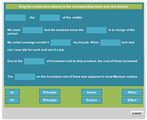
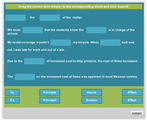
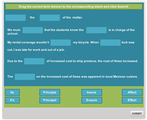
This week’s challenge was to build a spelling or vocabulary quiz that could leverage user interactivity. While I wouldn’t consider my result much of a quiz (in length), it gets the job done.
The Method
After reading 30 Incorrectly Used Words That Can Make You Look Bad by Jeff Haden, I was inspired to create a vocabulary quiz, using some of the terms identified. I created a free-form drag and drop interaction utilizing sentences with blank shapes. The user would need to drag the correct term from the bottom of the page to the correct placement in the corresponding sentences. This would test the user’s ability to distinguish between the appropriate use of various terms.
The Result
To view the complete interaction, click here.
Ashley Chiasson
.
Blog
.
<span class='date ' tip=''><i class='icon-time'></i> Jul 15, 2015 01:05pm</span>
|