Blogs
|
So I’m a bit late to the party on this one - things have been BUSY (and I won’t complain)! The e-learning challenge two weeks ago was to create a creative resume template to showcase e-learning portfolios. While not necessarily a template, I came up with a cutesy way to showcase my experience and some work samples.
The Concept
Create an interactive resume to showcase my education, work experience, and samples of my development work.
The Method
I was initially inspired by a desktop wallpaper posted by Smashing Magazine for the month of May (how is it May already?!). I downloaded the non-calendar version of the wallpaper, and formatted my slide background to display the image.
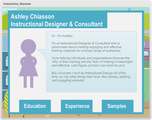
Then, I used shapes to create the a stick-figure version of myself and included a little blurb about what I do and why I’m passionate about it. Using shapes, I created buttons along the bottom of this slide which would launch additional layers. Each layer would contain information about my education, professional experience, and work samples. The work samples layer used hotspots to launch the actual sample interactions provided.
The Result
To view the complete interaction, click here.
Ashley Chiasson
.
Blog
.
<span class='date ' tip=''><i class='icon-time'></i> Jul 15, 2015 01:09pm</span>
|
|
Project Management and Instructional Design
There is some truth to saying that all Instructional Design requires some amount of project management; however, some roles require more project management than others. In a previous life, I was fortunate enough to have project managers who would deal with all the more frustrating client communications and assert their dominance, but now I’m foraging my own path as an Independent Contractor and I’m finding that I wear the Project Manager hat a bit more often than I’d like to - but it’s necessary.
Today I’m going to be discussing tips for managing your Instructional Design projects and the corresponding client. Hold on to your hats! You’re going to quickly notice a theme.
Tip # 1 - Communicate!
This may seem like an obvious thing to do, but the reality is that a lot of people don’t communicate effectively or enough. When beginning a new project, it is essential to discuss all project requirements with your client and THEN draft a Statement of Work or contract. This document will outline everything from project requirements to deadlines to payment to what will happen if the client initiates project delays, etc. You must detail EVERYTHING in this document. An important aspect often overlooked within a contract is a section on communication and how the client is to communicate with you, when they can expect a response, etc. Your client needs to know that they’re not the only client you have. You’ll be respectful of their time and they should be respectful of yours.
So the project has begun and you’re confused about something. Instead of spending days troubleshooting and trying to find a solution, ask your client - they may provide a simple solution, ask your colleagues - they may be able to help, and ask the internet - it’s one of our greatest resources.
Tip # 2 - Be Clear with Your Expectations
This goes hand-in-hand with Tip #1. In all of your communications, be very clear. Do not be wishy washy. Make decisions, and stand by these decisions. Including these expectations within your Statement of Work or Contract is a smart idea as doing so allows you to refer back to this signed document anytime the client starts moving toward scope creep or going back on their original agreement. Contracts can be always be amended, but they need to be mutually agreed upon.
Tip # 3 - Assert Yourself!
Now this one can be tricky for a lot of people. I have a hard time asserting myself and tend to prefer to go above and beyond to please my clients. However, going above and beyond is fine - so long as it’s in your contract. If it’s not in your contract and it’s going to add time on to your process, you need to let your client know and assert yourself by explaining that you can do X, but it will be an additional charge. It also helps if you explain this in your contract by indicating that any work above and beyond the work outlined in the contract will be billed at your hourly/daily/weekly rate of X. If scope creep begins to occur, you can refer your client back to their contract and they won’t be surprised - here they can decide whether the work is in fact required, or whether they can do without the additional work.
Bonus Tip: Learn from Your Mistakes
This is an important one! If you don’t learn from your past mistakes, you will likely keep making them. This will likely create more aggravation than good, so don’t be too proud to admit to your own mistakes.
Ashley Chiasson
.
Blog
.
<span class='date ' tip=''><i class='icon-time'></i> Jul 15, 2015 01:09pm</span>
|
|
We curated a list of the best content on scenario-based learning from our industry’s top companies and influencers. Read on to learn how leading companies are using scenario-based learning.
1. Five principles to use when creating scenario-based learning
Are you an elearning designer trying to move on from click-and-read courses? Do you realize the value of non-linear and scenario-based learning? Then this article will help you to structure your course so it’s more engaging and effective for your end user.
Read more →
2. Ten must-have elearning scenario resources
So you’re ready to create an elearning scenario with amazing branching. But you need some help getting started. You’ve arrived at the right place. In this article, we’ll be dishing out our 10 must-have elearning scenario resources for creating a great eLearning branching scenario.
Read more →
3. Six ways to create more effective elearning scenario
Elearning scenarios can make the overall elearning experience fun, engaging, and effective. In this article, learn how to design motivational and informative elearning courses using effective elearning scenarios.
Read more →
4. Five real-world examples of branching scenario elearning
Scenarios in elearning incorporate real-life situations which are designed to put learners in a role of problem solver. This approach helps increase interactivity and give learners the opportunity to use information in a practical setting.
Read more →
5. Branching elearning scenario checklist (5-steps)
Need some help getting started designing branching elearning scenarios? Make sure you’ve covered all the bases by following our simple five point checklist for producing high quality branching elearning scenarios.
Read more →
The post Scenario-based learning tips to help you create more effective elearning appeared first on Elucidat Blog.
Elucidat Blog
.
Blog
.
<span class='date ' tip=''><i class='icon-time'></i> Jul 15, 2015 01:09pm</span>
|
|
This week, I want to talk about "The Flipped Classroom," because this has been a buzzword within the Education sector for the past couple of years, and because I’m constantly receiving industry-related emails containing the phrase. With all of the terminology - Instructor-Led Training, Computer-Based Training, Blended Learning, Online Education - there is likely some confusion when it comes to this phrase, and I think we should just clear the air! So here goes nothing:
The Flipped Classroom
This phrase came to light in recent years; however, the approach has been used for many moons. The movement is quickly gaining motion as teachers become more creative with engaging their students and enhancing the overall learning experience. Essentially, the flipped classroom refers to a teaching framework that emphasizes self-paced learning outside of the classroom via online instruction and readings, leaving the regular face-to-face classes for students to engage with the instructor, complete homework, and enhance their overall understanding of the materials.
This way of teaching veers from the traditional ‘chalk-and-talk’ or lecture-based courses, and provides students with the opportunities to consider the instructional materials and any questions they may have prior to beginning to practical, hands-on work.
Why Flip the Classroom?
The ‘old way’ of doing things is very one-size-fits-all, and as we know (or can surmise), one way of teaching does not necessarily suit all learners, leading to student disengagement, frustration with homework/activities, and lower achievement rates. Flipping the classroom provides students with the best of two worlds: the face-to-face interaction and engagement with the instructor is still there, and the self-paced aspect is there. Additionally, with a world full of ‘digital natives’ and the (vast) presence and influence of the Internet, self-motivated learning and inquiry is likely occurring at a more rapid rate than twenty years ago. Information is readily accessible, and most individuals have access to the technology they need to obtain this information - why not leverage this technology to facilitate a classroom experience that may be more meaningful to this new generation of students?
Sure - Flipping the classroom may be a tough sell for a lot of traditional instructors, but the times are changing, and as educators we have a responsibility to adapt to our changing audience and enhance their overall success!
What do you think? Should educators flip their classroom? What are some benefits and limitations of this approach? Let me know in the comments!
Like this post? Want more Instructional Design tips? Sign up below!
Ashley Chiasson
.
Blog
.
<span class='date ' tip=''><i class='icon-time'></i> Jul 15, 2015 01:09pm</span>
|
|
Now here’s something different! A video book review, by yours truly.
I picked up my very first Seth Godin book, Linchpin (and since then have picked up another…and likely another soon…), and I LOVED it. I cannot recommend it more highly, and I really encourage anyone mildly interested to check it out - I don’t think you’ll be disappointed.
This here is my very first video of me visually explaining anything on camera, so please excuse my hmming and hawing and ceiling looking. Clearly public speaking isn’t my favourite thing to do, but I feel like it’s something I should get better at. So check out Seth Godin’s Linchpin and watch me fumble through my review in the video below - be easy on me, please!
Linchpin from Ashley Chiasson on Vimeo.
Ashley Chiasson
.
Blog
.
<span class='date ' tip=''><i class='icon-time'></i> Jul 15, 2015 01:09pm</span>
|
|
Modern elearning teams are under pressure to develop more content, faster.
To help you find ways to run your team more efficiently, we have scoured the web to curate a list of the best content on how to speed up elearning development.
Read on to learn how leading companies are creating more and more elearning content, faster than ever before.
1. How to speed up elearning content development
If you coordinate learning and development in your organization, you are probably looking for ways to speed up elearning development. In this post, Li Whybrow provides some tips to help you create elearning content faster.
Read more →
2. Four tips to save elearning development time
Developing an e-learning platform is an intensive piece of work. Here are four great tips you can use within your elearning development team to save time (and maintain high standards).
Read more →
3. Seven tips to ensure SME interactions are fast and integrated into your elearning development process
One crucial - and time consuming - step in elearning development is extracting relevant information out of Subject Matter Experts (SME). This article shows you how to keep SME interactions fast so you can speed up elearning development.
Read more →
4. Six rapid elearning best practices
When producing rapid learning the emphasis is on speed, but it’s still crucial that you construct a good foundation for your projects and use correct resources. In this article, learn practices to help you plan and produce rapid elearning, faster.
Read more →
5. Five tips to increase elearning productivity
In this article, learn five tips that can help you increase your elearning productivity today. Use these tips and tricks to start making every elearning design and development moment count.
Read more →
That concludes our round-up of the best tips and advice we could find on speeding up elearning content development.
Subscribe to our weekly email newsletter for more tips to help you create more effective elearning, faster.
The post Elearning tips to help you develop elearning content faster appeared first on Elucidat Blog.
Elucidat Blog
.
Blog
.
<span class='date ' tip=''><i class='icon-time'></i> Jul 15, 2015 01:09pm</span>
|
|
Woowee! This week I decided to tackle the term ‘content curation’ as I recently used the term ‘curating’ incorrectly and it created a bit of confusion. I was looking to develop a list of resources for a personal library of sorts - resources which I could consult, when necessary, to clear the air about Instructional Design related issues. However, what I actually meant was that I wanted to ‘collect’ or ‘compile’ a list of resources, not curate.
So what’s the difference?
Content curation can be considered the process of compiling content from all over the net (or even online), and then presenting that content to a larger audience in a meaningful way. Just like museum curators - content curators often work around a them (e.g. Instructional Design or Ancient Egypt…) and track down all of best, most relevant content they can find, and display the content in a manner that renders the content most effective. Content curation also reminds me a little bit of the poster boards you developed as a kid when presenting information to your classmates - you were given a theme, and tasked with teaching your classmates about that theme using visual and textual content - curated from many resources.
Compiling or collecting content is essentially just creating a list of resources which you can consult at a later time. I would liken this to the bookmarking functionality of any web browser. For example, I bookmarked a fantastic looking recipe for making quinoa guacamole. I will be consulting this reference this evening when I make dinner for my family. Another example is Pinterest. Now, I feel as though Pinterest walks a fine line between curating and collecting, because the content is being presented to an audience…just not necessarily within a meaningful way; however, content is being collected, and many individuals use Pinterest to house this ‘found’ content, as a library of sorts, for consultation at a later time.
So while I’m having a very face-palm morning when it comes to content curation and content compilation, you no longer have to! I hope this week’s edition of Terminology Tuesday cleared the air for you. It certainly helped me out!
Like this post? Want more Instructional Design tips? Sign up below!
Ashley Chiasson
.
Blog
.
<span class='date ' tip=''><i class='icon-time'></i> Jul 15, 2015 01:09pm</span>
|
|
Responsive learning is the future. Here are some strategies to help you prepare for it.
This week we deep dive into the hot topic of responsive learning. With the rise of the mobile workplace, learners want to access your courses on their mobile phones and tablets.
Prepare yourself for this learning revolution by reading six of my favorite articles on responsive and mobile learning.
1. How Utility Warehouse rolled out responsive elearning to their 46,000 BYOD learners
Paul Goundry, Head of Learning at Utility Warehouse had a grand vision: To put the experience of high performing distributors ‘in the pocket’ of new distributors with fully responsive elearning.
This is the story of how he achieved it with Elucidat.
2. Responsive elearning is a must-have, not a nice-to-have
Cammy Bean, VP of Learning at Kimeo thinks multi-device learning is the future.
"The new multi-device world order is here, and it means you need to build and design content that will work on almost any device."
Cammy shares some tips for designing with this new framework in mind.
3. Six misunderstood myths about mobile learning
Learn why mobile learning is cheaper, safer and more accessible than you may think.
We bust six of the biggest mobile learning myths.
4. Mobile learning statistics: 6 trends you need to know
At Elucidat, we pulled together the latest mobile trends into one concise article.
Here are the six major drivers for mobile learning.
5. Smartphone elearning - the importance of responsive design
Marshall ACM says "the mobile revolution is here to stay."
"We know that as a simple fact, and, as a result, your elearning platforms need to be embracing the revolution, and that means that your content needs to be optimized for whatever device - be it smartphone, tablet, laptop or desktop - from which your users choose to access it."
Learn why Marshall ACM thinks responsive design is important
The post Responsive elearning tips to help you author more effective elearning appeared first on Elucidat Blog.
Elucidat Blog
.
Blog
.
<span class='date ' tip=''><i class='icon-time'></i> Jul 15, 2015 01:08pm</span>
|
|
Have you, or your students, ever been a victim of ‘Death by PowerPoint’? Research conducted by PedRIO and Learning Development suggests many of us have.
Here is an opportunity to explore some new presentation tools in a supportive environment!
DigiThings is a self-directed, peer-mentored online programme that aims to help staff with teaching and research responsibilities at Plymouth University to explore and engage with social media and digital tools.
Each week a new ‘DigiThing’ will be introduced for you to explore and evaluate in terms of whether it could enhance your practice, through writing a reflective blog post to share and discuss your experiences with colleagues.
There are 8 things for you to try out over a 10 week period, or simply dip in and out of these things depending on your interests.
See http://technologyenhancedlearning.net/digithings for more details and to register. (The registration form is located at the bottom of the page)
Technology Enhanced Learning
.
Blog
.
<span class='date ' tip=''><i class='icon-time'></i> Jul 15, 2015 01:08pm</span>
|
|
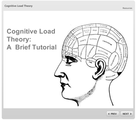
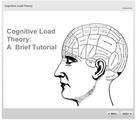
After a brief challenge hiatus, I decided that this week I would make a comeback. I’ve been swamped with work lately (not a bad problem to have), but was welcomed by some cognitive overload (goody!) earlier in the week and thought that this week’s challenge would be a great opportunity to (briefly) discuss Cognitive Load Theory. I would be lying if I said that my recent addiction to Lumosity wasn’t a motivating factor for wanting to discuss this topic…that rule game…with the words (or shapes)?! Come on! If that doesn’t scream German Cognitive Load…I don’t know what does!
The Concept
Select an Instructional Design (or learning) concept and create an interaction to explain this concept to others. Originally, I was going to do something related to Bloom’s Taxonomy, but 1 - I’m all Bloom’ed out for one month (to be honest) and 2 - there were already some great BT interactions kicking around the challenge thread, so I decided to choose Cognitive Load Theory as I often encounter training materials that are overloading (and overwhelming) learners to the point of becoming a hinderance on success.
Honestly, it is ESSENTIAL for anyone who develops instructional materials to be cognizant of Cognitive Load Theory. I once worked on a very complex project that sought to explain alternating and direct current flow on an aircraft…while the project ended up being a success (to the clients), I experienced a lot of cognitive overload and hopefully I was the only one - while successful to the administrators of the program, I really hope it was successful for students because it confused the pants right offa me! No amount of explaining Extraneous Cognitive Load was going to save me from that project.
The Method
When thinking about Cognitive Load Theory, I immediately think about those complicated mathematical equations you would see people writing on university chalkboards in the movies (or maybe in your high school calculus class) - BARF. These equations would give me the math sweats. I would clam up and panic, and DREAD my teacher calling on me to come solve the equation in front of the class (seriously - whose idea of fun is this?!). I consulted The Google and sourced some images of complex and simple mathematical equations to illustrate my point.
Then, I provided some explanations and examples of the three types of Cognitive Load, using hotspot interactions and layers. The tutorial was brief, I know, but to supplement, I included a few good links in the Resources tab, and folks can check them out if they so wish.
The Result
To view the complete interaction, Click Here.
Ashley Chiasson
.
Blog
.
<span class='date ' tip=''><i class='icon-time'></i> Jul 15, 2015 01:08pm</span>
|