Blogs
|
There are loads of great resources available to help you design really killer gamified elearning. Here we’ve curated just a handful. See what you think and feel free to contribute to the list in the comments section.
Killer Gamified eLearning Resources
Following on from my previous posts on gamifying eLearning, in this post I’ve curated a bunch of killer resources to help you in gamifying your elearning courses.
So let’s get stuck straight in. In no particular order:
1. Donald Clark’s seminal white paper ‘Games in Elearning’ now a decade old, Clark sets out a useful framework for solid learning design based on gaming mechanics.
2. Badges - Open badges, Achievements and badges Wherever you have a scoring system, as most games do, badges can be incorporated not only as rewards, but as achievements which learners can store as validations of competencies or as certification.
3. xAPI or Tin Can - If a Learning Record Store (LRS) provides external access for distributed solutions like games, simulators and other learning platforms supporting xAPI in various learning scenarios, then the xAPI opens up a world of possibilities for gamifying eLearning. Paul Welch over at Kineo, describes the way in which incorporating the Experience API (Tin Can) into the McDonald’s Till Game could open up the learner experience to lots more. For example, by accruing a team score together from individual members would allow learners to compete in teams on the leaderboard. It would also allow the game to be integrated with the other elements of the blend in the training, e.g. the more traditional eLearning and other online activities.
4. Elearning authoring software such as Elucidat provides tools and feature which make designing and building gamified eLearning very simple, e.g achievement badges, dynamic polls, branching navigation and responsive sophisticated look and feel that works on mobiles and desktops alike. It also supports the xAPI. Yay!
5. Adaptive learning people, Knewton, have done an infographic to demonstrate that gamification has tremendous potential in the education space.
6. Wharton & Kevin Werbach I just took this MOOC and it takes a deep dive into gamification. Whilst not limited to learning design alone, it covers all the principles and provides simple and useful framework for design as well as guidance on positioning gamified design in your organisation. Prof Werbach is a friendly and authoritative narrator throughout.
7. Snap up Christopher Pappas’ free ebook, it provides lots of information about how gamification shapes eLearning.
8. The Knowledge Guru is giving away 100 articles on game based learning - a bumper list.
9. If you read my post 5 killer examples of gamified eLearning, you may be interested in taking a deeper dive into Kineo’s award winning McDonnald’s Till Game
10. And while we’re on Kineo, the guys share more on gamification, posing the question: Is it good for the Blend?
11. And one last one from Kineo, Paul Welch on Game design in eLearning
12. #Gamification - the must-follow Twitter hashtag for all debate, resources and news about the games in the industry and beyond.
13. For the more visual amongst you, a useful info graphic, 30 facts about gamification in eLearning
14. Check out Brightwave’s Real-world examples of how game-based techniques can energise online learning programmes and make a positive, measurable impact. If you’re interested in gamifying learning in your organisation, this guide will give you some useful food for thought.
15. Head over to Elearning Superstars to get the lowdown on some ace examples of gamified eLearning: Finance Game, Till Training Game, Capability Academy, Medieval Swansea, Lifesaver, Virtual Reality House
16. The list wouldn’t carry any authority if I didn’t mention Karl Kapp’s book: The Gamification of Learning and Instruction
17. And well worth a read: Karl Kapp’s article: Top 10 +1 Instructional Game Design Best Practices
18. Karl Kapp’s 3 part course on Gamification in Learning Solutions Magazine
19. If you haven’t already seen them, check out my previous blog posts on this site: 5 Killer Examples of Gamified Elearning, Gaming Design for Elearning, The Anatomy of Good Gamified Elearning
20. Some solid design theories are presented in Talib Hussain’s useful tutorial: Serious Game Design
21. Some Gartner stats to support your proposal: Gartner says worldwide video game market to total $93 billion in 2013. Read all about it!
22. Elucidat’s 3 part series taking you through how to create non-linear and branched courses quickly with Elucidat’s powerful Gamification tools. Each article shows you how to create the a branching course from scratch.
23. Seth Priebatsch’s talk at Ted Talks Boston. Using game dynamics to influence or change behavior - the root of corporate training objectives. Argues that this decade is about building a framework for game layer on the web. Love it or hate it, motivating factors in gaming can be leveraged for education and training and this short talk explains how.
Anything to add?
I hope this collection is useful. It’s by no means complete, so please add any more that you have using the comments below.
A version of this article first appeared on elearningindustry.com
The post 23 Killer Resources For Gamifying Elearning appeared first on Elucidat Blog.
Elucidat Blog
.
Blog
.
<span class='date ' tip=''><i class='icon-time'></i> Jul 15, 2015 01:16pm</span>
|
|
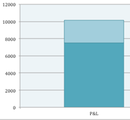
As I was in the process of getting my business up and running this past quarter, I figured that monthly reports would be less effective and accurate than they will going forward, so for 2014, I have resolved to produce quarterly income reports. In 2015, I may switch to monthly, but we’ll see.
I had some consistent revenue streams this quarter, so subsequent quarters may be a bit lower on the profit side, but I have some great prospective clients, and I’m eager to see how things pan out!
Income Report:
Full-Time Contracts - 4,659.24
Part-Time Contracts - 1,644.70
Business Contracts:
- Storyboarding - 429.00
- Authoring - 1,036.39
Taxes - 2,383.52
Total Profit: 10,152.85
Expense Report:
B-School Registration - 2,000.00
Office Expenses - 642.12
Total Expenses: 2,642.12
Total Profit - 7,510.73 (before taxes)
What do I think? Well, this quarter will likely be more profitable than most due to my tax return and full-time contract; however, I have a new full-time contract on the go, so once that gets up and running - who knows? Going forward, I also won’t have so many expenses as all of my expenses this quarter were moreso start-up type costs. That being said, I foresee the purchase of several licenses in the coming months, so really, it’s anyone’s guess! Overall, I was satisfied with my total profits, but I’m nervous and excited to see how the new business fares within the market.
Another thing - right now, I’m tracking all of my financials manually, and I’m looking for good project management tools. I’m wondering if anyone can provide me with some recommendations or comparisons. Right now, I’m going back and forth between Pancakeapp and Basecamp, but I can’t seem to commit to one or the other - HELP!
Like this post? Want more Instructional Design tips? Sign up below!
Ashley Chiasson
.
Blog
.
<span class='date ' tip=''><i class='icon-time'></i> Jul 15, 2015 01:15pm</span>
|
|
This month we’ve changed how the ‘Your Projects’ and ‘Releases’ pages work.
Let’s take a look at what we have changed:
Projects
Tags
In the ‘Projects’ page you can now tag projects, this is very handy for organising your projects. So for example if I wanted to have all of my colleague Bill’s projects grouped together, I could create a tag for ‘Bill’, and when Bill wishes to view his projects he can click the ‘Bill’ tag.
To create a tag press the section that says ‘Enter project tags here’, displayed below the project title:
Add a name and press enter.
Your new tag will appear, it will look a little something like this:
At the top of the page there is a tags section where you will be able to access all of your tags:
Once you click a tag, only the courses with that specific tag assigned to them will be displayed.
If you wish to reset the tags to the default settings press ‘Reset filters’.
Previews
You can now ‘Preview’ your course before opening, to preview your project press ‘Show previews’:
Icons
In the projects page you will now be able to see several icons:
- This icon will display once you have created a release from a project.
- This icon will display once you have created a release from a project, if you hover over the icon it will tell you how many times the course has been viewed.
- This icon will display once a comment has been added to a course.
Archiving projects
When you press the ‘Delete’ (X) button on a project you will now have the option to delete your project entirely or to archive your project.
Archiving your project will mean that you project is accessible in future.
Releases page
We’ve updated the releases page so that you can see how many course views your course has had, you can also see your release progress in real time.
The post New ‘Projects’ and ‘Releases’ page appeared first on Elucidat Blog.
Elucidat Blog
.
Blog
.
<span class='date ' tip=''><i class='icon-time'></i> Jul 15, 2015 01:15pm</span>
|
|
Within the realm of Instructional Design, the term ADDIE is often tossed around; Love it or hate it, it looks like ADDIE will be around for awhile, so you might as well brush up on your terminology! Some folks may wonder what ADDIE stands for, and for those folks - here you go!
ADDIE is an acronym used to encompass an Instructional Design model of: Analysis, Design, Development, Implementation, and Evaluation. Love it or hate it, if you work within the teaching and learning industry, you will become quite friendly with these terms as most Instructional Design models tend to be some variation of the ADDIE model. Below I will further breakdown each ‘step’ in the ADDIE model:
Analysis - Analysis is the highest level of course development. In it’s recommended format, this phase seeks to compile all information relevant to the project and 1) determine which delivery method will best display the content in a meaningful manner, (2) whether more information is required and from whom, and (3) high-level project goals.
Design - Within the design phase, the Instructional Designer will take information compiled in the Analysis phase and will outline (typically in design documentation) how the learner will learn the content. This often includes the specification of learning objectives, determination of instructional strategies, task analysis. At this point, some clients may also wish to have assessment items specified, instructional tasks further broken down into a task analysis, or high-level media descriptions.
Development - This phase involves the Instructional Designer taking the information outlined in the Design phase and putting it into practice. What do I mean by that? Well. This is where all of the content creation will occur and may include storyboards, media development and implementation, assessment item development and implementation, authoring, and/or rapid prototyping, just to name a few. Few Instructional Designer (in larger organizations at least) get down and dirty within the Analysis and Design phases, but all Instructional Designers gain experience within the Development phase. This is my favourite phase!
Implementation - Once the content has been developed, the Instructional Designer will implement the course. This may mean exporting it to a SCORM package for installation on a client’s Learning Management System (LMS) of preference or delivering the course as a complete package. This is where all of the testing occurs, as it is important to ensure that the developed product functions in the manner necessary to achieve the client’s project requirements.
Evaluation - Finally, the evaluation phase seeks to determine whether the developed product achieves the project goals specified in the Analysis and Design phases. Does the product facilitate learning in the manner for which it was intended? Can the learners achieve the outlined learning goals? Once evaluation has been completed, Instructional Designers may be required to further revise the product, as specified by the client.
Like this post? Want more Instructional Design tips? Sign up below!
Ashley Chiasson
.
Blog
.
<span class='date ' tip=''><i class='icon-time'></i> Jul 15, 2015 01:15pm</span>
|
|
Games are often more effective for learning than traditional training approaches. So in this article we aim to show you five examples of great gamified eLearning and guide you how to set about designing your own great gamified course.
Gamified eLearning: 5 Killer Examples
In my last post we took a look at a checklist for designing good gamified eLearning and saw how the story and look and feel that games provide engage learners on a deeper level; competition, rewards and challenges offer motivation, and feedback, both positive and negative, helps learners master information quickly.
In this post, we’ll take a look at some examples I think stand out, where good gamified eLearning demonstrates these guiding principles really well.
So, let’s dive in.
1. Till Training Game: Developed by Kineo (Elearning Awards gold winner)
Kineo worked with their client McDonald’s UK on a real game changer in the industry, the McDonald’s UK Till Training Game, which delivered an engaging and memorable learning experience to support the launch of a new till system to 1,300 restaurants, as well as trending for a bit on social media site as learners set up self-styled leader boards to compete against each other.
Some stats:
£35-£50K budget
2 developers
20 days tech effort
2/3 designers
Here are some of the elements that helps make this gamified approach work:
Realistic:
The game centers around using a simulation of the new till system so that learners’ ability to take orders is tested, using questions to assess knowledge on how to deliver the best customer experience. The till game is real-time and full on. Learners deal with customer orders, going between customer conversation and till entry, whilst being timed, to practice the till system and reaching customer expectation.
Strong use of stories for context and emotional engagement. The setting is realistic (restaurant), there are characters (customers) and narratives (the orders and the different customers)
Lots of game mechanics for fun and engagement e.g. lifelines, bonuses and panel elements to enhance the gamification feel. Some of the features included:
3 on the bounce: Get 3 correct orders in a row
Beat the clock: Finish the game with time to spare
Happy camper: Keeping the customer satisfaction meter high
Time to spare: Complete the order before the timer runs out
Dynamic feedback:
Little and often (satisfaction, scores, levels, customer response)
Branching:
Scenarios pose challenges for the learner, and the decisions the learner makes have consequence all the time. There are eLearning authoring tools available, such as Elucidat, which can help you to create branching scenarios quickly and easily
Gives learners an opportunity to learn in a safe environment, to practice and learn from their mistakes.
Levels:
Smooth learning curve with lots of attention to achievement.
Scoring:
Creates a sense of competition (there’s only one winner and the scoring goes up to 9 million) with lots of built-in opportunities to win bonuses and rewards.
2. Lifesaver: Developed by Resuscitation Council & Unit9
This immersive interactive training is available through a browser or can be launched via an app on mobile devices. The objective of the training is to make anyone aware of the basic steps in responding to a situation where someone (probably a stranger) suffers a cardiac arrest or choking. This multi award winning training utilizes gaming principles in some of the most effective ways:
‘Crisis simulator’:
Live action, totally immersive movie approach which you can play like a game
Immersive interactive scenario approach:
Throws the learner straight into the middle of the action.
Strong use of character and story:
With different scenarios which the learner can select from a menu.
Learn by doing model:
Provides a sequence of decision points where if you make the right decision you save a life, and if you don’t someone dies.
Beat the clock:
The decision objects are timed to simulate the real event where time is of the essence and making swift decisions can help save a life.
Levels get unlocked as you advance through the scenario through gaining points for correct decisions.
Makes use of native features on the device, e.g. on the iPad, you ‘pump’ the heart and the app ‘measures’ the rhythm and timing of your CPR to give you dynamic feedback on how you are doing. On a desktop, you press keys on the keyboard and it monitors how you are doing.
In-built competitive features allow you to save your progress and share via social media platforms.
Lots of dynamic feedback:
Number of answers right first time, average time to answer and provides a break down of your scores at the end.
3. Medieval Swansea: Developed by Make Sense Design & City Witness
Built in Elucidat, this rich interactive historical game gets learners taking on the role of detective to solve a historical mystery. It’s bursting with gaming features and is fully responsive, making it work nicely on just about all platforms and devices. The underpinning gaming concepts include:
Scenario driven with branching:
Player-learners are taken through a series of scenes with lots of stages to unlock in solving the medieval mystery. Interactive challenges take them on a quest to gather points and bonuses in order to tackle the quest.
Story-based:
Narrative stages, character witnesses.
Progression:
A dynamic map allows the player-learner to see what stage they are at and what’s left to do.
Scoring:
Each time a witness is interviewed, you get that character in your collection, unlocking the next stage. There are also objects to collect along the way and at the end you get to cast your vote on the crime in an interactive poll which shows in real time what other players are voting.
Feedback:
At each stage of the investigation, gamer-learners are presented with challenges and have instantaneous feedback on how they are doing. If they are doing well, they get to ask the witness more questions and add that witness to their collection to let them move on in the game.
4. Virtual Reality House: Developed by Train4TradeSkills
Double gold medallist at the Elearning Awards, The Virtual Reality House lets trades trainees such as plumbers practice their skills in a fully immersive virtual reality simulation, allowing them to make mistakes safely and learn from these in order to build confidence and competence before embarking on the workshop-based part of their course.
The training is an i3D engine built on the Unity 3D framework which allows rapid development of interactive training scenarios. This is an example of gamified eLearning which demonstrates the following:
Full simulation virtual reality environment.
Scenario based approach makes the training very realistic.
Flexible, non-linear instructional design and engineering - learners can create their own learning pathways, and the pathways can be altered for beginners and advanced learners.
Virtual reality - all fixtures, fittings and tools - helps learners visualize real world setting.
Learn by doing approach with a step-by step-training process: planning, costing and installation.
Gaming style hand-held console/nunchuck is available which works wirelessly with the online system to improve the virtual experience.
5. Heineken Capability Academy: Developed by Brightwave & Heineken
Not satisfied with gamified eLearning alone, Heineken got a real physical board game to go with its blended solution from Brightwave.
Progression:
A Tube-type map keeps play-learners abreast of their progress and shows them where they are headed.
Engagement:
A dynamic leaderboard provides opportunity to see how you are doing, compete with others and show off your success.
Quests and challenges:
Player-learners answer questions to get earn points.
Context:
The online environment imitates the real life board game, with players interacting with question cards they select and real-time scoreboard.
Scoring:
Earn point as you progress through the learning to push you up the leaderboard. Prizes for top scoring learners or teams.
Feedback:
The system provides feedback for challenges you take and also gives an overall ranking in terms of real competencies. Lots of supporting resources are available as you progress to provide more help or remediation in areas where you perform less well.
Was this post useful? Do you have any examples of great gamified eLearning you can share? We’d love to hear from you in the comments below. There is also a showcase featuring some examples of great gamification designs in eLearning which you can browse at Elearning Superstars.
A version of this article first appeared on eLearningIndustry.com
The post 5 Killer Examples Of Gamified eLearning appeared first on Elucidat Blog.
Elucidat Blog
.
Blog
.
<span class='date ' tip=''><i class='icon-time'></i> Jul 15, 2015 01:15pm</span>
|
|
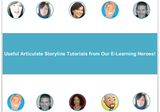
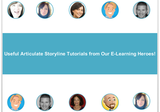
This week’s challenge was related to the top 10 things learners need to know about Articulate Storyline, and I really had a lot of fun re-watching the tutorials I included. The E-Learning Heroes community is one of the greatest resources I’ve found as an Instructional Designer. It’s current, and all of the community members are extremely helpful and proactive - not only in addressing concerns of their peers, but they’re passionate about what they do and love to share their knowledge!
The Concept
In considering this challenge, I wanted to compile screencasts posted by various E-Learning Heroes that I have found particularly interesting and/or helpful. I scoured the forums and my personal messages to find a group of 10 tutorials I think everyone using Articulate Storyline should at least watch.
The Method
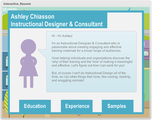
I developed a simple interface using circular buttons, filled with an image of the individual providing the tutorial. When selected, a layer is triggered to appear, providing a brief explanation of the tutorial and a screen capture; the full tutorial is linked to and will open in a new window. An exit button is available on each layer so the user can return to the main ‘menu’.
The Result
To view the complete interaction, click here.
Like this post? Want more Instructional Design tips? Sign up below!
Ashley Chiasson
.
Blog
.
<span class='date ' tip=''><i class='icon-time'></i> Jul 15, 2015 01:14pm</span>
|
|
Are you an eLearning designer trying to move on from click-and-read courses? Do you realize the value of non-linear and scenario-based learning? Then this post will help you to structure your course so it’s more engaging and effective for your end user.
Create Cutting Edge Scenario Based eLearning
If you take a look at one example of effective eLearning, such as Lifesaver, you’ll become aware quickly of the principles that make it an example of great scenario based eLearning. First, it puts you straight into the vortex of the action. It has a cast that you soon get involved with. It then dumps you right in the middle of a big old problem and makes you the one who has to take the decisions, with the clock ticking down, oh, and if you make the wrong decision, someone dies! So no pressure then. And it does this all through an unfolding scenario of events, told in the context of everyday life, in settings and with characters you are familiar with. The point is to provide you with a safe environment to practice responding to given situations. If you make a mistake, no one really dies - this time. Instead you get to practice again until you get it right. The premise is, learn from mistakes, and be ready with the right actions to apply to a real life event. Elearning doesn’t get much better than that. So what makes ‘scenario’ based eLearning?
Well, strip it back to design principles and all scenarios are stories: they have a context, some characters and some problems that need overcoming. So let’s break these principles down a little:
1. Story
Give the training relevance: consider what the real world contexts are for the specific topics and issues being addressed in the course, because training is about real situations. Get your subject matter expert (SME) to help identify authentic situations that will be relevant to the learners. Concentrate on situations where people can make mistakes. Build content around activities, not the other way around and tie the content to desired outcomes.
2. Script
At the heart of a great TV drama or movie, is a fantastic script. And part of what makes a script terrific is how it defines characters. So you need to be writing engaging and authentic dialog. If you struggle and can’t hire a scriptwriter, try creating a storyboard of the training scenario, a bit like a comic book, and sketch in some speech bubbles. Then try rewriting your content from the point of view of the characters, in dialogue rather than narrative. E.g. instead of In case of a heart attack, deploy a defibrillator, try
Character 1: Can you find a defibrillator or AED?
Character 2: Where do I find one of those?
Character 1: Try a shopping centre or station. Look for a metal box saying AED.
3. Characters you know or recognize
In Broken Co-worker the characters are real and believable. We all sort of know an Emma at work or in our local social circles. But the way we deal with the issues people like Emma raise, is tackled in Broken Coworker with humanity as well as professionalism in sight. And that means the way you respond to the challenges it throws you can sometimes lead to surprising feedback. The Virgin Atlantic Safety Film, whilst strictly not eLearning nevertheless provides a good example of using storytelling effectively to get a message across. It takes the exact format of the onboard safety training demo and with some real panache rescripts and recharacterizes it using some really well-known movie genres. The result? Very engaging and highly memorable. In the Up to Speed program for Sky, the team at Brightwave have clearly worked with Sky’s SME’s to build a whole family of Sky customers who star in the training. Each character is at the heart of scenario-driven activities, engaging the learner in developing skills to help build customer satisfaction and retention.
4. Tension
Scenarios help you to construct challenges and activities around real pain points to help learners practice resolving these in real life. Epic Group’s superb program for the UK Department of Work & Pensions, Lost IPO’s set the bar for scenario based eLearning when it was developed way back in 2002. High-res full-screen interactive video puts the learner right in front of the characters, eyeball-to-eyeball. Each interaction requires the learner to make decisions about how to respond in some highly charged situations in order to get the characters to be cooperative in the interview over their lost benefits books. In Elucidat’s Fraud Prevention demo course, simple branching scenarios provide a framework for presenting the learner with a challenge and consequences-style feedback to help raise awareness of how the two characters can unwittingly become victims of fraud.
5. Resolution
With scenario based eLearning, the point is you don’t get to go down the same learning path as other learners. How you go through depends on how you respond. And ultimately, you fail or succeed. Except, you don’ fail. Good learning design works with branching logic that will always engineer a point at which the learner gets on track and reaches a successful resolution. This is generally done with feedback loops, providing feedback to a challenge with inbuilt support to help the learner improve with a second attempt or with remedial practice. In the Finance Game, Epic co-wrote with the BBC if the leaner fails following a couple of attempts, a friendly avatar guide steps in to break down the problem into solvable chunks and give some solid advice without actually forcing the learner to jump through the hoop of answering a question correctly. It’s actually hard to fail the game - at the end the cumulative score and feedback takes into account that whilst you may be utterly rubbish with money, your staff satisfaction levels are through the roof!
Summary
So, in summary, scenario based eLearning is effective because it provides a framework for learners to practice in a safe environment and learn from mistakes. In order to do this in an engaging manner, good scenario based eLearning draws on stories, which are contextualized in the real world. The stories they draw on are relevant to the pain points or issues the learner faces in their role and at work. The characters are believable and challenges which are modeled on real world issues. Do you have any examples of superb scenario-based eLearning? We’d love for you to share, just use the comments area below this post. And why not check out some really easy to use tools - like Elucidat - to help you get started with your scenario based eLearning.
A version of this article first appeared on eLearningIndustry.com
The post Tell Me A Story: Cutting Edge Scenario Based eLearning appeared first on Elucidat Blog.
Elucidat Blog
.
Blog
.
<span class='date ' tip=''><i class='icon-time'></i> Jul 15, 2015 01:14pm</span>
|
|
I recently overhauled my Work With Me page, and I’m looking for some feedback. Is there anything you’re looking for as a potential client that isn’t there? I offer end-to-ends services, and sometimes it’s a little difficult to package some of these services up with a neat little bow. What can I do to make my services work for you?
For anyone else in the e-learning industry, is there anything I should do different here? I’m looking for insight based on what your current or past clients have required. My goal is to provide premium services customized based on client needs.
For anyone in the small business world, are there any suggestions you have to display service offerings in a more effective manner?
Any advice is appreciated!
Ashley Chiasson
.
Blog
.
<span class='date ' tip=''><i class='icon-time'></i> Jul 15, 2015 01:14pm</span>
|
|
Need some help getting started designing branching elearning scenarios? Make sure you’ve covered all the bases by following our simple 5 point checklist for producing high quality branching elearning scenarios.
Why branching eLearning scenarios?
Branching elearning scenarios are a great way to let learners practise skills in realistic situations. By asking them to choose how they’ll respond to tough scenarios, they can test out different approaches in a low-risk setting.
1. Make it look good
Scenario based eLearning is all about telling a story. And rather than do that will words, look for ways that visuals can convey the context, characters and feel of the scenario. When Cathy Moore partnered with Kinection to create a program for the US Military user respondents cited preference for video in the scenario, something that went beyond the budget, so instead, Cathy and Kinection worked on a style of illustration that was borrowed from the graphic novel, making it relatively simple to put a comic book style gloss on photographic imagery.
2. Make it conversational
In Cathy Moore/Kinection example, debates are used as a means by which the challenges are posed and contextualised. These are scripted as dialogue between characters. What’s more, audio is used to give authenticity to the voices of the characters. In Epic Group’s training for the BBC, each challenge is presented by different characters speaking to their manager about issues in everyday workplace situations.
3. Make it real
Give the training relevance: consider what the real world contexts are for the specific topics and issues being addressed in the course, because training is about real situations. Concentrate on situations where people can make mistakes. Thought provoking situational contexts with good use of characters, engaging video and consequences style branching are some of the elements which help drive home interviewing best practices in Epic’s Lost IPO program.
4. Make it challenging
The root of all branching eLearning scenarios is the challenge posed to the learner. By providing learners with decision making contexts, and a range of choices, you are giving them the chance to practise knowledge and skills in a safe environment. The branching is what makes the decision making critical - depending on the choices you make in the scenario, the outcome or at least the path through the course is altered and adapted. In Elucidat’s Fraud Prevention demo course, simple branching scenarios provide a framework for presenting the learner with a challenge and consequences-style feedback to help raise awareness of how the two characters can unwittingly become victims of fraud.
5. Make it interactive
Feedback Good learning design works with branching logic that will always engineer a point at which the learner gets on track and reaches a successful resolution. This is generally done with feedback loops, providing feedback to a challenge with inbuilt support to help the learner improve with a second attempt or with remedial practice. Broken Co-worker uses interactive video very effectively to provide feedback.
Summary
Does your branching eLearning scenario meet these criteria? Great stuff! If not, don’t worry! This is a checklist for an ideal eLearning scenario rather than a list of minimum criteria. Check that your eLearning tools allow you to build your scenario according to these criteria. Be especially aware of whether you can edit and/or change the content of your scenarios, because fixed content is dead content.
Using cloud based eLearning tools allows you and your team to easily update scenarios and build them out rapidly.
Have you got examples of great branching scenario eLearning which you can share with the community. We’d love to hear from you.
A version of this article first appeared on eLearningIndustry.com
The post How to create branching elearning scenarios (checklist) appeared first on Elucidat Blog.
Elucidat Blog
.
Blog
.
<span class='date ' tip=''><i class='icon-time'></i> Jul 15, 2015 01:14pm</span>
|
|
Another Tuesday, another acronym! Today we’re going to be talking about SCORM!
SCORM stands for Sharable Content Object Reference Model and more or less dictates how e-learning content must be programmed in order to work with other e-learning software, such as Learning Content Management Systems (LCMS’) or Learning Management Systems (LMS’). The SCORM website provides a nice explanation of how SCORM let’s code and software play well with one another, so to speak.
As the name alludes to, SCORM creates ‘sharable’ content, which is essential when it comes to saving a business’ hard earned profits. Why? Well - before the days of SCORM, organizations may have contracted out training requirements to many different providers who all used their LMS of choice - creating a high volume of duplication, and likely less consistency. Now that SCORM exists, organizations can re-use training programs more easily than in the past.
Why is SCORM a sought after client requirement? Well. When clients dictate they want SCORM conformant or compliant e-learning product, they’re doing this to ensure that the developed e-learning product will function within any LMS they wish to launch the product within. Adhering to the SCORM standard will greatly help ensure your e-learning products are well-equipped for interoperability.
Right now, Tin Can API is foraging ahead to become the next generation of SCORM (let’s face it; SCORM is an old-timer; don’t get me wrong - a tried and true old-timer, but everyone needs to evolve), and will become the new standard within coming years - more on Tin Can API in another post.
Still curious about SCORM? There’s a lot to it, and I’ve definitely only skimmed the top of explaining it, but Learningpool provides a great infographic that should explain anything I’ve left out!
Like this post? Want more Instructional Design tips? Sign up below!
Ashley Chiasson
.
Blog
.
<span class='date ' tip=''><i class='icon-time'></i> Jul 15, 2015 01:14pm</span>
|