Blogs
|
Download the guide for digital skills and practices
Technology Enhanced Learning
.
Blog
.
<span class='date ' tip=''><i class='icon-time'></i> Jul 15, 2015 01:18pm</span>
|
|
Download the guide for digital tools for busy academics
Technology Enhanced Learning
.
Blog
.
<span class='date ' tip=''><i class='icon-time'></i> Jul 15, 2015 01:18pm</span>
|
|
When developing courses, I tend to take the Keep It Simple, Stupid (KISS) approach. There’s no point overcomplicating things that some may already find complicated.
Tip #1 - Put yourself in your learner’s shoes. While you might be the Subject Matter Expert (SME), try to present information in a meaningful way, avoiding industry jargon at all costs. When a course isn’t successful, often times the issue is in the structure and presentation of the course, not the ability of the learners.
Tip #2 - Engage the learners my providing concrete examples that may allow learners to activate their prior knowledge as a foundation for new learning opportunities.
Tip #3 - CHUNK CONTENT. The last thing a learner needs is to spend hours scrolling, and scrolling, and scrolling through content.
Tip #5 - Be concise. I don’t think I can emphasize this point enough - maybe I could make a marquee banner? Learners likely spend a lot of their time scrolling through PDFs and reading textbooks or other course materials. Value your learner’s time by concisely structuring your content. Doing this will also allow you to easily chunk your content.
Tip #6 - Provide assessment opportunities coupled with meaningful feedback. Learners want to know they’re on the right track. If you allow them to apply their knowledge through assessment opportunities, you open up a door to provide them with meaningful feedback, which will likely contribute to higher academic achievement and learner satisfaction.
Tip # 7 - Add appropriate media. This is tricky because everyone has a different idea about what might be considered ‘appropriate media’. What I mean by this is engaging the learner with multimedia, when appropriate. For example, you’re teaching an individual about car doors and how they can open and close. For this example, a side-by-side static graphic of the car door open and then the car door closed would be sufficient. Creating an animation to illustrate this may enhance engagement, but is not necessary to meet the learning objective.
Tip #8 - Be smart about your use of audio. I’d like to think that most folks can use their heads here and make good judgement calls, but I’ve worked on projects where the client requested, and truly believed it was necessary, to have 1.5 minutes of audio narration for an animation lasting 45 seconds (cut to a classroom of sobbing learners). Use audio when it makes sense. You might explain a procedure in detail in the onscreen text, but in the audio you should paraphrase the procedural steps to line up with what’s happening in the onscreen media.
Ashley Chiasson
.
Blog
.
<span class='date ' tip=''><i class='icon-time'></i> Jul 15, 2015 01:18pm</span>
|
|
Not too long ago I mentioned that I had registered for the Bluenose Half Marathon. I ran this race last year, and really enjoyed the course, so I registered as a motivator to get out and ramp up my running again.
At the end of summer I had a nasty running injury. After several x-rays and being checked out by an orthopeadic surgeon who specializes in running-related injuries, I found out that I have pes cavus (my arches do not look as extreme as the wiki photo). What does this mean? Well. For me it means that I often experience metatarsal pain after running, no matter how much stretching or post-running care I attempt. Initially I thought it was a shoe issue, but my surgeon told me that no matter which shoes I purchase or which gimmicks I try out, I will just need to find ways of managing the pain and impact if I want to continue running. Now that my foot no longer throbs and I’ve registered for the half, I’m trying to get my butt in gear and get ready for the race. What better inspiration than to share my favourite running items?!
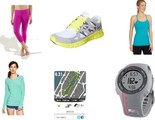
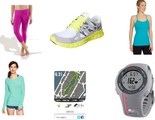
From top to bottom, left to right:
Lululemon Wunder Under Crops - These are my all time favourite workout pants. They keep everything feeling secure and have a gusset, which is CRITICAL when purchasing any tight-fitting pant.
Nike Free Run+ 2.0 - This particular style of the Nike Free Run is my favourite and has since been discontinued. None of the newer versions have fit quite as well, so I’m guilt of having ordered several pairs off eBay. Typically, I fit into a size 5 shoe, which in our city is near impossible to find in a woman’s shoe. Most sneaker retailers in our area offer size 6 as the smallest size, and kids shoes won’t cut it for long distance running. I find the size 6 in this style of shoe to fit me particularly well. I never feel like they’re too loose, and they’re extremely lightweight and flexible.
Lululemon Power Y Tank - There are few things I purchase from Lululemon, but they make a pretty good (and affordable) workout tank top. I have a few different styles, but the Power Y is my all-time favourite. It doesn’t ride up into my armpits, and the shelf bra offers enough support for my purposes.
GapFit Breathe Long Sleeve - This is a fantastic lightweight long sleeve that I love wearing on my runs. It isn’t too heavy and it’s breathable, so sweating doesn’t get uncomfortable. I often toss this over my tank top when I’m on the way to the gym, or will wear it at the beginning of a race if it’s a bit chilly to start.
Nike+ Running App - I’ve only recently begun to use this app, but I’ve been enjoying it so far. I like that it starts within seconds and I don’t have to wait as long for my GPS to configure. The battery life is dependent on my iPhone, so if I leave with a full charge, I can run the app and listen to my music for at least 3 solid hours before it craps out on me. And, it’s FREE! It has a lot of settings that you can configure based on your preferences, and even has a social media hookup if you want to report your results/progress or in the event that you need some social media cheerleaders.
Garmin Forerunner 10 - This is a great little garmin that is fairly affordable and has done me well for many of my long runs. Unfortunately, I think it’s going to be phased out by the Nike+ Running app, but we’ll see - I’ll report back in a few months. I love this device for the run/walk feature, but the battery drains quite fast, and I always worry that it’s going to die before the end of my run. I really do love my forerunner 10, but another negative is that it takes FOREVER to configure my GPS location. I’m not sure if anyone else has this problem, but I more or less need to stand still for 10 minutes on my doorstep to get it to make any progress. Once it’s set though, we’re good to go!
Any readers out there who are also runners? Have you dealt with injuries? Have any advice to share? Which products are you loving?
Ashley Chiasson
.
Blog
.
<span class='date ' tip=''><i class='icon-time'></i> Jul 15, 2015 01:18pm</span>
|
|
Download the guide for e-portfolio
Technology Enhanced Learning
.
Blog
.
<span class='date ' tip=''><i class='icon-time'></i> Jul 15, 2015 01:18pm</span>
|
|
The Do’s and Don’ts for Teachers on Social Media Infographic
There are millions of teachers on social media right now. They discuss professional, personal, and cultural things on a daily basis. But what are the best ways to make the most of your time on social networks? The Do’s and Don’ts for Teachers on Social Media Infographic presents a few best practices to keep in mind as you embrace the brave new world of social media for teachers.
Best Uses of Social Media
Do the following:
Post updates and comments. If you’re in a public forum, keep it light and positive. If you can’t, keep quiet.
Connect with colleagues with whom you feel safe. Don’t connect with colleagues you’re unsure about. Being friends with everyone isn’t part of the job description.
Control your privacy settings. And keep up with the changes that Facebook makes to those privacy settings.
Take care when posting pictures of others. If you tag a colleague, just think how you’d feel if they did the same to you.
Disconnect from negativity. Unfriend or block those who continually blast you with negativity and trolling.
Show what you’re proud of. Done something great? Let people know.
Worst Uses of Social Media
Avoid the following:
Don’t follow your students on Facebook. Your intentions are innocent but there’s little to gain and much to lose.
Don’t comment on status updates of your students, even if its positive, because you’ll either be criticising of showing favouritism. You can’t win.
Think twice before you connect with parents on social media. In a small community it can be fine, but think twice before you do.
Don’t drink and tweet or post. Comments made after a bottle has been opened never look so wise or amusing in the morning.
Do not post party pictures off social media. if you lost dignity and it was photographed, don’t revisit the crime scene.
Please don’t share the beach photos of anything with a state of undress. Those bikini photographs may look fabulous but will just cause comment.
Don’t overpost. Don’t offer the world continuous updates on your activities.
Do not post during work hours. It just doesn’t look good. Not even if it was scheduled.
View also: Top 10 Social Media Competencies for Teachers Infographic
Via: dailygenius.comThe post The Do’s and Don’ts for Teachers on Social Media Infographic appeared first on e-Learning Infographics.
eLearning Infographics
.
Blog
.
<span class='date ' tip=''><i class='icon-time'></i> Jul 15, 2015 01:18pm</span>
|
|
This weekend was all about relaxing. I resigned from my full-time role to take on a fantastic full-time contract opportunity, and in the interim, I have a mini-vacation I hadn’t expected! Joe and I went out on Saturday to pick up my new office desk and some home office supplies, and I am really excited to set up my new home office! How was your weekend?
Professional:
Cara Lynne Livermore provides a great overview of how she uses Evernote. This is fantastic! I’ve been curious about jumping on the Evernote bandwagon for awhile, and Cara helps clarify some of the questions I had.
This week’s E-Learning Challenge was to create an interactive screenshot for online training. While more of a local shelter promotion, I threw together (very quickly) this submission.
B-School is in full swing, with Module 2 being released tomorrow. I have one more activity to tackle, and I’ll be all ready!
Cute:
Photos of dogs leaving the shelter reminded me of how happy Oliver looked in the backseat of our car that first drive home!
Reading:
This week I finished reading Build Your Dreams: How to Make a Living Doing What You Love by Alexis Irvin and Chip Hiden. To be honest, I wasn’t too crazy about it, but I’ll save my opinion for a video review.
One book on my ‘to read’ list is The Art of Thinking Clearly by Rolf Dobelli. I’m interested to read about the psychology behind avoiding cognitive errors.
Also on my ‘to read’ list is Jab, Jab, Jab, Right Hook: How to Tell Your Story in a Noisy, Social World by Gary Vaynerchuk, because that kook-aid…I’m drinking it.
Enjoying:
DavidsTea Pom Tango
Gap’s Cuffed Always Skinny Jeans, because when uncuffed, they fit me perfectly.
Ashley Chiasson
.
Blog
.
<span class='date ' tip=''><i class='icon-time'></i> Jul 15, 2015 01:18pm</span>
|
|
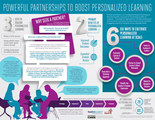
Powerful Partnerships to Boost Personalized Learning Infographic
Benefits of blended and online learning opportunities include increased student engagement and access to tools that support quality work products. A personalized approach provides students ownership of the learning experience, flexibility in path, and opportunities to progress at an individual pace. Schools and districts are now offering blended and online learning programs, and some are doing so at scale.
This Powerful Partnerships to Boost Personalized Learning outlines the key lessons from programs which have successfully scaled their online and blended learning opportunities. From simplifying the teacher and student user experience to cultivating leadership, the infographic displays the lessons learned and features a framework for thinking about scaling the personalized learning experience.
For more information, see How to Successfully Scale Personalized Learning: Six Key Lessons from Effective Programs by Fuel Education™ in partnership with Getting Smart®. This white paper explores how districts and schools can successfully scale online and blended programs to extend learning opportunities for all students.
The paper features:
A framework for scaling personalized learning
Six key lessons from the trenches on scaling personalized learning
Interviews with educators who have successfully scaled online and blended programs
Benefits being realized today by schools and districts who are scaling their programs
Recommendations for school leaders and educators who wish to scale
Via: www.getfueled.comThe post Powerful Partnerships to Boost Personalized Learning Infographic appeared first on e-Learning Infographics.
eLearning Infographics
.
Blog
.
<span class='date ' tip=''><i class='icon-time'></i> Jul 15, 2015 01:17pm</span>
|
|
I cannot tell you how long I have been wanting to write this post - years. I’m sure a musical will follow shortly…After reading an insightful article by fellow Instructional Designer, Nicole Mellas, entitled 3 Steps to Get MORE out of Subject Matter Expert (SME) Interviews, I was prompted to share my tips and experiences.
Dealing with Subject Matter Experts (SMEs) can be tricky. Often times, they have trouble placing themselves in the shoes of their audience and/or Instructional Designer, and on particularly frustrating days where communication has come to a standstill, I call this relationship "My SME and Me." In the darkest moments (re: sobbing over my keyboard), it renews my faith in humanity.
As Instructional Designers it is our job to figure out how to communicate effectively with our SMEs. Effectively in the sense that you get clear (or somewhat clear) answers to the questions you have in order to ensure the most accurate content, and you do this in an efficient manner. The phrase ‘time is money’ is a very accurate one in this respect. There are often many other tasks that you could devote your time and effort to in the instructional development process, so it is critical to be able to streamline the approach you take when it comes to communicating with your SME. Another phrase I’ve come to appreciate in recent weeks - "Everything is figureoutable" - Marie Forleo - allows me to recognize that each SME is their own person and as such, they are entitled to their own manner of communicating and disseminating information and the Instructional Designer will eventually figure out how best to communicate with that particular person.
When I reflect on my annual performance, I often cite communicating with SMEs as one of my greatest challenges. While I still consider this task challenging, I walk into my SME interactions with a different attitude - one that appreciates where the SME is coming from and their area of expertise - they’re a SME for a reason, after all. This is step one.
Go into your SME interactions prepared. Pinpoint the specific content areas you want to discuss in an agenda, that you submit to the SME ahead of time, and bring relevant reference material to the meeting (or include it in the agenda email) - this will help streamline your meeting by giving the SME an opportunity to prepare themselves ahead of time.
Always keep your eye on the prize. The prize is engaging, accurate content or copy, and you need to steer the ship of conversation! If your SME begins to go off on a tangent, diplomatically get them in check, and proceed with your agenda (e.g. "That’s an incredible story about how you built the rocket, but could you tell me more about how to launch the rocket?"). Accurate content is essential for many training programs. I would say all, but something like soft skills training may be more subjective than something more specific like air traffic control training. It is imperative that you keep your SME on point.
Finally, respect your SME. When you are especially frustrated and feel like you’ve talked circles around yourself, always be polite and ensure you are respectful to your SME. In many industries, you will likely have to interact with this individual again, and not burning bridges will go a long way in your next interaction.
To summarize, my tips for successful SME interactions are:
Get your attitude in check
Come prepared
Keep the content in mind
Direct your SME and keep them on point
Respect your SME and build rapport
What have your SME experiences been like? Have you experienced cases of My SME and Me?
Ashley Chiasson
.
Blog
.
<span class='date ' tip=''><i class='icon-time'></i> Jul 15, 2015 01:17pm</span>
|
|
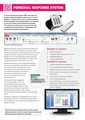
Download the guide for personal response system
Technology Enhanced Learning
.
Blog
.
<span class='date ' tip=''><i class='icon-time'></i> Jul 15, 2015 01:17pm</span>
|