Blogs
|
Makeup, or cosmetic products, are some of the most commonly sold products around the world. They are used on a variety of areas of the body in order to enhance appearance, such as the eyes, lips and skin.
Because they are designed to enhance beauty, cosmetics need to have a natural appeal on the shelf as well as a strong brand.
The packaging of the product is one great way to help show off how the product can make you more attractive:
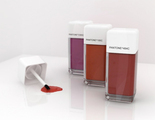
Pantone Cosmetics Concept Designed by Renata Veiga
Cedel Designed by Designed by Epic
Thymes Studio Collection Designed by Cue
The Basics Designed by mousegraphics
Büro Designed by SocioDesign
Cheeky Designed by Pearlfisher
Hudson Made Worker’s Soap Designed by Hovard Design
Swell Designed by Aloof
Health Basics Designed by Milk
Student Work - Carolin Boström
Related Posts
Love is in the Logo: 10 Inspiring Examples
Useful HDR Tutorials with Spectacular Results
jQuery Date and Calendar Plugins
Cute Cat Logo Ideas
Rocks, Stones and Pebbles in Photography
Stockvault Blog
.
Blog
.
<span class='date ' tip=''><i class='icon-time'></i> Jul 16, 2015 12:14pm</span>
|
|
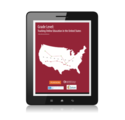
Grade Level:Tracking Online Education in the United States is the twelfth annual report on the state of online learning in U.S. higher education. The 2014 Survey of Online Learning conducted by the Babson Survey Research Group and co-sponsored by the Online Learning Consortium (OLC), Pearson and Tyton Partners, reveals the number of higher education students taking at least one distance education course in 2014 is up 3.7 percent from the previous year. While this represents the slowest rate of increase in over a decade, online enrollment growth far exceeded that of overall higher education.
Key report findings include:
The year-to-year 3.7% increase in the number of distance education students is the lowest recorded over the 13 years of this report series.
Public and private nonprofit institutions recorded distance enrollment growth, but these were offset by a decrease among for-profit institutions.
The percent of academic leaders rating the learning outcomes in online education as the same or superior to those in face-to-face remained unchanged at 74.1%.
The proportion of chief academic leaders reporting online learning is critical to their long-term strategy reached a new high of 70.8%.
Only 28.0% of academic leaders say that their faculty accept the "value and legitimacy of online education."
The adoption of MOOCs (Massive Open Online Course) is reaching a plateau, only 8.0% of higher education institutions currently offer one, another 5.6% report MOOCs are in the planning stages.
The proportion of academic leaders who believe that MOOCs represent a sustainable method for offering online courses dropped to 16.3%.
Download the full report [PDF] or the infographic [PDF], displayed below.
Click image above to enlarge
Jason Rhode
.
Blog
.
<span class='date ' tip=''><i class='icon-time'></i> Jul 16, 2015 12:13pm</span>
|
|
If you are like me, you are busy or focused elsewhere and misplace your keys, wallet, handbag, pens, etc. I hate when I lay things down and don’t know where I put it especially when I am in a hurry, running late or just had the item in my hand that I am now looking for. Well, I just learned about a new device that will help with that.
I have an iPhone and have the find my iPhone option enabled in case I lose the phone or the phone is stolen outside of the household. The new device is called ‘Tile’ and you put the one inch GPS ‘Tile’ on or inside of whatever item you want to keep track of. There is a small hole to attach the device to a keychain or similar item.
Tile’s website shares the following:
At Tile, we believe that technology, design, and ingenuity can solve problems that most of us take for granted. Life’s little inconveniences add up: the average person misplaces upwards of 3,000 items a year, and then spends another 60 hours a year searching for them. All told, our misplaced stuff adds up to billions of dollars annually.
Tile casts a signal across a 100-foot radius, making short work of any haystacks you lose your needles in. And since every phone with Tile helps find your stuff, your search range is potentially limitless.
The app that supports the Tile device can support up to 8 tiles. The app records the last time your cell phone saw the Tile on the item you want to keep track of and reports that information to the app. The app works on the signal strength of the device and the physical location. It indicates the location of the Tile on a map and then indicates as you get closer to the item Tile is attached to.
Lastly you can share the app with your friends so they can help you locate the items the device is attached to as well.
Share access to your Tiles with friends, family, and coworkers so that you can stay on top of the stuff you all use. Whether you’re helping Dad find the remote or keeping tabs on the office laptops, you can make it a team effort.
Currently the price is $20 a tile. They have an option to buy 3 for $60 and get 1 free. This is probably the option I might choose but I would love to hear from testers or anyone who gets one when it is finally released. For now, you can reserve your tiles and the app is only available for iOS but the Android version is soon to be released.
What are your thoughts? Just another gimmick or a valuable tool to use on a daily basis? I have shared my opinion - please share yours!
Kim Caise
.
Blog
.
<span class='date ' tip=''><i class='icon-time'></i> Jul 16, 2015 12:13pm</span>
|
|
Today we have a brand new set of Vintage Paper Textures that you can use for so many things. They are excellent as backgrounds and overlays in your photography and design projects. Free for commercial usage, and you can download a Zip file below the sample images. Enjoy!
Download all textures as ZIP from copy.com (10.8Mb)
Did you like these textures?
Let us know by leaving a comment, and you can even post a link if you used them in your artwork.
Related Posts
Free Texture Friday - Vintage Book 3
Free Texture Friday - Vintage Paper 8
Free Texture Friday - Vintage Stone Wall 2
Free Texture Friday - Color Stained Paper 4
Free Texture Friday - Vintage Paper 7
Stockvault Blog
.
Blog
.
<span class='date ' tip=''><i class='icon-time'></i> Jul 16, 2015 12:13pm</span>
|
|
Over the past two decades the Internet has made it possible for anyone anywhere to pursue an affordable degree; for adults to continue their education in efforts to remain productive; and for universities to reach a greater number of people who want to learn. Infusing online learning into higher education provides educators with innovative ways to connect with students, wherever they are, and offers incredible, new career opportunities. This infographic by the Online Learning Consortium highlights a few of these changes.
Jason Rhode
.
Blog
.
<span class='date ' tip=''><i class='icon-time'></i> Jul 16, 2015 12:12pm</span>
|
|
Ready to help NASA with a science project? NASA is inviting people around the globe to go outside during Earth Science Week and observe the sky, clouds, etc. and share those observations as ‘citizen scientists’. Earth Week is October 12-18, 2014 and is a great time to work on STEAM projects that have to do with weather and atmospheric conditions. I included the ‘A’ in STEAM as artwork can be done based on observations of what a students views in the sky.
Clouds are an important part of Earth’s atmosphere, and NASA scientists are studying how they affect our weather and climate. Clouds cover about half of the planet at any one time, ranging from high, wispy cirrus to dark, rumbling thunderheads. By participating in #SkyScience you will help NASA learn more about the types of clouds where you live, work and play, and help all of us celebrate the beauty of Earth’s atmosphere, and the science behind it.
Learn more:
What Are Clouds?
Earth Observatory: Clouds & Radiation
Improving Climate Change Predictions, One Cloud at a Time
What’s #SkyScience?
You don’t need a Ph.D. in a field of science to be a scientist. All it takes is curiosity and a bit of planning, and you’ll become a "Citizen Scientist" in no time!
#SkyScience is part of an annual event founded by the American Geosciences Institute to every ‘citizen scientists’ to engage in Earth Science by observing, photographing, drawing or reporting on clouds where they live and go to school.
To report your observations, share on Twitter, blog posts, Instagram, Flickr, Facebook or any other social media outlet and use the hashtag #SkyScience. During Earth Week, NAZA will share of most interesting photos on NASA’s social media outlets. For years, NASA has been involving students in cloud observation via the Students’ Cloud Observations On-Line (S’COOL) Project.
#SkyScience is one more opportunity to obtain a variety of reports in a short period of time and enable NASA scientists and personnel to study and analyze the reports shared with NASA.
To get more information and find out how the steps so you can participate, visit: http://go.nasa.gov/skysci. Please share your form of participation with this blog - what an exciting activity for your students!
Kim Caise
.
Blog
.
<span class='date ' tip=''><i class='icon-time'></i> Jul 16, 2015 12:12pm</span>
|
|
The depths of the ocean and other bodies of water can seem like another world, with different creatures and terrain than you’ll find anywhere else on Earth.
Taking photographs underwater can be challenging, because of water pressure, the issue of waterproofing hi-tech gadgets, and also the dangers of drowning.
However, with the proper precautions, and a little practice, the results of underwater photography can be beautiful:
Landslide Hall by Viktor Lyagushkin
Shipwrecks by Matthew Fischbach
love under the sea by Kenvin Pinardy
Underwater 8 Sodaro,k
Hunting bubbles by Dmitry Laudin
Wreck by Tim Briggs
Underwater Garden by Ladigue_99
Underwater fairy by Dmitry Laudin
Underwater by Xelor (on and off)
Whirpool by Andrey Narchuk
Underwater world by ???? ? ???????
Underwater foliage by Daniel Silverman
The Death of a Shark by Csaba Tokolyi
underwater by Schattenwerk
Underwater Sunset by Naomi Roe
Underwater Canyon by Julio Sanjuan
underwater world by Peggy J Hughes
Manta Ray by Kjersti Busk Joergensen
Underwater by Grant Stirton
Hai Siang Wreck by Barathieu Gobriel
Cathedral by Andrey Narchuk
underwater colors by Green.pit
Underwater 12 by Archangem
Underwater Traffic by Pete Leong
Underwater Tabletop by Josh Mazgelis
A last glance by nini_filippini
Underwater Scene by Parée
Life Underwater by Ed Melendres
Not a creature was stirring by Justin Salzer
Related Posts
30 Amazing Underwater Photographs
Beautiful Photographs of Movement in Water
30 Photographs of Bicycles
30 Intense Hunting Photographs
30 Majestic Photographs of Horses
Stockvault Blog
.
Blog
.
<span class='date ' tip=''><i class='icon-time'></i> Jul 16, 2015 12:11pm</span>
|
|
With the maker space theme becoming a big trend in current classrooms in today’s schools, trying to come up with learning activities and materials for a classroom that fits the maker theme can be a difficult and daunting task. I found several at ‘The Grommet’ website.
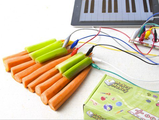
First is a circuit board kit that turns objects that conduct electricity into user interfaces and keyboard controllers. It is designed for ages 12 and up but can be for any age with supervision. Just complete the circuit to create the objects students want to make or run.
The next ‘toy’ or explorative activity item is called OgoSport constructive toy sets. These sets allow students to create open ended items and put the pieces into an endless number of configurations. The YouTube video explains more about this item.
The next item is the Sphere 2.0 app controlled robot ball. The balls are programmable with a smartphone app, can fit in your hand, light and do a variety of things once programmed. The YouTube video below shows more about what robot balls can do.
Next up is the remote-controlled robot. The robot is controlled with an iPhone or iPod Touch and can dance, walk, and talk. You can let the robot more about freely or use the remote-control to program and control the robot. You can do a great deal with the programming of the robots and I highly recommend you explore this ‘toy’ as well.
The last item is the littleBits modular electronic kits. It is described as:
Just as LEGO enables kids to build complex structures with very little engineering knowledge, littleBits are small, intuitive blocks that make it a snap to create sophisticated electronics. Each bit consists of a tiny circuit-board with its own specific function (light, sound, sensors, buttons, thresholds, pulse, and motors). littleBits are color-coded and magnetic making it simple to build large circuits in seconds. No soldering, no wiring, or programming necessary. In combination with everyday materials, littleBits can be transformed into working LEGO bots, clay cars, toy nightlights—you name it, you can create it.
There is a YouTube video that explains the item in more detail.
All of these items would make great additions for coding, programming and creating things that fit the maker theme type of classroom and align to the CCSS featuring creativity. The prices vary and you can read more about each item on the Grommet toys and games page. They also have other interesting items to explore to enrich your classroom. You can apply for grants or use sites like http://donorschoose.org and http://classwish.org. They have some very interesting items that kids would love to explore and create with!
Kim Caise
.
Blog
.
<span class='date ' tip=''><i class='icon-time'></i> Jul 16, 2015 12:11pm</span>
|
|
Love is a common concept that businesses try to market. Whether it’s a dating website or agency, a company that wants users to feel passion about the product or service, or something else, love and hearts are frequent components.
The best way to show this concept in a logo design is to use a heart shape of some kind. Because of the simple shape, hearts can show up in different styles and with different effects.
Here’s some examples where the love is literally in the logo:
LoveBiites
TrueLove
Lovehook
LoveGeek
Love Mouse
Love Letters
BeeLoved
Love Clip
Half Loved
Infinite Love
Related Posts
Cute Cat Logo Ideas
Motor and Car Themed Logo Designs
Christmas and Holiday Logos
Burning Hot Fire Logo Designs
Deliciously Creative Food Logo Designs
Stockvault Blog
.
Blog
.
<span class='date ' tip=''><i class='icon-time'></i> Jul 16, 2015 12:10pm</span>
|
|
Have you ever needed one of your SlideShare files on a mobile device for a presentation? If so, you can now download, view and upload SlideShare files using their new app. The app was just released on October 2, 2014 and is available for iOS and Android devices.
Discover New Presentations
The new app lets you browse the 12 million presentations that have been uploaded to Slideshare or discover new presentations based on a variety of topics. SlideShare gets 60 million unique visitors a month allowing you to view presentations and learn new content at the tip of your fingers from a wide variety of resources and networks. Now that the app is released it is even easier to view presentations uploaded to SlideShare.net.
Expand your Network and Make Connections
You can view presentations uploaded from people in your network in addition to the presentations that result from a general search. This month is Connected Educators Month now is the time to take advantage of this great opportunity to expand your network and learn from one another via SlideShare presentations whether you are an educator or not. We can all learn from one another and serve as educators in a variety of capacities and this is the perfect time to reach out to those in your network and download or view their presentations offline or online using the new app. Before the release of the app you were limited to viewing presentations online only and did not have the ability to download for offline viewing.
Share your Work with SlideShare Community
Additionally, you can share your own presentations by uploading them and connecting SlideShare with your favorite networks like the SlideShare community, Facebook, LinkedIn, Twitter or Plurk - quickly and easily using the SlideShare app. Viewing the slidedecks shared on SlideShare is even easier on your mobile device as you can view them in full-screen mode. Before the app release it was difficult to view the presentations online as the images were very small and details were not as visible as they are now. Be sure to download this app and view on the go!
Kim Caise
.
Blog
.
<span class='date ' tip=''><i class='icon-time'></i> Jul 16, 2015 12:10pm</span>
|