Blogs
|
These are live-blogged notes from Jeff Patton's session on Story Mapping which I couldn't upload until late next morning, due to a lack of internet connectivity.Jeff Patton: Started doing XP in 2000 (ex TW'er). User stories part of Extreme programming at the time, so he has a decade of experience of this thing. Claims to have figured this out only in the last 1 year. From my experience I know Jeff to be one of the most respected analysts in the industry and a name to reckon with in the area of agile customer experience.Its common practice to use user stories in SCRUM today. 'Everybody touches these user story things today'. Developers, BAs, testers, product owners, what have you.A lot of responses came out to define User stories:WishlistRequirements defined in the words of the customersmall usable output valuable to the customerunit of functionalitybusiness process to be implemented in the systemnon-functional requirementshas a notion of value or prioritya unit of testable functionalityTherefore: "User stories are different things to different people."So we can't all be possibly right. But we are!So who is a consumer of a user story?A developer may needimplementation detailssmall in scope - shouldn't take too much timeA tester may needAcceptance testsUser's perception of functionalityA user may care about whether the user story lets him achieve what he wantsA product may owner care abouttime to marketcost to builda project manager may care aboutno of resourcesschedule, cost, quality, constraintsrisksis it estimable?a business stakeholder may care aboutreturn on investmentqualityburn-rate? did they mean velocity?how does this fit in my product strategy?competitive advantageis it big enough to give me profit?a UX person may care aboutrole/ persona we're building foruser's goal?meta-details of the story? a.k.a contextis it big enough to give me feedback?By the time we address all these concerns and put all the details in, it becomes a real 'fat' document that perhaps needs a binder to hold! Everyone has a view on what the user story needs to have. Its really easy to abandon good old stories because its not easy to fit all this fluff into them.Jeff threw out the word 'boundary object'. User stories are a boundary object -- its information that's used in different ways by different communities. Its interpreted differently across communities, but has enough immutable content to maintain integrity. The big challenge is to make user stories all they mean to different people without making them into requirements specification documents.User stories are still a 'token for a conversation'.Here's where story mapping comes in. Jeff then started off to demo building a story map and asked the group to come up with ideas for products.Jeff picked an application for people new in Bangalore to know about auto-rickshaws, destinations, right prices, etc. They called the application - autorickshaw registry. The 'business value' of the application:public should be able to use this report behaviourpolice should be able to regulate auto driversthe public should be able to get auto-rickshaw information from this siteThe benefit for the stake-holders would be:police can do their job better - provide more safety (overall better law & order)the public sees more accountability for auto-rickshaw driversJeff ordered the story map by putting the persona on top and placing high-level coarse grained scenarios/goals under them and then user story-like requirements under them. This continued for a while with the story map -- with a really passionate customer who just kept hammering her needs onto him. Jeff did his best to facilitate and come up a with a story map. You can take a look at Jeff's blog to know more about the process of story mapping.The cool thing about the story mapping process is that it tells a story of the system more than an isolated story in a flat product backlog. As Jeff would say, "the new product backlog is a story map". The fact that its attached to a concrete, real persona makes it meaningful. The ordering of a story map often is:Business Value (the purpose of the system)Personas (the people involved)Category of functionality (user activities - cluster of things that people do. eg: ordering and pricing rickshaws, SMS activities)Actions performed (user tasks)Details for that taskJeff suggested that we should beware of templates (as a, i want to, so that) - they're useful but shouldn't be dogmas. A story map exactly explains all those three parts without getting caught up in the template.An important point he mentions is that discussion is crucial to the process -- we can't be getting into a 'feature bucket' without understanding the system, the context and the value it brings.Story mapping is an approach to organising and prioritising user storiesStory mapping shows decomposition and typical flow across the systemReading the activities from beginning to end, helps us understand the flow of the systemProduct discovery workshops help us understand the product we're building as a story map. These sessions may include discussion on:the purpose of the systemcustomers of the sytemusers, their usage and consequently the value they'll get out itA few things to remember about story maps:Building a story map may need a huge open space -- even floor space is coolA story map for a reasonable sized system can actually fill a room (can get very, very long)Adding tape lines t the wall lets participants organise stories into layers. Each layer makes a release!Planning incremental releases can be facilitated as a collaborative event. It was really cool to see a video of the process from a Brazilian client of Jeff's. Great culmination to his hugely informative session. You can email Jeff for a PDF of the handout for his session. I think you will be able to find them on his website too.© Sumeet Moghe, 2009
Sumeet Moghe
.
Blog
.
<span class='date ' tip=''><i class='icon-time'></i> Jul 20, 2015 11:48am</span>
|
|
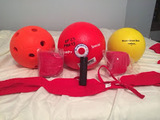
The Non-Profit, Camp Abilities Michigan, recently bought some sports equipment for the visually impaired. Since we are just starting out, a lot of the equipment we are testing out and seeing if we like them or not. For this blog I thought I would review the products and describe their functions.Electronic beeper A loud beeper that can be utilized for a child with a visual impairment to try and track something down. We will use this during a game of beep kickball/baseball by using the beeper rather than bases to run to in a gym setting . The reasoning behind this is for safety purposes. Using the beeper, we can stop it at an appropriate time rather than have an athlete run through a base and potentially fall down and hurt themselves. Trainer Goal BallThe simple goal ball with 2 bells is a must have piece if equipment!Beep Kickball The official beep kick ball is probably my favorite piece of equipment we have bought as of yet. It is durable and the beeping volume is perfect for an indoor gym or for an outside game. Foam beep ballA more generic beep ball than the beep kickball. I like how inexpensive this ball is and it feels quite durable as well. After pressing the inside button the beeps start to go off every 2 to 3 seconds so a student with a visual impairment can track down the ball. Website of the month:Educanon.comSince I have found this website I have not been able to get off of it! This site enables you to take videos from YouTube, Vimeo, and Teachertube and add questions intermittently to it. The website allows you to set up classes and have them watch videos with built in discussion questions. The site has an assessment tool that let's you see how your students scored on the questions related to a video. This website helps you plan out a lesson to go with a video and gathers data at the same time! Whether you are teaching 3rd grade, college biology or giving a presentation at a conference this site will make your life easier!Quote of the week: In three words I can sum up everything I've learned about life: it goes on.Robert Frost
All Good Education is Special Education
.
Blog
.
<span class='date ' tip=''><i class='icon-time'></i> Jul 20, 2015 11:47am</span>
|
|
In an article for CLO Magazine e-learning researcher Josh Bersin described three trends to watch for Corporate Learning in 2008. Researchers like Bersin, with their strong connections to vendors of corporate learning solutions, might be slightly biased towards creating hypes. On the other hand the trends he described are too generic and vendor unrelated to suspect him. According to Bersin the year 2008 will bring us:
Talent-Driven Learning Programs: forward-thinking learning executives are emphasizing talent-driven learning programs — particularly in areas such as leadership development, onboarding and career development — to support talent strategies.
The New Learning On Demand: We have been writing about rapid e-learning, performance support and informal learning for years. Conditioned by Google, RSS feeds, YouTube and other popular tools, employees are now expecting to find answers on any job- or company-related topic in seconds.
Get Ready for Self Published Content: Today, organizations can take "off the shelf" tools for blogs and wikis and use them to create communities of practice that facilitate such informal, on-the-job learning.
The are not very surprising and maybe even heard at the end of 2006 too some extent. But, it is always good to read some confirmation of directions taken with corporate learning initiatives in organisations.
Daan Assen
.
Blog
.
<span class='date ' tip=''><i class='icon-time'></i> Jul 20, 2015 11:47am</span>
|
|
As promised, here are the workshop outputs from the session Rixt Wiersma and I ran on the topic of 'Facilitating Dialogue in situations of Conflict' at the Agile Bengaluru 2010 conference. It was a really enjoyable session for us as participants and we had a wonderful crowd that impressed us with their keen interest in the humanistics of Agile software developments
At the end of the exercise, here are the thoughts that teams had about dealing with conflict. I don't have record of all the tips and discussion that cameup in the debrief, but this was all the stuff that the teams wrote up on their flipcharts.
Behaviours that facilitate dialogueBehaviours that hinder dialogueAn initiative to get the bigger picture (what are we trying to achieve here? who is involved?)Understanding the problem well, before jumping into solution modeTimeboxing often helps the team rally to a decisionListening to everyone - no views ignored (came up multiple times)
Being focussed on the discussion at hand and the goal in sightAn openness to clarifying doubts at the moment they aroseCollective ownership - participation from the whole groupRespecting and acknowledging other/ differing opinionsDeciding a strategy to begin with and iterating from there (came up multiple times)
Everyone trying to understand one anotherAsking questions and seeking opinions. eg: What do you think? Do you agree?Speaking in a calm tone of voiceNo language barriersLogical ThinkingAgreeing to disagree (concurring with the team)Interest based negotiation
Getting stuck in your own views of the situationToo much focus on the process of the discussion than on the rationale presented or even the resultOver-ruling others. A strong voice often stops others from expressing themselves freely and in the end may prevail as the only voice.A hurry or unnecessary 'push' towards decision makingAvoid making assumptions. Make assumptions explicit if anyForcing your thoughts on othersNot letting others speakPersonal conflicts!Not making understanding explicit. (People don't have visibility into all aspects of the problem)Unequal participationHidden agendas and biased prioritiesPositional bargainingSidestepping the emotional side of the conflict. (its important to address these concerns)
Here are the slides from our talk, just in case you're interested. Thanks everyone for attending -- hope we get the opportunity to do this in other places as well.
Facilitating Dialogue In Situations Of ConflictView more documents from sumeet.moghe.© Sumeet Moghe, 2009
Sumeet Moghe
.
Blog
.
<span class='date ' tip=''><i class='icon-time'></i> Jul 20, 2015 11:47am</span>
|
|
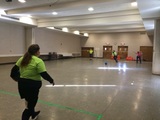
I haven't done a blog in a few weeks because I have been so busy with work and Camp Abilities Michigan. I went to a Goal Ball Tournament today at Warren Mott High School. At the event I was lucky enough to see some amazing athletes. I met a great group of female VI athletes as well. They call themselves "Live Wire". I went to their game today and saw Live Wire play a competitive game against Team Wisconsin. Through great efforts and through the use of excellent communication skills, Live Wire prevailed against Team Wisconsin.Here is a great link to an article about Live Wire and the sport of Goal Ball:Goal BallA picture from Live Wire's practice Quote of the Week:You don't develop courage by being happy in your relationships everyday. You develop it by surviving difficult times and challenging adversity.EpicurusVideo of the Week:An excellent video by the Adapted Physical Education channel about making equipment for a student with VI to help them with guided running.
All Good Education is Special Education
.
Blog
.
<span class='date ' tip=''><i class='icon-time'></i> Jul 20, 2015 11:47am</span>
|
|
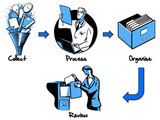
A few months back, Harold Jarche wrote a very interesting article about sense making with Personal Knowledge Management (PKM). Harold suggested a model that he uses to manage his personal knowledge and stay on top of his social media intake. I strongly suggest that you also look through the webinar he did on PKM at the LearnTrends conference. I think the article is a great reference for anyone that claims to be getting overwhelmed by the volume of information out there on the web. I have had this problem for ages as well and given that I'm a Getting Things Done (GTD) guy, I wanted to make my knowledge management fit into my regular scheme of life. So, at the very outset let me tell you that the names of the steps on my KM model are stolen from David Allen, though the content of these steps may be a little different from how Allen describes them in his book. Anyway, lets quickly look through the steps I go through to make sense of all the wonderful information that I come across on the big broad internet.
The First Step - CollectionI like to keep my collection mechanism automated. I work at least 12 hours a day on a regular basis and with 8 hours of sleep added on, there's very little time I have to manually collect information. I'd rather have all the information collected for me in advance, so I can get to processing it thereafter. So here are my channels of collecting information:
I use Google Reader to collect and aggregate all of my information from news sites and blogs;I use Twitter to collect and aggregate all of the information that my social network wants to throw my way;I often get information from some other sources like webinars, forums, IM and email;Here's a quick video tour of my most prominent channels to collect information and you can see how I ensure that the information stays contextualised in the right places.
The Second Step - ProcessingOne of the things I know for a fact is that even when I have all of this information collected automatically, I'll never ever be able to keep up with everything. I was at DevLearn last year and Leo Laporte in his keynote said, "Its a river of information, dip your foot in whenever its convenient." So the first rule for me when processing stuff is not to fret about staying on top of everything. So here's what I do to process my 'stuff':
If I miss something really important, my network will bring it to the surface again at some point -- so missing important stuff is something I try hard not to worry about.
I set aside a few fixed slots of time each day to look through my various collection channels of information.During this time, I try to skim through all the information that has come my way, while resisting the the information to read through each of them.I ensure that everything I wish to ignore is separate from the things I actually want to pay attention to.I organise the things I want to pay attention to as I perform the processing step.
The Second and a half Step - OrganisingI call organising the second and a half step, because I really almost do it simultaneously with the processing. My organisation revolves around one concept and one concept alone -- tagging. So here are my organising rules:
If I receive interesting information on twitter, webinars, forums, IM or email I socially bookmark it on Delicious and add an appropriate tag to it.If I find interesting information from any of the blogs I follow, I share and tag it on Google Reader and at most times when I have the energy I add it to Delicious as well. (I've just started to do this with some discipline, so don't be surprised if my tags on reader in particular don't lead you to much)Here's a quick video of how I organise my information.
Using my information - Reviewing & Retrieving
Once my information's organised the right way, all I need to do is search on Delicious and/or Google Reader and I should be able to find what I need. What also helps with social tools like Delicious, is that you can benefit from all the PKM that everyone else is doing. So I have power users like Dinesh Tantri on my network and now, I have access not just to the information that I've put up on Delicious, but also to all the information that my network has put up on Delicious. So I combine the power of tagging and search to find what i need, just when I need it - yaay! Take a look through the video below to see how I usually get around my personal and social knowledge base.
So since this blogpost was about how I'm managing my knowledge base, here are some of my aggregated resources that you may find useful.
Firstly my shared items on Google Reader (not many right now, but will grow). Also, here are some news feed bundles I've created which you may find useful:
Blogs from the Agile CommunityBlogs about Enterprise 2.0Blogs about Elearning and Learning TechnologyYou can also browse through my Delicious bookmarks and look at the bookmarks from my network. And just in case you got excited about RSS and twitter just because of this blog post, then do check out the links below:The RSS feed for this blogMy twitter handle - @sumeet_moghe
As always, don't forget to let me know how you found this blogpost. Your comments are always welcome and I'd love to hear what you think.© Sumeet Moghe, 2009
Sumeet Moghe
.
Blog
.
<span class='date ' tip=''><i class='icon-time'></i> Jul 20, 2015 11:46am</span>
|
|
I recently had the pleasure to go to the grand city of Grand Rapids, Michigan to attend the state CEC. The CEC or Council for Exceptional Children conference, is a conference held annually for people in the special education field. At the conference there is many different vendors and seminars that deal with a variety of different subjects in the field of special education. I attended a variety of amazing seminars and I wanted to share the resources that I found and what I learned with this post. I will be sharing the best of the seminars I was able to attend. I will break them up into three different sections: the law, technology and inspirational.The Law:The first day that I went to the conference I was able to go to a fantiastic seminar titled "Transition Today, Outcome Tomorrow". The seminar was lead by the Office of Transition Director, June Gothberg and the assistant director, Maria Peak. They did a wonderful job covering what the current needs and focus of transition in our schools are and need to be. I have attached a copy of the PowerPoint they presented and I will highlight some of the parts that I found to be the most revealing. During the presentation, they gave us a few pair-and-share questions about the transition process for students with disabilities, that we eventually discussed as a whole group. These same questions were used for a study that the state conducted about transition. At the end of the group discussions, the presenters shared with us the actual results. The first pair-and-share question was about if we believed our schools were doing a good job preparing our students to be successful in the community. The second question had us analyze if our community was prepared to support those students. This was an opened ended question and the results found that many people pinpointed different strengths and weaknesses in our state's transition programming. The results showed that many felt that we excelled with community based programming, collaboration focused on addressing mental health needs, and with collecting and using data. The study also showed that many felt that we needed to make major improvements in providing more consistent services, helping families understand post-school options, and making connections with schools and outside agencies. This study is on page 14-16 of the PowerPoint.Transition Another presentation that I had the pleasure attending was "Discipline Considerations for Students with Disabilities". This presentation was done by Michael Ghareeb, the Assistant Director of Special Education for Kent ISD. This presentation focused on how the law describes what is legal when disciplining students with disabilities. One of the major concepts I was able to learn was that the law is specific about the amount of time a student can be away from an instructor before it is called a day removed from school. This presentation took a good hard look at behavior intervention plan(BIP) and manifestation determination plans. DisciplineTechnology:A great seminar I went to at the MCEC was "Technology Tools for Supporting the Common Core". As soon as you enter the room, the presenters set you up with a laptop and had you start following along with their presentation. Even though I was already aware of the majority of the websites and resources they shared with us, I still learned a lot from this presentation.Two of the most useful resources that I picked up are from the Google Chrome store. The free apps Readability and Speak it! would be a helpful tool for any special educator. Readability takes a website and gets rid of distracting pop-ups and advertising so only the text is showing. This is a great tool for any student who may be more interested in a dating website rather than an article about the Middle East. Speak it! is another free Google Chrome app that will read aloud text from a website. This app would be useful for making students who struggle decoding long articles but are able to comprehend the text independently.www.tagxedo.com is an awesome website the presenters showed me . It will take website, feeds, or Google searches and make a word cloud using whatever picture you can dream of! Here is a word cloud using the words from my blog.The possibilities are endless!Inspirational:Probably the most inspirational of the seminars I attended was the seminar in which Anthony Ianni was the keynote speaker. Anthony Ianni is not only the first person with Autism to play in the NCAA, he also won a ring with Michigan State. He is currently touring as a motivational speaker throughout the state of Michigan. His speech covers a wide range of topics such as living with Autism, overcoming obstacles in his life, and anti-bullying. He would be an excellent speaker for any group of students. He shed light on Bullying and Autism better than most ever could. Check out this quick YouTube video of one of his speeches to get an idea of who he is and what he is trying to accomplish.Quote of the week:In times of great stress or adversity, it's always best to keep busy, to plow your anger and your energy into something positive.-Lee Iacocca
All Good Education is Special Education
.
Blog
.
<span class='date ' tip=''><i class='icon-time'></i> Jul 20, 2015 11:46am</span>
|
|
Within the field of Training & Development the learning style of generation Y employees is a hot topic. The central question is how to prepare these youngsters for their role in the workforce. In traditional instructor-led courses this generation growing up with Social Networks and Instant Messaging will be bored within 10 minutes. Should we adapt training approaches to this new continuously multitasking and thrill seeking target audience or should we stick to our traditional approach and bore them to death? Since research has shown that most traditional training approaches have generate dissapointing results with other generations as well, the answer is clear.
UPS, global logistics services provider, already invested heavily in new approaches for training new employees. An interesting article in Fortune magazine descibes their approach. UPS found that the time-to-competency of most of their generation Y staff was longer than it used to be. That is why they shifted from their traditional Human Engineering approach towards Technology-Enhanced Hands-on Training. A shift from theory oriented instructor-led training towards instant practice in a safe environment with technology support where usefull. No computerized simulations or videogames, but a real-life experience in a film set like training center. UPS invested 34 million dollar in this new approach setting up its Integrad training facility. According to UPS the new generation can be seen as Generation Why? They don’t like following instructions and always question assumptions. Good traits for a new generation of learners I would say!
Daan Assen
.
Blog
.
<span class='date ' tip=''><i class='icon-time'></i> Jul 20, 2015 11:46am</span>
|
|
Camp Abilities Michigan just had a very successful card tournament fundraiser! So being so invigorated by the event, I decided to finally make our camp digital. The logo is a pairing of Michigan with a heart. Let me know which color you would prefer. Also there is a question about how engaging the website is.Use the images below to help you with the Survey:Logo 1Logo 2Quote of the day:"We must be the change we want to see." -Mahatma GandhiWebsite of the day: brailletranslatorA website that I used with the logos to create text to braille in a simple and quick way! It works just like Google Translate.
All Good Education is Special Education
.
Blog
.
<span class='date ' tip=''><i class='icon-time'></i> Jul 20, 2015 11:46am</span>
|
|
These are liveblogged notes from the ELearning Guild online forum on Building Effective Interactivity. If you're not a member yet, please enrol -- the benefits are tremendous. I loved Carmen's really interesting webinar about how you can capture your audience's attention during online webinars and in virtual classrooms.Carmen Taran: Managing Partner at Rexi Media. In the business for almost two decades. Author of the book - Better Beginnings.Do you remember your first kiss? Most probably yes! People remember first and lasts. How do we recreate the "You had me at hello" syndrome?Most online training and presentations are boring. And the problem is not that bad things happen, but really nothing happens. Most people multi-task at the time they're in an online training. There's so much information around people now -- we find it difficult to capture people's attention for full hours.Chase Manhattan has reduced their ATM waiting time by 18 seconds. That says a lot about people's value for time.So how do we create better beginnings -- as juicy as the first kiss?Create AnticipationHockey players run towards a puck. We love to look towards a future state. We enjoy anticipating what'll happen next. Newscasters do this very well -- "What will Apple unveil next? All of this and more at 10PM!"Easy technique: Use a key phrase. "At last" a software that improves productivity. "Imagine" what it would be like to disconnect from the brain chatter. This program will open a "new" world for you. Promise a reward -- for example a freebie you give away during the session.There is order underneath chaos -- if you can promise to reduce complexity, you'll have people's attention. People want to demistify complicated things.Don't be predictable. Include a touch of unpredictability. Keep them guessing what'll happen next. For example, you promise how something will work in the audience's specific situation. That way people will keep waiting to get that hugely contextualised session.What kills anticipation at the beginning of a training program?A narcisstic beginning -- presenters that begin with boasts about themselves or their company. Don't focus on your ego. Reserve the elements of building credibility for later. Use the unforgiving first minute to gain people's attention. Think about TV commercials, Reader's Digest, movie teasers. Teaching is the act of 'giving' - focus on what people want to know.IncongruityTaking your audience on one path and them leaving them on a concept that they wouldn't expect. Show how reality is incongruent to what they would naturally think. Surprise facts help do this. For example what did the first coin operated vending machine dispense?Holy WaterHow many countries are there in the world?176What's the difference between nerd, geek and dork?Do some research! :-)What's the best time to work late?Research says Tuesday nights between 6-9What such incongruent stuff can you share in the beginning of your sessions? Think of the crazy statistic that people will never imagine!ParticipationOne way Carmen demonstrated -- a contest to win the free book she promised. We live in the era of participation. People want to interact with everything. Tivo for example!Try:Asking a question! Chat is your best friend. The more you do, the more you engage people. The moment you ask a question, the brain is programmed to answer. So that means people are thinking immediately. Eg: Atlantic used to hide questions in muffins. These were really intriguing questions and Atlantic's circulation increased hugely during this time.Try an interactive game: Flashcom guru has multiple such games that you can use within Adobe Connect Pro. Make sure that its linked to the content you're presenting.Visual ThinkingThe power of visuals is quite well known -- Presentation Zen.Edge, Energy, Emotion: You have people's attention when your visuals actually use all three of these factors. Use images that are striking and create the right energies (post modern room vs clutter) When you create just the right visual, you create the right kind of emotion.This way you:save timeare more memorablekeep people focussedKeep in mind texture - you should feel like being a part of the picture. Keep in mind focus - what grabs your attention first? Use full size graphics. "Good design is design that makes you want to lick the screen."You cannot go wrong with red. Red captures attention and triggers a whole bunch of emotions! But again go with what your audience may like.Sometimes color can be a distraction. Consider every so often turning things to black and white and see if the meaning changes.Abstract concepts -- try visualising those with symbolism. For example barb wire for alienation. Try to brainstorm different ways to depict a certain topic.Remember, "Any good design takes three eye movements or less."Vocal VarietyThere's a huge amount of power in your voice. Monotones are always boring. Sound natural, passionate and friendly.As virtual presenters, we don't have the luxury of body language and beautiful facial expressions. We're addressing people who are multitasking. The voice is a transitory medium - we have only one chance to connect with people. We delete voice mails after listening to it for 10 seconds. No one has the time to listen to something very long. Add more melody and pitch to your voice. Modulate your voice and don't be predictable. Doesn't matter if you go up or down -- its important you change your tone. Try highlighting adjectives and adverbs in your speech and change your tone by stressing those. That creates a great radio announcer effect. The ear listens more when there's variety. Use your host, co-present your sessions if need be.Practice by picking an everyday phrase and say it with various emotions.© Sumeet Moghe, 2009
Sumeet Moghe
.
Blog
.
<span class='date ' tip=''><i class='icon-time'></i> Jul 20, 2015 11:45am</span>
|