Blogs
|
Magali Trapero Turrent is an ELT Editor at Oxford University Press, Mexico. She is the co-author of several books published by OUP as well as a teacher and former OUP Educational Services teacher trainer. In her posts, she shares her ideas for using Web 2.0 tools to develop learner’s language skills.
It never ceases to amaze me the eagerness with which young learners begin the writing process—from tracing letters to learning to write their own name or their pet’s name. At that stage, the writing world seems so exciting—and it continues like this when they start forming sentences and, later, a complete paragraph. However, maintaining that zest for writing as they grow older is a completely different dynamic. As complexity increases in their development and more demands are placed on their attention, the desire to communicate in writing begins to decrease. But it does not have to be that way. Young learners love to tell stories and their imagination seems boundless. Yet, what sometimes seems missing is that much desired audience—the very reason for writing—and the knowledge on how to transform thoughts into an engaging, coherent and cohesive text. While we cannot escape the necessity to scaffold the writing lessons (Kendall & Khuon, 2006), we can certainly make the reason to write a lot of fun for our learners through the use of Web 2.0 tools.
Scaffolding our writing lessons depends on the purpose for writing (e.g., inform, keep in touch, persuade, entertain, express emotions, remind, etc.) the text type and other elements we need to consider when planning lessons. It is also useful to provide our learners with a model of the intended final product.
Because it is difficult for young learners to create content, prompts such as pictures, music, maps, real objects, short videos, or story starters can give them support as they activate prior knowledge on the topic, in addition to vocabulary and other linguistic elements they will need to complete the task. In providing a model for the final product, it is advisable to do that with a reading activity that shows the target text type and ideas about shaping content.
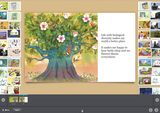
Two of my learners’ favorite award-winning, free, creative writing tools are Storybird and Pixton. With Storybird you can create a class and add students to it. You can also create specific assignments with a large assortment of illustrations to choose from. You and your learners can create poems, short picture stories or books. The advantage that Storybird and Pixton provide is that the image prompt can be chosen by you or your learners to begin brainstorming right on the page since it can be edited as many times as necessary. This is truly a lot of fun. Storybird and Pixton can be used with computers, tablets and smart phones through the mobile apps. The final version of the short story, poem, book or comic strip can be placed in your social network site or blog, or it can even be emailed.
Figure 1: Sample Storybird picture story development page—Images courtesy of Storybird and FranBravo.
Prompts used for scaffolding, such as sentence starters or word banks, along with the large assortment of beautiful illustrations found in Storybird and Pixton can be highly motivating and engaging for your learners. And it is just as motivating for them to have a large audience, including family and friends—as opposed to only their teacher. As a matter of fact, the Storybird poem function provides a word bank along with punctuation marks for learners to drag and drop to create their poem. Of course, you have to make sure that the vocabulary is familiar to your learners and let them know that they can also use their own words.
Figure 2: Sample Storybird poem development page—Images courtesy of Storybird and novoseltsev.
In planning a creative writing lesson to celebrate International Day for Biological Diversity, you can encourage your learners to write a picture story, a poem or a comic strip using Pixton— like the ones shown in the images. These activities can be collaborative. Pixton offers a user-friendly, fun way to develop comic strips. It contains a wide variety of characters to choose from and backgrounds.
Figure 3: Sample development page - Courtesy of Pixton.
I can attest from experience that when students know their work will have a large audience, they work very hard during the editing stage to develop a fine publication. I certainly hope that your learners feel as excited about these award-winning creative writing Web 2.0 tools. Remember, good writing skills are usually the outcome of diverse and constant exposure to good reading materials as well as systematic practice.
In the next article in this series, we will explore the use of Web 2.0 tools for reading activities.
Reference and Further Reading
Kendall, J. & Khuon, O. (2006). Best Practices. Writing Sense: Integrated Reading and Writing Lessons for English Language Learners (pp. 16-36). Portland, ME: Stenhouse.Filed under: Multimedia & Digital, Young Learners Tagged: Digital Learning, Web tools, Writing, Young Learners
Oxford University Press ELT blog
.
Blog
.
<span class='date ' tip=''><i class='icon-time'></i> Jul 23, 2015 07:57am</span>
|
|
Fancy livening up your classroom with some ready-made video activities? This is the final part of a series of four articles in which Keith Harding and Rachel Appleby share ideas for using the stunning new International Express video material. Each unit of the course features a video directly related to the unit topic. Here, Rachel offers ideas for using the clip from Upper Intermediate Unit 6 - PleaseCycle, which focuses on conditionals.
Before you watch
Try out some of these ideas to get your students thinking before they watch.
1. Discussion
You can focus on cycling from a number of angles, for example, you can think of it as a sport, a relaxing activity, or a method of commuting. Or you could discuss cycling equipment, safety issues, or infrastructure (for example, cycle paths). Find out quickly, open-class, how many of your students…
a. own a bike
b. cycle regularly (why/why not?)
c. participate in biking activities
2. Decide if these statements are true or false:
a. There are more bicycles than residents in the Netherlands.
b. In Groningen (in the Netherlands), the station has ‘parking’ for 1,000 bikes.
c. Spain has over 100 bike-sharing schemes.
d. The ratio between the number of cyclists in a city, and the number of bike-car accidents, is in inverse.
e. An adult regular cyclist has a fitness level of someone 20 years younger.
3. Brainstorm benefits and barriers
Move the discussion more closely to the video content by focusing on the benefits of and barriers to cycling. Put students into two groups: one group brainstorms the benefits, the other the barriers. Elicit 1-2 ideas per group, for example:
Benefits: keeping fit; saves on petrol
Barriers: you may need a change of clothes; lack of cycle paths
4. KWL Chart
Again, before they watch, you could do this with the audio. It’s an idea that works well with most listening or reading texts. Ask students to fill in a "KWL" chart: this looks at "what I know already, what I want to find out", and - later - "what I’ve learnt". Ask them to complete the first two sections alone (Know and Want), and then compare with a partner. Then, finally complete the third section (Learnt) afterwards (see exercise 8). This is very student-driven, as they are effectively making their own comprehension task.
5. Check key words
Tell the students they are going to watch a video about a new London scheme which aims to get as many people cycling to work as possible. Before watching the video, check students understand, and can pronounce, the following:
a. workforce
b. initiative
c. portal
d. gamification
While you watch
To maximize the learning opportunities, you need to set tasks for the students to focus on. The following exercise is taken from the video worksheet that comes with the International Express Teacher’s Resource Book DVD. All the worksheets are also available for free here. You just need your Oxford Teachers’ Club log-in details to view them.
6. Multiple choice
After you watch
7. Quick questions
Ask students for an immediate response.
What did they think?
Would they like to be involved in such a scheme?
Would PleaseCycle work for their company? Why/Why not?
How competitive would they be?
Would they encourage their company to register, and log their trips on the app?
8. Return to the KWL Chart
Go back to the KWL chart (see exercise 4) to check and complete part three.
Refer back to the "benefits" and "barriers" lists they brainstormed too.
9. Going into more detail
Before playing the video again, ask students what they can remember about Aegus Media, and Stravel. Both are mentioned in the video. Watch the video again, asking students to take notes about each company. Afterwards, let them compare notes in small groups.
Use the following questions to focus their ideas:
a. What did Aegus Media achieve using PleaseCycle?
b. How was their success measured?
c. What plans are there for Stravel?
10. Create a proposal
Each small group should imagine they are working together at a company. They need to create a proposal to convince the company managers to start using PleaseCycle.
Answers:
Ex. 2
a. T
b. F: 10,000
c. T
d. T
e. F: 10 years
Ex. 6
1. a
2. c
3. c
4. b
5. c
6. b
7. a Filed under: Adults / Young Adults, Grammar & Vocabulary, Multimedia & Digital Tagged: Adults, EdTech, International Express, Teaching adults, Video
Oxford University Press ELT blog
.
Blog
.
<span class='date ' tip=''><i class='icon-time'></i> Jul 23, 2015 07:57am</span>
|
|
This Friday, June 5th, marks UN World Environment Day, a day recognised to encourage worldwide awareness and action for the environment. With the theme this year being: ‘Seven Billion Dreams. One planet. Consume with care’, it’s worth looking at our every day practices, particularly in the classroom, and asking where we can conserve and reduce our consumption of resources. With the online resource of our Oxford Teacher’s Club and thousands of digital materials ready for download, we thought this week would be a great time to put together a collection of articles supporting paper-free and digital English language teaching.
Teaching a lesson with e-books
Teaching with Web 2.0 Tools (Part 1)
Teaching with Web 2.0 Tools (Part 2)
Teaching with Web 2.0 Tools (Part 3)
Flipping and Creating Video Presentations
Getting English language students to practise out of class
How do you use OUP digital resources in your class?
Using Social Media and Smart Devices effectively in your classroom
#EFLproblems - Facing your technology fears
The value of Virtual Learning Environments for Business English
Edmodo: Introducing the virtual classroom
5 Apps Every Teacher Should Have
So you want to teach online?
White paper on Tablets and Apps in School
Adapting online materials to suit your students
Using blogs to create web-based English coursesFiled under: Multimedia & Digital Tagged: Digital Learning, EdTech
Oxford University Press ELT blog
.
Blog
.
<span class='date ' tip=''><i class='icon-time'></i> Jul 23, 2015 07:56am</span>
|
|
I believe it was David Lloyd George who said you can't cross a chasm in two small jumps. And for late adopters of digital technologies in learning and development, that chasm is becoming ever wider.A chasm is a scary enough thing when it's narrow. The wider it gets, the scarier it gets. Fortunately, the technology exists to create stepping stones across the chasm. One of the things I have noticed, talking to late adopters is that many of them are of the opinion that their target user audience isn't ready to use digital technologies as part of their working/learning day.I'd like to address this from two angles. First of all, digital tech is here to stay, and it's evolving all the time. At some point, the chasm will have to be crossed, and I reckon sooner is better than later. That much is pretty inevitable to both providers and consumers of learning solutions. In five or ten years' time, the learning landscape is going to look very different, and as for the learner profile..! There seems to be a general consensus that by that time, even our late adopters are going to have to be functioning in that space. One very positive aspect to being a late adopter is that you don't have to follow the path taken by the trailblazers - they made a lot of mistakes. Just check where they are now, and plot a path to join them there.But I am seeing a tendency to postpone thinking about how they're going to get there. It is possible to introduce aspects of tech that set things in motion. You could digitise your happy sheets, for example. Such a small thing. You could move assessments online. You could introduce a tip/challenge of the week sent out to mobile phones. User manuals/process documentation could be moved online (or if that's too scary, locally based on computers/tablets), leveraging the navigational advantages that that brings, and paving the way for a full blown point-of-need performance support tool.Secondly, the user audience is seldom as digitally incompetent as the stakeholders seem to think. Many people, who are not regarded as being particularly digitally literate:Search for information using a search engine such as GoogleHave Facebook accountsCan take a photo with their smart phone and upload it to Facebook or send it to someoneCan use a satnav, either a purpose-made one or on their smart phonesFind and watch clips on YouTubeBook flights/holidays onlineBuy their groceries onlineBuy goods from Amazon and/or eBay and pay for them via PayPalAccess their children's VLEs in the school portaletc. etc.So I think we can gently challenge the perception of the stakeholders on that score - their user audience can often do more than they're given credit for, and there's no reason why they can't start to do some of those things as part of their learning experience.
Karyn Romeis
.
Blog
.
<span class='date ' tip=''><i class='icon-time'></i> Jul 23, 2015 07:56am</span>
|
|
Today, we feature a post from a guest blogger. Irina Lutsenko is a teacher of English from Saint Petersburg, Russia. Over her 10 years in the profession, Irina has taught teenagers, university students and adults. The courses she has taught include General English, Business English, IELTS preparation and TOEFL preparation. In this post, Irina explores how learning English can be much more than just following a course book, and how to fit ‘extra hours’ of English into the learning practice.
Being a teacher of English, I deal with piles of course books on a daily basis. Course books are really engaging these days, and I inevitably draw a lot of inspiration from them. Sometimes, a single sentence can start a long train of thought. In this post, I’m exploring one such instance, which led to a surprising realization! Lesson 9A in English File Intermediate (Third Edition) centers around the topic of luck. In this lesson the students read a text called ‘A question of luck?’ which explains why certain people become extraordinarily successful, and what factors contribute to their success.
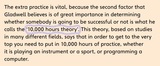
Have a look at the final paragraph of the text:
I don’t know about the specific number - 10,000 hours seems a little excessive! - but the theory behind it makes a lot of sense for language learning.
When deciding to embark on the journey of learning English, many students pin their hopes on the teacher and the course book. Unfortunately, just going to classes and following a course book is not enough. You do need to put in a lot of extra hours to become a successful language learner.
So how can you increase the amount of time you spend on English?
We’ll need to do a little maths here. Let’s say you have English classes twice a week and each class is one and a half hours long. That’s three hours of English a week. If you don’t do anything else - that’s just three for you. However, you can (and should) add the following:
Do your homework. That’s at least one hour per week. I love giving my students ‘enormous’ (in their words) homework. That’s at least one to two hours more. Add: three hours.
Start your day with a TED talk. These are short - 15 minutes on average, which gives you around two hours more per week if you start every day from listening to a TED talk. Add: two hours.
Read or listen to something in English on your way to work / school. Read a book if you go by metro or listen to an audio book if you go by car. Optimistically speaking, your way to work / school takes 30 minutes, multiply it by 2 and then by 5. Add: five hours.
Watch a series and/or a film in English. Most episodes of most series are only 20-30 minutes long. One episode each day multiplied by five working days gives you two and a half hours. At the weekend, watch a film. Add: four and a half hours.
Do some speaking. Find an English-speaking partner online, speak to your friends, join a Speaking Club. Add: one and a half hours.
Let’s throw in an additional hour for times when you check some vocabulary and/or make notes. Add: one hour.
Adding these together comes to seventeen additional hours of English - plus three hours of classes with a teacher. Combined, they total twenty hours of English a week!
It is overwhelmingly obvious that students who put in twenty hours of English a week will be more successful than those who put in just three. The extra hours - tens turning into hundreds, hundreds turning into thousands before you know it - they truly work wonders!Filed under: Adults / Young Adults, Grammar & Vocabulary, Teenagers Tagged: grammar and vocabulary, Teaching adults, Teenagers, Young Adults
Oxford University Press ELT blog
.
Blog
.
<span class='date ' tip=''><i class='icon-time'></i> Jul 23, 2015 07:56am</span>
|
|
If you know anything about me, you'll know that I have many passions and hot button topics in life. I am passionate about learning, and am embarked on a lifelong, lifewide learning experience.I am passionate about equality. Including - and perhaps especially - gender equality. I am hesitant to call myself a feminist, because the stereotypes associated with that term don't fit me comfortably as the happily married mother of sons, but I suspect I am often described as such. I will probably write more on that subject another day.I am also passionate about sport. Like many South African women, I can happily join in a conversation about almost any sport, without feeling as if the conversation excludes me or goes over my head. Almost any sport. I'm not a fan of the sport known as football in the UK and soccer in most other parts of the English speaking world. I do love cricket - pretty much in any format, 5-day tests, one day games, day/night games. I get a little tired of the endless T20 competitions, though, I confess. I only played cricket once, briefly, which 'epic fail' you can read more about here. My husband is even more passionate about cricket. He is possibly the only Swede ever to have opened the batting for a first division South African cricket team. I has been a source of frustration in my life that sportswomen have endured the uphill struggles that they have. So, when my husband shared this link on my Facebook page today, it filled me delight, and I felt the need to share it with you.Here's a potted history of women's cricket in England, from Enid Blakewell to Charlotte Edwards. I am thrilled that Blakewell's role in the women's game has finally been recognized by Wisden, if a little late in the day. I am also delighted that she's alive to see it. Too often these sorts of oversights are rectified posthumously.
Karyn Romeis
.
Blog
.
<span class='date ' tip=''><i class='icon-time'></i> Jul 23, 2015 07:56am</span>
|
|
This year Oxford University Press is excited to join IATEFL in the effort to bring more teachers to the 50th annual IATEFL conference in Birmingham through the Scholarship scheme. Sponsoring a scholarship seemed to be the most natural way to celebrate our own anniversary - the 70 years of ELT Journal, a quarterly publication for all those involved in English Language Teaching (ELT), whether as a second, additional, or foreign language, or as an international Lingua Franca. The ELT Journal has long had strong links with IATEFL, and the ELT J Debate has become an eagerly anticipated fixture in the IATEFL conference programme.
We hope that through this scholarship practising teachers will get a chance to take advantage of the IATEFL conference as a professional development opportunity - both in terms of ideas and theory shared at the talks and workshops, but also as a great time to network with fellow teachers from around the world.
The IATEFL annual meeting gives a truly global overview of contexts, experiences and practices, and to many delegates that is most valuable aspect of the conference.
It is not necessary to be a member of IATEFL to apply, and the applications must be submitted to IATEFL by 23 July 2015. Detailed criteria for the scholarship are available on the list of current scholarships.
APPLY FOR THE SCHOLARSHIP:
http://www.iatefl.org/scholarships/scholarships-how-to-apply
The award consists of:
Registration for the Pre-Conference event of the winner’s choice
Registration for the IATEFL Annual Conference
A year’s IATEFL membership
GBP 1500 towards conference related costs, including travel, accommodation, and visa costs
An annual individual subscription to ELT Journal online
An Oxford Teachers’ Academy online course of the winner’s choice
To qualify you must:
Be a practising teacher in primary, secondary, tertiary or adult education, state or private
Be interested in continuous professional development
Agree to submit a blog post about your conference experience by June 2016, to be published on the OUP blog: oupeltglobalblog.com
Agree to be interviewed (on video) by OUP about your conference experience, to be published on the OUP ELT global YouTube channel
To be considered for this scholarship you must submit a statement between 400 and 500 words in which you:
Outline your teaching context, including a brief description of your teaching community and the part you play in it.
Outline the professional development opportunities available to you in your context.
Identify key professional challenges NOT addressed by the professional development opportunities available to you in your context.
Outline an action plan for how you intend to take the learning gained during the conference to your teaching community.
APPLY FOR THE SCHOLARSHIP:
http://www.iatefl.org/scholarships/scholarships-how-to-applyFiled under: OUP ELT News, Professional Development Tagged: ELT J, ELT Journal, ELT Journal scholarship, IATEFL, IATEFL 2016, IATEFL Birmingham, IATEFL scholarship
Oxford University Press ELT blog
.
Blog
.
<span class='date ' tip=''><i class='icon-time'></i> Jul 23, 2015 07:55am</span>
|
|
A lot of blood, sweat and swearing has gone into the back story behind today's post. I am preparing to run a short internal workshop about the use of technology in learning. As part of that, I thought I might start with a brief, fun quiz, designed to demonstrate to my largely tech-shy colleagues that they are not as digitally illiterate as they think. Of course, it makes sense to deliver that quiz using technology in an intuitive enough form that it supports my message, right? Devising the quizSo I opted to use Articulate Storyline. I am fairly adept with Articulate Studio, having used it to build solutions for several of my clients when I had my own business, but I have only recently been coming to grips with Storyline. It's very handy for this sort of thing. So here we had learning experience 1. I made a few mistakes, and oversights, which revealed themselves in the test stages, but I managed to sort them out (I think). The challengesCreating the quiz proved to be the easy bit. The difficult bit comes when we start looking at the tech for the workshop. Here are the challenges I faced:There isn't enough cabling in any of our meeting rooms for everyone to bring along their laptops and access the quiz on our shared drive. There is only one, rather feeble, wifi network in our offices, which doesn't reach the meeting rooms.We have no supported tablets in our offices. We do, however, have some unsupported ones. These are generic non-iOS devices.The unsupported devices don't have access to our network drives.I don't have a space suitable for hosting the quiz module in a workable format.Normally speaking, in order to run an Articulate module on a tablet, you have to publish an html5 version and download the Articulate Mobile Player app from iTunes. That means it's only available to iOS devices.With the help of my remarkably supportive husband for some bits, this is what I will be doing:Creating a wifi hotspotI will create a wifi hotspot in the meeting room by bridging the networks on my laptop as follows (I hope - this bit has yet to be tested!): Hosting spaceThe tablets can then use that wifi to access the quiz. However, as I mentioned, there isn't a suitable space for me to host the quiz. So I'm hoping that I will be able to impose on the good graces of the people at Articulate to host the quiz on their tempshare space for the occasion. It is a little frustrating that I need to do this at all, but let's not go there for now.Accessing the quizOf course, the resultant link from the tempshare space will be a long-ass string of letters and numbers and I don't have a way of storing that link on the tablets, so I will use Bitly to shorten it and then, rather clunkily, ask my attendees to enter it manually into the address bar of the browser.BrowserThis brings me to the matter of the browser. As I mentioned, these are non-iOS devices. In order to run an Articulate module on a mobile device, said device needs to have the appropriate app. This app is only available from iTunes, so applies only to iOS mobile devices. However, thanks to this post by Robert George on the Articulate forum, I discovered that the way forward on my cheap and cheerful tablets was a browser called Dolphin.Having done that, I no longer needed the mobile player app. The tablet could run the quiz without it.So, at about midnight last night, my husband and I high fived each other and dragged our exhausted butts to bed.Now to see if I can replicate this in the office! It all hangs on that wifi connection!Wish me luck.
Karyn Romeis
.
Blog
.
<span class='date ' tip=''><i class='icon-time'></i> Jul 23, 2015 07:55am</span>
|
|
Dr Jenefer Philp is a senior lecturer at Lancaster University, and Director of Studies of the MA in Applied Linguistics and Language Teaching. She is interested in what research on second language acquisition has to say for the classroom. She has recently published two books related to the topic of peer interaction: Focus on Oral Interaction, with Rhonda Oliver and Peer Interaction and Second Language Learning, with Rebecca Adams and Noriko Iwashita. Today, she joins us ahead of her upcoming webinar, Peer Interaction in Foreign Language Settings.
In many language classrooms pair and group work between learners is common. In other settings, especially where numbers are high and seating is fixed, students can spend relatively little or no time learning from their peers: most of the discourse is between the teacher and the whole class. I suggest that in most classrooms peer interaction and teacher-led interaction can be complementary: learners benefit from both, and in different ways.
In this session we will focus on the potential benefits and problems of peers working together in foreign language learning classrooms.
How useful is it for learners to work together?
Should we try to use pair and group work, or is it a waste of time?
What is the role of the teacher?
I will discuss with you some of the research on peer interaction that has been carried out in foreign language classrooms among children, adolescents and adults. We will look at the potential benefits and discuss some of the challenges of peer interaction. By working out what students can gain through talking with one another, and how this complements the work of teachers, we can think about the strengths of peer interaction and how to make the most of peer activities in our classrooms.
Whether you are a teacher, researcher, or student yourself, I hope you’ll bring your stories of your own experiences, concerns and successes to share with us - through a combination of lecture and discussion, we’ll wrestle with the best ways to use peer interaction in your various classes, and ways to avoid common problems.
Topics we’ll cover:
What do we mean by "peer interaction"?
What types of peer interaction are there?
How can peer interaction support learning?
What about correcting errors?
What about large classes - the noise, the space, the time?
What does really useful peer interaction look like, and how can we get there?
For more on this topic do join Jenefer’s webinar, Peer Interaction in the Foreign Language Classroom,which will be held on the 24th and 25th of June. Register to join below.
Filed under: Professional Development, Skills Tagged: Peer work, Professional Development, Skills, Webinar
Oxford University Press ELT blog
.
Blog
.
<span class='date ' tip=''><i class='icon-time'></i> Jul 23, 2015 07:54am</span>
|
|
At a recent meeting, one attendee made an observation about how, when it comes to learning solutions, young people are comfortable with the use of technology, while older people are not. I challenged this, pointing out that I (being north of my 50th birthday) fall into the 'older' category, and I am perfectly comfortable with digital solutions (just as well, since I design them!). The person responded with, "Yes, but you're the exception."It wasn't an unfriendly exchange, that was simply her perception. One that I'm finding to be fairly widespread, and many late adopters are citing this as their reason for delaying the deployment of digital learning components in their learning solutions - they still have some older people on the staff.But is time we put this perception to bed, now. For one thing, it's ageist.Jane Hart and Harry get techie togetherI think generational labels like digital immigrants/natives, millennials, GenY, etc are anything but helpful in this regard, because they carry with them implications which the reality simply doesn't bear out. In fact, many of the movers and shakers in this field are no longer in the first flush of youth by any stretch of the imagination.Let's look at some case studies:Today, I read a blog post by Tony Bates, announcing his retirement. Tony recently turned 75, and many commenters are skeptical that he will be able to stay retired, because he lives and breathes online learning.Jay Cross is often credited with being the first person to use the term e-learning. Whether or not this is true isn't really the point. What is the point is that Jay is one of the movers and shakers in the field of digital learning, and - as far as I know - his 60th birthday is in the past. The link takes you to a website, but you'll find him on Twitter, Facebook, Google+, LinkedIn, Diigo, Pinterest... Jay is the CEO of the Internet Time Alliance, a collective which helps organisations become more networked, collaborative, distributed and agile. The other members of this group are Harold Jarche, Charles Jennings (think 70:20:10), Clark Quinn and Jane Hart (of the annual 100 top tools list - see photo). I'm on hugging terms with all these people, so I hope they won't mind me telling you that none of them will ever see 50 again. On his Facebook page, Charles recently shared a video of himself playing the banjo (the man is a skilled musician, as so many learning geeks appear to be) on the occasion of his 65th birthday. Jane Hart's Facebook page is full of photos of her adored grandchildren.Stephen Downes is a highly regarded "commentator in the fields of online learning and new media" (as his wikipedia page asserts). His OLDaily blog posts are varied and interesting - required reading for anyone who wants to keep up to date with developments in the field. He celebrated his 55th birthday earlier this month.Together with Stephen Downes, George Siemens developed the Theory of Connectivism as a way of describing learning in the digital era. In his early 40s, George is probably going to be the baby of this group that I'm throwing together here today. I just hope he doesn't mind being lumped together with all these oldies ;)There are many other examples of luminaries in the field, and I could sit here all day, listing people - purely from memory - who are leading lights in the field and north of 50. But let's come down a notch to more everyday people:My Facebook friends list includes at least two people in their 80s.I keep in touch with my 74 year old Mom by means of WhatsApp and Skype. When a WhatsApp message arrives from her, my screen announces her as 'Barbara the Legend'. And that's what she is.My doctors' surgery has an interactive screen by which patients of all ages make their arrival known. I've seen them do it.Buying groceries online and having them delivered is a boon for elderly and/or infirm customers. I have no concrete examples, but I'm confident they exist, and that more people would use the facility if they just got a little help with the initial learning curve.Autobanks are used by people of all ages. Next time you use one, take a look at the demographic of the other users.eReaders are a great tool for bookworms with arthritis and/or grandchildren. Imagine being a grandparent with an entire library of books in your handbag/pocket! I'm not a granny yet, but I know all about how the pain of arthritis! There are some fabulous interactive ebooks to explore with grandchildren.I've read Amazon book and product reviews by people of all ages.And on and on and on We have got to stop thinking of digital spaces as being the comfort zone of the 'young'. Jane Bozarth often refers to herself as 'the oldest millennial'. I think there are several others who might give her a run for her money (caveat: I have no idea how old Jane is).Give your older staff members some credit. I'm pretty sure they'll surprise you.Before I go, let me share this BBC article (with video) about 'cybergrannies'.
Karyn Romeis
.
Blog
.
<span class='date ' tip=''><i class='icon-time'></i> Jul 23, 2015 07:54am</span>
|