Blogs
|
Greetings! My name is Sarah Mason and I am a Ph.D. student in the Evaluation & Applied Research Methods program at Claremont Graduate University. My research focuses on the effectiveness of data visualization techniques, and my goal is to make sure that the communication strategies evaluators use have as much empirical support as the programs we evaluate.
Last year a bunch of us got together at AEA to talk about our research and experience with data visualization (AEA 2014 session #DVR2). Here’s a summary of what we found.
Lesson learned: We need more empirical data on the effects of data visualization in evaluation! One experiment with members of the public showed visual data reports were no more influential than text-based reports in shaping readers’ attitudes. But we need more research to understand how and why these findings occurred.
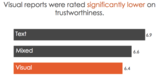
Lesson learned: One data visualization does not fit all! This same experiment showed that members of the general public viewed visual reports as less credible and of lower quality than text-only reports. Tailoring your data visualization to your audience is essential if you want to get your message across.
Rad Resource: Using MTurk to field-test your reporting strategies is a fast and low-cost way of trialing your visualizations before sending them to clients < https://www.mturk.com/mturk/welcome>
Lesson learned: One key to understanding the effectiveness of data visualization is knowing how it alters the cost structure of a task: whether it makes processing information easier or more difficult. Not all data visualizations are equal, and unless we’re careful our visualization efforts may make this processing task harder!
Rad Resource: Colin Ware’s book on Information Visualization offers a great overview of the theoretical foundations for data visualization techniques and strategies <http://www.amazon.com/Information-Visualization-Third-Edition-Technologies/dp/0123814642>
Lesson learned: Adding interactivity to PDF documents is one way to tailor reports so readers can choose their own reading adventure.
Rad Resource: Nicole Lobb Dougherty’s presentation at AEA 2014 was a great introduction to adding simple interactivity to PDFs http://comm.eval.org/viewdocument/?DocumentKey=cd2aa473-f749-40c7-a3ca-d943d79828d2
Lesson learned: Actively working with the media to develop visual materials they can use can help to make sure your message gets across to a wider audience.
Rad resource: Robin Kipke’s presentation at AEA 2014 offered an insightful overview on how the Tobacco Control Evaluation Center worked with the media to communicate evaluation findings to the general public.
The American Evaluation Association is celebrating Data Visualization and Reporting (DVR) Week with our colleagues in the DVR Topical Interest Group. The contributions all this week to aea365 come from DVR TIG members. Do you have questions, concerns, kudos, or content to extend this aea365 contribution? Please add them in the comments section for this post on the aea365 webpage so that we may enrich our community of practice. Would you like to submit an aea365 Tip? Please send a note of interest to aea365@eval.org. aea365 is sponsored by the American Evaluation Association and provides a Tip-a-Day by and for evaluators.
AEA365
.
Blog
.
<span class='date ' tip=''><i class='icon-time'></i> Jul 27, 2015 11:31am</span>
|
|
Hi! I’m Dave Shellard, the program evaluation manager at a professional association based in Washington, DC and Data Visualization and Reporting TIG (DVR TIG) Program Chair. As a founding member of the DVR TIG I’ve been a long advocate of incorporating meaningful and intentional data viz into communicating evaluation results.
Like many of us, I’m faced with tight resources for data visualization tools and I’ve found the older posts on this blog on free or low cost tools helpful. However, I often hit a snag for data analysis and viz tools - my data would land in the public domain as part of the agreement to use the free version and in some cases that can be beneficial. However, depending on the sensitivity of my data it is not always acceptable. I have had to scale back my expectations and look to build something myself in Microsoft Excel or PowerPoint.
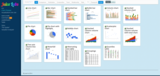
Rad Resource: Using the Juice Analytics Chart Chooser I can filter through the free tool for ideas and download a template in Excel or PowerPoint. Most importantly I can keep my data off of a third party server. Their templates also put our data first and fancy design second, helping me tell my story.
Rad Resource: I used the Speedometer Graph in Excel template to explore an idea for a project. My idea didn’t pan out but it was not due to my data needing to be uploaded to a third party server for presentation.
Rad Resource: A recently used the Map of the United States Google Document template to create a very basic heat map. I was in a pinch and this template worked perfectly to help illustrate my story. I did not have to upload any data and the document was stored in my Google Drive where I control the privacy settings.
Lesson Learned: Not every free template is created equal and some may lead you to a visualization that confuses your story may not score very high on the Data Visualization Checklist. With a little knowledge of Excel or PowerPoint you can convert any of these templates to match your style.
Have a free downloadable template that you like? Leave a link in the comments.
The American Evaluation Association is celebrating Data Visualization and Reporting (DVR) Week with our colleagues in the DVR Topical Interest Group. The contributions all this week to aea365 come from DVR TIG members. Do you have questions, concerns, kudos, or content to extend this aea365 contribution? Please add them in the comments section for this post on the aea365 webpage so that we may enrich our community of practice. Would you like to submit an aea365 Tip? Please send a note of interest to aea365@eval.org. aea365 is sponsored by the American Evaluation Association and provides a Tip-a-Day by and for evaluators.
AEA365
.
Blog
.
<span class='date ' tip=''><i class='icon-time'></i> Jul 27, 2015 11:30am</span>
|
|
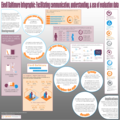
Hi! I’m Mandi Singleton, Research Assistant at Carson Research Consulting (CRC) in Baltimore, Maryland. Last October I attended Eval 2014 and gave a poster presentation on the process, results and implications of translating data findings into an infographic. My main focus when designing the poster was graphical content. I wanted to impress upon viewers the impact that data visualization can have on audience perception, recall and retention of information. My overall goal was to encourage people to think about the benefits of translating findings into an infographic.
Hot Tips: Below are the steps I took to design my poster:
Step 1: Identify the basics.
Determine the purpose, audience and key message of your poster. These things will help inform the content of your poster.
Step 2: Determine content.
All content should be supportive of your key message and catered to your audiences’ level of knowledge. Be mindful of terminology, acronyms and icons used in your poster.
Step 3: Sketch your design.
I sketched the layout for my poster using pencil and paper, but you can use whatever medium you like. The goal here is to get an idea of how you want your poster to look.
Hot Tip: Sketch your design on a paper that is the same size your poster will be. This helps with spacing and determining the placement of content.
Step 5: Create!
My poster was created using Microsoft Publisher 2013.
Insert your content. Most of my visuals were directly inserted into Publisher as image files. You can also create charts/data visuals in another program (like Excel) and paste them straight into Publisher.
Guide viewer’s eyes by creating visual paths of interest. This can be achieved through the use of color, varied font types and strategically placed shapes.
Determine the color scheme. My posters color scheme was orange, gray, burgundy and blue. Orange and gray were chosen because they’re our company colors; burgundy and blue were selected because they looked nice with our company colors.
Hot Tip: You can apply color schemes in Publisher; create your own or select a pre-made one.
Rad Resource(s): For help selecting a color scheme, visit Adobe Kuler (provides RGB & HEX codes) or HailPixel (provides HEX codes).
Step 6: Prepare poster for printing.
Before printing, check for things like spelling errors, objects in non-printable regions and poor image resolution.
Hot Tip: If you’re using Publisher you can run ‘Design Checker’ (found on the home tab) to find problems in your poster for you.
Do you have any other tips for creating a poster presentation? Share by leaving a comment below!
The American Evaluation Association is celebrating Data Visualization and Reporting (DVR) Week with our colleagues in the DVR Topical Interest Group. The contributions all this week to aea365 come from DVR TIG members. Do you have questions, concerns, kudos, or content to extend this aea365 contribution? Please add them in the comments section for this post on the aea365 webpage so that we may enrich our community of practice. Would you like to submit an aea365 Tip? Please send a note of interest to aea365@eval.org. aea365 is sponsored by the American Evaluation Association and provides a Tip-a-Day by and for evaluators.
AEA365
.
Blog
.
<span class='date ' tip=''><i class='icon-time'></i> Jul 27, 2015 11:29am</span>
|
|
Hi! We are Sara Vaca, independent consultant (EvalQuality.com) and Creative Advisor of this blog and Joseph Barnes (Senior Partner at ImpactReady). Today we are going to talk about the work ImpactReady is sponsoring to develop new ideas for using creativity and Dataviz to celebrate the International Year of Evaluation.
Like many evaluators, we have been really inspired by the energy and events that have circulated around EvalYear, and we wanted to find a way to make our contribution to coming-together. After exploring several opportunities, we decided to combine our love of sharing the things we have learnt about practicing evaluation with exploring the exciting new frontier of visualization.
Increasing access to broadband and awareness of how important user experience (UX) is to utilization means that there is a growing interest in Data Visualisation (Dataviz) in the evaluation community. But few of us are yet practicing it as much as we would like to. To help things along, we are attempting to create one new example of evaluation visualization each month throughout EvalYear.
With each of these products, we are seeking to achieve three aims:
To promote the dialogue within the evaluation community;
To foster deeper knowledge of evaluation theories; and
To have fun learning.
Rad Resources: Our first releases include:
Evaluation Metromap: Joseph put together this ‘underground map’ of evaluation where each line gathers the most representative of various evaluation aspects such as theories, approaches, techniques, actors, paradigms, etc.
What type of evaluator are you? Test: we created this non-scientific multiple-choice test to help evaluators discover if they embrace the paradigm they think they do. We invite you to try it (and help us improve it)!
What is good (and bad) evaluation (infographic): after having done many meta-evaluations, we have seen many common mistakes - including in our own work. We created this infographics as a way to provoke ourselves, and our fellow evaluators, to be as clear as possible about what we think ‘good’ really looks like.
Ethical issues in evaluation: Ethics is often a forgotten element in evaluation. We wanted to highlight typical controversial moments in evaluation to acknowledge them.
Rad Resources: You are welcome to visit the full project at EvalYear.com, and we have more releases coming soon. Here is a sneak peak:
A decision tree for helping with the Evaluation design
A motion picture explaining what evaluation really is.
A Gender dashboard
An evaluation coffee table e-book
And others!
Keep tuned to know more, and as usual, feel free to comment and contribute with your thoughts to help us learn more!
The American Evaluation Association is celebrating Data Visualization and Reporting (DVR) Week with our colleagues in the DVR Topical Interest Group. The contributions all this week to aea365 come from DVR TIG members. Do you have questions, concerns, kudos, or content to extend this aea365 contribution? Please add them in the comments section for this post on the aea365 webpage so that we may enrich our community of practice. Would you like to submit an aea365 Tip? Please send a note of interest to aea365@eval.org. aea365 is sponsored by the American Evaluation Association and provides a Tip-a-Day by and for evaluators.
AEA365
.
Blog
.
<span class='date ' tip=''><i class='icon-time'></i> Jul 27, 2015 11:29am</span>
|
|
I have written about the benefits of Pinterest in past AEA365 posts, but now I want to help you get started! Pinterest is a great resource for identifying visual trends in evaluation—it’s also pretty fun to use for your personal life.
First let’s understand the language:
Pin: Pins are visual bookmarks that you collect on boards. You can save Pins you find on the Pinterest site or add new ones from your favorite websites or personal computer.
Boards: Boards are where you save your Pins. You can make boards for anything and everything.
Follow All: When you select "Follow all" you choose to follow all of someone’s boards, meaning all their boards are shown to you in real-time on your Pinterest Home Page.
Follow Board: When you select "Follow board" you choose to follow and see updates on just one board from the individual’s profile.
How to Join: Just go to Pinterest.com and click on the prompt to "Join." () You can use your Facebook login to create an account or just develop a user name and password. If you use your Facebook account, the two platforms will be connected and your Facebook followers will be able to see your pins. Once you create an account, Pinterest will ask you to create a profile, where you can add a photo.
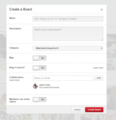
Create a Board: Go to your profile and select the icon that says "Create a board." This will open a form that prompts you for the name of your board, description, and category. People make boards for all sorts of topics and interests. Fo r example, data visualization info graphics, or even DIY all make great options for a board—the possibilities are endless.
Add a Pin: Now comes the fun part—you can start pinning images to your boards! To find interesting images, you can either search for a specific topic by keyword, or choose a topic from the drop down selection (located on the end of the search bar). Select "Home Feed" from the drop down box to see the pins of others you are following.
Once you find a pin that you like, hit the "Pin it" button at the top of the image. This will allow you to select the board you wish to pin the image to. Now if you visit your profile, you will see the image on your board and the source of the image for more information.
You can also add pins from the web, by adding the Pinterest button to your browser or upload your own images from your computer.
If you want to save an image but not necessarily add it to a board, you can like the image.
Dive right in: Pinterest can be a bit overwhelming at first, by just dive in. You will soon discover how intuitive it is to create boards, add pins, and browse the unlimited pins available on Pinterest.
Do you have questions, concerns, kudos, or content to extend this aea365 contribution? Please add them in the comments section for this post on the aea365 webpage so that we may enrich our community of practice. Would you like to submit an aea365 Tip? Please send a note of interest to aea365@eval.org. aea365 is sponsored by the American Evaluation Association and provides a Tip-a-Day by and for evaluators.
AEA365
.
Blog
.
<span class='date ' tip=''><i class='icon-time'></i> Jul 27, 2015 11:29am</span>
|
|
My name is Angie Ficek and I am a Program Evaluator at Professional Data Analysts, Inc. (PDA), a small firm in Minneapolis, MN that specializes in public health evaluation. Every once in a while I include timelines in my reports and/or presentations. I know there are many tools out there to create timelines, including Office Timeline and Timeline Maker, but recently I have been using a standard line chart in Excel. Say what?! Yes, I know, it’s crazy! But look at this lovely timeline!
So how do you do it? Like I said, you will want to use a line chart in Excel. For this example, here is what my datasheet looks like:
The first two columns are the year and month, and then I have a column for each timeline event - Intake data, Follow-up data, and Reports. Since I want these three events to appear in that order, from top to bottom, I typed in a 3 for each month for which there is Intake data available. I did the same for the Follow-up data with the number 2. And then for the Reports, since these happen at one point in time versus being continuous, I typed a 1 in the month in which a report is submitted, but left the cells in between blank. The exact numbers that you use aren’t as important as having equal spacing and the right amount of spacing between the events. For example, 2.5, 1.5 and .5 would have worked just fine too, but 3, 1.5, and 1 would have resulted in uneven spacing between events, which can be distracting to your audience and personally makes me twitch.
Ok, so our data is set up, and our chart looks something like this:
Not quite to the final product, but you’re close. From here we delete the vertical axis (and adjust the axis range if needed), the gridlines, and the legend, then reformat each data series. Change the marker type for the Reports to a sunburst, or circle, and adjust the color. Get rid of the markers for the Intake data and Follow-up data series and adjust the line color and width. Then, one at a time, select the first and last data points of these two series to add a sunburst, or circle, to the start and end of them. The final step is to label each event as needed with a text box.
Do you have questions, concerns, kudos, or content to extend this aea365 contribution? Please add them in the comments section for this post on the aea365 webpage so that we may enrich our community of practice. Would you like to submit an aea365 Tip? Please send a note of interest to aea365@eval.org . aea365 is sponsored by the American Evaluation Association and provides a Tip-a-Day by and for evaluators.
AEA365
.
Blog
.
<span class='date ' tip=''><i class='icon-time'></i> Jul 27, 2015 11:29am</span>
|
|
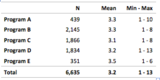
My name is Angie Ficek and I am a Program Evaluator at Professional Data Analysts, Inc. (PDA), a small firm in Minneapolis, MN that specializes in public health evaluation. It wasn’t too long ago that I was reviewing a co-worker’s report and came across a bunch of tables of descriptive statistics like the one below. I couldn’t help but think, "There has got to be a better way to visualize these!"
Then I remembered learning about dot plots from Ann Emery (for a quick 5 minute tutorial on how to create them, click here) and reading a blog post from Stephanie Evergreen on dumbbell plots. I applied the same concepts and came up with this:
It’s similar to a box or stock plot, but is actually created with an Excel scatterplot. In this example, I had three x-values (for the min, mean, and max), so I inserted three y-values which tell Excel where the data points should fall on the invisible y-axis.
As for the oh-so-important formatting of the data points, I added a marker for the mean and a light gray line to signify the range. I added the automated data labels above each data point and formatted the font size and color so that the means stood out more than the min and max since they were the most important value. Then I manually added text boxes to label the min, mean, and max along the top, and the program names along the left side.
I was really excited to find a simple, visual way for our client to see the pattern of these descriptive statistics a little more quickly. I cannot wait until I get to chart some descriptive statistics again! Said no one ever - until now.
Do you have questions, concerns, kudos, or content to extend this aea365 contribution? Please add them in the comments section for this post on the aea365 webpage so that we may enrich our community of practice. Would you like to submit an aea365 Tip? Please send a note of interest to aea365@eval.org . aea365 is sponsored by the American Evaluation Association and provides a Tip-a-Day by and for evaluators.
AEA365
.
Blog
.
<span class='date ' tip=''><i class='icon-time'></i> Jul 27, 2015 11:29am</span>
|
|
Hello! I’m Kate Tinworth, Program Co-Chair of the DVRTIG. I am excited to write about one of my favorite parts of my work as an evaluator— drawing.
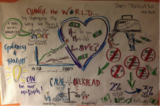
Last year at AEA I co-presented a session called, "Drawing Them In: Graphic Facilitation & Evaluation to Strategically Visualize Change" with my friend Chris Chopyak (a rock star who literally wrote the book on using visuals to help businesses address challenges and create strategies). We reminded our audience that we all think visually, images are key to memory and learning, and that you—yes, you—can draw. And you should! Visuals can resolve ambiguity, cut across language and cultural divides, help findings become more salient, and kick start action.
Hot Tip: Find a Local Friend.
If you want to explore the potential of teaming with a graphic facilitator, it’s time to make some new friends. Check out the International Forum of Visual Practitioners (IFVP): http://ifvpcommunity.ning.com/. There’s bound to be someone near you!
Rad Resource: Go to a Class/Workshop.
There are great opportunities to try your hand at graphic facilitation, whether you plan to incorporate it into your evaluation practice or just want to stimulate your visual thinking. Though it can feel intimidating, I highly recommend signing up for a class. Learning graphic facilitation techniques have helped me to sketch out graph and chart ideas, think through report layouts, and get far more creative with methodology and instrumentation.
Cool Trick: Drink.
Some graphic facilitation practitioners, including Chris, do "drink and draws" where you can get some drawing practice over a cocktail. Amazing!
Hot Tip: Draw. All the Time.
To become more comfortable with drawing I draw, all the time. Try covering your dining room/kitchen table with butcher paper and put crayons or colored pencils out. When you sit down for coffee or a meal, draw. Tape paper to the wall and "live capture" TED talks or your favorite podcasts. Carry a notebook and favorite pen everywhere. Commit to drawing for just 2 minutes a day.
Cool Trick: Apps.
More of a techie? Draw on your tablet! I like Notability and iMotion.
Rad Resource: Get Inspired.
The DVRTIG is a great place to find inspiration and make connect with colleagues who care about visual thinking. Check out the AEA365 blog posts, the TIG website, and resources on p2i.
Hot Tip: Go Visual.
Whenever you can, try to "go visual" in your projects. Try a visual logic model. Engage stakeholders in drawing. I often get my stakeholders to draw during a training or as I present preliminary data. Lately I have also been experimenting with data placemats, which I learned about through AEA (thanks @VeenaPankaj).
Do you have questions, concerns, kudos, or content to extend this aea365 contribution? Please add them in the comments section for this post on the aea365 webpage so that we may enrich our community of practice. Would you like to submit an aea365 Tip? Please send a note of interest to aea365@eval.org . aea365 is sponsored by the American Evaluation Association and provides a Tip-a-Day by and for evaluators.
AEA365
.
Blog
.
<span class='date ' tip=''><i class='icon-time'></i> Jul 27, 2015 11:28am</span>
|
|
I am Jackson Hille, the Content Associate for FormSwift, a SF-based startup that helps organizations, entrepreneurs, and businesses go paperless. Recently, for a work project, I had to evaluate the current strengths and weaknesses of our content campaigns, and also decide what content avenues present our greatest opportunities and our greatest threats. As a professional evaluator, you might be familiar with the aforementioned planning concept, commonly referred to as a SWOT Analysis. I am new to the business world, as I just graduated from UC Berkeley in May 2014, so as any decent millennial would do, I Googled and searched guides to SWOT Analysis. While the majority of what I found was disappointing, there was one existing rad resource out there from the University of Kansas; nonetheless, there was no SWOT Guide that combined honest evaluations about the modern economy, usable templates and a user friendly design. So, I called up my college mentor and we created our own, "Essential Guide to SWOT Analysis."
Rad Resource: The Community Tool Box’s SWOT Chapter:
The Community Tool Box is a service of the Work Group for Community Health and Development at the University of Kansas. Their SWOT Guide is comprehensive, user friendly and a great resource for any evaluator within the public health or community development field. The SWOT Guide not only provides a thorough explanation of the appropriate evaluation process when conducting a SWOT Analysis centered around health and community development related issues, but it also provides readers with multiple forms of content. For instance, it contains relevant examples for health and community development professionals, a ready-made PowerPoint version of the guide’s highlights, and a handy checklist to ensure you are taking the correct steps when conducting your SWOT Analysis.
Rad Resource: The Essential Guide to SWOT Analysis:
The Essential Guide to SWOT Analysis is the end product of a unique collaboration. As previously noted, through my work at a startup, I realized that there were no great, comprehensive SWOT guides out there, especially for people in the business world. So, I enlisted my college mentor, Justin Gomer, a Lecturer at UC Berkeley, and we decided to make a comprehensive guide ourselves. The finished product is a guide to SWOT Analysis that is readily usable for either a professional evaluator hired as a consultant to help out with a company’s investment strategy, or for a volunteer at a non-profit, who needs help evaluating an organization’s goals for the upcoming summer.
Do you have questions, concerns, kudos, or content to extend this aea365 contribution? Please add them in the comments section for this post on the aea365 webpage so that we may enrich our community of practice. Would you like to submit an aea365 Tip? Please send a note of interest to aea365@eval.org . aea365 is sponsored by the American Evaluation Association and provides a Tip-a-Day by and for evaluators.
AEA365
.
Blog
.
<span class='date ' tip=''><i class='icon-time'></i> Jul 27, 2015 11:28am</span>
|
|
Hi, Veronica Olazabal, senior associate director of evaluation at The Rockefeller Foundation here with Karim Harji, director at Purpose Capital. As many of you already know, market-based approaches to poverty alleviation are gaining traction across the social sector. A range of innovative strategies are being used to finance these initiatives, including impact investing—an approach to deploy various types of capital to intentionally deliver social impact alongside financial return.
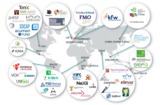
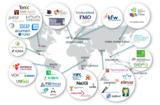
Mapping of the Impact Investing Industry (courtesy of E.T. Jackson and Associates)
There is clearly a strong need to strengthen impact measurement and evaluation in this space. Many evaluators have had limited engagement to date, but it is an emerging topic of interest, as demonstrated by the focus at the Evaluation 2014 AEA annual conference. Below, we outline a few ways the evaluation community can become more engaged with evaluating impact investing:
Lessons Learned:
Break out your Theory of Change facilitation skills! Like more conventional social sector program-designs, impact investors have theories of how they expect change to happen, including assumptions and goals.While they may use an ‘investment thesis/approach’ instead of ‘theory of change,’ they often use these models to select, assess and monitor investments. Thus, it should not be surprising that theory of change has become a tool of emerging importance to impact investing. Rad Resource: Interrogating the theory of change.
Use monitoring strategies to generate timely data: Monitoring can be an important strategy for tracking social performance, especially since investors already use financially-focused tools in this way. When designed and implemented well, monitoring data can provide timely and relevant information that can be used to adapt operational plans for investee enterprises or funds. For example, in the access to finance sector, monitoring has been used effectively to validate that target beneficiaries and clients are actually being reached. Rad Resource: Portfolios of the Poor
Gain familiarity with emerging standards and approaches: There are a range of initiatives in this sector that seek to assess social change for a range of uses and users. For example, the Impact Reporting and Investment Standard System(IRIS) seeks to build a standard vocabulary/taxonomy at the output level, while Global Impact Investing Global Rating System (GIIRS) is a standards-based rating system that assesses impact funds and social enterprises.
As this area continues to evolve, more evaluation capacity will be needed at every level, and particularly around moving from lives touched (reach) to validating lives impacted (depth) in the field. Evaluators will be important not only to assess the intended and actual outcomes from individual transactions, but also to critically analyze how the field is contributing to market-based approaches to poverty alleviation.
Rad Resource: Assessing Impact Investing: Five Doorways for Evaluators - Ted Jackson and Karim Harji.
Do you have questions, concerns, kudos, or content to extend this aea365 contribution? Please add them in the comments section for this post on the aea365 webpage so that we may enrich our community of practice. Would you like to submit an aea365 Tip? Please send a note of interest to aea365@eval.org . aea365 is sponsored by the American Evaluation Association and provides a Tip-a-Day by and for evaluators.
AEA365
.
Blog
.
<span class='date ' tip=''><i class='icon-time'></i> Jul 27, 2015 11:28am</span>
|