Blogs
|
In this blog post we will discuss K2 BlackPearl Mangement worklist webpart customization.
K2 offers Management Work list webpart and Work list webpart for managing work lists. However, there are situations when the webparts need to be customized to meet additional business requirements. Recall that the out of box K2 Management Worklist web part requires the user to have admin rights on the process and presents all process instances of that process running in the system without providing any filtering functionality?
Disassembling the appropriate K2 assemblies and inspecting the source code of ManagementWorklistWebPart class, we can see that the bulk of the processing to fetch the data to be displayed happens in the LoadWPData() method and a fair bit of the processing is performed using classes declared internal to the assembly. The end result of the processing is the creation of a DataTable object containing data for all process instances and assigned to a class member. There are two different options to enhance this class:
Option 1 - Override this method in a class derived from the out-of-box ManagementWorklistWebPart class.
Option 2 - Invoke the base class’s LoadWPData() method in the derived class followed by applying the desired filter on the created DataSet.
Below is an implementation of Option 2. To prune down the unfiltered data set, it’s joined with a data set containing only rows of interest. This 2nd data set can be created in any desirable way (e.g. using filter parameters exposed as web part properties). In our implementation it’s created using a process SmartObject’s GetList() method, which is then filtered based on the Project ID stored as Process Data Field in the current process instance. The joined data set is stored in the class member _dataTable, from where it’s rendered using other methods in the base class.
public override void LoadWPData()
{
try
{
// Create the unfiltered data set using base K2 class
base.LoadWPData();
// Create the filtered data set using DHF SmartObject and join with Unfiltered set to remove unwanted rows
DHFProcessData dhf = new DHFProcessData();
dhf.Status = 1;
if (bFilteringInEffect)
{
DataTable dt = dhf.GetList();
IEnumerable<DataRow> query =
from processInst1 in _dataTable.AsEnumerable()
join processInst2 in dt.AsEnumerable()
on processInst1.Field<string>("ProcInstId") equals processInst2.Field<string>("ProcessInstanceId")
select processInst1;
DataTable boundTable = query.CopyToDataTable();
this._dataTable = boundTable;
}
}
catch (Exception ex)
{
this._errorList.Add(ex.Message);
}
}
About the Authors:
This article is written by Viraj Bais and Surya Penmetsa from Netwoven. Viraj Bais is the CTO of Netwoven and Surya Penmetsa is a Principal Consultant with Netwoven. Both Viraj and Surya specialize in the design and implementation of highly scalable solutions with SharePoint, K2, .NET, and many other technologies. Netwoven is a professional services firm founded by ex-Microsoft employees. Netwoven specializes in the design and implementation of Enterprise Content Management, Business Intelligence, Business Process Management, Cloud Services and mobile applications. For additional information, please contact us at info@netwoven.com.
Netwoven
.
Blog
.
<span class='date ' tip=''><i class='icon-time'></i> Jul 27, 2015 12:58pm</span>
|
|
"Winter is Coming" is a key theme of the popular HBO series Game of Thrones. With its warning of constant vigilance, the meaning is clear - no matter how good or calm things seem now, the good times and serenity won’t last forever…and you need to prepare and be proactive to ensure you’re ready for when the tide turns. While talk of the long, dark winter in Game of Thrones centers around the inevitable attacks of the White Walkers and their ability to conquer the Seven Kingdoms if not unchecked, he could easily have been speaking...
SHRM
.
Blog
.
<span class='date ' tip=''><i class='icon-time'></i> Jul 27, 2015 12:58pm</span>
|
|
As many of you may know , Microsoft SharePoint has been the largest-selling software product in the history of the company. In the last 11 years, since the arrival of SharePoint 2001, SharePoint has captured a large share of the collaboration market. Today, SharePoint 2010 is used widely as a content or document management system, for company intranets, extranets and public websites.
We can define these terms as:
Intranet - An intranet is the internal facing portal in your company for your employees
Extranet - An extranet is the protected external facing portal in your company. It is used by business partners, clients and special customers
Public Website - The public website is the public-facing version of your website.
There are many benefits for organizations that use a common tecnology and framework for all of their web properties. These include:
Savings in software licensing costs
A smaller pool of developers competent in similar technologies
Historically, companies have been unable to use a common technology across the web properties because of the cost of the solutions, and the difficulty of using the solutions.
SharePoint 2010 includes a number of rich content management features that help organizations to manage their content and keep it current. These features include:
Various page layout options allowing website creators to create pages quickly
Ability to support rich streaming media
Ability to roll up content easily
Common meta data that allows content to be published once and available anywhere
Better control during the authoring process
Workflows for content review and approval
Easy deployment from staging to production
Web analytics
In our subsequent blog posts, we will be discussing the specific features of SharePoint 2010 and third party products to help create a useful customer portals or extranets.
About the Authors:
This article is written by Niraj Tenany from Netwoven. Niraj is the CEO of Netwoven and works with clients to assist them with their content management and big data strategies. Niraj has extensive experience with SharePoint, Livelink, Documentum, Business Objects, Cognos and Microsoft BI tools. Netwoven is a professional services firm founded by ex-Microsoft employees. Netwoven specializes in the design and implementation of Enterprise Content Management, Business Intelligence, Business Process Management, Cloud Services, and Mobile Applications. For additional information, please contact us at info@netwoven.com.
Netwoven
.
Blog
.
<span class='date ' tip=''><i class='icon-time'></i> Jul 27, 2015 12:58pm</span>
|
|
The SHRM Annual Conference & Exposition is just around the corner and the YPAC is gearing up for the event! What does "YPAC" mean? YPAC stands for the Young Professionals Advisory Council. As explained on SHRM’s website, the YPAC exists to serve the interests of SHRM young professional (YP) members and provide guidance to SHRM for attracting and retaining non-member YPs. The YPAC also exists to ensure that SHRM YP activities are relevant to members and SHRM. Who is the YPAC? ...
SHRM
.
Blog
.
<span class='date ' tip=''><i class='icon-time'></i> Jul 27, 2015 12:57pm</span>
|
|
Big Data has been a topic of intense discussion and media hype during the last year or two. A number of people have asked Netwoven consultants the following questions:
- What is Big Data?
- What is Hadoop?
- What is Microsoft’s strategy for Hadoop
- How can I use Hadoop for my business?
- Is Big Data only about Hadoop?
- What is Predictive Analytics?
- How does Search integrate with Hadoop?
- How do SharePoint and Hadoop Integrate?
- How can users use PowerPivot and Hadoop?
- How can users use Powerview and Hadoop together?
- How is SQL Server and Hadoop integrated?
- How is SSAS and Hadoop integrated?
- Is statistics dead with big data since we do not have to deal with smaller datasets anymore?
Netwoven has been actively working with Big Data, Hadoop, and Predictive Analytics. Our team of consultants will be providing you with information through our blog at http://netwovenblogs.com.
In this first blog article, we discuss what Big data is. It has several definitions:
- According to some, BIG DATA IS ALL ABOUT seeing and understanding the relations within and among pieces of information that, until very recently, we struggled to fully grasp.
- Big data is data that exceeds the processing capacity of conventional database systems. The data is too big, moves too fast, or doesn’t fit the structures of your database architectures.
To clarify matters, the three Vs of volume, velocity and variety are commonly used to characterize different aspects of big data. They’re a helpful lens through which to view and understand the nature of the data and the software platforms available to exploit them.
Volume points to the volume of data that is flowing down the pipe today that organizations need to deal with. Think about the volume of information that Bing, Google, Facebook create.
Velocity points to the speed at which the information is coming down the pipe.
Variety points to the various types of information that is generated today such as linkedin, blog, audio, video, facebook, twitter type of information.
In addition to the three V’s a fourth V often has been added to mean ‘Value’.
In the next blog post, we will go into more details of Big Data.
Niraj Tenany
Niraj specializes in Enterprise Content Management and Big Data business strategies and technologies.
Follow Niraj:
Netwoven
.
Blog
.
<span class='date ' tip=''><i class='icon-time'></i> Jul 27, 2015 12:57pm</span>
|
|
Over the past year I have seen a huge uptake in the use of JavaScript Model View with SharePoint. A Model View library allows you to separate your data, presentation, and the transformation of that data to presentation view. The uptake is probably caused by two factors, first a rejuvenated interest in the MVC pattern, and second is the RESTful services SharePoint 2013 brings to the table. SharePoint 2010 also had these RESTful services, but they were new and didn’t provide all the functions that the 2013 services do.
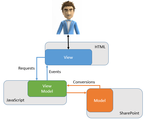
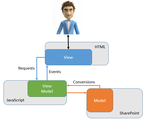
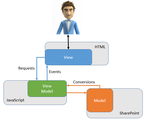
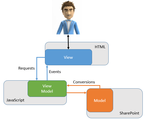
Here is a great drawing to explain the MVVM concept:
Model: The data and business objects
View: The presentation, the user interface
View Model: A code representation of the data and UI operations
In the next few installments of this blog I will go over some of the popular MV libraries out there (Backbone.JS, KnockOutJS, and Ember.JS) and how to make them work with SharePoint. After that we will take my favorite KnockOutJS and walkthrough how to provide a fully functioning newsfeed from SharePoint 2013 social feeds.
Intro
Backbone.js
Ember.js
KnockOutJS
Reading Social Feeds
Writing to Social Feeds
Tying it all together
Matt Maher
Matt is a SharePoint architect currently focused on end user solutions, Office365, enterprise social apps, and server infrastructure.
Follow Matt:
Netwoven
.
Blog
.
<span class='date ' tip=''><i class='icon-time'></i> Jul 27, 2015 12:57pm</span>
|
|
Overview
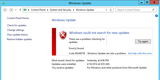
You are trying to perform Windows Update and you receive the following Error:
Error - "WindowsUpdate_8024001B OR WindowsUpdate_dt000″
Resolution
Follow below steps to resolve the Update issue:
Click on "Start" and type "cmd" (without the quotations)
When you see the "cmd" icon, Right Click on it and select "Run as administrator"
On the open Command Prompt window copy and paste the commands (all at once)
net stop wuauserv
net stop cryptSvc
net stop bits
net stop msiserver
ren C:\Windows\SoftwareDistribution SoftwareDistribution.old
ren C:\Windows\System32\catroot2 catroot2.old
net start wuauserv
net start cryptSvc
net start bits
net start msiserver
pause
Wait for the process to complete
Close the Command Prompt
Now, go to Windows Update and try installing the updates. Check if it helps.
Note: This section, method, or task contains steps that tell you how to modify the registry. However, serious problems might occur if you modify the registry incorrectly. Therefore, make sure that you follow these steps carefully. For added protection, back up the registry before you modify it. Then, you can restore the registry if a problem occurs. For more information about how to back up and restore the registry, refer the steps:
Click on the "Windows+R" keys simultaneously, type "regedit" (without the quotes) and hit "Enter".
Now, click on "File" and select "Export". Save it to the desired location.
If you make any mistakes while editing the registry, then you can just Right Click on the Exported file and select "Import"
Now try to check for Update one more time and you should be able to resume your Update…
Netwoven
.
Blog
.
<span class='date ' tip=''><i class='icon-time'></i> Jul 27, 2015 12:57pm</span>
|
|
Look at this chart. Does it resemble your employer’s organizational chart? Now envision this: No pyramid. No managers. No directors. No vice presidents, senior vice presidents or chiefs. Say hello to holacracy. It’s the latest method of operating an organization that removes power from a traditional leadership hierarchy and distributes it to every employee in an organization. In a holacracy there are no titles. Employees chart their own course, choose their own...
SHRM
.
Blog
.
<span class='date ' tip=''><i class='icon-time'></i> Jul 27, 2015 12:57pm</span>
|
|
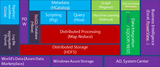
A number of people thought that Microsoft was not paying much attention to the Big Data space and that all developments were happening in the Linux platform. Well, Microsoft was working in the background and exploring ways to provide these offerings using the familiar Microsoft tools. Below is an overview of the various components in the Microsoft’s Hadoop offering:
Below is a summary of the Hadoop components and it’s integration with the Microsoft ecosystem:
Microsoft ported Hortonworks Data Platform (HDP) to Windows and is offering that as a service called HDInsight
HDInsight runs as a service on Windows Azure and the HDInsight Server runs on Windows
New Javascript libraries to integrate .NET programming with Hadoop
ODBC Driver to Hive for analyzing data in Hadoop
System Center extensions for managing Hadoop clusters
Hadoop connectors for SQL Server
Niraj Tenany
Niraj specializes in Enterprise Content Management and Big Data business strategies and technologies.
Follow Niraj:
Netwoven
.
Blog
.
<span class='date ' tip=''><i class='icon-time'></i> Jul 27, 2015 12:56pm</span>
|
|
Overview:
Error in MOSS 2007 search, this error occurs when index sever and query server are different and more than one query server exists. It turned out that the index had been corrupted on that server while the index was propagating from the index server.
End User experience:
While Searching from Portal, you get the below errors "Your search cannot be completed because of a service error" or "The search request was unable to connect to the Search Service"
Problem:
When having two servers configured so that one acts as Search Indexing server (APP server) and the other acts as Search Query server (WFE), you get multiple errors in event log and the search does not work.
On the Indexing server, errors are:
Error #1
Event Type: Error
Event Source: Office Server Search
Event Category: Search service
Event ID: 10038
Description:
Query machine <xyz> has been taken out of rotation due to this error: The object is not initialzed. 0x8004180b. It will be retried in 15 seconds. Component: 3a87986b-8ffe-41db-ae22-5e3fd1b9f4d9
Error #2
Event Type:Warning
Event Source: Office Server Search
Event Category: Search service
Event ID: 10039
Description:
Retry of query machine <xyz> has failed with error: The object is not initialzed. 0x8004180b. It will be retried again in 60 seconds. Component: 3a87986b-8ffe-41db-ae22-5e3fd1b9f4d9
Error #3
Event Type: Error
Event Source: Office Server Search
Event Category: Content index server
Event ID: 4127
Description:
Content index on Portal_Content could not be initialized. Error The system cannot find the file specified. 0×80070002.Component: 3a87986b-8ffe-41db-ae22-5e3fd1b9f4d9
On Query Server the errors are:
Event Type: Error
Event Source: Office SharePoint Server
Event Category: Office Server Shared Services
Event ID: 6482
Description:
Application Server Administration job failed for service instance Microsoft.Office.Server.Search.Administration.SearchServiceInstance (8fd1e03c-96df-4b7a-bd33-8da3fa924f03).
Root cause of this symptom
This problem occurs mostly when your Office SharePoint Service Search is not working (or configured correctly) or index had been corrupted on that server due to machine rebooting or some other reasons.
Solution:
First make sure the permissions are set correctly. Moreover, see that the Farm Search Service Account is in Administrators group and in WSS_ADMIN_WPG group on the Indexing and Query servers. After that stop and start theOffice SharePoint Server Search service in Central Admin. Also need to check that search service account have write permission on shared index of query server.
1. Stop Office SharePoint Service on all servers (command line option StsAdm.exe -o osearch -action stop)
2. Stop and Start MOSS timer service on all servers (OWSTIMER) (net stop "Windows SharePoint Services Timer"net start "Windows SharePoint Services Timer"
(If you wish to change the index location, you can do it then go for step 3)
3. Start office SharePoint Service Search service on index server first. (my observation is stsadm.exe command line tool works better StsAdm.exe -o osearch -action start -role index)
4. Start Office SharePoint Services Search Service on Query Server(s) next. (Command line option StsAdm.exe -o osearch -action start -role query)
5. Wait for couple of minutes.
6. Edit Shared Service Provider (SSP) settings. Select Index Server in drop down list. Provide service credentials and directory path for index location. Click OK
7. Wait for about 10 minutes and check server and search administration page.
Restart requirement
You do not have to restart the servers, need to configure and run full crawl.
Netwoven
.
Blog
.
<span class='date ' tip=''><i class='icon-time'></i> Jul 27, 2015 12:56pm</span>
|