Blogs
|
If you’re in the human resources profession (or plan to be), you will most likely experience at least one—if not several—HR technology implementations throughout your career. Technology implantations affect every part of HR, not only the human resource information system managers, and they affect every part of the organization. If you’ve never experienced an HR technology implementation, you’re in for an exciting challenge. Humans are generally resistant to change. Carefully preparing for each phase of the implementation will help result in a positive experience for the entire organization. The implementation period begins immediately after the...
SHRM
.
Blog
.
<span class='date ' tip=''><i class='icon-time'></i> Jul 27, 2015 01:00pm</span>
|
|
I've been a youth sports coach for several years. I've coached a number of successful teams: sometimes we win sometimes we lose. Wavering focus and the direction in which the ball bounces are unpredictable. What is always predictable is that the sidelines/bleachers will be filled with people who have not volunteered their time to help but are full of opinions as to how to manage the game. The easiest thing to do is to never devote yourself to anything but pretend you know everything. Why commit yourself to trying and failing if in your single opinion...
SHRM
.
Blog
.
<span class='date ' tip=''><i class='icon-time'></i> Jul 27, 2015 12:59pm</span>
|
|
Had the pleasure to attend an interesting Yammer/Forrester webinar the other day and thought I would summarize the talking points I heard about social for the enterprise:
Defining business value for a social enterprise effort is easier than other knowledge manager efforts. This is true, I go back to when I was helping directors come up with ROI slides on SharePoint as a portal and I thought wow this was hard. The business value for a team of sales people being able to communicate about a deal is a way easier story sell then people being able to share a document in under a minute.
Video is the new killer content. This one was an old one for me, I remember people saying that when YouTube was taking off. I want to believe that it is because in the consumer world it is so cool to watch videos of my friends or family is really cool. But do we really want to see a video of the head of marketing recapping our achievements.
Social cloud platforms have higher user adoption. I know it is bias, being a Yammer joint webinar, but I see it. Think of these cloud platforms, there aren’t hoops to jump through, they are always up to date, not a 2 year old instance of an on-prem server that IT forgot to update.
The sales department is the place to start our company’s social adoption. The sales folks are usually quicker to pick up things that will help them close deals, and they have smart phones and lots of time to check newfeeds and respond to things. I would love to see the study of which department’s employees spend the most time on Facebook and other consumer social sites, I bet it would be the sales folks.
The second half was how Booz Allen, Hamilton uses Yammer. It was ok, but it didn’t resonate with me. I hope this helps give you some fresh ideas.
Netwoven
.
Blog
.
<span class='date ' tip=''><i class='icon-time'></i> Jul 27, 2015 12:59pm</span>
|
|
I attended an HR conference last month where I heard some of the savviest business speak ever. Speakers from all over the globe discussed "leveraging," "ROI," "streamlining," "interfacing," "synergy," and "big data" more eloquently than ever imagined. I’ll be honest though. By the time I got to the fifth speaker, I was snoring because my head could not make anything palatable out of this jargon salad. Everywhere I looked someone was tossing business-speak land mines as if they were trying to make my head explode. The worst part is hearing people use terms like "market-driven frictionless acquisition" or "resource-leveling...
SHRM
.
Blog
.
<span class='date ' tip=''><i class='icon-time'></i> Jul 27, 2015 12:59pm</span>
|
|
This weekend I put together a list of vocabulary that Netwoven uses when engaging in Enterprise Social projects and opportunities. This is by all means not a complete set, but it starts to help people understand what you are talking about.
Also stay tuned for our SharePoint 2013 specific vocab list.
@Mention: a way of identifying a person in a post that lets the person know they were mentioned, usually by an @ symbol in front of the name, but Google Plus uses a + instead.
90-9-1 rule: 90% of users are "lurkers" that read and observe but don’t contribute, 9% of users contribute only occasionally, and 1% of users make the majority of postings in any one network
AstroTurfing: A tactic used by some to create a fake grassroots movement or buzz
Authenticity: Used to describe "real" people behind blog posts and other social profiles.
Avatar: An avatar is a name or image that represents a person on forums, social networks, and other websites. Usually a small picture or unique username.
Blog: A site updated frequently by an individual or group to record opinions or information.
Crowdsourcing: to harnessing the skills and enthusiasm of the crowd to contribute content and solve problems
Digg: A social news website that lets members vote for their favorite articles.
DM: A Direct Message is a private message from one person to another that others on Twitter cannot see.
Feed: In the social media world it applies to areas where information from your social network gathers and is presented.
Forum: also known as a message board, a forum is a site dedicated to discussion.
Geotagging: Geotags are location-based tags attached to status updates, media, or other posts that gives GPS information
Hashtag: The # symbol, called a hashtag, is used to mark keywords or topics in a Tweet or post. Identical hashtags are then grouped into a search thread as a way to categorize messages.
Meme: A means of taking viral concepts and making them everyday lingo.
Microblogging: Short message postings from a social media account. Facebook statuses and Twitter posts are two examples.
Online reputation management: ORM is the act of monitoring the social spaces for mentions of a company or person, often done by tools or applications that aggregate the networks.
Opengraph: This is an open protocol that Yammer, Facebook and other social networks use to enables a web page to become a rich object in a social graph.
Tag: Indicates or labels what content is about.
Trending: A word, phrase or topic that is popular a given moment.
Tweeps: Twitter + People = Tweople.
Viral: Anything shared across social networks that get passed along rapidly. YouTube videos are a great example
Wiki: Simple web pages that can be edited by other users.
Netwoven
.
Blog
.
<span class='date ' tip=''><i class='icon-time'></i> Jul 27, 2015 12:59pm</span>
|
|
On June 10, @shrmnextchat chatted with @williamtincup and @johnsumser about Perfecting the HR Tech Implementation. In case you missed this informative chat that was filled with great tips and advice, you can read all the tweets here: [View the story "#Nextchat RECAP: Perfecting the HR Tech Implementation" on Storify] ...
SHRM
.
Blog
.
<span class='date ' tip=''><i class='icon-time'></i> Jul 27, 2015 12:59pm</span>
|
|
Often there is a need to customize the content processing pipeline to meet certain business requirements. There are various approaches to this that are discussed in this blog.
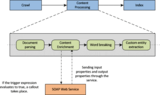
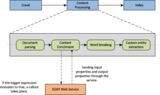
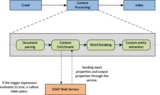
The figure below is showing the logical overview of how crawling and content processing works for SharePoint 2013 Enterprise search.
Now if requirement is such that the managed properties of crawled items need to be modified before being indexed then customized business logic needs to be implemented somewhere in the content processing pipeline. The only place where SharePoint 2013 allows us to call external SOAP services (wcf and web services) is during "Content Enrichment".
In this article, 2 cases will be discussed:
Case 1:
"Calcutta" is a city in India, recently renamed as "Kolkata". Now some people may search with "Kolkata" and others with "Calcutta". Here the "Location" property can be modified to "Kolkata" whenever "Calcutta" entry is found against "Location". For this the following steps are needed:
Create a wcf application in Visual Studio 2012 and add a reference to "Microsoft.office.server.search.contentprocessingenrichment.dll" which you can find in "c:\\program files\Microsoft office servers\15.\Search\Application\External".
Delete default interface (e.g. IService1)
Add following references to Service1.svc.cs file
Microsoft.office.server.search.contentprocessingenrichment
Microsoft.office.server.search.contentprocessingenrichment.PropertyTypes
Inherit "Icontentporcessingenrichmentservice" in Service1.svc.cs file
Implement the method "ProcessItem". This is the method where you get required properties for each items.
Add following in <system.servicemodel> in web.config file<bindings><basicHttpBinding><!- The service will accept a maximum blob of 8 MB. -><binding maxReceivedMessageSize = "8388608″>
<readerQuotas maxDepth="32″
maxStringContentLength="2147483647″
maxArrayLength="2147483647″
maxBytesPerRead="2147483647″
maxNameTableCharCount="2147483647″ />
<security mode="None" />
</binding>
</basicHttpBinding>
</bindings>
Host this wcf to IIS (Create a virtual directory). Map this to the physical path of wcf application. Right click on the Virtual Directory and click on "Convert to Application"
Browse and get the url for hosted .svc file
Execute following PowerShell script to map "Content Enrichment" to hosted custom wcf$ssa = Get-SPEnterpriseSearchServiceApplication$config = New-SPEnterpriseSearchContentEnrichmentConfiguration$config.Endpoint = http://Site_URL/<service name>.svc$config.InputProperties = "Location"
$config.OutputProperties = "Location"
$config.SendRawData = $True
$config.MaxRawDataSize = 8192
Set-SPEnterpriseSearchContentEnrichmentConfiguration -SearchApplication
$ssa -ContentEnrichmentConfiguration $config
Run a full crawl on the content source.
Case 2:
In case of more than one content source, one can be configured for "Advanced" and the other for "Intermediate" resources. Here "Author" property of one can be modified to "Advanced" and the other to "Intermediate" so that when users search using "Advanced" key word they can see files from first content source and vice versa.
Here the two different content sources are segregated first and then processed differently. That is why there is a need of a "WCF Router" to identify the content source and map to wcfs accordingly.
Create two wcfs as directed in Case 1
Create a WCF Application and open web.config and configure as described below :
Here "basicHttpBinding" is being used<basicHttpBinding><bindingname="basicHttpBinding_IContentProcessingEnrichmentService"maxReceivedMessageSize = "8388608″>
<readerQuotas
maxDepth="32″
maxStringContentLength="2147483647″
maxArrayLength="2147483647″
maxBytesPerRead="2147483647″
maxNameTableCharCount="2147483647″ />
<security mode="None" />
</binding>
</basicHttpBinding>
Then configure Services section (base address not required if service is hosted in IIS)<services><service behaviorConfiguration="RoutingServiceBehavior" name="System.ServiceModel.Routing.RoutingService"><endpoint name="RoutingServiceEndpoint" address="" binding="basicHttpBinding" bindingConfiguration="basicHttpBinding_IContentProcessingEnrichmentService" contract="System.ServiceModel.Routing.IRequestReplyRouter"/>
</service>
A service behavior needs to be created where the name of the filter table is referenced. This will be defined in the next step. To enable full inspection of the SOAP envelopes in the XPath filters, the attribute "routeOnHeadersOnly" is set to false.<behavior name="RoutingServiceBehavior"><routingfilterTableName="ContentSourceFilters"
routeOnHeadersOnly="False"/>
</behavior>
Now configure client wcfs<client><endpoint name="ContentProcessingEnrichmentService" address="http://localhost:300/ContentProcessingEnrichmentService/Service1.svc” binding="basicHttpBinding" bindingConfiguration="basicHttpBinding_IContentProcessingEnrichmentService" contract="*"/><endpoint name="ContentProcessingEnrichmentServiceDB" address="http://localhost:300/ContentProcessingEnrichmentServiceDB/Service1.svc” binding="basicHttpBinding" bindingConfiguration="basicHttpBinding_IContentProcessingEnrichmentService" contract="*"/>
</client>
Now "Routing" will be configured i.e. the mapping section between wcf and contentsource. Here the filters and the filter table are defined to map the filters to normal endpoints (and optionally to backup endpoints). Here "Xpath" filtertype is used as e XPath expressions look for all Property nodes in the SOAP envelope.<routing><namespaceTable><add prefix="cc" namespace="http://schemas.microsoft.com/office/server/search/contentprocessing/2012/01/ContentProcessingEnrichment"/>
</namespaceTable>
<filters>
<filter name="Sharepoint" filterType="XPath" filterData="//cc:Property[cc:Name[. = 'ContentSource'] and cc:Value[. = 'Local SharePoint sites']]"/>
<filter name="WCMContent" filterType="XPath" filterData="//cc:Property[cc:Name[. = 'ContentSource'] and cc:Value[. = 'WCM']]"/>
</filters>
<filterTables>
<filterTable name="ContentSourceFilters">
<add filterName="Sharepoint" endpointName="ContentProcessingEnrichmentService"/>
<add filterName="WCMContent" endpointName="ContentProcessingEnrichmentServiceDB"/>
</filterTable>
</filterTables>
</routing>
Build solution and host to IIS as case 1
Execute following PS commands to integrate routing.svc (router service) to content enrichment$ssa = Get-SPEnterpriseSearchServiceApplication$config = New-SPEnterpriseSearchContentEnrichmentConfiguration$config.Endpoint = "http://localhost:300/Router/Router.svc”
$config.InputProperties = "Author", "Filename", "ContentSource"
$config.OutputProperties = "Author"
$config.SendRawData = $True
$config.MaxRawDataSize = 8192
Set-SPEnterpriseSearchContentEnrichmentConfiguration -SearchApplication $ssa -ContentEnrichmentConfiguration $config
Run a full crawl on both content sources.
Hope you find this article interesting and helpful. Let us know in the comments below if you have any questions.
Netwoven
.
Blog
.
<span class='date ' tip=''><i class='icon-time'></i> Jul 27, 2015 12:59pm</span>
|
|
Posted on the Delaware Employment blog by Molly DiBianca by William W. Bowser ...
SHRM
.
Blog
.
<span class='date ' tip=''><i class='icon-time'></i> Jul 27, 2015 12:58pm</span>
|
|
K2 offers Management Work list web part and Work list web part for managing work lists. However, there are situations when the web parts need to be customized to meet additional business requirements. Here are some use cases that may require the customization of the available K2 web parts:
An application has several SharePoint sub sites where information is managed for project sub-teams. The teams should only see the process instances and work list items associated with them. The K2 Work list web part does not provide a comprehensive filtering scheme to filter process instances or tasks based on business data stored in process data fields.
Project managers responsible for a project should be able to see all tasks for that project. The management Work list web part does not provide a way to filter tasks by process instances; when a user has Admin rights to a process, it lists all tasks for all instances of the process regardless of the project. This will be a topic of our next blog.
An application has several SharePoint sub sites where information is managed for project sub-teams. The teams should only see the process instances and work list items associated with them. The K2 Work list web part does not provide a comprehensive filtering scheme to filter process instances or tasks based on business data stored in process data fields.
Project managers responsible for a project should be able to see all tasks for that project. The management Work list web part does not provide a way to filter tasks by process instances; when a user has Admin rights to a process, it lists all tasks for all instances of the process regardless of the project.
The K2 Worklist web part provides a mechanism to filter tasks, but that’s limited to out-of -box fields such as Folio, Originator etc. Often there is a need for additional filtering based on custom process XML fields (example: Project-Id). The source code for the K2 Worklist webpart is available on K2 Underground. A relatively straightforward modification can be made to accommodate the additional filtering needs. This avoids re-inventing the wheel and building something from scratch while providing consistent user experience in line with other out of box K2 webparts.
Following is the structure of K2 Worklist web part in Visual Studio solution explorer. The code is fairly complex and contains a lot of functionality. However, only the two highlighted .cs files need modifications:
Tasklistcontrolpage.cs
Tasklistwebpartfactory.cs
Execution starts in Tasklistwebpartfactory.cs file that defines the TaskListWebPartFactory class which is the actual webpart class derived from ASP.NET webpart class.
Public class TaskListWebPartFactory : System.Web.UI.WebControls.WebParts.WebPart, IWebEditable.
This TaskListWebPartFactory class is a container that loads an instance of TaskListControlPage class
The render() method of the TaskListControlPage class calls the ApplyFilter() method which actually sets the filters for the Worklist items.
We let the ApplyFilter() method do its job of setting the default filters (set by end user using Edit webpart properties page) and then applied our additional filtering on top. This is accomplished by adding a call to AddCustomFilter() method that we created. This custom method added desired filter(s) to the TaskListControlPage class’s CurrentConfiguration property mimicking how the out-of-box ApplyFilter() method handles user defined filters. Following is the code snippet.
private
void AddCustomFilter() {
if (!string.IsNullOrEmpty(_projectIdValue)) {
CurrentConfiguration.Criteria.AddFilterField(SourceCode.Workflow.Client.WCLogical.And,
SourceCode.Workflow.Client.WCField.ProcessData,
"<Process Field Name>", SourceCode.Workflow.Client.WCCompare.Equal,
"<Process Field Value>");
}
}
The <Process Field Name> in the above code needs to be replaced by the name of the process data field that holds the project name and <Process Field Value> replaced by the project name to filter on. In our implementation, the project name was stored in the SharePoint property bag for the site, and the K2 process was designed to grab that value from the context and save it in a process data field (specified in <Process Field Name>) when a process instance is launched. The web part can access that project name to filter on from the containing site’s property bag and use that in place of <Process Field Value>.
The ApplyFilter() method is not declared as protected that can be overridden in a derived class, therefore the implementation modified the original ApplyFilter() definition rather than creating a derived version that refines the logic.
Everything else beyond that point is unchanged and this customized webpart displays the custom filtered set of worklist items from the process instances that match the process field value mentioned in the query.
Summary
We were able to provide a webpart that really trims the noise and shows only the Worklist items and process instances that are relevant to the user.
About the Authors
This article is written by Viraj Bais and Surya Penmetsa from Netwoven. Viraj Bais is the CTO of Netwoven and Surya Penmetsa is a principal consultant with Netwoven. Viraj and Surya specialize in the design and implementation of highly scalable solutions with SharePoint 2010, K2 Blackpearl and advanced .NET applications. Netwoven specializes in the design and implementation of Enterprise Content Management, Business Intelligence, Business Process Management, Cloud Services and Mobile Applications. For additional information, please contact us at info@netwoven.com.
Netwoven
.
Blog
.
<span class='date ' tip=''><i class='icon-time'></i> Jul 27, 2015 12:58pm</span>
|
|
I read a recent story from Bloomberg BNA about plummeting revenues at McDonald’s—and the company's proposal to fix the problem with "toasted buns" and "grilled burger patties"—and had two immediate reactions. First, Burger King has been saying this for years. Char-grilled flavors arebetter (granted, I'm biased). Second—and more important—is there another cause? Is a toasty bun really the answer to a decade of dwindling revenues? Market research plays a key role in improving products, but there are other leading indicators of decline at McDonald’s: increased operational costs, greater voluntary turnover from management staff, lowest-ever customer service scores. These are people problems,...
SHRM
.
Blog
.
<span class='date ' tip=''><i class='icon-time'></i> Jul 27, 2015 12:58pm</span>
|