Blogs
|
ABCya's latest online tool is a tool for drawing and typing stories. ABCya Story Maker is a free tool on which students can draw pictures then write text to support their pictures. Story Maker provides lots of drawing tools for students to pick from. After drawing a picture students can click the text icon to type. Stories can be one page or multiple pages. When students have finished writing they can print their stories and or save them as PDFs.
Applications for Education
ABCya Story Maker can be used by students without registering on the site. Story Maker could provide a nice way for students to create visuals to complement their writing. Or the visuals that students make could inspire their writing.
Thanks to Kevin Jarrett for telling me about ABCya Story Maker.
This post originally appeared on Free Technology for Teachers
if you see it elsewhere, it has been used without permission.
Related StoriesMay Flowers - A Writing LessonApricot - Create Writing Prompts for Students and Share Responses With ParentsExplore History Through Project Writer
Richard Byrne
.
Blog
.
<span class='date ' tip=''><i class='icon-time'></i> Aug 05, 2015 11:24am</span>
|
|
As long time readers of FreeTech4Teachers.com know, every Saturday I publish a week-in-review post. In that post I always include something about what I'm doing that weekend. In the summer that is usually biking or fishing. In the winter it is usually skiing or snowshoeing. And it almost always involves my dogs. Recently, someone asked me why I do this by asking, "who cares that you rode your bike?"
I stumbled into doing the week-in-review posts six or seven years ago when a former colleague suggested it to me. She also suggested that I add a little personality to my blog. I took her suggestion and started to include a little blurb about my life along with the list of the most popular posts of the week. Over the years I've heard from lots of people in-person and virtually who tell me that they like that little personal touch. And more than a few have commented that my mention of an activity has reminded them to get outside too. I'm a big believer in the power of exercise to stimulate creativity. Many of my best ideas come to me while walking in the woods, riding my bike, or skiing. It's also important to remember to balance work with play.
And just a reminder, if you feel like you can't keep up with my pace of posting, I do offer a once-per-week email summary of the most popular posts of the week. That email comes from my PracticalEdTech.com blog. You can sign-up for the weekly email here.
This post originally appeared on Free Technology for Teachers if you see it elsewhere, it has been used without permission.
Related StoriesClasskick - Distribute Assignments and Give Feedback Through Your iPadNow You Can Add Images to Plickers QuestionsThe Week in Review - The Most Popular Posts
Richard Byrne
.
Blog
.
<span class='date ' tip=''><i class='icon-time'></i> Aug 05, 2015 11:24am</span>
|
|
When it comes to communicating with parents nothing can replace a good face-to-face meeting. Face-to-face meetings are not easy to schedule. Not every communication requires the intimacy of a face-to-face meeting. A phone call, a text message, an email, a blog post, or a social media post might be all that you need in order to convey your message. In the PDF embedded below I explain the features of five services for sending text messages and push notifications to students and their parents. You can download the PDF here.
This post originally appeared on Free Technology for Teachers if you see it elsewhere, it has been used without permission.
Related StoriesRemind's Chat Feature Is Now Open to EveryoneRemind Adds Chat to Their Mobile Messaging PlatformWho Cares That You Rode Your Bike?
Richard Byrne
.
Blog
.
<span class='date ' tip=''><i class='icon-time'></i> Aug 05, 2015 11:23am</span>
|
|
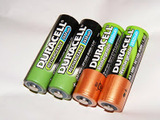
How Batteries Work is a new video lesson from TED-Ed. In this lesson students learn about the origins of batteries, how batteries work, the differences between disposable and rechargeable batteries, and why rechargeable batteries eventually cannot be recharged any more. Students watching the video will also see the difference between dry cell and wet cell batteries.
Applications for Education
To extend the lesson on batteries consider using one of the seven resources featured here including the Blobz Guide to Electric Circuits and Squishy Circuits.
This post originally appeared on Free Technology for Teachers if you see it elsewhere, it has been used without permission.
Related Stories5 Good Ways to Send Text & Push Notifications to Students & Parents - A HandoutWho Cares That You Rode Your Bike?ABCya Story Maker - Draw and Type Stories
Richard Byrne
.
Blog
.
<span class='date ' tip=''><i class='icon-time'></i> Aug 05, 2015 11:23am</span>
|
|
The end of the school year is near for many of us. If your students have been blogging all year, you might want to have a physical copy of what they've written this year. Creating a physical copy of a classroom blog is a great way to show students just how much they wrote in the course of the school year. It's one thing to tell them they wrote 10,000 words it's another to show them how many pages that is when printed.
BlogBooker is a free service that allows you to turn your the contents of your Blogger blog into a PDF. Using BlogBooker is a fairly straight-forward process. BlogBooker walks you through each step of the process except for the very first step which might sound a little too "techy" for some Blogger users, but it's actually quite easy. The first step in using BlogBooker is to export the contents of your blog as an XML file. This is actually easy to do in Blogger. Step one is to open the "settings" menu of your Blogger blog. Step two is to select "export blog" under "basic" menu. Step three is to click "download." Don't worry, exporting the contents of your blog will not remove any content from your blog. After you've completed the export process, jump over to BlogBooker and follow their directions for completing the transition from XML file to PDF.
This post originally appeared on Free Technology for Teachers if you see it elsewhere, it has been used without permission.
Related StoriesHow to Post to Blogger via Email5 Good Ways to Send Text & Push Notifications to Students & Parents - A HandoutWho Cares That You Rode Your Bike?
Richard Byrne
.
Blog
.
<span class='date ' tip=''><i class='icon-time'></i> Aug 05, 2015 11:23am</span>
|
|
Google's Safety Center offers parents good advice on keeping their kids safe online. Much of the information provided in the Safety Center is focused on things like privacy settings, search filters, and Android app management. The information on settings and filters is complemented with advice on talking to kids about responsible online behaviors. That advice comes from organizations including Common Sense Media, iKeep Safe, and OnGuard Online.
Applications for Education
As the school year winds-down consider adding some information about Google's Safety Center to a school blog post, library blog post, or newsletter. Even if parents have seen this information before, it's worth remembering as we head into summer when many students will be home alone with lots of time to be on the web.
This post originally appeared on Free Technology for Teachers
if you see it elsewhere, it has been used without permission.
Related StoriesGetting Started With Canva - A Quick Guide to Creating VisualsCreate a Physical Record of Your Blog With BlogBookerHow Do Batteries Work? - A Nice TED-Ed Lesson
Richard Byrne
.
Blog
.
<span class='date ' tip=''><i class='icon-time'></i> Aug 05, 2015 11:22am</span>
|
|
Silk is a free tool that I first tried a couple of years ago when it was primarily a digital portfolio and simple web page creation tool. Since then it has evolved to include some fantastic tools for creating and sharing data visualizations.
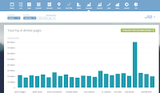
To create a visualization on Silk you can upload data in a spreadsheet, manually enter data, or use one of data sets that Silk provides in their gallery. Once you've uploaded data or selected it you can use it to create fourteen different visualizations. To create a different visualization of the same data set simply choose a different visualization style from the Silk menu. See my screenshot below for further explanation.
Click to view full size.
Silk visualizations can be made public or kept private. If you keep your visualizations private you can still share them directly to other Silk members by inviting them to your project. Public visualizations can be embedded into blog posts as I have done below.
Data from sports-data.silk.co
H/T to The Next Web for the update on Silk.
This post originally appeared on Free Technology for Teachers
if you see it elsewhere, it has been used without permission.
Related Stories13 Online Exhibits About Air and Space TravelGraphFree - An Online Graphing Tool for Students and TeachersHow Do Batteries Work? - A Nice TED-Ed Lesson
Richard Byrne
.
Blog
.
<span class='date ' tip=''><i class='icon-time'></i> Aug 05, 2015 11:22am</span>
|
|
On Friday afternoon I wrote about Silk.co's updated tools for creating data visualizations. The first time that you use Silk the account dashboard can be a little confusing. A couple of folks emailed me about it last night and this morning so I decided to make a little screencast about Silk.co. That video is embedded below.
This post originally appeared on Free Technology for Teachers if you see it elsewhere, it has been used without permission.
Related StoriesSilk Offers Great Tools for Creating Data VisualizationsCK-12 Brainflex - A Summer Program for Math and Science PracticeHow Do Batteries Work? - A Nice TED-Ed Lesson
Richard Byrne
.
Blog
.
<span class='date ' tip=''><i class='icon-time'></i> Aug 05, 2015 11:20am</span>
|
|
A couple of months ago the producers of the popular Crash Course channel on YouTube started a Crash Course for Kids channel. Crash Course for Kids offers overviews of various topics (mostly science) through the use of greenscreen visuals and a lot of talking. Weathering and Erosion is the topic of one of the more recent releases on Crash Course for Kids. In the video students will see a comparison of Cape Cod's coastline in 1984 and 2014. That image combined with the commentary does a great job of showing students the effects of erosion.
Applications for Education
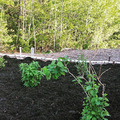
Like a lot of people this spring I've been spending time working on landscaping my yard. One of my projects has been to build terraces to slow erosion on my lot. After watching Weathering and Erosion: Crash Course Kids ask your students to find and take pictures of examples of erosion and erosion prevention measures in their neighborhoods.
You could also continue the lesson with Shape It Up. Shape It Up is one of many good educational games and activities on Kinetic City. Shape It Up is an activity that would be good for use in an elementary school Earth Science lesson. The activity presents students with "before" and "after" images of a piece of Earth. Students then have to select the force nature and the span of time it took to create the "after" picture. If students choose incorrectly, Shape It Up will tell the student and they can choose again.
This post originally appeared on Free Technology for Teachers if you see it elsewhere, it has been used without permission.
Related StoriesHow to Quickly Create a Variety of Data VisualizationsSilk Offers Great Tools for Creating Data VisualizationsHow Do Batteries Work? - A Nice TED-Ed Lesson
Richard Byrne
.
Blog
.
<span class='date ' tip=''><i class='icon-time'></i> Aug 05, 2015 11:19am</span>
|
|
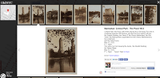
Old NYC and Old SF are two great websites featuring thousands of historical photographs of New York City and San Francisco. The images are sourced from the New York Public Library and the San Francisco Public Library. Each image is geolocated on the map according to the latitude and longitude coordinates of where it was taken. In most cases those coordinates match street addresses, but not always.
Applications for Education
Old NYC and Old SF were featured on Maps Mania last week. I couldn't stop thinking about the maps (I'm a maps junky). As I thought about the maps over the weekend I realized that the images in the maps could be helpful to students who are reading about the history of either city or reading stories set in either city. For example, students reading The Great Gatsby or The Catcher in the Rye may be interested to see images of NYC from those decades.
This post originally appeared on Free Technology for Teachers if you see it elsewhere, it has been used without permission.
Related StoriesMyReadingMapped Has Shut DownHow to Download KML Data from Google MapsTrans Atlantic Slave Trade Heat Maps and Lesson Plans
Richard Byrne
.
Blog
.
<span class='date ' tip=''><i class='icon-time'></i> Aug 05, 2015 11:19am</span>
|