Blogs
|
Hi all and welcome to my one month tenure at the editing console for the Learning Circuits Blog. Thanks to Justin and the team for the opportunity and the nice introduction!I've been working in and around E-Learning for the last 10 years or so - enough time to know a lot about nothing and a little about everything. Drawn in by the possibilities of blending technology with education, I'm a bit sad to say that the results haven't always been everything I might have hoped for...There's a very early episode of The Simpsons in which Lisa imagines herself in the school of the future. She puts on her VR headset and is transported alongside Genghis Khan to explore the battlefields with him on horseback. Somewhere along the way, we seemed to miss out on this vision.Driven as I was by this view of the future, it perhaps should come as no great surprise that my area of interest resides firmly in Social Learning Games - a whole buzzphrase, let alone buzzword.We've been researching, experimenting and implementing solutions that embrace both social and game-like behaviour for the last couple of years and we've seen some stunning results. But more of that later... it's time for the Big Question!Does Gamification have a role in Workplace Learning?How to Respond:Option 1 - Simply put your thoughts in a comment below.Option 2 - Tweet your thoughts using the hashtag: #LCBQ. We will do our best to collect together tweets around the topic.Option 3 - Post in your blog (please link to this post). We recommend including #LCBQ in your title to help us. Put a comment in this blog with an HTML ready link that I can simply copy and paste (an HTML anchor tag). I will only copy and post, thus, I would also recommend you include your NAME immediately before your link (or you could also include your blog name). So, it should look like: Tony Karrer - e-Learning 2.0 : eLearningTechnology.Feel free to interpret "Gamification" in the way you see fit - we'll discuss the outcome later in the month.Cheers for now!Ben
The Learning Circuits Blog
.
Blog
.
<span class='date ' tip=''><i class='icon-time'></i> Aug 19, 2015 03:02am</span>
|
|
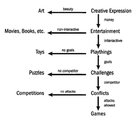
A great question from Kevin Shadix is the topic of my first proper blog post here on Learning Circuits. For me, the answer to this question lies in the perception of what a ‘game’ is. Personally, I’ve adopted Jesse Schell’s definition of a game which suggests that a game is "a problem solving activity, approached with an attitude of fun".It’s a pretty simplistic definition but it helps me to frame my thinking when it comes to designing a new game. The definition says nothing of time or expense, or even particular skills and resources to be deployed; it is purely about solving a problem with a fun approach.Of course, Schell isn’t the only person to have an opinion on the definition of games and for many this would be too simplistic. So I’ll throw another at you here; this time from Chris Crawford, which doesn’t so much define Games as it defines the taxonomy of creative expressions…Things get really interesting with Crawford’s taxonomy when you get to the lower reaches. Crawford suggests that without a competitor whose outcome you can directly influence, you don’t have a game. I’m not so sure direct "attacks" are actually required in order to influence the outcome of an event - think about the mind games that occur in a running race where you can’t actually touch your opponent, but you can psych them out. But his definition really boils down to this element of conflict, an element which makes it into other definitions of games, such as that of Learning Games expert Simon Egenfeldt-Nelson, who suggests the definition of computer games to be ‘virtual worlds with a conflict’.For me, ‘virtual worlds’ is a contentious term because it conjures the image of 3D graphics engines, Second Life and the rest of it. I don’t believe that this level of virtual world is necessary to create a computer game, but I do believe it is necessary to create a reality which is different to our own - be that through a webpage, an app or a world. Constructing the ‘world’ is a key part of the games design, as are a number of other elements. I’ll throw back to Jesse Schell who neatly outlined 4 pillars of game design for us to work from:Schell suggested that all games have a basis within these 4 pillars.They have Aesthetics - a look, feel and touch which appeals to players and is appropriate to the context. This might mean a 3D virtual world, or it might mean a few scribbles on a piece of paper. If you are short on resources, it probably doesn’t mean a 3D world, but that’s no big issue. Many fine computer games are played out through a text interface within a browser window.Schell also talks about the Story behind the game. This, for me, is one of the most important features in any game. Does it have a narrative that I am compelled to see through to the end? Am I genuinely interested in the outcome? To often ‘serious games’ overlook this aspect as they seek to rip the ‘fun’ elements out as an unnecessary and childish addition. It couldn’t be more core. If ‘fun’ isn’t a part of your vocab, leave games-based learning well alone.Mechanics are the pillar which the architects of many a ‘gamification’ have come to rest upon. Mechanics are the methods by which we compete within a game, the way in which we do better and win. Most people come to rest on the ideas of points, levels and badges as being the sum-total of mechanics, but again, this is selling the concept short. Mechanics can be woven into complex design patterns which promote engagement within the game if they are done right. Think about ideas like Quests, Treasure Hunts, Reputation, Scarcity of Resources and Roles as just a handful of mechanics which you can use to promote engagement and signal competence within the game.Finally, technology is the pillar which allows your participants to play your game. Simplistically, the technology you choose needs to facilitate the other pillars to the best of its ability. If you choose an aesthetic which happens to be a webpage, then you better have a web server which can serve it up reliably and your students better be able to access it. But it doesn’t need to be an X-Box to do this. I guess what I’m getting at with this background information is that you shouldn’t feel constrained by the ‘normal’ view of what a triple-A rated game on the store shelf looks like. You don’t need to invest in the next Call of Duty to make a great game. By considering the core components of a game and aligning the games objectives with your learning outcomes, you can create a neat solution which doesn’t cost the earth. Games come in all shapes and sizes and, if you structure your expectations accordingly, can be brought in at low or even no cost if you are willing to do the work yourself.Plagiarism is rife in the game development world and I wouldn’t be adverse from taking a leaf or two from existing games as your inspiration. For example, in a recent project we created a very simple game that replicated "Guitar Hero" to teach students the rhythms behind a horses hoof falls. Really simple, less than a day to make and it works really well.In reality, unless you happen to be a kick-ass coder, most games that are within the reach of your ‘average joe’ probably play out most of their story without the use of a computer game engine. But that’s fine too; the approach transcends computer games technology once you know the core components of creating a decent game. Nowhere in those definitions will you find an insistence to make it a 3D photo-realistic shoot ‘em up. Let me close on a favourite story of mine for the development of a simple game. Imagine you are running a new employee orientation course. On the first morning, you arrive 10 minutes late, looking a real mess. You announce to the class that you’ve lost everything for the onboarding programme - every scrap of information, save for the contents page at the front of the binder. Your job is on the line unless you can pull this information back together before the end of the day. You need their help. They need to get online, get around the office, and get talking to people to find you the information you need. They’ll compete against each other to get the info back to you first as you only need one copy. But you need it all by the end of the day. Well, what are you waiting for? Get going!
The Learning Circuits Blog
.
Blog
.
<span class='date ' tip=''><i class='icon-time'></i> Aug 19, 2015 03:02am</span>
|
|
I'm sure many of you will have come across Elgg before. For those that haven't, Elgg is an open-source engine that allows you to create your own Social Network. Founded in 2004 by Dave Tosh and Ben Werdmuller, Elgg was often pitched as a Social Network for education - perhaps the first foray into the world of 'online' Social Learning, some time before the phrase entered popular parlance.Dave Tosh has since moved to pastures new (as has Werdmuller) but I thought it would be interesting to touch base with Dave to talk about those early days before Social Learning became the phrase du jour... Ben Betts: When you were in the process of creating Elgg, did the phrase 'social learning' crop up or was it yet to emerge as a theme in education?Dave Tosh: I can't remember anyone talking about social learning back in 2004 when Elgg started. Blogging was just beginning to come on the radar, which did introduce some 'social' aspects but it was not referred to as social learning.BB: Which segments of the marketplace were quickest to adopt Elgg when you launched? DT: Education was the first group to experiment with Elgg, however, it was when things moved out of the Edu arena that groups became willing to pay for customisation which was the business model and ultimately dictated the future path. BB: In persuading your early adopters was there much focus on the command and control mechanisms within Elgg? Were people scared of how users might abuse a social system?DT: This was one of the major stumbling blocks when people tried Elgg. It was very deliberate that there were no roles and permissions. A student was on the same level as an educator as we tried to create a space where the individual (regardless of position) could control who to collaborate with and who got access to their content. This caused confusion and it was a constant battle to get people to try and forget (for the purpose of a trial) about the top-down, course centric, constraints imposed by the LMS platforms of the time in order to experiment with a platform that was bottom up, user controlled, and experience centric. There were other concerns raised when we visited the US around kids using the privacy options to plan attacks on the school and the school then being accountable due to provided them with the online platform for this.BB: In your opinion, is Social Learning a fad, a passing trend, or a sea change in the way we learn online? DT: I don't know enough about 'social learning' to comment. For me personally, learning is not a solitary pursuit. I feel the informal aspect of the learning process plays a crucial role in moving from the retention of fact to a real/deep understanding. This is something Elgg tried to address: it was not about access to course notes or course work submission but instead capturing and fostering the reflection that many students and researchers do in the cafe or pub after lectures as this was often, at least for me, when the grounding of understanding happened; in those informal discussions.BB: If you could have kept just one feature in Elgg for social networking, what would it have been? DT: This is a tough question as different components were important to different people. Some liked the group blogging component, others the fine-grain access controls - it was dependant on context. I guess if I had to choose, I would have kept, and focused more on, the aggregation side of things to make it easier for people to use their own tools but still participate in the community.BB: You open-sourced Elgg; was this a commercial or idealistic decision?DT: Elgg started out as a simple proof-of-concept - there was no business/commercial thinking involved at that time - so the decision to go open source was based on encouraging others to help build out the concept. BB: Finally, do you have any tips for how to engage and grow an online social learning community? DT: I am not sure about a social learning community. Regarding online communities in general, I would never underestimate the importance of having an engaged community; the community is everything. This is one of the biggest lessons I learnt during my Elgg days.About Dave: Dave Tosh is passionate about technology, in particular the web, and its potential for creating new learning opportunities for us all.Dave co-founded Elgg and is now to be found experimentingon a couple of ideas around information accuracy. You can read his blog at http://davetosh.com/
The Learning Circuits Blog
.
Blog
.
<span class='date ' tip=''><i class='icon-time'></i> Aug 19, 2015 03:02am</span>
|
|
With Ben’s expertise in simulations and games, I thought it might be worth mentioning that Military Training Technology (MT2) magazine recently announced its listing of the 2011 Top Simulation & Training Companies. Although companies making the 2011 list come from around the world and have made a significant impact on the military training industry across the spectrum of technologies and services, many produce non-military-based offerings as well.An impartial panel selected the winners from MT2’s most competitive group yet. The companies’ products and services enable U.S. airmen, Marines, sailors, soldiers and Coast Guardsmen to train and rehearse for missions in theater, or to prepare for deployment at home station. Companies were selected based on various criteria, which included innovation and program effectiveness. Each listing includes the name and description of the company as well as core competencies. Those that made the most significant contributions to the training community are recognized with one of the following awards:Best Program - a company that had been involved with or led a program of the year—programs that are revolutionizing military trainingInnovation - a company that leads the industry in advancementUp and Coming - a company that is quickly rising in the industry.
The Learning Circuits Blog
.
Blog
.
<span class='date ' tip=''><i class='icon-time'></i> Aug 19, 2015 03:00am</span>
|
|
Chad Udell is the managing director at Float Learning, a consultingfirm that combines strategy, mobile app development, and eLearning to guideorganizations by harnessing the power of mobile learning.Chad has a B.S. in Graphic Design from Bradley University(where he is also an adjunct faculty member for the Interactive MediaDepartment), with deep experience in large-scale web design and development.Chad and his team have done some impressive educational interactive design workas well (see what they built for the AlderPlanetarium to get an idea of some of that work), and released some greatapps on the iTunesstore and AndroidMarketplace.Chad is currently running ASTD's Essentials of Mobile Learningcourse along with Jeff Tillett.Chad will be blogging here this month, focusing on mobile learning. You cancatch up with Chad and the Float team over on their blog at floatlearning.com/blog, and if you’reinterested in web design and development, check in with his personal blog at visualrinse.com. Chad will be leading a fullday workshop on prototyping at the upcoming ASTD TechKnowledge Conferencein January.Oh, and if you think Chad is only a tech guy, he also brewshis own beer (he prefers nice citrusy IPAs) and is pretty good behind a grillor smoker.Join Chad as he explores topics this month on mobilelearning strategy and how to get started on the road to mobile learning.
The Learning Circuits Blog
.
Blog
.
<span class='date ' tip=''><i class='icon-time'></i> Aug 19, 2015 02:59am</span>
|
|
So now that you have the building blocks of your strategy in your sights, it important to maintain focus. Now is not the time to get caught up in discussions about building your first app or what type of devices the IT department is going to be buying. You need to stay in the driver’s seat and craft the strategy to match the technology landscape of the community at large and also find a healthy mix of progress and protection to meet your business goals.What The Strategy ProvidesMore than anything else, the mobile learning strategy gives you a compass on which to guide your team’s efforts (maybe more appropriately, a GPS). This aerial view of the mobile learning plan you have in mind prevents distractions. Think of wasted time in meetings, hours writing RFPs, designs and wireframes destined for failure. This strategy helps you continue making progress, not wasting efforts. It allows you to see the proverbial forest for the trees.The TreesOh the trees! They’re beautiful! With mobile there are just many of them. Every time a new tablet comes out, a tree! With every OS or SDK update and beta distribution, another tree! A press release from a company regarding their plug-ins status on mobile, there’s yet another. You see where I am going with this, right? Reading mobile industry news sites is a great idea of course; it keeps you informed as to where the leaders are headed. Attending conferences and webinars is also a great thing to help you see where technology is going. However, to take a single news story or a single bullet point in a keynote speech and seize on it as the cornerstone as your entire strategy will surely lead you to ruin. Each of these aforementioned ‘for instances’ is insignificant in the bigger picture and should be weighed and considered in light of all the other news items, customer or user inputs, and so on in order to help create your larger strategy.When the trees keep popping up quicker than you can cut them down, you know you are in trouble. You’ll constantly be issuing statements to your management about what the latest development means to them and your work. You’ll start to lose credibility with your stakeholders and designers as well. You must elevate and think big!The ForestStep back for a moment and take a look at the trees from a distance. What direction is the wind blowing through them in your line of work? I’m talking about big ideas, concepts, and trends. Are tablets growing in popularity? Is a particular platform taking over or dwindling rapidly? Are users demanding notifications and content just-in-time? Are advanced hardware features like cameras, geolocation, 3D graphics, etc., a now expected featureset? Are regulations hampering progress in your business? Are the stakeholders ready to make decisions and contribute? Is the mobile web winning over hearts and minds in your IT department due to scalability and ease of deployment and support? These are the telling signs that let you understand where you need to spend your efforts. These signs show you the true shape of your forest.Until Next TimeNow that we’ve gone over why a good Mobile Learning Strategy is important, what one looks like and you also have a good idea of what happens when you neglect to use one, we’ll talk implementation next week!
The Learning Circuits Blog
.
Blog
.
<span class='date ' tip=''><i class='icon-time'></i> Aug 19, 2015 02:58am</span>
|
|
Judy Unrein designs learning solutions for Artisan E-Learning, an e-learning design and consulting firm. I first saw Judy speak at last year’s TechKnowledge conference on HTML5, a topic of increasing importance in the learning and development field. Judy is also on the advisory committee for the upcoming TechKnowledge conference (and responsible for helping put together one of the conference’s best lineup of sessions). So, with that in mind, Judy will be blogging here this month about HTML5 and providing a peek at the upcoming conference.We’ll try to avoid the ever-popular HTML5 vs. Flash debate and really stick with the current state of HTML5 and some tools for its development, a conversation she already started in a T+D article this past October.To catch up with Judy, you can check in on her regular blog at www.onehundredfortywords.com or connect with her on Twitter @jkunrein. She also co-hosts "The ToolBar" a podcast about learning, technology, and beer (!).
The Learning Circuits Blog
.
Blog
.
<span class='date ' tip=''><i class='icon-time'></i> Aug 19, 2015 02:58am</span>
|
|
No doubt you’ve heard at least a whisper about HTML5 over the last year. It’s a Flash-killer. It’s the only way to get multimedia on mobile devices. It’s not going to be ready for use until 2022. It’s going to save the world.There’s a lot of hype and a lot of confusion.One thing that complicates the situation is that the spec is still technically undergoing revision, even as it’s currently being used in web development projects around the world. As of January 2011, it’s considered a "living standard," and browsers are continuing to change as the spec is revised.Another complication is that "HTML5" is often used to refer to a range of modern web technologies. Simply speaking, HTML is the language that the Web is written in, and HTML5 is the most recent version of it. But because there are a lot of other technologies commonly used to create rich experiences on the web these days (such as CSS3 and JavaScript), those get wrapped up into the the abbreviation "HTML5" in colloquial speech. There are those who think that’s a bad thing—one suggestion I’ve seen is replacing "HTML5" with "NEWT" when it’s being used to encompass more than the markup language—and while I like the idea (and the acronym), I don’t really consider it desirable to throw more jargon into the mix. I often use the phrase "the HTML5 stack" to communicate more clearly, but to me, the main thing is that people have good resources to keep them up to date on the capabilities of the technology, the delivery platforms, and the authoring tools.And that brings us to one final complication: The makers of authoring tools—the people we often count on to help us deliver on our designs—aren’t always very invested in helping us cut through the hype to find what we need.So what’s an elearning designer—or developer—to do? Sit this one out? Change jobs? Take that early retirement? I say none of the above! Here’s a quick primer on just what you need to know for e-learning (except the code).Why is HTML5 important?When I asked this question to a group I was speaking to about HTML5 authoring tools last month, about half of them held up their iPads. Good answer!Apple has never allowed Flash on iOS devices (iPhones, iPod Touches, and iPads), but these devices are way too popular for us to ignore their users. And just recently, Adobe announced that it is stopping development on the version of Flash Player that is used on all other mobile devices, as well. Even on desktop and laptop browsers, the Flash plug-in can be problematic…despite its great service over the last ten years providing the ability to rich multimedia experiences over the web.But HTML output that you can create with tools like Lectora and ToolBook is usually so…static. How are we supposed to deliver those rich learning experiences that our learners are used to if we can’t output to Flash?Well, HTML5 has the vast majority of the capabilities that Flash has, as well as much more widespread ability to play on mobile devices.What can you do with HTML5?You can build rich, app-like experiences. Blah, blah, blah.Let me try that again.You can make pretty stuff. You can make stuff that that responds to the learner’s input and understands gestures that used to require plugins. You can make cool multimedia experiences. You can make apps for sketching, image editing, and sound editing. You can make a drum kit. You can make a musical instrument out of the NYC subway route. You can rebuild Quake (warning: violence) and Angry Birds. (Caveat: Angry Birds still has a tiny amount of Flash built-in, for sound only as I understand). You can build lots of other games, as well.Now, can you do all of these things? Probably not. I certainly can’t. But people who are skilled with the technology can. It wasn’t too long ago that it took a lot of skill with Flash to build the things we can create easily with rapid development tools today. We are going to have some growing pains while our tools catch up.What can’t HTML5 do?There are limitations (and there is an ongoing discussion about this on my individual blog), but the main point we should be concerned with is whether it can support the things we want to do in developing e-learning, not how all of HTML5’s capabilities stack up to those of other technologies. From what I’ve seen—and just based on the samples I linked above—the differences are at the margins. Most elearning designs aren’t going to cause the HTML5 stack to break a sweat.Speaking of other technologies… is it going to kill Flash?As Justin promised, I’m not going to waste your time on this debate. The material point for us is that if we need to produce non-Flash content so that that it can play on some devices, why bother producing a separate Flash version, as well?If I want to deliver HTML5 output, which tools should I use?A couple of months ago, I contributed an article to T+D on some of the more capable tools available, and I hope to report on more of them in coming months. Ones to watch in particular: Adobe Captivate is testing HTML5 output, Articulate has announced that the upcoming Storyline will output to HTML5, and Allen Technologies has announced that they are working on HTML5 output for ZebraZapps, as well.But in addition, I would encourage you to check out tools that are not specifically built for elearning, such as Adobe Dreamweaver for full-fledged authoring and Tumult Hype and Sencha Animator for animation. Not only will it broaden your development skill set, it could encourage you to start broadening your design ideas…especially if you’ve been using rapid authoring tools for a while.Will my learners be able to see it?It depends. One of the great things about HTML5 is the ability to gracefully degrade content, or offer different versions of content depending on which browsers (and which versions) your audience has. For a quick graphical view of which browsers support which features and how support has been added over time, see HTML5 & CSS Readiness; for more nitty-gritty and frequently-update details, see When can I use…. In general, mobile browsers present less of a concern than desktop/laptop browsers, because they’re more frequently updated and almost all of them are built upon the same HTML5-friendly technology.What else?I hope this post answered some of your existing questions and I look forward to hearing any others you have!Update: ZebraZapps added to the "tools to watch for" list. Judy Unrein designs learning solutions at Artisan E-Learning, blogs at E-Learning Uncovered and onehundredfortywords, and tweets at @jkunrein.
The Learning Circuits Blog
.
Blog
.
<span class='date ' tip=''><i class='icon-time'></i> Aug 19, 2015 02:57am</span>
|
|
I’m starting to get some questions along the lines of, "We’ve been hearing we need to switch to HTML5 delivery, and we’d like to be forward-thinking, but why and when should we do it?" Those are really good questions; thanks for asking! Some companies need to deliver content on iPads now. In that case, there is urgency to consider something other than a Flash-based solution. One option may be to deliver that content through (VPN) access, like Tom Kuhlmann wrote about on the Rapid E-Learning Blog a few months ago. The same post covers some publish-to-video and -PDF options. If those don’t suit your needs for interactivity, you’ll probably want to check out some of the existing HTML5 authoring tools. For companies that aren’t planning to deliver content to mobile devices any time soon, there may not be that much urgency, and it might be difficult to understand why you would want to switch to HTML5 delivery at all. If you don’t have issues with your current technology, it’s even more difficult to explain without getting into ideological discussions (including the ever-popular Why HTML5 Will Kill Flash/Why HTML5 Will Never Kill Flash debate). You can find plenty of that elsewhere on the Internet and we’ve promised not to re-tread that topic here, so just a few words in the service of answering the question… For me, it mainly comes down to recognizing that browser plug-ins came along largely to fill a very real gap in web technology; HTML wasn’t initially built to deliver rich multimedia. But that gap is closing fast with the capabilities of the HTML5 stack of technologies, and I have more faith in the community of companies, organizations, and individuals that keep pushing web standards forward than I have in the individual companies that develop proprietary plugins. I don’t think that plugins are evil; I simply don’t think they are the way of the future. Your company may choose to produce content in Flash or Silverlight or Quicktime and your desktop/laptop users will be able to access it as long as the company supports that technology, but when introducing new devices into the mix, your need for more widely-accepted technology will likely grow. So, if you are considering a change to HTML5 delivery for future-proofing, my advice is to take a hard look at your needs and the existing software options and be willing to wait a bit if necessary. The authoring applications that are available now either aren’t as powerful or aren’t as compliant as some of the tools to watch that I mentioned in last week’s post. So if you buy something now, I think there’s a good possibility you’ll end up with: software that’s not powerful and flexible enough to meet future needs,software for which you’ll have to spend a lot of time testing the output (which you’ll have to do to some degree anyway), orsoftware that doesn’t take advantage of as many modern HTML5 features as you might expect. That’s not to say that existing software isn’t good, but more competition would accelerate and further development. I think we have a little way to go before the market is mature enough to have lots of solid contenders for your software-buying dollar. And you may find yourself using combinations of tools more than you have in the past, as well. In some ways, this whole situation feels a little like the tail wagging the dog, doesn’t it? It’s seemed like, for years now, that the learning industry has had delivery figured out. Now limitations on that have us scrambling for new tools—some of which might not even meet our needs. There’s a good chance you’re going to be in the market for a new authoring tool or two soon, so I think it’s a good time to take another look at what strategies your tools support. This is a huge conversation, but the issues I do want to mention that are on my radar more and more these days are reusability and revision of content. One of the cool things about HTML—5 or otherwise—is that the published output is viewable, changeable code (rather than an object inside of a plug-in), that’s easier to manipulate, even without native files. That’s the kind of openness that can promote greater reusability and easier revision, at least in a manual workflow…though if revisions are a huge factor in your company’s workflow, you might consider tools that handle that programmatically. I hope this has cleared up a few things and, yes, opened a few cans of worms, as well. One of the things I’ve been privileged to experience over the last couple of years is that this conversation over delivery technology—seemingly a small part of what we do and already debated to a pulp in the Flash vs. HTML5 Ring of Death—has opened up for me much larger conversations about design strategy, semantics (in a good way), accessibility…the list goes on. And we need to have these conversations. I’m as game for a good Articulate Studio vs. Adobe Captivate conversation as the next person, but we also need to remember that our jobs are bigger than that. Much bigger. Let’s discuss.Judy Unrein designs learning solutions at Artisan E-Learning, blogs at E-Learning Uncovered and onehundredfortywords, and tweets at @jkunrein.
The Learning Circuits Blog
.
Blog
.
<span class='date ' tip=''><i class='icon-time'></i> Aug 19, 2015 02:57am</span>
|
|
While I like my laptop, I’ve gotten very tired of lugging it around conferences, and my mobile devices get better battery life and pick up WiFi signal better than my laptop anyway. So I’ve decided to go to TechKnowledge almost laptop-free. (As it turns out, since I’m presenting a Creation Station and probably doing client work during the week, I’m going to have to bring my laptop, but I’m definitely going to minimize taking it to the event itself.)Here’s how I’m preparing.GearI have an iPad case that I love; it looks slick, protects the device well, has Smart Cover functionality, and allows me to stand it up at a variety of angles for reading and notetaking. Just for this effort, I’ve bought an Apple Bluetooth keyboard as well, because there’s no way I can last a week only typing on iOS. They cost $69 at the Apple Store, but I got mine from Other World Computing for $49 (brand new, but without a box or instructions). Setup instructions are here.I don’t have a stylus that I’m particularly fond of yet, especially for sketching, but I’m looking to try some out beforehand and possibly at the conference itself. In particular, I know that both the AluPen and the Cosmonaut will be in attendance with friends of mine, and I welcome other recommendations, too!This isn’t a consideration for me this time, but if you’re presenting a session with just a slideshow, you can do that laptop-free too... you just need Keynote and the proper connector. I’ve been told that the VGA adapter is the one you’ll need for this conference.AppsYou’ve probably traveled enough with your mobile devices already to know what you like in travel and entertainment apps, so I’m going to skip to a few categories that I’ve found very useful for conferences.The official TK12 conference app. It’s not on the app stores yet, but there will be a conference app and you’ll definitely want it to help you plan your conference experience.Business card scanner/importer. These can be a huge timesaver as well as a safety net to keep you from losing valuable contacts in your travels. There are lots of these out there. I tried three free/trial ones for the iPhone: CamCard Lite, ScanBizCards Lite, and WorldCard Mobile Lite.For this trial, I took a not-so-great picture of a business card from one of my favorite places to visit in Portland -- complete with non-English words -- and used it for all three apps.(Tip: If you don’t want to go through the whole process of importing and checking contact info, snap quick pictures of your collected cards so that you don’t lose the information even if you lose the cards. You can process them on your flight home.)CamCard came out on top with the most accurate reading and the best user interface, and it was the only one of the three with no limits on how many cards could be read and stored. The $7 paid version removes advertisements and adds some more advanced features.Notetaking apps. There are several apps that have a specific functionality that’s very cool to me: the ability to record audio while you’re taking notes and play back your notetaking with the audio -- even skip to the part of the audio that you were recording when you tap a certain note that you’ve taken. The two I’ve been tinkering around with are CaptureNotes 2 and AudioNote, both of which work well. CaptureNotes is much more full-featured in general, which is good, but if I don’t take the time to become really fluid in it soon, I’ll probably stick to AudioNote for its simplicity.Sketching apps. I tend to like Adobe Ideas and Penultimate, but like many categories of app, the best one is the one you like and know how to use. Load up your device with a few free ones, figure out what you like and don’t, and you’ll be able to turn a more educated eye toward the reviews and screenshots on your device’s app store.QR scanner. I see plenty of QR codes on business cards and vendor booths these days so I would recommend having one, but I’ve never looked hard to find differentiating factors between them. I use QR Reader for iPhone and it works fine.Anything else for networking. There are lots of programs that let you easily share your contact information with others... Bump and CardFlick, to name two. Most of them rely on both parties having the same app, so it’s smart to have a variety of apps and get them set up ahead of time. And there will be parts of the conference that rely on Twitter, so try it if you haven’t yet and get an app that you like for your phone or tablet. Again, there are tons of them; just find one that works well for you.The more effort I’ve put into this, the more I’ve been curious what other gear and equipment people recommend. If you have favorites, feel free to comment, disagree, and discuss... I’m looking forward to learning from you!Judy Unrein designs learning solutions at Artisan E-Learning, blogs at E-Learning Uncovered and onehundredfortywords, and tweets at @jkunrein.
The Learning Circuits Blog
.
Blog
.
<span class='date ' tip=''><i class='icon-time'></i> Aug 19, 2015 02:57am</span>
|