Blogs
|
Thanks to everyone on Twitter who shared their #bestYAfiction. Here’s the list so far:
The Absolutely True Diary of a Part-Time Indian, by Sherman Alexie
Speak, by Laurie Halse Anderson
The True Confessions of Charlotte Doyle, by Avi
The Blue Helmet, by William Bell
Stones, by William Bell
Zack, by William Bell
Ender’s Game, by Orson Scott Card
The Hunger Games, by Suzanne Collins
Little Brother, by Cory Doctorow
The Gravesavers, by Sheree Fitch
Skate, by Michael Harmon
Collected Stories, by Richard Kennedy
The Giver Trilogy, by Lois Lowry
Number the Stars, by Lois Lowry
The Changeover, by Margaret Mahy
The Tricksters, by Margaret Mahy
Touching Spirit Bear, by Ben Mikaelson
39 Clues series, by Rick Riordan
Percy Jackson series, by Rick Riordan
And Then it Happened series, by Michael Wade
Anything by Scott Westerfield
Sprig of Broom, by Barbara Willard
And in the Morning, by John Wilson
Flames of the Tiger, by John Wilson
Four Steps to Death, by John Wilson
The Book Thief, by Markus Zusak
NPR’s Year’s Best Teen Reads 2010
NPR’s Year’s Best Teen Reads 2011
Royan Lee
.
Blog
.
<span class='date ' tip=''><i class='icon-time'></i> Aug 23, 2015 05:52pm</span>
|
|
CC licensed photo shared by Flickr clipmage
I take great glee in working on a regular basis with educators excited and serious about employing social media, blogging, and other web 2.0 tools in their classes. In fact, it seems to me that certain widely known tools are almost becoming part of the mainstream. The ongoing and meaningful leveraging of web technologies (at least in my parts) fills me with a certain degree of optimism.
I also know that our general mantra in #edtech discourse is to encourage teachers to try using the technology in spite of their own lack of comfort or familiarity. We often talk about the students leading the way, "let them teach us", and so on.
I wonder if we’re being a little disingenuous when we sing that song for certain types of tech. I used to belt that tune all the time but now I’m pressing shuffle on my iPod. I think it’s one thing to say that not knowing GarageBand shouldn’t stop you from letting students use it in the classroom, but it may be another when you’re talking about digital footprinting. So, I’m wondering if it is a good idea for Kamal and Kerry to be blogging away when their teacher can’t recognize an embed code. Thus, I’m about to say something that may or may not be controversial.
If you’re going to be getting your students to post online, it behooves you to do the same.
I think this is something that seems obvious but is often overlooked; something of an elephant in some tech PD rooms. By no means am I positing that expertise in the area or, say, a high klout score preclude the use of it in your class. Rather, I’m putting forward the idea that co-learning involves us as the adults, well, co-learning, not co-watching.
I’m wondering if, since the online world as we know it now changes so fast and is overly nuanced, it is alright for us to be giving kids the keys to the SM and web 2.0 car without experience driving ourselves. It’s not that I think we always need to be two steps ahead of the students or that I suddenly share the view that online equals danger. Rather, I’m starting to think that it is only when you begin understanding how these tools fit into your own personal and/or professional life curriculum that you should even begin to integrate it into your class curriculum.
I would love your thoughts on this.
Royan Lee
.
Blog
.
<span class='date ' tip=''><i class='icon-time'></i> Aug 23, 2015 05:52pm</span>
|
|
I expect greatness from my students. I don’t mean that in the way that the stereotypical Asian dad in Searching for Bobby Fischer expects greatness from his super intelligent, but repressed son. Nor do I mean that in an epic-win sort of way. I also don’t mean that I expect every kid to be great at all times. There are two broad things I mean.
First of all, I always go on the assumption that somewhere in my classroom, there might be an Einstein or a Martin Luther King Jr. Perhaps a Bob Marley, an Earhart, or a Rosa Parks. I have no trouble admitting I’m horrified at the idea of being remembered as a teacher who stalled that child’s progress as a leader in any way, shape, or form. I want to do everything possible to have had an instructional and nurturing role in that person’s timeline.
Secondly, I mean that I expect all of my students to eventually become great in anything period. I’m totally positive that we are all stupendous at something already, and that we have the make-up to be supreme at other things. Whether it’s that they are the greatest hiker, or gardener, or tango teacher. If it’s that she will be an elite doctor, or cafe barrista, or sniper. A father, a store manager, a real estate agent. I like to think that I make an effort as a teacher to teach literacy, math, or phys. ed. with this framework in mind (whether I succeed in this may be another matter).
Greatness is culture-bound, relative, subjective, and sometimes beguiling. I expect it regardless.
Royan Lee
.
Blog
.
<span class='date ' tip=''><i class='icon-time'></i> Aug 23, 2015 05:52pm</span>
|
|
Above is a photo I took a few days ago of my first home, 523 Finch Avenue West. From the outside, it hasn’t changed much. What a cockroach infested, dark, health-and-safety-code-breaking, stench-filled place it was. I loved it. Notice the little black stains that come down around the edges of the windows? As a child, I always thought they were tears.
It was the late seventies, what I call the golden era of Toronto immigration. My parents were like thousands of others that came both literally and figuratively barefoot. Our building of six floors almost resembled a refugee camp of sorts, but when I was a kid I thought it was the greatest place on earth.
I was fascinated by the terrifyingly dark and stinky garbage chutes. The ominous stairs compelled and horrified me. Our elevator always threatened imprisonment. The barrier free windows invited us as toddlers and preschoolers to test gravity.
The cultural make-up of our big brown home was as diverse as you could get, and it featured a significant Korean community. Many of us who live amongst Korean émigrés nowadays think of the upwardly mobile, highly educated; not so then. This might explain why newly arrived Koreans look at me like I’m speaking a pigeon brand of the language when I use it nowadays. Awkward, clumpy, and somewhat crass.
One of my favourite memories is of the Korean veggie truck that used to drop by once a week. You’d know the man had arrived because you’d suddenly hear the echoed call of ajimas (ladies) reverberating through the building. Soon, every Korean mother would be outside, cash in hand, ready to stock up for the week on various turnips, chives, and cabbages.
There were a lot of different immigrants in the building, and plenty of apparent racism. We used every slur in the book to describe each other. And then we would babysit each other’s kids and go to one another’s birthday parties. We would fight for each other, literally. A strange brand of conflict and love. All fiery, lots of passion.
We had our little world and it was special.
School was our internet, really. It was the place to go to expand oneself, to legitimize or devalue one’s cultural capital, to literally learn stuff that was foreign to us. I loved it. My kindergarten teachers were a step above Jesus for me. They taught me to read, sing, smile, share, and not be ashamed when I pissed my pants on the classroom mat (basically everything you need for success the world no?) In my memories, I envision those ladies as 8 foot tall superhuman entities. There isn’t anything I wouldn’t have trusted them with.
Most or many of us have kids like me in our classes. We make a monstrous difference.
Royan Lee
.
Blog
.
<span class='date ' tip=''><i class='icon-time'></i> Aug 23, 2015 05:51pm</span>
|
|
Sometimes we put the horse before the cart in tech PD because we want to show flashy and instantly gratifying tools. This is especially true in the realm of web 2.0. There are so many supposedly easy web-based applications out there, so we often contend the entry point is easier than, say, delving into the specifics of Photoshop or Final Cut Pro. This is somewhat true, but I think there are many little variables that determine success in navigating a browser-based world. Primarily, I worry that we neglect the issue of workflow.
That’s why I wanted to write a quick post sharing my love for two apps in particular that make my online workflow fluid rather than scattered. I am certain that I am the umpteenth person in the blogosphere to write about them, but que sera, I say.
1Password Pro
Why: Because I need a way to create and store secure passwords without relying on a) my feeble brain, or b) the ol’ "I use the same password for everything".
How it works: All you need to remember for 1Password is, well, one password. This one password gives you entry to your ‘vault’ of passwords. They have a toolbar for nearly every well-known toolbar, so for me, I rarely even have to type in my usernames and passwords for 1Password does it for me.
What it works with and syncs across: Mac, PC, iPhone, iPad, Android.
Free? No, but it’s worth it.
Xmarks Premium
Why: Because I use multiple devices and a plethora of browsers. I need my browser bookmarks easy to access and synced across all my devices.
How it works: Install the plugin for all your browsers and away you sync. No more, "Oh I have that bookmark on my home computer" or whatever.
But what about Diigo and Delicious? Oh, I use those too, but I think of those tools more as social media devices. Xmarks is more like personalizing the buttons on your browser, if you know what I mean.
What it works with and syncs across: You name it.
Free? No, but it’s worth it.
Like a lot of technology nowadays, the hard work is in the set up. Once all the necessary installations and logins are set up, it’s syncing bliss. I honestly don’t know how I would get my work and play done online without these items in the toolbox.
Royan Lee
.
Blog
.
<span class='date ' tip=''><i class='icon-time'></i> Aug 23, 2015 05:51pm</span>
|
|
I am totally astounded with James Mollison’s photo essay Where Children Sleep. I couldn’t help look at it with my teacher glasses on. Possibilities kept growing out of brain like so many mind maps. Always keeping in mind the dangers of using resources like this to support hegemonic world views that serve to other its subjects, I encourage you to take a look at this amazing text and let the possibilities for reflection and discourse run wild in your mind.
Royan Lee
.
Blog
.
<span class='date ' tip=''><i class='icon-time'></i> Aug 23, 2015 05:50pm</span>
|
|
The other day I shared my dependence on 1Password and Xmarks to help keep my web 2.0 life in fluid motion. Today I want to take a second to share some other apps that help me stay organized, productive, and zen in my teaching life. Almost all of these come cross-platform (Mac/PC) and in mobile versions that offer either cloud-based or wi-fi sync - an essential characteristic for this multi-device user
Wunderlist/Things (I prefer Things, but Wunderlist has cloud syncing which is essential for me)
Why? Because I need lists. Oh, do I love lists.
Free? Wunderlist is, but Things isn’t.
Evernote
Why? So I can keep all manner of observational and conversational assessment data of my students.
Free? As a baby’s behind.
Planbook
Why? For digital timetabling and lesson/day planning.
Free? No, but it’s worth it.
Bento
Why? To keep all student information and numerical assessment/evaluation data organized and easily retrievable.
Free? No, but it’s worth it.
Dropbox
Why? Because I need to be able to store large files and folders in a place that makes them accessible and shareable from anywhere at anytime.
Free? As the wind.
Google Chrome Browser
Why? Because I need a really fast browser that talks to my google apps nicely.
Free? It’s Google.
Google Docs
Why? To collaborate with students; to use forms for assessment surveys and feedback; to share files instantly on any browser; and to create working documents and ‘anchor charts’ for my class.
Free? C’est Google.
Royan Lee
.
Blog
.
<span class='date ' tip=''><i class='icon-time'></i> Aug 23, 2015 05:48pm</span>
|
|
CC licensed photo shared by macinate
Hi, it’s Mr. Lee here. I’m just calling to say hi and let you know how excited I am to be teaching your amazing kid this year.
I have just gotten off the phone after spending only about an hour calling twenty-four families of the students in my class this year. I do this at the start of every school year as I look at trust building with families as a must for the job of learning I hope to do with their children. It never ceases to amaze me how much they appreciate my little phone call. The feedback I have just received has been overwhelmingly positive and full of gratitude. The best part was that I got to have some great conversations with them about how their children learn best. Let’s not forget that the parents are the experts when it comes to their own children. If you haven’t done so already, I urge you to put aside an hour or two and call the homes of your students just to say hi.
Royan Lee
.
Blog
.
<span class='date ' tip=''><i class='icon-time'></i> Aug 23, 2015 05:48pm</span>
|
|
On the first day of school, I had my students fill in a quick one line google form question which asked, "What’s one thing every teacher should know about you?" Here are some samples (I kept the original spelling, punctuation, and grammar):
I like learning alot with modern technology
I have bad vision (I can't see stuff that are far)
I am scared of needles
I have a fragile nose it was broken last year.
That I work hardly and independant
I work best individually sometimes.
I am not always able to concentrate in class.
I do gymnastics
I love hockey and runing sports
That I might need some help sometime.
That I like lego coins
Sometimes I freak out in a math test and start to cry.
I enjoy whale biology.
I have troubble sometimes.
I'm good at stuff when i like it
That I try my best to succeed
I have a difficult time concentrateing in class.
I get nervous when it comes to tests.
I don't like talking in front of the class.
I love to learn about new things
i am a little bit slow answering multiplication and division questions.
one of my weakest subjects are reading and comprehension.
I don't like like insects
i have a very short attention span and i have trouble concentrating after teachers talk for a long time
i like teachers that talk to me
Royan Lee
.
Blog
.
<span class='date ' tip=''><i class='icon-time'></i> Aug 23, 2015 05:48pm</span>
|
|
Disclaimer: What I am about to describe can only really be done on a Mac right now because Skitch is currently unavailable for PC (this is apparently changing soon).
This is not an argument measuring the pedagogical value of Interactive White Boards, although it may invariably lead your mind down that road (if you’re interested in that discussion, I suggest you add your two cents to Pernille Ripp‘s great post questioning their merit). Rather, it is about two things few people can argue against:
The ability to digitally scan documents on-demand in class, make it viewable in large form, then write, erase, highlight on said document is an incredibly valuable tool.
Many classrooms are currently doing this using document cameras and IWBs.
Here’s the thing:
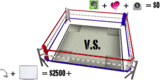
Average cost of document camera: $500US (give or take a hundred).
Average cost of IWB: At least a couple of grand.
Total cost: At least $2500US (not including laptop and projector)
I used to have both of these things in my class, but find I no longer need them because of three things:
Evernote ($0 on PC/Mac/iOS/Android/Blackberry/PalmOS/Windows Mobile 7)
Skitch ($0)
My Smart Phone (I would have one regardless)
Total cost: $0 (not including laptop and projector)
Let me describe to you an example of how I used my $0 technology just the other day.
It was math class. I was leading the students through a standard 3 part problem solving lesson. While collaborating in pairs, students used paper to draw out their thinking and explanations justifying their solutions. In the third part of the lesson, I invited partnerships to share their results with the whole class. To aid in this process, we digitally enlarged their papers so we could draw and write on them.
This is how I used to do this:
Scan paper under SMART document camera.
Open in SMART Notebook.
Draw on SMART Board.
This is how I did it the other day:
Opened Evernote on my iPhone.
Took a snapshot of papers.
Opened Evernote and Skitch on my MacBook.
Dragged synced photo from Evernote into Skitch.
Presented, drew on photo in Skitch.
Dragged photo from Skitch back to Evernote.
Tagged photo with subject, student name(s), and observational assessment comments.
Maybe it’s just me, but I’m liking the new way better.
Royan Lee
.
Blog
.
<span class='date ' tip=''><i class='icon-time'></i> Aug 23, 2015 05:47pm</span>
|