Blogs
|
Fuel Up For Summer with a Free VoiceThread Innovator Webinar!Tuesday, June 5th at 12pm PDT/ 3pm EDTRegister: https://www2.gotomeeting.com/register/566437106 We know that VoiceThread is hugely popular in K-12 classrooms. How does this relevance translate to teacher preparation? This webinar will look at alternate models for using VoiceThread in higher ed pre-service teacher preparation for collaboration, formative assessment, reflection, and building digital products. This webinar will showcase the teaching innovations of Kathleen Gradel, Professor at SUNY Fredonia (Fredonia, NY). Kathleen will share concrete examples from her own pre-service teacher training courses that demonstrate how VoiceThread allows her to effectively model the role of a 21st century teacher-facilitator while simultaneously fostering a student-centered learning environment. Excerpts from class VoiceThreads will be shown, links to sample VoiceThreads will be shared, and your questions will be answered. Are you a college instructor using VoiceThread to move learning beyond the traditional lecture? Please share with me here: http://goo.gl/Z0l1o
Michelle Pacansky-Brock
.
Blog
.
<span class='date ' tip=''><i class='icon-time'></i> Aug 26, 2015 04:57pm</span>
|
|
Wow! That's all I could think after last week's exhilarating webinar, Reframing Visual Arts Instruction with VoiceThread. This was the second "Innovator" webinar I have hosted for VoiceThread (I present one sponsored webinar each month for VT). I spent the months of October through February showcasing many of my own VoiceThread teaching practices in the webinar series and each month we received the same question, "I'd like to see more examples of how professors in [insert any discipline here] are using VoiceThread." So, I ventured out in search of some innovators who were doing cool things with VoiceThread and who would be willing to share their practices with the educational community to inspire their peers and contribute to innovation in higher education.This month, I was joined by two fabulous educators, Heidi Upton and Tammy Lockett. Check out the full archive of the webinar when you have 50-minutes of uninterrupted time to dedicate and are ready to be wowed! Watch it with a colleague or two for an added zing factor! Oh, and don't miss the Goody Bag which is filled with loads of fabulous resources.Here's what is so fabulous about pairing Heidi and Tammy's use of VoiceThread in this webinar. Each of them uses VoiceThread in an extremely different way yet each uses it to invent new pathways to teach students and create unique spaces for students to reflect and learn together.Heidi UptonSt. John's UniversityHeidi Upton is an Assistant Professor at St. John's University in Jamaica, New York where she teaches Discover New York, a core-curriculum freshman transition course. Heidi is also affiliated with the Fine Arts department where she teaches other core curriculum courses including The Creative Process and Intro to Music. Her talents in the area of performance shine through in the methodology she uses to teach Discover New York. The class engages students in a process of inquiry to explore, understand, analyze, and interpret their city -- through walking tours that involve the fostering of critical visual analysis observations. Heidi uses VoiceThread as a multisensory, online fabric in which students upload/share the photographs they've taken on their walks and, through voice comments, reflect and analyze their discoveries. In the webinar, Heidi reflected with us about the details that emerge when the students are offered the opportunity to reflect in their own voice, which is so different from writing. She also demonstrated how she thoughtfully scaffolds VoiceThread into her class through a process that involves modeling -- she takes her students on a walk, uploads her own photographs, leaves her own voice comments about her photographs, and invites students to give it a try. This low-risk entry point demonstrates the instructional value of VoiceThread to students, allows them to naturally see why the technology is valuable to them in the class (no, it's not just busy work), and it also gives them an opportunity to try it and learn how to leave a comment without worrying about leaving the wrong answer -- bravo, Heidi! Those are outstanding tips for any educator using emerging technologies to teach.Here is an example of an art walk created by three of Heidi's Discover New York students with VoiceThread. Tammy LockettArt Institute of Pittsburgh's Online Division Tammy Lockett is one of the Lead Faculty members for the Foundations Department at the Art Institute of Pittsburgh's Online Division. A self-proclaimed, former skeptic about the teaching studio art online, Tammy taught me a thing or two! In the webinar, Tammy demonstrated for us how she uses VoiceThread to deliver a multimedia lecture to her drawing students to support each new module for the course. She embeds the VoiceThread at the top of the unit each time. Her students view the lecture and complete a specific oriented activity (for example, complete a still life drawing that demonstrates one's attempt to apply the skill learned in the lecture). After the drawings are due, students scan them and submit the digital file to Tammy through eCollege, the course management system used by her institution. She then proceeds to the MyVoice area of her VoiceThread account and edits the VoiceThread lecture. Then she uploads the submitted activities into the "lecture VoiceThread," dragging slides representing the student work to the front of the VoiceThread. Then she records her feedback on each slide. When students log in, the exact same VoiceThread is embedded in the unit but the first slide is now a student's work, signalling to them that the critique is available for them to access, listen to, and learn from. Students may listen to the critiques Tammy has shared on any of the students work, just as they would in a group critique in a classroom. View a demonstration of how Tammy uses VoiceThread to records critiques of her students' work.And what you see embedded here is a recording of a brief lecture Tammy created using a Go Pro video camera (the type of action camera used in extreme sports that attaches to your head!) and VoiceThread. This is fabulous! I received my undergraduate degree in studio art and when I watched this video, I found myself thinking back to my traditional drawing classes. At first, I didn't know what Tammy's intent was when I saw the video -- honestly, I kept thinking to myself, "Why didn't she use a tripod? The jerky movements of the camera are making me nauseous." Then, about half way through, it dawned upon me that this was her instructional genius! Tammy elected to use the Go Pro camera because it's affixed to her head and it tracks her eyes as they continuously and fluidly move between subject and paper. This may not seem like a huge deal to someone who has never taken a drawing class -- but, trust me, it's an essential element to master. And, honestly, I don't think the importance of this skill or the clarity of how it functions in the process of creating a drawing has ever been communicated to me so clearly by a teacher as it has through this video. But wait! There's more. Watch the VoiceThread and notice that this is more than a video. Tammy uses VoiceThread's unique ability to let a user play the video while recording a voice comment, pause the video while still recording, and annotate on the video while still recording. This technique enables her to engage the moving image and interact with it -- like a ball of clay -- sculpting it into the perfect instructional message needed to teach her students. In case you can't tell, I'm pretty impressed with this one! Explore the full VoiceThread webinar library here!Register for the next webinar here!
Michelle Pacansky-Brock
.
Blog
.
<span class='date ' tip=''><i class='icon-time'></i> Aug 26, 2015 04:56pm</span>
|
|
Each month, I write a sponsored blog post for Cisco's GETInsight blog, which is part of the GETideas.org network, a global community of educators with a shared interest in change and innovation through technology.This month's post explores the dual topic of the role a professor plays (or should play?) in motivating students and the opportunities social media and web 2.0 tools hold for boosting motivation in the online environment. Included in the post are my perspectives on this topic and a specific sample of an Animoto video I created and shared in my online class to announce winners of student-nominated blogging awards (also embedded above -- shared with permission from my students). Click here to read the post. Enjoy!
Michelle Pacansky-Brock
.
Blog
.
<span class='date ' tip=''><i class='icon-time'></i> Aug 26, 2015 04:56pm</span>
|
|
Thursday, July 19th12pm PDT/ 3pm EDTFREE!Register here: https://www2.gotomeeting.com/register/49774503How does learning change when students are given the reigns to curate and facilitate an entire learning unit? Join me, Michelle Pacansky-Brock, on July 19th for a free webinar in which I will share an overview of a teaching experiment from my online History of Photography class.In this 2-week activity, students were delegated with the challenge to create a learning module about the work of mid 20th century photographers. In week two, the students re-engaged with the module, learning from what each other had contributed and responding to the critical discussion prompts they planted throughout the presentation. What did students learn from this activity? How did this personalized approach to curating content present new challenges and new opportunities for relevant and personalized learning? Were there unexpected challenges that presented new opportunities? And what were my reflections, as the instructor, on the side line watching all of this play out? Will I do it again? Join me for an hour of candid sharing and discussing!I will also be available for open-ended discussion about teaching with VoiceThread during my July office hour on July 24 at 12pm PDT/ 3pm EDT. Everyone is welcome and participation is free. Please register in advance here. Want to learn more about how to teach effectively with VoiceThread? I recommend the VoiceThread webinar library for a rich collection of free professional development resources! View them alone or coordinate a small group viewing with your peers for enhanced learning and inquiry.Are you a college instructor using VoiceThread to move learning beyond the traditional lecture? Please share with me here: http://goo.gl/Z0l1o
Michelle Pacansky-Brock
.
Blog
.
<span class='date ' tip=''><i class='icon-time'></i> Aug 26, 2015 04:56pm</span>
|
|
When you integrate YouTube videos (that aren't yours) into your online course content, you may sometimes want to show your students just a particular part of the video, rather than the whole thing. If you were teaching in a classroom, you could easily skip to the essential point and play from there but teaching online makes that tricky. Today I learned that YouTube has created a very simple method for customizing the start time of a video you share with others.This 2-minute video illustrates how it works. Unfortunately, it only works when sharing a link and not with embedding.
Michelle Pacansky-Brock
.
Blog
.
<span class='date ' tip=''><i class='icon-time'></i> Aug 26, 2015 04:55pm</span>
|
|
Becoming a more effective online instructor can be a daunting objective, especially for faculty who feel dazed and confused about today's technological landscape. How does one take the first step and where does one begin? I have one strategy to share that I think is manageable and certainly would work for any instructor teaching any discipline.Two Key Characteristics for Effective Online TeachingA critical characteristic of an effective online instructor is communicating clear expectations. Another key objective is fostering a strong social presence in the online environment, which increases the important student-instructor relationship in the distance learning environment. Audio and video technologies are the golden ticket for delivering rich social presence but they can also involve steep learning curves to learn new technologies. The practical tip shared here will assist you with both of these objectives.The Transition to OnlineEffective communication can start to erode in the online environment because when faculty teach online is they are not typically empowered with a toolkit that allows them to transfer their full spectrum of face-to-face communications to the online environment. For example, when you are in a class in front of students on the first day of class you likely spend time reviewing the major points of your course syllabus with them -- chances are you don't say, "Download the syllabus from the course site tonight. OK, let's get started with our first lecture." You know how critical that syllabus is. You know your students' success largely hinges upon the criteria and requirements you have outlined in that syllabus, right? So you take the time, not to read it to them, but to summarize important points on each page. In fact, you probably do this with every major document you share with your students in class -- the assignment document that explains the criteria for the course research project, the exam details, the group project, etc.When you teach the same class online, chances are you probably summarize these main overview points in text in your course management system near the link students click to download the document. What your students are missing in this approach is YOU -- your vocal intonations that stress the importance of key points and a sense of who you are, your interest in your topic, your passion for teaching, or whatever unique quality is that you bring to your class. VoiceThread: Simple, Personalized Voice or Video Overviews of Your DocumentsSo, I am proposing a simple application of a web-based tool called VoiceThread that empowers you, as an online instructor, to simply upload your existing documents (.doc or .PDF ... but VoiceThread also supports image files like .png and .jpg, .ppt files, and video files too!) and record voice or webcam comments on each slide (simply by clicking "comment"). VoiceThread even provides the option to narrate or "Doodle" on any slide with your mouse, allowing you to circle and point out important areas of a page to your students. The VoiceThread can be embedded directly in your course management system after it has been created so it will appear to your students alongside the link to download the document. Click here to view a video demonstrating how to embed a VoiceThread in Blackboard.The sample VoiceThread embedded at the top of this post shows one that I made by uploading a PDF of my course syllabus into my VoiceThread account (log in and click on the Create tab at the top of the page to get started). For added help, you are invited to download my guide, "How to Create a VoiceThread," which walks you through the creation process and explains how to select from VoiceThread's privacy options: secure, semi-private, and public. If you listen to my comments at the start, you'll see that I use this in my online class not only to introduce my syllabus to my students but also to introduce VoiceThread to my students. I use VoiceThread nearly every week for a variety of activities and this first exposure to VoiceThread is merely an opportunity for students to be introduced to the interface in a non-threatening way. They do not need to leave a comment; however, VoiceThread opens the door for students to comment (if I choose to enable the "comment" feature). And this is another benefit of this strategy. Not only are your students able to listen to your personalized overview of your syllabus but they can also leave a comment (in voice, video or text) on any slide. This is the equivalent of an asynchronous or time-shifted raising of a hand in a classroom.By the way, if you are new to VoiceThread, you can create an account for free and that free account will allow you to create up to three VoiceThreads which is enough to learn how to use the tool and assess its effectiveness for your class. This application of VoiceThread is just a taste of its full potential; however. VoiceThread full range of possibilities are not explored until you begin crafting participatory learning experiences with your students and consider having your students create their own VoiceThreads to demonstrate key course proficiencies. Meeting Diverse Student NeedsFinally, students would have the option to access any VoiceThread you create through any web browser or they could access/comment on it with the free VoiceThread mobile app (currently supports iPad, iPhone, and iPod Touch...Android coming soon). Students who are blind and rely upon full screen readers would access the VoiceThread through VoiceThread Universal (an html version of VoiceThread). The one important accommodation I have built into the development of this VoiceThread is the transcriptioning of my voice comments so they are accessible to students who are hearing impaired. I have done this by using VoiceThread's text comment feature. I have also set up an alternative VoiceThread identity which I toggle to before posting the transcript of my audio comment. This creates a visual marker to students who may need or prefer the text option. Keep Learning...If you'd like to learn more about teaching with VoiceThread, join me for my free monthly VoiceThread webinar series. Click here to read about the next webinar and view archives of past events.
Michelle Pacansky-Brock
.
Blog
.
<span class='date ' tip=''><i class='icon-time'></i> Aug 26, 2015 04:54pm</span>
|
|
"If organizations can sense and respond to emerging opportunities, there is a good chance they will endure. If they can sense and respond to each new opportunity with greater ingenuity and speed—that is, if they can get better at getting better—there is a good chance they will bloom." (Conner and Clawson, 2002)Today, I read once again of the horrific budget cuts looming for California's community colleges which is the largest system of higher education in the nation serving roughly 2.6 million students (down from 2.9 million a few years ago, as a result of the budget losses). The situation is dire and I, for one, am saddened and dismayed to see the great Golden State lose sight of its commitment to providing free and low cost college education to its citizens. This commitment is what laid the foundation for the state's Master Plan for Higher Education and is what provided access to education for the Baby Boomer generation (including my father who emerged from poverty to a PhD thanks to Porterville Community College) which, in turn, provided for a highly skilled workforce in California to cultivate the world famous Silicon Valley.As a California community college educator since 1999 and a parent, I find myself wondering what the future of California will look like. And I find myself searching for the vision that will carry the legacy of the CCC system forward. I believe it's critical that we must turn our eyes from the budget mess and realize that without a vision, there are a world of opportunities that are passing us by.Fellow California Community College educators, we are amidst the greatest information revolution ever. 47% of US adults have a smartphone in their pocket right now that connects them to a world of content, the opportunity to foster relationships with like-minded individuals anywhere in the world, and even shape our own digital profile into becoming a subject mater expert, author, and creator of rich media content. Learning is wide open. For decades it has been our mission to deliver open access learning -- well, that mission is changing and buried within this change are opportunities for us to redefine our future. But we will continue to miss these opportunities if we do not look for them.Students come to community college for all kinds of reasons but, arguably, the number one reason is because they're affordable. This is a result of our committment to providing open educational access to all. Well, today learning is free at the Khan Academy and even at Stanford and MIT. This isn't news. What is news is the fact that these open learning approaches are now beginning to dabble with new forms of certification in the form of digital badges. This is a future pathway that will replace community colleges for some students, but not for others.I know, the ivory tower will scoff at the concept for years to come but, yes, digital badges will change the future course of community colleges. I believe buried in the depths of digital badges and open education lie the early whispers of a paradigm change. You see, there are skills that one may demonstrate her proficiency of very effectively in an online environment with a digital badge coupled with an ePortfolio and recommendations from clients (on LinkedIn or a simple blog created with WordPress or Blogger, for example) -- and this type of digital credentialing process will shift the sands of college enrollment. We won't get there tomorrow but we will get there. Remember, smartphones were non-existent five years ago. Five years ago! Today, half of all US adults own one. Change happens quickly today.Moreover, there are "different flavors of learning for different types of learners" (taken from a tweet sent by @Bio_prof). Many learners who come to community colleges for a low cost education would do just fine in an open course provided by many of the open courseware providers. And once those courses are paired with a credentialing process that is socially valued those students will make a different choice in where they will go for their learning experiences -- and that is terrific. Because what's important is that people -- all people -- have access to education. But what's also critical to understand is that many learners will not succeed in a Stanford or MIT-type open courseware class. The students who will continue to come to community colleges well into the future are the students who are the first in their families to go to college, the students who speak english as a second or third language, the students who have struggled since birth with cognitive learning differences (many of whom are not diagnosed). These students will rely heavily upon community colleges because it's within the community colleges that great, committed teachers work. It is in community colleges where students are empowered to see that they too are capable of learning. It's in community colleges where stunning teaching innovations are occuring not because faculty have institutional support and funding for new technologies but because there are professors who see the value, the critical role of using emerging technologies in a student's learning experience to make an online class more human, more connected, more collaborative, more inspirational. Innovations in teaching and learning -- in the classroom and online and in between -- is the future of community colleges. And I hope our system leaders can see that the future of California Community Colleges hinges not just upon funding but also upon re-imagining what the mission of the community college is in the context of a global, digital, open learning society. For if we can create a vision, we will create opportunities and we will bloom, rather than wilt.
Michelle Pacansky-Brock
.
Blog
.
<span class='date ' tip=''><i class='icon-time'></i> Aug 26, 2015 04:54pm</span>
|
|
Each month, I hold one VoiceThread-sponsored webinar and one online office hour in support of effective teaching and learning with VoiceThread throughout the higher education community. This blog post shares details of my next webinar, as well as an exciting change I'm making to my online office hours. Starting this month, I'll be using Google+ Hangouts!Higher Ed WebinarWatch Learning Bloom: Understanding, Analyzing, Evaluating, and Creating with VoiceThreadRegister here (free!): https://www2.gotomeeting.com/register/662817034This webinar will feature the teaching innovations of Vicki Phillips, General Education Coordinator and English faculty at Rasmussen College. Vicki will share her own holistic VoiceThread teaching integration plan that scaffolds the use of VoiceThread to support all levels of Bloom's taxonomy of the cognitive learning domain. Specifically, Vicki will demonstrate how she uses VoiceThread in her literature and developmental English classes to:Transform students from information consumers into content creators. Vicki’s students create a research-based VoiceThread with a written script in lieu of writing a paper. Develop concise, just-in-time grammar modules to support her own developmental English learners. Links to these resources are shared to support all students across the region. Foster online discussions that lead to strengthened relationships between students in F2F classes and provide opportunities for enhanced reflection.Hangout with Me in Google+ and Learn to Teach with VoiceThreadAugust "Teaching with VoiceThread Hangout" will be held on Tuesday, August 14th at 3pm PDT/ 6pm EDT.This month, in the spirit of innovation and experimentation, I am shifting my online office hour concept to Google+ Hangouts. If you are unfamiliar with Hangouts, you can learn more about what they are here and it is my hope that you will consider this an opportunity to try something new and learn about about VoiceThread -- two great objectives! Essentially, each month I will schedule a one-hour "Teaching with VoiceThread" Hangout. The day/time of the Hangout will be announced here on my blog, on Google+, and on Twitter (follow me @brocansky) and on the VoiceThread webinars page. To receive an invitation to this Hangout when it begins, all you need to do is go to my Google+ profile page and add me to your Circles. You can do this right now by clicking this link and then clicking on the "Add to Circles" button at the top of the page. This process does require you to have a Google account (which you already have if you have a gmail and/or YouTube account). When I initiate the Hangout at the scheduled time, you will receive an invitation in your Google+ feed. Just click on the "Join Hangout" link and you should get in just fine. If you are using a browser other than Chrome, you will likely need to install a plug-in your first time. Users without a webcam are able to participate with text chat while still being able to view the video presentations/demos on their screen.I will be using the "Hangouts on Air" feature which means the Hangout itself will be limited to ten actively participating contributors (first come first serve so get there early!). After the first ten seats are filled, you will take an "audience" seat which means you will be able to view the live stream. If this all seems complicated, give it a try. I promise, it's really not so bad. And, trust me, I'm learning too! You just might like it and see lots of dazzling opportunities for teaching and learning!Have a question? Leave a comment here and I'd be happy to answer it.
Michelle Pacansky-Brock
.
Blog
.
<span class='date ' tip=''><i class='icon-time'></i> Aug 26, 2015 04:53pm</span>
|
|
Join in on the Learning 2.0 Conference, August 20-24, 2012 -- a free, international, virtual conference that is being organized with leadership from Steve Hargadon and many other fabulous educators associated with Classroom 2.0. I am honored and excited to be included in the awesome line-up of keynote speakers: Julie Evans, Heidi Hayes Jacobs, Sugata Mitra, Marc Prensky, Audrey Watters, Yong Zhao.This event is entirely free and open. All sessions will be presented in Blackboard Collaborate and will engage an international audience of educators who are passionate about exploring the ever shifting nature of education into a new, learning 2.0 culture. The call for proposals is now open! Share your great ideas!Learn more about the Learning 2.0 Conference here.
Michelle Pacansky-Brock
.
Blog
.
<span class='date ' tip=''><i class='icon-time'></i> Aug 26, 2015 04:53pm</span>
|
|
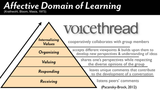
Why is it that the cognitive domain of learning plays such a visible, central role in mainstream conversations about learning theory and practice in higher education while the affective domain frequently takes a back seat? Sprinkled throughout the web, we find visuals of Bloom's taxonomy of the cognitive domain (nowadays usually the revised version) in a myriad of formats. Here are the results of a Google Image Search using the terms "Blooms taxonomy." Take a peek. How many results illustrate the affective domain?The cognitive domain is, of course, critical to learning and I do not intend to belittle its importance in any way here. But I think it's important to unveil the lack of critical discourse that has developed around the affective domain as our learning landscape has gradually moved into the online environment in recent years. The affective domain contributes to the development of a student's motivation, confidence, how relevant they perceive the content to be, and how meaningful their learning experience is to them (Polhemus, Shih, Richardson and Swan, 2000). The affective domain shapes learning into a meaningful, relevant, life changing experience. All of these factors are critical contributors to powerful, inspirational online classes (Zvacek, 1991).The affective domain, according to Donald Clark, "includes the manner in which we deal with things emotionally, such as feelings, values, appreciation, enthusiasms, motivations, and attitudes." As an online teacher, these are critical skills that contribute to my students' effectiveness to participate as a member of our learning community. Fostering these skills is a gradual process that begins in week one and progresses throughout each week and is practiced and improved upon in each of our activities. For this reason, the activities (or most of them), need to be designed with tools that foster a participatory environment and empower students to develop a shared sense of purpose in the community.As online educators, we must be consciously aware of how we are fostering our students emotional and social learning in online environments and explore how hybrid environments can expand and heighten these skills in a class. Doing so will ensure that pedagogies that leave out socialization, which were so eloquently refuted by Cathy Davidson here, will not become mainstream delivery methods within higher education in the future. We must cultivate the emotional intelligence of our students and understand what that means to do so within a 21st century context.At the top of this post is a graphic I created to illustrate how I use VoiceThread, a web-based participatory tool that fosters conversations around media, to foster the affective domain. I welcome your comments and questions, as I consider this a working draft. What tools do you use that scaffold the development of the skills in the affective domain in an online class? And how do you employ them?___________ReferencesPolhemus, L., Shih, L-F., Richardson, J.C. and Swan, K. (2000). Building an affective learningcommunity: Social presence and learning engagement. Paper presented at the World Conference onthe WWW and the Internet (WebNet); San Antonio, TX. Zvacek, S. M. Effective affective design for distance education. Tech Trends. 1991; 36: 40-43.
Michelle Pacansky-Brock
.
Blog
.
<span class='date ' tip=''><i class='icon-time'></i> Aug 26, 2015 04:53pm</span>
|