Blogs
|
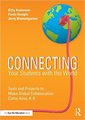
Connecting Your Students with the World: Book Review by Billy Krakower, Paula Naugle, Jerry Blumengarten (Eye on Education, 2015)
Overwhelmed teachers who want to collaborate globally are going to love Connecting Your Students with the World. This book designed especially for grades K-8 classrooms. I’m excited to review this book.
My favorite thing: The book organizes by month! You’ll see all the opportunities by month with links and information about the project. You’ll learn how to take part. There are tons of links and resources to get you started.
I knew when I saw this book several months ago that it was going to help lots of teachers and their students connect. Connecting isn’t always easy. Teachers are busy and don’t have time to ferret out what they need to do. This book makes it easier.
The authors of this book are often seen at conferences. (Sometimes one of them even wears a cape. Here we have (L-R) Billy Krakower, Jerry Blumengarten (the two pics in the middle) and Paula Naugle (right.) They are quite a team and have written a great book for teachers, Connecting Your Students to the World.
Mystery Location Calling How -To Guide
Some people call it Mystery Skype. Others call it Mystery FaceTime. They’re right, we should take the tool out of the name of the practice. We can connect with anyone, anywhere, anytime.
Mystery Location Calling is the best way to get started. They’ve broken it down by how you get prepared. What you’ll do to connect. And the roles for all the students (including many I’d never thought of but make such sense.)
It is worth the book just to have this handy guide.
Connecting Your Students to the World on Amazon
Monthly Projects and Activities
Connect your classroom! A child’s worldview will change. Everything changes. You can connect with the world much easier than you think possible.
With this book, you can plan your whole year. Although I teach high school, I’m going to use this book just to keep up with what is when.
Standards
And yes, the standards correlations for Common Core and ISTE are in there. So, if you need to meet a standard and want to do it with global collaboration (why not?), you can do it too.
My Book Review
Connecting Your Students with the World (K-8) is a must-purchase for all teachers in grades K-8 who want to collaborate globally. (Add it to your shelf along with Flattening Classrooms, Engaging Minds. Flattening Classrooms teaches you how to plan and construct your projects!)
This book has:
The practicality of Paula Naugle,
The zest and energy of Billy Krakower and the
Incredible curation superpower of everyone’s favorite cybrary man, Jerry Blumengarten.
I hope this fantastic team cranks out some more books as helpful as this one.
I recommend this book for:
Elementary and middle school teachers (K-8)
Anyone who wants to do Mystery Location Calls
Curriculum directors
Anyone responsible for planning school-wide events and calendars. (Many principals do this job!)
Connecting Your Students with the World is a practical, useful book for teachers. I highly recommend it.
Disclosure of Material Connection: Some of the links in the post above are "affiliate links." This means if you click on the link and purchase the item, I will receive an affiliate commission. Regardless, I only recommend products or services I use personally and believe will add value to my readers. I am disclosing this in accordance with the Federal Trade Commission’s 16 CFR, Part 255: "Guides Concerning the Use of Endorsements and Testimonials in Advertising."
The post Connecting Your Students with the World: Book Review [Book] appeared first on Cool Cat Teacher Blog by Vicki Davis @coolcatteacher helping educators be excellent every day. Meow!
Vicki Davis
.
Blog
.
<span class='date ' tip=''><i class='icon-time'></i> Dec 04, 2015 05:51am</span>
|
|
An Every Classroom Matters Episode
How can we connect with our students every single day? Teacher Jennie Magiera reflects honestly about how she killed creativity but brought it back from the dead. She shares how a simple Google form changed everything about the relationship with her students. Her insights about kids working below grade level are helpful to every teacher who struggles to reach them. A White House Champion for Change, you’ll be inspired to connect with your students in new ways after listening to this episode.
Important Takeaways
How a mood check-in gave Jennie a "qualitative shift" in her relationship with her students. (BYOD schools take note)
5 Ideas for how to do mood check-ins (even without technology)
How Jennie pursued Ken Robinson’s dream to move towards creativity only to realize she had "broken" her students
How to empower and engage kids who are far below grade level.
How to help kids want to learn.
Educator Resources
Creating Mood Check Ins with Google Forms [VIDEO]
Power to the Pupil - Jennie’s TEDx Talk
Sir Ken Robinson’s TED Talk on Creativity
Jennie Magiera’s Keynote on Wes Fryer’s Podcast
@msmageira
Quotes
How can we allow for all students to have access to powerful and transformational opportunities? @MsMagieraPowered By the Tweet This PluginTweet This
Every child deserves a world-class education. @coolcatteacher #edreformPowered By the Tweet This PluginTweet This
We need to give our students more choice and voice. @MsMagieraPowered By the Tweet This PluginTweet This
"I realized I had essentially broken my students. They were looking for rubrics and checklists. I had robbed them of their ability to make choices. They didn’t feel comfortable anymore, they were so reliant on me. I had to undo that overscaffolding and show them how to be their own educational agents of change on their own educational journey." Jennie Magiera
Connect with Students: Getting and Staying in Touch with Every Student is Episode 175 on Every Classroom Matters with guest Jennie Magiera.
Join the Every Classroom Matters Awesome Educators Network on Facebook
You can subscribe to the podcast on iTunes or elsewhere, get the RSS feed, or listen via the media player above.
The post Connect with Students: Getting and Staying In Touch with Every Student appeared first on Cool Cat Teacher Blog by Vicki Davis @coolcatteacher helping educators be excellent every day. Meow!
Vicki Davis
.
Blog
.
<span class='date ' tip=''><i class='icon-time'></i> Dec 04, 2015 05:50am</span>
|
|
An Every Classroom Matters Episode
My ears were still ringing. The tears were still fresh. The day itself was ok, but at 3:04, I got a phone call that I try to forget. I can’t tell you any more than it was horrible. The worst accusations. No inquiries to what happened. Pure, unadulterated hate. It was the single worst day of my teaching career.
So, when I went home, I had an episode of Every Classroom Matters to record with my friend Alicia Roberts from Arizona. We were supposed to talk technology. I say supposed because the moment I got her and my senior producer Jeannette on the line, I burst into tears. It was too much. I trust these two women deeply, and all the pain came out through the phone line. I sobbed.
So, we sat there wondering what to do with me. We decided that the calamitous school year Alicia had and my devastating day could not be wasted. We decided to speak to all you who struggle. We could always leave the result on the cutting room floor. Or it might help someone one day when enough time had passed to let the show air.
So, if you are falsely accused, yelled at, hurt, or misunderstood — dear friends, this show is for you. I can’t fix these problems, but my friend Alicia and I can share how we dealt with them, each in our way. No tear is wasted when you use the heartache to serve and encourage others. Here’s to you, teachers. Few people understand the hurt and betrayal teachers feel when these things happen. I know the pain. Alicia does too. You are not alone. You are noble. You matter.
Important Takeaways
Betrayal happens to us all.
What to do when you have difficult conversations.
How a polar bear led to Alicia deciding to move to another school.
Sometimes you go, sometimes you stay. It depends on your situation.
We all need people who love us and encourage us when we’re down. Alicia encourages me and it is overwhelming.
We all need people who love us and encourage us when we’re down. I hope that all of you listening out there will appreciate and understand that it takes courage to share this show.
I also think that administrators should listen to know how it feels when teachers are in this situation.
Will you go encourage someone who is having a hard time today? Please?
Educator Resources
How a Student comment saved Ms. Lopez, who was about to quit. (Alicia mentioned this article.)
Interview Links
@teach2inspireu
Join the Every Classroom Matters Awesome Educators Network on Facebook
You can subscribe to the podcast on iTunes or elsewhere, get the RSS feed, or listen via the media player above.
Vicki Davis
.
Blog
.
<span class='date ' tip=''><i class='icon-time'></i> Dec 04, 2015 05:50am</span>
|
|
Make Writing Essays Easier My student cried when I showed her how to voice type in Google. Then, instead of 90 words in one class period, she typed 500. She edited it. She turned it in early. Tears of joy happen when the right tool is taught to the right student. Technology isn’t flashy The right technology makes lives better. Make writing well easier with these four writing tips.
We are all apprentices in a craft where no one ever becomes a master. Ernest Hemingway about writing #amwritingPowered By the Tweet This PluginTweet This
Teachers are busy. As I share in Reinventing Writing, teachers need to do what teachers do best — give creative advice. Sadly, many teachers are glorified spelling and grammar checkers. Many students won’t or don’t use the technology tools. Stop the madness!
I require students to use Spellcheck and Grammar tools before turning in work. Here’s what I teach.
4 Writing Tips for Students Tutorial Video
My 4 Favorite Student Writing Tips that Make Writing Easier
Writing Tip #1: Use Grammarly
www.grammarly.com
Grammarly is awesome. I have the pro version that includes extensive grammar checking and plagiarism checking. So, I edit every blog post with Grammarly. My students signed up for Grammarly this week. As a result, here are the valuable lessons we learned.
How to Get the Basic Version of Grammarly Free (Read this First)
Go to Grammarly using the Chrome web browser.
Firefox and Internet Explorer take you in an endless loop. They do not seem to give you the option for the free account.
You can also search "Free Grammarly" in a search engine to get to the right page.
If you go to the page that has you paste in text, sometimes it will take you in the "sign up" loop. Make sure it talks about the free account on the page BEFORE you sign up.
Make sure you are clicking on the button that says "Sign for Grammarly, It’s free."
If you start signing up, and it doesn’t say it’s free, you’ll have to use another email. I don’t know how to get it to let you sign up for the free version once you start signing up the other way.
When it asks, install the Grammarly Chrome add-in.
Now, Grammarly will check basic grammar. Grammarly will also tell you how many advanced issues there are. (You need the pro version to see them.)
The Grammarly status bar. Notice the percentage it says is copied from other sources!
When grading student work, I paste all papers into Grammarly and turn on the plagiarism checker. (See picture above.) Typically, I’ll coach students before they turn their work in so they can see that they should rework it.
When you check your writing, it generates citations for works you quote. It makes generating MLA citations so much easier when I’m writing books. I couldn’t live without Grammarly. The Grammarly Chrome plugin helps me write better email, blog posts and Facebook status updates.
Grammar Coaching Tip. Grammarly doesn’t just correct your work; it teaches you WHY you made a mistake. I find that I’m removing bad habits no English teacher could eradicate. Grammarly is my English teacher. I can focus on content, not commas.
Writing Tip #2: Use the Hemingway App
http://www.hemingwayapp.com/
In the screenshot, you can see Hemingway’s five basic suggestions with color coding:
Hard to read sentences (Yellow)
Very hard to read sentences (Red)
Simpler alternatives (Purple)
Adverbs (Blue)
Passive voice (Green)
Hemingway Tip. Sometimes students who don’t space after the period will have sentences turn red that shouldn’t be. Once they fix their spacing, the red will go away.
Because I have the Grammarly extension installed, it also checks grammar inside Hemingway. (Shown by the advanced issues and critical issues box.)
Formatting Tip. Sometimes these tools will mess up formatting. For this reason, wait to format until after editing. Also, note that Grammarly mistakenly believes the word "Grammarly" is an adverb because it ends in a "ly." No tool is perfect! You still have to use the software between your ears.
As I show in the tutorial movie above, I like to paste into Hemingway. Improve sentences, then go into Grammarly. Teach students to get rid of the colors. Run on sentences jump off the page. Yahoo!
Some students want to leave a sentence as yellow or red. Have them read the sentence to a friend. See if their friend understands it. If not, simplify.
Reading Level Tip.There are times, especially in higher education, when you choose to write at a higher grade level. But I’ll tell you a secret: blog posts with a lower reading level perform better. My goal is below sixth grade. You can still use big words! Just simplify.
Writing Tip #3 Use Pro Writing Aid
https://prowritingaid.com/
As seen in the screenshot, Pro Writing Aid has many tools and checks. It is a must-use for those doctoral dissertations or books. I run my most important works through both Pro Writing Aid and Grammarly.
It is easy to sign up for the free account on Pro Writing Aid. Pro Writing Aid is perhaps the most robust, free grammar checking tool available. It can be complex, so take the time to teach your students about each aspect.
My favorite tools here are the sticky sentences review and transitions report.
Remove Sticky Sentences for Online Writing. Sticky sentences hurt readability. Sticky sentences have a high number of commonly used words. (You can see these "sticky words" in the purple highlighting below.) Rework these sentences. The more you use Pro Writing Aid, the better you get at avoiding sticky sentences.
While sticky sentences may not bother a writing teacher, they are death to a blog post or online writing. Rewrite sticky sentences for improved readability.
Add Transitions. I have a list of transition words pinned to my bulletin board. With them in front of me, I can better add them to my writing. The target, according to Pro Writing Aid, is to have transition words on 25% of your sentences. I struggle to get that high, but there is no doubt, that when I add transitions, my writing is easier to read.
Pro Writing Aid helps you add transitions to your writing.
Pro Writing Aid has so many features; this tool can be overwhelming to beginners! (See my bonus tip below.)
Try the Pro Version Free. You can tweet about the service and earn some free weeks of the pro version if you want to try it out. The Pro Version makes it easier to edit the document live as you’re working on the document.
Writing Tip #4: Use Voice Typing to Draft Your Paper
https://support.google.com/docs/answer/4492226?hl=en
The Macbook Pro and Mac Air running the newer operating systems have a robust dictation feature. But now, Google Docs has Voice typing (as I demonstrate above.) Just about any computer with a microphone running Google Chrome can use this feature.
Tips for Voice Typing in Google Docs
Not surprisingly, you need to use the Chrome browser.
I had to turn on Rapid Release in Google Apps for Education before my students had access.
Use a headset mic and teach students to talk quietly. Just a few can do this at once, or you end up with chaos. If your mic cancels out background noise, that helps.
You can’t backspace (that I’ve found). Teach students about drafting and just encourage them to get it on the page.
Dictating from another source is STILL PLAGIARISM. (I’m not sure why that is hard to understand, but it is. Writing teachers will smile at this one.)
Collaborative writing is awesome, as I discuss in Reinventing Writing, but when a student is voice typing, it is best not to have other students in the document. Trust me on this one.
Voice Typing and Kids with Learning Differences. For students who struggle with written expression, voice typing is a must use. It will be interesting to see if the testing done on many LD students starts more deeply testing verbal expression versus written expression. The benefit of testing in this way means that we could find students who will benefit from voice typing most of their work.
Offline Writing Tips
Many of these tools are available offline. If you have poor Internet access or like to write offline, improve your editing.
Hemingway has an offline app for the Mac and PC. (I use this when I write my books in Scrivener. I often write and block the Internet so to focus.)
Grammarly and Pro Writing Aid both have a plug-in for Microsoft Word. (Grammarly’s plug in only works on the PC. Pro Writing Aid works on both.)
You can dictate using a Mac and Windows 10 is supposed to have many voice features. (I haven’t played with them yet, but some people say Cortana is pretty cool in Windows 10.)
Bonus Writing Tip for Beginners
My middle schoolers aren’t ready for all of the tools I’ve shared. I just teach them the spelling and grammar check in Microsoft Word. Then, I take them into Grammarly. Here’s a quick video that I use to get students used to spelling and grammar check.
ESSENTIAL TIP FOR TEACHERS: Require Spelling and Grammar Check Every Time
Spelling and Grammar check do you NO GOOD if you don’t USE THEM. Use them. These tools are here. They are available. I require their use. I won’t even grade papers if it has not been checked. I am not a human spell check. I fatigue over time and miss things. I’ll let the computer do that… my student’s computer.
Special Needs. Spell check, grammar check, and voice typing are saving technologies for students with special needs. We should expect and teach how to use these valuable tools. They can change the lives of kids! Require students to use them!
Writing has been reinvented. We must reinvent some of our teaching practices as well.
We haven’t even delved into collaborative editing, writing, and collaborative prewriting, but I covered that in my book. Please share your writing tips and tools in the comments.
The post 4 Writing Tips to Help the Writing Process appeared first on Cool Cat Teacher Blog by Vicki Davis @coolcatteacher helping educators be excellent every day. Meow!
Vicki Davis
.
Blog
.
<span class='date ' tip=''><i class='icon-time'></i> Dec 04, 2015 05:49am</span>
|
|
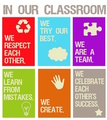
Empower Awesome Learning Every Day We are team classroom. Learning can be a solo venture. It can also be a team sport. (Thanks to Krissy Venosdale of Venspired for letting me use the graphic on this post.)
No bystanders.
When you build team classroom, you unleash a giant. Your class can learn more, grasp more, and move faster. Students learn to appreciate each other’s strengths and work together.
10 Ways to Build Team Classroom
1. Have a wordless way to ask for help.
Flags, indicators, cups. Something. Teach team classroom to spring into action when someone is struggling. As the teacher, be one of those who helps those struggling too. You’re part of the team.
One of my secrets of an awesome classroom is empowering everyone to help. There are no bystanders.
We have these cards I call "flip cards" or "station cards." Each student gets one, and they slide into a slot above the computer where everyone can see. When everything is great, the card is green. When they are stuck, the card is red. If they just want to talk to me (not urgent, have a question like a grade, etc.) the card is blue. If they are away for a moment (like checked out to the bathroom), the card is yellow.
But what is awesome is what happens when someone sees the card flip to red. It reminds me of rafting.
Before you go down the Nantahala river, they give you this talk. I’ve heard the talk at least 50 or more times.
"When someone falls in the water, it is a red flag. Everyone’s goal becomes to get that person back into the boat."
A red card is a similar call for help. If I’m not available or across the room, everyone’s goal is to help that person get back on track. Of course, there’s one significant rule — no hands on anyone else’s mouse. Help one another do it themselves.
2. Help students appreciate everyone’s unique strengths.
I like to discuss:
how the brain works,
personality types, or
anything that helps students see that "book smart" is not the only smart.
When they start appreciating talents, they become more confident of their own. They become grateful of strengths in others.
Classroom example. Fifth grade teacher Laura Candler talks about how she used an "intelligences" quiz to do this with her students.
3. Praise the types of behaviors you want to see with growth mindset words.
Talk about your team classroom with words. "We work together." Things like on the poster above. Study great coaches. Learn how they help their team work together in positive ways.
"I am so proud of how you worked that out."
"I noticed how you all listened to everyone’s opinion."
Classroom example. Read the Teaching Growth Mindset post including the words that you should say to promote a growth mindset.
Teaching Growth Mindset with these 10 Statements by Sylvia Duckworth
4. Be clear when things you’re doing are NOT team classroom type activities.
Tests, if you have to give them are definitely a solo endeavor.
5. Plan celebrations together of great achievements.
Today in my classroom we’re having a "screening party." Everyone has finished their movies and we’re watching them. We’re bringing breakfast foods. I’m planning to tell them just how I feel about their accomplishments. They’ve worked so hard together.
Classroom Example. You can see the Invent this project we did on our public wiki.
6. Let students lead.
When you ask a question, step back and let them discuss it.
When you have them in charge of something, you can advise when they ask, but let them find their way. As Kevin Honeycutt said on a recent show, "teachers should be the resource, not the source."
Let students volunteer to lead and give them titles like:
Project Manager,
Assistant Project Manager,
Editor, etc..
When they come to you with problems, teach them how to work through the problem. Only get involved in the rarest of circumstances.
Classroom example. When my students created their app projects last year, they did it. I was an advisor. They led. You can see their teams, presentations and videos. Note that these teams were across classrooms. Every team had someone from one of four classes. They used Trello to coordinate their work.
Leadership and Mystery Location Idea. One of my favorite aspects of the book Connecting Your Students with the World book by Blumengarten,Krakower, and Naugle is the leadership positions they designate as part of the mystery location calls. If you’re doing Mystery Location Calls or "Mystery Skypes", you can build team classroom NOW with their ideas.
7. Value your students’ opinions.
Students will come to you for opinions. I always ask what they think first.
I also work to include students in other conversations. For example, a teacher asked me about the graphic design of a piece. I said,
"__*student name*__ has a great eye for graphic design. _*student name*__ do you have a moment to give us your thoughts on this piece?"
Help students become known for their strengths.
8. Be willing to admit when you’re learning or mess up.
We all mess up. When I make a mistake or inadvertently have a misunderstanding, I privately apologize to the child.
There have been a few times I found out that something I said was misconstrued by several kids. When that happened, I apologized publicly in front of the class with that person’s permission. Every single child deserves respect. To be a team, you must respect all of the teammates. When teachers mess up and cover it up, they are not behaving honorably for their team. These teachers are undermining themselves by letting their pride keep them from doing what is right.
9. Never speak ill of another student or teacher when they are not present.
If students want to say something negative about any other person, it will not happen in my classroom. If they want to talk privately to me about a problem they are having with another student, that is fine. But a public "dissing" with other kids will not be tolerated. There’s too much gossip, slander, and unkindness in the world today. My classroom is a place of respect and people who are not there deserve to know that their reputation is safe in my classroom.
10. Let the Class Set Team Goals
When you plan activities, projects, or initiatives — let the class set team goals. The #choose2matter movement is an incredible model for how to do this. (Listen to Angela Maiers talking about this program and get a copy of her free ebook Liberating Genius.)
Students should have social entrepreneurship projects. They can choose to make a difference in the world together. Unleashing student creativity in this way creates a passion for the project and for learning how to do the project. You can incorporate passion-based projects into any subject.
Classroom examples. Pauline Roberts and Sciracy, the 4 Liter challenge, and my students talking about passion-based learning are three examples of passion based learning in action.
You have a classroom. You build a team. Build team classroom.
Teamwork certainly makes the dream work. But the secret is to have great dreams and build highly effective teams. Everyone doesn’t have to get along. But everyone should "get" what you’re teaching and be able to work as a team. You can do it.
Speaking of teams, we’re a team. Team teacher. That is who we are. We reflect. We encourage. We help each other be more. Go team! Be an awesome educator every day. We can do this!
Attribution note. UPDATE: I’ve been told that Krissy Venosdale at Venspired created this graphic (shout out to Janelle Wilson and Sarah Schleehauf on Facebook who let me know this.) Krissy gave us permission to use the graphic within moments. Yeah! I’m reaching out to Krissy to see if she will allow the graphic to stay on this post and a place to link the source. The graphic at the top of this post seems to have come from teachfactory.com, however, that domain name is for sale, and I can’t find any trace of the company. It is an incredible graphic.
The post 10 Ways to Build Team Classroom appeared first on Cool Cat Teacher Blog by Vicki Davis @coolcatteacher helping educators be excellent every day. Meow!
Vicki Davis
.
Blog
.
<span class='date ' tip=''><i class='icon-time'></i> Dec 04, 2015 05:48am</span>
|
|
Every Classroom Matters Episode #177: Judy Fishel
Guilty. We tell students "be a good student." "Study hard." "Work hard." But are we guilty of not telling them HOW to be a good student? WHAT study tips actually work? WHAT things do they do to be a "good" student without having to work so hard?
Important Takeaways
The simple things students need to do before anything else.
What does it mean to "study?"
How do you study?
What can you do that will have more impact than reading a book or passage four times?
Why rewriting notes doesn’t work, but what does.
How do you help reluctant learners become more self-motivated?
Over Judy Fishel’s 35 year career in education, she was a Presidential award-winning math teacher and principal. She’s not only read the research, but she’s lived what works. Judy knows how to help students get results. In this episode, she shares important study tips for students.
Educator Resources
Judy Fishel’s April 2015 book Straight A’s are Not Enough: Breakthroughs in Learning for College Students
Judy Fishel’s Breakthroughs to Learning Website
Quotes
Study tips So many times we just tell students, -Study for a test- or -pay attention in class- but we don’t show students what it means to be an excellent student but we don’t tell them how. Vicki Davis
Study Tip: It is so important to reorganize notes, not just rewrite them.
Study Tip: Students need to eat healthy foods, get rest, exercise, and sleep.
Join the Every Classroom Matters Awesome Educators Network on Facebook
You can subscribe to the podcast on iTunes or elsewhere, get the RSS feed, or listen via the media player above.
The post Study Tips: Teaching Kids to Be Excellent Students appeared first on Cool Cat Teacher Blog by Vicki Davis @coolcatteacher helping educators be excellent every day. Meow!
Vicki Davis
.
Blog
.
<span class='date ' tip=''><i class='icon-time'></i> Dec 04, 2015 05:47am</span>
|
|
Every Classroom Matters episode 178 with John Spencer
Writing should be exciting. You can teach writing skills with powerful multimedia based prompts and ideas, a global audience, and easy to use tools. John Spencer has the data to show that kids write more using this method.
Important Takeaways
How can reluctant writers get excited about writing?
Why we should use multimedia writing IDEAS (not prompts.)
The big question that should be asked BEFORE writing (but most people don’t.)
Why we shouldn’t dictate student writing topics and instead, give them choices.
Why sometimes less technology inspires more creativity.
If you teach writing to any age student, you’ll want to hear what 14-year teacher and now college professor John Spencer
Educator Resources
What is Design Thinking? Can it work in my classroom? by John Spencer
Larry Ferlazzo "The Best Web-based tools for Teaching" Episode 131
John Spencer’s Write about App
Student Shark Tank
How to Write Magnetic Headlines by Copyblogger
Upworthy
follow @spencerideas on twitter
If you love writing, check out 4 Writing Tips to Help the Writing Process
Quotes
"Prompts require kids to write.Ideas inspire them to write." John Spencer
Learn how to teach writing skills with rich multimedia writing prompts, a global audience, and student engagement.
Join the Every Classroom Matters Awesome Educators Network on Facebook
You can subscribe to the podcast on iTunes or elsewhere, get the RSS feed, or listen via the media player above.
The post Teach Writing Skills: Using Powerful Prompts to Inspire Students to Write appeared first on Cool Cat Teacher Blog by Vicki Davis @coolcatteacher helping educators be excellent every day. Meow!
Vicki Davis
.
Blog
.
<span class='date ' tip=''><i class='icon-time'></i> Dec 04, 2015 05:46am</span>
|
|
The top 10 education tweets of the 2015 school year so far include lots of sketchtnotes. Sketchnotes! Educators love them. SAMR, growth mindset, new tools, blogging, and back to school were hot topics for my PLN. How encouraging it is to see educators taking the little time we have to reflect, learn, and challenge one another to be more.
A big shout out to uber sketchnoter Sylvia Duckworth! She has graphics in 7 of the 10 top Tweets! She is so gracious and helpful (as well as talented.)
How were the top education tweets selected? The Buffer app weights popularity using retweets, favorites and click throughs. When you look at Twitter, you don’t see "clickthroughs" but that is a measure of how many people click the link or interact with the graphic. (Think of it as helpfulness, I blogged about it when I analyzed the tweets for last year.
Top 10 Education Tweets (August 1-October 9, 2015 on @coolcatteacher )
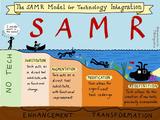
1. SAMR Model Sketchnote
Well done! mT @JeredMartinez: The SAMR Model from @sylviaduckworth #edtech #edchat #NASUWT15… http://t.co/Tf2svHVFgy pic.twitter.com/a6o9CRdJYU
— Vicki Davis (@coolcatteacher) August 1, 2015
2. Helping Kids Reflect on their Learning
What a great way to have kids reflect on their learning.: http://t.co/BaCQbqiXJW pic.twitter.com/WGHDchiHJ9 — Vicki Davis (@coolcatteacher) October 3, 2015
3. Growth Mindset Words
Nice chart: RT @Primary_Ed: Growth Mindset focus http://t.co/0khYwxQwiG via @kevindeforge #edchat #edtech #ISTE2015 … pic.twitter.com/NkGkggTNFh — Vicki Davis (@coolcatteacher) August 27, 2015
4. How I teach a Growth Mindset in My Classroom (With Sketchnote from Sylvia Duckworth)
NEW POST: How I teach a growth mindset in my classroom http://t.co/hjQZsC6P7r pic.twitter.com/5TYpA3x6I7 — Vicki Davis (@coolcatteacher) October 6, 2015
5. Quote from Confucious about Teaching
"Tell me and I forget; teach me and I may remember; Involve me and I will learn." Confucius #edtech pic.twitter.com/mW9iqukQG2
— Vicki Davis (@coolcatteacher) August 2, 2015
6. 5 Ways of Bringing Student Passions to Student Learning (an article I wrote for Edutopia with a Sketchnote by Sylvia Duckworth)
5 Ways of Bringing Student Passions to Student Learning http://t.co/HbaVX3hHGq sketchnote by @sylviaduckworth pic.twitter.com/zSZTRqmMUd — Vicki Davis (@coolcatteacher) August 20, 2015
7. 10 Habits of Bloggers that Win
FREE BOOK: 10 Habits of Bloggers that Win by Vicki Davis (sketchnote by @sylviaduckworth ) http://t.co/hVV5cNHiNe pic.twitter.com/BkeDqbt1w9 — Vicki Davis (@coolcatteacher) August 9, 2015
8. Funny Back to School Cartoon
Lol this is priceless! pic.twitter.com/qsvRTyWOUi — Vicki Davis (@coolcatteacher) September 2, 2015
9. 15 Things Every Teacher Should Try this Year
15 Things Every Teacher Should Try This Year by Austin Gagnier & Sylvia Duckworth http://t.co/aWfNCsd4nm
— Vicki Davis (@coolcatteacher) October 3, 2015
10. Epic Sketchnoting Resources: How To Get Started
Note: This is a blog post I wrote on sketchnoting. It is difficult to know if people liked the blog graphic or the topic. I think it was a combination of both.
Epic Sketchnoting Resources: How to Get Started Teaching Sketchnoting http://t.co/glH0Bghq1Ppic.twitter.com/GrydM2lPJ9 — Vicki Davis (@coolcatteacher) September 30, 2015
connect with me on twitter by clicking here @coolcatteacher
A big thank you to all of you who connect with me on Twitter. I’m grateful for your words of encouragement, best practices, and everything you share with me every day. My PLN is chock full of over achievers, super-parents, amazing athletes, and really smart people. We live in an amazing day when we can connect in such a way!
The post Top 10 Education Tweets of the School Year So Far - Fall 2015 appeared first on Cool Cat Teacher Blog by Vicki Davis @coolcatteacher helping educators be excellent every day. Meow!
Vicki Davis
.
Blog
.
<span class='date ' tip=''><i class='icon-time'></i> Dec 04, 2015 05:46am</span>
|
|
The Cellist of the Schoolyard In 1992, thirty-seven-year-old Vedran Smailovic was principal cellist of the Sarajevo Opera. Because of the fighting, Sarajevo was being called "the capital of hell." On May 27, a long line waited in front of one of the last bakeries in town. Parents wanted to buy bread to feed their families. A mortar landed among them, exploding and killing twenty-two people in line.
Something inside Vedran Smailovic’s heart broke.
The carnage lay in the street outside his window. Instead of white bread for the masses to eat with their red meat, there were white bones and bloody masses of red flesh scattered everywhere.
It scarred his mind. His naivety evaporated. War was in his neighborhood. What could he do about it?
As he stayed up that night sobbing, his anguished mind struggled to rescue his soul from the pit of despair. How could he make a difference in a living hell? What could he do? Smailovic did the only thing he could. The only thing he knew.
The next day, he donned black. Not the black of mourning, but the formal black of a musician of a prestigious opera company. Twenty-four hours after the massacre, at 4 p.m., Smailovic settled his stool beside the still smoking crater.
And he began to play.
Smailovic plays in the partially destroyed National Library in 1992. (Source: Wikipedia)
Excellence Amidst Tragedy.
He continued to play every day at 4 pm for twenty-two days - one for each person who died. He played through the rockets red glare and the bombs bursting in air.
The citizens in the capital of hell received a heavenly emissary every day at 4 pm. They heard music that reminded them of the good, beautiful things of life. The lilting music singing that there was hope that again peace would return.
His powerful testimony brought even more attention to the horrors around him. This is quoted from a news report.
"Asked by a journalist whether he was not crazy doing what he was doing, Smailovic replied: "You ask me am I crazy for playing the cello, why do you not ask if they are not crazy for shelling Sarajevo!"
He played on.
After twenty-two days, he moved his chair. He played in other neighborhoods with freshly charred craters and fragments of humanity where souls had recently departed this earth. He played in graveyards amidst the newly buried where muffled mourners shuffled in the street looking for bread. Snipers poised to shoot those who attended funerals where he played. Smailovic played on.
He played until December 1993.
He had played to hold out hope to those who would listen. He became the personal embodiment of hope for peace in Bosnia. He dispensed hope in his music; he became hope to his people.
The next year, in 1994 famed cellist Yo-Yo Ma played a newly composed piece by English composer David Wilde at the International Cello Festival in Manchester, England. The piece entitled "The Cellist of Sarajevo" haunted those who were there. Pianist Paul Sullivan described it this way in Everyday Greatness:
"When he had finished, Ma remained bent over his cello, his bow resting on the strings. No one in the hall moved or made a sound for a long time. It was as though we had just witnessed that horrifying massacre ourselves.
Finally, Ma looked out across the audience and stretched out his hand, beckoning someone to the stage. An indescribable electric shock swept over us as we realized who it was…
Smailovic rose from his seat and walked down the aisle as Ma left the stage to meet him. They flung their arms around each other … everyone in the hall erupted into a chaotic, emotional frenzy…
We were all stripped down to our starkest, deepest humanity at encountering this man who shook his cello in the face of bombs, death, and ruin, defying them all."
My heart is quiet.
It is as if the strings inside my vocal chords that make that dissonant sound - the sound of whining - those chords are broken. Snapped in two by the understanding that far worse things are happening in the world than my struggles to make ends meet and to put 26 hours into a 24-hour day.
And the vocal chords that share hope and goodness, and knowledge are stronger. I feel compelled. I must impart knowledge, but I must also teach things to prevent more carnage in future breadlines. I must play my music. I will lend my voice. I will pull up my chair to empower my students to add their voice to the things that echo for the good in this world.
You see, right now, our schoolyards are pretty tough places. I don’t care where you work; parents are stressed out. And when parents are stressed out, they send stressed toddlers, tykes and teens in through our doors.
And teachers are stressed too! Administrators! Curriculum directors! Librarians! Tightening budgets mean we have to do more with less. And we love our students, which means we have a decision. We have a choice.
We can see the carnage and problems outside our window - and we can have a pity party and say we are in the midst of the capital of hell. And we can do nothing.
Or, we can take a bit of humility and perspective from a cellist who really has been to hell. Realize that we have a choice as we retreat into our homes at night and lock our doors and contemplate what we shall do on the morrow. Surely our problems are far less. Most of our problems aren’t hell. They are hard. Sometimes they are hell. But not always.
We can’t do a lot. Some of us can blog. Others can speak or sing. Lots of us can teach, encourage, and help others. But there’s one thing we can all do.
We can teach.
For, you see, a good teacher is like music in the life of a student. Every educator is music in someone’s life. Our little words and actions are notes in the symphony of our school. The more of us who unite to play sweet music, the more we can be heard. United we are a symphony. But alone, we can still play sweet music.
So many times, life is not what we want it to be. But we examine ourselves, see what we can do and then we do what we can with all we have.
For, by playing our music - sometimes we become the only symbol of hope that others will hear.
Adapted and updated from Cellist of the Schoolyard written in 2006, coolcatteacher.com - http://www.coolcatteacher.com/the-cellist-of-the-schoolyard/
Sources:
The Cellist of Sarajevo. Live Positive.
Everyday Greatness: Inspiration for a Meaningful Life Paul Sullivan. "The Cellist of Sarajevo"
The post Why Teachers Need to Keep Going Even When It’s Hard appeared first on Cool Cat Teacher Blog by Vicki Davis @coolcatteacher helping educators be excellent every day. Meow!
Vicki Davis
.
Blog
.
<span class='date ' tip=''><i class='icon-time'></i> Dec 04, 2015 05:45am</span>
|
|
Useful Tools for Teachers Padlet is a versatile, easy to use tool for every teacher’s toolkit. Let’s dive into Padlet and Learn the Basics.
At the bottom of this post, I have a Padlet that is temporarily open for you to post and share your favorite edtech tools.
Richard Byrne, author of Free Technology for Teachers, spent some time teaching the teachers at my school about Padlet. I’ve got some notes in this article that he mentioned in the workshop to give him due credit. Richard has a fantastic blog, and I highly recommend it.
Padlet Website:
www.padlet.com
What you can share on Padlet:
The box where you type or share your item in Padlet.
Padlet lets you
Type
Record Your Voice
Add a Hyperlink
Add a Photo
Add a Document
The flexibility of this tool means you could have one class padlet for the year and share resources and links throughout the year. (Particularly if you set it up in "flow" style as shown below.)
How to Edit Your Padlet
As with many tools the gear icon (as shown in the graphic below) is where you go to edit your background and change your settings.
You can customize your Padlet page with a different background, title and more.
Organize Your Padlet
Richard Byrne taught me something new today. You can change it to be more like a Twitter or have a flow. I like this view much better than having people write all over the board.
You can move the Padlet layout to stream. This view is much better than typing all over each other, in my opinion. (hat tip Richard Byrne - I didn’t know this.)
Security and Control with Padlet
There are lots of features you can customize on your padlet. For example, you can make it public, private, password protected and even moderate everything.
You can have lots of control of your Padlet even moderate comments.
Remember, as the teacher, you can see a little trash can and delete items that need to be removed. You can also turn off writing and set it just to view when you’re not in the classroom. If you’re worried about "naughty students" - you just need to dig deeper.
How you can give the students the link to the Padlet:
You can share the link with others in many ways. You can also copy the link at the top and paste into a link shortener like bitly.
If you click the share button, you can share via email, Tweet, and it even creates a QR code. But the best way is to copy the long address and then paste the link into bit.ly and customize the link. (See my blog post on link shortening.)
SANDBOX: The BIG Tip for the First Time You Use Padlet (or any Tool)
As Richard shared, he has a common experience with tools that I do. The first time you share it, have a sandbox Padlet. Sandboxing software means that you play with the software before you get down to "business."
Kids get a bit excited and sometimes silly. When they are done and get it out of their system, delete the Padlet and go onto the real activity. Glad to see another teacher seeks kids get excited. Both Richard and I recommend this as best practice in the workshops we give.
How can I use Padlet in the Classroom?
For younger classes, use it as a portfolio to share with parents. Snap pictures of student work and share them.
Richard Byrne says you can use it almost as a blog.
Have a class Padlet and put the links to everything else in it. Set the student web browsers to start with the class Padlet. If you set it to flow, the work is already at the top.
You can have pictures on the Padlet and have kids sort the pictures to classify them (and use the Interactive White Board (IWB)).
Have students create their Padlets by topic and paste their link in the class Padlet.
Use it as a class backchannel and have discussions on it.
Have students work a problem, and snap a picture of how they worked it.
Padlet Resources
Richard Byrne has written blog posts and recorded many tutorials on getting started with Padlet
Tom Barrett has a fantastic Google Presentation "32 Ways to Use Padlet in the Classroom" that you should review
Classroom 21 Wikispaces on Padlet
Matt Miller’s 20 Useful Ways to use Padlet in the Classroom Now
Created with Padlet
The post How to Use Padlet: A Fantastic Tool for Teaching appeared first on Cool Cat Teacher Blog by Vicki Davis @coolcatteacher helping educators be excellent every day. Meow!
Vicki Davis
.
Blog
.
<span class='date ' tip=''><i class='icon-time'></i> Dec 04, 2015 05:44am</span>
|