Blogs
|
One of the interesting things that was not included in the announcement of the iPad yesterday was support for Flash. It’s a nice big device, perfect for browsing the web and remote learners. But it doesn’t have Flash support. Apple has said in the past that they plan to support Flash at some point, but I’m beginning to wonder. In the meantime, it seems like HTML 5 is picking up steam. Any guesses on Flash support on Apple mobile devices going forward? And if it’s not going to be supported, does this mean we’ll be looking at other delivery technologies going forward? eLearning Technology
Subscribe to the Best of eLearning Learning for updates from this blog and other eLearning blogs.
Tony Karrer
.
Blog
.
<span class='date ' tip=''><i class='icon-time'></i> Jul 14, 2015 12:46pm</span>
|
|
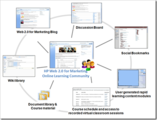
I had a great conversation last week that sparked an early stage idea for what I think would be a wonderful way for learning and development organizations to leverage SharePoint better. HP Web 2.0 for Marketing - Social Learning Experience The concept is probably easiest to understand by considering what HP did around their course on Web 2.0 for Marketing. You can find more on this by going to the LearnTrends - SharePoint in Corporate Learning Recordings. The basic concept was that HP’s learning organization wanted to help their marketing professionals get up to speed on the implications of Web 2.0 for HP’s marketing efforts. Of course, that’s an interesting learning problem in that the answer around "implications" is not defined. The L&D organization created a social learning experience that brought together 60 marketing professionals from across the organization. They established a goal of having the group produce a summary of what they found and what Web 2.0 could mean for the organization. In many ways, this was a facilitated work task more than a learning experience. The L&D organization provided some instruction on the basics for how the sessions would operate and some information around Web 2.0, but a lot of the effort was discovery by the marketing professionals themselves. In the picture below, you can see some of the mechanisms they used: Social Bookmarks to share resources they found Discussion Boards to ask questions and have discussions. A blog that helped spark conversations around key topics. A wiki that served as a repository for the resources they collected. Virtual class sessions to share what they were finding Learners were encouraged to do quick screen capture movies to explain their thoughts around particular uses of Web 2.0 technologies and share with the group. The results were pretty incredible for HP. And it’s exactly this kind of facilitated social learning experience where the result is somewhat a work objective that makes a lot of sense. SharePoint Social Learning Experience Based on the above description, I’m sure you can see where I’m going with what I think would be a fantastic learning opportunity for L&D organizations who want to understand what it means to Use SharePoint in their organization as both a system for facilitating the work of L&D and as a tool to be used as part of learning solutions. The idea would be to: Set a goal to produce a presentation and set of recommendations to be presented to senior L&D management Get a cross section of L&D professionals and possibly others within the business Setup an environment that will be used both as a sandbox and as a support for the learning experience Introduce SharePoint (and/or other technologies) to participants Facilitate activities and discussions that ultimately lead towards the presentation and recommendations Of course, there’s nothing preventing variants of this being done across multiple smaller organizations. And certainly there are lots of external professionals that likely would make sense to either help make this happen or include as third party experts as part of the learning experience. See Learning Community, Peers and Outside Experts for more description of possible design elements. I also think this is a great way to help build understanding of social learning within an organization. I’m hoping to get feedback on this? Does it make sense as a model? Are organizations already beyond this or should it actually be a facilitated discussion around learning technologies period, not just SharePoint? Will it make the most sense as SharePoint 2010 begins to roll out into organizations? eLearning Technology
Subscribe to the Best of eLearning Learning for updates from this blog and other eLearning blogs.
Tony Karrer
.
Blog
.
<span class='date ' tip=''><i class='icon-time'></i> Jul 14, 2015 12:45pm</span>
|
|
Of all the interactive learning gadgets that Versal offers, teachers consistently tell us that Deeper Diagram is one of their favorites.
Deeper Diagram lets you upload any image and add labels and descriptions to various parts of the image. Teachers often use Deeper Diagram to encourage visual learning and memory. It’s a versatile gadget that we’ve seen do especially well in science and technology courses.
You can also use Deeper Diagram with two different quiz modes. In the first, students must identify the correct part of an image when given a label. In the alternative quiz mode, students must match a given description to one of the labels.
Check out this video to learn how to use Deeper Diagram in your next Versal course.
And remember that you can always find How To video tutorials for setting up gadgets and more at our Support Center.
Have an idea for a gadget? We’d love to hear it! Email us at support@versal.com.
Christopher Poseley
.
Blog
.
<span class='date ' tip=''><i class='icon-time'></i> Jul 14, 2015 12:45pm</span>
|
|
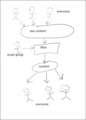
Great post by Tim Kastelle - Filtering, Crowdsourcing and Innovation. He’s talking primarily about Innovation pipelines based on crowdsourcing. His diagram: Show a fairly common model for how things can be filtered. This is similar to the model that we used on Project Greenlight - the scriptwriting and director contest by Matt Damon and Ben Affleck. Anyone (hopefully everyone) could submit their script / movie. From there, we had smaller and smaller batches of people reviewing until it got down to the core team looking at the top few submissions. This caught my eye because it’s a bit different than the model we are using on Browse My Stuff that powers sites like eLearning Learning. In Curator Editor Research Opportunities on eLearning Learning, I described the flow that it uses: In this case, the input is curated content although it can come from virtually anywhere. It then relies on social signals from everyone to filter it down. I’m not claiming that one is preferred. And I think that you can argue that Digg uses a slightly different model. The other part of this thought process is that the feedback on my Top 10 eLearning Predictions for 2010 was that I should have Information Overload and Information Filtering as my user chosen prediction number 10. I tend to agree with that. But there’s a challenge to it. And that challenge is somewhat hinted at in this month’s big question: Instruction in a Information Snacking Culture? Are the training solutions being produced part of the problem of information overload? How do we shift to a position where we are helping to filter information and reduce overload rather than possibly contribute? Certainly, I’m paying attention to this and I’m going to go through Tim’s post - Personal Aggregate, Filter and Connect Strategies to see how it might impact my Tool Set 2009 tools and methods, especially Information Radar, Networks and Learning Communities). Good stuff Tim! eLearning Technology
Subscribe to the Best of eLearning Learning for updates from this blog and other eLearning blogs.
Tony Karrer
.
Blog
.
<span class='date ' tip=''><i class='icon-time'></i> Jul 14, 2015 12:45pm</span>
|
|
The 2014-15 SAT testing season is in full swing, with the next exam less than a week away. We understand that getting ready for it can be tough, even overwhelming at times. Versal is here to help. We are offering a full and interactive SAT prep course, absolutely free! Expert tutors with years of experience will help take the guess work out of getting ready for the big day with insider tips, tricks, and strategies.
Sneak a peek inside an Essay Writing course
The Versal SAT courses cover the Math, Writing, and Critical reading sections to sharpen your skills in each area. Practice using the short amount of allowed time to write a stellar essay or brush up on your grammar and paragraph structure with the Writing courses. Take advantage of the tutorials and sample problems the Math course comes complete with to learn about common questions and equations.
The Versal SAT test prep course series includes 35 hours of lecture videos, sample quizzes for each section, and full length practice exams. Authored by San Francisco SAT teachers on Versal’s interactive platform, the lessons are self paced so it’s easier to fit in practice time with your busy schedule. Study when it works best for you. And there is always the option to go back to an earlier lesson and review it again.
To find the Versal SAT courses and start practicing now, visit https://versal.com/learn. You need a Versal account to enroll. Don’t have one yet? Not to worry, registering takes only a minute and is free, visit https://versal.com/register
Best of luck on your exam!
Christopher Poseley
.
Blog
.
<span class='date ' tip=''><i class='icon-time'></i> Jul 14, 2015 12:45pm</span>
|
|
I was just reading a post - Top 5 tips to gain buy in for learning with social media. The tips were many of the usual suspects (click on the link for details): Build a solid measurable plan Do your research and put it to the test Choose your words carefully Blitz the stigma Educate the decision makers This is good stuff, but it also got me to thinking that this might be way more complicated than it really needs to be. Instead, one of the things that I Learned about Learning in 2009 and was an important eLearning Predictions for 2010 was to "Be a Jack". What does this mean? I detailed it in Selling Learning Communities - Not Everyone Will or Wants a Group Hug. Go listen to Jack and how he describes what he does. And the key in selling social learning / learning communities was the simple explanation of what they are in a value proposition. Here’s what Be a Jack sounds like: If I can bring together outside experts and/or people from across the organization with expertise and facilitate a conversation on the critical business issues you are facing and help you capture that so that it can get distributed in the organization - is that something you would want? Absolutely! In fact, we all want that all the time! As an example, the way that I should have described a SharePoint Social Learning Experience if my audience was a CLO or VP Learning would be: If I can bring together people from across your learning organization in a facilitated discussion possibly with outside peers or experts so that they can explore the implications of social learning, informal learning and Using SharePoint in the organization as both a system for facilitating the work of L&D and as a tool to be used as part of learning solutions - is that something you would want? Or the HP example out of that same post: Help marketing professionals understand the implications of Web 2.0 for HP’s marketing efforts. Am I wrong, or doesn’t it make a lot of sense to simply Be a Jack? eLearning Technology
Subscribe to the Best of eLearning Learning for updates from this blog and other eLearning blogs.
Tony Karrer
.
Blog
.
<span class='date ' tip=''><i class='icon-time'></i> Jul 14, 2015 12:45pm</span>
|
|
I received an interesting question from someone who is working on providing content to a remote sales force of about 40 people on topics such as selling process, products and selling skills. They currently provide some podcasts and video casts, but would like to track the new content that is being developed now. It seems like this should be an obvious question. You can put the audio or video inside a SCORM course and load it into an LMS. Given the small audience and limited scope, likely a Rapid Learning Management System would make a lot of sense if that was the direction. I’d have to think a bit more to have a specific suggestion on the course authoring tool for this, but should be easy enough to do this. However, in this case the sales force is used to accessing this as MP3 and MP4 files available for download into their iPods, iPhones, etc. They are not used to connecting via an LMS. Likely the sales force is not going to be happy about: The extra clicks and complexity to access - Does a Learner WANT an LMS? Not playing it back on their disconnected mobile device. This is a fairly common use case. Certainly, I’m missing something. So, asked my various networks about this and got back few responses. Peter Casebow via twitter: @tonykarrer got to ask how does it help org to count or know who's had access unless for compliance reasons. What will you do with data? They do want to track this for helping to make sure that the sales force gets through the content. I.e., follow-up notifications. However, they might be able to get away with putting the core content out the same way they do today and only put the assessments into the LMS. The tracking would only be that they did a portion. This is a change to What Goes in the LMS? Of course, that assumes that they don’t need to track going through the content and that there are assessments. I’m pretty sure that neither is true. Is there a better way to do this? eLearning Technology
Subscribe to the Best of eLearning Learning for updates from this blog and other eLearning blogs.
Tony Karrer
.
Blog
.
<span class='date ' tip=''><i class='icon-time'></i> Jul 14, 2015 12:44pm</span>
|
|
In a Github post by Andrey Mereskin, a Versal front end Web developer, we take a behind-the-scenes peek at the capabilities of the HTML5 drag-and-drop API, an API used within Versal to add gadgets to a course. Andrey provides an engineering perspective and outlines the issues one may run into when implementing the API in different browsers. Read on at http://mereskin.github.io/dnd/
Are you a senior engineer or interaction designer interested in #EdTech? If so, we’re hiring! Check out our latest openings on AngelList.
Christopher Poseley
.
Blog
.
<span class='date ' tip=''><i class='icon-time'></i> Jul 14, 2015 12:44pm</span>
|
|
I’ll have more coming on this topic, but today someone asked me how to approach is going through an LMS selection because the general feeling was that the existing LMS was too hard for users to use. In this case, it’s customer training around products that the company sells. They are doing a combination of virtual classroom training (via WebEx) and self-paced eLearning. They currently use Moodle as an LMS with some customizations. However, the resource who did the customizations is no longer with the company. And the person who asked the question tells me: My managers have asked me to find alternatives to Moodle that are more user friendly and that are easier to update and manage. I’ve discussed many times about dissatisfaction with LMS: LMS Satisfaction Features and Barriers LMS Dissatisfaction on the Rise and even a bit about the disconnect between an LMS and what things most users want / need: Do You WANT an LMS? Does a Learner WANT an LMS? When I look at how I define the process for selecting an LMS, a lot of it comes down to the ability to support differentiating use cases. That doesn’t necessarily help when it comes to selecting an LMS that will be easy for the user. So, I’m left wondering: What are examples of specific requirements that can be used during LMS selection to ensure that the result is easy to use? Have you found that any LMS is particularly easier to use and been able to make a selection based on that? What advice would you have for helping this individual find alternatives to Moodle? eLearning Technology
Subscribe to the Best of eLearning Learning for updates from this blog and other eLearning blogs.
Tony Karrer
.
Blog
.
<span class='date ' tip=''><i class='icon-time'></i> Jul 14, 2015 12:44pm</span>
|
|
The 2014-15 SAT testing season is in full swing, with the next exam less than a week away. We understand that getting ready for it can be tough, even overwhelming at times. Versal is here to help. We are offering a full and interactive SAT prep course, absolutely free! Expert tutors with years of experience will help take the guess work out of getting ready for the big day with insider tips, tricks, and strategies.
The Versal SAT courses cover the Math, Writing, and Critical reading sections to sharpen your skills in each area. Practice using the short amount of allowed time to write a stellar essay or brush up on your grammar and paragraph structure with the Writing courses. Take advantage of the tutorials and sample problems the Math course comes complete with to learn about common questions and equations.
Sneak a peek inside an Essay Writing course
The Versal SAT test prep course series includes 35 hours of lecture videos, sample quizzes for each section, and full length practice exams. Authored by San Francisco SAT teachers on Versal’s interactive platform, the lessons are self paced so it’s easier to fit in practice time with your busy schedule. Study when it works best for you. And there is always the option to go back to an earlier lesson and review it again.
To find the Versal SAT courses and start practicing now, visit https://versal.com/learn. You need a Versal account to enroll. Don’t have one yet? Not to worry, registering takes only a minute and is free, visit https://versal.com/register
Best of luck on your exam!
Christopher Poseley
.
Blog
.
<span class='date ' tip=''><i class='icon-time'></i> Jul 14, 2015 12:44pm</span>
|