Blogs
|
I received a link in one of my Google + communities to Kasey Bell’s blog, Shake Up Learning. It arrived in my inbox just when I needed it. I’ve started … Continue reading →
Chevin S. Stone
.
Blog
.
<span class='date ' tip=''><i class='icon-time'></i> Jul 15, 2015 07:15am</span>
|
|
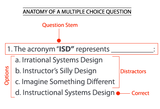
Join in on the excitement of writing multiple choice test items. You won't want to miss out on this!Post from: The eLearning Coach10 Rules For Writing Multiple Choice Questions
Connie Malamed
.
Blog
.
<span class='date ' tip=''><i class='icon-time'></i> Jul 15, 2015 07:15am</span>
|
|
I am looking forward to being back in San Jose next week for the ASTD TechKnowledge 2011 conference. This is ASTD's dedicated event for learning professionals who are responsible for or interested in elearning and learning technologies methods, new media...
Ellen Wagner
.
Blog
.
<span class='date ' tip=''><i class='icon-time'></i> Jul 15, 2015 07:15am</span>
|
|
This post is part of my continuing series of weekly lesson summaries. My goal is to give parents & caregivers in our school community the resources needed to extend student learning at home, and to share my professional practice with teacher colleagues around the world in the interest of improving my craft.
Synopsis: Kindergarteners and First Graders enjoyed a "day of play" (free time, essentially) this week as I had to work with students either one-on-one (recording Kindergarten voices for our Holiday Greetings project) or, in groups of five (for a formative assessment involving the ChromeOS user interface in general and tabbed browsing in specific). Second, Third and Fourth Graders rocked Learning.com’s EasyTech service for some basic instruction on spreadsheets which will come in handy after the new year when we begin the data analysis phase for the "Drops on a Penny Challenge" unit.
Please note: in our current "Day" rotation, Mondays are Day 5, which means my new lessons start on Tuesday (Day 1). These "days" change over the course of the year due to holidays, etc.
Week ending 12/14/12
Kindergarten
What we learned / did / explored together:
Kids warmed up with a keyboarding activity of their choice (Keyboard Climber was easily the most popular), then they got some free time to explore the activities on the Kindergarten Symbaloo page as I used my digital voice recorder (above) to capture their voices for our Holidays Greetings project. (Here’s a sample.)
What I observed / inferred / connected:
We have done this project or something similar for years, and every time, I am amazed at how shy kids get when asked to record their voice. Trying to remember what it was like to be five years old, I’m missing something, because, when I was in Kindergarten, I looked like this, and didn’t have any problems chattering up a storm. (In fact, I never shut up. No surprise, eh?)
What students can do at home:
As always, check out the Kindergarten Symbaloo for fun activities and skill builders.
If your child plays Keyboard Climber, encourage them to persist all the way "to the moon," and make a big deal about it when they get there. It’s definitely doable. Then be sure to tell them to let me know the next time they see me so I can give them a big "high-five."
First Grade
What we learned / did / explored together:
Kids warmed up with a keyboarding activity of their choice (Keyboard Climber was the most popular, as in Kindergarten), then they got some free time to explore the activities on the First Grade Symbaloo page as I worked with groups of four or five on a short, four-page, eight item formative assessment on ChromeOS in general and tabbed browsing in specific.
I read each of the questions to the group and they provided answers on their papers, which I am still reviewing.
The total time of the assessment was about six to seven minutes per group. (One student, in Mrs. Edelmann’s class, read it all by himself and got all the questions right.)
What I observed / inferred / connected:
This assessment was prompted by a pattern I’ve been noticing for weeks - students often close browser tabs, and sometimes, even the browser itself, by mistake. The results have been illuminating. A significant number of kids, when asked to "click the tab," actually click the "x" that CLOSES it. That explains a lot of what we’ve been seeing and helps me understand how I need to teach differently. I’ve already made adjustments, we’ll see if things improve.
Teaching tabbed browsing to early learners, particularly non-readers, is proving to be a greater challenge than I anticipated. Part of the problem is the high resolution Chromebook screen (and the resulting small size of the fonts.)
What students can do at home:
First, it would be great if you could install the free Google Chrome web browser. It’s free and will ensure your kids have a consistent experience with applications and websites we use at school. If you’d rather not install Chrome, that is fine, as all major current browsers use tabs, and you can speak with your child about them.
Check out the First Grade Symbaloo page for fun online activities!
Second, Third and Fourth Grades
What we learned / did / explored together:
Students warmed up with TypingPal and then tackled a few Learning.com EasyTech lessons on basic spreadsheet skills in preparation for our continued work on the "Drops on a Penny Challenge" unit. (Parents should have information needed to access EasyTech at home, if not, please contact me.)
What I observed / inferred / connected:
In the photo above, students are shown using the "foam cubes" during the lesson. This particular activity was VERY challenging without a mouse but the kids I selected for the test did admirably well. One of my learning space design goals this year is to allow students to choose where they sit and work. We are getting closer to realizing that vision but more work needs to be done on procedures (proper laptop carrying technique) etc. Of note: several students ended up sitting on the foam pads and placing the Chromebook on the cube to work. It’s all about whatever the student finds comfortable (and productive).
Headphones (properly sized and comfortable to wear) are absolutely critical in my classroom this year. This lesson is one reason why. Headphones are also essential for use with screencasted (a.k.a. "flipped") lessons, which we will be seeing more of in 2013.
What students can do at home:
Work through the EasyTech Spreadsheet lessons (completing any that were unfinished). These are excellent and have a gentle learning curve.
Practice keyboarding with Typing Pal. Students should know their usernames and passwords by now (they are simpler than Google Docs.)
Check out the grade-level Symblaoo pages for fun learning activities: Grade 2 | Grade 3 |Grade 4
Kevin Jarrett
.
Blog
.
<span class='date ' tip=''><i class='icon-time'></i> Jul 15, 2015 07:15am</span>
|
|
As noted last week, I’ve started sharing some learning with my PLN at work. I thought I might share it with you also. Enjoy!
Chevin S. Stone
.
Blog
.
<span class='date ' tip=''><i class='icon-time'></i> Jul 15, 2015 07:15am</span>
|
|
Sometimes text to speech synthesis can save the day. Find out more.Post from: The eLearning CoachText To Speech Synthesizers For eLearning
Connie Malamed
.
Blog
.
<span class='date ' tip=''><i class='icon-time'></i> Jul 15, 2015 07:14am</span>
|
|
I have a story to tell. More than 45 years ago, when my mother taught elementary school, I would, for years, go with her the week before school started to … Continue reading →
Chevin S. Stone
.
Blog
.
<span class='date ' tip=''><i class='icon-time'></i> Jul 15, 2015 07:14am</span>
|
|
Interesting article in today's Chronicle of Higher Education's Wired Campus about a growing shitstorm around learning technology standards. Per Jeff Young, author of article in question: "The issue centers around a single line of the 53-page grant guidelines for the...
Ellen Wagner
.
Blog
.
<span class='date ' tip=''><i class='icon-time'></i> Jul 15, 2015 07:14am</span>
|
|
As we prepare to head into winter break, I wanted to take a moment to ask parents of all my 546 students these questions:
Does your child have a working, comfortable, inexpensive set of computer headphones (or earbuds) for use in my class?
If so, are they kept in a properly sized (up to one gallon) Zip-Lock storage bag which is marked with their name?
Most of our students DO have these, particularly in grades K & 1st, but in Grades 2, 3 & 4 (where the need is actually greatest) the numbers trail off significantly. So much so, in fact, that kids without them - too many - are having difficulty completing lessons. Whether it’s working through some EasyTech tutorials on Spreadsheet basics or watching a screencast I created explaining how to change a Google Account password, personal listening devices are essential this year. (We’re going to be doing a lot more with screencasts starting in January, too.)
Fortunately, there’s hope. FiveBelow has excellent "DJ Style" headphones for $5 - here’s a pic:
Image credit: Five Below
These are very popular and perfect for kids in grades 2-3-4. (They are a little large for younger students). Earbuds are totally fine for older kids too, as long as they fit comfortably and don’t fall out. For younger students, I prefer smaller, lighter, equally inexpensive over-the-ear headphones like the ones pictured here.
Earbuds are another option. FiveBelow comes through here as well for just $5:
Image credit: Five Below
But wait, we’re not done yet. Headphones need to be stored for safekeeping. A small Zip Lock bag works for earbuds but a one-gallon Zip Lock bag as shown below is ideal for headphones. The bag can accomodate the student’s name written in permanent marker:
Image credit: Steven Gould
Finally, your child’s headphones (not earbuds, obviously) also should have their name written PROMINENTLY on them in permanent marker, ideally, in a place that makes it obvious and effectively "defaces" them to discourage theft. (I’m sad to say I’ve heard that some headphones have gone missing. Names should help reduce the problem.)
By the way, here’s a handy tip: cut off the corner of the bag (a very small corner) so that air does not get trapped in the bag. This helps for storage.
I really, really appreciate your help getting kids equipped for the 21st century learning happening in my class!
Best,
Mr. Jarrett
Kevin Jarrett
.
Blog
.
<span class='date ' tip=''><i class='icon-time'></i> Jul 15, 2015 07:14am</span>
|
|
Our district is moving towards full GAFE integration, mainly because its cost effective and the collaboration piece is mind blowing. We’ll be using Chromebooks in the classrooms and are in … Continue reading →
Chevin S. Stone
.
Blog
.
<span class='date ' tip=''><i class='icon-time'></i> Jul 15, 2015 07:14am</span>
|