Blogs
|
For the past several weeks, my new lessons have been falling on Thursdays (i.e., Day 1). With the upcoming Dr. Martin Luther King holiday on January 21st, "Day 1″ will shift to Fridays. So, posting a recap on Saturday after having taught only one of five lessons seems, well, silly.
To rectify this, I’m going to skip (hence the picture, oooh, I’m so clever, aren’t I?) my reflection / update for one week. This will allow me to complete (and therefore reflect on) four days worth of lessons. So, watch this space next weekend for an update on our usual adventures! Thanks!
Kevin Jarrett
.
Blog
.
<span class='date ' tip=''><i class='icon-time'></i> Jul 15, 2015 07:10am</span>
|
|
I recently contributed an essay to the inaugural issue of the Journal of Applied Instructional Design. This is a new journal, sponsored by the Association for Educational Communications and Technology, aimed at giving the ID scholar - practitioner greater voice....
Ellen Wagner
.
Blog
.
<span class='date ' tip=''><i class='icon-time'></i> Jul 15, 2015 07:10am</span>
|
|
Instructional designers will increasingly be asked to design information, not just learning content. Here's a model for info design.Post from: The eLearning CoachWe Design Information Too
Connie Malamed
.
Blog
.
<span class='date ' tip=''><i class='icon-time'></i> Jul 15, 2015 07:10am</span>
|
|
Every educational technology professional knows the frustrations of getting buy in from the teaching staff in school as districts work hard to create 21st century learning environments for students. I’ve … Continue reading →
Chevin S. Stone
.
Blog
.
<span class='date ' tip=''><i class='icon-time'></i> Jul 15, 2015 07:09am</span>
|
|
The sun is setting on another Educon weekend, 2+ days (depending on your availability and inclination) of conversation, networking, questioning, observing, sharing and reflecting on life as an educator and the future of schools (among eleventy-billion other things). It was a great two days, filled with seeing (and in many cases actually talking to) old friends - and making many new ones. In years past I might have written blog posts about each of the sessions I attended, my takeaways, the ideas I’m going to implement in my classroom, etc., but, I lost my blogging mojo many months ago (if you see it, please tell it I’m looking for it, thanks.)
Instead, I’ll share an awesome video that came to me by way of my dear friend and colleague Bernajean Porter. She was not at Educon, but, followed the conference from afar, and thought I’d like the video.
She was wrong. I *LOVE* it. It captures so much of the essence of this past weekend - being inspired and inspiring others; taking action; laughter and love; and, most of all, the power of being awesome.
So, enjoy this pep talk. And share it with others. They’ll be glad you did.
Thanks, Bernajean. Miss you lots.
Kevin Jarrett
.
Blog
.
<span class='date ' tip=''><i class='icon-time'></i> Jul 15, 2015 07:09am</span>
|
|
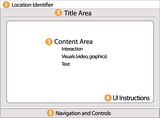
What goes into designing a screen for eLearning? Start with the functional screen areas first.Post from: The eLearning CoachConsiderations For Screen Design
Connie Malamed
.
Blog
.
<span class='date ' tip=''><i class='icon-time'></i> Jul 15, 2015 07:09am</span>
|
|
This post is part of my continuing series of weekly lesson summaries. My goal is to give parents & caregivers in our school community the resources needed to extend student learning at home, and to share my professional practice with teacher colleagues around the world in the hopes of improving my craft.
Synopsis: Getting back on the blogging bandwagon this week … Kindergarten worked on sorting and counting, getting their first taste of Google Apps (!) in the process; First Grade made excellent progress on our Engineering is Elementary "Designing Walls" unit; Second Grade worked in Google Docs also (a basic writing exercise) while Third and Fourth grade were challenged to design yet another paper bridge structure, this time, with even more complex requirements, including a lesson on the strength of corrugated paper.
Please note: in our current "Day" rotation, Mondays are Day 2, which means my new lessons start on Friday (Day 1). These "days" change over the course of the year due to holidays, etc.
Week ending 02/01/13
Kindergarten
What we learned / did / explored together:
This week’s lesson was all about sorting and counting up to 20. We warmed up by counting some fish, then connecting some dots, and finally helping Curious George find missing numbers.
The main part of the lesson involved a Google Presentation I created based on one I have used before with Kindergarten. It’s a simple sorting activity that gets them familiar with the user interface and has them enter text into boxes and also re-positioning objects on a slide page.
What I observed / inferred / connected:
This lesson worked a lot better than I expected. I feel as though there are too many steps needed to complete the tasks (I’m sensitive to how much information the kids can process and have made adjustments) but most everyone was able to fill in the template correctly on the first try, without assistance. So, maybe not.
The warmup activities were a huge hit. I try really hard to find fun and engaging sites for the first part of each lesson and we definitely hit the mark this week (judging by reactions from the kids.)
What students can do at home:
These lessons are easily replicated with common household objects and paper/pencil.
Check out the Kindergarten Symbaloo for fun activities and skill builders.
First Grade
What we learned / did / explored together:
In this week’s lesson as part of the Engineering is Elementary unit "A Sticky Situation: Designing Walls," students compared three different earth materials - sand, soil and clay flour, in sealed plastic bags - to determine their properties. They also got to see how those properties changed when water was added to each material. Finally, they spread each mixture onto ceramic tiles which were allowed to dry overnight and then "strength tested" the next morning. Click here for a video!
It was a very messy lesson, one of the messiest yet in the new STEMLAB, but we were ready, thanks to generous donations of various supplies (including the gloves used by Mrs. Best in the video and awesome t-shirts that were perfect smocks for the kids.) We had to set aside extra time for cleanup, but everything went smoothly overall.
What I observed / inferred / connected:
This unit keeps getting better and better. The kids really enjoyed examining the samples (dry and wet) and using the ceramic tiles to create miniature test walls was very helpful. In every case, students thought the ‘mortar’ would hold - and their reactions during the tests were priceless.
Due to time pressures, we had to take some liberties with the testing as described in the EiE unit guide, but were able to successfully show the students that each material was unique in terms of its adhesion properties.
What students can do at home:
Since it’s winter, it’s hard to encourage students to go outside and dig in the yard for materials to build and test their own walls, but that is exactly what I’d say to do. It would be great for the kids to source their own material, imagine and perform tests (on a miniature scale), experimenting with different mixtures to see which works best. That is the essence of this unit - how materials engineers combine materials to form new, effective materials for particular applications.
Second Grade
What we learned / did / explored together:
Students logged onto their Chromebooks using their Google Accounts, then warmed up with some Typing Pal lessons (one second grader has finished the entire set of lessons, working at home!)
Students then worked on a writing assignment they’d brought with them from class, entering the text and "sharing" the document with me for my review.
What I observed / inferred / connected:
Students are pretty adept at this point with the Google Apps login process and navigating the Chromebooks. This means that very soon I’m going to kick things up a notch and provide intentionally vague (but still scaffolded) lesson instructions to see how they manage.
It is said that using technology to "retype" written material is one of the worst possible activities, but here’s the reality, at least for us: in Second grade, kids’ keyboarding skills are simply not good enough for them to type as fast as they think. Although we are working on this (see pic #1), it’s a slow process, especially since I only see these kids once a week for 42 minutes. Ideally, students (like the one I mentioned) are finding their way onto Typing Pal at home or doing other projects on the computer that require them to use the keyboard quite a bit (including chatting with friends). It’s not a perfect solution, but until we go 1:1 with laptops and keyboards are more common than journals or lined paper, this is how we’ve gotta play it.
What students can do at home:
Ideally, if they remember their Google Account credentials, they should be able to log in and review/continue working on any project they have started in my class. They’ll know what to do once they get in. If your child needs their credentials, have them see me in school, so we can provide them on a piece of paper (I don’t have access to their passwords at home.) I keep telling people that remembering usernames and passwords - for multiple systems - is a 21st century skill if there ever was one.
Third & Fourth Grade
What we learned / did / explored together:
This week’s lesson served two purposes: to challenge students once again to solve a problem using the Engineering Design Process and to provide material/context for next week’s lesson utilzing Google Presentations.
I started the lesson by explaining that the students were once again going to "do the impossible" by building a bridge/structure:
- capable of supporting a box of modelling clay at least 10″ off the table,
- using only three pieces of 8.5″ x 11″ paper & two pieces of tape, and
- the design had to allow another box of clay to pass underneath, like a boat crossing under a bridge.
After a lot of trial and error, we gathered at the SMART Board to watch the clip shown above, demonstrating the power of corrugated materials. This was the "aha" moment that many students needed. It was also an opportunity for me to make the point that a single person - a Brooklyn printer and paper bag maker named Robert Gair, in this case - invented something that literally changed the world … and that any one of them could do the same.
Once the bridges were constructed, we stacked boxes of clay onto each one until they collapsed. This was without a doubt the most popular part of the lesson!
What I learned / observed / inferred:
This lesson was too easy at first. Students were able to simply perch the clay boxes on two columns of paper without even using the third piece of paper as the ‘deck’. Worse, adding the corrugated deck would make the design LESS stable if their folds were too large. Still, most students were successful, and everyone understood the power of corrugated materials.
We need more lessons where kids truly have to rely on each other and work together. While we had no real problems per se, there were many instances where "personalities" dominated, despite my best efforts to coach and support. We also should have some sort of system for changing partners so that kids get more chances to work with other people than their usual circle of friends.
The average student does not know a piece of paper is 8.5″ x 11″ and I had to be sure to communicate this; most grasped the significance when I said their structure had to be at least 10″ off the table. Still, many students pressed on with designs that relied on folding the paper on the horizontal rather than the vertical axis, resulting in insufficient height. After some prodding, and encouraging them to "borrow" ideas from other tables, most got it. This is precisely the kind of hands-on problem solving and collaboration I am trying to foster in my program.
What students can do at home:
It’s easy enough to replicate this project with household materials, just have something durable that can be easily stacked on top and will not break when the tower collapses. Allow your child to experiment freely - and to predict what will happen and why. Encourage them to follow the Engineering Design Process and to use that language - it’s extremely important in my classroom this year!
Kevin Jarrett
.
Blog
.
<span class='date ' tip=''><i class='icon-time'></i> Jul 15, 2015 07:09am</span>
|
|
Originally posted on History Tech:I waded into the shallow end of the Google Apps / GAFE / Chromebook pool last summer. In November, I dove off the high board as…
Chevin S. Stone
.
Blog
.
<span class='date ' tip=''><i class='icon-time'></i> Jul 15, 2015 07:09am</span>
|
|
Picking up a thread from yesterday... I continue to believe that the most immediate opportunity for demonstrating the value of learning analytics in institutions and enterprises comes from mining existing pools of data in creative and thoughtful ways. But Stephen...
Ellen Wagner
.
Blog
.
<span class='date ' tip=''><i class='icon-time'></i> Jul 15, 2015 07:09am</span>
|
|
I am the most evil science teacher in the history of science teachers. I’ve assigned HOMEWORK over Spring Break!! *gasp* I discovered CK-12 several months ago as an app on … Continue reading →
Chevin S. Stone
.
Blog
.
<span class='date ' tip=''><i class='icon-time'></i> Jul 15, 2015 07:09am</span>
|