Blogs
|
The University has just released a set of mobile friendly information called Mobile With Plymouth University.
Mobile With Plymouth University, allows students, both current and prospective, to access comprehensive information about Plymouth University. Mobile with Plymouth University is available from the
iTunes (Apps are available for the iPhone and iPad)
Android Market
any mobile device with a web browser by going to mobile.plymouth.ac.uk
Current features include:
Access to student focused information to support your learning and your time at Plymouth University
Open day information
Search maps for buildings and locations, on and off campus
Find out which Student Computing Rooms have free PCs and see which is the closest using GPS
Search the contact directory
Call or email contacts and add them directly to your address book
Find Friends - use the Friend Locator to see where friends are and contact them to meet up.
Receive University alerts and announcements.
Live weather information
Videos from the University
Mobile access to your e-portfolio
Receive the latest news and events from the University and Students’ Union.
Soon to be accessible by Mobile with Plymouth University
Search the Library catalogue
View your Library loans
New features, such as mobile access to timetables, are being planned for the future, and the Blackberry app will be available in the new year
Technology Enhanced Learning
.
Blog
.
<span class='date ' tip=''><i class='icon-time'></i> Jul 15, 2015 01:29pm</span>
|
|
The Plymouth App, Mobile with Plymouth University, now has the capability for users to search the Plymouth Library.
The new Library icon will appear the next time Mobile with Plymouth University is started.
This new functionality of Mobile with Plymouth University allows users to view their library record and have access to:
Items they have on loan
Items they have requested
Any outstanding library fines
As well as accessing their library record, users can also search the library catalogue.
Details on how to download Mobile with Plymouth University can be seen in this earlier blog post.
Technology Enhanced Learning
.
Blog
.
<span class='date ' tip=''><i class='icon-time'></i> Jul 15, 2015 01:29pm</span>
|
|
Need some exciting and engaging nonfiction experiences for your elementary-age students? Then News-O-Matic, an iOS and Android app that covers relevant news of the day, just might be your answer!
This super cool tool provides a combination of five current events stories covering the latest U.S. and international news, sports, science, arts, fun human interest stuff and more—all within a 100% ad-free environment.
Each News-O-Matic article is accompanied with a wealth of rich media: Images, video clips, illustrations, interactive maps related to the story location, history-based timelines, puzzles, games, fun facts, a News Room for drawing or asking questions and audio support for challenging vocabulary as well as in-app audio playback of complete articles.
All stories are written by journalists, award-winning K-12 writers and educational experts and then reviewed by a child psychologist prior to publication to ensure all content is age appropriate and emotionally safe.
Sounds like a deal, right? Yeah, pretty much! Download the News-O-Matic app, select your subscription option (Yearly: $19.99; Monthly subscription: $1.99; Weekly: $0.99) or sign up for the free daily email delivered in PDF format right to your inbox.
News-O-Matic also offers a School Edition that’s perfect for classroom use. Get all of the really great stuff previously mentioned plus a Teacher’s Guide which includes questions related to the text, suggested discussion prompts, several assessment questions correlated to the Common Core State Standards and graphic organizers. Check it out here.
Classroom Connection:
Bring the news to life in your classroom with News-O-Matic, an excellent resource for incorporating national and world news into the curriculum. What an awesome way to develop well-informed global citizens via real-world relevant reading assignments! The articles can also be used for class discussions as well as prompts for writing.
In addition, educators can utilize News-O-Matic to inspire class projects in which students produce their own publications.
Edutech for Teachers team
.
Blog
.
<span class='date ' tip=''><i class='icon-time'></i> Jul 15, 2015 01:29pm</span>
|
|
Access to a valuable collection of Plymouth student journals is available at https://studentjournals.plymouth.ac.uk which currently houses 3 eJournals consisting of: The Plymouth Student Educator, The Plymouth Student Journal of Health & Social Work, and The Plymouth Student Scientist.
These journals are a key output of a HEFCE-funded project, to support and develop research informed teaching at the University of Plymouth. These e-journals seeks to make the research process more accessible and explicit, by highlighting examples of good practice from across the University. It also aims to support both staff and student involvement, by acting as a teaching tool for staff and as a vehicle to promote and share student research activities. It is hoped that the journal will encourage students to become more reflective and critical of their own research skills as they consider the work of their peers.
The journal is set up so that readers do not have to register to access the full content.
Technology Enhanced Learning
.
Blog
.
<span class='date ' tip=''><i class='icon-time'></i> Jul 15, 2015 01:29pm</span>
|
|
To celebrate Safer Internet Day we present the movie ‘Facing the Consequences’ with added interactivity, enabled by Viewbix. Viewbix allows you to add a links to further information, in this case, Facebook’s Privacy Resources page. You can also add an RSS feed, in this example it points to Dan Schawbel’s ‘Student Branding Blog’; a QR code which links to further resources; TEL’s Flickr stream and even a Google map! These features are available with a free, basic account. Pro and Enterprise accounts are available at a cost which give you even more apps. The video can then be embedded into any web page, as below. Great for podcasting!
Technology Enhanced Learning
.
Blog
.
<span class='date ' tip=''><i class='icon-time'></i> Jul 15, 2015 01:29pm</span>
|
|
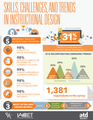
Skills, Challenges, and Trends in Instructional Design Infographic
To keep up with the changes in the workplace and in order for learning professionals to be competitive in the evolving global workforce, instructional design (ID) must progress as current conditions evolve, challenges become more complicated, and new trends emerge. Have ID skills changed? What other competencies are needed to be successful in the profession? The Association for Talent Development has partnered with the International Association for Continuing Education and Training and commissioned Rothwell & Associates (R&A) to conduct Skills, Challenges, and Trends in Instructional Design research. R&A President William J. Rothwell of Penn State University led this research. The Skills, Challenges, and Trends in Instructional Design Infographic presents the most important tasks for Instructional Designers and the most often used design models.
Top 5 Important Tasks for Instructional Designers
98% conduct needs assessment.
98% design a curriculum, program, or learning solution.
99% identify appropriate learning approach.
98% collaborate with stakeholders.
98% design instructional materials.
Top 3 Design Models
ADDIE
Bloom’s Learning Taxonomy
Kirkpatrick’s 4 Level of Training Evaluation
Via: www.td.orgThe post Skills, Challenges, and Trends in Instructional Design Infographic appeared first on e-Learning Infographics.
eLearning Infographics
.
Blog
.
<span class='date ' tip=''><i class='icon-time'></i> Jul 15, 2015 01:29pm</span>
|
|
The Horizon Report was established in 2002 as part of the New Media Consortium’s longitudinal research programme. The annual report aims to identify emerging technologies which are likely to have a significant impact in teaching and learning. The report is structured by looking at technologies which will be in widespread use by "horizons" - hence its name. These horizons are: Near term (within 12 months), mid-term horizon (within 2-3 years) and far-term horizon ( 4-5 years). To view the full Report go to: http://www.nmc.org/ NB: If you are not already a member, you will have to join the NMC (New Media Consortium).
The 2012 Horizon Report has identified the following:
Near-term horizon:
Mobile Apps
Tablet computing
Mid-term horizon:
Learning analytics
Game-based learning
Far-term horizon:
Gesture-based computing
The Internet of things
For the full report and more information on both the methods used in the research and more detail about the technologies identified in each of the horizons, go to: http://www.nmc.org/publications/horizon-report-2012-higher-ed-edition NB: If you are not a member of the New media consortium, you will need to sign up to gain access.
Near-term horizon:
Mobile Apps - These are becoming more and more widely used in the HE forum and Plymouth University has embraced this trend and developed the Mobile with Plymouth University. This is an app which allows students to gain information about university facilities and services, such as checking the availability of open access pcs. http://technologyenhancedlearning.net/mobile/
Tablet Computing - The Learning Technologies team has some iPads available for loan to staff and these have been proving popular. One of the most innovative uses of them has been part of a Teaching Fellowship. Illustrative Arts students use the iPads to create a drawing using an app called "brushes" which records as you are drawing. The students can then play this back. The pedagogic benefit is that it allows students to see how they construct their drawings which makes it easier to reflect on their drawing and illustrative techniques. For more information on this check out the iPads, illustration and reflection website. http://technologyenhancedlearning.net/ipadsforillustration/
Mid-term Horizon:
Game-based learning - the Horizon Report highlights game-based learning as an emerging technology which will see widespread adoption in the next two to three years. A phD student created a game simulation for use in the immersive vision theatre, but it was not intended for use in teaching. However, it has shown that this area has potential within the HE arena and it will be exciting to see future developments in game-based learning.
Learning Analytics - this aims to build on the type of information which Google Analytics currently uses which will augment the power of data-mining tools in the teaching and learning sector. These analytic tools will be capable of providing information on student engagement, performance and progress and this information could then in turn, be used to drive future curricula, teaching and assessment.
Far-Term Horizon:
The Horizon Report feels that the following will be widely adopted across the HE sector within the next four to five years:
Gesture-based computing - involves controlling a computer with body movements or voice commands. this has already had a popular reception in gaming and leisure use with tools such as the XBox Kinect and Nintendo Wii. One of the potential benefits of using gesture based computing in education could be that of using a large touch-screen surface such as a desk or wall which would allow multiple users to interact and collaborate simultaneously. The interface may also encourage student engagement.
The internet of things - this is defined in Wikipedia as "uniquely identifiable objects (things) and their virtual representations in an Internet-like structure". Basically it is that information and systems have the potential to link and communicate with each other. A video explains the internet of things (IOT) very well.
Potential for education could be that information stored on smartphones or tablets could be shared with other devices and incorporate other technologies such as gesture-based technology and augmented reality.
Technology Enhanced Learning
.
Blog
.
<span class='date ' tip=''><i class='icon-time'></i> Jul 15, 2015 01:29pm</span>
|
|
Hey, edtech peops! Don’t miss your chance to learn how to leverage the power of ThingLink EDU in your classroom by participating in the upcoming ThingLink Interactive Images Slams. This series of webinars aims to provide educators with an opportunity to share, highlight and discuss ThingLink interactive images or video they have created and used with students of all ages. Discover the endless creative possibilities for enriching students’ enthusiasm for learning like never before through unique sessions featuring the work of fellow ThingLink-ers—including yours truly!
Just hover over the image below to register for the first-ever ThingLink Interactive Image Slam and/or learn about how you can grab the spotlight!
A huge shout out to ThingLink guru Susan Oxnevad for organizing these very useful professional development opportunities!
Edutech for Teachers team
.
Blog
.
<span class='date ' tip=''><i class='icon-time'></i> Jul 15, 2015 01:29pm</span>
|
|
Teaching Tech to Teachers Infographic
While classroom technology continues to grow in popularity, according to a survey conducted by GfK on behalf of Samsung Business, K-12 teachers are having trouble keeping up. By redefining professional development for the curriculum of the future, teachers will have the skills and resources necessary to help students thrive. The Teaching Tech to Teachers Infographic illustrates the survey findings and provides Samsung’s recommendations for improved professional development programs.
Today’s Classrooms
With Chromebooks, tablets, interactive whiteboards apps and more, technology is becoming an increasingly important part of today’s K-12 classrooms. School districts are rapidly adopting these new digital tools and teachers agree that making this transition is critical to improving learning outcomes:
81% of teachers agree that tech in the classroom enables students to get more hands-on experience during lessons.
90% of teachers believe that modern technology in the classroom is important to achieve success.
Today’s Teachers
However even with so much technology at their fingertips, K-12 teachers need help to effectively use these devices to motivate their students and enhance their lessons:
37% would "love" to use technology in the classroom but say they support they simply do not know how.
Nearly one-third are not satisfied with the receive from their schools in integrating technology into the classroom (32").
60% agree they would like to better integrate technology but need more training.
Empowering Teachers Is The Key
91% of teachers feel access to up-to-date training on how to use technology in the classroom is important to achieving success in the classroom.
5 Steps to Teacher Tech Training
Start with the basics: 38% of teachers feel that training on tech fundamentals would be most helpful - a feeling more pronounced among older teachers, ages 43+.
Host PD days: 76% say they would value a dedicated professional development day, and 57% prefer for this to be in-person.
Offer self-paced online training: Help teachers become more tech-savvy with insights that track their progress throughout the year.
Build a community to share successes: 80% say it would be helpful to download pre-existing lesson plans that enhance STEM skills in a way that easily integrates tech.
Create a tech support center: 70% of teachers surveyed claim they do not have a tech center that allows teachers to access resources they cannot access from their classrooms.
Via: www.samsung.comThe post Teaching Tech to Teachers Infographic appeared first on e-Learning Infographics.
eLearning Infographics
.
Blog
.
<span class='date ' tip=''><i class='icon-time'></i> Jul 15, 2015 01:29pm</span>
|
|
PebblePad3, due to be launched in July this year, combines Pebble+, a revamped version of the personal learning space we’re already using, with a new institutional environment, ATLAS, which replaces the current Gateway system to support active teaching, learning and assessment. There are also plans to launch a brand new Community/ Social space in 2013 , where users will be able to access a global resource centre across all institutions - resources being displayed in terms of popularity of use through users’ rating. PebblePad will now also be hosting the service which includes storing video - therefore there will no longer be an upload limit of 10MB per asset.
Pebble+
Pebble+ has been completely redesigned as a website with the menus at the top of the screen. The ‘Create New’ menu has been condensed and includes the ‘Upload File’ option. There are a range of generic inbuilt templates for recording (action) plans, experiences and reflections. Templates, including forms and profiles, can now be created by all users and customised for different scenarios - you could create your own course ‘workbooks’. They can also now contain confidential fields, a requirement for many Health-related courses. You can also select from a range of banners to change the appearance of your template, or create your own. The end result looks less cluttered (and therefore more professional) than what is currently available. Templates can be ‘favourited’ and added to the ‘Create New’ menu.
Other changes include the ability to submit ‘Assets’ directly to the VLE, although I’m not sure whether this would work with SharePoint. Also users can create extensible CVs through dragging chosen assets onto a Folio page (available in addition to the Webfolio) - this could be good for showcasing achievements using a range of media to illustrate, for example, the process involved to achieve The Plymouth Award.
PebblePad+ is still Flash-based, although the back-end is ready to convert this to HTML5 when this has been standardised. Those accessing PebblePad via an iPhone or iPad will be directed to the mobile (HTML) version, which currently does 95% of what the Flash version can do.
ATLAS
ATLAS is the new institutional workspace where students submit their assets for feedback, peer review and validation - it supports blind and double blind marking, moderation, external review and grading. It is HTML-based so can be accessed via any device.
A typical Workspace (the new name for Gateway) contains 4 pages: - About, Submissions, Resources and Conversations. The old Gateway structure has been flattened and multiple assignments can now be submitted to one Workspace. Owners and tutors will be able to see all submissions to all Workspaces they are associated with through a new ‘Dashboard-like’ screen. Assignments can be ‘paused’, so that feedback can be given to a formative submission while the learner is able to carry on with the piece of work. Assignments can then be ‘played’ again to continue for submission to a summative assessment - this way a learner’s progress can be tracked throughout their course. Templates can be customised for feedback and feedback collections of common statements can be collated and reused. You can also now annotate directly onto submitted work. Institutional resources such as referencing guides can be hyperlinked. Conversations can be saved as assets, with all participants being anonymised.
In response to meeting the new demands for auditing, there is much more recording available in ATLAS, including the performance of teaching staff.
In addition you can now create custom help sheets by selecting pre-defined areas within PebblePad Help in order to support introductory tutorials and/or specific tasks.
Notifications in the future will be better as students will be able to select how they want to be notified - SMS, Facebook, Twitter and/ or email.
All elements of PebblePad3 are designed to link to other systems - staff and student data, VLE, Facebook, Twitter, Blogger, Flickr and YouTube, enabling users to create and publish directly from PebblePad+.
Summer 2013 Rollout
PebblePad3 will be rolled out during the summer. There will also be a masterclass at the VC’s Teaching and Learning Conference on the 28th of June, with workshops available shortly afterwards. If you would like to discuss how PebblePad could be used to support your curriculum, contact your local Learning Technologist. In the meantime, you can get more information, including videos of the new workspaces and features, from the PebblePad website.
Technology Enhanced Learning
.
Blog
.
<span class='date ' tip=''><i class='icon-time'></i> Jul 15, 2015 01:28pm</span>
|