Blogs
|
Today I have another set of wood chip textures that you can use for your designs and illustrations. Enjoy!
ps. This will be the last texture post until mid-august. Have a great summer guys!
Download all textures as ZIP from copy.com (30.8Mb)
Did you like these textures?
Let us know by leaving a comment, and you can even post a link if you used them in your artwork.
Related Posts
Free Texture Friday - Wooden Chips
Free Texture Friday - From Wood to Metal
Free Texture Friday - Misc Wood
Free Texture Friday - Vintage Rust
Free Texture Friday - Yellow Concrete
Stockvault Blog
.
Blog
.
<span class='date ' tip=''><i class='icon-time'></i> Jul 16, 2015 11:38am</span>
|
|
The importance of editing!
Neill Woelk (@NeillWoelk) shared this via twitter this week.
Jennifer Yaros
.
Blog
.
<span class='date ' tip=''><i class='icon-time'></i> Jul 16, 2015 11:38am</span>
|
|
Flowers are structures of certain plants, used by the plant for reproduction, and can create fruit and seeds that are harvested by animals for food.
Flowers are naturally appealing to animals and insects, in order to facilitate the transfer of pollen and thus reproduction. As such, they often have bright, vivid colors, and eye catching structures.
When in full bloom, the colors are at their peak and the flower is at the largest size, and in optimum position for photography:
Sunflowers By Thomas Lindholm
Flowers VI By Henk Goossens
Spring time By Anna Nahabed
Springtime, all colourful flowers bloom. By Fabrizio Malisan
Béllis By Sergei Zyubin
Stargazing Resting By Karen Forsyth
Floral Mecca By Igor G
sunflower By Daniel Wechsler
Daisies By Jouni Pihlanko
Lotus blossoms By Elena Elisseeva
Vintage roses bouquet sepia toned By Arletta Cwalina
Heaven on Earth By Marc Adamus
The beauty of Spring By Lazy Vlad
The Fab Four By Ursula Abresch
Spring Blooms By Lijah Hanley
A small flower on the ground By Allan Wallberg
porcelain By Aida Ianeva
Mayleen By Jacky Parker
Apple Blossom By Ralf Stelander
Nearness By Bee Thalin
Roe deer flower field By Andy Luberti
Ladybag on cherry flower By Roksana Bashyrova
Cherry blossoms on spring cherry tree By Elena Elisseeva
Tulips Blooming in Spring Season By Jit Lim
Blackthorn By Oliver Andrews
Vintage tree flower background photo of beautiful cherry tree. A By Maciej Bledowski
Charleston SC Magnolia Plantation Gardens - Memory Lane By Dave Allen
Lupinicious By David Hardy
Blooming in the sun By Edwin Leung
Beautiful valley By Dmitry Pichugin
Related Posts
30 Delicate Flower Photographs
30 Photographs with Rings
30 Photographs of Arches Around the World
30 Lovely Flower Photographs
Bears in Photography: 30 Jaw-Dropping Photos
Stockvault Blog
.
Blog
.
<span class='date ' tip=''><i class='icon-time'></i> Jul 16, 2015 11:38am</span>
|
|
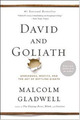
Join us for a discussion of Malcolm Gladwell’s book David and Goliath: Underdogs, Misfits, and the Art of Battling Giants.
Three thousand years ago on a battlefield in ancient Palestine, a shepherd boy felled a mighty warrior with nothing more than a pebble and a sling-and ever since, the names of David and Goliath have stood for battles between underdogs and giants. David’s victory was improbable and miraculous. He shouldn’t have won.
Or should he?
In DAVID AND GOLIATH, Malcolm Gladwell challenges how we think about obstacles and disadvantages, offering a new interpretation of what it means to be discriminated against, suffer from a disability, lose a parent, attend a mediocre school, or endure any number of other apparent setbacks.
In the tradition of Gladwell’s previous bestsellers-The Tipping Point, Blink, Outliers and What the Dog Saw-DAVID AND GOLIATH draws upon history, psychology and powerful story-telling to reshape the way we think of the world around us.
RSVP to attend!
Jennifer Yaros
.
Blog
.
<span class='date ' tip=''><i class='icon-time'></i> Jul 16, 2015 11:38am</span>
|
|
This week I attended a local Accelerated Learning event on Using Social Media Platforms to Continue the Learning. It was a great session and got the wheels turning on ways to incorporate social media in training programs.
Yes, there are draw backs. The biggest objection raised at the meeting was confidentiality. Social media is not an appropriate solution if the training includes sensitive or proprietary company information. However, consider using it for safety training, leadership training, and other general topics.
Here are some ideas on implementing social media into a training program that the group came with:
Create a group on LinkedIn or Facebook. Post relevant questions or problems to start discussions with learners.
Create a twitter hashtag and post links to articles, websites, and videos for learners to discover more.
Create an Instagram hashtag for learners to create vision boards.
Create a Pinterest board and invite learners. Have learners search for and post relevant articles and images.
Use YouTube for instructional and inspirational videos.
Post your PowerPoint presentation on SlideShare for future reference.
Use eHow instead of printed job aids.
The key is to engage the learners. Get them talking and researching on their own. Continue the learning outside of the class with self-discovery and reflection.
Why should you implement a social media plan in your training? Watch this: Did You Know?
How can you implement a social media plan? Read this: 8 Top Tips to Create an Effective Social Learning Strategy
(No, I’m not going to supply you with the answers, but I do encourage you to reply with your thoughts on why and how. Either leave a comment here or post a comment on one of my various social media posts: @jessiner, LinkedIn, Facebook, Pinterest.)
Jennifer Yaros
.
Blog
.
<span class='date ' tip=''><i class='icon-time'></i> Jul 16, 2015 11:38am</span>
|
|
One of Radcom’s core values is Lifelong Learning. To us it means:
Lifelong learning for ourselves and our clients. We believe that the most successful companies prepare for and embrace change.
With this in mind, I found the following post by Educational Technology and Mobile Learning with links to three TED Talks video about lifelong learning to be worth reblogging. Check out the post and the talks!
3 Must Watch TED Talks on The Power of Life Long Learning
Jennifer Yaros
.
Blog
.
<span class='date ' tip=''><i class='icon-time'></i> Jul 16, 2015 11:37am</span>
|
|
Being an Instructional Designer often includes writing scripts for online training voiceovers and for videos. Jonathan Halls, author of Rapid Video Development for Trainers, recently delivered a presentation on the Brain Science and the Media Psychology of Script Writing. (An archive of the presentation is available through KZO Innovations.)
Have you ever been distracted by the um’s and uh’s in a training video? What about a YouTube video that rambled into tangents, taking forever to get to the point? That is exactly what happens when you do not have a video script. However, Jonathan Hall provides other important reasons to have a script before recording and tips on writing the best scripts. His focus is on short videos, 3 to 4 minutes in length for elearning purposes. Here are the highlights:
7 Reasons to Write Video Scripts
Keep the team on the same page
Consistency for editing
No script requires more takes
Scripts make you look and sound better
Ensures brand and message consistency
Makes message quicker and easier to understand
Crucial tool for video management system - ensures use of key words for searches
4 Message Busters
These are things that prevent your message from getting through to learners.
Sensory bottleneck - restrict the amount of images that you bombard viewers with
Cognitive overload - chunk information into 2 to 4 bits at any one time. Keep them focused on one topic, don’t go into too much detail, and realize that viewers are also thinking about other things
Unfamiliarity - use pictures, words, and other media that are easy for the audience to recognize
Boredom - stimulate the audience by changing shots, voices, and music. Use cliffhangers
Video Writing Mindset
Make the message quick and easy to understand
Integrate spoken word with images and music to convey message
Read the script out loud because what it looks like on paper is not the same as it will turnout in video and audio
Listen to oral sense of the word
Word Choice
Keep it simple
Use verbs instead of nouns
Use concrete words instead of abstract
Listen to oral sense of phrase
Wrap Up
Script writing is finding the right words to support the pictures. Explain the things that are not obvious from just looking at the picture.
Jennifer Yaros
.
Blog
.
<span class='date ' tip=''><i class='icon-time'></i> Jul 16, 2015 11:37am</span>
|
|
Meeting course objectives is important. Having interactivity, stories, visual appeal, and multimedia is excellent. But how much thought have you put into the navigation of your eLearning courses? I’ve always selected a navigation style that looked nice with the screen layout.
In his article, The top 6 eLearning Course Navigation Styles, Christopher Pappas explains that the choice of navigation style is also important for an effective eLearning course. He provides an explanation of six different navigation styles and the pros and cons of using each.
Take 5 minutes to read the article and learn something new that you can apply today.
Excel Now. Embrace the Future. Learn Always.
Jennifer Yaros
.
Blog
.
<span class='date ' tip=''><i class='icon-time'></i> Jul 16, 2015 11:36am</span>
|
|
Today’s post is by Ed Flahive, Chief Learning Officer of Videonitch. Videonitch provides a platform for organizations to create, organize, centralize, and secure training assets within a dedicated and branded video channel that is available on-demand, 24/7/365, to employees and partners.
I met the folks at Videonitch at ATD’s (Association for Talent Development) Techknowledge conference this year and was impressed. I had a wonderful conversation about how their platform works and aligns with various learning strategies. After the conference I continued my conversation and received a demonstration of Videonitch’s platform.
I naturally thought of them when I wanted to post an article about video as part of a training solution. Enjoy the article and be sure to check out what Videonitch is about. Don’t hesitate to reach out to them. They are great people!
When most adults want to learn how to fix something, learn a new process, or simply need information, we typically do a search or watch a video on the Internet (ie; YouTube). So why wouldn’t we apply the same rationale at work? According to the Masie Center, "Video is changing the format of content, collaboration and knowledge publishing in the workplace. Our employees are increasingly turning to video as their media of choice to access updated knowledge, skill development, corporate storytelling and even peer-to-peer social collaboration." There’s certainly a reason why over 4 billion (yes, with a "B"!) videos are watched every day on YouTube, and it’s not just for entertainment. When it comes to utilizing video for learning, studies show that it is far more effective than more traditional methods. According to Nick van Dam, Chief L&D Officer at Deloitte, "90 percent of learning comes from informal training activities like apps, social networks and……..VIDEO."
So, when someone asks me, "Why should I use video in my learning strategy?" my response is simply "Why wouldn’t you?" If there is any truth behind the saying that a video is worth 1.8 billion words1, and that people retain information 200% more with video than with audio alone2, then you are missing a significant and effective learning asset in your strategy if you are not utilizing the power of video. Face-to-face training is expensive; video is a cost-effective, but a personal way of getting your message out there. Training via video can slash your training spend and save you a fortune. Video can also take the benefits of face-to-face training and combine it with affordability, convenience and anytime, anywhere access. Videos can also be re-watched, re-wound and re-visited as often as the user wants and needs. They can even be used as part of an e-learning course, as a pre-requisite to classroom training or as performance support where learners can refresh themselves rather easily by watching a video tutorial that summarizes the main points of a longer training program.
This ensures that they are able to get to grips with any element of the content they’re not confident with, before moving on. Furthermore, with a video content management system (like www.videonitch.com), videos can be hosted on a single platform where students can share and comment to promote collaboration.
Video appeals to the largest volume of people. People like to learn through visual and audio stimulation. It gives students the ability to see complicated things in a way that keeps attention and shows how and why it works. Three days after learning something, our brains retain 65% of what we see and hear. Compare this to the 10% we retain of what we read! People are immediately drawn to watching a video in a way that is lacking in a book, or a downloadable resource. Remember at school, when the teacher said, "We’re going to watch a video today?" I don’t know about you, but I LOVED those days!
Despite what some people think, videos can be quick to make and can engage the audience. Aside from using them just for training, videos can be created quickly and affordably to promote, what I call, "Corporate Glue." These are videos of senior leaders in an organization that give focus to key messages and reinforce significance. By utilizing video, these messages can reach employees around the world, regardless of time differences, and can ensure that everyone is hearing a consistent message, unlike PowerPoint, which can be amended or ignored. After all, the video is the same for all who see it, so the message will remain unchanged.
Let’s get back to why one would use video in a learning strategy. When e-learning was first introduced in the late 90s, most organizations weren’t ready for it. Not because they didn’t think it was effective, but because they didn’t know what e-learning was. There are many similarities between e-learning in the 90s and video learning today. For example, when e-learning was first introduced, authoring tools were very complicated and very expensive. In most cases it took someone with an html coding background and an understanding of instructional design to produce an effective self-paced course. Over a number of years e-learning authoring tools became much easier to use and certainly much more affordable. Today, anyone that understands basic instructional design can create e-learning courses with very little technical expertise - and definitely do NOT need to know code. So how does this relate to video learning? Companies have been creating training videos for many years, that concept isn’t new. However, producing traditional training videos used to be very expensive and time consuming. Like e-learning, the tools to produce video content today are MUCH more affordable and anyone that can point and shoot can create effective videos. Why use video in your learning strategy……WHY NOT?
1 Dr. James McQuivey’s Forrester study "How Video Will Take Over the World" , 2008
2 Yankee Group’s Anywhere Enterprise: 2010 US Unified Communications FastView Survey, 2010
Jennifer Yaros
.
Blog
.
<span class='date ' tip=''><i class='icon-time'></i> Jul 16, 2015 11:36am</span>
|
|
Which is worse?
Reading below grade level or living below the poverty level?
Achievement gaps or gaps in healthcare?
Failing M-Step (substitute your state test here) or failing to get enough food to eat?
Institutions without structured curriculum or institutional racism re-enforcing structural poverty?
Children who don’t know their math facts or homeless children who don’t know where they are sleeping tonight?
Kids who break the dress code or kids who are broken from domestic abuse?
Students who aren’t engaged in class or students whose families are stuck in the lowest class.
Kids who aren’t exposed to "rigorous" learning or kids who are exposed to drugs and crime in their neighborhood.
Students who don’t memorize the right answers or students whose civil rights are violated.
Photo by Urbanfeel https://www.flickr.com/photos/30003006@N00/3538568443
Should we start firing social workers to hold them accountable because of all of the domestic problems in this country?
Should we cut national funding to cities who have segregated neighborhoods with high poverty, drugs and crime?
Should we privatize police forces in areas with high crime rates to save money and give communities "choices?"
The United States is a world leader in child poverty. Maybe instead of all of the time, energy, and money spent by politicians on testing to blame schools and teachers they should try to spend some money actually helping the families of our poorest children.
But that would require a change in mindset to admit that our system isn’t perfect and is designed for those at the top to remain there. It would require admitting that people don’t choose to be poor. It would require empathy and compassion.
Maybe education alone can’t solve all of our problems.
Mike Kaechele
.
Blog
.
<span class='date ' tip=''><i class='icon-time'></i> Jul 16, 2015 11:34am</span>
|