Blogs
|
Sometimes it feels that I am working in a vacuum. I spend hours and hours clicking away on the keyboard. I can go an entire day at work without talking to a single person. However, it is important to remember that as a Technical Writer and Instructional Designer, I am not alone. There are many people on whom I rely for information and collaboration. Make sure that you are fully utilizing your team to create the best documentation and training possible.
Subject Matter Experts (SMEs)
Working with SMEs is an important part of technical writing and training development. They are the ones with the subject knowledge. Often they have the ears of the project sponsors. When you work well with your SME and you know how to filter the content, everyone wins - the client, the audience, and you. Here is a great article on Harnessing the Power of a SME.
Illustrators and Graphic Designers
Because of budget, I often to do my own illustration and graphic design on projects. I do my best using templates and very basic Photoshop skills, but I am the first to admit that illustration and writing are two very different forms of art. When the opportunity to work with an illustrator or graphic designer is possible, it is good to follow some basic guidelines to insure clear communication and realistic expectations on both sides for a successful project. Here are eight tips for working with a graphic designer, which are also applicable for working with an illustrator.
Editors
On my projects nothing ever goes to a client that has not been edited. I greatly value my editor and it is not an easy job. An editor is responsible for catching all errors in a project, making valuable suggestions for improvement, and, ultimately, protecting the company’s reputation. That’s a lot of pressure.
A few important things to remember when working with an editor are:
Proofread your work before giving it to the editor. At a minimum, run the spell check tool.
Provide the project standards and guidelines.
Grow thick skin. Don’t take revisions and comments personally. They are only to make the project better.
Know when an editor’s comment is a suggestion. Sometimes it is okay not to follow the changes.
Provide the editor with sufficient time. Do not wait until 4:00 pm of the project due date and expect the editor to be able to do a proper job.
Techwhirl has a very detailed article about editors for more information. You can also look forward to more about editors and editing your work in a future blog.
Jennifer Yaros
.
Blog
.
<span class='date ' tip=''><i class='icon-time'></i> Jul 16, 2015 11:43am</span>
|
|
When designing for the web, print design or advertising design, text effects can help make your text stand out and enhance your design. But designing text effects can be a time consuming process.
One of the great resources in Photoshop is the ability to utilize text effects, and they can save you lots of time and hassles with design.
In this post I’ve collected some text effects you can download and use for your typography, all for free:
Plump Text Effect
Popcorn Text Effect
Lightbox Text Effect
Texty: Dimensional Photoshop Text & Logo Effect
3D Text Effect
Candy Text Effect
Retro Text Effect
Cinematic Text Effect
Neon Text Effect
Isometric Text Effect
Related Posts
10 Fun Photoshop Text Effect Tutorials
Fun Text Effect Tutorials You Have to Try
Photoshop Typography and Text Effect Tutorials
Big Header Text in Web Design
Illustrator Tutorials for Text Effects
Stockvault Blog
.
Blog
.
<span class='date ' tip=''><i class='icon-time'></i> Jul 16, 2015 11:42am</span>
|
|
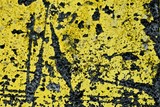
Today I have a set of yellow concrete wall textures. Well, all except one. They are grungy, high contrast and detailed, perfect for adding a vintage effect to your designs. Enjoy!
Download all textures as ZIP from copy.com (60.5Mb)
Did you like these textures?
Let us know by leaving a comment, and you can even post a link if you used them in your artwork.
Related Posts
Free Texture Friday - Gritty Concrete
Free Texture Friday - Gritty Concrete Wall
Free Texture Friday - Worn Concrete
Free Texture Friday - Smoke
Free Texture Friday - Vintage Rust
Stockvault Blog
.
Blog
.
<span class='date ' tip=''><i class='icon-time'></i> Jul 16, 2015 11:41am</span>
|
|
Bears have an interesting place in human perspectives. On one hand, they are some of the most feared predators on Earth and one of few creatures that is known to occasionally attack humans. But they are also viewed as soft, fluffy and cuddly, and many children have a teddy bear that they sleep with.
There are many types of bears, but they tend to share similar characteristics, such as a large build, the ability to walk on both hind legs or on all fours, lots of fur and long snouts with short tails. But some bears like the grizzly bear are carnivores, while others like the panda are herbivores.
The combination of the soft fur and the fierce teeth makes bears jaw-dropping to see in person or photographs:
Fishing By Sergei Nikolaev
Fancy Footwork By Alison Mazur
Bear browling By Andrea Izzotti
oops, it’s gone By Peter Zala
Gone fishing By Jomppa
Bear cubs By Lauri Tammik
?????? ???????? ! By Sergey Ivanov
Brown Bear By Randy Harris
Faith, hope, and love By Nikolai zinoviev
Three… By Mac Danzig
Guarding Mom’s sleep By Nikolai Zinoviev
Private Bear Business By Harry Eggens
Two brothers By Luigi Calabrese
Stand up By Massimiliano Orpelli
Bear with bear cubs By Sergey Krasnoshchekov
Hello stranger…. By Gleb Tarro
Are You Friendly? By Evgeny Tchebotarev
Family portrait in the open air By Sergey Ivanov
Lone Bear on Kodiak Island, Alaska, USA By Dean Allman
Brother & Sister By Evgeny Tchebotarev
Tough Choices By Evgeny Tchebotarev
Sneaking A Peak By Buck Shreck
oh no, he´s back again… By Kai Glomp
Bears war By Valerio Ferraro
Hard Look By Buck Shreck
Concerned Look By Buck Shreck
Polar Bear Gaze By Stephen Moehle
Grizzlies By FMJ Photography
Sneaking Up By Buck Shreck
Who is more important? By Mila Gumnik
Related Posts
30 Photographs with Rings
30 Photographs of Arches Around the World
In Full Bloom: Flowers in Photography
Rocks, Stones and Pebbles in Photography
30 Marvelous Underwater Photographs
Stockvault Blog
.
Blog
.
<span class='date ' tip=''><i class='icon-time'></i> Jul 16, 2015 11:40am</span>
|
|
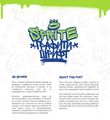
Graffiti fonts are great for adding an urban or stylish feel to your designs. They can be used for logo designs, but are most often used for event promotion flyers, websites and other graphic designs.
Graffiti fonts usually have elements like drips and splatters, with a spray pattern to them, but they can also be rounded letters or etched effects.
Here you’ll see a collection of stylish urban and graffiti fonts for download:
Graffiti Sprite
Brock Vandalo
Urban Jungle
Brooklyn
Urban Decay
Sprayerz
The Graffiti Font
Wassimo
Misdemeanor
Inner City
Related Posts
Awesome Free Fonts You Should Download
Out of this World Futuristic Sci-Fi Fonts
10 Great Free Fonts from 2011
Adobe Photoshop On the Web
10 High Quality Free Script Fonts
Stockvault Blog
.
Blog
.
<span class='date ' tip=''><i class='icon-time'></i> Jul 16, 2015 11:39am</span>
|
|
Hey guys, today’s textures are a bit different from what I usually post. These are taken a couple of years ago from a huge cooling mechanism from a power plant near the Blue Lagoon in Iceland. There is a constant flow of water from the top of the generator that creates a mesmerizing waterfall all around it. Well, I thought it might be cool to share them and maybe you can find use for them. Enjoy!
Download all textures as ZIP from copy.com (25.7Mb)
Did you like these textures?
Let us know by leaving a comment, and you can even post a link if you used them in your artwork.
Related Posts
Free Texture Friday - Smoke
Free Texture Friday - From Wood to Metal
Free Texture Friday - Crystallized Silica
Free Texture Friday - Old Tile Glue
Free Texture Friday - Grunge Screens
Stockvault Blog
.
Blog
.
<span class='date ' tip=''><i class='icon-time'></i> Jul 16, 2015 11:39am</span>
|
|
Arches are curved structures with a gap below them, often serving as entrances to buildings, but also occurring naturally in rock canyons and caves around the world.
In architecture, arches are some of the most important structures, and the development of the pointed arch as a refinement of the rounded arch was a major development for building taller and bigger buildings.
In this post, we’ll look at 30 photographs of constructed and natural arches around the world:
Turret Arch through North Window Arch By Kenneth Keifer
Delicate Arch By Nick Chill
Double-O Arch By Scott Barlow
Delicate Arch II By Jeff Burton
The Star of Broken Arch By Jerry Patterson
Souvenirs des jours. By Fábio Brandão
Train Bridge By XRISTOS GIOFKOS
Old Bridge By Bez Dan
Corona Arch By StockFootage .com
Saints and Sinners By Pravin Sitaraman
The 7 Arches By Priyank Patel
Reverence By Nate Ng
Pine Tree Arch By Rodger Podlogar
Delicate Arch By Stas Aleksandersson
Coliseum By Claude Gariepy
Placa del Rei in Barcelona By Andrey Omelyanchuk
The India Gate By Anadi Chaturvedi
Lady and the mosque By Daniel Murphy
arches and stairs By Peter Bigorajski | fototectura.de
The Shoemaker By Leah Kennedy
Old World By Ali Khataw
Misty Mahal By Leah Kennedy
The Abbey By Mal Smart
Arch View By Sean Bailey
Mystical gateway By Milan Panchal
View of famous Arc de Triomphe at sunset By Frederic Prochasson
L’Arc de Triomphe By Hemant Goyal
Gateway By Dan Cornock
Pigeon Conundrum By Simon Linge
Ruins of Kirkham Priory By Anthony Dezenzio
Related Posts
30 Photographs with Rings
Bears in Photography: 30 Jaw-Dropping Photos
In Full Bloom: Flowers in Photography
Rocks, Stones and Pebbles in Photography
30 Marvelous Underwater Photographs
Stockvault Blog
.
Blog
.
<span class='date ' tip=''><i class='icon-time'></i> Jul 16, 2015 11:39am</span>
|
|
Isn’t it funny how the universe sometimes seems to align?
Today I read an article because the title made me laugh and caught my interest. Well, the planets must be aligning. It turns out that the article fits in very nicely with last week’s post, You Are Not Alone - Fully Utilizing Your Team, and the discussion on working with SMEs.
The artilce is If men are from Mars, where ae SMEs from? by Tim Elliott. It is worth a read.
Jennifer Yaros
.
Blog
.
<span class='date ' tip=''><i class='icon-time'></i> Jul 16, 2015 11:39am</span>
|
|
jQuery remains one of the most powerful languages for adding dynamic functionality and interactivity to your website.
There are plugins for everything from lightboxes to animated loaders, form validation, timers, modal boxes and more, and with repositories like GitHub, many are available for download for free.
For your next website project, consider using one of these ten new, powerful and useful jQuery plugins and take your website to the next level.
Easy Autocomplete lets you add autocomplete text functionality to your site.
Round Slider lets you add round sliders to your website.
LoadGo is a plugin for creating a loading effect using your logo.
Mmenu lets you add a mobile style menu to your website navigation.
AudioControls is a plugin to add a music player custom to your website.
Pongstagram is a bootstrap method of displaying Instagram media on your website.
jsSocials is a plugin that lets you add social media sharing options to your website.
ComboSelect lets you add searchability functionality to your select boxes.
jPicture is a plugin that loads only the image size that is needed for the given display.
Circular Loader lets you add circular loading dials to your website.
Related Posts
The Most Useful jQuery Scrolling Plugins
jQuery Date and Calendar Plugins
Useful jQuery Menu Plugins and Scripts
Awesome New CSS3 Tutorials to Try Out
The Best Free HTML5 and CSS3 UI Kits
Stockvault Blog
.
Blog
.
<span class='date ' tip=''><i class='icon-time'></i> Jul 16, 2015 11:38am</span>
|
|
When you read the Acknowledgement section in a book, you always see a big, heartfelt note to the author’s editor. "This book wouldn’t have been possible without the patience and help of my dear editor…" However, have you ever received comments back from your editor and thought that he bled all over your writing because there is so much red ink? Sometimes don’t you feel a little offended that she questioned your work or made a comment like "Consider making this section more engaging by…"
Who’s the writer?!
Ok, take a deep breath and let’s look at this objectively instead of emotionally. Yes, you have worked hard on writing the course or manual. You take pride in your work, but you are a writer not an editor. The editor is not there to change every word you write or to question every paragraph. He is there to make your writing better, make valuable suggestions for improvement, and to protect the company’s reputation for quality.
Proofread
In my post You Are Not Alone - Fully Utilizing Your Team I provided some tips on working with editors. I would like to expand on one of those tips; proofread your work before giving it to the editor. Before you provide your work to your editor, make sure that you have reviewed it. If you catch the simple stuff then the editor can concentrate on the meat of the writing.
Run the spell check tool to catch any obvious spelling and grammatical errors.
Reread the entire deliverable; one sentence at a time, one word at a time to make sure it makes sense.
Look at the formatting of every page. Make sure it is consistent and there are correct headers and footers.
Make sure page, section, and chapter numbers are consecutive.
I strongly recommend that either you or your company adopt an Editing Checklist to insure that all projects receive consistent and thorough editing. Here is an Editing Checklist you can download if you do not have one.
Before giving the project to your editor, go through the Editing Checklist yourself.
Edit Levels
Not all projects require an in-depth edit, especially if it is a revision of a draft the client has reviewed or updates to an existing manual or course.
When you provide the project to the editor, make sure that you state what level of edit is required and make sure that you provide adequate time for the editing process. Here are some guidelines:
Edit Type
Time Estimate
Description
Light Edit
8 pages per hour
Usually used as a final review of the project materials. It includes typical proofreading, conformance to style guidelines, and checking for errors in headings, tables, figures, and references, plus basic grammar and punctuation errors. The text is skimmed.
Medium Edit
4 pages per hour
Usually used as a first review of the project materials. It includes everything from the Light Edit, word usage errors, overly complex sentence structure, and overly complex (long) procedures. Every word is read.
Heavy Edit
1 page per hour
Rarely used. It includes everything from Medium Edit, plus rewriting to improve sentence and paragraph structure, and overall document organization.
Online Learning / Help
4 screens per hour
Includes a Medium Edit plus usability, functionality, and special requirements checking.
Final Word on Editors
Editors are Superheroes. They make your writing the best it can be. Developed a collaborative relationship with them so that the final project is a result of a team effort and not a one-man-show.
The editor is not your archenemy. If you do not agree with a change that your editor recommends, then do not make the change. You have the final power to accept or reject the editor’s comments. However, that also means that you are responsible for that final decision. Make sure you do not let pride make the decision for you.
Jennifer Yaros
.
Blog
.
<span class='date ' tip=''><i class='icon-time'></i> Jul 16, 2015 11:38am</span>
|