Blogs
|
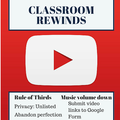
Movie making and digital storytelling do not have to be multi-class activities. They can be done in minutes and be a great way to recap classroom learning. A great app to try for iPhone and iPad is YouTube Capture. It is possible to shoot, compile, edit and upload to the web in minutes. More than likely, you should even be able to cobble together enough student devices even if you are not in a 1:1. YouTube Capture takes all the complexity out of digital storytelling and keeps the focus on the content. You can do some lightweight editing like trimming clips, add music and upload straight from your device (or export to your camera roll). This is an advantage because it will keep your students from spending all their time on themes, transitions and keep the focus on what they are saying, learning or showing. Encourage your students to be documentarians of their learning. Capture video of science labs, art projects, poetry clips, proper phys-ed techniques, paper note sheets, or even main ideas in a lecture. All of those digital artifacts sitting on camera rolls can then become content for students to mix and remix into classroom rewinds. YouTube is famous for their year-end YouTube Rewind and you can take a page out of their book by having your students recap and reflect on their learning (minus the high production value) at the end of a unit or lesson. Take all those learning experiences and digital artifacts and synthesize them into a classroom rewind. Rewind Tips:Teach your kids about the rule of thirds when filming. Set privacy to unlisted to allow for easy sharing.You can skip posting to YouTube by exporting finished videos directly to the camera roll (this can be a little tricky). Another piece of advice...give up the Oscar...it does not have to be perfect. Turn down the volume on the music so it does not overpower the audio in the video clip. Have students submit video links to a Google Form so they can watch other video and review from each other’s videos. Ben Friesen is an EdTechTeam member and Digital Content Specialist based in Minnesota and you can see him present at EdTechTeam Global Summits around the world! Say hi @benjaminfriesen.
EdTechTeam
.
Blog
.
<span class='date ' tip=''><i class='icon-time'></i> Jul 20, 2015 06:36am</span>
|
|
I recently attended a GAFE summit conference in Tennessee and presented on implementing Google Drive with kindergarten and first grade students. One thing I love about conferences is getting awesome ideas to try out from other attendees. After the session, a teacher came up and asked if I had ever tried playing Battleship with my students using Google Drive, which I hadn’t.I normally set up a public Google Drawing and demonstrate a game of Tic Tac Toe with students as a means of teaching collaboration and sharing and to teach the kids how to share and open a document, but a game like Battleship? Nah, it sounded a little too complex.However, curiosity got the best of me the following days. First chance back in the classroom, I pushed back our regular plans for the week and gave Battleship a chance. My schedule is set up so I have four classes of each grade a week (k-4). It may be unfair, but the first class usually helps me get things oiled and working smoothly for the other classes. I created a public text document and had two tables on it. The top one was for my ships and the bottom was to keep track of their torpedoes. The first run-through didn’t go so well. I didn’t demo as well as I should have and the map was way too big. I set it up 15 x 15 and left too much of a variety of ships. Some of the kids created the wrong size or too many or too little. There were too many misses in such a short class time to actually enjoy playing the game.The second class went much better. The playing area was narrowed down to 8 x 8 and the ships were just 4 blocks long and they had to put four ships on the map. We then confirmed with our neighbors (not our enemies) that our ships were in fact 4 x 1 and that we had just four. We had half the class divide up around two computers on opposite sides of the room. After about six or seven shots (including some teacher advised locations…:), the students got the idea. We went over key vocabulary words like hit, miss and ship sunk! We also worked on coloring in locations of hits and misses on the maps by either using specific letters or by filling in the cells. They also utilized the undo button, which solved a lot of unnecessary hand raising for help during the first class when they accidentally adjusted the map or colored in an entire portion by error.It went extremely well the second time around. We worked on hand signals and mouthing our torpedo shots instead of shouting them. Surprisingly, it didn’t get very loud in the room.We set a timer of about 15-20 minutes. The goal was to sink as many ships as you could and if all of them were sunk, then you started over. Plus, the kids worked on map coordinates without even knowing it.Thanks to that kind stranger for telling me about this excellent idea. The kids learned many valuable tech skills at the same time. Give it shot; you’ll love it and the kids will too.Use Mark's Battleship template here! Mark Littlefield is the lower school technology coordinator at University School of Nashville where he teaches technology to grades k-4. He can be found online at www.mrlittlefield.com or on Twitter @littlemarkfield.
EdTechTeam
.
Blog
.
<span class='date ' tip=''><i class='icon-time'></i> Jul 20, 2015 06:36am</span>
|
|
Move over Game of Thrones and House of Cards, the Google Education on Air Lineup is full of the same thrilling plots that make us watch one after the other but for our own practice! Here's an easy way to grab your laptop, some wine, and snuggle up in bed this weekend for your own professional development.First, make sure you philosophically set the stage and breeze through Day 1's Keynotes, a great mix of leaders in different industries designed to get you thinking about the big picture. After all, you wouldn't jump into Season 4 without at least watching the recap, right? The interface is better than any of your cable provider's On-Demand technology, and you can toggle to the one you want, take a screenshot of that a-ha moment, or go back and relisten.Here's a few gems.The Economist Intelligence Unit looked at What are the Skills of the Future, and Zoe Tabary shared some insights into her research investigating digital literacy, leadership, and creativity and whether those skills meet the needs of employers. A salient point from the report was:But the support for this is lacking. Zoe kicks things off with a panel about being #futureready and digital leaders! We loved seeing Jaime Casap and Ken Shelton who present at our events share HOW we can prepare for these skills with student-centered strategies.I know we're all making change in our classrooms and schools, but it can be so infuriating when we have the best intentions. Lisa's talk discusses how to anticipate and activate change, and these three steps she covers is such a good start to thinking about change in learning technologies at your school!Lisa Bodell, "Make Change Happen: Three Tools for Better Problem Solving."Jennie Magiera, "Power to the Pupil." Jennie got to edu-nirvana with three lessons! How to cultivate curiosity, how to outwit obstacles, and how to play purposefully. Get inspired!Richard Curtis,"Take Part in the World's Largest Lesson." World's Largest Lesson is here to help this be the last generation to be threatened by climate change and the first generation to end extreme poverty, and teachers make this happen!Day 2 is full of Hands-on and interactive strategies you can take straight to the classroom. Here's just a sampling of awesome ones, but dig in, watch a bit, take some notes, and move onto the next. The beauty is that they are always here!Data's Not So Scary | Jay Atwood | Session Materials Data and spreadsheets sometimes get stigmatized for being tough, but Jay's smooth style helps anyone understand how to make the best use of data with your students. I love that he pumps his example spreadsheet with notes with hints and tricks, so an interactive template! Love!Extreme Pedagogy Makeover Using Multimedia Text Sets and Hyperdocs | Lisa Highfill | Session MaterialsLisa's style is so fun to listen to, and I particularly loved her notes on how to package your lessons using Google Docs.Google Apps Admin Console Best Practices | Peter Henrie | Session MaterialsPeter goes through the admin console in such an easy and step-by-step way, especially for such a complex topic!You Think You Know Google Search? | Lisa Thumann | Session MaterialsYou and your students Google ALL DAY LONG. Get these quick and easy efficient tips and modifications for students, like microphone search, using Google as a dictionary, and more!There were SO many more fantastic sessions we couldn't possibly highlight them all, but you can! Let us know which were your favorites.Please follow these amazing presenters, and go to see them present live at our EdTechTeam Global Summits! Which is the next one near you?
EdTechTeam
.
Blog
.
<span class='date ' tip=''><i class='icon-time'></i> Jul 20, 2015 06:36am</span>
|
|
Original post: "When Students Completed Their First PBL" by Kaitlin Morgan"Picture a classroom...the first thing most of us think of is a square room with rows of desks….this traditional classroom space is the product of an industrial-era model education. Just like factories, schools were designed to categorize students by age and (supposedly) ability, then deliver curriculum in an assembly line format." As a history teacher, this statement made by Kevin Brookhouser in his The 20time Project hit me in the gut. One group discussing their thesis: Although more women are represented in the workforce, a wage gap still exists- impeding women from advancing in society- making it necessary for them to be paid the same amount as their male counterparts..While my classroom does not look as Brookhouser described, elements of my instruction still did. I was increasing rigor within my content, but I still had to teach my students in way for them to do well on our CST style benchmarks despite the recent inclusion of short responses. This had been weighing heavily on my mind so when I heard this quote at the EdTechTeam Google Summit in Minarets earlier this month, I felt guilty and ashamed that I was not making my students "future ready."Thankfully, I was not alone in my concerns and convictions regarding the way to teach history, even prior to the Google Summit. My department head was also feeling the same way so we collaborated and came up with a PBL (Project Based Learning) lesson for our students to complete regarding the Civil Rights Movement, which was a modified version of one I found online. Rather than just lecturing and informing students in an engaging way about the Civil Rights Movement, we decided to have students explore various minority groups (African Americans, Hispanic Americans, LGBT, and Americans with disabilities--one group requested to do women, which I allowed) in literature, politics, movies, and working place. In their groups, students selected a specific area of a certain American group to do a research project on; for example, LGBT in movies or Hispanic Americans in the workplace (instructions here).After students selected their topics, I explained that what they cover was up to them completely. For example, if they were research African American in movies, they could do actors, directors, representation in film, etc. The only set criteria I had was that two students in the group research from 1900 to 1975 and two from present day. Based on that criteria, I asked them what they expected to find/discuss and they came up with milestones, compare and contrast, progression of rights/equality, etc. I then set them free to do general research on their topic. We did a Pear Deck discussing how to evaluate resources, including discussion of Tree Octopus and the CA Velcro Crop and then after a day or two of information gathering, I had students complete (as a group) a Research Thesis; even though they weren't writing a paper, they still needed to come up with a guiding statement to help keep their slideshows, videos, or posters focused. The group leaders then share their document with another group, who evaluated their thesis on the rubric provided. We did two rounds of this officially and if a group did not receive at least a 3, then I met with them individually to help. As students began their presentations (all chose to do a Google Slideshow...there was some interest in Prezi, but their Chromebooks needed a Java update), we discussed expectations for presentations by brainstorming what make a good presentation: Finally, their ten minute presentations began after about a week and half of work and students evaluated each group on a four point scale. By the end of the week, everyone in the class had a great deal of knowledge dropped on them. As a teacher, this entire process was very strange to me. While they were researching and creating their presentations, I stood back and guided them when they asked for help instead of spewing information at them. When I did teach, it was regarding skills that they needed for the project rather than information and details. Yet I saw the students engage in the material in ways I hadn’t seen before. Almost all of my students were on task and excited about the project since they were given the freedom of what they could discuss and research. I heard them arguing over whether a site was a legitimate source and excitedly brainstorming ways to engage their audience. By the end of the project, I was surprised at how much they were getting out of the project that didn’t involve me directly teaching. As self-centered as that sounds, its true. I grew up with teachers that stood up and directly explained information. Even though I made my direct instruction engaging and thought provoking, I was still directly explaining information to them in an assembly line fashion. It was very strange to step aside and allow students to find their own way through a historical period. It was even more strange that I couldn’t give the students an assessment at the end of the unit since every students learned so many different things; it worried me that maybe the students didn’t learn anything from the research, but I know from their passionate conversations, presentations, and eagerness to complete the project that they did get something meaningful out of it. While this project was not a 20time project that Kevin Brookhouser discussed, I felt as though I had taken a step in the right direction, away from the assembly line classroom. Kaitlin Morgan is a Google Certified Educator and Social Science Teacher in the Central Valley of California. She recently attended the Central Valley Summit this month and you can find her online @missmorgan810.You can learn more Future Ready techniques at an upcoming Future Ready Summit-- EdTechTeam has one coming up in Orange County and in the Tri-State area.
EdTechTeam
.
Blog
.
<span class='date ' tip=''><i class='icon-time'></i> Jul 20, 2015 06:36am</span>
|
|
In 2010 and 2011, I made a point of visiting as many innovative schools as I could. I wanted to see what made them different... and if there were things I could help share with other schools. One of the things that struck me then (but took a few more years to come into focus) was the importance of Inspiring Spaces for learning.One of the first times I remember visiting what I now consider a Future Ready School (long before James Sanders gave us the phrase to describe what we were seeing) was at Minarets High School in 2010. They had gone 1:1 with laptops - and were working hard to be "all" project-based learning. Not coincidentally, many of their learning spaces didn't look like an ordinary school. Their Media Lounge in particular struck me as important. This was the building originally designated as the Library, but as Jon Corippo and Mike Niehoff pointed out to me at the time, if they had called it a Library "kids wouldn't have come." Instead they created a space "more like Starbucks" with couches, high top tables, monitors, and plenty of shared gathering spaces... nevermind the view they took advantage of. (And, yes, they still presented a collection of 10,000 books in easily accessible and attractive shelves.)The Media Lounge at Minarets High SchoolSince 2012 I've had the good fortune to be able to visit many more innovative schools all over the world... the host schools of the EdTechTeam Summits featuring Google for Education. One of the first International Schools I visited was Singapore American School, where I found a wide variety of themed learning spaces and flexible furniture (often on wheels), and once again I was struck by the fact that it didn't feel like an ordinary school. At the American School of Bombay even the book shelves and walls were on wheels, and teachers (in a large shared area) reconfigured the space to meet the needs of the day. Incidentally, there were no bells at the elementary school of ASB... teachers decided when was the best time for their students to go outside or take a lunch break. The space reflected the flexibility in their practice.At Parklands College in South Africa the importance they placed on technology serving a purpose (rather than being an end unto itself) was also clear in their spaces; their students worked in sustainable organic gardens and an impressive recording studio - neither of which looked or felt like school, and both of which allow students to express themselves in very human ways. Iolani School in Hawaii also showcases a sustainable garden on top of the Sullivan Center, and the bottom floor is home to an expansive makerspace, where (among other things) students experiment with generating electricity while biking in order to power appliances (or video games). The students are also responsible for redecorating the building elevator each quarter, complete with sound track, lighting system, and design elements they manufacture on the first floor. The focus on student agency is evident even in their interior design.The Maker Space at Iolani School (2014)In New Zealand, Albany Senior High School has a building that powerfully reflects the culture of the school, with wide open learning commons (again with flexible furniture). If you can win the game "where's the teacher?" then the principal says they're doing it wrong. Glass conference rooms surround the commons for when small groups need a separate space for collaboration, and all teachers share multidisciplinary office space... not unlike what we've seen in Google's offices, which are modern spaces designed for highly effective collaboration (and creativity). The school buildings and grounds at Albany are even rich with evidence of students 20% projects (the Impact Projects that all students spend all day every Wednesday on)... including murals, windmills, gardens, open source software, and more.Learning Commons at Albany Senior High SchoolBack in the United States we have also been lucky enough to host an annual event at New Technology High School in Napa Valley, where they have been 1:1 with laptops since 1996, and where they have institutionalized project based learning, complete with their own online learning management system (that looks and feels a bit more like social media, and what might be called a digital learning space). Their classrooms are all glass walled and double wide (with two teachers' classes in them... making traditional teaching methods all but impossible), and the shared spaces once again feature flexible furniture reminiscent of a starbucks... but with the addition of several projectors and monitors students can hook up to for a shared visual focus as they work.Gunn High School in Palo Alto, host of our flagship summit has also experimented with new learning spaces, including classrooms with Idea Paint to make the walls "white-board" writable, individual white boards for students, rolling furniture, and a variety of gathering spaces. The IDEA (Innovation, Discovery, and Engagement Area) at Glenbrook North High School in Illinois also sported idea paint on the walls (and columns), a variety of collaboration spaces, and easy access to all the resources of the library.Classroom at Gunn High SchoolBy early 2014 our team was coming to the conclusion that Inspiring Spaces were an important part of our host schools' success with students. We believe it is not a coincidence that the schools that inspired us all look so radically different from traditional schools (and from each other, too, for what it's worth... there is no one way to do learning spaces well... but there is a common way for doing them poorly that we need to move away from). This belief led us to include "Inspiring Spaces" as one of the elements in the visual "honeycomb" we developed at this time last year to illustrate what makes a Future Ready School. We feel each of the elements is important - and dependent upon the others. You can't just add devices to a school (to go 1:1 with Chromebooks or iPads for instance) without also changing the learning spaces, especially if you want to move from substitution (and perpetuating the old ways of "teaching) to redefinition (and previously inconceivable new experiences for students).Now we're ready to take the next step in sharing what we've learned for the benefit of other schools... and it begins with us needing to learn a lot more ourselves - and needing to build our team's capacity in this area. We've gotten to work with around 3000 presenters over the past three years producing summits around the globe, and there was someone who stood out to us as particularly well prepared for this effort.David Jakes was a public school science teacher and technology coordinator before he left to join the Third Teacher Plus and spent the next two years working with designers and architects to create learning spaces in schools. David was a featured speaker at last year's flagship summit at Gunn High School, leading a strand of sessions on Inspiring Learning Spaces. Over the past year, I've learned a lot from David about the process behind designing effective spaces, the need to help schools and districts develop their own drivers for their designs, and the wide variety of furniture and finishings available - not to mention a whole new vocabulary around architecture and design. I've also learned how important professional development is for the educators involved, both before and after a new space is created. When David became available in March, we knew it was time to act, and started talking to him about the possibilities.David Jakes, Director of Learning Spaces, EdTechTeam, Inc.I'm thrilled to announce that David is now working with EdTechTeam to help design and launch our Learning Space Design Studio. We're set for a soft launch (or pre-launch) at ISTE this year and a hard launch at our flagship summit in July back at Gunn High School. Today you can already reach out to us via our request form for help redesigning your learning spaces - or for the professional development you might need in preparation for that process. We look forward to working with you to create Inspiring Spaces for your students, whether you've got a minimal budget for your own classroom - or a community bond to modernize your school. Let's build something better together...#FutureReady #InspiringSpaces #SpacesMatter #DreamOutLoud #OnlyTheBeginningPS. David is only one of several new members of the EdTechTeam in the past 12 months, many of whom I haven't properly introduced. Stay tuned for a number of other introductions here on the EdTechTeam Blog in coming weeks.
EdTechTeam
.
Blog
.
<span class='date ' tip=''><i class='icon-time'></i> Jul 20, 2015 06:36am</span>
|
|
I can’t imagine a better email than the one I received saying that my grant application for a class set of Chromebooks was selected. For the past several years, I have been anticipating the day my school goes 1:1. I always imagined we would be purchasing laptops, preferably Macs. But, in the past two years we have started purchasing Chromebooks in order to be ready for the CAASPP (California's State Test). I couldn’t be happier with them. They provide the functionality students need at a more reasonable price than laptops or tablets. So, I’m excited for the grant. With it, I hope to show my colleagues, administrators, parents, and district what we can do when the students have access to devices every day. I teach 6th grade English, and my students have two periods of English, one period of Composition and one of Literature. I hope to have my students complete almost all their written work using the Chromebooks. I haven’t used it yet, but I’ve heard only good things about Google Classroom. So, I plan to have students use it to submit all their work. My district already has Google Apps accounts set up for my students, so it should be an easy transition. One of my goals for my students is for them to be published authors. For the past four years my students have participated in National Novel Writing Month. It’s a program that attempts to get adults and students to write a novel in the month of November. My students spend the last week of October planning an outline of their novel. Then, they spend every day in November writing. Each day I teach a short lesson about a writing strategy, and then the students practice using that technique as they write their novel. The students set a word count goal for the month and have written between three and twenty thousand words in past years. After the students finish writing, revising, and editing their novels, I compile them and publish them in a book using createspace.com. Because createspace is owned by Amazon, our books our for sale on Amazon. The students bring in money and I order copies for them. My goal is for them to realize that they can be published authors and to spark their interest in writing. A few new (to me) tools I’m considering using next year are remind.com (to sent text messages with due date reminders to students) and Class Dojo (to help with class management). I also signed up for a free trial of Net Support School. It’s software that allows the teacher to monitor the screens of a classroom of Chromebooks. I’ve used Remote Desktop in the past with Macs, and found it to be a great tool for making sure students are staying on task. I look forward to hearing what the other teachers receiving the grant plan to use. After hearing about the grant, I looked in to professional development that I could attend this summer. I signed up for a week-long class at Stanford’s Summer Teaching Institute called "Transforming Teaching with Technology." I’m excited to have a week without distractions to get ideas and make plans for making the best use of the Chromebooks. Like every student and teacher, I’m looking forward to the summer off. But, I’m also excited to engage my students in reading and writing while using the Chromebooks next school year.David Pickett is a 6th grade English teacher at Ralston Middle School in Belmont, CA, where he also serves as a technology leader and head of the English Department. He grew up in Fresno, CA and was lucky to have a series of great elementary school teachers. In particular, his 6th grade teacher made the year fun and educational by using project based learning. My favorite project was one in which we created our own businesses and sold products from a refrigerator box "store." That teacher inspired me to become a teacher. The EdTechTeam Student Device Grant application is open! We review and award quarterly. Submit your proposal here.
EdTechTeam
.
Blog
.
<span class='date ' tip=''><i class='icon-time'></i> Jul 20, 2015 06:36am</span>
|
|
We were so thrilled to be joined today for our Lunch w/ EdTechTeam series by Molly Schroeder, our Director of Summits. Molly is a Global Digital Age Learning Specialist, Google Certified Teacher and Google Apps for Education Certified Trainer. She presents nationally and internationally at conferences, workshops and conventions on how to integrate Google Apps and other emerging technologies into learning. Her background is in Elementary Education and she also holds a certificate in Educational Technology and Gifted Education. Find her contact information below and watch our lunch with her and read the transcript below! We hope you come to see Molly at an upcoming summit soon.Contact InformationEmail: molly@edtechteam.comTwitter: @followmollyGoogle+: +MollySchroeder WENDY: If you have any questions or if you’re following this from Twitter or a Google+ page, please feel free to tweet @followmolly or @edtechteam or on our EdTechTeam Google+ page, we’ll monitor that if you have any questions for Miss Molly. But just a little background of Molly, here’s her Twitter. But right now, other than directing our Summits, which is a huge job, how many EdTechTeam Summits, Molly, do we have going on this year alone? MOLLY: Well, for 2015 we’ll have over 100. So, we just added another one today in December, TBD. We can’t publicly announce it yet. So, yeah, we’re still adding Summits for 2015. WENDY: That’s crazy. And Molly is at almost all of them, practically it feels like. She’s a road warrior and out there, but she’s also a Google certified teacher, so you might have seen her in the Google Certified Teacher Network. She’s going to be at the Moonshot EDU Summit, which I think just closed their applications, right, for Amsterdam? MOLLY: Nope, it’s open until June 26th. So, it’s moonshotsummit.org. You can apply at the one day training at the Amsterdam Google office, and applications are pretty easy, and they are due by June 26th, and we’ll choose about 40 people to attend that with us. So the question is, if you could wave a magic wand and change something about education, what would you do? And we’re just going to try to put some big thinking around that. WENDY: Awesome. And Molly will be there as one of the lead learners there, so of course you’re going to have a great time, but you’re also going to have an Apps for Education certified trainer. And you’re in Minnesota now, right, Molly? MOLLY: I am. I’m in the middle of a really great summer thunderstorm here, But yeah, I’m just in Minneapolis, Minnesota. That’s where I have my home office, and I’m a frequent at the Minneapolis airport. WENDY: And you achieved your Delta status this year, right, Molly? MOLLY: Yeah. Yup, it’s been awesome just to kind of really have that global audience as a network of people to work with, and it’s really a lot of fun to be able to travel around and meet all the just super empowered teachers that are choosing to be at the Summits on the weekend and really empower them to go back and change their classrooms, so it’s been really fun. WENDY: That’s awesome, Molls. And you also have...you’re my biggest travel fashion icon, and I think you have a new travel purse. MOLLY: I do. This one, you know, bags are very important to women. This is the cute new Lulu Lemon little travel purse, and it’s a great spot for your phone, it’s got like six different pockets, and it’s just like that really good collapsible size, so I just got it, you know. WENDY: Could it fit an Android or an iPad device? MOLLY: An iPad mini for sure, or an Android, yeah, probably a 7 or a 9, definitely, but you’ll see it at ISTE, so keep your eye out. WENDY: Awesome. Thanks, Moll. I learned about Molly’s fashion from Tieks, the… MOLLY: Oh, yeah, the online… WENDY: Collapsible ballet flat. Awesome. Thanks for giving us your fashion tips as being our Director of Summits. You’ve gotta be wearing the right stuff. But Molly, tell us, this is Lunch with EdTech Team, right? And for me it’s a little early. I’m in Portland, Oregon, everyone, and... there’s a new salad place by my place that’s a garden bar that you can just go do it yourself, and being EdTech people, we kind of like to customize everything, so those salad places are my favorite. What are you going to have for lunch, Molly? MOLLY: I have a delicious turkey sandwich waiting for me, so yum. WENDY: Yay! MOLLY: It’s very exciting, very exciting lunch today. WENDY: Well, tell us, what’s your next Summit that you’re going to be at? MOLLY: So, next week I am gearing up to lead the Illinois Summit which is in Homer Glen, Illinois, just outside of Chicago, and we just sold out with 500 people attending, which is really exciting, and I’ll be leading that with one of our other EdTech team featured speakers, Kate Petty. So, we’re going to be at Illinois Summit, and we’ve got an awesome program of people and a lot of featured speakers that are joining us. And then in two weeks I’m going to be out in Colorado. We just finished the Breckenridge Summit. We’ll have another Summit in Boulder in October, but I’m going to do a little custom PD with a school district in Steamboat Springs. So, EdTechTeam not only puts on Summits, but you can hire us to come to your school and do custom PD for whatever you want us to do, so you let us know the theme of the day, and we’ll make ourselves available to do sessions and keynotes and all that stuff available for you too. WENDY: Awesome. And I’m looking just right now at the schedule for Illinois just for folks to know what does Molly like to present on, and I know my favorite sessions from yours are always your Chrome apps and extensions, and I also really enjoy some of the Sites stuff you’ve done, but it looks like in Illinois you’ll be doing Google Classroom and Personalizing Chrome for Learning on a Chromebook or a Laptop. What’s your favorite session that you like to do and what can folks expect to see from you? MOLLY: Well, I just did a session in Breckenridge, a brand-new session, called Assessment in the Digital Age. Probably one of my least favorite parts of teaching was doing the assessment part, but it’s so important, and if you start thinking about if kids are learning, that’s what you’re in charge of: figuring out if they have or not. So, I’m loving a new extension and website called docent.edu for that, and that’s a Google Apps extension. It’s actually a cool startup company by two teachers here in Minnesota, and it allows you to customize any webpage with discussions and questions, so that’s really cool, and add sticky notes and embed different things on the webpage. And then another new favorite extension in my Chrome Apps one in Google Tone, if people haven’t used it, and we were able to share our website resources using Google Tone at the Breckenridge Summit, which was really fun. So, if you haven’t seen either one of those, you should check them out for sure. WENDY: Well, I just saw on the Twitter feed and the docent.edu won the Demo Slam at Breckenridge, I think, so that’s awesome. MOLLY: Yeah, it did. It’s really, really impressive. So, yeah, the cool new little extension, personalize websites and kind of provide some feedback within a website. WENDY: Where else you gonna be this year, Moll? Where else you heading on the Summit tour? MOLLY: Well, I’ll be at ISTE (International Society for Technology in Education) this month, which we are really excited about. Maybe I’ll just do a little shoutout that we are going to have a booth with Max Cases at the ISTE conference, and so we have an entire teaching leader of little 20 minute sessions of some of our most awesome featured speakers at all Summits. So, literally the EdTech Team Max Cases booth is like a Summit within an ISTE, a Summit within a conference, so we would love it for you guys to stop by, there’s going to be a photo booth, and there’s just going to be stuff going on all day long with our featured speaker. So we hope it’s a place to hang out and network as well as learn, and then, you know, visit the other guys too, Max Cases who do a lot of protective gear for your iPads and your Chromebooks and any kind of digital devices that you have in the class. So, I’ll be at ISTE and I’ll be at the Moonshot Summit, and then in August I’m at Orange County. I’m at our Palo Alto Summits in July as well. We have two weekends in Palo Alto. These are sort of our flagship events. We have one the weekend of July 11th and 12th. Pre-Summits in between that whole week, and then another full Summit the 19th and 20th, I think, whatever the weekend is. So, really excited about those events too. If you haven’t been to one in California and Palo Alto, you’re missing out. It’s our big flagship one. It’s fun. WENDY: I know a fun time with Molly is I know you like to do your weekly yoga. What is your favorite pose in yoga that you’re working on right now? MOLLY: Oh my gosh. Well, I did do a headstand this morning, so I am working on that, and that is, that’s good, I know. I’m kind of thinking that I was pretty proud of myself doing that. But I’m perfecting my chipping in golf too, so those are sort of my two past times that I’m going to be working on those this summer. WENDY: Awesome. Well, again, you can follow Molly @followmolly on Twitter, @edtechteam on Twitter as well. Go to gafesummit.com if you want to see the schedule of events that Molly is helping head up as Director of Summits for EdTech Team, and you can just share on Twitter at #gafesummit, or for our iOS Summits for iPads, which we have one in NorCal coming up soon as well, right, this July, Molly? MOLLY: NorCal, yep, it’s going to be awesome. There’s a full three Summits. It’s going to be an awesome, awesome time. WENDY: Awesome, and anything else that folks have to look forward to this year with EdTech Team and with Summits? Anything else to keep on the horizon? MOLLY: Yeah, you know, I just think that our sessions are changing so much and I there’s always a fresh variety of what you’re going to learn at them, so even if you’ve been to one, I heard a stat one time that somebody said that Google changes over 150 things every year, so we just try to stay fresh and keep it fun and the networking of being together is just seriously the best part of it. It’s empowering, it’s exciting, it’s energizing and contagious, so we just love everybody who chooses to spend their weekends with us.WENDY: Yay! And we love you, Molly. Thank you so much for joining us. Have an awesome turkey sandwich, and thanks for all of our viewers. We’ll have this up on the blog so you can watch it again and read the transcript and hopefully keep sharing with us online. Stay in touch, everybody. Have a good lunch, Moll.Come see us next week with Michael Wacker, our Chief Learning Officer! RSVP here for the June 11th Hangout On Air at 12:00 Noon Pacific.
EdTechTeam
.
Blog
.
<span class='date ' tip=''><i class='icon-time'></i> Jul 20, 2015 06:35am</span>
|
|
We had an amazing time at our 3rd Annual Hawaii Summit this past March, and Claire Sakata, 6th Grade teacher from Makalapa Elementary School in Honolulu! Claire's "Chrome Crew" student tech team so enjoyed learning from their teacher and the extra goodies she brought back they wrote a pretty darn awesome Thank You Slide Deck, complete with great ideas you can use with your own students.Happy Warm and Fuzzy Friday all!Stay tuned: the 4th Annual EdTechTeam Hawaii Summit is about to be announced! Where and when will it be...
EdTechTeam
.
Blog
.
<span class='date ' tip=''><i class='icon-time'></i> Jul 20, 2015 06:35am</span>
|
|
What a week!!I found myself in a car this past Tuesday driving the 10 hours to Illinois for the Google Apps for Education Summit 2015. This conference was hosted by the amazing EdTechTeam just outside of Chicago. The first thing we were asked, before we ever set foot in the building, was how well do you know Google and the apps used for education. I typically walk into any setting knowing I am likely the least knowledgeable person in the room on the topic. This way there is more collaboration and I can see how others are using things rather than push the ways we do things. I humbly said I knew quite a bit, but that I was no Google Ninja.However, I felt pretty confident about my Google skills, but tried to undersell myself.HA!!Turns out...there was absolutely no frickin' reason to undersell my abilities. These programs which I have been using and sharing for the last couple of years have a whole new level of kick-ass to them that I am pretty sure educators are not even touching. For instance, take this quick quiz for me and see what I am talking about. This blew my mind. I mean, I have been using Forms for many reasons and for over a year now. Think about all of the cool ways you can then formatively assess your students in the classroom. This still comes with all of the analytics so you have an overall snapshot of your class or group in pretty pie charts or bar graphs.Sidebar - Summative assessment is the icky word that makes people think of standardizing or Unit reviews because they are in the book. Formative assessment is the super cool way to know if your kids get it. NOT because it will be on the test.Ok, so another cool thing I learned this week is Google Sites. Teachers, and principals for that matter. Hell, administrators!!! You can use Google Sites for your classroom, school building, or district website. And it's free. Or as my friend Johnny Atchley likes to say, "it's free 99!".I will link the overview page here and here is a video on the process if it's all new to you. The leader of the session I attended, Molly Schroeder, explained how to use Google Sites as a digital portfolio for her students to upload their work. Gosh, I have had students work together to create a "textbook" of the content they learned over the year, but the potential here is astounding. You could have a shared or individualized 2015 website where the students share with the/their parents the work you have been teaching and they have been learning all year. Here is a link to Molly's (our session presenter and Google Certified Teacher) presentation on how to use sites as digital portfolios for your students. The link is her own Google Site. You can see how professional it looks, and again, ITS FREE. #gooddealThe last take home for the week was the idea of throwing out the grade book and going with a badge system. My Twitter feed has been slowly coming around to the idea in the last year. It completely disrupts everything tradition schools schools stand for, so I am sure I will catch some flack on this one. If it helps you traditionalists out there, the session was titled WTF: Why Teach Failure. So in this session Google Certified Teacher Jeffery Heil (On the twitter he's @jheil65) talks about giving a syllabus of all assignments at the beginning of the semester or school-year and assigning badges to different checkpoints along the way. You will have to decide for yourself if this will work for your age of students. He works with undergrad students at the secondary level. I have tried this with my students in personal finance. Each checkpoint had an essay, presentation or video that allowed the students to demonstrate their level of knowledge for each subject. This was a LOT of work for me and I had to let the parents know what I was doing and that their kids would not be receiving weekly grades in the class. This was incredibly difficult for some parents....and students to wrap their minds around, but the level of work was amazing. I did not provide a three column rubric, only a single column. For them it was sort of a check list of all the things that the projects needed. Why would we show the first and second column of that rubric? Why would we allow them the chance to fail at a topic so crucial to life? Because the school system was not ready for a non-graded system, and students must receive a final grade, the number of badges awarded in the class determined the grade at the end of the class. But all of the projects ended up looking amazing. So, there is another EdTechTeam #GAFEsummit this October here in Oklahoma. I highly, ardently, and insanely recommend this conference if you think you know Google and want more or if you want to see what other amazing educators are doing with Google. I will be attending this conference again, as there were like 10 rooms per session, so there is obviously more to know out there. Here is the link to get signed up for the Tulsa Conference.Cross-Post from Educating Me BlogErin Barnes
EdTechTeam
.
Blog
.
<span class='date ' tip=''><i class='icon-time'></i> Jul 20, 2015 06:34am</span>
|
|
One of the topics of concern for both technology and library teachers is the way in which our students conduct research online. All too often students and even classroom teachers choose an open Google Search as their first step when looking for information on a topic. This isn’t necessarily a bad thing, but when you combine this with a lack of understanding on how to conduct a web-based search there is the risk that students will get results that may not only be inaccurate but also not appropriate for their age level. Enter Google’s Research Tool for Google Docs and Slides.In coordination with our two librarians, I put together a mini-lesson that would ask students to access prior knowledge ("What research tools do you have access to here in our library?") and teach them how to conduct more efficient searches for information on the Internet: ("How do you make your search ‘smarter?'"). Our target audience was third grade who was just beginning their Maine Animal Research Project. I started by giving us a problem to research: "We need a new pair of sneakers, but what kind should we get?" I then threw out different scenarios for how to go about this research and asked the students to evaluate whether or not I was being a "smart" researcher so that they would begin to ask this question over and over again in their minds during the research process. Once the mantra seemed to take hold, I transitioned to showing students how Google’s Research Tool could help them be a smarter researcher using the Maine Gray Wolf as an example. Before I entered any text, we talked about how the different search tools (e.g. images, quotes, dictionary) could make my search smarter. I then introduced the second theme in the lesson: the power of keywords. By purposefully only typing in the keyword "wolf" I was able to apply this theme to domain names ("Is a .com more or less trustworthy than a .edu?"), website titles, and the site descriptions. Students were able to eliminate several of the search results almost immediately, saving ourselves time and maintaining our "smarter searchers" label. When we found a site that looked promising, we then used the "preview" button to evaluate the site to see if it was worth our time to investigate, thereby making our search even smarter. Finally, I asked the students to brainstorm lists of keywords that I could add to my initial search term "wolf" that would make the Research Tool results even more smart (e.g. wolf habitat, wolf diet, Maine gray wolf). I wrapped up the lesson by showing how to use the "cite" button to begin building they bibliography section of our project, emphasizing the concept that we must always make the effort to give credit to the original author(s) by "citing" our sources.Classroom teachers were invited to sit in and participate in these lessons. I wanted to ensure that they knew how to access this tool themselves and have an opportunity to connect the themes of my lesson with those they had already introduced back in the classroom. And, because the final product was a Google Slides presentation, the Research Tool was a perfect and welcomed addition to this project. The feedback was so positive in fact that the librarians reached out to our fourth grade teachers, who were getting ready to start their own research projects on national parks. I ended up spending the next week training them to be smarter searchers as well. Google’s Research Tool can’t do the research for you, but it is a good place to start and an invaluable resource to help students be safer and smarter searchers of the vast and enormous database of information that is the Internet. Resource Links:Google Slides Student Presentation (w/presenter notes)Google Research Tool TutorialYork School Department online library database (i.e. Minerva)Nick has worked in education for over 13 years at the elementary, middle, and high school levels as a computer technician, technology integrator, and digital literacy teacher. He has a Masters degree in Technology Education, is an authorized Google Education Trainer, and an Apple Certified Trainer. He has worked with a variety of technologies including interactive whiteboards, multimedia creation and editing applications, mobile devices, and an ever-growing list of web 2.0 tools.Email: shumanstudios@gmail.comGoogle+: google.com/+NickShumanIoTTwitter: http://twitter.com/nshuman78School Site: https://sites.google.com/a/yorkschools.org/ysdit_nshuman/
EdTechTeam
.
Blog
.
<span class='date ' tip=''><i class='icon-time'></i> Jul 20, 2015 06:34am</span>
|