Blogs
|
'11:59pm last night Pacific time marked the last chance to submit your application for the Google Teacher Academy in either Mountain View, California or Atlanta, Georgia this summer. Google Teacher Academies are intense two-day events with 50 educators from around the globe gathering at a Google office to connect, collaborate, and innovate, and most of the presenters at EdTechTeam Summits are Google Certified Teachers who went to one of these events.We hope you took a shot and submitted yours! If not, fear not, there are still nine more Google Teacher Academies happening in 2014 with applications yet to open, so watch Google for Education's page, Google Plus, the #googlect hashtag on Twitter, and this blog for more announcements.Mark Wagner, Danilo Marrone, Wendy Gorton, Linda Lindsay, Brendan Brennan, and Liz Castillo share on the Google Certified Teacher and Trainer Panel in Honolulu, Hawaii at the 2nd Annual Hawaii SummitHere's just a few of the awesome videos that attendees in our EdTechTeam Summit Google Plus Community shared with us-- put yours in the comments below if you applied as well, and best of luck to you!Hope MulhollandEdTechTeam New England Summit ft. Google for Education Attendee Google Qualified EducatorMary BerelsonGoogle Qualified EducatorMegan BirdEdTechTeam Arizona Summit ft. Google for Education Attendee Connected Classrooms Guru Cori FreadeEdTechTeam Pennsylvania Summit ft. Google for Education AttendeeAs you prepare for your application when the next round becomes available, we love sharing GCT David Theriault's (GTA Chicago) inspiring and thorough blog on the video production process. Here is his video here for even more inspiration!We hope to see you at the next EdTechTeam Summit featuring Google for Education. Check out the lineup here.
EdTechTeam
.
Blog
.
<span class='date ' tip=''><i class='icon-time'></i> Jul 20, 2015 06:58am</span>
|
|
Guest Blogger Susan KileyEdTechTeam New England Summit Attendee and Google Certified Trainer Bootcamp Attendee Bishop Feehan High School, MAIn honor of the Google Certified Educator application closing today at 11:59pm Pacific Standard Time, we asked folks in our community to share their experience with the application. The next application period opens June 2nd and is due August 15th, so start thinking now about preparing! A great start is to begin your Qualified Educator Exams.You can also attend a Google Education Trainer Certification Bootcamp before most of our summits this summer! Good luck to Emily Roth, Sarah Kyriazas, Cori Frede, Chad Fisher, and so many more who shared with us on our community that they went for it this go-around! Thanks Sarah also for sharing your portfolio for ideas. Sign up to hold a Bootcamp here! -EdTechTeamI attended the EdTech Team’s Google Bootcamp in Massachusetts this fall to become better acquainted with Google Apps for Education (GAFE) and to learn practical application of all Google has to offer for schools. We are in the process of migrating our entire organization over to a Google EDU domain and as the trainer for my school, I wanted to be sure I was on the right track with the training I had already started with our staff. My instructor was Kern Kelley, a dynamic and innovative educator from Maine. The most valuable part of the bootcamp was Kern’s experience with GAFE and how he has transformed an entire school district with practical application of GAFE and all it has to offer. The Bootcamp was the highlight of my school year. I left feeling inspired by all of the possibilities Google presents for schools at all levels of the organization. After attending, I first passed all of my certification exams to become a Google Qualified Educator, the first step to becoming a trainer, and have applied to be a Google Education Trainer for this round. My advice to anyone taking the exams is to not assume that you know everything about Google! Even after the bootcamp, I also took the self-paced training prior to each exam to be sure. Application Requirements Once in the exam session, I was very glad I did this. The most difficult exam, I found, was Drive. Receiving my Google Certified Educator certificate was a sweet moment! I then moved on to apply for my Trainer badge, for which I am anxiously awaiting word back. If you apply for the trainer program you first need to have at least 50 hours experience delivering Google training...no problem for me since I’ve been doing this pretty much full time since March. For my 2-minute application video, I created a screencast demonstrating one aspect of Sites. (I actually chose Page types & embedding the Recent Posts gadget in my class website so that teachers in my school could learn how to do this.) For the application Case Study, it pretty much wrote itself as I am fortunate enough to be experiencing a Google migration in my everyday work. (I love seeing people’s faces the first time they see the desktop Drive client sync their files to the web!As the primary Google trainer for my school, I have also invited teachers from other schools to attend my training sessions to spread the word. I created a site containing offerings for teachers in my school for the upcoming school year, as well as a public one on which I'm hoping to place a Trainer badge. (feedback/suggestions are most welcome!)
EdTechTeam
.
Blog
.
<span class='date ' tip=''><i class='icon-time'></i> Jul 20, 2015 06:58am</span>
|
|
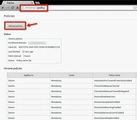
There is a manual procedure that works well if there is a new policy that you do not want to wait for or you have a Chromebook that just doesn’t seem to pull down policies from the Google Apps Management console, even after you wipe it and rejoin it to the domain. If you are running into something of this nature, the following will work.Login to the Chromebook that is having the problem and launch the Chrome browser (if it doesn’t launch automatically).In the URL field type Chrome://policy and hit enter. At the top left you will see a button called Reload Policies. Click on that button, wait about 30 - 60 seconds and log off.'Check the Chromebook for the policy that you are missing (i.e. wifi, login screen, SBAC Airsecure browser app, etc.). If you do not see it right away, try updating again or just let it sit for a little longer.
EdTechTeam
.
Blog
.
<span class='date ' tip=''><i class='icon-time'></i> Jul 20, 2015 06:58am</span>
|
|
In early 2012 a small team of passionate educational technologists came together with the purpose of producing a "Google in Education Summit" in Google’s own backyard, the silicon valley of California, a place with more Google Certified Teachers than anywhere else in the world. Very soon they realized that the event they were planning was something special and would benefit teachers in many other regions… and the decided to "take the show on the road." The result was the EdTechTeam Summit featuring Google for Education.Then, over a period of 21 months, the EdTechTeam produced 50 summits serving 16,624 educators from 4272 educational institutions, in 15 countries, with sessions in 7 languages, on 6 continents… with 1 goal: to empower and inspire educators to make the future better using the best technology and pedagogy available.Educators all around the world have experienced a "mind blowing," "life changing," and "downright fun" event often evaluated as "the best professional development of my career." Self described geeky educators have said "I didn’t know what I didn’t know." Beginners and technophobes have have shared a "positive hands-on experience" - and been "encouraged" by their ability to use these tools with their students. New teachers have changed the course of their careers and near-retirees have been reinvigorated and excited about their remaining years. Educational leaders have found new ways to motivate and inspire… while technical leaders have found the answers and support they needed to make all of this possible at their schools. Every participant has been invited to "Dream Out Loud" and become "Architects of the Possible" as they become co-conspirators in a new learning movement. #gafesummitEveryone at the EdTechTeam is sincerely grateful to have been a part of the experience… and they want to thank each participant for buying tickets and being a part of the journey.Ticket sales have also allowed us to give away seven class sets of Chromebooks (or Nexus 7s)... with three more class sets going out this quarter - and more to come. Each class set has been put in the hands of a teacher launching a 1:1 pilot with his or her students. Each pilot has been explicitly focused on providing engaging, inquiry-driven, context-embedded, collaborative, and reflective learning experiences for students… with a particular focus on creating, making, and doing. We are grateful to have been able to empower the teachers and students involved in this grant program as well. Thank you.We've produced another 4 summits in the past month, and we are now on pace to connect even more educators in 2014, with over 50 summits scheduled for this year alone (yes, that's one a week - or more some months). Whether you’ve been to a summit before, or have yet to be, we hope to see you at one of these special events in the coming months. See you soon at the summit!Interested in hosting a summit in your region? Let us know!
EdTechTeam
.
Blog
.
<span class='date ' tip=''><i class='icon-time'></i> Jul 20, 2015 06:58am</span>
|
|
Guest Blogger Hope MulhollandEdTechTeam New England Summit AttendeeMy experience using Google in the classroom all started last year. I ran an after school Bring Your Own Device program where the students explored what apps and programs can be used across multiple devices. One of the apps that the students fell in love with was Google Drive. They were soon collaborating at home, and I started incorporating what we had learned into my classroom lessons. I worked with our school Technology Coordinator as we became a Google Apps for Education (GAFE) district with our own domain and deployed Chromebooks in the school. As part of my own learning, I attended the New England Bootcamp and Summit. That experience was one of the best professional experiences I have ever had. Not only did I learn the nuts and bolts I needed to use GAFE effectively, but also innovative ways to incorporate them into my classroom. I was even able to visit the Boston Google offices. Since returning from the New England Summit featuring Google for Education, I have started offering Professional Development to my colleagues. I have led several sessions for other teachers who are getting started using Chromebooks and GAFE in the classroom. I also facilitated my first ever conversation at an EdCamp. Being at the Summit inspired me to take the Google Educator exams and apply to the Google Teacher Academy. My tips to anyone who is interested in becoming a Google Educator include:1. Attend a Bootcamp and Summit2. Study the courses on www.google.com/edu (especially the advanced courses)3. Leave yourself the full 90 minutes for the exams Learning is a daily part of my life and this has been a great year of growth for me as a teacher. I hope to continue at this year’s Google Teacher Academy.
EdTechTeam
.
Blog
.
<span class='date ' tip=''><i class='icon-time'></i> Jul 20, 2015 06:58am</span>
|
|
Guest Blogger Julie Revell Cross-PostEdTechTeam New Zealand Summit Attendee It has taken more than a few weeks to pare back the explosion of "Google goodness" that abounded at the New Zealand North Island Summit I attended last month at Albany Senior High School. It is really hard not to feel overwhelmed with all of the information and incredible exemplars of learning (N.B: the 'e' is already in there.) I am hoping that writing this will help me pull the strands together! There are so many perspectives to reflect from.@MissDtheTeacher and @digitallearnin #shenanigans My Drive is bulging now with more shared documents. Even looking at the document's titles gives me those instant triggers of "Oh yeah, learnt that in that session, will pass that on to..." I wanted to record many of the sessions - flipping them would be great - and would love to have the ability to rewind. Suan Yeo, Google’s Education Evangelist in Asia-Pacific began the Summit. His keynote prompted us (with the help of Simon Sinek's Golden Circle) to think of our learners. Starting with the Why ensures that we are thinking about why we are doing what we do. Suan spoke of the power of technology - it can change lives. Shift your students from being consumers, enable them to be creators. "Google is great, but it's making our kids dumb." - We need to challenge kids to discover. Suan believes it "is imperative that educators continue to innovate with new teaching models and technological advances, or risk getting left behind." Are you asking the ungoogleable questions? Learning is discovery versus searching. "Google is great, but its making our kids dumb." We need to change this. Discovery is the challenge, focus on the journey. Dorothy Burt's Going Google session was incredibly informative. The Point England/Manaiakalani Cluster journey provides an inspirational exemplar to me as an eLearning leader. From that perspective I was (and am) interested in the big picture they have developed. Their vision, and what they have achieved for their community is remarkable. They chose Google Apps for Education for collaboration, a theme that clearly permeated the summit. It was Point England that provided me with an important shift in my thinking. Point England junior educators are using one app. No surprises for which one it is. I had previously thought that Explain Everything was a bit too complicated for my Year 2s, and have been mainly using ShowMe for the children's response activities. Having Karen Belt share with me a couple of response activities that they created for their NEs was really powerful. I also learnt that they use Hapara's Google Dashboard in the junior school. They are able to create and plan for a week's reading response, and "push out" the Explain Everything activities to all their student's iPads. From a classroom management/workload perspective I am sold on Dashboard. I had fears that Dashboard wouldn't play nicely with the iPads, but these have been allayed. It was great to hear that Hapara's Teacher Planning step for Dashboard is in BETA. 'It's fantastic when the Professional Development that you attend specifically caters to your next steps, and this is certainly what the Summit provided for me. I now need a winter's worth of rainy Sundays to work on my class' (and our school's) Google Sites. Fiona Grant, and Allanah King your resource sites are tremendous! Wendy Gorton's session on Google Sites as a Learning Management System was one that I wish I could have recorded. My colleagues were thinking that I was off-task on this one, as there were few notes recorded! The session was so practical, I was too busy playing. Loved it.And I just have to mention Jim Sill. OMG. He spoke in his Keynote about the internet being a creator of culture. There are 100 hours of video uploaded to You Tube every minute. Amazing educator. Google him.And the best part of the Summit? Seeing my mates, meeting people IRL and making new connections. #geeksrock
EdTechTeam
.
Blog
.
<span class='date ' tip=''><i class='icon-time'></i> Jul 20, 2015 06:58am</span>
|
|
Guest Blogger Sarah Kyriazis Cross-Post from Technology for all Teachers Blog New round of Certified Trainer Applications begins in June, so get ready!It's been a couple of months since we hosted the Assabet Valley Collaborative Google Apps for Education Certification Bootcamp at Hudson, HS. We had over 60 educators and a waiting list to attend this bootcamp. Our amazing trainers were +Kern Kelley and +Michael Wacker from EdTechTeam.Two weeks later I attended the +Google for Education Summits by EdTechTeam in Cambridge, MA at the Google Offices. What a great experience. Again, I ran into my new friends and learned so much from all of the trainers +Kern Kelley, +Michael Wacker, +Holly Clark, +Chris Bell and more!It was one of the most educationally enlightening and inspiring experience I have had as an adult. I instantly began applying all of my new knowledge into my coaching with teachers. All of this Googliness is in the attempt to be a better Educational Technology Coach to the districts I serve! It is so great to network with other educators.After these four full days of fun, I started taking the 5 exams. I've been building Google Sites for two years pretty extensively, but I thought that exam was pretty challenging. Chrome was the easiest. The exams were very technical and required fast research skills. I was originally going to apply in August after I deployed GAFE at my Collaborative, but decided that I had enough PD to apply for the 5/16/14 deadline.The most challenging was the screen cast. By attending the Bootcamp, I learned about different types of screencasting programs and chose one that is relevant to me and my life and the teachers I work with.True Story: I was actually waiting for my daughter to get out of Girl Scouts while I finished the screen cast. I learned a few more things by truly NOT having an Internet connection and was able to work in my car. I tried to get rid of my blended Massachusetts/Maine accent, but couldn't so just figured I'd go with it.I've created screen casts before, but I like this short style much better so I am going to incorporate this style more!For my Case Study, I had the tremendous opportunity to work with educators across programs in the collaboration of lesson plans, so this part was quite natural. I then created a Google Site with my own URL www.sarahkyriazis.com. Since this is my first year in this position, I really wanted to link my work from my previous district to weave it all together.I submitted the application last week after a few long late nights! Rowing started this week on Lake Quinsigamond so my days were quite long. It feels good to have it finished.Thanks so much to EdTechTeam for all of their mentoring!
EdTechTeam
.
Blog
.
<span class='date ' tip=''><i class='icon-time'></i> Jul 20, 2015 06:57am</span>
|
|
The EdTechTeam is undergoing an exciting change. When we founded the company in June 2006, we wanted to "do things right" and began by incorporating in California as a standard S-Type Corporation. I know this sounds like boring business stuff, but trust me… it gets exciting. In recent years, new options have become available in California (and other states). Now, in May 2014 we have made the change to a California Benefit Corporation, allowing us to formally make decisions that put our mission ahead of our bottom line.Our core team went on a three-day retreat in January 2014. Among other things we discovered that we were at least as passionate about our mission (and our giving efforts) as we were about selling tickets to events and signing contracts with schools. We knew our financial success would always be tied to the quality of professional development we provide educators, and the impact of the services we provide educational institutions… but we also wanted to be able to provide services to teachers and schools who can’t afford what we offer (in markets where our operations cannot be profitable). We wanted to build a business where we could not only give away class sets of devices for student use, but we could institutionalize giving as part of what what this company is about, and what we actually do. Ultimately, we wanted to establish a business structure that would never sacrifice our ideals, convictions, and social change goals for the sake of making a sale.We already found ourselves in a place where we were were straddling the space between a mission-driven non-profit… and a profitable corporation. Happily, we discovered that California (and a number of other states) now have a new business structure called a Benefit Corporation. By amending our articles of incorporation to establish the EdTechTeam as a Benefit Corporation we have now formalized our commitment to our mission - and made it legally justifiable for our directors to make decisions that serve our mission before our bottom line. In addition, Benefit Corporations are held to higher standards of transparency and accountability. Among other things, we look forward to publishing our first annual impact report next year. Most importantly, as the company continues to grow, our mission will remain the focus and all stakeholders will know this.We also hope this reorganization will help attract more of the kind of people we want to work with, and allow us to serve more educators who want to see the same sort of change in the world. Most importantly, we hope it will better position us to actually effect the positive social change necessary to improve students’ lives and make the future… better.Our mission is to "improve the world’s education systems using the best learning principles and best technologies available." In short, we aim to help the world’s schools be future ready. We know this will mean different things to different people, and we’re sure our own articulation of this mission will change over time. But to us this means that we are helping connect educators with each other and with the best (often free) learning tools available… and that we are helping them learn to use the tools for working with their students and colleagues. We’re particularly passionate about open ended tools that help provide an authentic context for student inquiry, creation, collaboration, and reflection. Ideally, we love to see students engaged in solving real-world problems… and effecting positive social change themselves. We encourage courageous leadership, empowered teachers, and student agency - as well as access to the resources, devices, and infrastructure necessary to fully realize these goals in today’s world... and in the future. To help make all of this possible, we support communities of educators (and institutions) that share these same goals.With all of this in mind, we have re-committed to making this team blog a community building effort aimed at inspiring and empowering readers to play a role in these changes as well. We will share much more about what the team is doing and working toward - and we’ll share many more resources for educators and students. We hope that many of you will contribute to these efforts - in the comments, as guest bloggers, and by discussing these posts elsewhere in social media and other forums, including face-to-face in school staff rooms around the world.
EdTechTeam
.
Blog
.
<span class='date ' tip=''><i class='icon-time'></i> Jul 20, 2015 06:57am</span>
|
|
Guest Blogger Shawn DavidsEdTechTeam Vancouver Summit AttendeeI just finished an amazing weekend at the EdTechTeam Summit ft. Google for Education at Mulgrave School in West Vancouver. And what an amazing conference it was. I have to be honest, I was a little reluctant to go when it was first brought to my attention, let alone present at it. But a "gentle nudge" by a colleague (thanks Victoria Olson) convinced me to give it a try. And boy am I glad I did. What an amazing time.There was so much I took away from the weekend; here are a few of the themes that have jumped out after a bit of time to reflect. Google Gets Education And Learning: This was one of the real pleasant surprises from the GAFE Summit. When I submitted my presentation proposal on Celebrating Success Through Social Media, I actually didn’t even expect it to get a second look. I mean this was a conference about Google. I figured people would be "geeking out" over all that is Google. I should have known better the moment the acceptance email arrived. The sessions offered were about STUDENT LEARNING! Google Apps were simply seen as tools to empower and enhance that learning. And that’s right up my alley. Too often we get caught up on the technology and forget to focus on what’s important, the learning. But sessions like Digital Portfolios by Holly Clark and Sketchnoting by Brad Ovenell-Carter showed me that learning was at the forefront. The technology was merely a tool, no more valuable than a pencil or hammer. It is in the leveraging of these tools that the magic of learning was magnified exponentially.The Future’s So Bright, I Gotta Wear Shades: One of the things I came away with was the realm of possibility that exists in education today. And while it’s not really accurate to say the "future" looks bright (it’s already here!), the GAFE Summit was an excellent opportunity to see what was possible in education when we effectively leverage the tool of technology. For example, Holly Clark’s session on Digital Portfolios really had me excited about a system where a child’s learning could be documented and curated for the entire K - 12 journey. I got goose bumps at the thought of sending our West Langley grade 7s to the neighbouring high school with a website that celebrates their learning during their 8 years with us. And even more excited about the thought of a graduate student being ready to apply for post-secondary or the workforce with a digital resume ready to go."Dark Clouds" Are Opportunities: I have to thank Dave Shortreed for this one. In the session I was presenting, we were discussing our province’s Freedom of Information, Personal Privacy Act legislation and I described it as a "dark cloud" when it comes to leveraging social media to celebrate our schools. Dave pointed out that in his situation, he has been using FIPPA as an opportunity to discuss with students, staff and parents the importance of security, privacy and the digital tattoo that our kids are creating everyday. That was an important paradigm shift for me. I have spent much of my energy being annoyed (for lack of a better word) at the wall FIPPA can create in leveraging technology. But instead, I need to embrace it as a chance to implement technology in a way that makes everyone comfortable so they can all benefit from the power of this tool.My Name Is Shawn and I’m a Disruptive Educator: Okay, well maybe that is a bit of a stretch. I would hardly call myself a disruptive educator, but after attending Holly Clark’s session on Digital Portfolios and listening to Yong Zhao’s inspirational keynote, I felt even more strongly about my sense that education needs "different" and not "better." Those who know me, know that I am a ‘ready, fire, aim’ kind of person. And I’m more excited about the possibilities of what technology can do to empower learning than the actual destination. And during the weekend, the things Holly and Yong were describing about innovation were exactly some of the things we are currently implementing or would like to implement at West Langley. It was really empowering to know that I am at least on the path to being one of those disrupters in education that will truly change a system in need of an overhaul. My Name Is Shawn and I’m Also Tech Geek: So apparently I really am a bit of a geek. I think deep down I alway knew that, but thanks to Jennie Magiera, I finally had to admit it. I’ve said this a few times in describing what happened to me at the Vancouver GAFE Summit when it comes to the power of Google … before, I thought I was only scratching the surface in my use of Google Apps, but I’m not even in the water yet. There is so much depth to this tool to make learning powerful for students and workflow exponentially more efficient for educators. I sat through two sessions and a keynote continually having my mind blown by what Google Apps like Forms, Calendar and different scripts could do to make learning authentic for students, connect them to the world around them, all while giving me more time by creating an efficient workflow. I’m not sure if a "tech crush" is actually a real thing, but I may have had my first. Thanks Jennie! I know I’ll be Gettin’ Scripty With It in the very near future.I want to pass along a sincere thank you to MC, Ken Shelton and the entire EdTechTeam for organizing a great event. It was a powerful weekend of learning and connecting. I would strongly urge anyone who has a GAFE Summit coming to their area to attend. They put on a great weekend full of laughs and learning. And a huge thank you to Mulgrave School. You were excellent hosts for this event. I really enjoyed chatting with the teachers from the school who attended. You hospitality was appreciated. I’m already looking forward to next year’s Vancouver GAFE Summit!Check out our next Canada offerings, like the Calgary Summit this summer!
EdTechTeam
.
Blog
.
<span class='date ' tip=''><i class='icon-time'></i> Jul 20, 2015 06:57am</span>
|
|
Guest Blogger Christina Pommer2nd Annual CA Summit AttendeeOur school went 1:1 iPad this year in grades 6-12. How many times have I heard the following statement from teachers? "One of the advantages of the iPads is that we no longer have to gather our belongings and go to the library anymore." Way too many to count.As a librarian, part of me cries each time even as I cheerfully nod my response. In the library I still rotate seasonal displays, showcase student work, offer a wide variety of fun fiction reads, and have many nonfiction materials that support the curriculum. However, the ironic part is that the people saying this are using library resources more than ever before and see the concept of the library evolving beyond the physical space. They are teachers who have always supported the library and who are continuing to request my services in their classrooms. Students are accessing JSTOR through the app, filling out web evaluation forms for History class, and checking out books on Overdrive. Other classes are coming to the library for new projects, and I’m as busy as ever! Where does Google Drive come in?I was inspired by the EdTechTeam California Summit ft. Google for Education last year, and we are going as paperless as possible for research projects. I work very closely with the 9th grade Western Civilizations teacher, and she teaches all the freshmen. Our big research project occurs during third interim, and we taught isolated research tasks in conjunction with units of study all fall so the full process wouldn't be as daunting. In September, in about 15 minutes, we taught her students how to set up Google Drive research folders with selected (and at this point, empty) files. We were uniform in our naming conventions, and we asked all students to give us editing privileges in their folders. If you haven’t used Google Drive before, here are some main differences from other word processing programs: • It’s cloud-based, and thus accessible anywhere with Internet connectivity. Files and folders can be private or shared with others. Sharing can involve viewing or editing privileges. It’s easy to collaborate via comment or chat features, and thus it facilitates revision. • Viewers can check the revision history to compare various versions of a document, as well as who made each change and when they did so. It was surprising to me that none of the students even mentioned privacy concerns, and all happily shared. The day that we did this, they were practicing web evaluation and note-taking.• Multiple users can work in a document simultaneously, so I was able to watch exactly what students typed in real-time and assess their speed and skills in paraphrasing. I was also able to jump in immediately and stop them when they listed a url that didn’t meet our criteria for reputable websites. Students quickly got used to seeing the pink bar highlighting that I was "in" their notes, and the quieter students didn’t hide and work under our radar the way they have in the past. Any time librarians collaborate with classroom teachers, it’s important to make sure each person is offering the same advice. Since we can both see the comments we have written on students’ documents and the direction given to them, it’s made us more supportive of each other and a more effective team. If this isn’t enough, I spent two weeks this fall subbing for a teacher on paternity leave. I taught Cannery Row by John Steinbeck, a book I’ve always wanted to teach. I didn’t want to overstep my place and grade his students’ work, and he didn’t want to fall behind while he was out. The students all shared their class folders with me, and I could see how their work for me compared to their work for their regular teacher. Also, when I had a question about an individual student, the teacher was able to pull up their work from home and comment online. Finally, I’m asked to proofread a lot of papers. As more students share their work with me on Google Drive, I’m better able to keep tabs on their progress as they’re writing their papers. I now step in before the final day when they are panicking. I love that they are comfortable sharing works in progress and asking questions throughout the research process. I also love that there is no more concern about losing notecards or leaving a first draft at home. And I absolutely love that a byproduct is that I spend less time adding paper to the printer! What do you think? Other techniques for making Google Drive work for you and your students?Christina attended last year's flagship California Summit which sold out! Will you join us at the third annual summit in Palo Alto on July 19th and 20th? Register here.
EdTechTeam
.
Blog
.
<span class='date ' tip=''><i class='icon-time'></i> Jul 20, 2015 06:57am</span>
|